Page 170 of 607
483
Features of your vehicle
The trip computer is a microcomput-
er-controlled driver information sys-
tem that displays information related
to driving.
✽ ✽NOTICE
Some driving information stored in
the trip computer (for example
Average Vehicle Speed) resets if the
battery is disconnected.
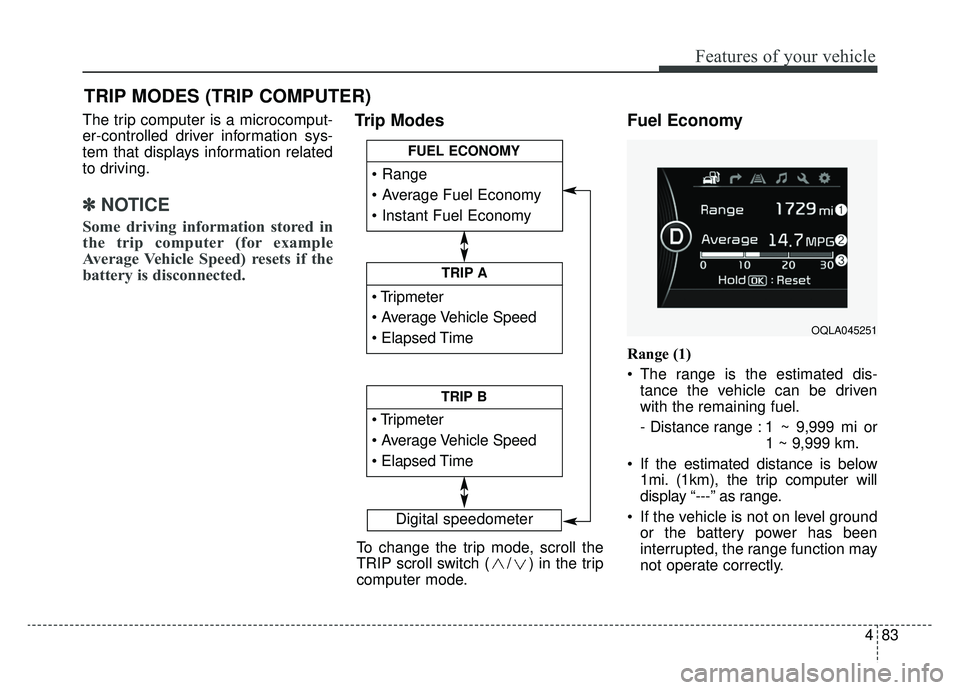
Trip Modes Fuel Economy
Range (1)
The range is the estimated dis-
tance the vehicle can be driven
with the remaining fuel.
- Distance range : 1 ~ 9,999 mi or 1 ~ 9,999 km.
If the estimated distance is below 1mi. (1km), the trip computer will
display “---” as range.
If the vehicle is not on level ground or the battery power has been
interrupted, the range function may
not operate correctly.
TRIP MODES (TRIP COMPUTER)
Digital speedometer
To change the trip mode, scroll the
TRIP scroll switch ( / ) in the trip
computer mode.
TRIP A
TRIP B
FUEL ECONOMY
OQLA045251
Page 175 of 607
Features of your vehicle
88
4
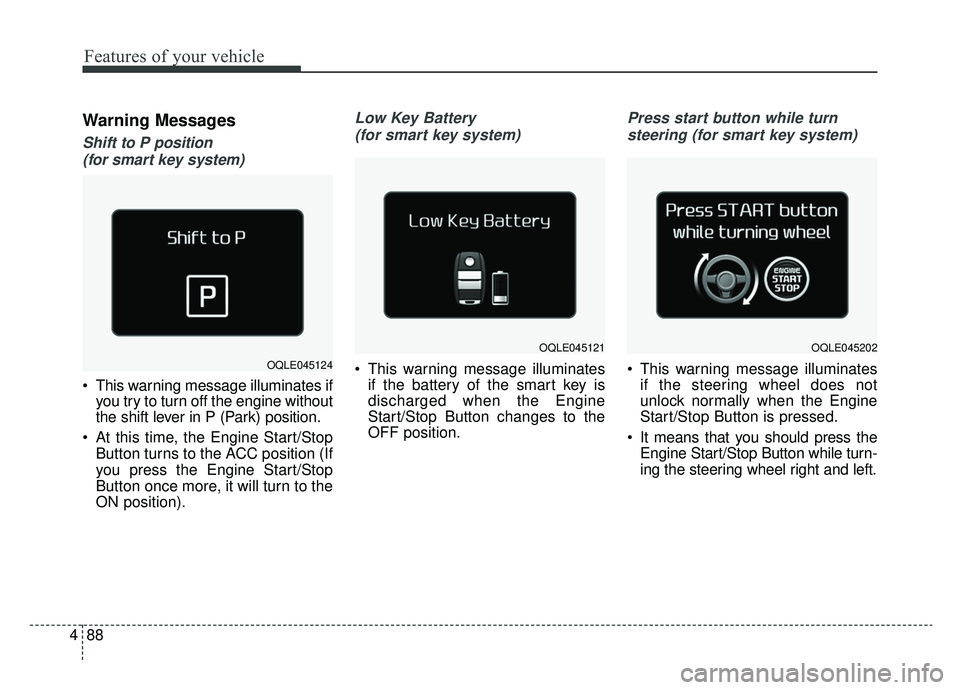
Warning Messages
Shift to P position
(for smart key system)
This warning message illuminates if you try to turn off the engine without
the shift lever in P (Park) position.
At this time, the Engine Start/Stop Button turns to the ACC position (If
you press the Engine Start/Stop
Button once more, it will turn to the
ON position).
Low Key Battery
(for smart key system)
This warning message illuminates if the battery of the smart key is
discharged when the Engine
Start/Stop Button changes to the
OFF position.
Press start button while turn
steering (for smart key system)
This warning message illuminates if the steering wheel does not
unlock normally when the Engine
Start/Stop Button is pressed.
It means that you should press the Engine Start/Stop Button while turn-
ing the steering wheel right and left.OQLE045124
OQLE045121OQLE045202
Page 191 of 607
Features of your vehicle
104
4
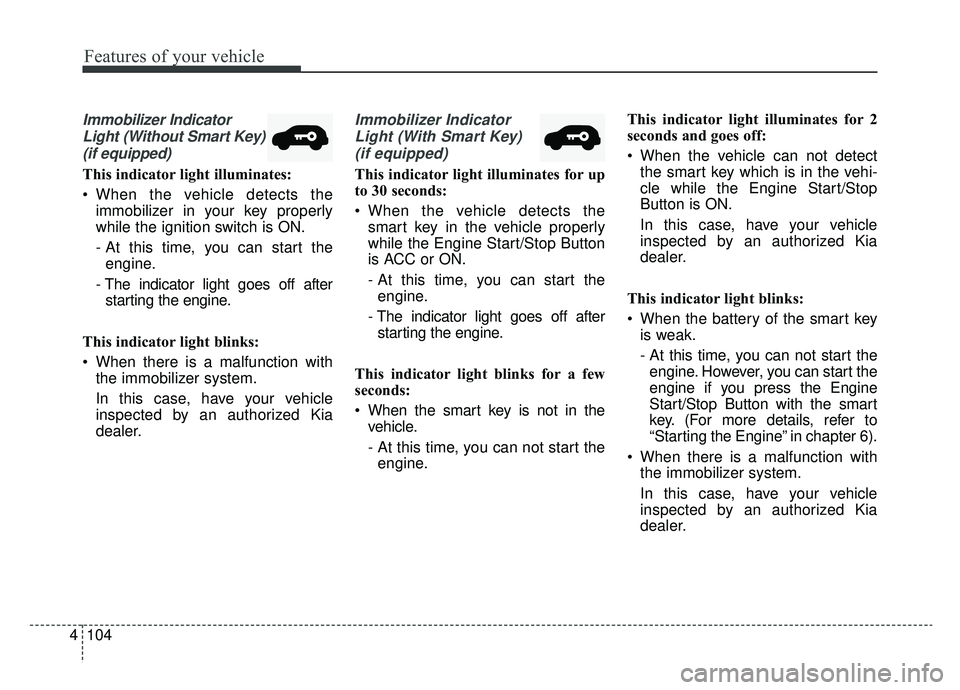
Immobilizer Indicator
Light (Without Smart Key)(if equipped)
This indicator light illuminates:
When the vehicle detects the immobilizer in your key properly
while the ignition switch is ON.
- At this time, you can start theengine.
- The indicator light goes off after starting the engine.
This indicator light blinks:
When there is a malfunction with the immobilizer system.
In this case, have your vehicle
inspected by an authorized Kia
dealer.
Immobilizer Indicator
Light (With Smart Key) (if equipped)
This indicator light illuminates for up
to 30 seconds:
When the vehicle detects the smart key in the vehicle properly
while the Engine Start/Stop Button
is ACC or ON.
- At this time, you can start theengine.
- The indicator light goes off after starting the engine.
This indicator light blinks for a few
seconds:
When the smart key is not in the vehicle.
- At this time, you can not start theengine. This indicator light illuminates for 2
seconds and goes off:
When the vehicle can not detect
the smart key which is in the vehi-
cle while the Engine Start/Stop
Button is ON.
In this case, have your vehicle
inspected by an authorized Kia
dealer.
This indicator light blinks:
When the battery of the smart key is weak.
- At this time, you can not start theengine. However, you can start the
engine if you press the Engine
Start/Stop Button with the smart
key. (For more details, refer to
“Starting the Engine” in chapter 6).
When there is a malfunction with the immobilizer system.
In this case, have your vehicle
inspected by an authorized Kia
dealer.
Page 205 of 607
Features of your vehicle
118
4
Battery saver function
The purpose of this feature is to
prevent the battery from being dis-
charged if the lights are left in the
ON position. The system automati-
cally shuts off the parking lights 30
seconds after the ignition key is
removed and the driver’s door is
opened and closed.
With this feature, the parking lights will turn off automatically if the driver
parks on the side of the road at night
and opens the driver’s side door.
If necessary, to keep the parking
lights on when the ignition key is
removed, perform the following:
1) Open the driver-side door.
2) Turn the parking lights OFF and ON again using the light switch
on the steering column.
Daytime running light
(if equipped)
The Daytime Running Lights (DRL)
can make it easier for others to see the
front of your vehicle during the day.
DRL can be helpful in many different
driving conditions, and it is especially
helpful after dawn and before sunset.
The DRL system turns OFF when:
1. The headlight switch is ON.
2. The engine is OFF.
3. The front fog light is ON.
4. Engaging the Parking Brake
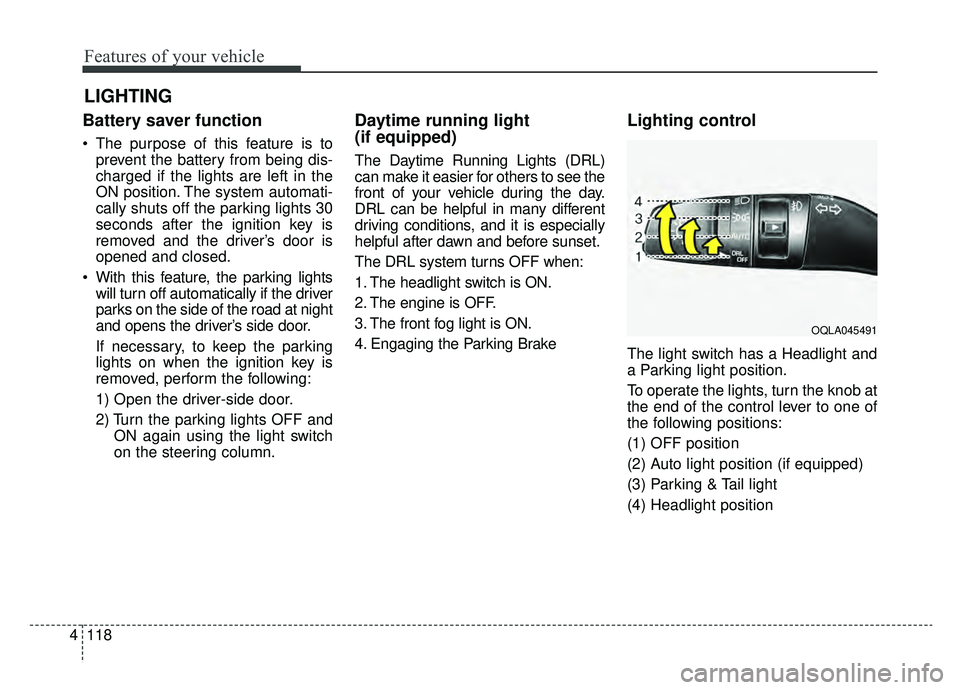
Lighting control
The light switch has a Headlight and
a Parking light position.
To operate the lights, turn the knob at
the end of the control lever to one of
the following positions:
(1) OFF position
(2) Auto light position (if equipped)
(3) Parking & Tail light
(4) Headlight position
LIGHTING
OQLA045491
Page 207 of 607
Features of your vehicle
120
4
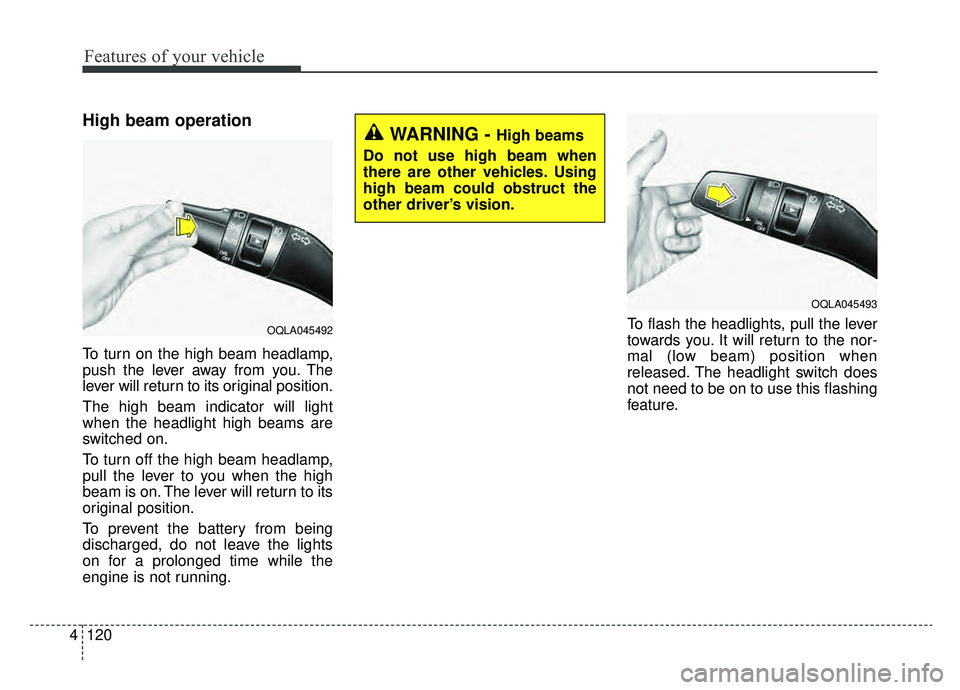
High beam operation
To turn on the high beam headlamp,
push the lever away from you. The
lever will return to its original position.
The high beam indicator will light
when the headlight high beams are
switched on.
To turn off the high beam headlamp,
pull the lever to you when the high
beam is on. The lever will return to its
original position.
To prevent the battery from being
discharged, do not leave the lights
on for a prolonged time while the
engine is not running. To flash the headlights, pull the lever
towards you. It will return to the nor-
mal (low beam) position when
released. The headlight switch does
not need to be on to use this flashing
feature.
WARNING - High beams
Do not use high beam when
there are other vehicles. Using
high beam could obstruct the
other driver’s vision.
OQLA045493
OQLA045492
Page 216 of 607
4129
Features of your vehicle
Do not use the interior lights for
extended periods when the engine is
not running.
It may cause battery discharge.Automatic turn off function
(if equipped)
The interior lights automatically turn
off approximately 20 minutes after
the ignition switch is turned off, if the
lights are in the ON position.
If your vehicle is equipped with the
theft alarm system, the interior lights
automatically turn off approximately
5 seconds after the system is in
armed stage.
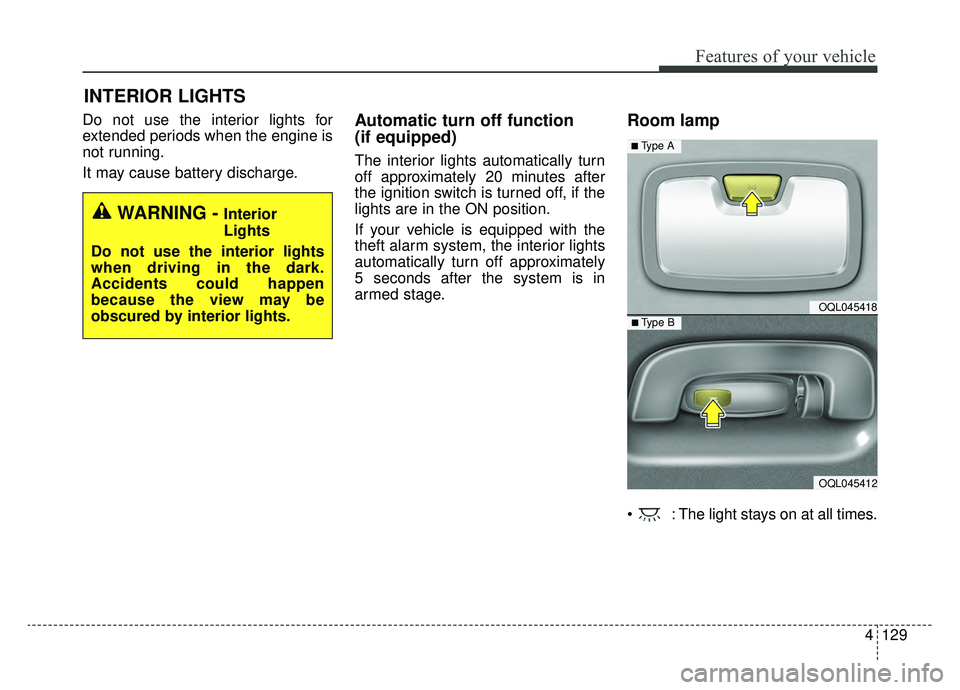
Room lamp
: The light stays on at all times.
INTERIOR LIGHTS
WARNING - Interior
Lights
Do not use the interior lights
when driving in the dark.
Accidents could happen
because the view may be
obscured by interior lights.
OQL045418
OQL045412
■ Type B
■ Type A
Page 218 of 607
4131
Features of your vehicle
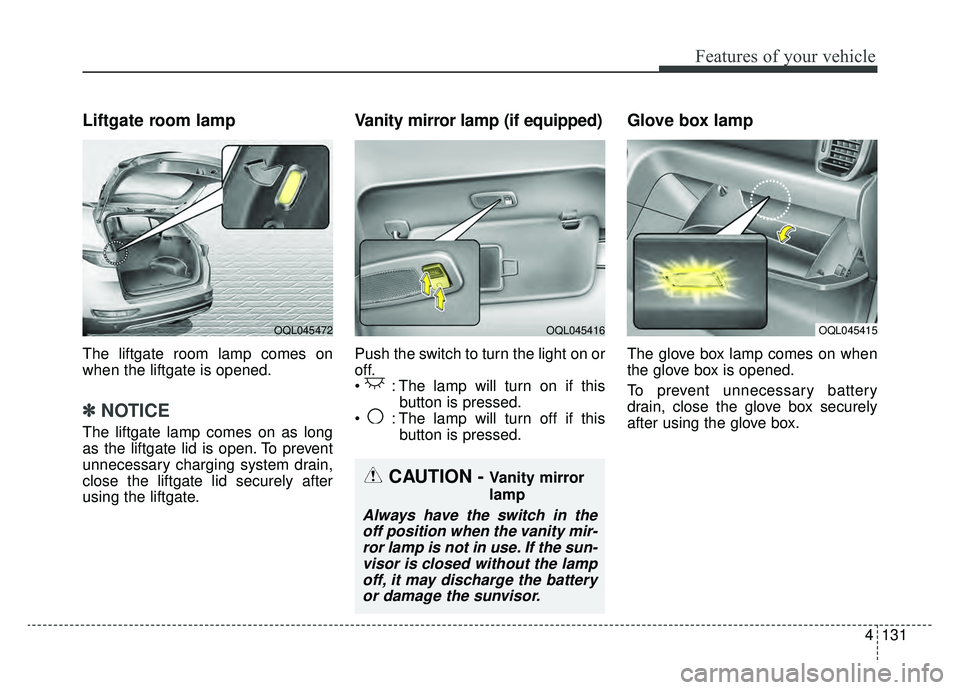
Liftgate room lamp
The liftgate room lamp comes on
when the liftgate is opened.
✽ ✽NOTICE
The liftgate lamp comes on as long
as the liftgate lid is open. To prevent
unnecessary charging system drain,
close the liftgate lid securely after
using the liftgate.
Vanity mirror lamp (if equipped)
Push the switch to turn the light on or
off.
: The lamp will turn on if this
button is pressed.
: The lamp will turn off if this button is pressed.
Glove box lamp
The glove box lamp comes on when
the glove box is opened.
To prevent unnecessary battery
drain, close the glove box securely
after using the glove box.
OQL045415OQL045416OQL045472
CAUTION - Vanity mirror
lamp
Always have the switch in theoff position when the vanity mir-ror lamp is not in use. If the sun-visor is closed without the lampoff, it may discharge the batteryor damage the sunvisor.
Page 221 of 607
Features of your vehicle
134
4
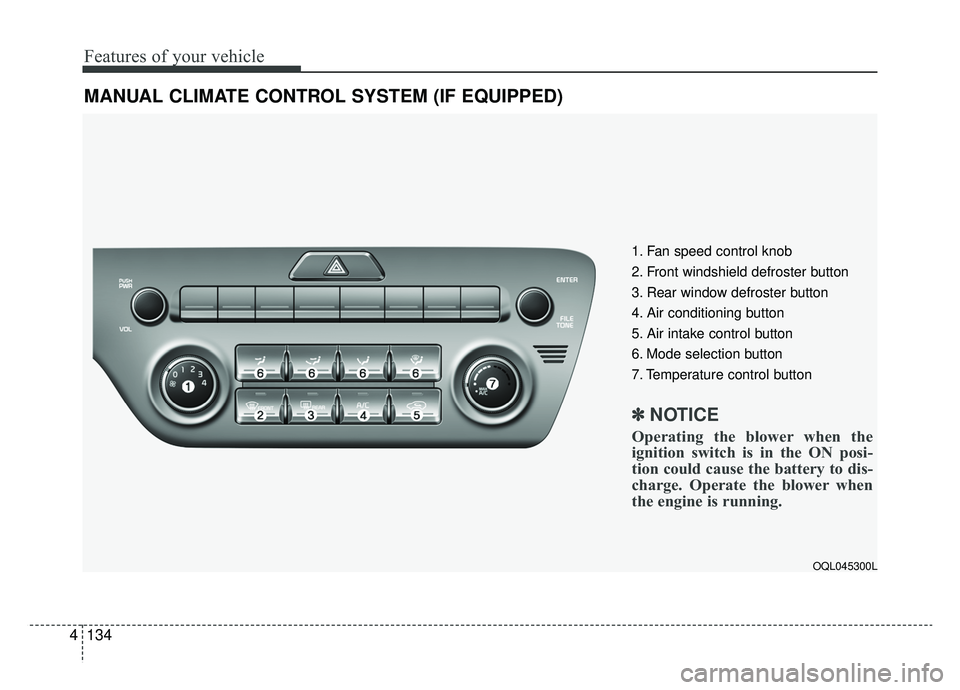
MANUAL CLIMATE CONTROL SYSTEM (IF EQUIPPED)
OQL045300L
1. Fan speed control knob
2. Front windshield defroster button
3. Rear window defroster button
4. Air conditioning button
5. Air intake control button
6. Mode selection button
7. Temperature control button
✽ ✽
NOTICE
Operating the blower when the
ignition switch is in the ON posi-
tion could cause the battery to dis-
charge. Operate the blower when
the engine is running.