2019 KIA SOUL tow
[x] Cancel search: towPage 244 of 564
Audio system
56
How vehicle audio works
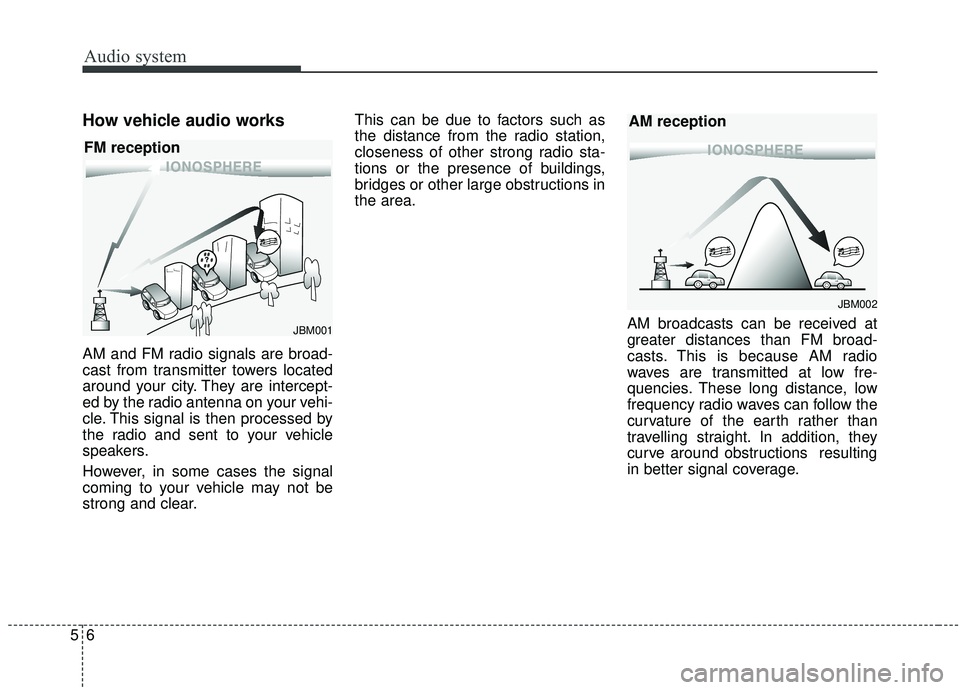
AM and FM radio signals are broad-
cast from transmitter towers located
around your city. They are intercept-
ed by the radio antenna on your vehi-
cle. This signal is then processed by
the radio and sent to your vehicle
speakers.
However, in some cases the signal
coming to your vehicle may not be
strong and clear.This can be due to factors such as
the distance from the radio station,
closeness of other strong radio sta-
tions or the presence of buildings,
bridges or other large obstructions in
the area.
AM broadcasts can be received at
greater distances than FM broad-
casts. This is because AM radio
waves are transmitted at low fre-
quencies. These long distance, low
frequency radio waves can follow the
curvature of the earth rather than
travelling straight. In addition, they
curve around obstructions resulting
in better signal coverage.
JBM002
AM reception
JBM001
FM reception
Page 292 of 564
. . . 6-79
. . . . . . . . . . . . . . . 6-79
. . . . . . . . . . . . . . . . . . . . . . 6-80
Drive mode integrated control system . . . . . . . . . 6-86
Lane Departure Warning System (LDWS) . . . . . 6-88
. . . . . . . . . . . . . . . . . . . . . . . . . . . . 6-90
. . . . . . . . . . . . . . 6-91
vehicle leaves the lane, or may warn you even if the
vehicle does not leave the lane when; . . . . . . . . . . . 6-91
Blind Spot Detection system (BSD) . . . . . . . . . . . 6-93
LCA (Lane Change Assist) . . . . . . . . . . . . . . . . . . . . 6-94
. . . . . . . . . . . . . . . . . . . . . . . . . . . . 6-99
Economical operation . . . . . . . . . . . . . . . . . . . . . 6-101
Special driving conditions . . . . . . . . . . . . . . . . . . 6-103
. . . . . . . . . . . . . . . . . 6-103
. . . . . . . . . . . . . . . . 6-103
. . . . . . . . . . . . . . . . . . . . . . . . . . 6-104
. . . . . . . . . . . . . . . . . . . . . . . . . . . 6-105
. . . . . . . . . . . . . . . . . . . . . . . . . . . . . 6-105
. . . . . . . . . . . . . . . . . . . . . . . . . . . 6-106
. . . . . . . . . . . . . . . . . . . . . . 6-107
. . . . . . . . . . . . . . . . . . . . . . . . . . . . . 6-107 . . . . . . . . . . . . . . . . . . . . . . . . . . . . 6-107
Winter driving . . . . . . . . . . . . . . . . . . . . . . . . . . . 6-109
. . . . . . . . . . . . . . . . . . . . . . 6-109
. . . . . . . . . 6-110
. . . . . . . . . . . . . . . . . . . . . 6-110
. . . . . . 6-110
. . . . . . . . . . . . . . . . . . . 6-110
. 6
-110
. . . . . . . . . . . . 6-111
. . . 6-111
. . . . . . . . . . . . . . . . . . 6-111
Trailer towing . . . . . . . . . . . . . . . . . . . . . . . . . . . . 6-111
Vehicle load limit . . . . . . . . . . . . . . . . . . . . . . . . . 6-112
. . . . . . . . . . . . . 6-112
. . . . . . . . . . . . . . . . . . . . . . . . . . . 6-116
Vehicle weight glossary . . . . . . . . . . . . . . . . . . . . 6-118
. . . . . . . . . . . . . . . . . . . . . . . . . . . 6-118
. . . . . . . . . . . . . . . . . . . . . . . . . . 6-118
. . . . . . . . . . . . . . . . . . . . . . . . . . . . . . . 6-118
. . . . . . . . . . . . . . . . . . . . 6-118
. . . . . . . . . . . . . 6-118
. . . . . . . . . . . . . . . . . . 6-118
. . . . . . . . . . 6-118
6
Page 296 of 564
Driving your vehicle
66
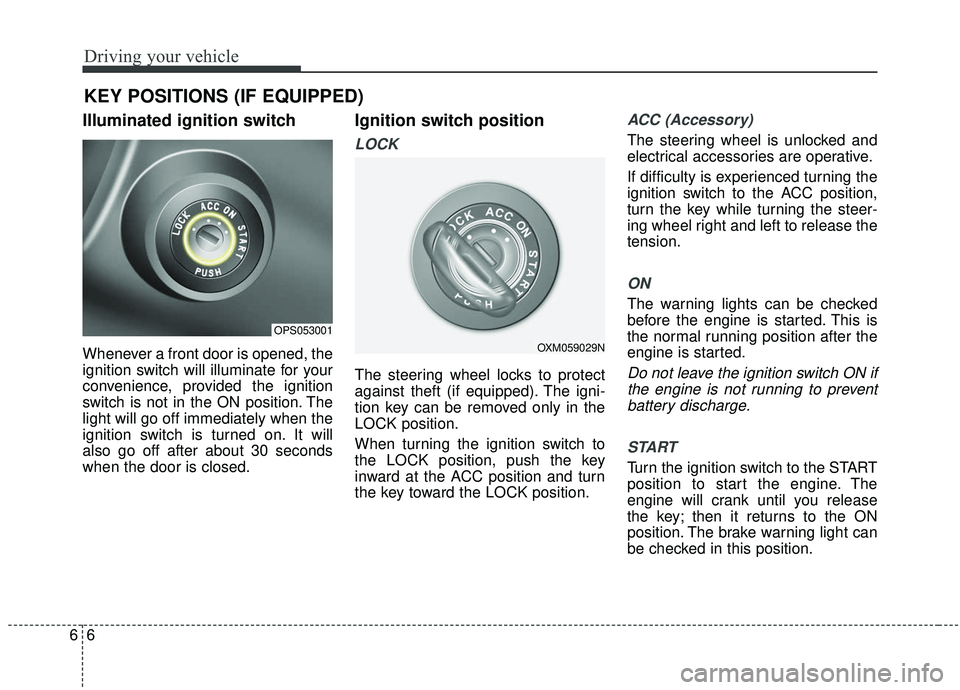
Illuminated ignition switch
Whenever a front door is opened, the
ignition switch will illuminate for your
convenience, provided the ignition
switch is not in the ON position. The
light will go off immediately when the
ignition switch is turned on. It will
also go off after about 30 seconds
when the door is closed.
Ignition switch position
LOCK
The steering wheel locks to protect
against theft (if equipped). The igni-
tion key can be removed only in the
LOCK position.
When turning the ignition switch to
the LOCK position, push the key
inward at the ACC position and turn
the key toward the LOCK position.
ACC (Accessory)
The steering wheel is unlocked and
electrical accessories are operative.
If difficulty is experienced turning the
ignition switch to the ACC position,
turn the key while turning the steer-
ing wheel right and left to release the
tension.
ON
The warning lights can be checked
before the engine is started. This is
the normal running position after the
engine is started.
Do not leave the ignition switch ON ifthe engine is not running to preventbattery discharge.
START
Turn the ignition switch to the START
position to start the engine. The
engine will crank until you release
the key; then it returns to the ON
position. The brake warning light can
be checked in this position.
KEY POSITIONS (IF EQUIPPED)
OPS053001
OXM059029N
Page 349 of 564
659
Driving your vehicle
The driver's field of view is not wellilluminated (either too dark or too
much reflection or too much back-
light that obscures the field of view)
The vehicle in front does not have their rear lights properly turned ON
The outside brightness changes suddenly, for example when enter-
ing or exiting a tunnel
Light coming from a street light or an oncoming vehicle is reflected on
a wet road surface such as a pud-
dle in the road
The field of view in front is obstructed by sun glare
The windshield glass is fogged up; a clear view of the road is obstruct-
ed
The vehicle in front is driving errat- ically
The vehicle drives through a con- struction area, on an unpaved
road, or above metal materials,
such as a railway
The vehicle drives inside a build- ing, such as a basement parking
lot The adverse road conditions cause
excessive vehicle vibrations while
driving
The vehicle in front is moving verti- cally to the driving direction
The vehicle in front is stopped ver- tically
The vehicle in front is driving towards your vehicle or reversing
Sensor recognition changes rapid- ly when driving over a bump
When the vehicle vibrates heavily
When the vehicle in front drives in circles, such as on a roundabout
Window tint on the front wind- shield, film, water repellent coat-
ing, damaged glass, camera lens
contaminated with foreign objects
(e.g. a sticker, insect, etc.)
When the radar or camera/camera lens is damaged
When the headlights are off or weak at night or in a tunnel
Light such as street light, sunlight or oncoming vehicle light reflects
from water on the road Driving with the sun in front of you
(including headlights of a vehicle
coming from the opposite direc-
tion)
Signs, shadow on the road, tunnel entrance, toll gate, partially paved
roads
The windshield is fogged by humid air in the vehicle or frosted over
In foggy weather
The radar/camera sensor recogni- tion is limited
Page 353 of 564
663
Driving your vehicle
Signs, shadow on the road, tunnelentrance, toll gate, partially paved
roads
The windshield is fogged by humid air in the vehicle or frosted over
In foggy weather
The radar/camera sensor recogni- tion is limited
Do not use the Autonomous Emergency Braking system when
towing a vehicle.
Application of the AEB system
while towing may adversely affect
the safety of your vehicle or the
towing vehicle.
Use extreme caution when the vehicle in front of you has cargo
that extends rearward from the
cab, or when the vehicle in front of
you has higher ground clearance.
The AEB system is designed to detect and monitor the vehicle
ahead or detect a pedestrian in the
roadway through radar signals and
camera recognition. It is not
designed to detect bicycles, motor-
cycles, or smaller wheeled objects
such as luggage bags, shopping
carts, or strollers. Never try to test the operation of
the AEB system. Doing so may
cause severe injury or death.
Please have the system inspected by a professional workshop when
replacing or reinstalling the front
windshield, front bumper or
radar/camera. Kia recommends to
visit an authorized Kia dealer/serv-
ice partner.
✽ ✽ NOTICE
In some instances, the AEB system
may be cancelled when subjected to
electromagnetic interference.
Page 359 of 564
669
Driving your vehicle
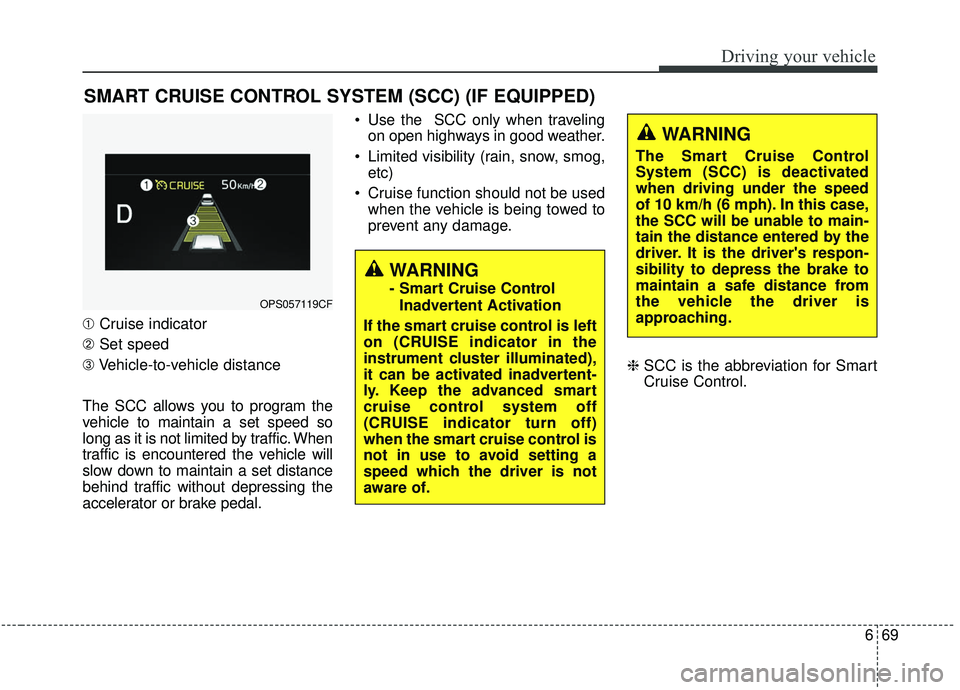
➀Cruise indicator
➁ Set speed
\b Vehicle-to-vehicle distance
The SCC allows you to program the
vehicle to maintain a set speed so
long as it is not limited by traffic. When
traffic is encountered the vehicle will
slow down to maintain a set distance
behind traffic without depressing the
accelerator or brake pedal. Use the SCC only when traveling
on open highways in good weather.
Limited visibility (rain, snow, smog, etc)
Cruise function should not be used when the vehicle is being towed to
prevent any damage.
❈SCC is the abbreviation for Smart
Cruise Control.
SMART CRUISE CONTROL SYSTEM (SCC) (IF EQUIPPED)
WARNING
- Smart Cruise Control
Inadvertent Activation
If the smart cruise control is left
on (CRUISE indicator in the
instrument cluster illuminated),
it can be activated inadvertent-
ly. Keep the advanced smart
cruise control system off
(CRUISE indicator turn off)
when the smart cruise control is
not in use to avoid setting a
speed which the driver is not
aware of.OPS057119CF
WARNING
The Smart Cruise Control
System (SCC) is deactivated
when driving under the speed
of 10 km/h (6 mph). In this case,
the SCC will be unable to main-
tain the distance entered by the
driver. It is the driver's respon-
sibility to depress the brake to
maintain a safe distance from
the vehicle the driver is
approaching.
Page 373 of 564
683
Driving your vehicle
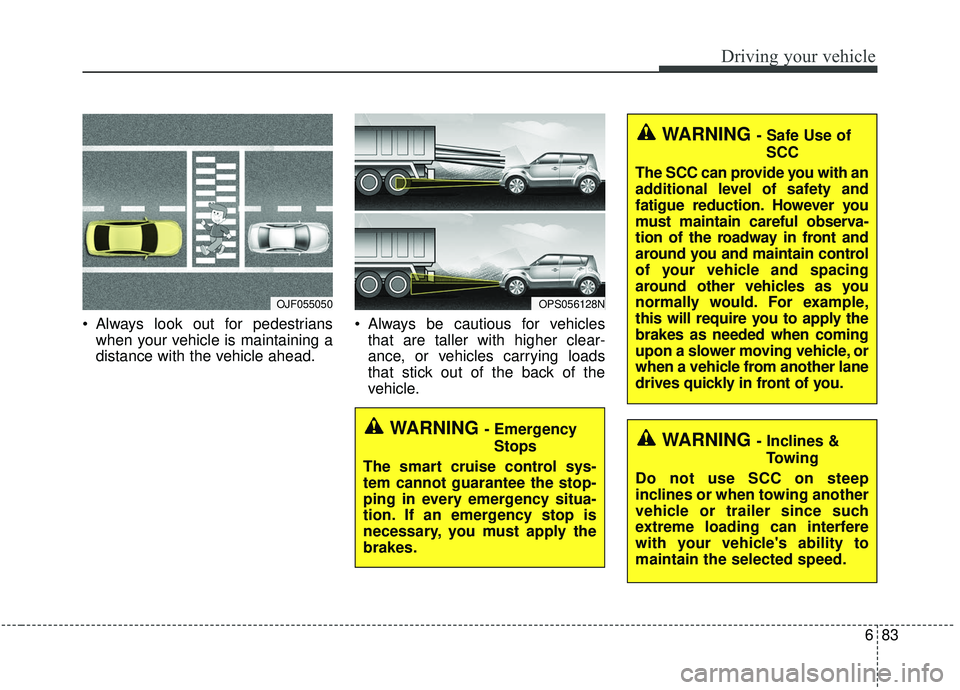
Always look out for pedestrianswhen your vehicle is maintaining a
distance with the vehicle ahead. Always be cautious for vehicles
that are taller with higher clear-
ance, or vehicles carrying loads
that stick out of the back of the
vehicle.
OJF055050OPS056128N
WARNING - Safe Use of
SCC
The SCC can provide you with an
additional level of safety and
fatigue reduction. However you
must maintain careful observa-
tion of the roadway in front and
around you and maintain control
of your vehicle and spacing
around other vehicles as you
normally would. For example,
this will require you to apply the
brakes as needed when coming
upon a slower moving vehicle, or
when a vehicle from another lane
drives quickly in front of you.
WARNING - Inclines & Towing
Do not use SCC on steep
inclines or when towing another
vehicle or trailer since such
extreme loading can interfere
with your vehicle's ability to
maintain the selected speed.WARNING - Emergency Stops
The smart cruise control sys-
tem cannot guarantee the stop-
ping in every emergency situa-
tion. If an emergency stop is
necessary, you must apply the
brakes.
Page 394 of 564
Driving your vehicle
104
6
If at all possible, avoid sharp turns or
abrupt maneuvers, do not load your
roof rack with heavy cargo, and
never modify your vehicle in any way.Rocking the vehicle
If it is necessary to rock the vehicle to
free it from snow, sand, or mud, first
turn the steering wheel right and left
to clear the area around your front
wheels. Then, shift back and forth
between 1st (First) and R (Reverse)
in vehicles equipped with a manual
transaxle or R (Reverse) and any for-
ward gear in vehicles equipped with
an automatic transaxle. Do not race
the engine, and spin the wheels as lit-
tle as possible. If you are still stuck
after a few tries, have the vehicle
pulled out by a tow vehicle to avoid
engine overheating and possible
damage to the transaxle.
WARNING- Replacement
tires
Always use the size and type of
tires recommended in the tire
section of the manual.
Installation of variant tires can
affect the safety and perform-
ance of your vehicle.
WARNING- Rollover
As with other Crossover Utility
Vehicle (CUV), failure to operate
this vehicle correctly may result
in loss of control, an accident or
vehicle rollover.
Utility vehicles have a signifi- cantly higher rollover rate
than other types of vehicles.
Specific design characteris- tics (higher ground clearance,
narrower track, etc.) give this
vehicle a higher center of
gravity than ordinary vehicles.
A CUV is not designed for cor- nering at the same speeds as
conventional vehicles.
Avoid sharp turns or abrupt maneuvers.
In a rollover crash, an unbelt- ed person is significantly
more likely to die than a per-
son wearing a seat belt. Make
sure everyone in the vehicle is
properly buckled up.
WARNING
- Sudden vehicle movement
Do not attempt to rock the vehi-
cle if people or objects are near-
by. The vehicle may suddenly
move forward or backwards as
it becomes unstuck.