Page 280 of 564
Audio system
542
Starting/ending voice recognition,and settings
Starting voice recognition
Press the [VOICE] button on the
steering wheel remote control to
start voice recognition and see the
voice recognition screen. Ending voice recognition
In voice recognition mode, say the
command ‘Exit’ to end voice recog-
nition.
Press the [Exit] on the bottom left corner of the screen to end voice
recognition.
Press and hold the [VOICE] button
on the steering wheel remote con-
trol to end voice recognition. Quick-starting voice recognition
(manual control)
Normally, to start voice recognition,
you must wait for the voice prompt
before saying a command. This
involves some waiting time. To run
the function immediately to select
the commands displayed on the
screen.
This feature is useful if the voice prompt takes too long or the sys-
tem fails to properly recognize your
voice commands.
Page 281 of 564
Audio system
43
5
Skip voice prompt
While the voice prompt is playing,
press the [VOICE] button on the
steering wheel remote control to
skip the voice prompt and place
the system in standby for your
voice commands.
This feature is useful if the voice prompt takes too long or you
already know the voice command
for the desired function. Extending voice recognition standby
time
After voice recognition is started
and the voice prompt and beep
sound (‘Beep~’) are played, the
system enters standby for user
voice commands for five seconds.
During this five-second standby,
press the button again to play the
beep sound (‘Beep~’), and extend
voice command standby time by
five seconds.
If you do not say a command for five seconds, you are prompted by
voice to repeat your command.
Page 287 of 564
Audio system
49
5
Siri
✽ ✽
NOTICE - Using Siri
• Android device is not supported to
use Siri.
• If you want to use Siri, you have to connect your iOS device to the
multimedia system through
Bluetooth
®Wireless Technology.
(Please check whether your iOS
device supports Siri and turning
Siri On)
• If the iOS version is changed, the functions and response may be dif-
ferent according to the iOS device
and the latest version.
• Siri automatically stops in the fol- lowing events.
1) Outgoing and incoming phone calls.
2) Media (USB, etc.) is connected. (Siri mode is maintained when
iPod
®s are connected)
3) Rear camera is activated
(if
equipped).
4) Vehicle is started or engine is
turned off. (Continued)(Continued)
5) Screen transition buttons, such as RADIO or MEDIA, are
selected.
6) When a pop-up message is dis- played on the screen due to
accidental execution of Siri.
• The microphone is located above the driver’s seat. To ensure proper
Siri, state your voice while main-
taining proper driving posture.
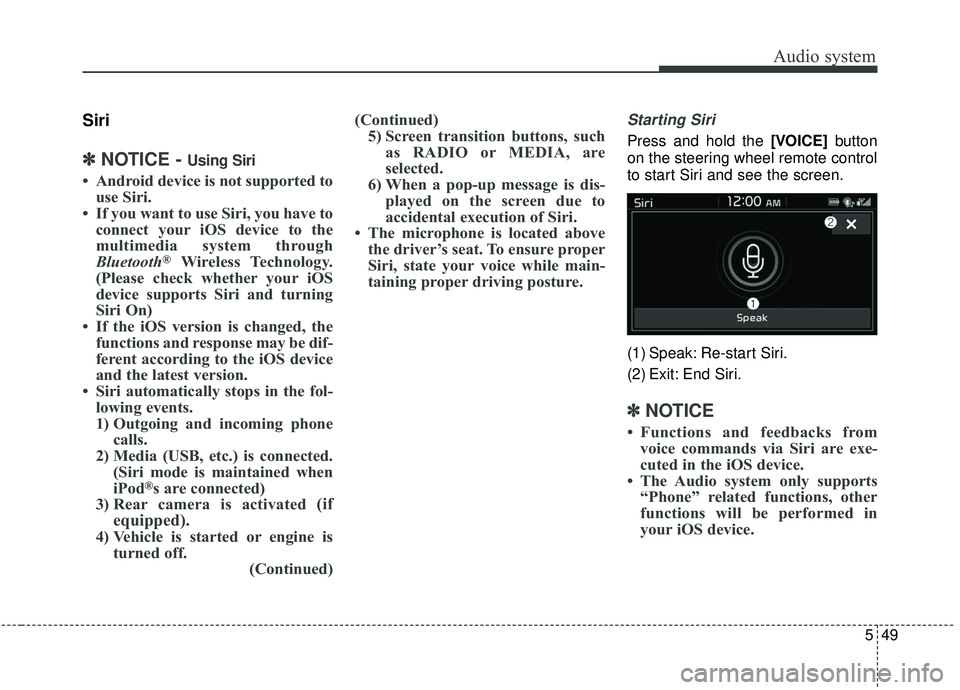
Starting Siri
Press and hold the [VOICE] button
on the steering wheel remote control
to start Siri and see the screen.
(1) Speak: Re-start Siri.
(2) Exit: End Siri.
✽ ✽ NOTICE
• Functions and feedbacks from
voice commands via Siri are exe-
cuted in the iOS device.
• The Audio system only supports “Phone” related functions, other
functions will be performed in
your iOS device.
Page 556 of 564
Index
2I
Air bag - advanced supplemental restraint system . . . . 3-42Adding equipment to or modifying your air bag-equipped vehicle . . . . . . . . . . . . . . . . . . . . 3-68
Air bag warning label. . . . . . . . . . . . . . . . . . . . . . . . 3-68
Air bag warning light . . . . . . . . . . . . . . . . . . . . . . . . 3-45
Curtain air bag . . . . . . . . . . . . . . . . . . . . . . . . . . . . . 3-61
Driver's and passenger's front air bag . . . . . . . . . . . 3-56
How does the air bag system operate. . . . . . . . . . . . 3-43
Occupant Detection System (ODS) . . . . . . . . . . . . . 3-49
Side air bag. . . . . . . . . . . . . . . . . . . . . . . . . . . . . . . . 3-59
SRS Care . . . . . . . . . . . . . . . . . . . . . . . . . . . . . . . . . 3-67
SRS components and functions . . . . . . . . . . . . . . . . 3-46
Air cleaner . . . . . . . . . . . . . . . . . . . . . . . . . . . . . . . . . . 8-36\
Filter replacement. . . . . . . . . . . . . . . . . . . . . . . . . . . 8-36
Air conditioning system . . . . . . . . . . . . . . . . . . . . . . . 9-6
Appearance care . . . . . . . . . . . . . . . . . . . . . . . . . . . . . . 8-94 Exterior care . . . . . . . . . . . . . . . . . . . . . . . . . . . . . . . 8-94
Interior care . . . . . . . . . . . . . . . . . . . . . . . . . . . . . . . 8-99
Audio (with Touch Screen). . . . . . . . . . . . . . . . . . . . . . 5-10 Feature of Your Audio . . . . . . . . . . . . . . . . . . . . . . . 5-11
Media . . . . . . . . . . . . . . . . . . . . . . . . . . . . . . . . . . . . \
5-21
Phone . . . . . . . . . . . . . . . . . . . . . . . . . . . . . . . . . . . . \
5-32
Radio . . . . . . . . . . . . . . . . . . . . . . . . . . . . . . . . . . . . \
5-17
Setup . . . . . . . . . . . . . . . . . . . . . . . . . . . . . . . . . . . . \
. 5-50
Siri . . . . . . . . . . . . . . . . . . . . . . . . . . . . . . . . . . . . \
. . 5-49 SiriusXM . . . . . . . . . . . . . . . . . . . . . . . . . . . . . . . . . 5-19
Voice Recognition . . . . . . . . . . . . . . . . . . . . . . . . . . 5-41
Audio System . . . . . . . . . . . . . . . . . . . . . . . . . . . . . . . . . 5-2 Antenna . . . . . . . . . . . . . . . . . . . . . . . . . . . . . . . . . . . 5-\
2
Audio remote control . . . . . . . . . . . . . . . . . . . . . . . . . 5-3
AUX and USB port . . . . . . . . . . . . . . . . . . . . . . . . . . 5-4
How vehicle audio works . . . . . . . . . . . . . . . . . . . . . . 5-6
Speaker lights . . . . . . . . . . . . . . . . . . . . . . . . . . . . . . . 5-4
Automatic climate control system . . . . . . . . . . . . . . . 4-117 Automatic heating and air conditioning. . . . . . . . . 4-118
Checking the amount of air conditioner refrigerant and compressor lubricant . . . . . . . . . . . . . . . . . . . . . . 4-129
Climate control air filter. . . . . . . . . . . . . . . . . . . . . 4-129
Manual heating and air conditioning . . . . . . . . . . . 4-119
System operation . . . . . . . . . . . . . . . . . . . . . . . . . . 4-127
Automatic transaxle . . . . . . . . . . . . . . . . . . . . . . . . . . . 6-19 Automatic transaxle operation . . . . . . . . . . . . . . . . . 6-19
Good driving practices . . . . . . . . . . . . . . . . . . . . . . . 6-25
Autonomous Emergency Braking (AEB) . . . . . . . . . . . 6-50 Brake operation . . . . . . . . . . . . . . . . . . . . . . . . . . . . 6-54
Limitations of the system . . . . . . . . . . . . . . . . . . . . . 6-58
Sensor to detect the distance from the vehicle in front (Front radar) . . . . . . . . . . . . . . . . . . . . . . . . . . . . . . 6-55
System malfunction . . . . . . . . . . . . . . . . . . . . . . . . . 6-56
System setting and activation . . . . . . . . . . . . . . . . . . 6-50
A
![KIA SOUL 2019 Owners Manual Audio system
542
Starting/ending voice recognition,and settings
Starting voice recognition
Press the [VOICE] button on the
steering wheel remote control to
start voice recognition and see the
voice re](/manual-img/2/40387/w960_40387-279.png "KIA SOUL 2019 Owners Manual Audio system
542
Starting/ending voice recognition,and settings
Starting voice recognition
Press the [VOICE] button on the
steering wheel remote control to
start voice recognition and see the
voice re")
![KIA SOUL 2019 Owners Manual Audio system
43
5
Skip voice prompt
While the voice prompt is playing,
press the [VOICE] button on the
steering wheel remote control to
skip the voice prompt and place
the system in standby for your](/manual-img/2/40387/w960_40387-280.png "KIA SOUL 2019 Owners Manual Audio system
43
5
Skip voice prompt
While the voice prompt is playing,
press the [VOICE] button on the
steering wheel remote control to
skip the voice prompt and place
the system in standby for your")