2019 KIA SOUL EV lights
[x] Cancel search: lightsPage 7 of 455
2
1
Table of contents
3
4
5
6
7
8I
IntroductionVehicle data collection and event data recorders
Electric Vehicle GuideReview of Electric Vehicle / High voltage battery / Charge / Driving Electric Vehicle / Etc.
Your vehicle at a glance
Exterior overview / Interior overview / Instrument panel overview / Moto\
r room compartment
Safety features of your vehicle
Seats / Seat belts / Child restraint system / Air bag
Features of your vehicleSmart key / Door locks / Tailgate / Windows / Steering wheel / Mirrors / Instrument cluster / Lighting / Etc.
Driving your vehicleBefore driving / POWER button / Active ECO system / Reduction gear / Brake system / Etc.
What to do in an emergencyRoad warning / Emergency while driving / Emergency starting / Vehicle overheat / TPMS / Flat tire / Towing / Etc.
MaintenanceMotor room compartment / Maintenance service / Coolant / Brake fluid / Washer fluid / Lights bulbs / Etc.
Specifications, Consumer information and Reporting safety defects
Index
Page 11 of 455
4
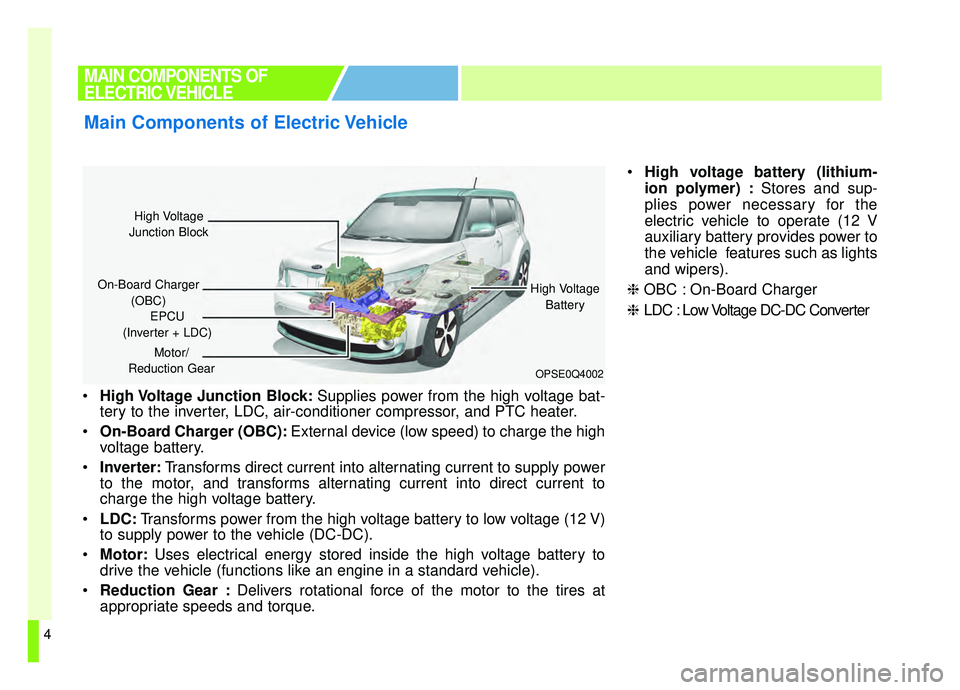
High Voltage Junction Block: Supplies power from the high voltage bat-
tery to the inverter, LDC, air-conditioner compressor, and PTC heater.
On-Board Charger (OBC): External device (low speed) to charge the high
voltage battery.
Inverter: Transforms direct current into alternating current to supply power
to the motor, and transforms alternating current into direct current to
charge the high voltage battery.
LDC: Transforms power from the high voltage battery to low voltage (12 V)
to supply power to the vehicle (DC-DC).
Motor: Uses electrical energy stored inside the high voltage battery to
drive the vehicle (functions like an engine in a standard vehicle).
Reduction Gear : Delivers rotational force of the motor to the tires at
appropriate speeds and torque.
High voltage battery (lithium-
ion polymer) : Stores and sup-
plies power necessary for the
electric vehicle to operate (12 V
auxiliary battery provides power to
the vehicle features such as lights
and wipers).
❈ OBC : On-Board Charger
❈ LDC : Low Voltage DC-DC Converter
MAIN COMPONENTS OF
ELECTRIC VEHICLE
Main Components of Electric Vehicle
OPSE0Q4002
High Voltage
Junction Block
On-Board Charger (OBC) High Voltage
Battery
EPCU
(Inverter + LDC)
Motor/
Reduction Gear
Page 41 of 455
34
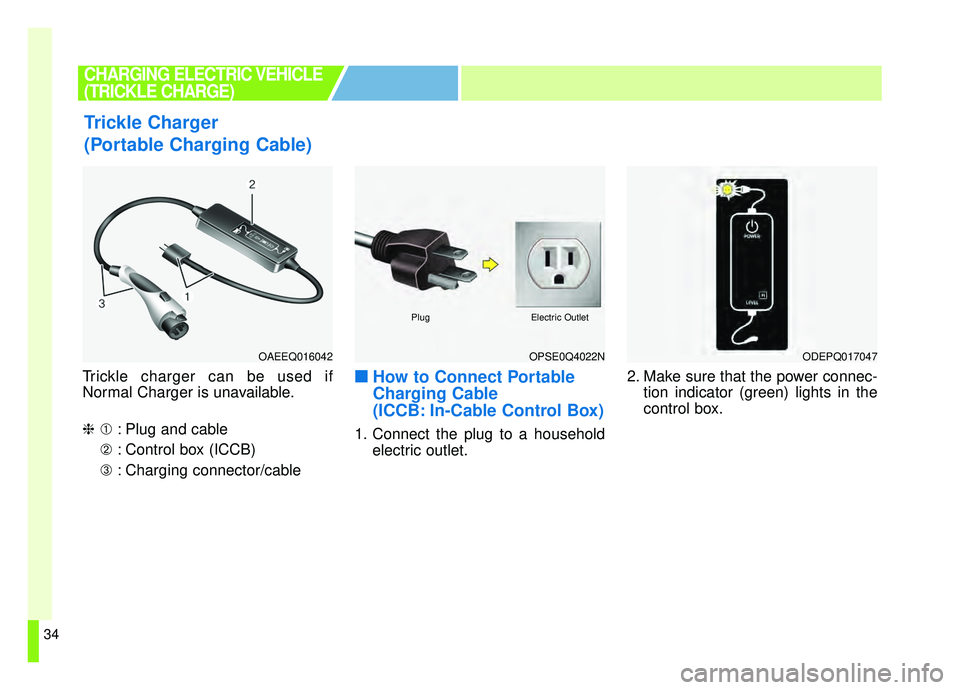
Trickle charger can be used if
Normal Charger is unavailable.
❈➀: Plug and cable
➁ : Control box (ICCB)
➂ : Charging connector/cable■ ■
How to Connect Portable
Charging Cable
(ICCB: In-Cable Control Box)
1. Connect the plug to a household
electric outlet. 2. Make sure that the power connec-
tion indicator (green) lights in the
control box.
Trickle Charger
(Portable Charging Cable)
CHARGING ELECTRIC VEHICLE
(TRICKLE CHARGE)
OPSE0Q4022N
PlugElectric Outlet
ODEPQ017047OAEEQ016042
Page 77 of 455
Your vehicle at a glance
42
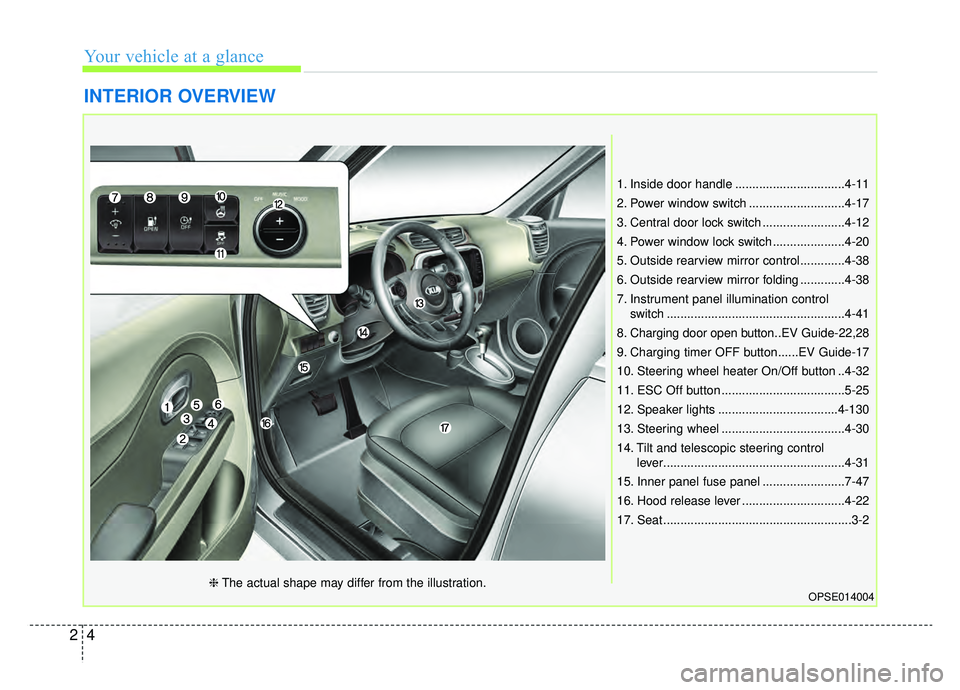
INTERIOR OVERVIEW
1. Inside door handle ................................4-11
2. Power window switch ............................4-17
3. Central door lock switch ........................4-12
4. Power window lock switch .....................4-20
5. Outside rearview mirror control.............4-38
6. Outside rearview mirror folding .............4-38
7. Instrument panel illumination controlswitch ....................................................4-41
8. Charging door open button..EV Guide-22,28
9. Charging timer OFF button......EV Guide-17
10. Steering wheel heater On/Off button ..4-32
11. ESC Off button ....................................5-25
12. Speaker lights ...................................4-130
13. Steering wheel ....................................4-30
14. Tilt and telescopic steering control lever.....................................................4-31
15. Inner panel fuse panel ........................7-47
16. Hood release lever ..............................4-22
17. Seat .......................................................3-2
OPSE014004❈ The actual shape may differ from the illustration.
Page 139 of 455

• A/V mode . . . . . . . . . . . . . . . . . . . . . . . . . . . . . . . . . . . 4-\
48
. . . . . . . . . . . . . . . . . . . . . . . . . . . . . . . . 4-48
. . . . . . . . . . . . . . . . . . . . . . . . . . . . 4-52
Trip computer . . . . . . . . . . . . . . . . . . . . . . . . . . . . . 4-61
. . . . . . . . . . . . . . . . . . . . . . . . . . 4-61
. . . . . . . . . . . . . . . . . . . . . . . . . . . . . . . . . . . . \
4-62
. . . . . . . . . . . . . . . . . . . . . . . . . . . . . . . . . . . . \
. . 4-64
Warning and indicator lights . . . . . . . . . . . . . . . . 4-65
. . . . . . . . . . . . . . . . . . . . . . . . . . . . . . . 4-65
Parking distance warning . . . . . . . . . . . . . . . . . . . 4-76
. . . . . . . 4-76
warning. . . . . . . . . . . . . . . . . . . . . . . . . . . . . . . . . . . . \
4-78
. . . . . . . . . . . . . . . . . . . . . . . . . . . . . . . . 4-79
Rear view monitor . . . . . . . . . . . . . . . . . . . . . . . . . 4-80
Lighting . . . . . . . . . . . . . . . . . . . . . . . . . . . . . . . . . . 4-81\
. . . . . . . . . . . . . . . . . . . . . . . . . . . . . 4-81
. . . . . . . . . . . . . . . . . . . . . . . . . 4-81
. . . . . . . . . . . . . . . . . . . . . 4-82
electric control system . . . . . . . . . . . . . . . . . . . . . . . 4-82 . . . . . . . . . . . . . . . . . . . . . . . . . . . . . . 4-82
. . . . . . . . . . . . 4-85
. . . . . . . . . . . . . . . . . . . . . . . . . . . . . . . 4-86
Wipers and washers . . . . . . . . . . . . . . . . . . . . . . . . 4-87
. . . . . . . . . . . . . . . . . . . . . . 4-87
. . . . . . . . . . . . . . . . . . . . 4-87
. . . . . . . . . . . . . . . . . . . . . . . . . . . . 4-87
. . . . . . . . . . 4-89
Interior light . . . . . . . . . . . . . . . . . . . . . . . . . . . . . . 4-90
. . . . . . . . . . . . . . . . . . . . . . . . . . . . . . . . . . . 4-\
90
. . . . . . . . . . . . . . . . . . . . . . . . . . . . . . . . . . 4-91\
. . . . . . . . . . . . . . . . . . . . . . . . . . 4-92
. . . . . . . . . . . . . . . . . . . . . . . . . . . . . . 4-92
. . . . . . . . . . . . . . . . . . . . . . . . . . . 4-92
Defroster . . . . . . . . . . . . . . . . . . . . . . . . . . . . . . . . . 4-93
. . . . . . . . . . . . . . . . . . . . . . . . 4-93
Automatic climate control system. . . . . . . . . . . . . 4-94
. . . . . . . . . . 4-95
. . . . . . . . . . . . 4-96
. . . . . . . . . . . . . . . . . . . . . . . . 4-106
. . . . . . . . . . . . . . . . . . . . . . . . . . . . 4-107
. . . . . . . . . . . . . . . . . . . . . . 4-109
4
Page 141 of 455
Features of your vehicle
44
Record your key number
The key code num-
ber is stamped on
the key code tag
attached to the key
set. Should you
lose your keys, this number will
enable an authorized Kia dealer to
duplicate the keys easily. Remove
the key code tag and store it in a safe
place. Also, record the key code
number and keep it in a safe and
handy place, but not in the vehicle.
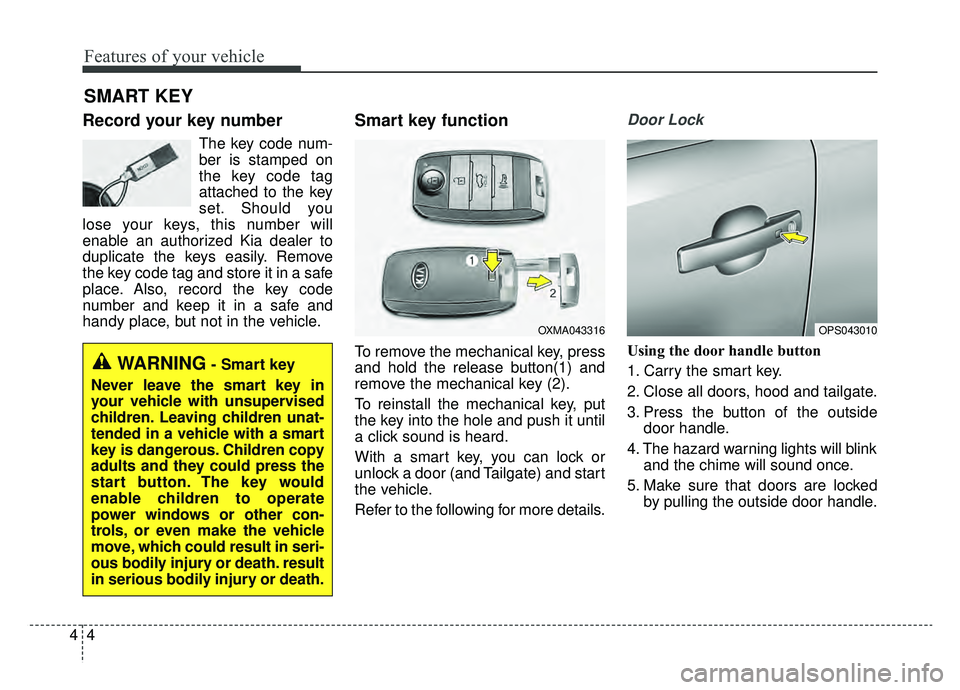
Smart key function
To remove the mechanical key, press
and hold the release button(1) and
remove the mechanical key (2).
To reinstall the mechanical key, put
the key into the hole and push it until
a click sound is heard.
With a smart key, you can lock or
unlock a door (and Tailgate) and start
the vehicle.
Refer to the following for more details.
Door Lock
Using the door handle button
1. Carry the smart key.
2. Close all doors, hood and tailgate.
3. Press the button of the outside door handle.
4. The hazard warning lights will blink and the chime will sound once.
5. Make sure that doors are locked by pulling the outside door handle.
SMART KEY
OXMA043316
WARNING- Smart key
Never leave the smart key in
your vehicle with unsupervised
children. Leaving children unat-
tended in a vehicle with a smart
key is dangerous. Children copy
adults and they could press the
start button. The key would
enable children to operate
power windows or other con-
trols, or even make the vehicle
move, which could result in seri-
ous bodily injury or death. result
in serious bodily injury or death.
OPS043010
Page 142 of 455
45
Features of your vehicle
The button will only operate when the
smart key is within 28~40 in. (0.7~1m)
from the outside door handle.
Even though you press the outside
door handle button, the doors will not
lock and the chime will sound for 3
seconds if any of following occur:
• The smart key is in the vehicle.
The POWER button is in ON posi-tion.
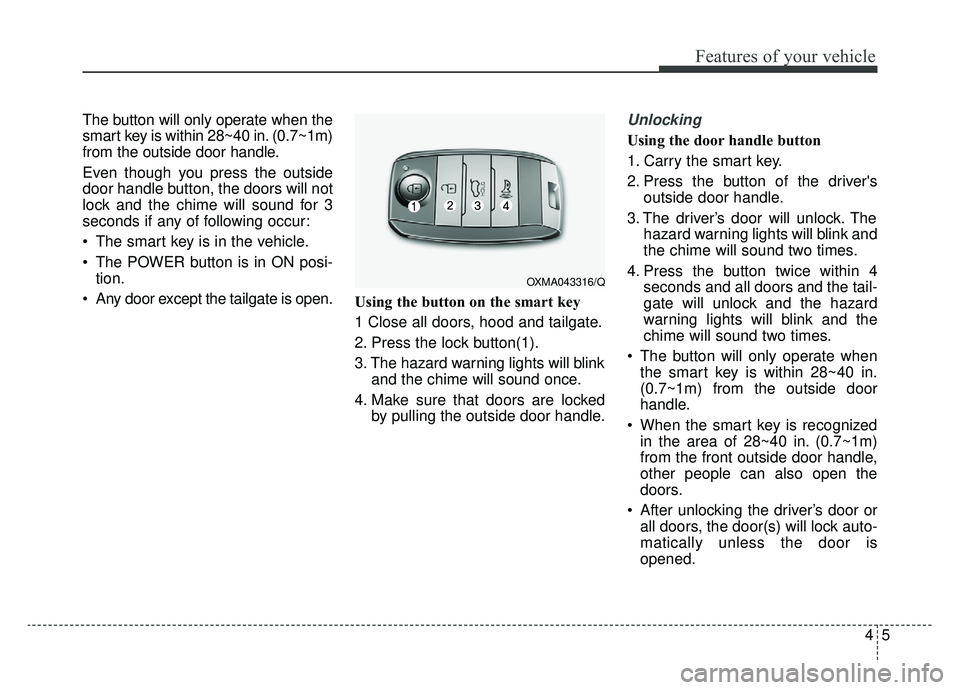
Any door except the tailgate is open. Using the button on the smart key
1 Close all doors, hood and tailgate.
2. Press the lock button(1).
3. The hazard warning lights will blink
and the chime will sound once.
4. Make sure that doors are locked by pulling the outside door handle.Unlocking
Using the door handle button
1. Carry the smart key.
2. Press the button of the driver'soutside door handle.
3. The driver’s door will unlock. The hazard warning lights will blink and
the chime will sound two times.
4. Press the button twice within 4 seconds and all doors and the tail-
gate will unlock and the hazard
warning lights will blink and the
chime will sound two times.
The button will only operate when the smart key is within 28~40 in.
(0.7~1m) from the outside door
handle.
When the smart key is recognized in the area of 28~40 in. (0.7~1m)
from the front outside door handle,
other people can also open the
doors.
After unlocking the driver’s door or all doors, the door(s) will lock auto-
matically unless the door is
opened.
OXMA043316/Q
Page 143 of 455
Features of your vehicle
64
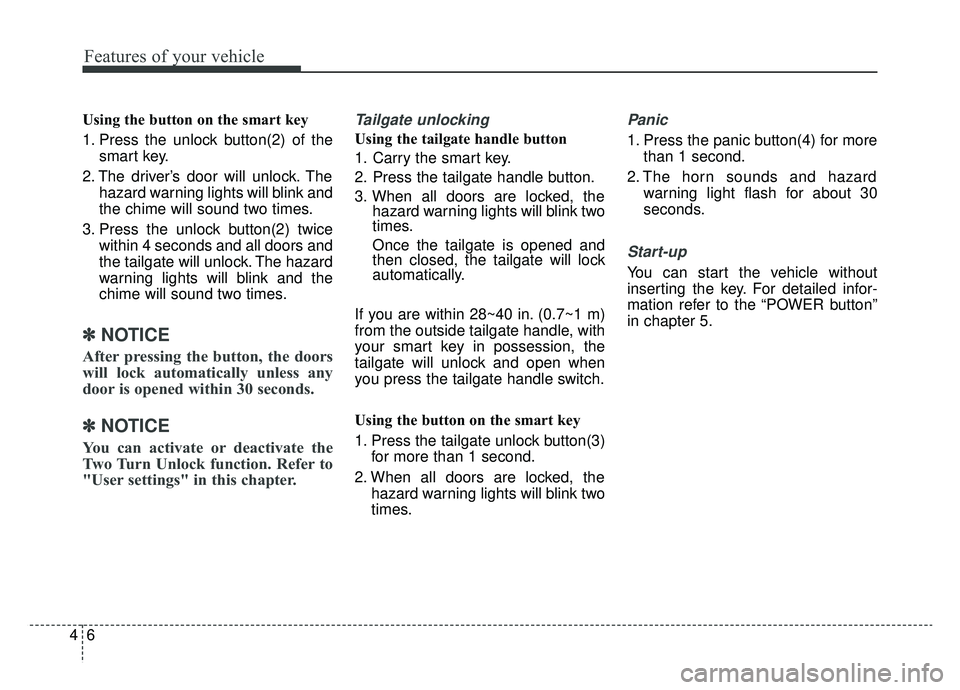
Using the button on the smart key
1. Press the unlock button(2) of thesmart key.
2. The driver’s door will unlock. The hazard warning lights will blink and
the chime will sound two times.
3. Press the unlock button(2) twice within 4 seconds and all doors and
the tailgate will unlock. The hazard
warning lights will blink and the
chime will sound two times.
✽ ✽NOTICE
After pressing the button, the doors
will lock automatically unless any
door is opened within 30 seconds.
✽ ✽NOTICE
You can activate or deactivate the
Two Turn Unlock function. Refer to
"User settings" in this chapter.
Tailgate unlocking
Using the tailgate handle button
1. Carry the smart key.
2. Press the tailgate handle button.
3. When all doors are locked, the
hazard warning lights will blink two
times.
Once the tailgate is opened and
then closed, the tailgate will lock
automatically.
If you are within 28~40 in. (0.7~1 m)
from the outside tailgate handle, with
your smart key in possession, the
tailgate will unlock and open when
you press the tailgate handle switch.
Using the button on the smart key
1. Press the tailgate unlock button(3) for more than 1 second.
2. When all doors are locked, the hazard warning lights will blink two
times.
Panic
1. Press the panic button(4) for morethan 1 second.
2. The horn sounds and hazard warning light flash for about 30
seconds.
Start-up
You can start the vehicle without
inserting the key. For detailed infor-
mation refer to the “POWER button”
in chapter 5.