2019 KIA SORENTO Drive modes
[x] Cancel search: Drive modesPage 170 of 573

Features of your vehicle
82
4
LCD DISPLAY
LCD Modes
❈ For controlling the LCD modes, refer to “LCD Display Control” in this chapter.
ModesSymbolExplanation
Trip ComputerThis mode displays driving information like the tripmeter, fuel economy, and so on.
❈For more details, refer to “Trip Computer” in this chapter
Tu r n b y Tu r n m o d e
(if equipped)This mode displays the state of the navigation.
Assist mode
(if equipped)
This mode displays the state of below systems.
- SCC with S&G(Refer to “Smart Cruise Control with Stop & Go System” in chapter 5)
- Lane keeping Assist (Refer to “Lane Keeping Assist System” in chapter 5)
- In AWD AUTO MODE, the cluster displays the traction force distribution status of front- wheels and rear-wheels, but in AWD LOCK MODE, the cluster doesn’t display the sta-
tus. (Refer to “All Wheel Drive (AWD) transfer mode selection” in chapter 5)
❈ For more details, refer to chapter 5 and 6.
User SettingsOn this mode, you can change settings of the doors, lamps and etc.
Master warning
modeThis mode informs of warning messages related to Low tire pressure or malfunction of
Blind-spot Collision Warning and etc.
Page 171 of 573

483
Features of your vehicle
The trip computer is a microcomput-
er-controlled driver information sys-
tem that displays information related
to driving.
✽ ✽NOTICE
Some driving information stored in
the trip computer (for example
Average Vehicle Speed) resets if the
battery is disconnected.
Trip Modes Fuel Economy
Average Fuel Economy (1)
The average fuel economy is cal-
culated by the total driving dis-
tance and fuel consumption since
the last average fuel economy
reset.
- Fuel economy range: 0.0 ~ 99.9km/L, L/100km or MPG
The average fuel economy can be reset both manually and automati-
cally.
TRIP MODES (TRIP COMPUTER)
To change the trip mode, scroll the
MOVE scroll switch (▲/▼) in the trip
computer mode.
OUMA048527C
* : if equipped
Accumulated Info
Digital speedometer
Drive Info
Fuel Economy
Smart shift*
Page 241 of 573
4153
Features of your vehicle
Automatic heating and air con-
ditioning
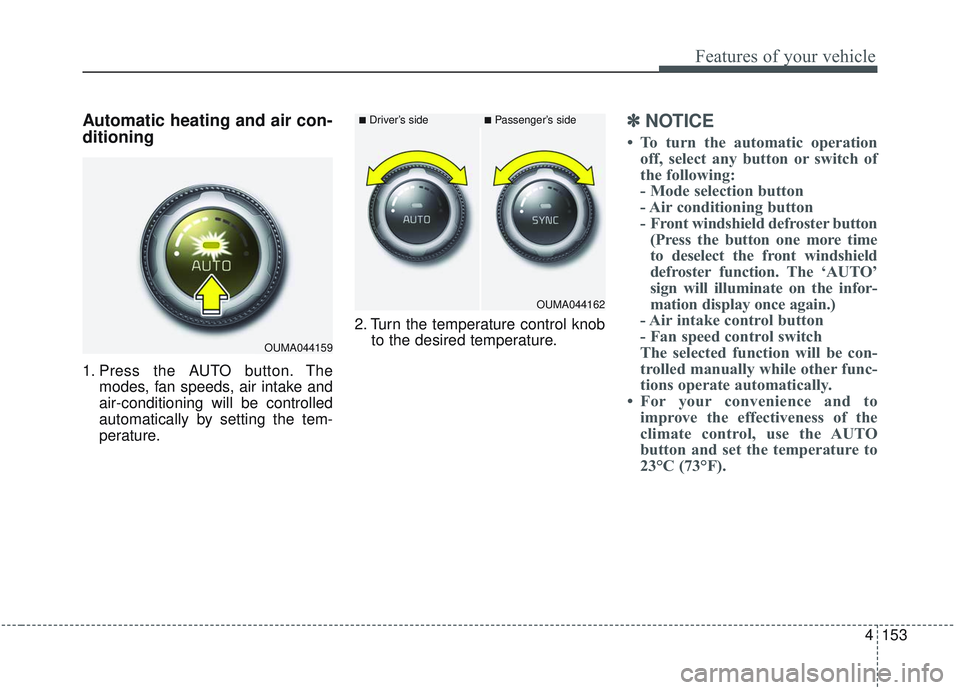
1. Press the AUTO button. Themodes, fan speeds, air intake and
air-conditioning will be controlled
automatically by setting the tem-
perature. 2. Turn the temperature control knob
to the desired temperature.
✽ ✽NOTICE
• To turn the automatic operation
off, select any button or switch of
the following:
- Mode selection button
- Air conditioning button
- Front windshield defroster button(Press the button one more time
to deselect the front windshield
defroster function. The ‘AUTO’
sign will illuminate on the infor-
mation display once again.)
- Air intake control button
- Fan speed control switch
The selected function will be con-
trolled manually while other func-
tions operate automatically.
• For your convenience and to improve the effectiveness of the
climate control, use the AUTO
button and set the temperature to
23°C (73°F).
OUMA044159
■Driver’s side■Passenger’s side
OUMA044162
Page 299 of 573
Driving your vehicle
22
5
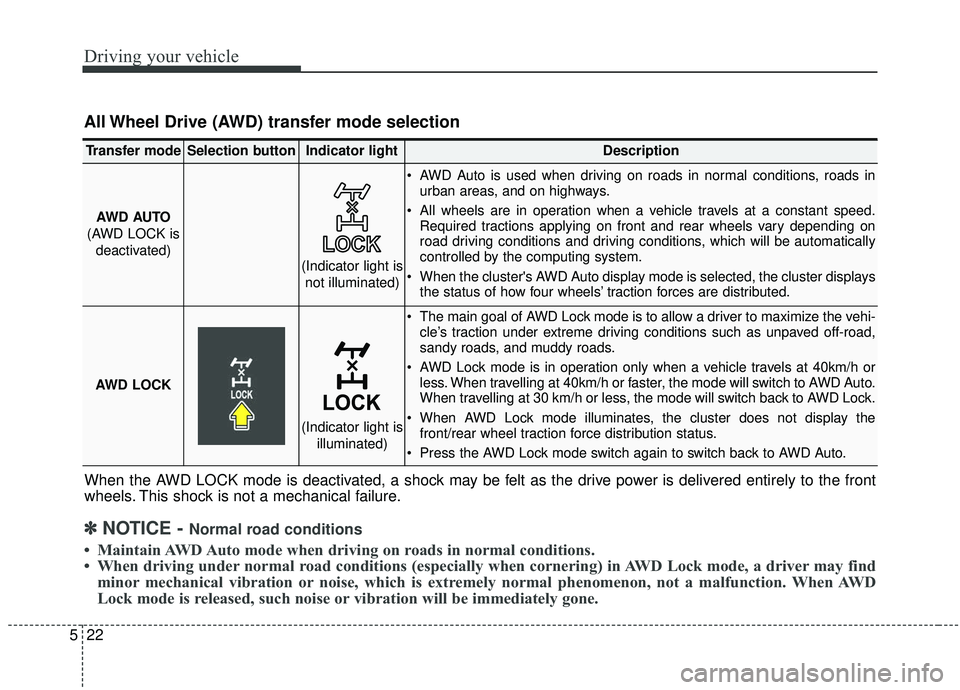
All Wheel Drive (AWD) transfer mode selection
When the AWD LOCK mode is deactivated, a shock may be felt as the drive power is delivered entirely to the front
wheels. This shock is not a mechanical failure.
Transfer modeSelection buttonIndicator lightDescription
AWD AUTO
(AWD LOCK is deactivated) AWD Auto is used when driving on roads in normal conditions, roads in
urban areas, and on highways.
All wheels are in operation when a vehicle travels at a constant speed. Required tractions applying on front and rear wheels vary depending on
road driving conditions and driving conditions, which will be automatically
controlled by the computing system.
When the cluster's AWD Auto display mode is selected, the cluster displays the status of how four wheels’ traction forces are distributed.
AWD LOCK
The main goal of AWD Lock mode is to allow a driver to maximize the vehi- cle’s traction under extreme driving conditions such as unpaved off-road,
sandy roads, and muddy roads.
AWD Lock mode is in operation only when a vehicle travels at 40km/h or less. When travelling at 40km/h or faster, the mode will switch to AWD Auto.
When travelling at 30 km/h or less, the mode will switch back to AWD Lock.
When AWD Lock mode illuminates, the cluster does not display the front/rear wheel traction force distribution status.
Press the AWD Lock mode switch again to switch back to AWD Auto.
(Indicator light is not illuminated)
(Indicator light is illuminated)
✽ ✽NOTICE - Normal road conditions
• Maintain AWD Auto mode when driving on roads in normal conditions.
• When driving under normal road conditions (especially when cornering) in AWD Lock mode, a driver may find
minor mechanical vibration or noise, which is extremely normal phenomenon, not a malfunction. When AWD
Lock mode is released, such noise or vibration will be immediately gone.
Page 566 of 573

I9
Index
Jump starting. . . . . . . . . . . . . . . . . . . . . . . . . . . . . . . . . . 6-5
Key operations (Folding key) . . . . . . . . . . . . . . . . . . . . . 4-5
Key positions . . . . . . . . . . . . . . . . . . . . . . . . . . . . . . . . . 5-7Illuminated ignition switch . . . . . . . . . . . . . . . . . . . . 5-7
Ignition switch position . . . . . . . . . . . . . . . . . . . . . . . 5-7
Starting the engine . . . . . . . . . . . . . . . . . . . . . . . . . . . 5-8
Label Tire sidewall labeling . . . . . . . . . . . . . . . . . . . . . . . . 7-42
Vehicle certification label. . . . . . . . . . . . . . . . . . . . . 8-10
Tire specification and pressure label . . . . . . . . . . . . 8-11
Refrigerant label . . . . . . . . . . . . . . . . . . . . . . . . . . . . 8-11
Lane Keeping Assist (LKA) system . . . . . . . . . . . . . . . 5-91 LKA system operation . . . . . . . . . . . . . . . . . . . . . . . 5-93
Driver's attention . . . . . . . . . . . . . . . . . . . . . . . . . . . 5-97
LKA system malfunction . . . . . . . . . . . . . . . . . . . . . 5-98
LKA system function change . . . . . . . . . . . . . . . . . . 5-99
LCD display . . . . . . . . . . . . . . . . . . . . . . . . . . . . . . . . . 4-82 LCD modes . . . . . . . . . . . . . . . . . . . . . . . . . . . . . . . 4-82
Trip information . . . . . . . . . . . . . . . . . . . . . . . . . . . . 4-83
Trip modes . . . . . . . . . . . . . . . . . . . . . . . . . . . . . . . . 4-83 Fuel economy . . . . . . . . . . . . . . . . . . . . . . . . . . . . . . 4-83
Accumulated driving information mode . . . . . . . . . 4-85
One time driving information mode . . . . . . . . . . . . 4-85
Digital speedometer . . . . . . . . . . . . . . . . . . . . . . . . . 4-86
Smart shift . . . . . . . . . . . . . . . . . . . . . . . . . . . . . . . . 4-86
Turn by turn mode . . . . . . . . . . . . . . . . . . . . . . . . . . 4-86
Assist mode . . . . . . . . . . . . . . . . . . . . . . . . . . . . . . . 4-87
Distance to empty. . . . . . . . . . . . . . . . . . . . . . . . . . . 4-89
User settings mode . . . . . . . . . . . . . . . . . . . . . . . . . . 4-89
LCD modes . . . . . . . . . . . . . . . . . . . . . . . . . . . . . . . . . . 4-82\
License plate lamp bulb replacement . . . . . . . . . . . . . . 7-87
Liftgate (for manual liftgate) . . . . . . . . . . . . . . . . . . . . 4-26 Opening the liftgate . . . . . . . . . . . . . . . . . . . . . . . . . 4-26
Closing the liftgate . . . . . . . . . . . . . . . . . . . . . . . . . . 4-26
Emergency liftgate safety release . . . . . . . . . . . . . . 4-27
Light bulb position (Front) . . . . . . . . . . . . . . . . . . . . . . 7-71
Light bulb position (Rear) . . . . . . . . . . . . . . . . . . . . . . 7-72
Light bulb position (Side). . . . . . . . . . . . . . . . . . . . . . . 7-73
Light bulbs . . . . . . . . . . . . . . . . . . . . . . . . . . . . . . . . . . 7-69\
Bulb replacement precaution . . . . . . . . . . . . . . . . . . 7-69
Light bulb position (Front). . . . . . . . . . . . . . . . . . . . 7-71
Light bulb position (Rear) . . . . . . . . . . . . . . . . . . . . 7-72
Light bulb position (Side) . . . . . . . . . . . . . . . . . . . . 7-73
Headlamp (Low beam) bulb replacement (Headlamp Type A) . . . . . . . . . . . . . . . . . . . . . . . . 7-73
Headlamp (High beam) bulb replacement (Headlamp Type A) . . . . . . . . . . . . . . . . . . . . . . . . 7-74
J
K
L