2019 KIA SORENTO steering
[x] Cancel search: steeringPage 340 of 573

563
Driving your vehicle
The cruise control system allows you
to program the vehicle to maintain a
constant speed without depressing
the accelerator pedal.
This system is designed to function
above approximately 30 km/h (20
mph).
If the cruise control is left on,
(CRUISE indicator light in the instru-
ment cluster illuminated) the cruise
control can be switched on acciden-
tally. Keep the cruise control system
off (CRUISE indicator light OFF)
when the cruise control is not in use,
to avoid inadvertently setting a speed.
Use the cruise control system only
when traveling on open highways in
good weather.
Do not use the cruise control when
driving in heavy or varying traffic, or
on slippery (rainy, icy or snow-cov-
ered) or winding roads or over 6%
up-hill or down-hill roads.✽ ✽NOTICE
• During normal cruise control
operation, when the SET switch is
activated or reactivated after
applying the brakes, the cruise
control will energize after approx-
imately 3 seconds. This delay is
normal.
• To activate cruise control, depress the brake pedal at least once after
turning the ignition switch to the
ON position or starting the engine.
This is to check if the brake switch
which is important part to cancel
cruise control is in normal condi-
tion.
To set cruise control speed:
1.Press the CRUISE button on the
steering wheel to turn the system
on. The CRUISE indicator light in the
instrument cluster will illuminate.
2.Accelerate to the desired speed, which must be more than 30 km/h
(20 mph).
CRUISE CONTROL SYSTEM
WARNING - Misuse of
Cruise Control
Do not use cruise control if the
traffic situation does not allow
you to drive safely at a constant
speed and with sufficient dis-
tance to the vehicle in front.
OUM058022CN
Page 359 of 573

Driving your vehicle
82
5
Your vehicle may accelerate when
a vehicle ahead of you disappears.
When you are warned that the vehicle ahead of you is not detect-
ed, drive with caution.
Vehicle recognition
Some vehicles ahead in your lane
cannot be recognized by the sensor
as follows:
- Narrow vehicles such as motorcy-cles or bicycles
- Vehicles offset to one side
- Slow-moving vehicles or sudden- decelerating vehicles
- Stopped vehicles
- Vehicles with small rear profile such as trailers with no loads A vehicle ahead cannot be recog-
nized correctly by the sensor if any of
following occurs:
- When the vehicle is pointing
upwards due to overloading in the
liftgate
- While making turns by steering
- When driving to one side of the lane
- When driving on narrow lanes or on curves
Adjust your vehicle speed by
depressing the brake pedal accord-
ing to the road condition ahead and
driving condition.
OUM054045L
OUM054044L
Page 365 of 573
Driving your vehicle
88
5
Various driving situations, which you
may encounter in SMART mode
The driving mode automatically
changes to ECO mode after a cer-
tain period of time, when you gen-
tly depress the accelerator pedal
(Your driving is categorized to be
mild.).
The driving mode automatically changes from SMART ECO mode
to SMART COMFORT mode after
a certain period of time, when you
sharply or repetitively depress the
accelerator pedal.
The driving mode automatically changes to SMART COMFORT
mode with the same driving pat-
terns, when the vehicle starts to
drive on an upward slope of a cer-
tain angle. The driving mode auto-
matically returns to SMART ECO
mode, when the vehicle enters a
leveled road. The driving mode automatically
changes to SMART SPORT, when
you abruptly accelerate the vehicle
or repetitively operate the steering
wheel (Your driving is categorized
to be sporty.). In this mode, your
vehicle drives in a lower gear for
abrupt accelerating/decelerating
and increases the engine brake
performance.
You may still sense the engine brake performance, even when you
release the accelerator pedal in
SMART SPORT mode. It is
because your vehicle remains to
be in a lower gear over a certain
period of time for next acceleration.
Thus, it is a normal driving situa-
tion, not indicating any malfunc-
tion.
The driving mode automatically changes to SMART SPORT mode
only in harsh driving situations. In
most of the normal driving situa-
tions, the driving mode sets to be
either in SMART ECO mode or in
SMART COMFORT mode. Limitation of SMART mode
The SMART mode may be limited in
following situations. (The OFF indica-
tor illuminates in those situations.)
The driver manually moves the
shift lever : It deactivates SMART
mode. The vehicle drives, as the
driver manually moves the shift
lever.
The cruise control is activated : The cruise system may deactivate
the SMART mode. When a higher
system is set by the cruise system,
it starts to control vehicle speed
and deactivates SMART mode.
(SMART mode is not deactivated
just by activing the cruise system.)
The transmission oil temperature is either extremely low or extremely
high : The SMART mode can be
active in most of the normal driving
situations. However, an extremely
high/ low transmission oil tempera-
ture may temporarily deactivate the
SMART mode, because the trans-
mission condition is out of normal
operation condition.
Page 366 of 573
589
Driving your vehicle
SPORT mode
SPORT mode manages
the driving dynamics by
automatically adjusting
the steering effort, and
the engine and trans-
mission control logic for
enhanced driver per-
formance.
When SPORT mode is selected by pressing the DRIVE MODE button,
the SPORT indicator will illuminate.
Whenever the engine is restarted, the Drive Mode will revert back to
COMFORT mode. If SPORT mode
is desired, re-select SPORT mode
from the DRIVE MODE button. When SPORT mode is activated:
- The engine rpm will tend toremain raised over a certain
length of time even after releas-
ing the accelerator
- Upshifts are delayed when accel- erating
✽ ✽ NOTICE
In SPORT mode, the fuel efficiency
may decrease.
ECO mode
When the Drive Mode is
set to ECO mode, the
engine and transmission
control logic are changed
to maximize fuel efficiency.
When ECO mode is selected by pressing the DRIVE MODE button,
the ECO indicator will illuminate.
If the vehicle is set to ECO mode, when the engine is turned OFF
and restarted the Drive Mode set-
ting will remain in ECO mode.
✽ ✽ NOTICE
Fuel efficiency depends on the dri-
ver's driving habit and road condi-
tion.
ECOSPORT
Page 368 of 573
591
Driving your vehicle
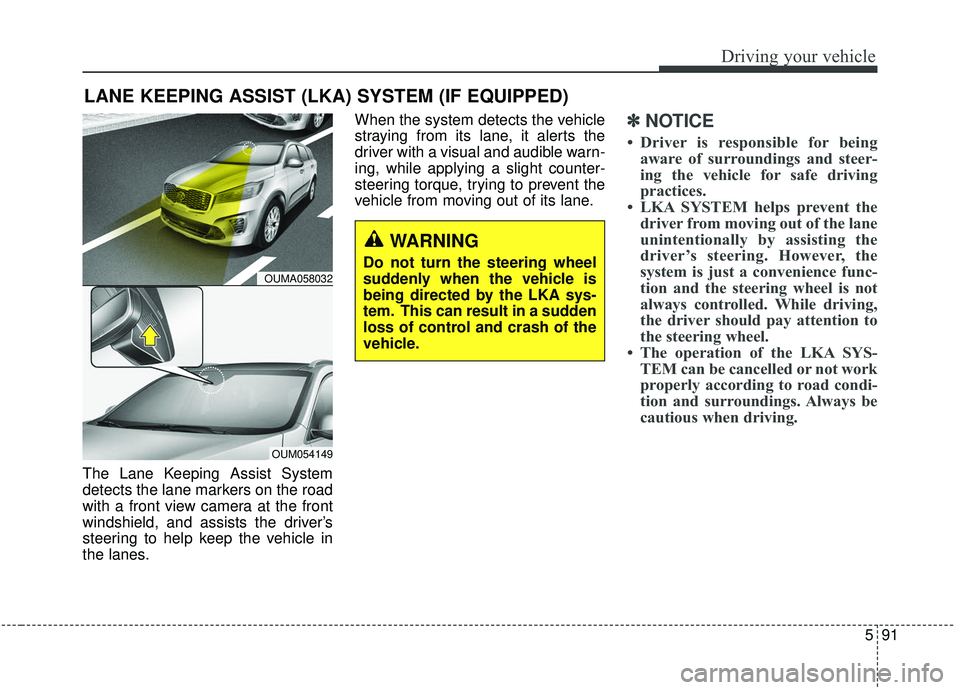
The Lane Keeping Assist System
detects the lane markers on the road
with a front view camera at the front
windshield, and assists the driver’s
steering to help keep the vehicle in
the lanes.When the system detects the vehicle
straying from its lane, it alerts the
driver with a visual and audible warn-
ing, while applying a slight counter-
steering torque, trying to prevent the
vehicle from moving out of its lane.
✽ ✽
NOTICE
• Driver is responsible for being
aware of surroundings and steer-
ing the vehicle for safe driving
practices.
• LKA SYSTEM helps prevent the driver from moving out of the lane
unintentionally by assisting the
driver’s steering. However, the
system is just a convenience func-
tion and the steering wheel is not
always controlled. While driving,
the driver should pay attention to
the steering wheel.
• The operation of the LKA SYS- TEM can be cancelled or not work
properly according to road condi-
tion and surroundings. Always be
cautious when driving.
LANE KEEPING ASSIST (LKA) SYSTEM (IF EQUIPPED)
WARNING
Do not turn the steering wheel
suddenly when the vehicle is
being directed by the LKA sys-
tem. This can result in a sudden
loss of control and crash of the
vehicle.OUMA058032
OUM054149
Page 369 of 573
Driving your vehicle
92
5
Do not disassemble a front view
camera temporarily for tinted win-
dow or attaching any types of coat-
ings and accessories. If you disas-
semble the camera and assemble
it again, take your vehicle to an
authorized Kia dealer and have the
system checked to need a calibra-
tion.
When you replace the windshield glass, front view camera or related
parts of the steering, take your
vehicle to an authorized Kia dealer
and have the system checked to
need a calibration.
The system detects lane markers and controls the steering wheel by
a front view camera, therefore, if
the lane markers are hard to
detect, the system may not work
properly. Always be cautious when
using the system. When the lane markers are hard to
detect, please refer to “Driver’s
Attention”.
Do not remove or damage the related parts of LKA SYSTEM.
Do not place objects on the crash pad that reflects light such as mir-
rors, white paper, etc. it may cause
malfunction of LKA SYSTEM if the
sunlight is reflected.
You may not hear warning sound of LKA SYSTEM because of the
excessive audio sound.
If you continue to drive with your hands off the steering wheel, the
LKA SYSTEM will stop controlling
the steering wheel after the hands
off alarm. After then, if you drive
with your hands on the steering
wheel, the control will be activated
again.✽ ✽
NOTICE
• If the vehicle speed is high, steer-
ing torque for assistance will not
be enough to keep your vehicle
within the lane. If so, the vehicle
may move out of its lane. Obey
speed limit when using LKA SYS-
TEM.
• If you attach objects to the steer- ing wheel, the system may not
assist steering.
• If you attach objects to the steer- ing wheel, hands off alarm may
not work properly.
Page 370 of 573

593
Driving your vehicle
LKA SYSTEM operation
To activate/deactivate the LKA SYS-
TEM:
With the ignition switch in the ON
position, press the LKA SYSTEM
button located on the instrument
panel on the lower left hand side of
the driver.
The indicator in the cluster display
will initially illuminate white.
When the indicator (white) activated
in the previous ignition cycle, the
system turns on without any control.If you press the LKA SYSTEM button
again, the indicator on the cluster
display will go off.
The color of indicator will change
depend on the condition of LKA
SYSTEM.
- White : Sensor does not detect the
lane marker or vehicle
speed is less than 64 km/h
(40 mph).
- Green : S ensor detects the lane
marker and system is able
to control the steering.
LKA SYSTEM activation
To see the LKA SYSTEM screen on the LCD display in the cluster,
Tab to the Assist mode ( ).
For further details, refer to [menu settings] in chapter 4, [crash pad].
After LKA SYSTEM is activated, if both lane markers are detected,
vehicle speed is over 64 km/h (40
mph) and all the activation condi-
tions are satisfied, a green steering
wheel indicator will illuminate and
the steering wheel will be controlled.
OUMA058031
WARNING
The Lane Keeping Assist
System is a system to help pre-
vent the driver from leaving the
lane. However, the driver should
not solely rely on the system
but always check the road con-
ditions when driving.
Page 371 of 573
Driving your vehicle
94
5
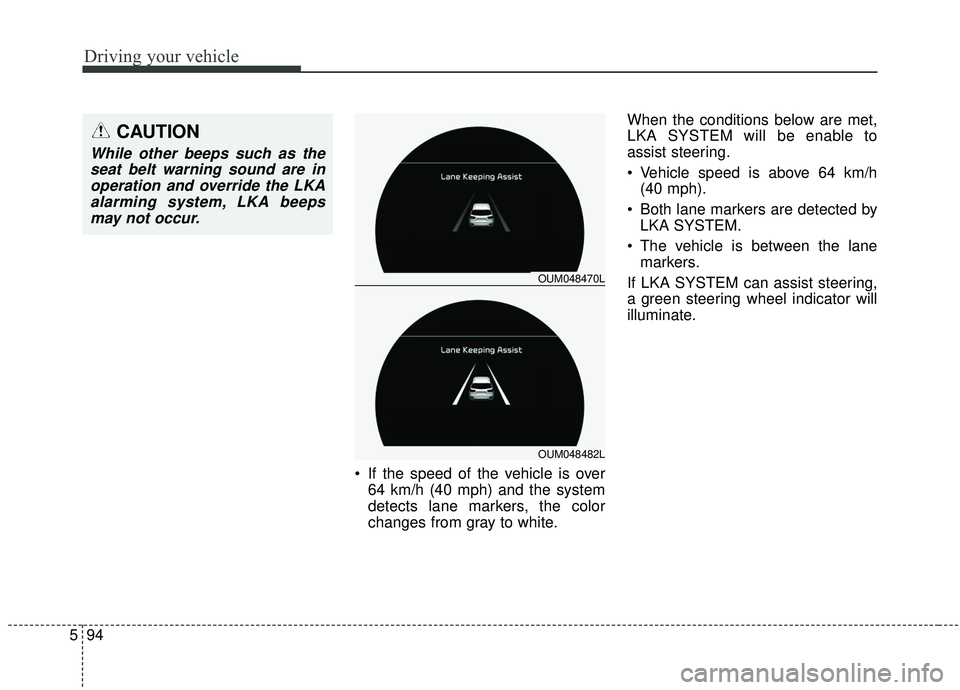
If the speed of the vehicle is over
64 km/h (40 mph) and the system
detects lane markers, the color
changes from gray to white. When the conditions below are met,
LKA SYSTEM will be enable to
assist steering.
Vehicle speed is above 64 km/h
(40 mph).
Both lane markers are detected by LKA SYSTEM.
The vehicle is between the lane markers.
If LKA SYSTEM can assist steering,
a green steering wheel indicator will
illuminate.
OUM048470L
OUM048482L
CAUTION
While other beeps such as the seat belt warning sound are inoperation and override the LKAalarming system, LKA beepsmay not occur.