2019 KIA SORENTO Bumper
[x] Cancel search: BumperPage 378 of 573

5101
Driving your vehicle
BLIND-SPOT COLLISION WARNING (BCW) (IF EQUIPPED)
The Blind-Spot Collision Warning
(BCW) system uses radar sensors in
the rear bumper to monitor and warn
the driver of an approaching vehicle
in the driver's blind spot area.
The system monitors the rear area of
the vehicle and provides information
to the driver with an audible alert and
a indicator on the outside rearview
mirrors(1) Blind spot area
The BCW range varies relative tovehicle speed. Note that if your
vehicle is traveling much faster
than the vehicles around you, the
warning will not occur.
(2) Closing at high speed The BCW-Closing at high speedfeature will alert you when a vehi-
cle is approaching in an adjacent
lane at a high rate of speed. If the
driver activates the turn signal
when the system detects an
oncoming vehicle, the system
sounds an audible alert. Distance
from approaching vehicle can be
seen differently according to the
relative speed. (3) RCCW (Rear Cross-Traffic
Collision Warning)
The RCCW feature monitors approaching cross traffic from the
left and right side of the vehicle
when your vehicle is in reverse.
The feature will operate when the
vehicle is moving in reverse
below about 10 km/h (6 mph). If
oncoming cross traffic is detected
a warning chime will sound.
Distance from approaching vehi-
cle can be seen differently
according to the relative speed.
OUM056176L
Page 381 of 573

Driving your vehicle
104
5
- The second stage alarm may be
deactivated.
To activate the alarm: Go to the User Settings Mode →
Driver Assistance and select
“Blind-Spot Collision Warning” on
the LCD display.
To deactivate the alarm: Go to the User Settings Mode →
Driver Assistance and deselect
“Blind-Spot Collision Warning” on
the LCD display.
✽ ✽
NOTICE
The alarm function helps alert the
driver. Deactivate this function only
when it is necessary
RCCW (Rear Cross-Traffic
Collision Warning)
When your vehicle moves backwards
from a parking position, the sensor
detects approaching vehicles to the
left or right side direction and gives
information to the driver.
Detecting sensor
The sensors are located inside of the
rear bumper.
Always keep the rear bumper clean
for the system to work properly.
OUMA058030
OYP054026K
CAUTION
While other beeps such as the
seat belt warning sound are inoperation and override the BCWalarming system, BCW beepsmay not occur.
Page 383 of 573

Driving your vehicle
106
5
\b If your vehicle's left or right side
bumper is blinded by a barrier or
vehicles, the system sensing abili-
ty may be deteriorated.
When the BCW system is being acti-
vated, the warning light on the out-
side rearview mirror will illuminate
whenever a vehicle is detected at the
rear side by the system. To avoid
accidents, do not focus only on the
warning light and neglect to see the
surrounding of the vehicle.✽ ✽
NOTICE
• The system may not work proper-
ly if the bumper has been replaced
or if repair work has been done
near the sensor.
• The detection area differs accord- ing to the road's width. If the road
is narrow the system may detect
other vehicles in the next lane.
• If the road is very wide the system may not detect other vehicles.
• The system may turn off due to strong electromagnetic interfer-
ence.
WARNING
The Blind-Spot Collision
Warning System and Rear
Cross-Traffic Collision
Warning is not a substitute for
proper and safe lane chang-
ing procedures. Always drive
safely and use caution when
changing lanes. The Blind-
Spot Collision Warning
System may not detect every
object alongside the vehicle.
(Continued)
(Continued)
Drive safely even though thevehicle is equipped with a BCW
(Blind-Spot Collision Warning)
system. Do not solely rely on
the system but check for your-
self before changing lanes.
The system may not alert the
driver in some conditions so
always check the surround-
ings while driving.
Page 384 of 573
5107
Driving your vehicle
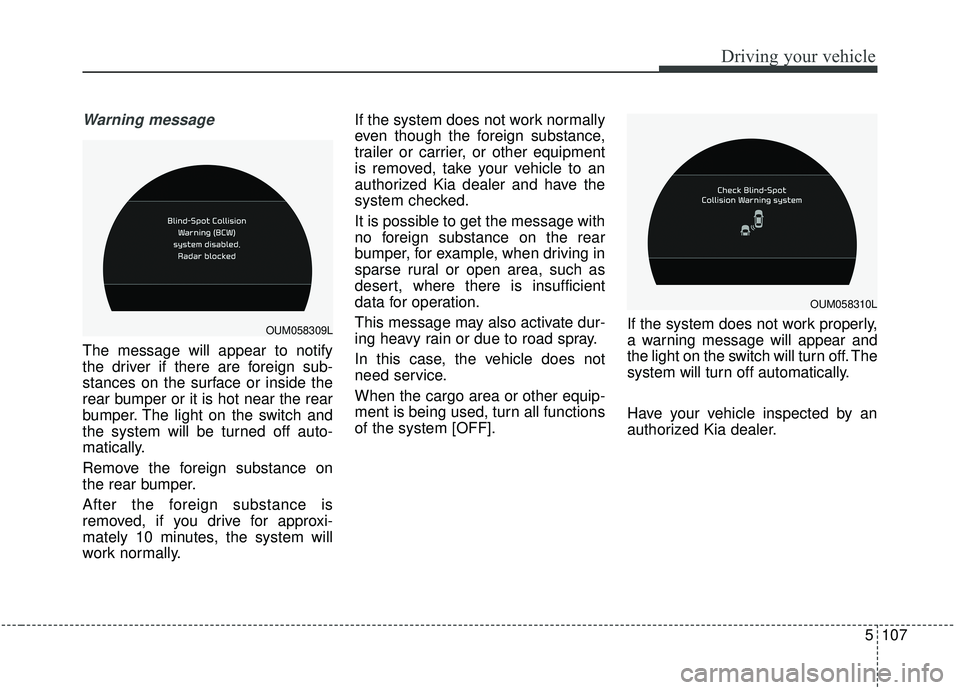
Warning message
The message will appear to notify
the driver if there are foreign sub-
stances on the surface or inside the
rear bumper or it is hot near the rear
bumper. The light on the switch and
the system will be turned off auto-
matically.
Remove the foreign substance on
the rear bumper.
After the foreign substance is
removed, if you drive for approxi-
mately 10 minutes, the system will
work normally.If the system does not work normally
even though the foreign substance,
trailer or carrier, or other equipment
is removed, take your vehicle to an
authorized Kia dealer and have the
system checked.
It is possible to get the message with
no foreign substance on the rear
bumper, for example, when driving in
sparse rural or open area, such as
desert, where there is insufficient
data for operation.
This message may also activate dur-
ing heavy rain or due to road spray.
In this case, the vehicle does not
need service.
When the cargo area or other equip-
ment is being used, turn all functions
of the system [OFF].
If the system does not work properly,
a warning message will appear and
the light on the switch will turn off. The
system will turn off automatically.
Have your vehicle inspected by an
authorized Kia dealer.
OUM058310L
OUM058309L
Page 385 of 573

Driving your vehicle
108
5
Non-operating condition
Outside rearview mirror may not
alert the driver when:
- The outside rearview mirror housing
is damaged or covered with debris.
- The window is covered with debris.
- The windows are severely tinted.
DRIVER’S ATTENTION
The driver must be cautious in the
below situations, because the sys-
tem may not detect other vehicles
or objects in certain circumstances.
- The vehicle drives on a curved road or through a tollgate.
- The sensor is polluted with rain, snow, mud, etc.
- The rear bumper, in which the sensor is located, is covered or
blocked with a foreign matter
such as a sticker, a bumper
guard, a bicycle stand, etc.
- The rear bumper is damaged, or the sensor is out of the original
default position.
- The vehicle height gets lower or higher due to heavy loading in a
liftgate, abnormal tire pressure,
etc.
- The vehicle drives in a bad weather such as heavy rain or
snow.
(Continued)(Continued)
- There is a fixed object near the
vehicle, such as a guardrail,
pedestrian, animal, tunnel, etc.
- A big vehicle is near such as a bus or truck.
- A motorcycle or bicycle is near.
- A flat trailer is near.
- If the vehicle has started at the same time as the vehicle next to
you and has accelerated.
- When the other vehicle passes at a very fast speed.
- While changing lanes.
- When going down or up a steep road where the height of the lane
is different.
- When the other vehicle approaches very close.
- When a trailer or carrier is installed.
- When the temperature of the rear bumper is very high or low.
(Continued)
Page 404 of 573
5127
Driving your vehicle
Hitches
It's important to have the correct
hitch equipment. Crosswinds, large
trucks going by, and rough roads are
a few reasons why you’ll need the
right hitch. Here are some rules to
follow:
Will you have to make any holes inthe body of your vehicle when you
install a trailer hitch? If you do, then
be sure to seal the holes later
when you remove the hitch.
If you don’t seal them, deadly car-
bon monoxide (CO) from your
exhaust can get into your vehicle,
as well as dirt and water.
The bumpers on your vehicle are not intended for hitches. Do not
attach rental hitches or other
bumper-type hitches to them. Use
only a frame-mounted hitch that
does not attach to the bumper.
Kia trailer hitch accessory is avail- able at an authorized Kia dealer.
Safety chains
You should always attach chains
between your vehicle and your trail-
er. Cross the safety chains under the
tongue of the trailer so that the
tongue will not drop to the road if it
becomes separated from the hitch.
Instructions about safety chains may
be provided by the hitch manufactur-
er or by the trailer manufacturer.
Follow the manufacturer’s recom-
mendation for attaching safety
chains. Always leave just enough
slack so you can turn with your trail-
er. And, never allow safety chains to
drag on the ground.
Trailer brakes
If your trailer is equipped with a brak-
ing system, make sure it conforms to
your state’s regulations and that it is
properly installed and operating cor-
rectly.
If your trailer weight exceeds the
maximum allowed weight without
trailer brakes, then the trailer will also
require its own brakes as well. Be
sure to read and follow the instruc-
tions for the trailer brakes so you’ll be
able to install, adjust and maintain
them properly.
Don’t tap into or modify your vehi-cle's brake system.
WARNING- Trailer brakes
Do not use a trailer with its own
brakes unless you are absolute-
ly certain that you have proper-
ly set up the brake system. This
is not a task for amateurs. Use
an experienced, competent
trailer shop for this work.
Page 432 of 573
What to do in an emergency
16
6
IF YOU HAVE A FLAT TIRE
Jack and tools
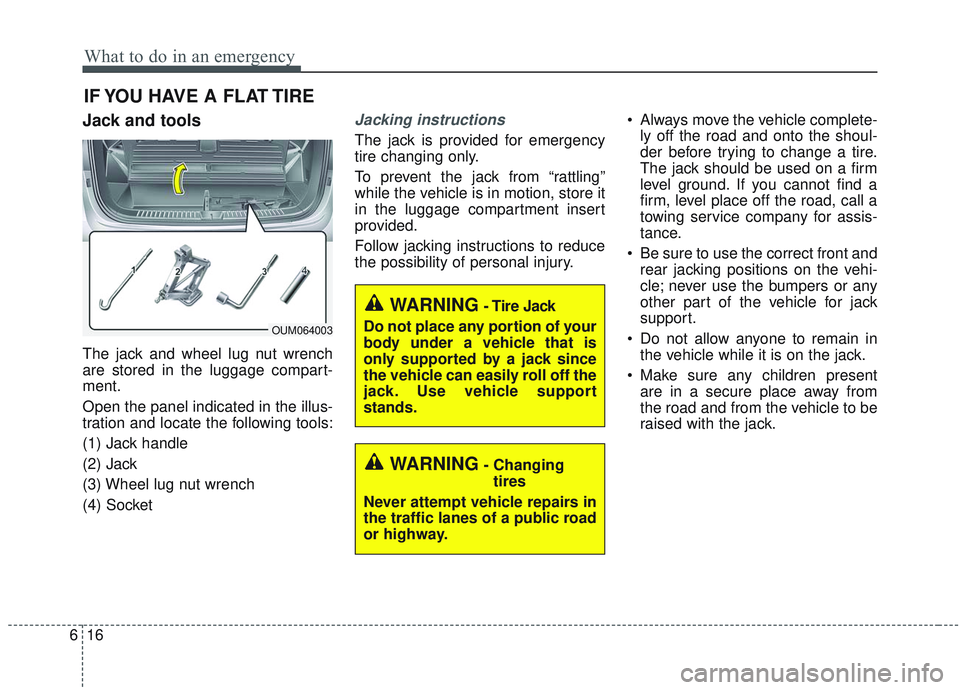
The jack and wheel lug nut wrench
are stored in the luggage compart-
ment.
Open the panel indicated in the illus-
tration and locate the following tools:
(1) Jack handle
(2) Jack
(3) Wheel lug nut wrench
(4) Socket
Jacking instructions
The jack is provided for emergency
tire changing only.
To prevent the jack from “rattling”
while the vehicle is in motion, store it
in the luggage compartment insert
provided.
Follow jacking instructions to reduce
the possibility of personal injury. Always move the vehicle complete-
ly off the road and onto the shoul-
der before trying to change a tire.
The jack should be used on a firm
level ground. If you cannot find a
firm, level place off the road, call a
towing service company for assis-
tance.
Be sure to use the correct front and rear jacking positions on the vehi-
cle; never use the bumpers or any
other part of the vehicle for jack
support.
Do not allow anyone to remain in the vehicle while it is on the jack.
Make sure any children present are in a secure place away from
the road and from the vehicle to be
raised with the jack.
WARNING- Changing
tires
Never attempt vehicle repairs in
the traffic lanes of a public road
or highway.
OUM064003
WARNING- Tire Jack
Do not place any portion of your
body under a vehicle that is
only supported by a jack since
the vehicle can easily roll off the
jack. Use vehicle support
stands.
Page 485 of 573

Maintenance
42
7
Wheel replacement
When replacing the metal wheels for
any reason, make sure the new
wheels are equivalent to the original
factory units in diameter, rim width
and offset.
A wheel that is not the correct size
may adversely affect wheel and
bearing life, braking and stopping
abilities, handling characteristics,
ground clearance, body-to-tire clear-
ance, snow chain clearance,
speedometer and odometer calibra-
tion, headlamp aim and bumper
height.
Tire traction
Tire traction can be reduced if you
drive on worn tires, tires that are
improperly inflated or on slippery
road surfaces. Tires should be
replaced when tread wear indicators
appear. Slow down whenever there
is rain, snow or ice on the road to
reduce the possibility of losing con-
trol of the vehicle.
Tire maintenance
In addition to proper inflation, correct
wheel alignment helps to decrease
tire wear. If you find a tire is worn
unevenly, have your dealer check the
wheel alignment.
When you have new tires installed,
make sure they are balanced. This
will increase vehicle ride comfort and
tire life. Additionally, a tire should
always be rebalanced if it is removed
from the wheel.
Tire sidewall labeling
This information identifies and
describes the fundamental charac-
teristics of the tire and also provides
the Tire Identification Number (TIN)
for safety standard certification. The
TIN can be used to identify the tire in
case of a recall.
1. Manufacturer or brand name
Manufacturer or Brand name is
shown.
I030B04JM
1
1
2
34
5,6
7