2019 KIA RIO lock
[x] Cancel search: lockPage 225 of 503
Audio system
55
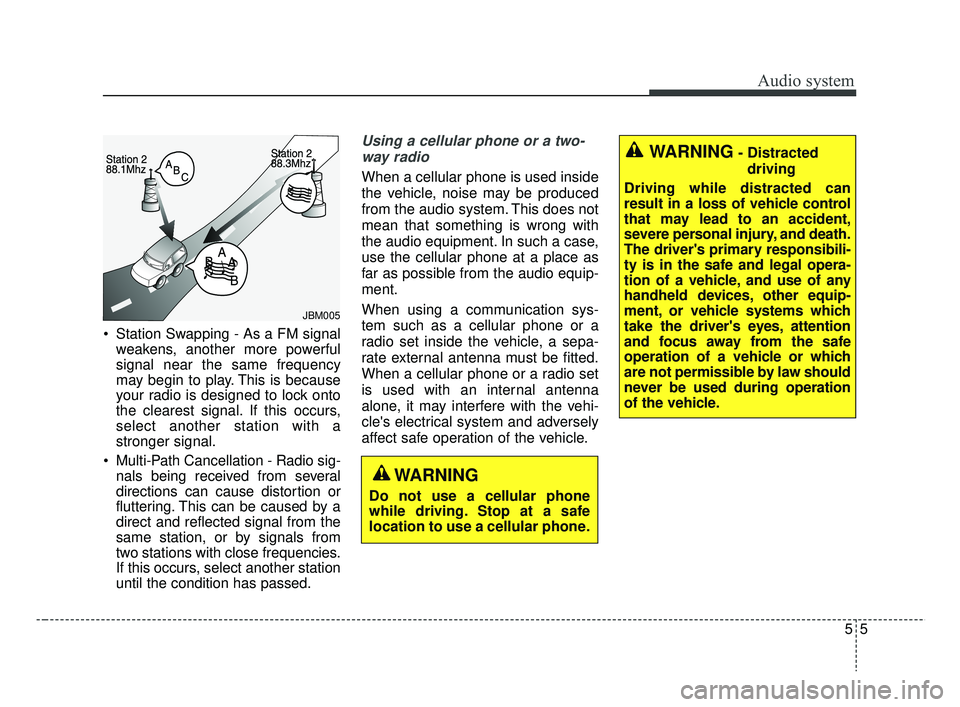
Station Swapping - As a FM signalweakens, another more powerful
signal near the same frequency
may begin to play. This is because
your radio is designed to lock onto
the clearest signal. If this occurs,
select another station with a
stronger signal.
Multi-Path Cancellation - Radio sig- nals being received from several
directions can cause distortion or
fluttering. This can be caused by a
direct and reflected signal from the
same station, or by signals from
two stations with close frequencies.
If this occurs, select another station
until the condition has passed.
Using a cellular phone or a two-
way radio
When a cellular phone is used inside
the vehicle, noise may be produced
from the audio system. This does not
mean that something is wrong with
the audio equipment. In such a case,
use the cellular phone at a place as
far as possible from the audio equip-
ment.
When using a communication sys-
tem such as a cellular phone or a
radio set inside the vehicle, a sepa-
rate external antenna must be fitted.
When a cellular phone or a radio set
is used with an internal antenna
alone, it may interfere with the vehi-
cle's electrical system and adversely
affect safe operation of the vehicle.
JBM005
WARNING
Do not use a cellular phone
while driving. Stop at a safe
location to use a cellular phone.
WARNING- Distracted driving
Driving while distracted can
result in a loss of vehicle control
that may lead to an accident,
severe personal injury, and death.
The driver's primary responsibili-
ty is in the safe and legal opera-
tion of a vehicle, and use of any
handheld devices, other equip-
ment, or vehicle systems which
take the driver's eyes, attention
and focus away from the safe
operation of a vehicle or which
are not permissible by law should
never be used during operation
of the vehicle.
SC CAN (ENG) 5(audio).qxp 7/18/2018 6:02 PM Page 5
Page 230 of 503

Audio system
510(8)
DISP
Turn the display on or off.
(9) CLOCK
Display the time/date/day.
(10) SETUP
Access Display, Sound, Date/Time,
Bluetooth, System, Screen Saver
and Display Off settings.
(11) TUNE knob
Turn to navigate through the sta- tions/songs list.
Press to select an item.
WARNING
- Clock Setting Distraction
Do not adjust the clock while
driving. You may lose your steer-
ing control and cause severe
personal injury or accidents.
SC CAN (ENG) 5(audio).qxp 7/18/2018 6:02 PM Page 10
Page 239 of 503
![KIA RIO 2019 Owners Manual Audio system
19
5
List
A list of all channels is displayed.
Select the desired channel.
Favorite channels can be saved to
[Presets] by selecting [+]. Menu
Select [Menu], and select the desired
functio](/manual-img/2/40414/w960_40414-238.png "KIA RIO 2019 Owners Manual Audio system
19
5
List
A list of all channels is displayed.
Select the desired channel.
Favorite channels can be saved to
[Presets] by selecting [+]. Menu
Select [Menu], and select the desired
functio")
Audio system
19
5
List
A list of all channels is displayed.
Select the desired channel.
Favorite channels can be saved to
[Presets] by selecting [+]. Menu
Select [Menu], and select the desired
function.
Presets: Save up to 40 frequently
used channels.
To listen to a preset, select the
desired channel.
Press and hold the desired slot
from 1 through 40. This saves the
current channel in the selected
slot.
If the slot is empty, simply selecting
saves the channel to the slot.
Categories: Channels can be searched by category.
Direct Tune: The desired channel can be selected by entering num-
bers.
Sound Settings: Audio sound set- tings can be changed.
Tag Song: Tag the current song information.
When an Apple device (iPhone
®,
iPod®) is connected, tagged song
information is sent automatically to
the connected device.
✽ ✽ NOTICE
Up to 50 songs can be tagged.
Scan: All channels available in the
vehicle’s current location are
played for ten seconds each.
Program Schedule: View the pro- gram schedule.
Featured Favorites: The Featured Favorites feature allows SiriusXM™
to broadcast additional presets.
- Example 1: During holidays,“Holiday Music” might include all
SiriusXM™ channels that are
playing holiday music for easy
access by users.
Multiple sets of Featured Favorites
data can be broadcast by
SiriusXM™ and can change from
time to time.
Information: View detailed channel information.
Category Lock: Search or scan channels in the current category
only.
SC CAN (ENG) 5(audio).qxp 7/18/2018 6:02 PM Page 19
Page 261 of 503
![KIA RIO 2019 Owners Manual Audio system
41
5
Screen Saver
Set the information displayed when
the audio system is switched off or
the screen is turned off.
Press the [SETUP] button on the
audio system ➟ Select [Screen
Saver].](/manual-img/2/40414/w960_40414-260.png "KIA RIO 2019 Owners Manual Audio system
41
5
Screen Saver
Set the information displayed when
the audio system is switched off or
the screen is turned off.
Press the [SETUP] button on the
audio system ➟ Select [Screen
Saver].")
Audio system
41
5
Screen Saver
Set the information displayed when
the audio system is switched off or
the screen is turned off.
Press the [SETUP] button on the
audio system ➟ Select [Screen
Saver].
Analog: An analog clock is dis- played.
Digital: A digital clock is displayed.
None: No information is displayed.
Display Off
To prevent glare, the screen can be
turned off with the audio system in
operation.
Press the [SETUP] button on the
audio system ➟ Select [Display Off].
SC CAN (ENG) 5(audio).qxp 7/18/2018 6:02 PM Page 41
Page 263 of 503

Driving your vehicle
Before driving . . . . . . . . . . . . . . . . . . . . . . . . . . . . . . 6-4
• Before entering vehicle . . . . . . . . . . . . . . . . . . . . . . . . . 6-4
• Necessary inspections . . . . . . . . . . . . . . . . . . . . . . . . . . 6-4
• Before starting . . . . . . . . . . . . . . . . . . . . . . . . . . . . . . . . 6-4
Key positions . . . . . . . . . . . . . . . . . . . . . . . . . . . . . . . 6-6
• Ignition switch position . . . . . . . . . . . . . . . . . . . . . . . . . 6-6
Engine start/stop button . . . . . . . . . . . . . . . . . . . . . 6-8
• Illuminated engine start/stop button . . . . . . . . . . . . . . 6-8
• Engine start/stop button position. . . . . . . . . . . . . . . . . 6-8
Starting the engine . . . . . . . . . . . . . . . . . . . . . . . . . 6-12
• Starting the engine with an ignition key . . . . . . . . . . 6-12
• Starting the engine with a smart key. . . . . . . . . . . . . 6-13
Manual transmission . . . . . . . . . . . . . . . . . . . . . . . 6-15
• Manual transmission operation . . . . . . . . . . . . . . . . . 6-15
• Good driving practices . . . . . . . . . . . . . . . . . . . . . . . . 6-17
Automatic transmission . . . . . . . . . . . . . . . . . . . . . 6-18
• Automatic transmission operation. . . . . . . . . . . . . . . 6-18
• Good driving practices . . . . . . . . . . . . . . . . . . . . . . . . 6-23
Brake system . . . . . . . . . . . . . . . . . . . . . . . . . . . . . . 6-24
• Power brakes . . . . . . . . . . . . . . . . . . . . . . . . . . . . . . . . 6-24
• Parking brake . . . . . . . . . . . . . . . . . . . . . . . . . . . . . . . 6-26
• Anti-lock Brake System (ABS). . . . . . . . . . . . . . . . . . 6-29
• Electronic Stability Control (ESC) . . . . . . . . . . . . . . 6-30
• Hill-start assist control (HAC) . . . . . . . . . . . . . . . . . . 6-34• Vehicle Stability Management (VSM) . . . . . . . . . . . . 6-35
• Good braking practices. . . . . . . . . . . . . . . . . . . . . . . . 6-37
Forward Collision-avoidance Assist (FCA) system
(Radar type) . . . . . . . . . . . . . . . . . . . . . . . . . . . . . 6-39
• FCA warning message and system control . . . . . . . . 6-41
• Brake operation . . . . . . . . . . . . . . . . . . . . . . . . . . . . . . 6-42
• Sensor to detect the distance from the vehicle in front
(front radar). . . . . . . . . . . . . . . . . . . . . . . . . . . . . . . . 6-43
• System malfunction . . . . . . . . . . . . . . . . . . . . . . . . . . . 6-44
• Limitation of the system . . . . . . . . . . . . . . . . . . . . . . . 6-45
Cruise Control System . . . . . . . . . . . . . . . . . . . . . . 6-50
• Cruise Control Switch. . . . . . . . . . . . . . . . . . . . . . . . . 6-50
• To set cruise control speed . . . . . . . . . . . . . . . . . . . . . 6-51
• To increase cruise control set speed. . . . . . . . . . . . . . 6-52
• To decrease the cruising speed . . . . . . . . . . . . . . . . . . 6-52
• To temporarily accelerate with the cruise control on . 6-52
• To cancel cruise control . . . . . . . . . . . . . . . . . . . . . . . 6-53
• To resume cruising speed at more than approximately 30 km/h (20 mph) . . . . . . . . . . . . . . . . . . . . . . . . . . . 6-53
• To turn cruise control off . . . . . . . . . . . . . . . . . . . . . . 6-54
Sport mode integrated control system . . . . . . . . . 6-55
• Sport mode . . . . . . . . . . . . . . . . . . . . . . . . . . . . . . . . . . 6-55\
Economical operation . . . . . . . . . . . . . . . . . . . . . . 6-56
6
SC CAN (ENG) 6.QXP 7/18/2018 5:41 PM Page 1
Page 264 of 503

6
Special driving conditions . . . . . . . . . . . . . . . . . . . 6-58
• Hazardous driving conditions . . . . . . . . . . . . . . . . . . 6-58
• Rocking the vehicle . . . . . . . . . . . . . . . . . . . . . . . . . . . 6-58
• Smooth cornering . . . . . . . . . . . . . . . . . . . . . . . . . . . . 6-59
• Driving at night . . . . . . . . . . . . . . . . . . . . . . . . . . . . . . 6-59
• Driving in the rain . . . . . . . . . . . . . . . . . . . . . . . . . . . . 6-60
• Driving in flooded areas . . . . . . . . . . . . . . . . . . . . . . . 6-61
• Driving off-road . . . . . . . . . . . . . . . . . . . . . . . . . . . . . . 6-61
• Highway driving . . . . . . . . . . . . . . . . . . . . . . . . . . . . . 6-61
Winter driving . . . . . . . . . . . . . . . . . . . . . . . . . . . . 6-63
• Snowy or icy conditions . . . . . . . . . . . . . . . . . . . . . . . 6-63
• Use high quality ethylene glycol coolant . . . . . . . . . . 6-64
• Check battery and cables . . . . . . . . . . . . . . . . . . . . . . 6-64
• Change to "winter weight" oil if necessary . . . . . . . 6-64
• Check spark plugs and ignition system. . . . . . . . . . . 6-64
• To keep locks from freezing . . . . . . . . . . . . . . . . . . . . 6-64
• Use approved window washer anti-freeze in system . 6-64
• Don't let your parking brake freeze . . . . . . . . . . . . . 6-65
• Don't let ice and snow accumulate underneath . . . . 6-65
• Carry emergency equipment . . . . . . . . . . . . . . . . . . . 6-65
Vehicle load limit . . . . . . . . . . . . . . . . . . . . . . . . . . 6-66
• Tire and loading information label . . . . . . . . . . . . . . 6-66
• Certification label . . . . . . . . . . . . . . . . . . . . . . . . . . . . 6-69
Vehicle weight . . . . . . . . . . . . . . . . . . . . . . . . . . . . . 6-71
• Base curb weight . . . . . . . . . . . . . . . . . . . . . . . . . . . . . 6-71
• Vehicle curb weight . . . . . . . . . . . . . . . . . . . . . . . . . . . 6-71
• Cargo weight . . . . . . . . . . . . . . . . . . . . . . . . . . . . . . . . 6-71
• GAW (Gross Axle Weight) . . . . . . . . . . . . . . . . . . . . . 6-71
• GAWR (Gross Axle Weight Rating) . . . . . . . . . . . . . 6-71
• GVW (Gross Vehicle Weight) . . . . . . . . . . . . . . . . . . . 6-71
• GVWR (Gross Vehicle Weight Rating) . . . . . . . . . . . 6-71
SC CAN (ENG) 6.QXP 7/18/2018 5:41 PM Page 2
Page 266 of 503

Driving your vehicle
46
Before entering vehicle
• Be sure that all windows, outsidemirror(s), and outside lights are
clean.
Check the condition of the tires.
Check under the vehicle for any sign of leaks.
Be sure there are no obstacles behind you if you intend to back up.
Necessary inspections
Fluid levels, such as engine oil,
engine coolant, brake fluid, and
washer fluid should be checked on a
regular basis, with the exact interval
depending on the fluid. Further
details are provided in Chapter 8,
“Maintenance”.
Before starting
Close and lock all doors.
Position the seat so that all con-trols are easily reached.
Buckle your seat belt.
Adjust the inside and outside rearview mirrors.
Be sure that all lights work.
Check all gauges.
Check the operation of warning lights when the ignition switch is
turned to the ON position.
Release the parking brake and make sure the brake warning light
goes off.
For safe operation, be sure you are
familiar with your vehicle and its
equipment.
BEFORE DRIVING
WARNING- Distracted driving
Focus on the road while driving.
The driver's primary responsi-
bility is in the safe and legal
operation of the vehicle. Use of
any hand held devices, other
equipment or vehicle systems
that distract the driver should
not be used during vehicle
operation.
SC CAN (ENG) 6.QXP 7/18/2018 5:41 PM Page 4
Page 268 of 503
Driving your vehicle
66
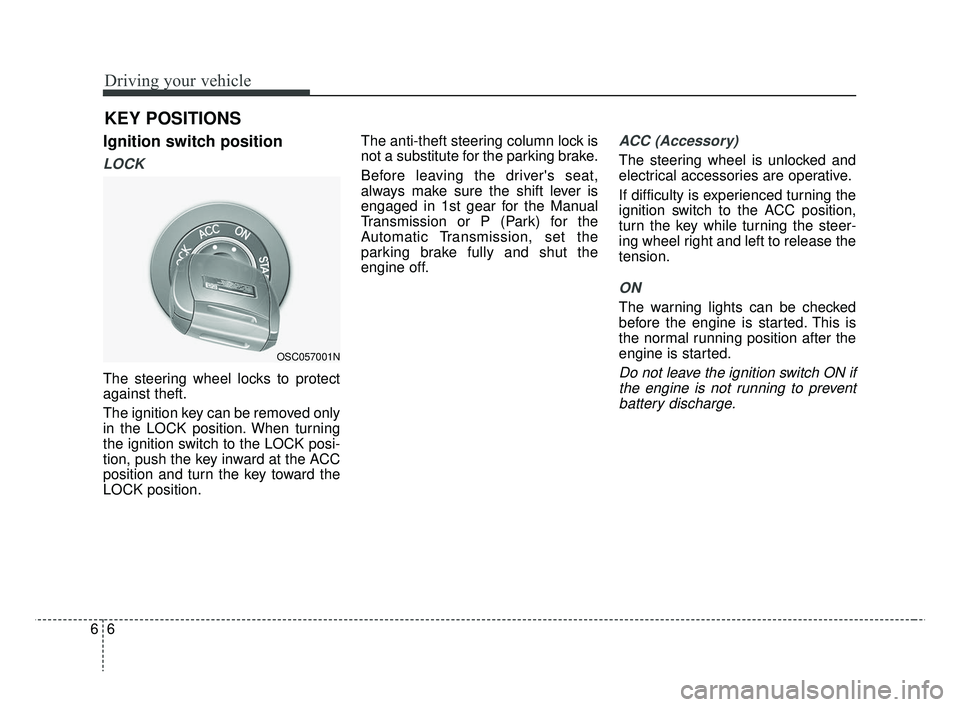
Ignition switch position
LOCK
The steering wheel locks to protect
against theft.
The ignition key can be removed only
in the LOCK position. When turning
the ignition switch to the LOCK posi-
tion, push the key inward at the ACC
position and turn the key toward the
LOCK position.The anti-theft steering column lock is
not a substitute for the parking brake.
Before leaving the driver's seat,
always make sure the shift lever is
engaged in 1st gear for the Manual
Transmission or P (Park) for the
Automatic Transmission, set the
parking brake fully and shut the
engine off.
ACC (Accessory)
The steering wheel is unlocked and
electrical accessories are operative.
If difficulty is experienced turning the
ignition switch to the ACC position,
turn the key while turning the steer-
ing wheel right and left to release the
tension.
ON
The warning lights can be checked
before the engine is started. This is
the normal running position after the
engine is started.
Do not leave the ignition switch ON if
the engine is not running to preventbattery discharge.
KEY POSITIONS
OSC057001N
SC CAN (ENG) 6.QXP 7/18/2018 5:41 PM Page 6