2019 KIA K900 brake sensor
[x] Cancel search: brake sensorPage 91 of 580
Safety features of your vehicle
74
3
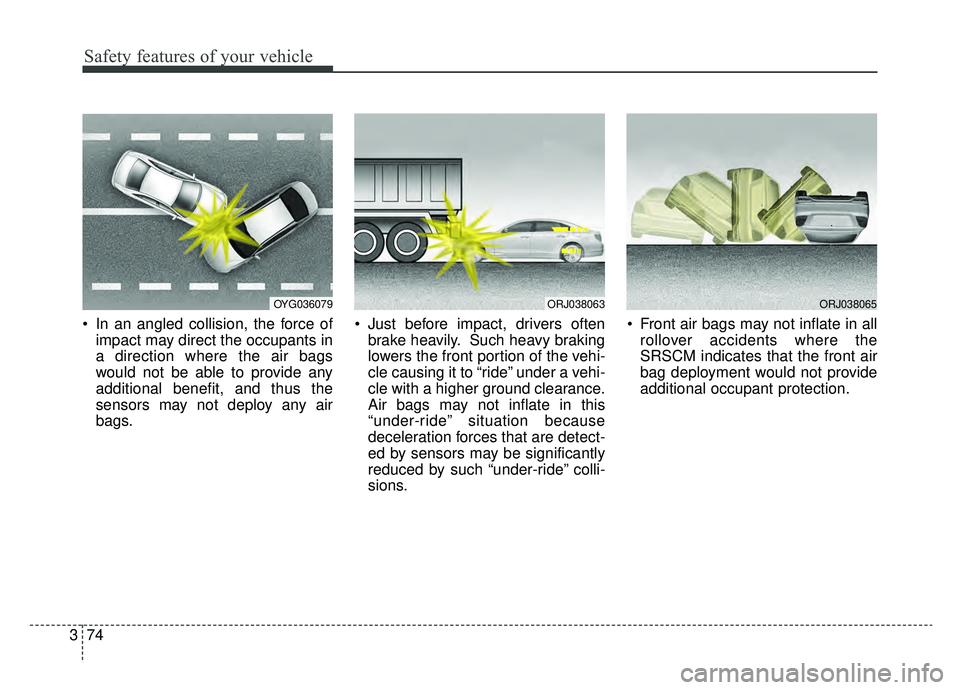
In an angled collision, the force of
impact may direct the occupants in
a direction where the air bags
would not be able to provide any
additional benefit, and thus the
sensors may not deploy any air
bags. Just before impact, drivers often
brake heavily. Such heavy braking
lowers the front portion of the vehi-
cle causing it to “ride” under a vehi-
cle with a higher ground clearance.
Air bags may not inflate in this
“under-ride” situation because
deceleration forces that are detect-
ed by sensors may be significantly
reduced by such “under-ride” colli-
sions. Front air bags may not inflate in all
rollover accidents where the
SRSCM indicates that the front air
bag deployment would not provide
additional occupant protection.
OYG036079ORJ038063ORJ038065
Page 201 of 580

Features of your vehicle
108
4
✽ ✽
NOTICE
• This system can only sense objects
within the range and location of
the sensors; It can not detect
objects in other areas where sen-
sors are not installed. Also, small
or slim objects, such as poles or
objects located between sensors
may not be detected by the sen-
sors. Always visually check behind
the vehicle when backing up.
• Be sure to inform any drivers of the vehicle that may be unfamiliar
with the system regarding the sys-
tems capabilities and limitations.
Non-operational conditions of
parking distance warning
parking distance warning may
not operate when:
1. Moisture is frozen to the sensor. (It will operate normally when the ice
melts.)
2. Sensor is covered with foreign matter, such as snow or water, or
the sensor cover is blocked. (It will
operate normally when the materi-
al is removed or the sensor is no
longer blocked.)
3. Driving on uneven road surfaces such as unpaved roads, gravel,
bumps, or gradient.
4. Objects generating excessive noise such as vehicle horns, loud
motorcycle engines, or truck air
brakes can interfere with the sen-
sor.
5. The weather conditions produce heavy rain or water spray.
6. Wireless transmitters or mobile phones present near the sensor.
Detecting range may decrease
when:
1. Outside air temperature is extremely hot or cold.
2. The sensor is covered with foreign matter such as snow or water.
(The sensing range will return to
normal when removed.)
The following objects may not be
recognized by the sensor:
1. Sharp or slim objects such as ropes, chains or small poles.
2. Objects, which tend to absorb sen- sor frequency such as clothes,
spongy material or snow.
3. Undetectable objects smaller than 4 in. (1 m) and narrower than 5.5
in. (14 cm) in diameter.
Page 266 of 580
Driving your vehicle
Before driving . . . . . . . . . . . . . . . . . . . . . . . . . . . . . . 5-5
• Before entering vehicle . . . . . . . . . . . . . . . . . . . . . . . . . 5-5
. . . . . . . . . . . . . . . . . . . . . . . . . . 5-5
. . . . . . . . . . . . . . . . . . . . . . . . . . . . . . . . 5-5
Engine start/stop button . . . . . . . . . . . . . . . . . . . . . 5-7
. . . . . . . . . . . . . . 5-7
. . . . . . . . . . . . . 5-9
Automatic transmission (shift-by-wire) . . . . . . . . 5-11
. . . . . . . . . . . . . . . 5-11
. . . . . . . . . . . . . . . . . . . . . . . . . . . . . . . . . . . . \
. 5-18
The ECO-coasting system . . . . . . . . . . . . . . . . . . . 5-23
. . . . . . . . . . . . . . . 5-23
. . . . . . . . . . . . . 5-24
. . . . . 5-24
All Wheel Drive (AWD) . . . . . . . . . . . . . . . . . . . . . 5-26
. . . . . . . . . . . . . . . . . . 5-26
Brake system . . . . . . . . . . . . . . . . . . . . . . . . . . . . . . 5-31
. . . . . . . . . . . . . . . . . . . . . . . . . . . . . . . . 5-31
. . . . . . . . . . . . . . . . 5-33
. . . . . . . . . . . . . . . . . . . . . . . . . . . . . . . . . . . 5-\
39
. . . . . . . . . . . . . . . . . . . . . . . . . . . . 5-42
. . . . . . . . . . . . . . 5-45
. . . . . . . . . . . . 5-49
. . . . . . . . . . . . . . . . . 5-51
Forward Collision-avoidance Assist (FCA) system
- sensor fusion type (front radar + front
camera) . . . . . . . . . . . . . . . . . . . . . . . . . . . . . . . . . 5-53
. . . . . . . . . . . . . . . . . . . 5-53
. . . . . . . . 5-55
. . . . . . . . . . . . . . . . . . . . . . . . . . . . . . . . . . 5-58\
. . . . . . . . . . . . . . . . . . . . . . . . . . . 5-60
. . . . . . . . . . . . . . . . . . . . . . 5-62
. . . . . . . . . . . . . . . . . . . . . . . 5-66
Smart cruise control with Stop & Go system . . . 5-69
. . . . . . . . . . . . . . . . . . . 5-69
. . . . . . . . . . . . . . . . . . . . 5-70
. . 5-76
. . . . . 5-79
. . 5-81
. . . . . . . . . . . . . . . 5-82
. . . . . . . . . . . . . . . . . . . . . . 5-82
Leading vehicle departure alert . . . . . . . . . . . . . . 5-88
5
Page 289 of 580
Driving your vehicle
24
5
Eco-Coasting operation condi-
tions
The Eco-Coasting system is activat-
ed when the accelerator pedal is
depressed and released under the
following conditions.
When the driving mode is ECO
mode.
When driver acceleration is SMART ECO in SMART mode.
When the shift lever is in the D (Drive) position.
When Cruise Control/Smart Cruise Control button is OFF.
The accelerator or brake pedal is not depressed.
When the vehicle speed is within the range of 55 km/h to 160 km/h.
If the road gradient is within the range of -5% to +5%.
In SMART mode, if the distance between the vehicle ahead and the
relative speed is within a certain
range (if the Smart Cruise system
is equipped) ❈
If the front radar for smart cruise
system cannot operate normally,
the inter-vehicle distance and rela-
tive speed condition are automati-
cally ignored.
❈ The Eco-Coasting system works
after the engine is turned on, the
transmission is warmed up, and
the engine sensor self-diagnosis is
completed after starting.
❈ Depending on the driving situation,
Eco-Coasting operation may be
temporarily delayed even if the
above conditions are met.
The Eco-Coasting system
release conditions
The Eco-Coasting system will be
automatically released when the fol-
lowing conditions are met.
When the drive mode is COM-
FORT or SPORT mode.
In SMART mode, when driver acceleration is SMART COMFORT
or SMART SPORT.
When using the paddle shift of the steering wheel.
When the Cruise Control/Smart Cruise Control button is on (The /CRUISE indicator is on.).
When pressing the accelerator pedal or brake pedal.
When the vehicle speed is outside the rage of 55 km/h to 160 km/h.
Road inclination is less than -5% or exceeds +5%.
In SMART mode, if the headway distance to the vehicle ahead is too
close of the relative speed
changes momentarily (if the smart
cruise control system is equipped)
Page 318 of 580
553
Driving your vehicle
The Forward Collision-avoidance
Assist (FCA) system is designed to
help detect and monitor the vehicle
ahead or help detect a pedestrian in
the roadway through radar signals
and camera recognition to warn the
driver that a collision is imminent,
and if necessary, apply emergency
braking.
System setting and activation
System setting
The driver can activate the FCA byplacing the ignition switch to the
ON position and by selecting:
"AVN →Settings →Vehicle →
Driver assistance → Forward safety"
- If you select "Active assistance", the FCA system activates. The
FCA produces warning mes-
sages and warning alarms in
accordance with the collision risk
levels. Also, it controls the brakes
in accordance with the collision
risk levels.
- If you select "Warning only", the FCA system activates and pro-
duces only warning alarms in
accordance with the collision risk
levels. You should control the
brake directly because the FCA
system do not control the brake.
- If you select "Off", the FCA sys- tem deactivates,
FORWARD COLLISION-AVOIDANCE ASSIST (FCA) SYSTEM - SENSOR FUSION TYPE
(FRONT RADAR + FRONT CAMERA)
WARNING
Take the following precautions
when using the Forward
Collision-avoidance Assist
(FCA) system:
This system is only a supple- mental system and it is not
intended to, nor does it
replace the need for extreme
care and attention of the driv-
er. The sensing range and
objects detectable by the sen-
sors are limited. Pay attention
to the road conditions at all
times.
NEVER drive too fast in accor- dance with the road condi-
tions or while cornering.
Always drive cautiously to prevent unexpected and sud-
den situations from occur-
ring. The Forward Collision
Avoidance system may not
always stop the vehicle com-
pletely and is only intended to
help mitigate a collision that
is imminent.
Page 325 of 580
Driving your vehicle
60
5
The system will operate normally
when such dirt, snow or debris is
removed.
However, the FCA may not properly
operate in an area (e.g. open ter-
rain), where any substances are not
detected or the camera is blocked
with dirt, snow or debris after turning
ON the engine.
Also, even though a warning mes-
sage does not appear on the LCD
display, the FCA may not properly
operate.System malfunction
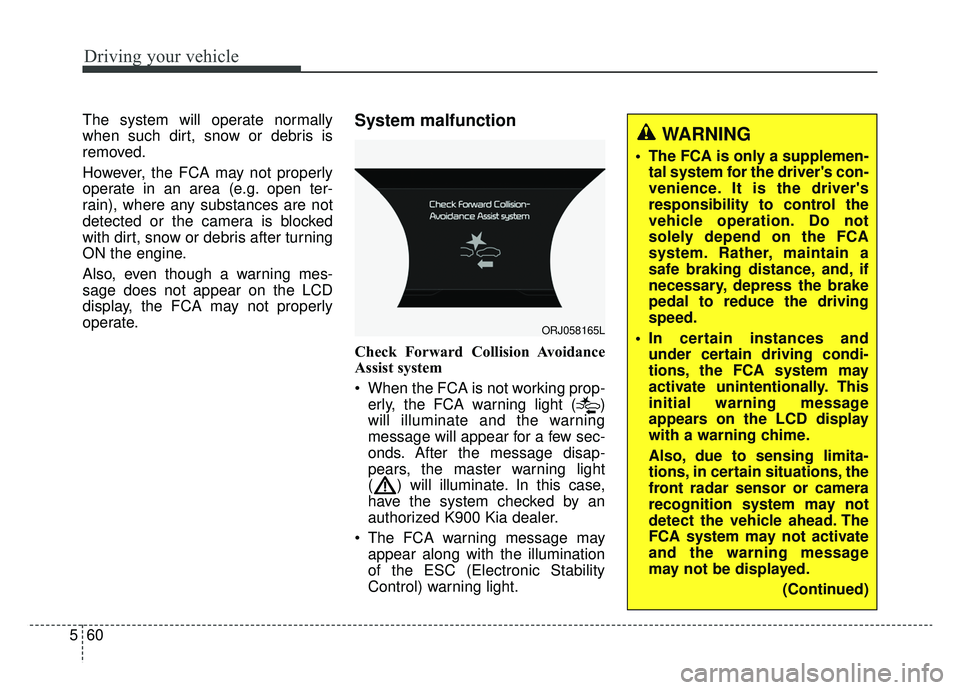
Check Forward Collision Avoidance
Assist system
When the FCA is not working prop-
erly, the FCA warning light ( )
will illuminate and the warning
message will appear for a few sec-
onds. After the message disap-
pears, the master warning light
( ) will illuminate. In this case,
have the system checked by an
authorized K900 Kia dealer.
The FCA warning message may appear along with the illumination
of the ESC (Electronic Stability
Control) warning light.
ORJ058165L
WARNING
The FCA is only a supplemen-tal system for the driver's con-
venience. It is the driver's
responsibility to control the
vehicle operation. Do not
solely depend on the FCA
system. Rather, maintain a
safe braking distance, and, if
necessary, depress the brake
pedal to reduce the driving
speed.
In certain instances and under certain driving condi-
tions, the FCA system may
activate unintentionally. This
initial warning message
appears on the LCD display
with a warning chime.
Also, due to sensing limita-
tions, in certain situations, the
front radar sensor or camera
recognition system may not
detect the vehicle ahead. The
FCA system may not activate
and the warning message
may not be displayed.
(Continued)
Page 327 of 580
Driving your vehicle
62
5
Limitations of the system
The Forward Collision avoidance
assist (FCA) system is designed to
monitor the vehicle or pedestrian
ahead in the roadway through radar
signals and camera recognition to
warn the driver that a collision is
imminent, and if necessary, apply
emergency braking.
In certain situations, the radar sen-
sor or the camera may not be able to
detect the vehicle or pedestrian
ahead. In these cases, the FCA sys-
tem may not operate normally. The
driver must pay careful attention in
the following situations where the
FCA operation may be limited.
Detecting vehicles
The sensor may be limited when:
The radar sensor or camera is
blocked with a foreign object or
debris
The camera lens is contaminated due to tinted, filmed or coated
windshield, damaged glass, or
stuck of foreign matter (sticker,
bug, etc.) on the glass
Inclement weather such as heavy rain or snow obscures the field of
view of the radar sensor or camera
There is interference by electro- magnetic waves
Something in the path of travel deflects the radar waves.
The radar/camera sensor recogni- tion is limited
The vehicle in front is too small to be detected (for example a motor
cycle, a bicycle etc.)
The vehicle in front is an oversize vehicle or trailer that is too big to
be detected by the camera recog-
nition system (for example a tractor
trailer, etc.)(Continued)
The FCA system cannotdetect any cross traffic
cyclists that are approaching.
In these cases, you must
maintain a safe braking dis-
tance, and if necessary,
depress the brake pedal to
reduce the driving speed in
order to maintain a safe dis-
tance.
Page 331 of 580
Driving your vehicle
66
5
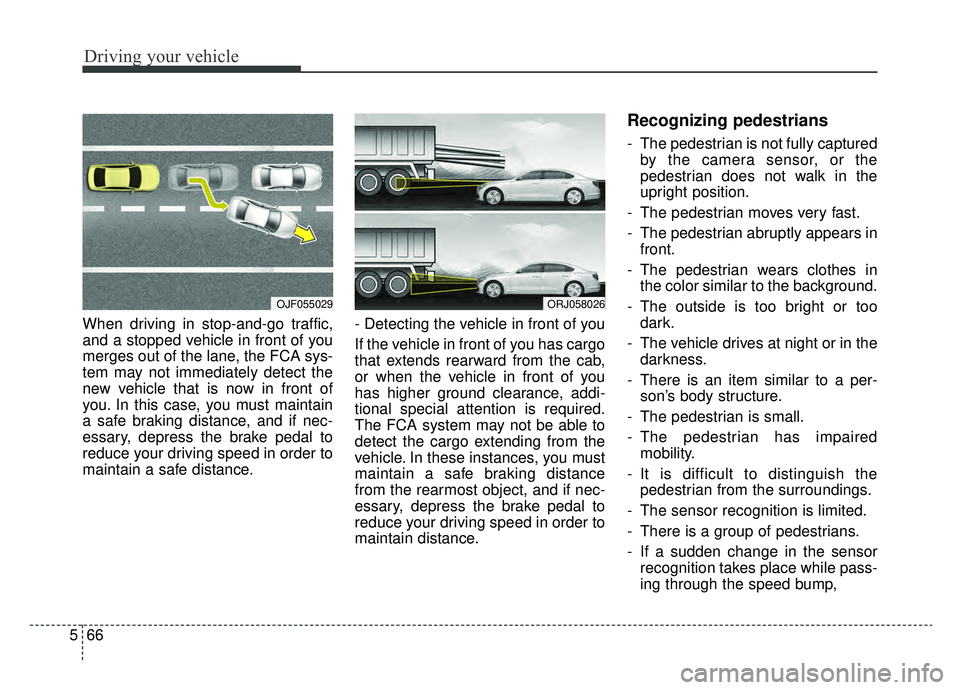
When driving in stop-and-go traffic,
and a stopped vehicle in front of you
merges out of the lane, the FCA sys-
tem may not immediately detect the
new vehicle that is now in front of
you. In this case, you must maintain
a safe braking distance, and if nec-
essary, depress the brake pedal to
reduce your driving speed in order to
maintain a safe distance. - Detecting the vehicle in front of you
If the vehicle in front of you has cargo
that extends rearward from the cab,
or when the vehicle in front of you
has higher ground clearance, addi-
tional special attention is required.
The FCA system may not be able to
detect the cargo extending from the
vehicle. In these instances, you must
maintain a safe braking distance
from the rearmost object, and if nec-
essary, depress the brake pedal to
reduce your driving speed in order to
maintain distance.
Recognizing pedestrians
- The pedestrian is not fully captured
by the camera sensor, or the
pedestrian does not walk in the
upright position.
- The pedestrian moves very fast.
- The pedestrian abruptly appears in front.
- The pedestrian wears clothes in the color similar to the background.
- The outside is too bright or too dark.
- The vehicle drives at night or in the darkness.
- There is an item similar to a per- son’s body structure.
- The pedestrian is small.
- The pedestrian has impaired mobility.
- It is difficult to distinguish the pedestrian from the surroundings.
- The sensor recognition is limited.
- There is a group of pedestrians.
- If a sudden change in the sensor recognition takes place while pass-
ing through the speed bump,
OJF055029ORJ058026