2019 KIA FORTE front radar sensor
[x] Cancel search: front radar sensorPage 247 of 550

Driving your vehicle
Before driving . . . . . . . . . . . . . . . . . . . . . . . . . . . . . . 5-5
• Before entering vehicle . . . . . . . . . . . . . . . . . . . . . . . . . 5-5
• Necessary inspections . . . . . . . . . . . . . . . . . . . . . . . . . . 5-5
• Before starting . . . . . . . . . . . . . . . . . . . . . . . . . . . . . . . . 5-5
Key positions . . . . . . . . . . . . . . . . . . . . . . . . . . . . . . . 5-7
• Illuminated ignition switch . . . . . . . . . . . . . . . . . . . . . . 5-7
• Ignition switch position . . . . . . . . . . . . . . . . . . . . . . . . . 5-7
• Starting the engine. . . . . . . . . . . . . . . . . . . . . . . . . . . . . 5-9
• Stopping the gasoline engine (Manual transmission) . . . . . . . . . . . . . . . . . . . . . . . 5-10
Engine start/stop button . . . . . . . . . . . . . . . . . . . . 5-11
• Illuminated engine start/stop button . . . . . . . . . . . . . 5-11
• Engine start/stop button position . . . . . . . . . . . . . . . . 5-11
• Starting the engine. . . . . . . . . . . . . . . . . . . . . . . . . . . . 5-14
• Stopping the engine (Manual transmission) . . . . . . . 5-17
Manual transmission . . . . . . . . . . . . . . . . . . . . . . . 5-18
• Manual transmission operation . . . . . . . . . . . . . . . . . 5-18
• Good driving practices . . . . . . . . . . . . . . . . . . . . . . . . 5-20
Intelligent Variable Transmission (IVT) . . . . . . . 5-22
• Intelligent Variable Transmission (IVT) operation . 5-22
• Shift lock system . . . . . . . . . . . . . . . . . . . . . . . . . . . . . 5-27
• Good driving practices . . . . . . . . . . . . . . . . . . . . . . . . 5-28
Brake system . . . . . . . . . . . . . . . . . . . . . . . . . . . . . . 5-31
• Power brakes . . . . . . . . . . . . . . . . . . . . . . . . . . . . . . . . 5-31
• Parking brake . . . . . . . . . . . . . . . . . . . . . . . . . . . . . . . 5-33 • Anti-lock Brake System (ABS). . . . . . . . . . . . . . . . . . 5-36
• Electronic Stability Control (ESC) . . . . . . . . . . . . . . 5-37
• Vehicle Stability Management (VSM) . . . . . . . . . . . . 5-42
• Hill-start Assist Control (HAC) . . . . . . . . . . . . . . . . . 5-44
• Good braking practices. . . . . . . . . . . . . . . . . . . . . . . . 5-44
Forward Collision-avoidance Assist (FCA)
(Camera type) . . . . . . . . . . . . . . . . . . . . . . . . . . . . 5-46
• System setting and activation . . . . . . . . . . . . . . . . . . . 5-46
• FCA warning message and system control . . . . . . . . 5-48
• Brake operation . . . . . . . . . . . . . . . . . . . . . . . . . . . . . . 5-49
• FCA front view camera sensor. . . . . . . . . . . . . . . . . . 5-50
• System malfunction . . . . . . . . . . . . . . . . . . . . . . . . . . . 5-52
• Limitation of the system . . . . . . . . . . . . . . . . . . . . . . . 5-54
Forward Collision-avoidance Assist (FCA) (Camera + radar type). . . . . . . . . . . . . . . . . . . . . 5-59
• System setting and activation . . . . . . . . . . . . . . . . . . . 5-59
• FCA warning message and system control . . . . . . . . 5-61
• Brake operation . . . . . . . . . . . . . . . . . . . . . . . . . . . . . . 5-62
• Sensor to detect the distance from the vehicle in front
(front radar/camera) . . . . . . . . . . . . . . . . . . . . . . . . . 5-63
• System malfunction . . . . . . . . . . . . . . . . . . . . . . . . . . . 5-65
• Limitation of the system . . . . . . . . . . . . . . . . . . . . . . . 5-67
• Recognizing pedestrians . . . . . . . . . . . . . . . . . . . . . . . 5-70
5
BDm CAN (ENG) 5.QXP 7/4/2018 10:12 AM Page 1
Page 309 of 550
563
Driving your vehicle
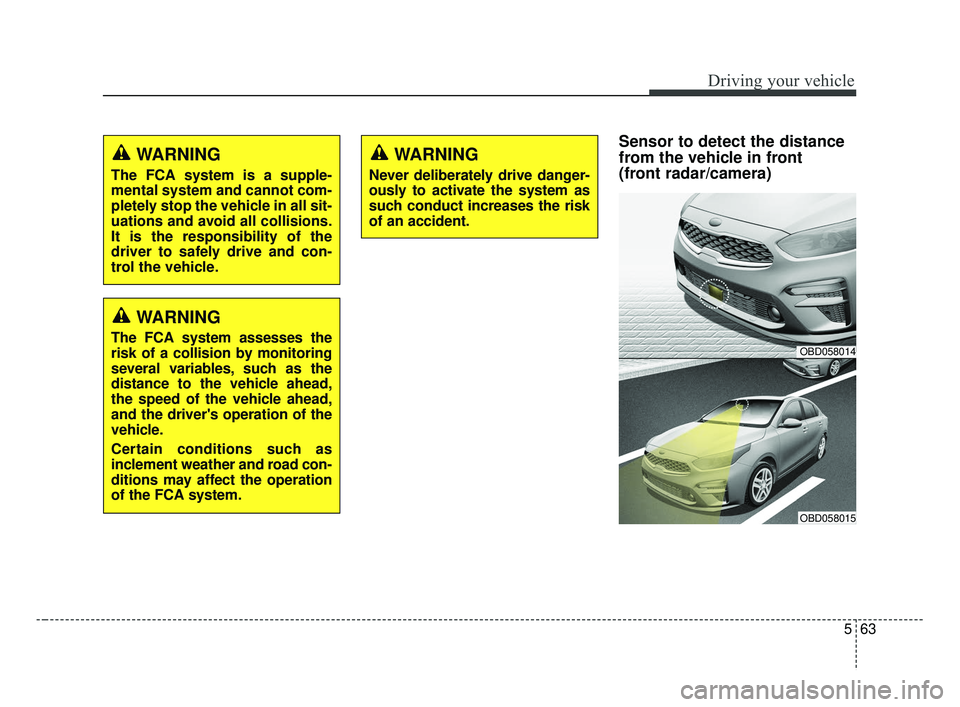
Sensor to detect the distance
from the vehicle in front
(front radar/camera)WARNING
The FCA system is a supple-
mental system and cannot com-
pletely stop the vehicle in all sit-
uations and avoid all collisions.
It is the responsibility of the
driver to safely drive and con-
trol the vehicle.
WARNING
The FCA system assesses the
risk of a collision by monitoring
several variables, such as the
distance to the vehicle ahead,
the speed of the vehicle ahead,
and the driver's operation of the
vehicle.
Certain conditions such as
inclement weather and road con-
ditions may affect the operation
of the FCA system.OBD058014
OBD058015
WARNING
Never deliberately drive danger-
ously to activate the system as
such conduct increases the risk
of an accident.
BDm CAN (ENG) 5.QXP 7/4/2018 10:14 AM Page 63
Page 311 of 550

565
Driving your vehicle
✽ ✽NOTICE
• Do not install any accessories,
such as license plate molding or
sticker, on the sensor area. Nor
arbitrarily replace the bumper.
Those may adversely affect the
sensing performance.
• Always keep the sensor/bumper area clean.
• Use only soft clothes to wash the vehicle. Also, do not spray highly-
pressurized water on the sensor
installed on the bumper.
• Be careful not to apply unneces- sary force on the frontal sensor
area. When the sensor moves out
of the correct position due to
external force, the system may not
normally operate and may not
provide a warning light or mes-
sage. In this case, have the vehicle
inspected by an authorized Kia
dealer.
• Use only the genuine Kia sensor cover. Do not arbitrarily apply
paint on the sensor cover. (Continued)(Continued)
• Do not tint the window or install
stickers, or accessories around the
inside mirror where the camera is
installed.
• Make sure the frontal camera installation point does not get wet.
• Do not impact or arbitrarily remove any radar/camera compo-
nents.
• Do not place reflective objects(white paper or mirror etc.)
on the dashboard.
The system may unnecessarily
activate or deactivate due to
reflection of the sunlight.
• Excessive audio system volume may prevent occupants from hear-
ing the FCA system warning
alarm.
System malfunction
When the FCA is not working prop-
erly, the FCA warning light ( ) will
illuminate and the warning mes-
sage will appear for a few seconds.
After the message disappears, the
master warning light ( ) will illu-
minate. In this case, have the vehi-
cle inspected by an authorized Kia
dealer.
OBDM058095N
BDm CAN (ENG) 5.QXP 7/4/2018 10:14 AM Page 65
Page 314 of 550

Driving your vehicle
68
5
Recognizing vehicles
- The radar or the camera is con-
taminated with foreign substances.
- It heavily rains or snows.
- There is electromagnetic interfer- ence
- Something in the path of travel deflects the radar waves
- The vehicle in front has a narrow body. (i.e. motor cycle and bicycle)
- The driver’s view is not clear due to backlight, reflected light, or dark-
ness.
- The camera cannot contain the full image of the vehicle in front.
- The vehicle in front is a special vehicle, such as a heavily-loaded
truck or a trailer.
- The outside brightness is greatly changed, such as entering/exiting
a tunnel.
- The vehicle driving is unstable.
- The radar/camera sensor recogni- tion is limited. - The driver's field of view is not well
illuminated (either too dark or too
much reflection or too much back-
light that obscures the field of view)
- There is severe irregular reflection from the radar sensor
- The vehicle in front is driving errat- ically
- The vehicle is driven near areas containing metal substances such
as a construction zone, railroad,
etc.
- Backlight is reflected in the direc- tion of the vehicle (including front
light from the vehicle ahead)
- Moisture on the windshield is not completely removed or frozen.
- The weather is misty.
- The vehicle in front does not turn ON the rear lights, does not have
rear lights, has asymmetric rear
lights, or has rear lights out of
angle. - Driving on a curve
The FCA performance may be limit-
ed while driving on a curve. The FCA
may not recognize the vehicle in front
even if in the same lane.It may pro-
duce the warning message and the
warning alarm prematurely, or it may
not produce the warning message or
the warning alarm at all. When driv-
ing on a curve, exercise caution,
maintain a safe braking distance,
and if necessary, depress the brake
pedal to reduce your driving speed in
order to maintain a safe distance.
OJF055025
BDm CAN (ENG) 5.QXP 7/4/2018 10:14 AM Page 68
Page 317 of 550

571
Driving your vehicle
- There is a group of pedestrians.
- If a sudden change in the sensorrecognition takes place while pass-
ing through a speed bump,
- When the vehicle is severely shak- en,
- When driving around circular inter- section after the vehicle in front,
- If the front of the camera lens is contaminated by front glass tinting,
film, water repellent coating, dam-
age on glass, or foreign matter
(sticker, insect, etc.)
- The radar or camera or camera lens is damaged.
- If the headlights of a vehicle are not used at night or in a tunnel sec-
tion, or the light is too weak
- If street light or the light of a vehi- cle coming from a opposite direc-
tion is reflected or when sunlight is
reflected by the water on the road
surface - When the back light is projected in
the direction of the vehicle's motion
(including the headlights of vehi-
cles)
- Road sign, shadow on the road, tunnel entrance, toll gate, partial
pavement
- If the windshield has moisture on its surface or if windshield freezes,
- Driving in the fog.
- When objects are out of the sens- ing range of the sensor or radar.
WARNING
Do not use the FCA systemwhen towing a vehicle. Cancel
the FCA in the User Settings
on the LCD display before
towing. Brake application by
the FCA system while towing
may adversely affect your
safety.
Use extreme caution when the vehicle in front of you has
cargo that extends rearward
from the cab, or when the
vehicle in front of you has
higher ground clearance.
The FCA system is designed to detect and monitor the
vehicle ahead or detect a
pedestrian in the roadway
through radar signals and
camera recognition. It is not
designed to detect bicycles,
motorcycles, or smaller
wheeled objects such as lug-
gage bags, shopping carts, or
strollers.
(Continued)
BDm CAN (ENG) 5.QXP 7/4/2018 10:15 AM Page 71
Page 333 of 550

587
Driving your vehicle
If the vehicle ahead (vehicle speed:
less than 30 km/h (20 mph) disap-
pears to the next lane, the warning
chime will sound and a message will
appear. Adjust your vehicle speed for
vehicles or objects that can sudden-
ly appear in front of you by depress-
ing the brake pedal according to the
road and driving conditions ahead.
Radar to detect distance to thevehicle ahead
The sensor detects the distance to
the vehicle ahead.
If the sensor is covered with dirt or
other foreign matter, the vehicle to
vehicle distance control may not
operate correctly.
Always keep the area in front of the
sensor clean.
CAUTION
The warning chime sounds and LCD display blinks if it ishard to maintain the selecteddistance to the vehicle ahead.
If the warning chime sounds, actively adjust the vehiclespeed by depressing thebrake pedal according to theroad condition ahead anddriving condition.
Even if the warning chime is not activated, always payattention to the driving condi-tions to prevent dangeroussituations from occurring.
Be alert to road conditions as radio, sound and outside con-ditions could interrupt a warn-ing sound.
OJF058401L
OBD058014
BDm CAN (ENG) 5.QXP 7/4/2018 10:16 AM Page 87
Page 335 of 550

589
Driving your vehicle
In this case, take your vehicle to an
authorized Kia dealer and have the
system checked.CAUTION
Do not install accessoriesaround the sensor and do notreplace the bumper by your-self. It may interfere with thesensor performance.
Always keep the sensor and bumper clean.
Use only a soft cloth to wash the vehicle. Do not spray pres-surized water directly on thesensor or sensor cover.
Be careful not to apply unnec- essary force on the radar sen-sor or sensor cover. If the sen-sor is forcibly moved out ofproper alignment, the SmartCruise Control System maynot operate correctly. In thiscase, a warning message maynot be displayed.
Have the vehicle inspected byan authorized Kia dealer.
(Continued)
(Continued) Do not damage the sensor or sensor area by a strongimpact. If the sensor movesslightly off position, the smartcruise control system will notoperate correctly without anywarning or indicator from thecluster. If this occurs, takeyour vehicle to an authorizedKia dealer and have the sys-tem checked.
Use only a genuine Kia sensor cover for your vehicle. Do notpaint anything on the sensorcover.
If the front bumper becomes damaged in the area aroundthe radar sensor, the SmartCruise Control System maynot operate properly.
BDm CAN (ENG) 5.QXP 7/4/2018 10:16 AM Page 89
Page 541 of 550

Index
6I
Flat tire . . . . . . . . . . . . . . . . . . . . . . . . . . . . . . . . . . . . \
. 6-14Changing tires . . . . . . . . . . . . . . . . . . . . . . . . . . . . . 6-15
Compact spare tire . . . . . . . . . . . . . . . . . . . . . . . . . . 6-20
Jack and tools . . . . . . . . . . . . . . . . . . . . . . . . . . . . . . 6-14
Removing the spare tire . . . . . . . . . . . . . . . . . . . . . . 6-15
Storing the spare tire . . . . . . . . . . . . . . . . . . . . . . . . 6-15
Floor mat anchor(s) . . . . . . . . . . . . . . . . . . . . . . . . . . 4-154
Fluid Brake/clutch fluid . . . . . . . . . . . . . . . . . . . . . . . . . . . 7-26
Washer fluid . . . . . . . . . . . . . . . . . . . . . . . . . . . . . . . 7-27
Folding the outside rearview mirror . . . . . . . . . . . . . . . 4-54
Folding the rear seat . . . . . . . . . . . . . . . . . . . . . . . . . . . 3-15
Forward Collision-Avoidance assist (FCA) (Camera + Radar type) . . . . . . . . . . . . . . . . . . . . . . . 5-59
Brake operation . . . . . . . . . . . . . . . . . . . . . . . . . . . . 5-62
FCA warning message and system control . . . . . . . 5-61
Limitation of the system . . . . . . . . . . . . . . . . . . . . . 5-67
Recognizing pedestrians. . . . . . . . . . . . . . . . . . . . . . 5-70
"Sensor to detect the distance from the vehicle in front (front radar/camera)" . . . . . . . . . . . . . . . . . . . 5-63
System malfunction . . . . . . . . . . . . . . . . . . . . . . . . . 5-65
System setting and activation. . . . . . . . . . . . . . . . . . 5-59
Forward Collision-Avoidance assist (FCA) (Camera type) . . . . . . . . . . . . . . . . . . . . . . . . . . . . . . 5-46
Brake operation . . . . . . . . . . . . . . . . . . . . . . . . . . . . 5-49
FCA front view camera sensor. . . . . . . . . . . . . . . . . 5-50 FCA warning message and system control . . . . . . . 5-48
Limitation of the system . . . . . . . . . . . . . . . . . . . . . 5-54
Recognizing vehicles . . . . . . . . . . . . . . . . . . . . . . . . 5-54
System malfunction . . . . . . . . . . . . . . . . . . . . . . . . . 5-52
System setting and activation. . . . . . . . . . . . . . . . . . 5-46
Front fog lamp bulb replacement . . . . . . . . . . . . . . . . . 7-80
Front fog light . . . . . . . . . . . . . . . . . . . . . . . . . . . . . . . 4-107
Front passenger seat belt warning . . . . . . . . . . . . . . . . 3-20
Front seat adjustment (manual) . . . . . . . . . . . . . . . . . . . 3-7
Front seat adjustment (power) . . . . . . . . . . . . . . . . . . . . 3-8
Front turn signal lamp bulb replacement . . . . . . . . . . . 7-79
Fuel filler lid . . . . . . . . . . . . . . . . . . . . . . . . . . . . . . . . . 4-38
Fuel gauge. . . . . . . . . . . . . . . . . . . . . . . . . . . . . . . . . . . 4-\
59
Fuses . . . . . . . . . . . . . . . . . . . . . . . . . . . . . . . . . . . . \
. . . 7-55 Engine compartment fuse replacement . . . . . . . . . . 7-58
Fuse/relay panel description. . . . . . . . . . . . . . . . . . . 7-61
Inner panel fuse replacement . . . . . . . . . . . . . . . . . . 7-57
Gauges . . . . . . . . . . . . . . . . . . . . . . . . . . . . . . . . . . . . \
. 4-58
Glove box . . . . . . . . . . . . . . . . . . . . . . . . . . . . . . . . . . 4-14\
3
Glove box lamp. . . . . . . . . . . . . . . . . . . . . . . . . . . . . . 4-112
Glove box lamp replacement . . . . . . . . . . . . . . . . . . . . 7-89
Gross vehicle weight . . . . . . . . . . . . . . . . . . . . . . . . . . . 8-5
F
G
BDm CAN (ENG) Index.qxp 6/30/2018 2:03 PM Page 6