Page 182 of 550

497
Features of your vehicle
Types of warning sound
When an object is 120 cm to 61 cm(47 in. to 24 in. ) from the rear
bumper: Buzzer beeps intermit-
tently.
When an object is 60 cm to 31 cm (24 in. to 12 in. ) from the rear
bumper: Buzzer beeps more fre-
quently.
When an object is within 40 cm (16 in.) of the rear bumper:
Buzzer sounds continuously.
Non-operational conditions of
parking distance warning-
reverse
The parking distance warning-
reverse may not operate properly
when:
1. Moisture is frozen to the sensor. (It will operate normally once the
moisture clears.)
2. The sensor is covered with foreign matter, such as snow or water, or
the sensor cover is blocked. (It will
operate normally when the materi-
al is removed or the sensor is no
longer blocked.)
3. Driving on uneven road surfaces (unpaved roads, gravel, bumps,
gradient).
4. Objects generating excessive noise (vehicle horns, loud motor-
cycle engines, or truck air brakes)
are within range of the sensor.
5. Rain or water spray exists.
6. Wireless transmitters or mobile phones are within range of the
sensor.
7. The sensor is covered with snow.
8. Trailer towing The detecting range may decrease
when:
1. The sensor is covered with foreign
matter such as snow or water.
(The sensing range will return to
normal when removed.)
2. Outside air temperature is extremely hot or cold.
The following objects may not be
recognized by the sensor:
1. Sharp or slim objects such as ropes, chains or small poles.
2. Objects which tend to absorb the sensor frequency such as clothes,
sound absorbent material or snow.
3. Undetectable objects smaller than 1 m (40 in.) in height and narrower
than 14 cm (6 in.) in diameter.
BDm CAN (ENG) 4.qxp 7/4/2018 10:07 AM Page 97
Page 187 of 550

Features of your vehicle
102
4
High beam operation
To turn on the high beam headlamp,
push the lever away from you. The
lever will return to its original position.
To turn off the high beam headlamps,
pull the lever towards you. It will return
to the normal (low beam) position
when released.
The high beam indicator will light
when the headlight high beams are
switched on. To prevent the battery
from being discharged, do not leave
the lights on for a prolonged time while
the engine is not running.
WARNING - High beams
Do not use high beam when
there are other vehicles in front
of your vehicle. Using high
beam could obstruct the other
driver’s vision.
OJF045054
CAUTION
Never place anything over the sensor (1) located on theinstrument panel as this willensure better auto-light sys-tem control.
Do not clean the sensor using a window cleaner as the clean-er may leave a light film whichcould interfere with the sen-sor's operation.
If your vehicle has window tint or other types of metallic coat-ing on the front windshield,the Auto light system may notwork properly.
BDm CAN (ENG) 4.qxp 7/4/2018 10:07 AM Page 102
Page 188 of 550
4103
Features of your vehicle
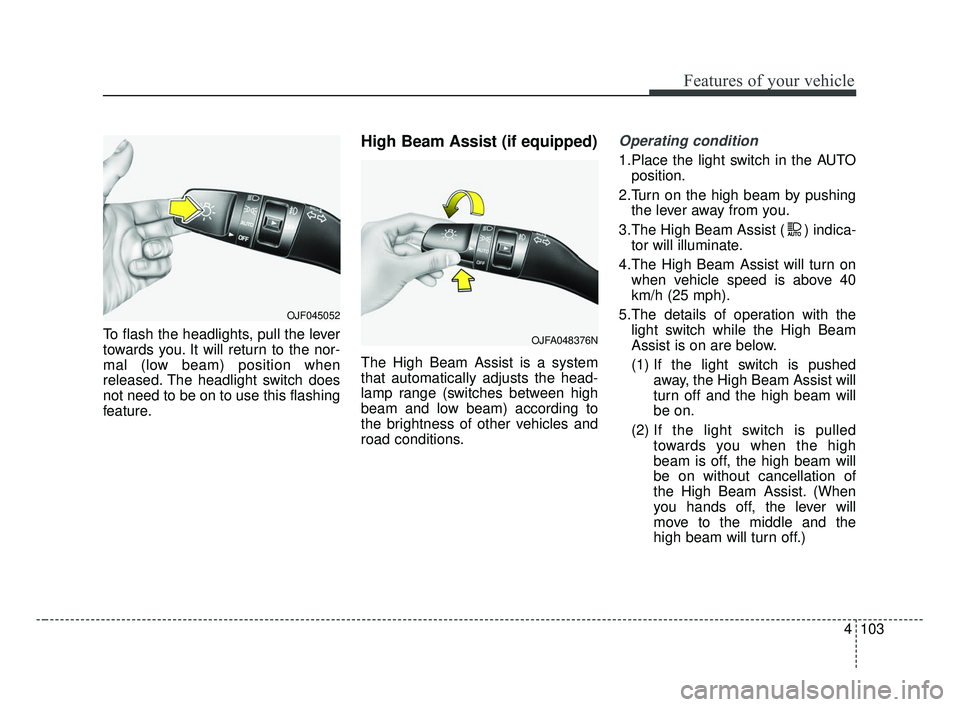
To flash the headlights, pull the lever
towards you. It will return to the nor-
mal (low beam) position when
released. The headlight switch does
not need to be on to use this flashing
feature.
High Beam Assist (if equipped)
The High Beam Assist is a system
that automatically adjusts the head-
lamp range (switches between high
beam and low beam) according to
the brightness of other vehicles and
road conditions.
Operating condition
1.Place the light switch in the AUTOposition.
2.Turn on the high beam by pushing the lever away from you.
3.The High Beam Assist ( ) indica- tor will illuminate.
4.The High Beam Assist will turn on when vehicle speed is above 40
km/h (25 mph).
5.The details of operation with the light switch while the High Beam
Assist is on are below.
(1) If the light switch is pushed away, the High Beam Assist will
turn off and the high beam will
be on.
(2) If the light switch is pulled
towards you when the high
beam is off, the high beam will
be on without cancellation of
the High Beam Assist. (When
you hands off, the lever will
move to the middle and the
high beam will turn off.)
OJFA048376N
OJF045052
BDm CAN (ENG) 4.qxp 7/4/2018 10:07 AM Page 103
Page 189 of 550

Features of your vehicle
104
4
(3) If the light switch is pulled
towards you when the high
beam is on by the High Beam
Assist, the low beam will be on
and the High Beam Assist will
turn off.
(4) If the light switch is turned to the headlamp position ( )
from AUTO position, the High
Beam Assist will turn off and
the low beam will be on. When the High Beam Assist is oper-
ating, the high beam switches to low
beam in the following conditions.
When the headlamp is detected
from an on-coming vehicle.
When the tail lamp is detected from the front vehicle.
When headlamp/tail lamp from a bicycle/motorcycle is detected.
When the surrounding is so bright that high beams are not needed.
When streetlights or other lights are detected.
When the light switch is not in the AUTO position.
When the High Beam Assist is off.
When vehicle speed is below 24 km/h (15 mph).Warning light and message
When the High Beam Assist System
is not working properly, the warning
message will come on for a few sec-
ond. After the message disappears,
the master warning light ( ) will
illuminate. Take your vehicle to an
authorized Kia dealer and have the
system checked.
OBDM048414C
BDm CAN (ENG) 4.qxp 7/4/2018 10:07 AM Page 104
Page 190 of 550

4105
Features of your vehicle
(Continued) When front visibility is poor - When the lamp of the on-com-ing or front vehicle is coveredwith dust, snow or water.
- When the light from the on- coming or front vehicle is notdetected because of exhaustfume, smoke, fog, snow, etc.
- When the front window is cov- ered with foreign matters.
- When it is hard to see because of fog, heavy rain orsnow and etc.(Continued)
- When driving on a narrowcurved road, rough road,downhill or uphill.
- When only part of the vehicle in front is visible on a cross-road or curved road.
- When there is a traffic light, reflecting sign, flashing signor mirror ahead.
- When there is a temporary reflector or flash ahead (con-struction area).
- When the road conditions are bad such as being wet, iced orcovered with snow.
- When a vehicle suddenly appears from a curve.
- When the vehicle is tilted from a flat tire or being towed.
(Continued)CAUTION
The High Beam Assist systemmay not work properly in the fol-lowing situations:
When the light from a vehicle is poor
- When the light from a vehicle is not detected because oflamp damage, hidden fromsight, etc.
- When the lamp of a vehicle is covered with dust, snow orwater.
- When a vehicle's headlamps are off but the fog lamps onand etc.
When external condition is intervened
- When there is a similar shape as a vehicle's lamps.
- When the headlamp is not repaired or replaced at anauthorized dealer.
- When headlamp aiming is not properly adjusted.
(Continued)
BDm CAN (ENG) 4.qxp 7/4/2018 10:07 AM Page 105
Page 194 of 550

4109
Features of your vehicle
Front windshield washers
In the OFF position, pull the lever
gently toward you to spray washer
fluid on the windshield and to run the
wipers 1-3 cycles.
Use this function when the wind-
shield is dirty.
The spray and wiper operation will
continue until you release the lever.
If the washer does not work, check
the washer fluid level. If the fluid level
is not sufficient, you will need to add
appropriate non-abrasive windshield
washer fluid to the washer reservoir.The reservoir filler neck is located in
the front of the engine compartment
on the passenger side.
CAUTION - Washer pump
To prevent possible damage to
the washer pump, do not oper-ate the washer when the fluidreservoir is empty.
WARNING - Obscured
visibility
Do not use the washer in freez-
ing temperatures without first
warming the windshield with
the defrosters; the washer solu-
tion could freeze on the wind-
shield and obscure your vision.OJF045063
CAUTION -Wipers & windshields
To prevent possible damage to the wipers or windshield,do not operate the wiperswhen the windshield is dry.
To prevent damage to the wiper blades, do not use gasoline,kerosene, paint thinner, orother solvents on or near them.
To prevent damage to the wiper arms and other compo-nents, do not attempt to movethe wipers manually.
BDm CAN (ENG) 4.qxp 7/4/2018 10:07 AM Page 109
Page 202 of 550
4117
Features of your vehicle
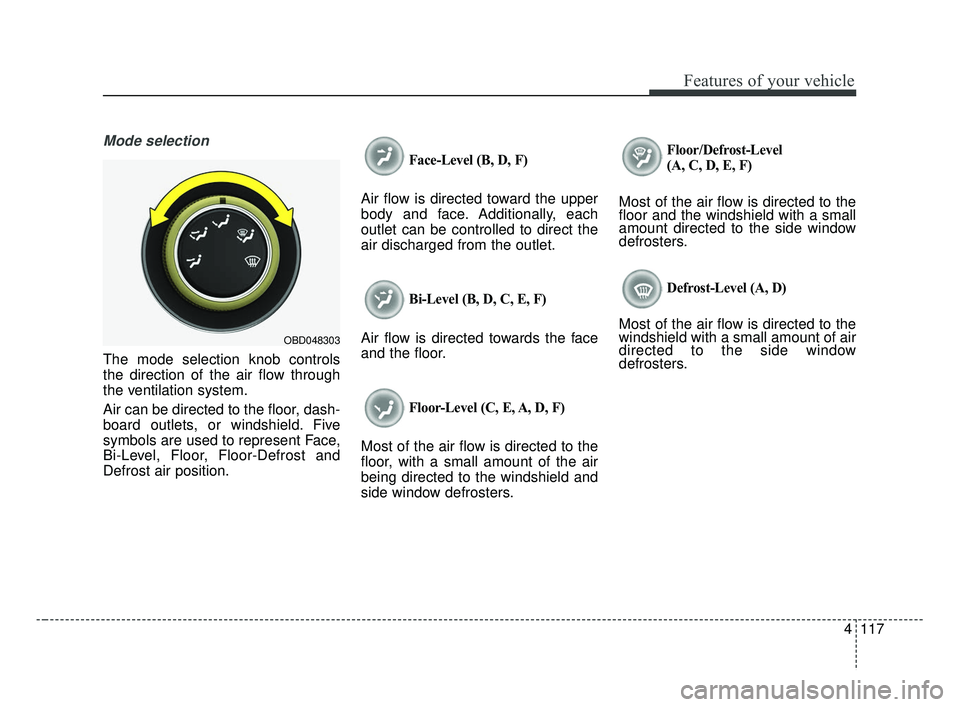
Mode selection
The mode selection knob controls
the direction of the air flow through
the ventilation system.
Air can be directed to the floor, dash-
board outlets, or windshield. Five
symbols are used to represent Face,
Bi-Level, Floor, Floor-Defrost and
Defrost air position.
Face-Level (B, D, F)
Air flow is directed toward the upper
body and face. Additionally, each
outlet can be controlled to direct the
air discharged from the outlet.
Bi-Level (B, D, C, E, F)
Air flow is directed towards the face
and the floor.
Floor-Level (C, E, A, D, F)
Most of the air flow is directed to the
floor, with a small amount of the air
being directed to the windshield and
side window defrosters.
Floor/Defrost-Level
(A, C, D, E, F)
Most of the air flow is directed to the
floor and the windshield with a small
amount directed to the side window
defrosters.
Defrost-Level (A, D)
Most of the air flow is directed to the
windshield with a small amount of air
directed to the side window
defrosters.
OBD048303
BDm CAN (ENG) 4.qxp 7/4/2018 10:08 AM Page 117
Page 203 of 550
Features of your vehicle
118
4
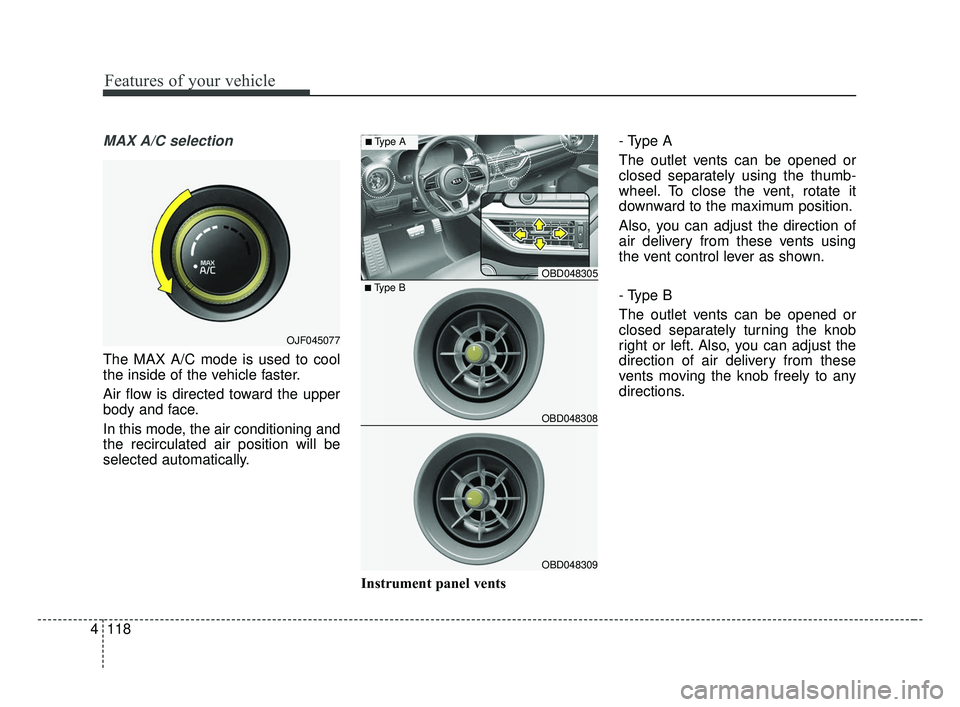
MAX A/C selection
The MAX A/C mode is used to cool
the inside of the vehicle faster.
Air flow is directed toward the upper
body and face.
In this mode, the air conditioning and
the recirculated air position will be
selected automatically.
Instrument panel vents- Type A
The outlet vents can be opened or
closed separately using the thumb-
wheel. To close the vent, rotate it
downward to the maximum position.
Also, you can adjust the direction of
air delivery from these vents using
the vent control lever as shown.
- Type B
The outlet vents can be opened or
closed separately turning the knob
right or left. Also, you can adjust the
direction of air delivery from these
vents moving the knob freely to any
directions.
OJF045077
OBD048305
OBD048308
OBD048309
■Type B
■Type A
BDm CAN (ENG) 4.qxp 7/4/2018 10:08 AM Page 118