Page 135 of 550
Features of your vehicle
50
4
WARNING
If the steering wheel becomes
too warm, turn the system off.
The heated steering wheel may
cause burns even at low tem-
peratures, especially if used for
long periods of time.
BDm CAN (ENG) 4.qxp 7/4/2018 10:05 AM Page 50
Page 138 of 550
453
Features of your vehicle
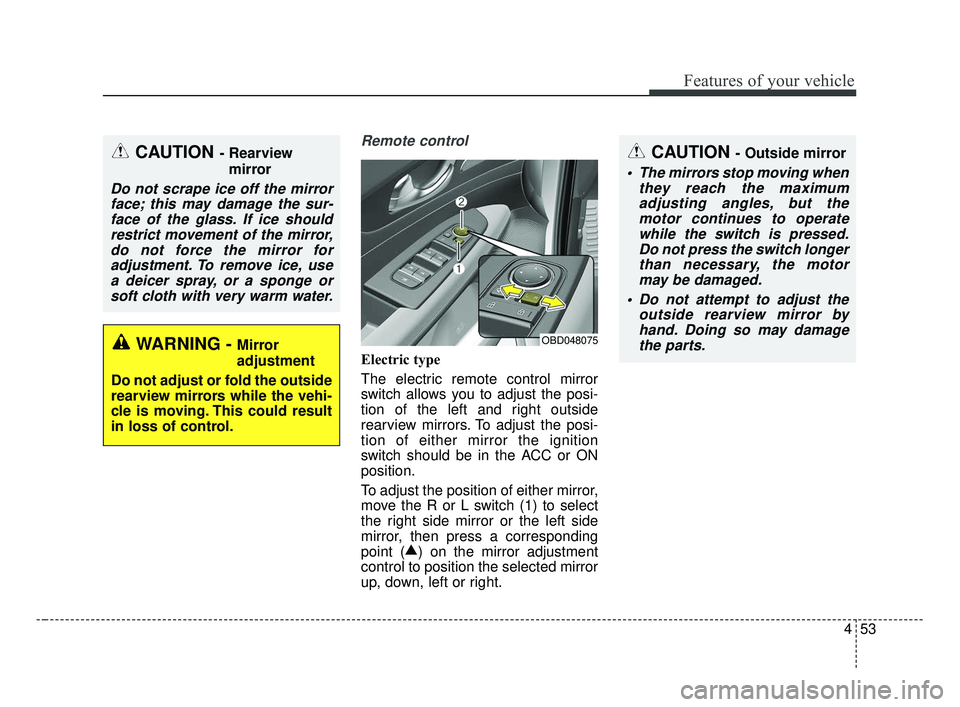
Remote control
Electric type
The electric remote control mirror
switch allows you to adjust the posi-
tion of the left and right outside
rearview mirrors. To adjust the posi-
tion of either mirror the ignition
switch should be in the ACC or ON
position.
To adjust the position of either mirror,
move the R or L switch (1) to select
the right side mirror or the left side
mirror, then press a corresponding
point (▲
) on the mirror adjustment
control to position the selected mirror
up, down, left or right.
OBD048075
CAUTION - Outside mirror
The mirrors stop moving when they reach the maximumadjusting angles, but themotor continues to operatewhile the switch is pressed.Do not press the switch longerthan necessary, the motormay be damaged.
Do not attempt to adjust the outside rearview mirror byhand. Doing so may damagethe parts.
CAUTION - Rearview
mirror
Do not scrape ice off the mirrorface; this may damage the sur-face of the glass. If ice shouldrestrict movement of the mirror,do not force the mirror foradjustment. To remove ice, usea deicer spray, or a sponge orsoft cloth with very warm water.
WARNING - Mirror
adjustment
Do not adjust or fold the outside
rearview mirrors while the vehi-
cle is moving. This could result
in loss of control.
BDm CAN (ENG) 4.qxp 7/4/2018 10:05 AM Page 53
Page 179 of 550
Features of your vehicle
94
4
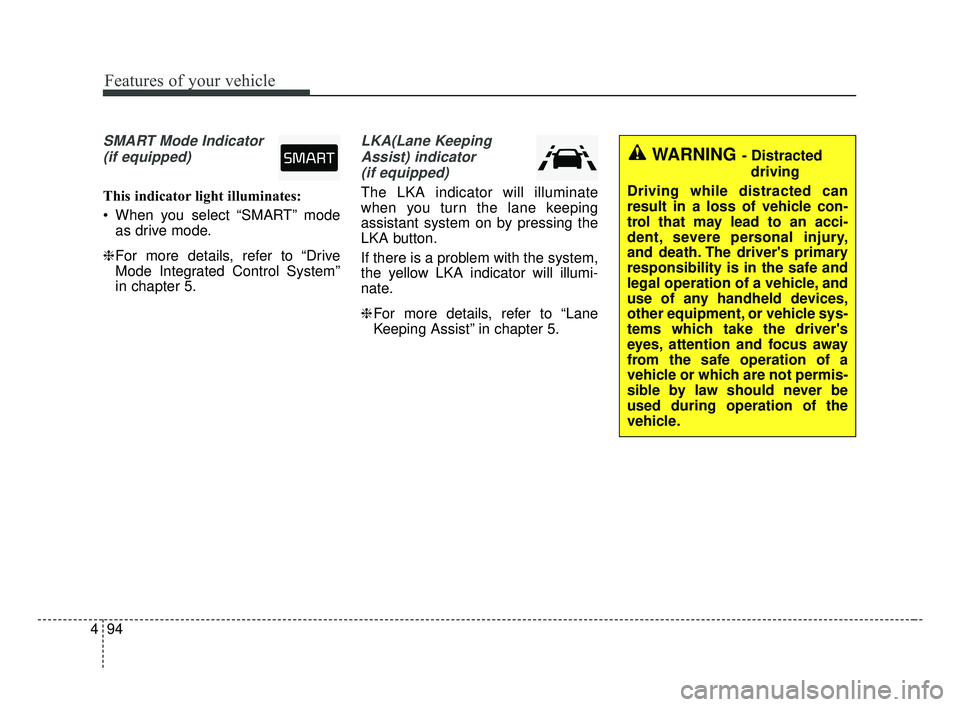
SMART Mode Indicator
(if equipped)
This indicator light illuminates:
When you select “SMART” mode as drive mode.
❈ For more details, refer to “Drive
Mode Integrated Control System”
in chapter 5.
LKA(Lane Keeping
Assist) indicator(if equipped)
The LKA indicator will illuminate
when you turn the lane keeping
assistant system on by pressing the
LKA button.
If there is a problem with the system,
the yellow LKA indicator will illumi-
nate.
❈ For more details, refer to “Lane
Keeping Assist” in chapter 5.
WARNING - Distracted
driving
Driving while distracted can
result in a loss of vehicle con-
trol that may lead to an acci-
dent, severe personal injury,
and death. The driver's primary
responsibility is in the safe and
legal operation of a vehicle, and
use of any handheld devices,
other equipment, or vehicle sys-
tems which take the driver's
eyes, attention and focus away
from the safe operation of a
vehicle or which are not permis-
sible by law should never be
used during operation of the
vehicle.
BDm CAN (ENG) 4.qxp 7/4/2018 10:07 AM Page 94
Page 183 of 550

Features of your vehicle
98
4
Parking distance warning-
reverse precautions
The parking distance warning-
reverse system may not sound
consistently depending on the
speed and shapes of the objects
detected.
The parking distance warning- reverse system may malfunction if
the vehicle bumper height or sen-
sor installation has been modified
or damaged. Any non-factory
installed equipment or accessories
may also interfere with the sensor
performance.
The sensor may not recognize objects less than 40 cm (15 in.)
from the sensor, or it may sense an
incorrect distance. Use caution.
When the sensor is frozen or cov- ered with snow, dirt, or water, the
sensor may be inoperative until the
material is removed using a soft
cloth.
To prevent damage, do not push, scratch or strike the sensor.
✽ ✽ NOTICE
This system can only sense objects
within the range and location of the
sensors. It cannot detect objects in
other areas where sensors are not
installed. Also, small or slim objects,
such as poles or objects located
between sensors may not be detected
by the sensors. Pay close attention
when the vehicle is driven close to
objects on the road, particularly
pedestrians, and especially children.
Always visually check behind the
vehicle when backing up.
Be sure to inform any drivers of the
vehicle that may be unfamiliar with
the system regarding the system’s
capabilities and limitations.
Self-diagnosis
If you don’t hear an audible warning
sound or if the buzzer sounds inter-
mittently when shifting the gear to the
R (Reverse) position, this may indi-
cate a malfunction in the parking dis-
tance warning-reverse system. If this
occurs, have your vehicle checked by
an authorized Kia dealer as soon as
possible.
✽ ✽NOTICE
Your new vehicle warranty does not
cover any accidents or damage to
the vehicle or injuries to its occu-
pants. Always drive safely and cau-
tiously.
BDm CAN (ENG) 4.qxp 7/4/2018 10:07 AM Page 98
Page 184 of 550
499
Features of your vehicle
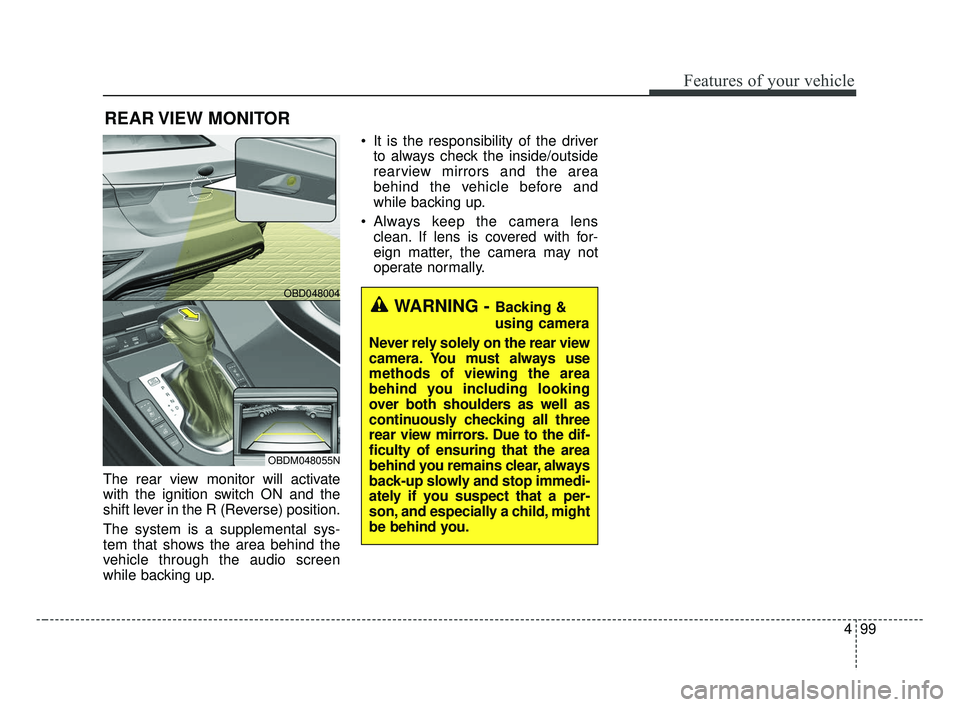
The rear view monitor will activate
with the ignition switch ON and the
shift lever in the R (Reverse) position.
The system is a supplemental sys-
tem that shows the area behind the
vehicle through the audio screen
while backing up. It is the responsibility of the driver
to always check the inside/outside
rearview mirrors and the area
behind the vehicle before and
while backing up.
Always keep the camera lens clean. If lens is covered with for-
eign matter, the camera may not
operate normally.
REAR VIEW MONITOR
WARNING - Backing &
using camera
Never rely solely on the rear view
camera. You must always use
methods of viewing the area
behind you including looking
over both shoulders as well as
continuously checking all three
rear view mirrors. Due to the dif-
ficulty of ensuring that the area
behind you remains clear, always
back-up slowly and stop immedi-
ately if you suspect that a per-
son, and especially a child, might
be behind you.
OBD048004
OBDM048055N
BDm CAN (ENG) 4.qxp 7/4/2018 10:07 AM Page 99
Page 185 of 550
Features of your vehicle
100
4
Battery saver function
The purpose of this feature is to
prevent the battery from being dis-
charged if the lights are left in the
ON position. The system automati-
cally shuts off the parking lights 30
seconds after the ignition key is
removed and the driver’s door is
opened and closed.
With this feature, the parking lights will turn off automatically if the driver
parks on the side of the road at night
and opens the driver’s side door.
If necessary, to keep the parking
lights on when the ignition key is
removed, perform the following:
1) Open the driver-side door.
2) Turn the parking lights OFF and ON again using the light switch
on the steering column.
Daytime running light
(if equipped)
The Daytime Running Lights (DRL)
can make it easier for others to see
the front of your vehicle during the
day. DRL can be helpful in many dif-
ferent driving conditions, and it is
especially helpful after dawn and
before sunset.
The DRL system turns OFF when:
1. The headlight switch is ON.
2. The engine is OFF.
3. The front fog light is ON.
4. Engaging the parking brake.
Lighting control
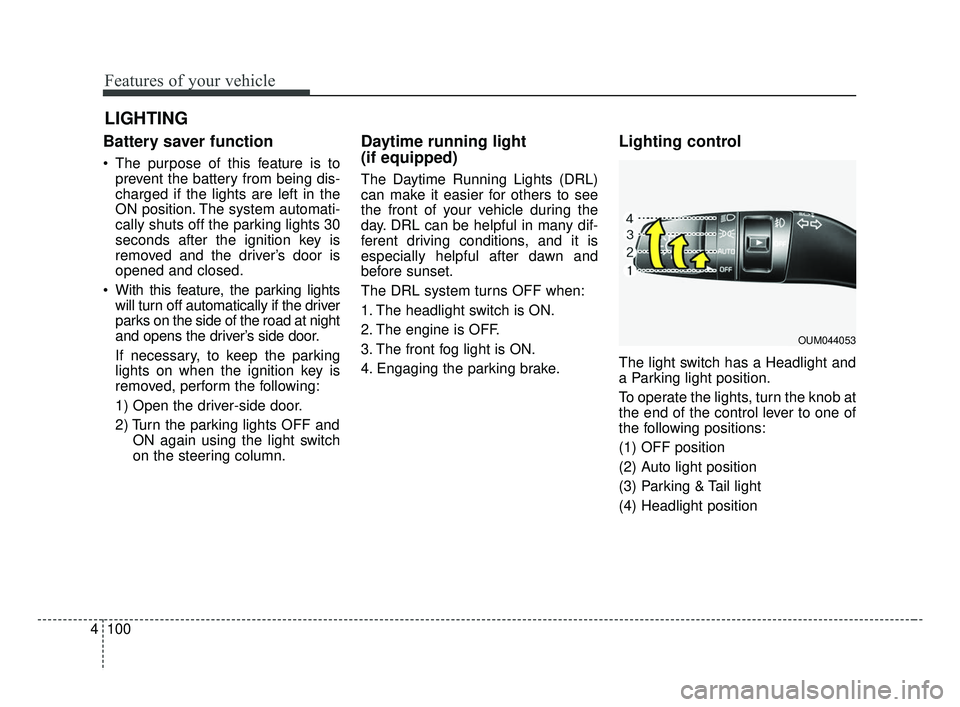
The light switch has a Headlight and
a Parking light position.
To operate the lights, turn the knob at
the end of the control lever to one of
the following positions:
(1) OFF position
(2) Auto light position
(3) Parking & Tail light
(4) Headlight position
LIGHTING
OUM044053
BDm CAN (ENG) 4.qxp 7/4/2018 10:07 AM Page 100
Page 191 of 550
Features of your vehicle
106
4
✽ ✽
NOTICE
• Do not disassemble a front view
camera temporarily for tinted
window or attaching any types of
coatings and accessories. If you
disassemble the camera and
assemble it again, take your vehi-
cle to an authorized Kia dealer
and have the system checked to
need a calibration.
• When you replace or reinstall the windshield glass or front view
camera, take your vehicle to an
authorized Kia dealer and have
the system checked.
• Be careful that water doesn't get into the High Beam Assist unit and
do not remove or damage parts of
the High Beam Assist system.
• Do not place objects on the dash board that reflect light such as
mirrors, white paper, etc. The sys-
tem may not be able to function if
sunlight is reflected. (Continued)(Continued)
• At times, the High Beam Assist
may not operate due to system
limitations. The system is for your
convenience only.
It is the responsibility of the driv-
er to drive safely and always check
the road conditions.
• When the system does not operate normally, change the lamp posi-
tion manually between the high
beam and low beam.
• Do not place any accessories, stickers or tint on the windshield.
Turn signals and lane change
signals
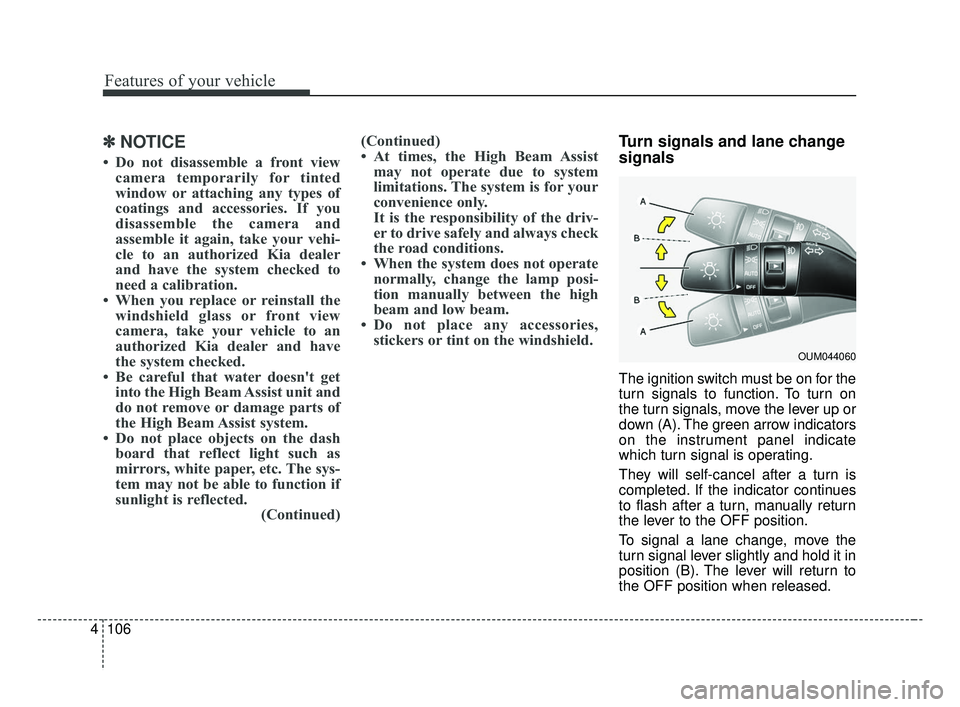
The ignition switch must be on for the
turn signals to function. To turn on
the turn signals, move the lever up or
down (A). The green arrow indicators
on the instrument panel indicate
which turn signal is operating.
They will self-cancel after a turn is
completed. If the indicator continues
to flash after a turn, manually return
the lever to the OFF position.
To signal a lane change, move the
turn signal lever slightly and hold it in
position (B). The lever will return to
the OFF position when released.
OUM044060
BDm CAN (ENG) 4.qxp 7/4/2018 10:07 AM Page 106
Page 222 of 550

4137
Features of your vehicle
For maximum defrosting, set thetemperature control to the extreme
right/hot position and the fan speed
control to the highest speed.
If warm air to the floor is desired while defrosting or defogging, set
the mode to the floor-defrost posi-
tion.
Before driving, clear all snow and ice from the windshield, rear win-
dow, outside rear view mirrors, and
all side windows.
Clear all snow and ice from the hood and air inlet in the cowl grill to
improve heater and defroster effi-
ciency and to reduce the probabili-
ty of fogging up the inside of the
windshield.Manual climate control system
To defog inside windshield
1. Set the fan speed to the desired position.
2. Select desired temperature.
3. Select the or position.
4. The outside (fresh) air and air con- ditioning will be selected automat-
ically.
If the air conditioning and/or outside
(fresh) air position are not selected
automatically, press the correspon-
ding button manually.
WINDSHIELD DEFROSTING AND DEFOGGING
WARNING - Windshield
heating
Do not use the or posi-
tion during cooling operation in
extremely humid weather. The
difference between the temper-
ature of the outside air and the
windshield could cause the
outer surface of the windshield
to fog up, causing loss of visi-
bility. In this case, set the mode
selection to the position
and fan speed control to the
lower speed.
OBDM048323N
BDm CAN (ENG) 4.qxp 7/4/2018 10:09 AM Page 137