2019 KIA FORTE air condition
[x] Cancel search: air conditionPage 82 of 550
Safety features of your vehicle
66
3
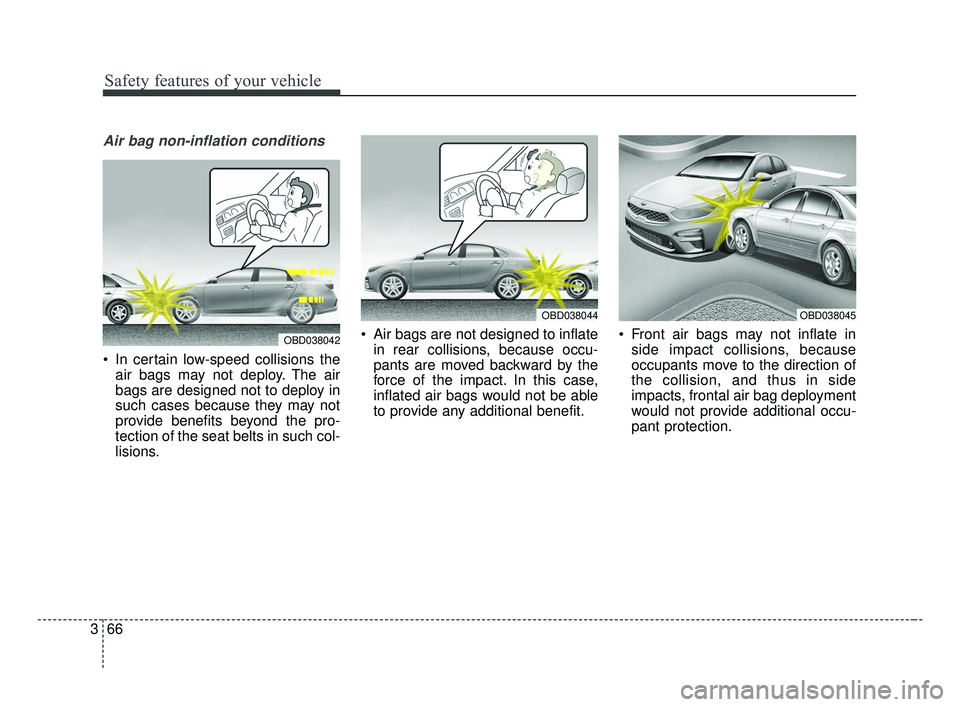
Air bag non-inflation conditions
In certain low-speed collisions the
air bags may not deploy. The air
bags are designed not to deploy in
such cases because they may not
provide benefits beyond the pro-
tection of the seat belts in such col-
lisions. Air bags are not designed to inflate
in rear collisions, because occu-
pants are moved backward by the
force of the impact. In this case,
inflated air bags would not be able
to provide any additional benefit. Front air bags may not inflate in
side impact collisions, because
occupants move to the direction of
the collision, and thus in side
impacts, frontal air bag deployment
would not provide additional occu-
pant protection.
OBD038042
OBD038044OBD038045
BDm CAN (ENG) 3.qxp 6/30/2018 1:45 PM Page 66
Page 87 of 550

Instrument cluster . . . . . . . . . . . . . . . . . . . . . . . . . 4-56
• Instrument cluster control . . . . . . . . . . . . . . . . . . . . . 4-57
• LCD window control . . . . . . . . . . . . . . . . . . . . . . . . . . 4-57
• Gauges . . . . . . . . . . . . . . . . . . . . . . . . . . . . . . . . . . . . \
. 4-58
• Transmission shift indicator . . . . . . . . . . . . . . . . . . . . 4-61
LCD windows . . . . . . . . . . . . . . . . . . . . . . . . . . . . . 4-63
• Over view . . . . . . . . . . . . . . . . . . . . . . . . . . . . . . . . . . . 4-\
63
• Trip information (Trip computer) . . . . . . . . . . . . . . . 4-63
• Distance to empty . . . . . . . . . . . . . . . . . . . . . . . . . . . . 4-63
• LCD modes (For type B, C cluster) . . . . . . . . . . . . . . 4-69
• Service mode . . . . . . . . . . . . . . . . . . . . . . . . . . . . . . . . 4-70
• User settings mode (For type B, C cluster) . . . . . . . . 4-71
Warning and indicator lights . . . . . . . . . . . . . . . . 4-80
• Warning lights . . . . . . . . . . . . . . . . . . . . . . . . . . . . . . . 4-80
• Indicator lights. . . . . . . . . . . . . . . . . . . . . . . . . . . . . . . 4-90
Parking distance warning-reverse . . . . . . . . . . . . 4-96
• Operation of the parking distance warning-reverse. 4-96
• Non-operational conditions of parking distance warning-reverse . . . . . . . . . . . . . . . . . . . . . . . . . . . . . 4-97
• Parking distance warning-reverse precautions . . . . 4-98
• Self-diagnosis . . . . . . . . . . . . . . . . . . . . . . . . . . . . . . . . 4-98
Rear view monitor . . . . . . . . . . . . . . . . . . . . . . . . . 4-99
Lighting . . . . . . . . . . . . . . . . . . . . . . . . . . . . . . . . . 4-100
• Battery saver function. . . . . . . . . . . . . . . . . . . . . . . . 4-100
• Daytime running light . . . . . . . . . . . . . . . . . . . . . . . . 4-100 • Lighting control . . . . . . . . . . . . . . . . . . . . . . . . . . . . . 4-100
• High beam operation. . . . . . . . . . . . . . . . . . . . . . . . . 4-102
• High beam assist . . . . . . . . . . . . . . . . . . . . . . . . . . . . 4-103
• Turn signals and lane change signals . . . . . . . . . . . 4-106
• Front fog light . . . . . . . . . . . . . . . . . . . . . . . . . . . . . . 4-107
Wipers and washers . . . . . . . . . . . . . . . . . . . . . . . 4-108
• Windshield wipers . . . . . . . . . . . . . . . . . . . . . . . . . . . 4-108
• Front windshield washers . . . . . . . . . . . . . . . . . . . . . 4-109
Interior lights . . . . . . . . . . . . . . . . . . . . . . . . . . . . 4-110
• Room lamp . . . . . . . . . . . . . . . . . . . . . . . . . . . . . . . . . 4-110
• Map lamp . . . . . . . . . . . . . . . . . . . . . . . . . . . . . . . . . . 4-110
• Trunk room lamp. . . . . . . . . . . . . . . . . . . . . . . . . . . . 4-111
• Vanity mirror lamp . . . . . . . . . . . . . . . . . . . . . . . . . . 4-112
• Glove box lamp . . . . . . . . . . . . . . . . . . . . . . . . . . . . . 4-112
Welcome system . . . . . . . . . . . . . . . . . . . . . . . . . . 4-113
• Headlight (Headlamp) escort function . . . . . . . . . . 4-113
• Interior light . . . . . . . . . . . . . . . . . . . . . . . . . . . . . . . . 4-113
• Pocket light . . . . . . . . . . . . . . . . . . . . . . . . . . . . . . . . . 4-113
Defroster . . . . . . . . . . . . . . . . . . . . . . . . . . . . . . . . 4-114
• Rear window defroster . . . . . . . . . . . . . . . . . . . . . . . 4-114
Manual climate control system . . . . . . . . . . . . . . 4-115
• Heating and air conditioning . . . . . . . . . . . . . . . . . . 4-116
• System operation . . . . . . . . . . . . . . . . . . . . . . . . . . . . 4-121
• Climate control air filter . . . . . . . . . . . . . . . . . . . . . . 4-123
4
BDm CAN (ENG) 4.qxp 7/4/2018 10:03 AM Page 2
Page 88 of 550

• Checking the amount of air conditionerrefrigerant and compressor lubricant . . . . . . . . . . 4-124
Automatic climate control system . . . . . . . . . . . 4-125
• Automatic heating and air conditioning . . . . . . . . . 4-126
• Manual heating and air conditioning . . . . . . . . . . . 4-127
• System operation . . . . . . . . . . . . . . . . . . . . . . . . . . . . 4-133
• Climate control air filter . . . . . . . . . . . . . . . . . . . . . . 4-135
• Checking the amount of air conditionerrefrigerant and compressor lubricant . . . . . . . . . . 4-135
Windshield defrosting and defogging . . . . . . . . . 4-137
• Manual climate control system . . . . . . . . . . . . . . . . 4-137
• Automatic climate control system . . . . . . . . . . . . . . 4-138
• Defogging logic. . . . . . . . . . . . . . . . . . . . . . . . . . . . . . 4-139
Storage compartments . . . . . . . . . . . . . . . . . . . . . 4-142
• Center console storage . . . . . . . . . . . . . . . . . . . . . . . 4-142
• Glove box . . . . . . . . . . . . . . . . . . . . . . . . . . . . . . . . . . 4-14\
2
• Sunglass holder . . . . . . . . . . . . . . . . . . . . . . . . . . . . . 4-143
Interior features . . . . . . . . . . . . . . . . . . . . . . . . . . 4-144
• Cup holder . . . . . . . . . . . . . . . . . . . . . . . . . . . . . . . . . 4-144
• Seat warmer . . . . . . . . . . . . . . . . . . . . . . . . . . . . . . . . 4-144
• Air ventilation seat . . . . . . . . . . . . . . . . . . . . . . . . . . 4-146
• Sunvisor . . . . . . . . . . . . . . . . . . . . . . . . . . . . . . . . . . . 4-\
146
• Sliding armrest . . . . . . . . . . . . . . . . . . . . . . . . . . . . . 4-147
• Power outlet . . . . . . . . . . . . . . . . . . . . . . . . . . . . . . . . 4-148
• USB charger . . . . . . . . . . . . . . . . . . . . . . . . . . . . . . . . 4-149 • Wireless smart phone charging system . . . . . . . . . . 4-150
• Clothes hanger . . . . . . . . . . . . . . . . . . . . . . . . . . . . . . 4-153
• Floor mat anchor (s) . . . . . . . . . . . . . . . . . . . . . . . . . 4-154
Audio system . . . . . . . . . . . . . . . . . . . . . . . . . . . . . 4-155
• Antenna. . . . . . . . . . . . . . . . . . . . . . . . . . . . . . . . .\
. . . 4-155
• AUX, USB port . . . . . . . . . . . . . . . . . . . . . . . . . . . . . 4-156
• How vehicle audio works . . . . . . . . . . . . . . . . . . . . . 4-156
Declaration of Conformity . . . . . . . . . . . . . . . . . 4-161
• IC. . . . . . . . . . . . . . . . . . . . . . . . . . . . . . . . . . . \
. . . . . . 4-161
4
BDm CAN (ENG) 4.qxp 7/4/2018 10:03 AM Page 3
Page 93 of 550

Features of your vehicle
84
Smart key precautions
If you lose your smart key, you willnot be able to start the engine. Tow
the vehicle, if necessary, and con-
tact an authorized Kia dealer.
A maximum of 2 smart keys can be registered to a single vehicle. If
you lose a smart key, you should
immediately take the vehicle and
key to your authorized Kia dealer
to protect it from potential theft.
The smart key will not work if any of following occurs:
- The smart key is close to a radiotransmitter such as a radio sta-
tion or an airport which can inter-
fere with normal operation of the
smart key.
- The smart key is near a mobile two-way radio system or a cellu-
lar phone.
- Another vehicle’s smart key is being operated close to your vehicle.
When the smart key does not work
correctly, open and close the door
with the mechanical key. If you
have a problem with the smart key,
contact an authorized Kia dealer. If the smart key is in close proximity
to your cell phone or smart phone,
the signal from the smart key could
be blocked by normal operation of
your cell phone or smart phone.
This is especially important when
the phone is active such as making
calls, receiving calls, text messag-
ing, and/or sending/receiving
emails. Avoid placing the smart key
and your cell phone or smart phone
in the same pants or jacket pocket
and maintain adequate distance
between the two devices.
Do not leave the smart key near metallic objects such as golf bags,
metal cases and so on.
Door Lock/Unlock failure or poor starting can occur when the smart
key is placed near metallic objects.
Always carry your smart key when you leave the car. An unattended
smart key close to the vehicle can
cause the vehicle battery to be dis-
charged. Internal circuit damage may occur
when the key comes into contact
with moisture (beverage, water
etc.) or heat. Damage to the smart
key due to exposure to liquids or
heat is not covered by the manu-
facturer's vehicle warranty.
CAUTION - Transmitter
Keep the smart key away fromwater or any liquid as it canbecome damaged and not func-tion properly.
IC WARNING
This device complies with
Industry Canada licence-
exempt RSS standard(s).
Operation is subject to the fol-
lowing two conditions: (1) this
device may not cause interfer-
ence, and (2) this device must
accept any interference, includ-
ing interference that may cause
undesired operation of the
device.
BDm CAN (ENG) 4.qxp 7/4/2018 10:03 AM Page 8
Page 100 of 550

415
Features of your vehicle
This device complies with
Industry Canada licence-exempt
RSS standard(s).
Operation is subject to the following
two conditions:
(1) This device may not cause inter-ference, and
(2) This device must accept any interference, including interfer-
ence that may cause undesired
operation of the device.
✽ ✽NOTICE
Changes or modifications not
expressly approved by the party
responsible for compliance could
void the user's authority to operate
the equipment.
Limp home (override) procedure
When you turn the ignition switch to
the ON position, if the immobilizer
indicator ( ) goes off after blink-
ing 5 times, your transponder
equipped in the ignition key is out of
order. You cannot start the engine
without the limp home procedure. To
start the engine, you have to input
your password by using the ignition
switch. Your password is only avail-
able from an authorized Kia dealer-
ship. Contact an authorized dealer
for more information.
The following procedure is how to
input your password of “2345” as an
example.
1. Turn the ignition s witch to the ON
position. The immobilizer indicator
( ) will blink 5 times and go off
indicating the beginning of the limp
home procedure.
2. Turn the ignition switch to the ACC position. 3. To enter the first digit (in this
example “2”), turn the ignition
switch to the ON and ACC position
twice. Perform the same proce-
dure for the next digits between 3
seconds and 10 seconds (for
example, for “3”, turn the ignition
ON and ACC 3 times).
4. If all of the digits have been input successfully, you have to start the
engine within 30 seconds. If you
attempt to start the engine after 30
seconds, the engine will not start
and you will have to input your
password again.
After performing the limp home pro-
cedure, you have to see an author-
ized Kia dealer immediately to
inspect and repair your ignition key
or immobilizer system.
BDm CAN (ENG) 4.qxp 7/4/2018 10:03 AM Page 15
Page 182 of 550

497
Features of your vehicle
Types of warning sound
When an object is 120 cm to 61 cm(47 in. to 24 in. ) from the rear
bumper: Buzzer beeps intermit-
tently.
When an object is 60 cm to 31 cm (24 in. to 12 in. ) from the rear
bumper: Buzzer beeps more fre-
quently.
When an object is within 40 cm (16 in.) of the rear bumper:
Buzzer sounds continuously.
Non-operational conditions of
parking distance warning-
reverse
The parking distance warning-
reverse may not operate properly
when:
1. Moisture is frozen to the sensor. (It will operate normally once the
moisture clears.)
2. The sensor is covered with foreign matter, such as snow or water, or
the sensor cover is blocked. (It will
operate normally when the materi-
al is removed or the sensor is no
longer blocked.)
3. Driving on uneven road surfaces (unpaved roads, gravel, bumps,
gradient).
4. Objects generating excessive noise (vehicle horns, loud motor-
cycle engines, or truck air brakes)
are within range of the sensor.
5. Rain or water spray exists.
6. Wireless transmitters or mobile phones are within range of the
sensor.
7. The sensor is covered with snow.
8. Trailer towing The detecting range may decrease
when:
1. The sensor is covered with foreign
matter such as snow or water.
(The sensing range will return to
normal when removed.)
2. Outside air temperature is extremely hot or cold.
The following objects may not be
recognized by the sensor:
1. Sharp or slim objects such as ropes, chains or small poles.
2. Objects which tend to absorb the sensor frequency such as clothes,
sound absorbent material or snow.
3. Undetectable objects smaller than 1 m (40 in.) in height and narrower
than 14 cm (6 in.) in diameter.
BDm CAN (ENG) 4.qxp 7/4/2018 10:07 AM Page 97
Page 190 of 550

4105
Features of your vehicle
(Continued) When front visibility is poor - When the lamp of the on-com-ing or front vehicle is coveredwith dust, snow or water.
- When the light from the on- coming or front vehicle is notdetected because of exhaustfume, smoke, fog, snow, etc.
- When the front window is cov- ered with foreign matters.
- When it is hard to see because of fog, heavy rain orsnow and etc.(Continued)
- When driving on a narrowcurved road, rough road,downhill or uphill.
- When only part of the vehicle in front is visible on a cross-road or curved road.
- When there is a traffic light, reflecting sign, flashing signor mirror ahead.
- When there is a temporary reflector or flash ahead (con-struction area).
- When the road conditions are bad such as being wet, iced orcovered with snow.
- When a vehicle suddenly appears from a curve.
- When the vehicle is tilted from a flat tire or being towed.
(Continued)CAUTION
The High Beam Assist systemmay not work properly in the fol-lowing situations:
When the light from a vehicle is poor
- When the light from a vehicle is not detected because oflamp damage, hidden fromsight, etc.
- When the lamp of a vehicle is covered with dust, snow orwater.
- When a vehicle's headlamps are off but the fog lamps onand etc.
When external condition is intervened
- When there is a similar shape as a vehicle's lamps.
- When the headlamp is not repaired or replaced at anauthorized dealer.
- When headlamp aiming is not properly adjusted.
(Continued)
BDm CAN (ENG) 4.qxp 7/4/2018 10:07 AM Page 105
Page 200 of 550
4115
Features of your vehicle
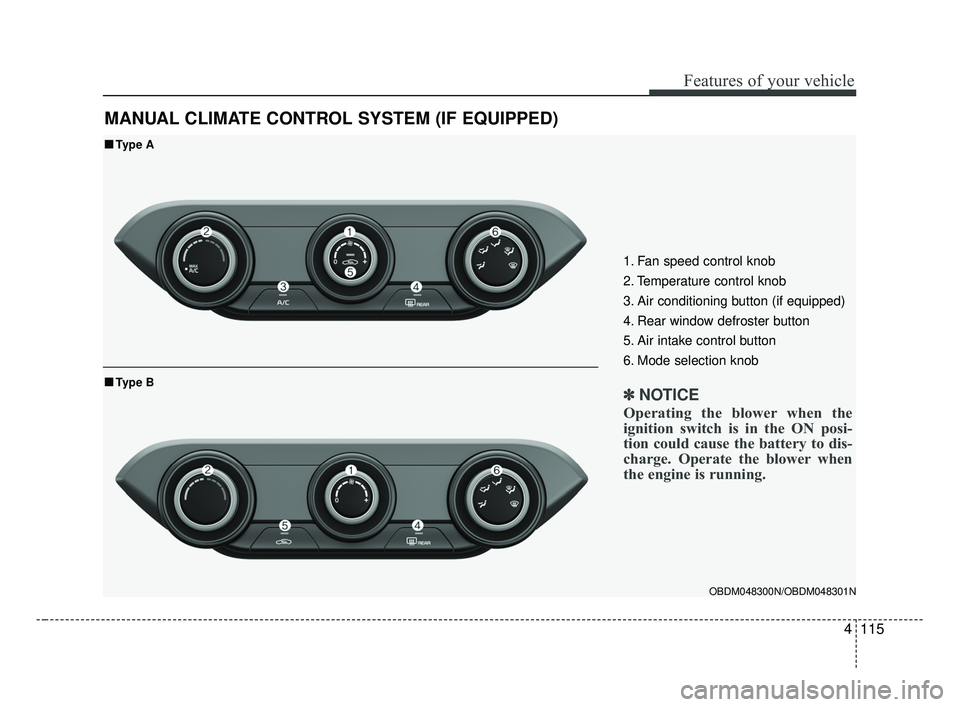
MANUAL CLIMATE CONTROL SYSTEM (IF EQUIPPED)
OBDM048300N/OBDM048301N
■ ■Type A
■ ■Type B
1. Fan speed control knob
2. Temperature control knob
3. Air conditioning button (if equipped)
4. Rear window defroster button
5. Air intake control button
6. Mode selection knob
✽ ✽ NOTICE
Operating the blower when the
ignition switch is in the ON posi-
tion could cause the battery to dis-
charge. Operate the blower when
the engine is running.
BDm CAN (ENG) 4.qxp 7/4/2018 10:08 AM Page 115