2019 KIA FORTE ignition
[x] Cancel search: ignitionPage 322 of 550

Driving your vehicle
76
5
Each of these actions will cancel
cruise control operation (The SETspeed will disappear.), but it will notturn the system off. If you wish toresume cruise control operation,move the lever up (to RES+). You willreturn to your previously presetspeed.To resume cruising speed at
more than approximately 30
km/h (20 mph):
If any method other than the
CRUISE ON-OFF switch was used
to cancel cruising speed and the sys-
tem is still activated, the most recent
set speed will automatically resume
when you move the lever up.
It will not resume, however, if the
vehicle speed has dropped below
approximately 30 km/h (20 mph).
To turn cruise control off, do
one of the following:
Press the CRUISE button (The CRUISE status on the LCD screen
will disappear.).
Turn the ignition off.
Both of these actions will cancel the cruise control operation. If you wantto resume the cruise control opera-tion, repeat the steps provided in “Toset cruise control speed” on the pre-vious page.
OBD058086L
OBD058083L
BDm CAN (ENG) 5.QXP 7/4/2018 10:15 AM Page 76
Page 323 of 550

577
Driving your vehicle
➀Cruise indicator
➁ Set speed
➂ Vehicle-to-vehicle distance
The smart cruise control system
allows you to program the vehicle to
maintain a constant speed and pre-
determined distance to the vehicle
ahead without depressing the accel-
erator or brake pedal.
✽ ✽ NOTICE
To activate smart cruise control,
depress the brake pedal at least once
after turning the ignition switch to
the ON position or starting the
engine. This is to check if the brake
switch which is important part to
cancel smart cruise control is in nor-
mal condition.
SMART CRUISE CONTROL (IF EQUIPPED)
WARNING
For your safety, please read the
owner's manual before using the
smart cruise control system.
WARNING
The Smart Cruise Control sys-
tem (SCC) is deactivated when
driving under the speed of 10
km/h (6.0 mph). In this case, the
SCC will be unable to maintain
the distance entered by the driv-
er. It is the driver's responsibility
to depress the brake to maintain
a safe distance from the vehicle
the driver is approaching.
WARNING
-
Smart cruise control sys-
tem Limitations
The smart cruise control system
is a supplemental system and is
not a substitute for safe driving
practices. It is the responsibility
of the driver to always check the
speed and distance to the vehi-
cle ahead.
OBD058023
BDm CAN (ENG) 5.QXP 7/4/2018 10:15 AM Page 77
Page 349 of 550
5103
Driving your vehicle
BCW (Blind-Spot Collision
Warning) / LCA (Lane Change
Assist)
Operating conditions
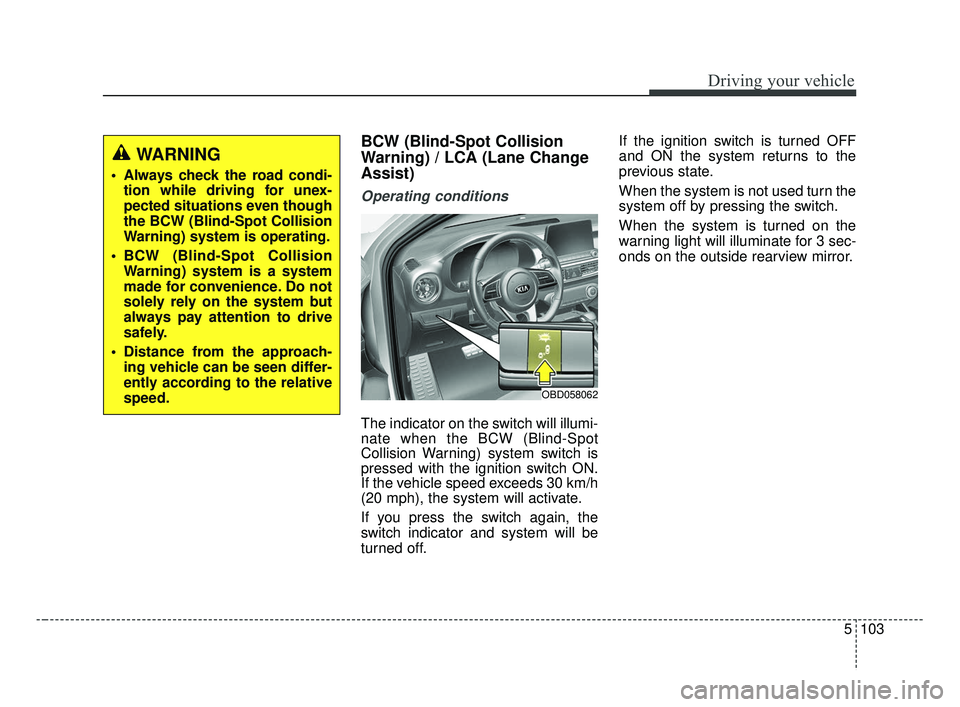
The indicator on the switch will illumi-
nate when the BCW (Blind-Spot
Collision Warning) system switch is
pressed with the ignition switch ON.
If the vehicle speed exceeds 30 km/h
(20 mph), the system will activate.
If you press the switch again, the
switch indicator and system will be
turned off.If the ignition switch is turned OFF
and ON the system returns to the
previous state.
When the system is not used turn the
system off by pressing the switch.
When the system is turned on the
warning light will illuminate for 3 sec-
onds on the outside rearview mirror.
WARNING
Always check the road condi-
tion while driving for unex-
pected situations even though
the BCW (Blind-Spot Collision
Warning) system is operating.
BCW (Blind-Spot Collision Warning) system is a system
made for convenience. Do not
solely rely on the system but
always pay attention to drive
safely.
Distance from the approach- ing vehicle can be seen differ-
ently according to the relative
speed.
OBD058062
BDm CAN (ENG) 5.QXP 7/4/2018 10:17 AM Page 103
Page 359 of 550
5113
Driving your vehicle
(Continued)
• When you replace the windshieldglass, front view camera or sys-
tem, take your vehicle to an
authorized Kia dealer and have
the system checked to need a cali-
bration.
• The system is designed to detect lane markers using a front view
camera. If the lane markers are
hard to detect, then the system
may be limited. Always be cau-
tious when using the system.
• When the lane markers are hard to detect, please refer to “Driver’s
Attention”.
• Do not remove or damage the related parts of LKA.
• Do not place objects on the dash- board that reflects light such as
mirrors, white paper, etc. This
may prevent the system from
functioning. (Continued)(Continued)
• You may not hear warning sound
of LKA because of the excessive
audio sound.
• If you continue to drive with your hands off the steering wheel, the
LKA system will stop controlling
the steering wheel after the hands
off alarm. Afterwards, if you drive
with your hands on the steering
wheel, the control will be activated
again.
• If the vehicle speed is high, steer- ing torque for assistance will not
be enough to keep your vehicle
within the lane. If so, the vehicle
may move out of its lane. Obey
speed limit when using LKA.
• If you attach objects to the steer- ing wheel, the system may not
assist steering.
• If you attach objects to the steer- ing wheel, hands off alarm may
not work properly.LKA operation
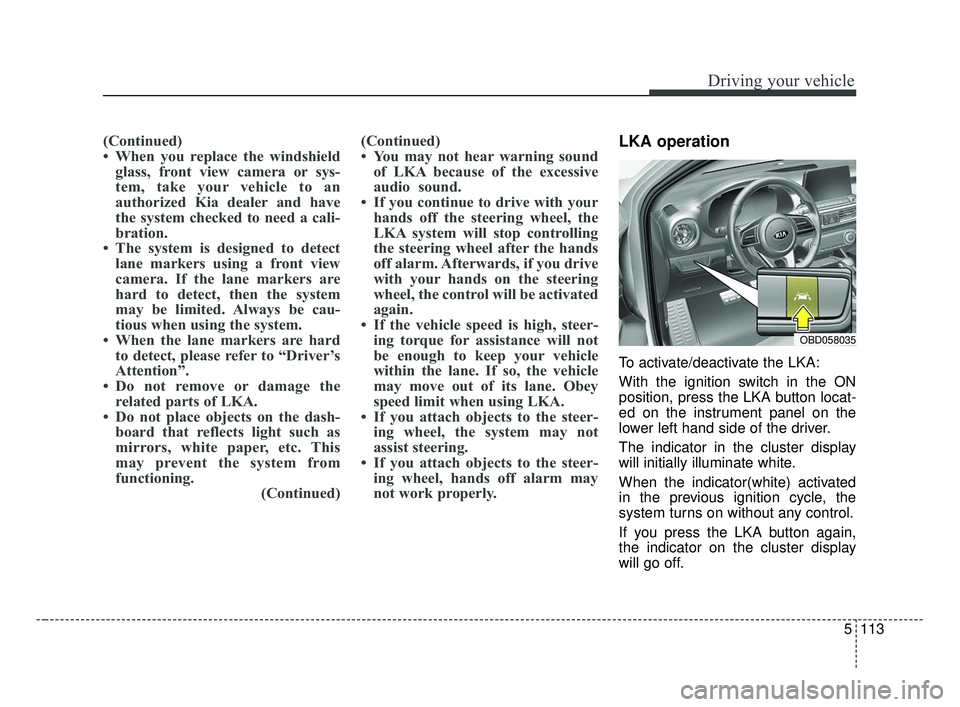
To activate/deactivate the LKA:
With the ignition switch in the ON
position, press the LKA button locat-
ed on the instrument panel on the
lower left hand side of the driver.
The indicator in the cluster display
will initially illuminate white.
When the indicator(white) activated
in the previous ignition cycle, the
system turns on without any control.
If you press the LKA button again,
the indicator on the cluster display
will go off.
OBD058035
BDm CAN (ENG) 5.QXP 7/4/2018 10:17 AM Page 113
Page 366 of 550
Driving your vehicle
120
5
When there is a problem with the sys-
tem do one of the following:
Turn the system on after turning
the engine off and on again.
Check if the ignition switch is in the ON position.
Check if the system is affected by the weather. (ex: fog, heavy rain,
etc.)
Check if there is foreign matter on the camera lens
If the problem is not solved, take your
vehicle to an authorized Kia dealer
and have the system checked.LKA function change
The driver can change LKA to Lane
Departure Warning (LDW) system or
change the LKA mode between
Standard LKA and Active LKA from
the User Settings Mode on the LCD
display. The driver can choose them by plac-
ing the ignition switch to the ON posi-
tion and by selecting ‘User Settings’,
‘Driver Assistance’, and ‘Lane
Safety’.
The system is automatically set to
Standard LKA when your vehicle is
first delivered from the factory.
Lane Departure Warning
LDW alerts the driver with a visual
and acoustic warning when the sys-
tem detects the vehicle leaving the
lane. In this mode, the system will not
provide steering inputs. When the
vehicle’s front wheel contacts the
inside edge of lane line, LKA issues
the lane departure warning.
Standard LKA
The Standard LKA mode guides the
driver to keep the vehicle within the
lanes. It provides inputs to the steer-
ing, when the vehicle is about to
deviate from the lanes.
Active LKA
The active LKA mode provides more
frequent steering wheel control in
comparison with the Standard LKA
mode. Active LKA can reduce the dri-
ver’s fatigue to assist the steering for
maintaining the vehicle in the middle
of the lane.
BDm CAN (ENG) 5.QXP 7/4/2018 10:18 AM Page 120
Page 373 of 550
5127
Driving your vehicle
Remember, your vehicle does notrequire extended warm-up. After
the engine has started, allow the
engine to run for 10 to 20 seconds
prior to placing the vehicle in gear.
In very cold weather, however, give
your engine a slightly longer warm-
up period.
Don't "lug" or "over-rev" the engine. Lugging is driving too slowly in a
very high gear resulting in engine
bucking. If this happens, shift to a
lower gear. Over-revving is racing
the engine beyond its safe limit.
This can be avoided by shifting at
the recommended speed. Use your air conditioning sparingly.
The air conditioning system is
operated by engine power so your
fuel economy is reduced when you
use it.
Open windows at high speeds can reduce fuel economy.
Fuel economy is less in crosswinds and headwinds. To help offset
some of this loss, slow down when
driving in these conditions.
Keeping a vehicle in good operating
condition is important both for econ-
omy and safety. Therefore, have an
authorized Kia dealer perform
scheduled inspections and mainte-
nance.
WARNING - Engine off
during motion
Never turn the engine off to
coast down hills or anytime the
vehicle is in motion. The power
steering and power brakes will
not function properly without
the engine running. In addition,
turning off the ignition while
driving could engage the steer-
ing wheel lock resulting in loss
of vehicle steering. Keep the
engine on and downshift to an
appropriate gear for an engine
braking effect.
BDm CAN (ENG) 5.QXP 7/4/2018 10:18 AM Page 127
Page 379 of 550

5133
Driving your vehicle
Use high quality ethylene gly-
col coolant
Your vehicle is delivered with high
quality ethylene glycol coolant in the
cooling system. It is the only type of
coolant that should be used because
it helps prevent corrosion in the cool-
ing system, lubricates the water
pump and prevents freezing. Be sure
to replace or replenish your coolant
in accordance with the maintenance
schedule in chapter 8. Before winter,
have your coolant tested to assure
that its freezing point is sufficient for
the temperatures anticipated during
the winter.
Check battery and cables
Winter puts additional burdens on
the battery system. Visually inspect
the battery and cables as described
in chapter 8. The level of charge in
your battery can be checked by an
authorized Kia dealer or a service
station.
Change to "winter weight" oil
if necessary
In some climates it is recommended
that a lower viscosity "winter weight"
oil be used during cold weather. See
chapter 9 for recommendations. If
you aren't sure what weight oil you
should use, consult an authorized
Kia dealer.
Check spark plugs and ignition
system
Inspect your spark plugs as
described in chapter 8 and replace
them if necessary. Also check all
ignition wiring and components to be
sure they are not cracked, worn or
damaged in any way.
To keep locks from freezing
To keep the locks from freezing,
squirt an approved de-icer fluid or
glycerine into the key opening. If a
lock is covered with ice, squirt it with
an approved de-icing fluid to remove
the ice. If the lock is frozen internally,
you may be able to thaw it out by
using a heated key. Handle the heat-
ed key with care to avoid injury.
Use approved window washer
anti-freeze in system
To keep the water in the window
washer system from freezing, add an
approved window washer anti-freeze
solution in accordance with instruc-
tions on the container. Window wash-
er anti-freeze is available from an
authorized Kia dealer and most auto
parts outlets. Do not use engine
coolant or other types of anti-freeze
as these may damage the paint fin-
ish.
BDm CAN (ENG) 5.QXP 7/4/2018 10:18 AM Page 133
Page 390 of 550

What to do in an emergency
46
IF THE ENGINE WILL NOT START
If engine doesn't turn over or
turns over slowly
1. If your vehicle has an IntelligentVariable Transmission, be sure the
shift lever is in N (Neutral) or P
(Park) and the emergency brake is
set.
2. Check the battery connections to be sure they are clean and tight.
3. Turn on the interior light. If the light dims or goes out when you oper-
ate the starter, the battery is dis-
charged.
4. Check the starter connections to be sure they are securely tight-
ened.
5. Do not push or pull the vehicle to start it. See instructions for "Jump
starting".
If engine turns over normally
but does not start
1. Check the fuel level.
2. With the ignition switch in theLOCK position, check all connec-
tors at the ignition coils and spark
plugs. Reconnect any that may be
disconnected or loose.
3. Check the fuel line in the engine compartment.
4. If the engine still does not start, call an authorized Kia dealer or
seek other qualified assistance.
WARNING - Push/
pull start
Do not push or pull the vehicle
to start it. Push or pull starting
may cause the catalytic con-
verter to overload and create a
fire hazard.
BDm CAN (ENG) 6.qxp 7/4/2018 10:20 AM Page 4