2019 INFINITI Q60 brake light
[x] Cancel search: brake lightPage 164 of 468

3-22Pre-driving checks and adjustments
CONDITIONS THE REMOTE EN-
GINE START WILL NOT WORK
The remote engine start will not operate if
any of the following conditions are present:
.The ignition switch is placed in the ON
position.
. The hood is not securely closed.
. The hazard warning lights are on.
. The engine is still running. The engine
must be completely stopped. Wait at
least 6 seconds if the engine goes from
running to off. This is not applicable
when extending engine run time.
. The remote engine start
button is
not pushed and held for at least 2
seconds.
. The remote engine start
button is
not pushed and held within 5 seconds of
pushing LOCK
button.
. The brake pedal is depressed.
. The doors are not closed and locked.
. The trunk is open.
. The Intelligent Key warning message is
displayed in the vehicle information dis-
play.
. The alarm sounds due to illegal entry into
the vehicle.
. Two remote engine starts, or a single
remote engine start with an extension,
have already been used. .
The vehicle is not in P (Park).
. The remote engine start function has
been switched to OFF in the settings
menu on the lower display. For additional
information, see the INFINITI InTouch
TM
Owner’s Manual.
The remote engine start may display a
warning or indicator in the vehicle informa-
tion display. For an explanation of the
warning or indicator, see “Indicators for
operation” (P.2-23).
Page 190 of 468

5-8Starting and driving
CAUTION
.The TPMS may not function properly
when the wheels are equipped with
tire chains or the wheels are buried in
snow.
. Do not place metalized film or any
metal parts (antenna, etc.) on the
windows. This may cause poor recep-
tion of the signals from the tire
pressure sensors, and the TPMS will
not function properly.
Some devices and transmitters may tem-
porarily interfere with the operation of the
TPMS and cause the low tire pressure
warning light to illuminate. Some examples
are:
. Facilities or electric devices using similar
radio frequencies are near the vehicle.
. If a transmitter set to similar frequencies
is being used in or near the vehicle.
. If a computer (or similar equipment) or a
DC/AC converter is being used in or near
the vehicle.
Low tire pressure warning light may illumi-
nate in the following cases.
. If the vehicle is equipped with a wheel
and tire without TPMS. .
If the TPMS has been replaced and the ID
has not been registered.
. If the wheel is not originally specified by
INFINITI.
FCC Notice:
For USA:
This device complies with Part 15 of the
FCC Rules. Operation is subject to the
following two conditions: (1) This device
may not cause harmful interference, and (2)
this device must accept any interference
received, including interference that may
cause undesired operation.
NOTE:
Changes or modifications not expressly
approved by the party responsible for
compliance could void the user’s authority
to operate the equipment.
For Canada:
This device complies with Industry Canada
licence-exempt RSS standard(s). Operation
is subject to the following two conditions:
1. This device may not cause interference,
and
2. This device must accept any interfer-
ence, include interference that may
cause undesired operation of the device.
TPMS with Tire Inflation Indicator
When adding air to an under-inflated tire,
the TPMS with Tire Inflation Indicator
provides visual and audible signals outside
the vehicle to help you inflate the tires to the
recommended COLD tire pressure.
Vehicle set-up:
1. Park the vehicle in a safe and level place.
2. Apply the parking brake and place the
shift lever in the P (Park) position.
3. Place the ignition switch in the ON position. Do not start the engine.
Operation:
1. Add air to the tire.
2. After a few seconds, the hazard indica- tors will start flashing.
3. When the designated pressure is reached, the horn beeps once and the
hazard indicators stop flashing.
4. Perform the above steps for each tire.
. If the tire is over-inflated more than
approximately 4 psi (30 kPa), the horn
beeps and the hazard indicators flash 3
times. To correct the pressure, push the
core of the valve stem on the tire briefly
to release pressure. When the pressure
reaches the designated pressure, the
horn beeps once.
Page 192 of 468
5-10Starting and driving
.If you decide that it is not safe toreturn the vehicle to the road surface
based on vehicle, road or traffic
conditions, gradually slow the vehicle
to a stop in a safe place off the road.
RAPID AIR PRESSURE LOSS
Rapid air pressure loss or a “blow-out” can
occur if the tire is punctured or is damaged
due to hitting a curb or pothole. Rapid air
pressure loss can also be caused by driving
on under-inflated tires.
Rapid air pressure loss can affect the
handling and stability of the vehicle, espe-
cially at highway speeds.
Help prevent rapid air pressure loss by
maintaining the correct air pressure and
visually inspect the tires for wear and
damage. See “Wheels and tires” (P.8-32) of
this manual.
If a tire rapidly loses air pressure or “blows-
out” while driving maintain control of the
vehicle by following the procedure below.
Please note that this procedure is only a
general guide. The vehicle must be driven as
appropriate based on the conditions of the
vehicle, road and traffic.
WARNING
The following actions can increase the
chance of losing control of the vehicle if
there is a sudden loss of tire air pressure.
Losing control of the vehicle may cause a
collision and result in personal injury.
. The vehicle generally moves or pulls
in the direction of the flat tire.
. Do not rapidly apply the brakes.
. Do not rapidly release the accelerator
pedal.
. Do not rapidly turn the steering
wheel.
1. Remain calm and do not overreact.
2. Maintain a firm grip on the steering wheel with both hands and try to hold
a straight course.
3. When appropriate, slowly release the accelerator pedal to gradually slow the
vehicle.
4. Gradually steer the vehicle to a safe location off the road and away from
traffic if possible.
5. Lightly apply the brake pedal to gradu- ally stop the vehicle. 6. Turn on the hazard warning flashers and
either contact a roadside emergency
service to change the tire or see “Chan-
ging a flat tire” (P.6-5) of this Owner’s
Manual.
DRINKING ALCOHOL/DRUGS
AND DRIVING
WARNING
Never drive under the influence of alco-
hol or drugs. Alcohol in the bloodstream
reduces coordination, delays reaction
time and impairs judgement. Driving
after drinking alcohol increases the like-
lihood of being involved in an accident
injuring yourself and others. Addition-
ally, if you are injured in an accident,
alcohol can increase the severity of the
injury.
INFINITI is committed to safe driving. How-
ever, you must choose not to drive under the
influence of alcohol. Every year thousands of
people are injured or killed in alcohol-related
accidents. Although the local laws vary on
what is considered to be legally intoxicated,
the fact is that alcohol affects all people
differently and most people underestimate
the effects of alcohol.
Page 196 of 468

5-14Starting and driving
JVS0404X
INTELLIGENT KEY BATTERY DIS-
CHARGE
If the battery of the Intelligent Key is
discharged, or environmental conditions in-
terfere with the Intelligent Key operation,
start the engine according to the following
procedure:
1. Move the shift lever to the P (Park)position.
2. Firmly apply the foot brake.
3. Touch the ignition switch with the Intelligent Key as illustrated. (A chime
will sound.)
4. Push the ignition switch while depressing the brake pedal within 10 seconds after
the chime sounds. The engine will start.
After step 3 is performed, when the ignition
switch is pushed without depressing the
brake pedal, the ignition switch position will
change to ACC.
NOTE:
. When the ignition switch is pushed to
the ACC or ON position or the engine is
started by the above procedures, the
Intelligent Key battery discharge indi-
cator appears in the vehicle information
display even if the Intelligent Key is
inside the vehicle. This is not a malfunc-
tion. To turn off the Intelligent Key
battery discharge indicator, touch the
ignition switch with the Intelligent Key
again.
. If the Intelligent Key battery discharge
indicator appears, replace the battery as
soon as possible. (See “Intelligent Key
battery replacement” (P.8-27).)
. Make sure the area around the vehicle is
clear.
. Check fluid levels such as engine oil,
coolant, brake fluid and window washer
fluid as frequently as possible, or at least
whenever you refuel.
. Check that all windows and lights are
clean.
. Visually inspect tires for their appearance
and condition. Also check tires for proper
inflation.
. Lock all doors.
. Position seat and adjust head restraints.
. Adjust inside and outside mirrors.
. Fasten seat belts and ask all passengers
to do likewise.
. Check the operation of warning lights
when the ignition switch is pushed to the
ON position. (See “Warning lights, in-
dicator lights and audible reminders”
(P.2-12).)
BEFORE STARTING THE ENGINE
Page 204 of 468
5-22Starting and driving
SPA2331
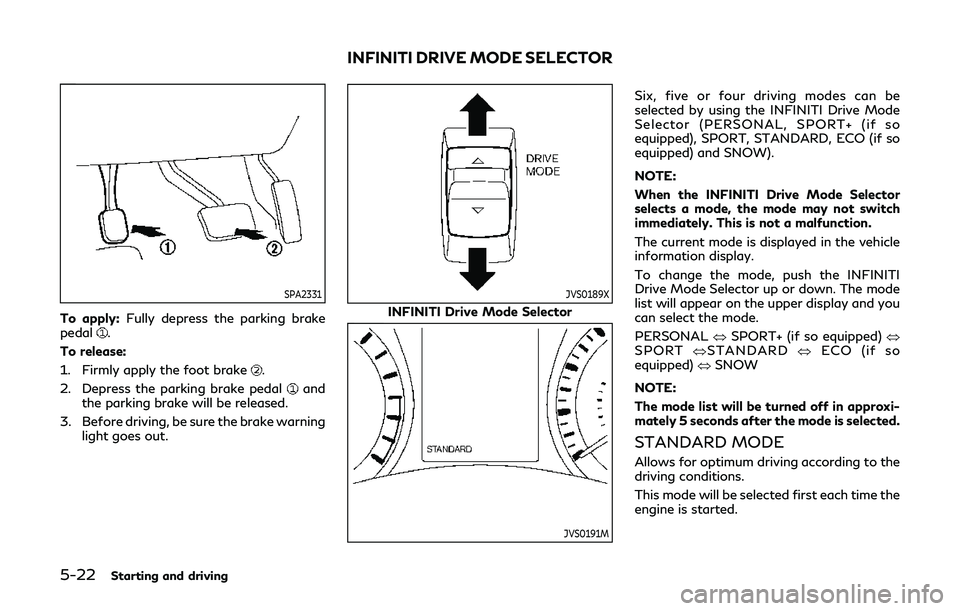
To apply:Fully depress the parking brake
pedal.
To release:
1. Firmly apply the foot brake
.
2. Depress the parking brake pedal
and
the parking brake will be released.
3. Before driving, be sure the brake warning light goes out.
JVS0189X
INFINITI Drive Mode Selector
JVS0191M
Six, five or four driving modes can be
selected by using the INFINITI Drive Mode
Selector (PERSONAL, SPORT+ (if so
equipped), SPORT, STANDARD, ECO (if so
equipped) and SNOW).
NOTE:
When the INFINITI Drive Mode Selector
selects a mode, the mode may not switch
immediately. This is not a malfunction.
The current mode is displayed in the vehicle
information display.
To change the mode, push the INFINITI
Drive Mode Selector up or down. The mode
list will appear on the upper display and you
can select the mode.
PERSONAL œSPORT+ (if so equipped) œ
SPORT œSTANDARD œECO (if so
equipped) œSNOW
NOTE:
The mode list will be turned off in approxi-
mately 5 seconds after the mode is selected.
STANDARD MODE
Allows for optimum driving according to the
driving conditions.
This mode will be selected first each time the
engine is started.
INFINITI DRIVE MODE SELECTOR
Page 241 of 468

JVS0742X
Illustration 10 - Entering from the side
Illustration 10: The BSI system will not
operate if your vehicle is on a lane marker
when another vehicle enters the detection
zone. In this case only the BSW system
operates.
NOTE:
. The radar sensors may not detect a
vehicle which is traveling at about the
same speed as your vehicle when it
enters the detection zone.
. If the driver activates the turn signal
before a vehicle enters the detection
zone, the side indicator light will flash
but no chime will sound when the other
vehicle is detected. .
BSI will not operate or will stop operat-
ing and only a warning chime will sound
under the following conditions.
— When the brake pedal is depressed.
(models without Direct Adaptive
Steering)
— When the vehicle is accelerated dur-
ing BSI system operation
— When steering quickly
— When the ICC, DCA, PFCW or FEB
warnings sound.
— When the hazard warning flashers
are operated.
— When driving on a curve at a high
speed.
JVS0826X
Vehicle information display
Dynamic driver assistance switch
SYSTEM TEMPORARILY UNA-
VAILABLE
Under the following conditions, a chime will
sound, the “currently unavailable” warning
message will appear in the vehicle informa-
tion display
and the BSI system will be
turned off automatically. The BSI system will
not be available until the conditions no
longer exist.
. When the VDC system (except TCS
function) or ABS operates.
. When the VDC system is turned off.
Starting and driving5-59
Page 243 of 468

Do not strike or damage the area around the
radar sensors.
It is recommended you visit an INFINITI
retailer if the area around the radar sensors
is damaged due to a collision.
The lane camera unit
for BSI system is
located above the inside mirror. To keep the
proper operation of BSI and prevent a
system malfunction, be sure to observe the
following:
. Always keep the windshield clean.
. Do not attach a sticker (including trans-
parent material) or install an accessory
near the camera unit.
. Do not place reflective materials, such as
white paper or a mirror, on the instru-
ment panel. The reflection of sunlight
may adversely affect the camera unit’s
capability of detecting the lane markers.
. Do not strike or damage the areas around
the camera unit. It is recommended you
contact an INFINITI retailer if the cam-
era unit is damaged due to an accident.
Radio frequency statement
For USA
This device complies with part 15 of the
FCC Rules.
Operation is subject to the following two
conditions: (1) This device may not cause harmful interference, and (2) this device
must accept any interference received, in-
cluding interference that may cause unde-
sired operation.
NOTE:
The manufacturer is not responsible for any
radio or TV interference caused by un-
authorized modifications to this equipment.
Such modifications could void the user’s
authority to operate the equipment.
For Canada
This device complies with Industry Canada
Standard RSS-310.
Operation is subject to the following two
conditions: (1) This device may not cause
harmful interference, and (2) this device
must accept any interference received, in-
cluding interference that may cause unde-
sired operation.
Frequency of operation: 24.05GHz —
24.25GHz
Field Strength: Not greater than 2.5V/m
peak (0.25V/m average) at a distance of 3
m
WARNING
Failure to follow the warnings and
instructions for proper use of the BCI
system could result in serious injury or
death.
.
The BCI system is not a replacement
for proper driving procedure, is not
designed to prevent contact with
vehicles or objects and does not
provide full brake power. When back-
ing out of parking spaces, always use
the inside and rear mirrors and turn
and look in the direction you will
move. Never rely solely on the BCI
system.
. There is a limitation to the detection
capability of the radar or the sonar.
Using the BCI system under some
road, ground, traffic or weather con-
ditions could lead to improper system
operation. Always rely on your own
operation to avoid accidents.
The BCI system can help alert the driver of
an approaching vehicle or objects behind the
vehicle when the driver is backing out of a
parking space.
Starting and driving5-61
BACK-UP COLLISION
INTERVENTION (BCI) (if so equipped)
Page 245 of 468

JVS0831X
Side indicator light
BCI ON indicator
Upper display
Lower display
JVS0173X
BCI SYSTEM OPERATION
When the shift lever is in the R (Reverse)
position and the vehicle speed is less than
approximately 5 MPH (8 km/h), the BCI
system operates.
If the radar detects a vehicle approaching
from the side or the sonar detects close
stationary objects behind the vehicle, the
system gives visual and audible warnings. If
the driver does not apply the brakes, the
system automatically applies the brake for a
moment when the vehicle is moving back-
wards. After the automatic brake applica-
tion, the driver must depress the brake pedal
to maintain brake pressure. If the driver’s
foot is on the accelerator pedal, the system
Starting and driving5-63