2019 HYUNDAI VELOSTER ignition
[x] Cancel search: ignitionPage 261 of 491
5-49
Driving your vehicle
5
Good Braking Practices Wet brakes can be dangerous! The
brakes may get wet if the vehicle is
driven through standing water or if it
is washed. Your vehicle will not stop
as quickly if the brakes are wet. Wet
brakes may cause the vehicle to pull
to one side.
To dry the brakes, apply the brakes
lightly until the braking action returns
to normal, taking care to keep the
vehicle under control at all times. If
the braking action does not return to
normal, stop as soon as it is safe to
do so and call an authorized
HYUNDAI dealer for assistance.
DO NOT drive with your foot resting
on the brake pedal. Even light, but
constant pedal pressure can result in
the brakes overheating, brake wear,
and possibly even brake failure.
If a tire goes flat while you are driv-
ing, apply the brakes gently and
keep the vehicle pointed straight
ahead while you slow down. When
you are moving slowly enough for it
to be safe to do so, pull off the road
and stop in a safe location.Keep your foot firmly on the brake
pedal when the vehicle is stopped to
prevent the vehicle from rolling for-
ward.
If your vehicle is equipped with
the automatic transmission/dual
clutch transmission, do not let
your vehicle creep forward. To
avoid creeping forward, keep
your foot firmly on the brake
pedal when the vehicle is
stopped.
Be cautious when parking on a hill. Firmly engage the parking
brake and place the shift lever in
P (automatic transmission/dual
clutch transmission) or in first
or reverse gear (manual trans-
mission). If your vehicle is fac-
ing downhill, steer the front
wheels to the curb to help pre-
vent the vehicle from rolling. If
your vehicle is facing uphill, turn
the front wheels away from the
curb to help prevent the vehicle
from rolling. If there is no curb
or if the vehicle has to be kept
from rolling due to conditions
block the wheels.
NOTICEWhenever leaving the vehicle or
parking, always come to a com-
plete stop and continue to
depress the brake pedal. Move
the shift lever into 1
stgear (for
manual transmission vehicle) or
P (Park, for automatic transmis-
sion/dual clutch transmission
vehicle) position, then apply the
parking brake, and place the
ignition switch in the LOCK/OFF
position.
Vehicles parked with the park-
ing brake not applied or not
fully engaged may roll inadver-
tently and may cause injury to
the driver and others. ALWAYS
apply the parking brake before
exiting the vehicle.
WARNING
Page 268 of 491
5-56
Driving your vehicle
BCW (Blind-Spot Collision
Warning)
Operating conditions
To operate:
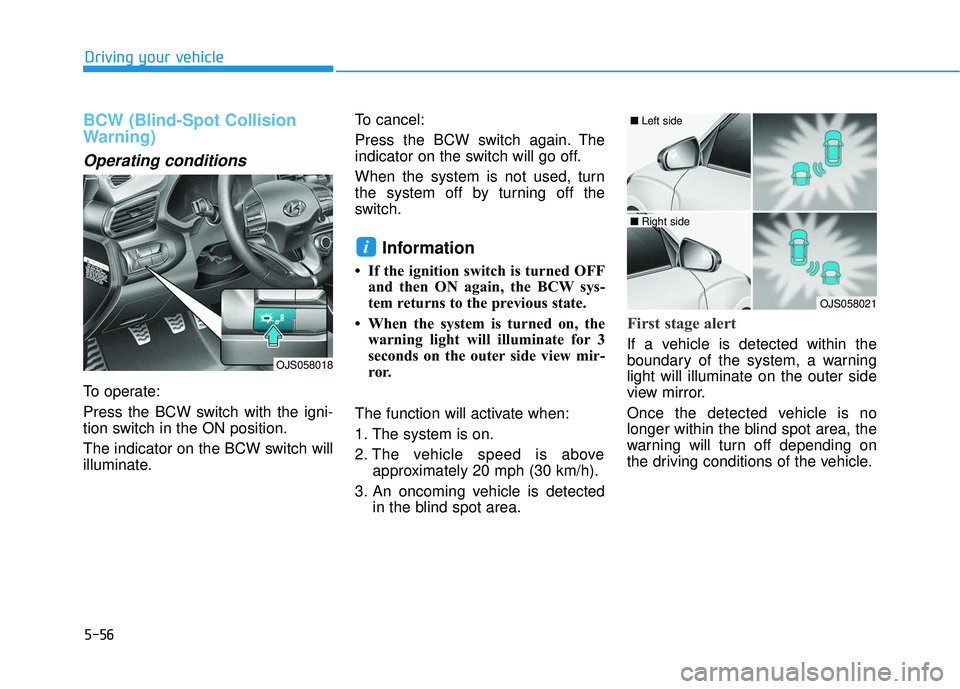
Press the BCW switch with the igni-
tion switch in the ON position.
The indicator on the BCW switch will
illuminate.To cancel:
Press the BCW switch again. The
indicator on the switch will go off.
When the system is not used, turn
the system off by turning off the
switch.
Information
• If the ignition switch is turned OFF
and then ON again, the BCW sys-
tem returns to the previous state.
• When the system is turned on, the warning light will illuminate for 3
seconds on the outer side view mir-
ror.
The function will activate when:
1. The system is on.
2. The vehicle speed is above approximately 20 mph (30 km/h).
3. An oncoming vehicle is detected in the blind spot area.
First stage alert
If a vehicle is detected within the
boundary of the system, a warning
light will illuminate on the outer side
view mirror.
Once the detected vehicle is no
longer within the blind spot area, the
warning will turn off depending on
the driving conditions of the vehicle.
i
OJS058021
■ Left side
■ Right side
OJS058018
Page 275 of 491
5-63
Driving your vehicle
5
The Forward Collision-avoidance
Assist (FCA) system is designed to
help detect and monitor the vehicle
ahead in the roadway through cam-
era recognition to warn the driver
that a collision is imminent, and if
necessary, apply emergency brak-
ing.
* Camera type FCA does not detectpedestrian.System Setting and Activation
System setting
The driver can activate the FCA by placing the ignition switch to the
ON position and by selecting:
''User Settings → Driver
Assistance →Forward Collision-
Avoidance Assist (FCA)''
The FCA deactivates, when the driv-
er deselects the system setting.
F F O
O R
RW
W A
AR
RD
D
C
C O
O L
LL
LI
IS
S I
IO
O N
N-
-A
A V
VO
O I
ID
D A
A N
N C
CE
E
A
A S
SS
SI
IS
S T
T
(
( F
F C
C A
A )
)
S
S Y
Y S
ST
T E
EM
M
(
( C
C A
A M
M E
ER
R A
A )
)
(
( I
IF
F
E
E Q
Q U
UI
IP
P P
PE
ED
D )
)
Take the following precautions
when using the Forward
Collision-avoidance Assist (FCA)
system:
This system is only a supple-
mental system and it is not
intended to, nor does it replace
the need for extreme care and
attention of the driver. The
sensing range and objects
detectable by the sensors are
limited. Pay attention to the
road conditions at all times.
NEVER drive too fast in accor-
dance with the road condi-
tions or while cornering.
Always drive cautiously to
prevent unexpected and sud-
den situations from occur-
ring. The Forward Collision
Avoidance system may not
always stop the vehicle com-
pletely and is only intended to
help mitigate a collision that
is imminent.
WARNING
Page 287 of 491
5-75
Driving your vehicle
5
The Forward Collision-avoidance
Assist (FCA) system is designed to
help detect and monitor the vehicle
ahead or detect a pedestrian (if
equipped) in the roadway through
radar signals and camera recogni-
tion to warn the driver that a collision
is imminent, and if necessary, apply
emergency braking.System Setting and Activation
System setting
The driver can activate the FCA byplacing the ignition switch to the
ON position and by selecting:
''User Settings → Driver
Assistance →Forward Collision-
Avoidance Assist (FCA)''
The FCA deactivates, when the driv-
er deselects the system setting.
F F O
O R
RW
W A
AR
RD
D
C
C O
O L
LL
LI
IS
S I
IO
O N
N-
-A
A V
VO
O I
ID
D A
A N
N C
CE
E
A
A S
SS
SI
IS
S T
T
(
( F
F C
C A
A )
)
S
S Y
Y S
ST
T E
EM
M
(
( F
F U
U S
SI
IO
O N
N
S
S E
E N
N S
SO
O R
R)
)
(
( I
IF
F
E
E Q
Q U
UI
IP
P P
PE
ED
D )
)
Take the following precautions
when using the Forward
Collision-avoidance Assist (FCA)
system:
This system is only a supple-
mental system and it is not
intended to, nor does it replace
the need for extreme care and
attention of the driver. The
sensing range and objects
detectable by the sensors are
limited. Pay attention to the
road conditions at all times.
NEVER drive too fast in accor-
dance with the road condi-
tions or while cornering.
Always drive cautiously to
prevent unexpected and sud-
den situations from occur-
ring. The Forward Collision
Avoidance system may not
always stop the vehicle com-
pletely and is only intended to
help mitigate a collision that
is imminent.
WARNING
Page 300 of 491
5-88
Driving your vehicle
LKA System Operation
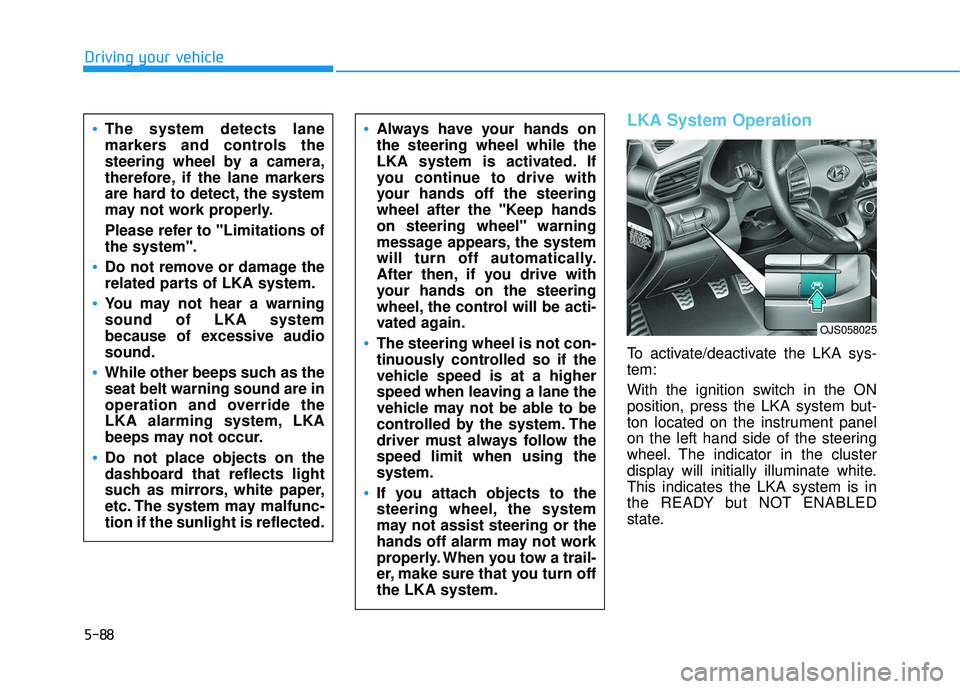
To activate/deactivate the LKA sys-
tem:
With the ignition switch in the ON
position, press the LKA system but-
ton located on the instrument panel
on the left hand side of the steering
wheel. The indicator in the cluster
display will initially illuminate white.
This indicates the LKA system is in
the READY but NOT ENABLED
state.
Always have your hands on
the steering wheel while the
LKA system is activated. If
you continue to drive with
your hands off the steering
wheel after the "Keep hands
on steering wheel" warning
message appears, the system
will turn off automatically.
After then, if you drive with
your hands on the steering
wheel, the control will be acti-
vated again.
The steering wheel is not con-
tinuously controlled so if the
vehicle speed is at a higher
speed when leaving a lane the
vehicle may not be able to be
controlled by the system. The
driver must always follow the
speed limit when using the
system.
If you attach objects to the
steering wheel, the system
may not assist steering or the
hands off alarm may not work
properly. When you tow a trail-
er, make sure that you turn off
the LKA system.
OJS058025
The system detects lane
markers and controls the
steering wheel by a camera,
therefore, if the lane markers
are hard to detect, the system
may not work properly.
Please refer to "Limitations of
the system".
Do not remove or damage the
related parts of LKA system.
You may not hear a warning
sound of LKA system
because of excessive audio
sound.
While other beeps such as the
seat belt warning sound are in
operation and override the
LKA alarming system, LKA
beeps may not occur.
Do not place objects on the
dashboard that reflects light
such as mirrors, white paper,
etc. The system may malfunc-
tion if the sunlight is reflected.
Page 304 of 491
5-92
Driving your vehicle
Information
• Even though the steering is assistedby the system, the driver can still
steer to control the steering wheel.
• The steering wheel may feel heavier when the steering wheel is assisted
by the system than when it is not.
Warning Light and Message
Check Lane Keeping Assist (LKA)
system
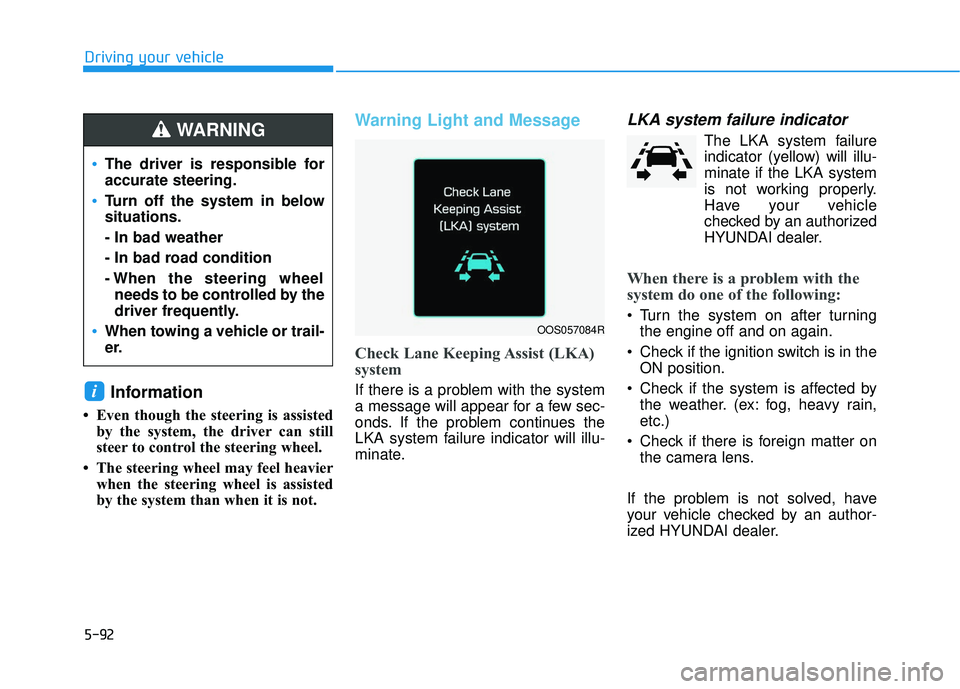
If there is a problem with the system
a message will appear for a few sec-
onds. If the problem continues the
LKA system failure indicator will illu-
minate.
LKA system failure indicator
The LKA system failureindicator (y ellow) will illu-
minate if the LKA system
is not working properly.
Have your vehicle
checked by an authorized
HYUNDAI dealer.
When there is a problem with the
system do one of the following:
Turn the system on after turning the engine off and on again.
Check if the ignition switch is in the ON position.
Check if the system is affected by the weather. (ex: fog, heavy rain,
etc.)
Check if there is foreign matter on the camera lens.
If the problem is not solved, have
your vehicle checked by an author-
ized HYUNDAI dealer.
i
OOS057084R
The driver is responsible for
accurate steering.
Turn off the system in below
situations.
- In bad weather
- In bad road condition
- When the steering wheel needs to be controlled by the
driver frequently.
When towing a vehicle or trail-
er.
WARNING
Page 312 of 491
5-100
Driving your vehicle
Information
• During normal cruise control opera-tion, when the SET switch is activat-
ed or reactivated after applying the
brakes, the cruise control will ener-
gize after approximately 3 seconds.
This delay is normal.
• Before activating the cruise control function, the system will check to
verify that the brake switch is oper-
ating normally. Depress the brake
pedal at least once after turning ON
the ignition or starting the engine.
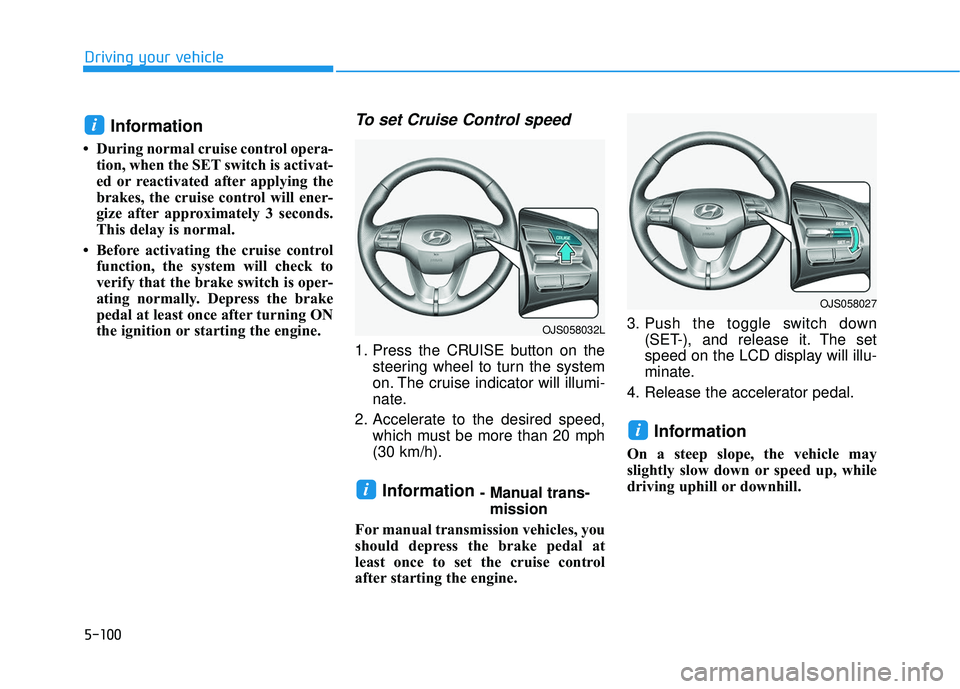
To set Cruise Control speed
1. Press the CRUISE button on the steering wheel to turn the system
on. The cruise indicator will illumi-
nate.
2. Accelerate to the desired speed, which must be more than 20 mph
(30 km/h).
Information - Manual trans-mission
For manual transmission vehicles, you
should depress the brake pedal at
least once to set the cruise control
after starting the engine. 3. Push the toggle switch down
(SET-), and release it. The set
speed on the LCD display will illu-
minate.
4. Release the accelerator pedal.
Information
On a steep slope, the vehicle may
slightly slow down or speed up, while
driving uphill or downhill.
i
i
i
OJS058027
OJS058032L
Page 337 of 491
5-125
Driving your vehicle
5
- When using tire chains:
Make sure to use the right sizeand type of snow chains for your
tires. Incorrect snow chains can
cause damage to the vehicle
body and suspension. Damage
to your vehicle caused by
improper tire chain use is not
covered by your vehicle manu-
facturer's warranty.
If you hear noise caused by chains contacting the body,
retighten the chain to prevent
contact with the vehicle body.
To prevent body damage, retighten the chains after driving
0.3~0.6 miles (0.5~1.0 km).
Do not use tire chains on vehi- cles equipped with aluminum
wheels. If unavoidable, use a
wire or fabric type snow chain.
When using tire chains, install
the right type chain according to
the below tire sizes.
- 215/45R17 : Wire type chain
- 225/40R18 : Fabric type chain(Autosock) Use wire chains less than 0.47
inch (12 mm) wide to prevent
damage to the chain's connec-
tion.
Winter Precautions
Use high quality ethylene glycolcoolant
Your vehicle is delivered with high
quality ethylene glycol coolant in the
cooling system. It is the only type of
coolant that should be used because
it helps prevent corrosion in the cool-
ing system, lubricates the water
pump and prevents freezing. Be sure
to replace or replenish your coolant
in accordance with the maintenance
schedule in chapter 7. Before winter,
have your coolant tested to assure
that its freezing point is sufficient for
the temperatures anticipated during
the winter.
Change to "winter weight" oil ifnecessary
In some climates it is recommended
that a lower viscosity "winter weight"
oil be used during cold weather. See
chapter 8 for recommendations. If
you aren't sure what weight oil you
should use, consult an authorized
HYUNDAI dealer.
Check battery and cables
Winter puts additional burdens on
the battery system. Visually inspect
the battery and cables as described
in chapter 7. The level of charge in
your battery can be checked by an
authorized HYUNDAI dealer or a
service station.
Check spark plugs and ignitionsystem
Inspect your spark plugs as
described in chapter 7 and replace
them if necessary. Also check all
ignition wiring and components to be
sure they are not cracked, worn or
damaged in any way.
NOTICE