Page 11 of 546
1
2
3
4
5
6
7
8
I
Your Vehicle at a Glance
Safety System of Your Vehicle
Convenient Features of Your Vehicle
Multimedia System
Driving Your Vehicle
What to Do in an Emergency
Maintenance
Specifications, Consumer Information and
Reporting Safety Defects
Index
TABLE OF CONTENTS
Page 256 of 546
3-165
Convenient features of your vehicle
3
Clock
Set the clock on the multimedia dis-
play by pressing the SETUP button
on the side of the audio unit and
selecting Date/Time icon on the dis-
play.
For more details, refer to the
"Multimedia System" in chapter 4 or
Navigation System (AVN) Manual
that was supplied with your vehicle.
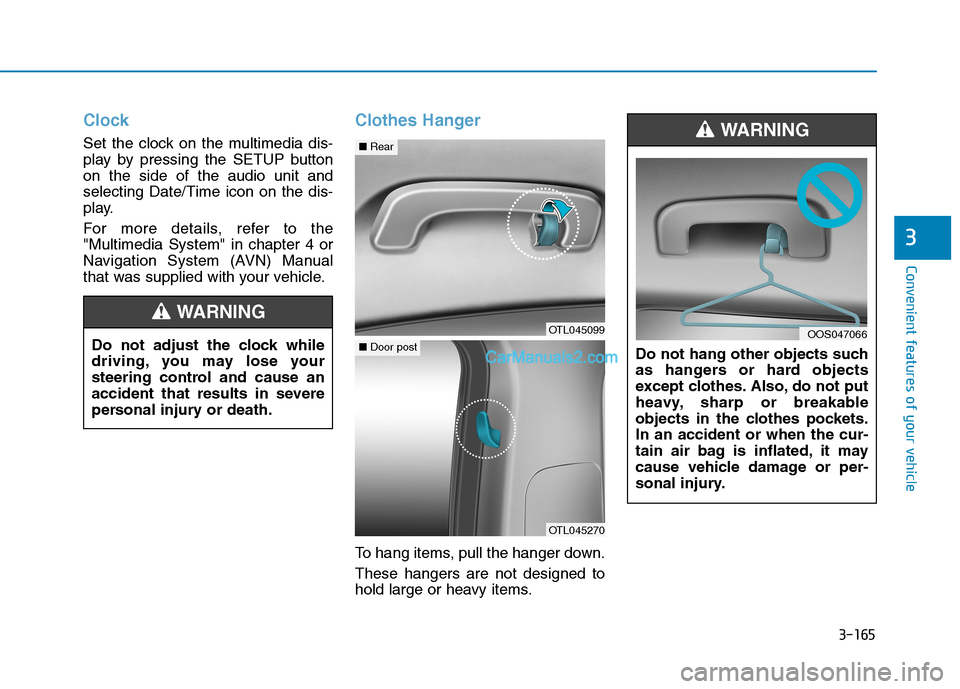
Clothes Hanger
To hang items, pull the hanger down.
These hangers are not designed to
hold large or heavy items.Do not hang other objects such
as hangers or hard objects
except clothes. Also, do not put
heavy, sharp or breakable
objects in the clothes pockets.
In an accident or when the cur-
tain air bag is inflated, it may
cause vehicle damage or per-
sonal injury.
WARNING
OOS047066Do not adjust the clock while
driving, you may lose your
steering control and cause an
accident that results in severe
personal injury or death.
WARNING
OTL045099
■Rear
OTL045270
■Door post
Page 263 of 546
Multimedia System
Multimedia System.................................................4-3
AUX, USB and iPod® ®Port ...............................................4-2
Antenna ...............................................................................4-2
Steering Wheel Audio Control........................................4-3
Audio / Video / Navigation System (AVN) ..................4-4
Bluetooth® ®Wireless Technology Hands-Free ...........4-4
4
Page 264 of 546
4-2
• If you install an aftermarket HID
head lamp, your vehicle's audio
and electronic device may mal-
function.
Use caution to keep chemicals
such as perfumes, cosmetics,
sun screen lotions, hand sanitiz-
ers, or air fresheners from con-
tacting any interior components.
These chemicals may cause
damage or discoloration to the
interior materials.
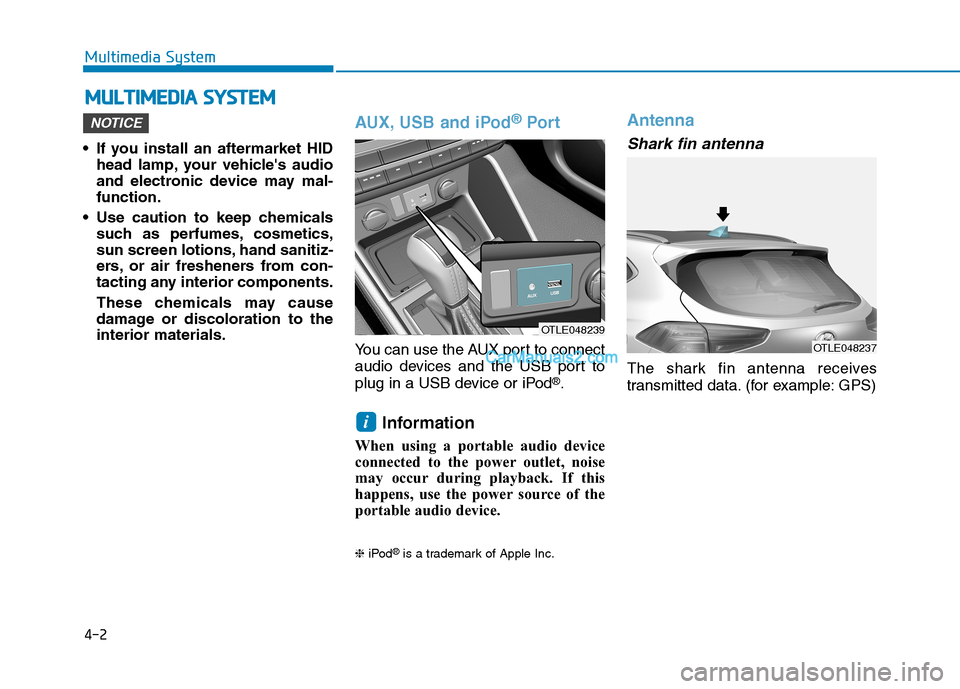
AUX, USB and iPod®Por t
You can use the AUX port to connect
audio devices and the USB port to
plug in a USB device or iPod
®.
Information
When using a portable audio device
connected to the power outlet, noise
may occur during playback. If this
happens, use the power source of the
portable audio device.
❈iPod®is a trademark of Apple Inc.
Antenna
Shark fin antenna
The shark fin antenna receives
transmitted data. (for example: GPS)
i
NOTICE
M MU
UL
LT
TI
IM
ME
ED
DI
IA
A
S
SY
YS
ST
TE
EM
M
Multimedia System
OTLE048239
OTLE048237
Page 265 of 546
4-3
Multimedia System
Steering Wheel Audio Control
Do not operate multiple audio
remote control buttons simultane-
ously.
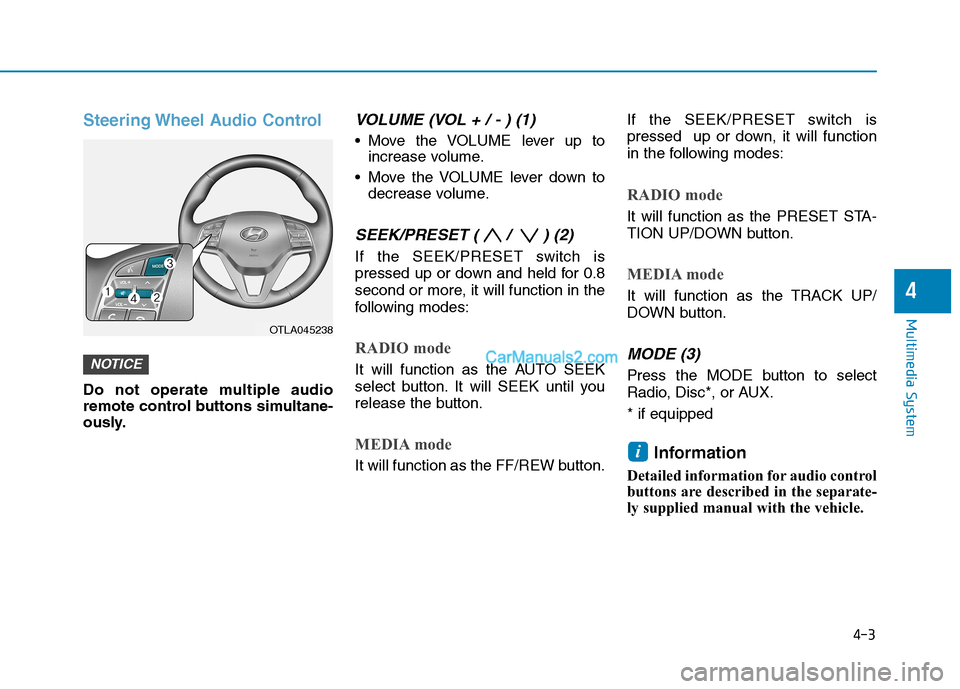
VOLUME (VOL + / - ) (1)
Move the VOLUME lever up to
increase volume.
Move the VOLUME lever down to
decrease volume.
SEEK/PRESET ( / ) (2)
If the SEEK/PRESET switch is
pressed up or down and held for 0.8
second or more, it will function in the
following modes:
RADIO mode
It will function as the AUTO SEEK
select button. It will SEEK until you
release the button.
MEDIA mode
It will function as the FF/REW button.If the SEEK/PRESET switch is
pressed up or down, it will function
in the following modes:
RADIO mode
It will function as the PRESET STA-
TION UP/DOWN button.
MEDIA mode
It will function as the TRACK UP/
DOWN button.
MODE (3)
Press the MODE button to select
Radio, Disc*, or AUX.
* if equipped
Information
Detailed information for audio control
buttons are described in the separate-
ly supplied manual with the vehicle.
i
NOTICE
4
OTLA045238
Page 266 of 546
4-4
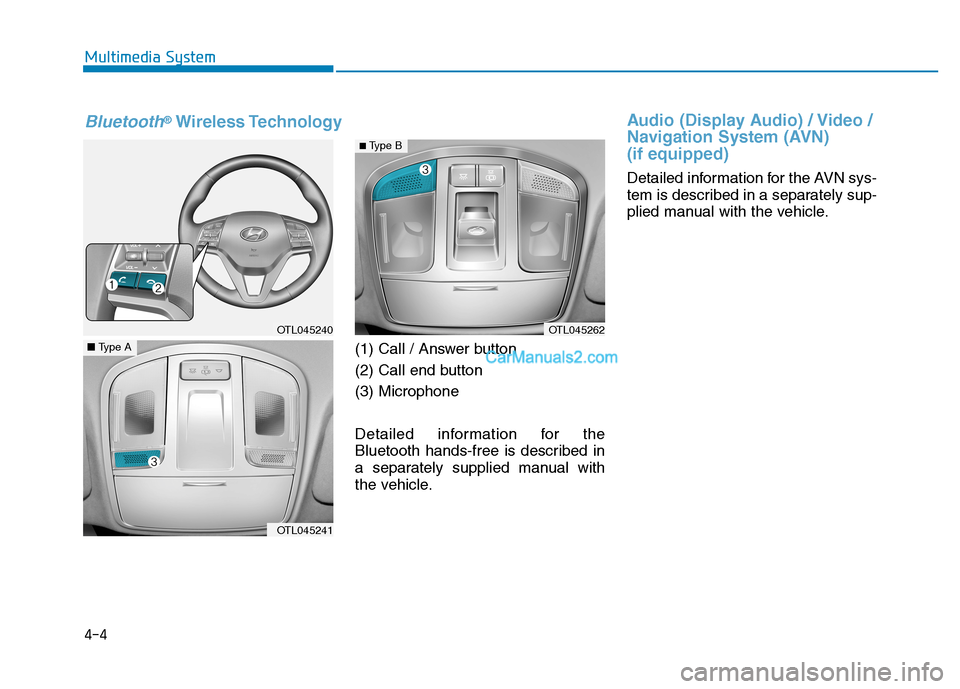
(1) Call / Answer button
(2) Call end button
(3) Microphone
Detailed information for the
Bluetooth hands-free is described in
a separately supplied manual with
the vehicle.
Audio (Display Audio) / Video /
Navigation System (AVN)
(if equipped)
Detailed information for the AVN sys-
tem is described in a separately sup-
plied manual with the vehicle. Multimedia System
OTL045240
OTL045241
■Type A
OTL045262
Bluetooth®Wireless Technology
■ Type B
Page 492 of 546

7-58
Maintenance
Instrument panel fuse panel
Fuse Name Fuse ratingCircuit Protected
TAILGATE OPEN10ATail Gate Open Relay
S/HEATER RR15ARear Seat Warmer
MDPS7.5AMDPS Unit
SMART KEY37.5A Smart Key Control Module, Immobilizer Module
CLUSTER7.5A Instrument Cluster (IG1 Power)
SMART KEY210A Smart Key Control Module, Start/Stop Button Switch, Immobilizer Module
MULTIMEDIA15A Audio, A/V & Navigation Head Unit
INTERIOR LAMP10A Ignition Key Ill. & Door Warning Switch, Luggage Lamp, Glove Box Lamp, Overhead Console Lamp,
Front Vanity Lamp LH/RH, Room Lamp, Rear Personal Lamp LH/RH, Wireless Charger
DOOR LOCK20A Door Lock Relay, Door Unlock Relay, ICM Relay Box (Two Turn Unlock Relay)
SUNROOF220A Panorama Sunroof
POWER OUTLET20A [W/O Wireless Charging] Front Power Outlet & Cigarette Lighter,
[With Wireless Charging] Cigarette Lighter
BRAKE SWITCH7.5A Smart Key Control Module, Stop Lamp Switch
MEMORY210A Instrument Cluster, A/C Control Module, Electro Chromic Mirror
P/SEAT (PASS)30A Passenger Seat Manual Switch
S/HEATER FRT20A Front Air Ventilation Seat Control Module, Front Seat Warmer Control Module
MODULE220A PCB Block (Fuse - ABS3, ECU6, TCU2)
SUNROOF120A Panorama Sunroof
A/CON27.5A A/C Control Module
HEATED MIRROR10ADriver/Passenger Power Outside Mirror, A/C Control Module, ECM (G4FJ)
P/SEAT (DRV)30ADriver Seat Manual Switch
Page 495 of 546

7
Maintenance
Engine compartment main fuse panel
Fuse NameFuse rating Circuit Protected
MULTI
FUSE-1
MDPS 80AMDPS Unit
B+1 60ASmart Junction Block (ARISU-LT IPS 1, IPS 2, IPS 3, IPS 4, Fuse - AMP)
B+2 60ASmart Junction Block (ARISU-LT IPS 5, IPS 6, IPS 7, IPS 8, Fuse - SMART KEY1,
SMART KEY2, BRAKE SWITCH, MODULE9)
B+3 50ASmart Junction Block (Fuse - SUNROOF1, SUNROOF2, S/HEATER FRT, S/HEATER RR,
SAFETY P/WINDOW DRV),
Power Window Relay (Fuse - P/WINDOW LH, P/WINDOW RH)
ABS1 40AESC Module, Multipurpose Check Connector
ABS2 40AESC Module, Multipurpose Check Connector
IG1 40AIgnition Switch (W/O Smart Key),
PCB Block (PDM (IG1)/PDM (ACC) Relay - With Smart Key)
IG2 30AStart Relay, Ignition Switch (W/O Smart Key),
PCB Block (PDM (IG2) Relay - With Smart Key)
MULTI
FUSE-2PTC HEATER 150APTC 1 Relay
PTC HEATER 250APTC 2 Relay
FUSE
B+450A Smart Junction Block (Fuse - MODULE8, 4WD, P/SEAT (DRV), P/SEAT (PASS),
TAILGATE OPEN, DOOR LOCK,
Leak Current Autocut Device - Fuse Switch, INTERIOR LAMP, MULTIMEDIA, MEMORY2)
COOLING FAN140A [G4NC/G4KJ] Cooling Fan High Relay
50A [G4FJ] Cooling Fan High Relay
TCU340A [G4FJ - 7DCT] TCM
TCU440A [G4FJ - 7DCT] TCM
BLOWER40A Blower Relay
POWER TAILGATE40A Power Tail Gate Module
REAR HEATED40A Rear Defogger Relay
7-61