2019 Hyundai Tucson tail
[x] Cancel search: tailPage 321 of 546

5-55
Driving your vehicle
5
RCCW (Rear Cross-Traffic
Collision Warning)
The Rear Cross-Traffic Collision
Warning function monitors approach-
ing cross traffic from the left and right
side of the vehicle when your vehicle
is in reverse.
Operating conditions
To operate:
Go to the 'User Settings →Driver
Assistance and select Rear Cross-
Traffic Collision Warning' on the LCD
display.(For more details, refer to
"LCD Display" in chapter 3.)
The system will turn on and standby
to activate. The system will activate
when vehicle speed is below 6 mph
(10 km/h) and with the shift lever in R
(Reverse).
Information
The Rear Cross-Traffic Collision
Warning (RCCW) detecting range is
approximately 1 - 65 ft (0.5 – 20 m).
An approaching vehicle will be detect-
ed if their vehicle speed is within 2.5 -
22.5 mph (4 - 36 km/h).
Note that the detecting range may
vary under certain conditions. As
always, use caution and pay close
attention to your surroundings when
backing up your vehicle.
Warning type
If the vehicle detected by the sensors
approaches your vehicle, the warn-
ing chime will sound, the warning
light on the outer side view mirror will
blink and a message will appear on
the LCD display.
i
■ Left■Right
OTLE058186/OTLE058187
Page 355 of 546

5-89
Driving your vehicle
5
LKA System Operation
To activate/deactivate the LKA sys-
tem:
With the ignition switch in the ON
position, press the LKA system
switch located on the instrument
panel on the left hand side of the
steering wheel. The indicator in the
cluster display will initially illuminate
white. This indicates the LKA system
is in the READY but NOT ENABLED
state.
If you press the LKA button again,
the indicator on the cluster display
will go off.Note that the vehicle
speed must be at least
approximately 40 mph
(64 km/h) to ENABLE the
LKA system. The indicator in the
cluster display will illuminate green.
The color of indicator will change
depending on the condition of LKA
system.
- White :Sensor does not detect
lane markers or vehicle
speed is under 40 mph (64
km/h).
- Green : Sensor detects lane mark-
ers and the system is able
to control vehicle steering.
Information
If the indicator (white) is activated
from the previous ignition cycle, the
system will turn ON without any addi-
tional control. If you press the LKA
switch again, the indicator on the clus-
ter goes off.
LKA system activation
To see the LKA system screen on
the LCD display in the cluster,
select Assist mode ( ).For more
details, refer to "LCD Display
Modes" in chapter 3.
i
OTLE058189OTL058188
Page 363 of 546
5-97
Driving your vehicle
5
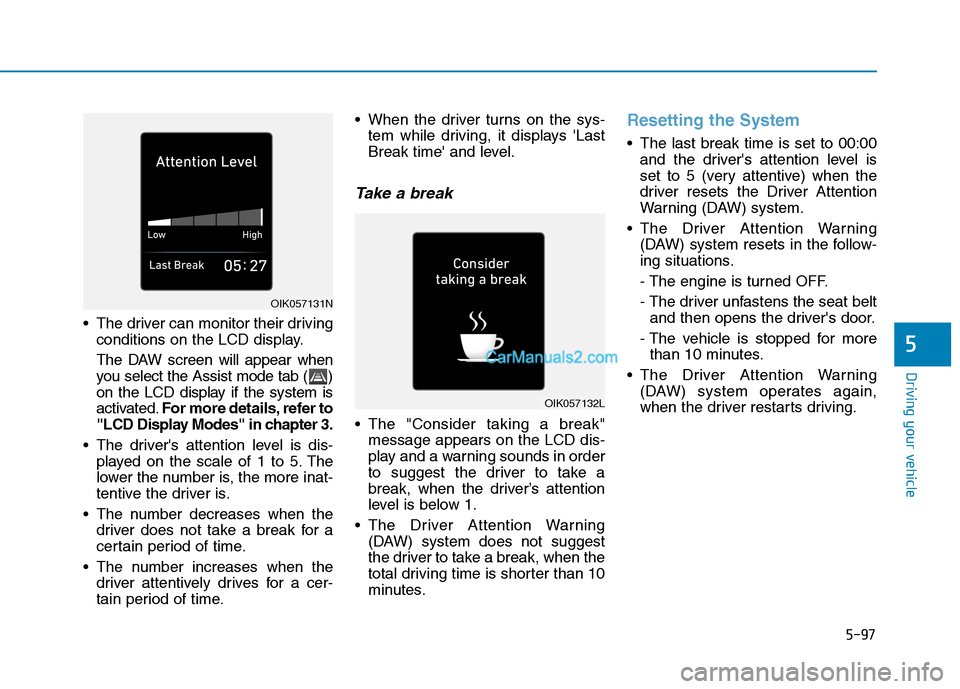
The driver can monitor their driving
conditions on the LCD display.
The DAW screen will appear when
you select the Assist mode tab ( )
on the LCD display if the system is
activated.For more details, refer to
"LCD Display Modes" in chapter 3.
The driver's attention level is dis-
played on the scale of 1 to 5. The
lower the number is, the more inat-
tentive the driver is.
The number decreases when the
driver does not take a break for a
certain period of time.
The number increases when the
driver attentively drives for a cer-
tain period of time. When the driver turns on the sys-
tem while driving, it displays 'Last
Break time' and level.
Take a break
The "Consider taking a break"
message appears on the LCD dis-
play and a warning sounds in order
to suggest the driver to take a
break, when the driver’s attention
level is below 1.
The Driver Attention Warning
(DAW) system does not suggest
the driver to take a break, when the
total driving time is shorter than 10
minutes.
Resetting the System
The last break time is set to 00:00
and the driver's attention level is
set to 5 (very attentive) when the
driver resets the Driver Attention
Warning (DAW) system.
The Driver Attention Warning
(DAW) system resets in the follow-
ing situations.
- The engine is turned OFF.
- The driver unfastens the seat belt
and then opens the driver's door.
- The vehicle is stopped for more
than 10 minutes.
The Driver Attention Warning
(DAW) system operates again,
when the driver restarts driving.
OIK057132L
OIK057131N
Page 365 of 546

5-99
Driving your vehicle
5
The Driver Attention Warning sys-
tem utilizes the camera sensor on
the front windshield for its opera-
tion. To keep the camera sensor in
the best condition, you should
observe the followings:
Do not disassemble the camera
temporarily to tint the window or
to attach any types of coatings
and accessories. If you disas-
semble a camera and assemble
it again, take your vehicle to an
authorized HYUNDAI dealer and
have the system checked for cal-
ibration.
NEVER install any accessories
or stickers on the front wind-
shield, nor tint the front wind-
shield.
NEVER locate any reflective
objects (i.e. white paper, mirror)
over the dashboard. Any light
reflection may cause a malfunc-
tion of the Driver Attention Alert
(DAW) system.
Pay extreme caution to keep the
camera sensor out of water.
NOTICE
The Driver Attention Warning
(DAW) system may not properly
operate with limited alerting in
the following situations:
The lane detection perform-
ance is limited. (For more
details, refer to "Lane Keeping
Assist (LKA) system" in this
chapter.)
The vehicle is violently driven
or is abruptly turned for
obstacle avoidance (e.g. con-
struction area, other vehicles,
fallen objects, bumpy road).
Forward drivability of the
vehicle is severely under-
mined (possibly due to wide
variation in tire pressures,
uneven tire wear-out, toe-
in/toe-out alignment).
The vehicle drives on a curvy
road.
The vehicle drives on a
bumpy road.
The vehicle drives through a
windy area.
The vehicle is controlled by
the following driving assist
systems:
- Lane Keeping Assist (LKA)
system
- Forward Collision-Avoidance
Assist (FCA) system
- Smart Cruise Control (SCC)
system
CAUTION
The DAW system warning
chime may be difficult to hear if
the audio system volume is set
to a high level.
CAUTION
Page 371 of 546
5-105
Driving your vehicle
5
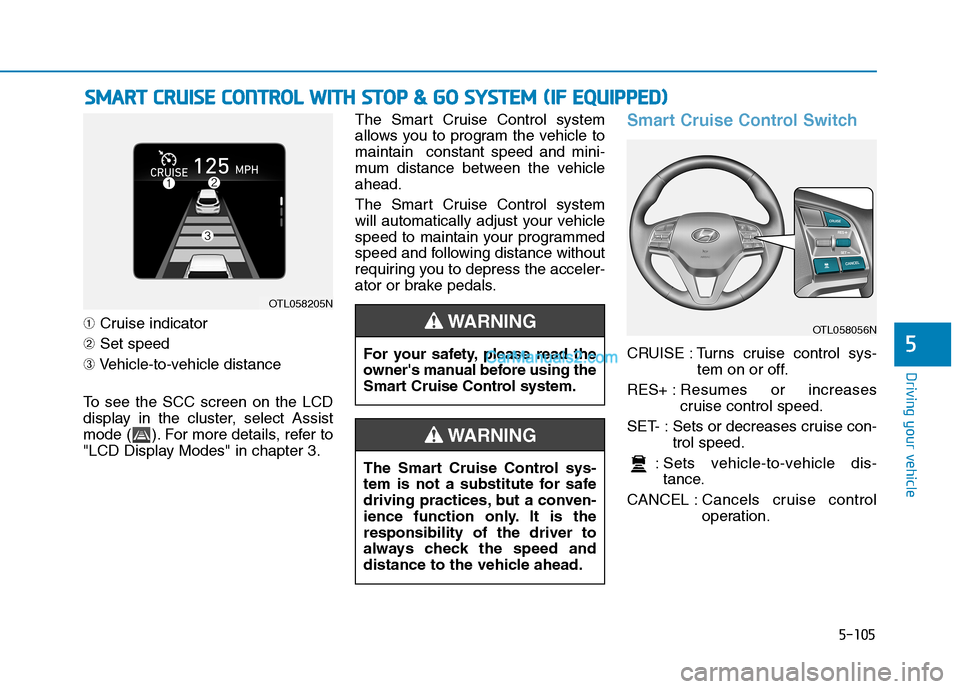
➀Cruise indicator
➁Set speed
➂Vehicle-to-vehicle distance
To see the SCC screen on the LCD
display in the cluster, select Assist
mode ( ). For more details, refer to
"LCD Display Modes" in chapter 3.The Smart Cruise Control system
allows you to program the vehicle to
maintain constant speed and mini-
mum distance between the vehicle
ahead.
The Smart Cruise Control system
will automatically adjust your vehicle
speed to maintain your programmed
speed and following distance without
requiring you to depress the acceler-
ator or brake pedals.
Smart Cruise Control Switch
CRUISE : Turns cruise control sys-
tem on or off.
RES+ :Resumes or increases
cruise control speed.
SET- : Sets or decreases cruise con-
trol speed.
: Sets vehicle-to-vehicle dis-
tance.
CANCEL :Cancels cruise control
operation.
S SM
MA
AR
RT
T
C
CR
RU
UI
IS
SE
E
C
CO
ON
NT
TR
RO
OL
L
W
WI
IT
TH
H
S
ST
TO
OP
P
&
&
G
GO
O
S
SY
YS
ST
TE
EM
M
(
(I
IF
F
E
EQ
QU
UI
IP
PP
PE
ED
D)
)
OTL058205N
The Smart Cruise Control sys-
tem is not a substitute for safe
driving practices, but a conven-
ience function only. It is the
responsibility of the driver to
always check the speed and
distance to the vehicle ahead.
WARNING
OTL058056N
For your safety, please read the
owner's manual before using the
Smart Cruise Control system.
WARNING
Page 396 of 546
5-130
Driving your vehicle
If you are considering to tow with your
vehicle, you should first check with
your state's Department of Motor
Vehicles to determine legal require-
ments. Since laws vary from state to
state the requirements for towing
trailers, vehicles, or other types of
vehicles or apparatus may differ. Ask
an authorized HYUNDAI dealer for
further details before towing.
Remember that trailering is different
than just driving your vehicle by itself.
Trailering means changes in han-
dling, durability, and fuel economy.
Successful, safe trailering requires
correct equipment, and it has to be
used properly. Damage to your vehi-
cle caused by improper trailer towing
is not covered by your vehicle manu-
facturer’s warranty.
This section contains many time-
tested, important trailering tips and
safety rules. Many of these are
important for your safety and that of
your passengers. Please read this
section carefully before you pull a
trailer.
If you decide to pull a trailer
Here are some important points if
you decide to pull a trailer:
Consider using a sway control. You
can ask a trailer hitch dealer about
sway control.
Do not do any towing with your
vehicle during its first 1,200 miles
(2,000 km) in order to allow the
engine to properly break in. Failure
to heed this caution may result in
serious engine or transmission
damage.
When towing a trailer, be sure to
consult an authorized HYUNDAI
dealer for further information on
additional requirements such as a
towing kit, etc.
Always drive your vehicle at a mod-
erate speed (less than 60 mph
(100 km/h)) or posted towing
speed limit.
On a long uphill grade, do not
exceed 45 mph (70 km/h) or the
posted towing speed limit,
whichever is lower.
Carefully observe the weight and
load limits provided in the following
pages.
T TR
RA
AI
IL
LE
ER
R
T
TO
OW
WI
IN
NG
G
Take the following precautions:
If you don't use the correct
towing equipment, or if you
drive improperly while towing,
you can lose control of the
vehicle when pulling a trailer.
For example, if the trailer is
too heavy, the braking per-
formance may be reduced.
You and your passengers
could be seriously or fatally
injured. Pull a trailer only if
you have followed all the
steps in this section.
Before towing, make sure the
total trailer weight, GCW
(Gross Combination Weight),
GVW (Gross Vehicle Weight),
GAW (Gross Axle Weight ) and
trailer tongue load are all with-
in the limits.
WARNING
Page 429 of 546
6-20
What to do in an emergency
Jack label
To prevent damaging the com-
pact spare tire and your vehicle:
Drive slowly enough for the
road conditions to avoid all
hazards, such as a potholes
or debris.
Avoid driving over obstacles.
The compact spare tire diame-
ter is smaller than the diame-
ter of a conventional tire and
reduces the ground clearance
approximately 1 inch (25 mm).
Do not use tire chains on the
compact spare tire. Because
of the smaller size, a tire chain
will not fit properly.
Do not use the compact spare
tire on any other wheels, nor
should standard tires, snow
tires, wheel covers or trim
rings be used with the com-
pact spare wheel.
CAUTION
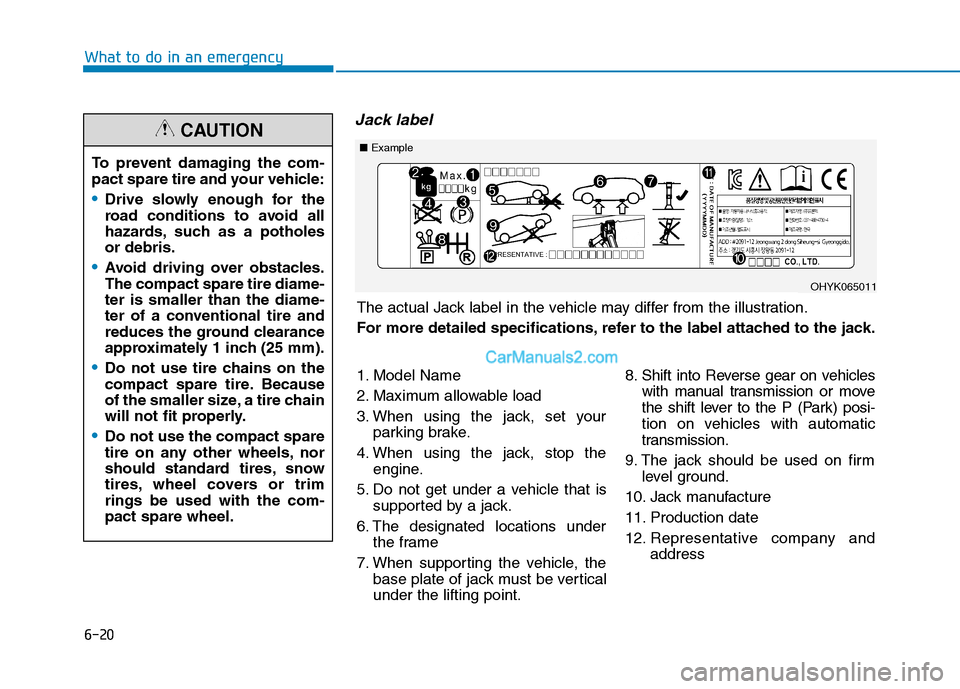
The actual Jack label in the vehicle may differ from the illustration.
For more detailed specifications, refer to the label attached to the jack.
■Example
OHYK065011
1. Model Name
2. Maximum allowable load
3. When using the jack, set your
parking brake.
4. When using the jack, stop the
engine.
5. Do not get under a vehicle that is
supported by a jack.
6. The designated locations under
the frame
7. When supporting the vehicle, the
base plate of jack must be vertical
under the lifting point.8. Shift into Reverse gear on vehicles
with manual transmission or move
the shift lever to the P (Park) posi-
tion on vehicles with automatic
transmission.
9. The jack should be used on firm
level ground.
10. Jack manufacture
11. Production date
12. Representative company and
address
Page 431 of 546
6-22
What to do in an emergency
When towing your vehicle in an
emergency without wheel dollies:
1. Place the ignition switch in the
ACC position.
2. Place the shift lever in N (Neutral).
3. Release the parking brake.
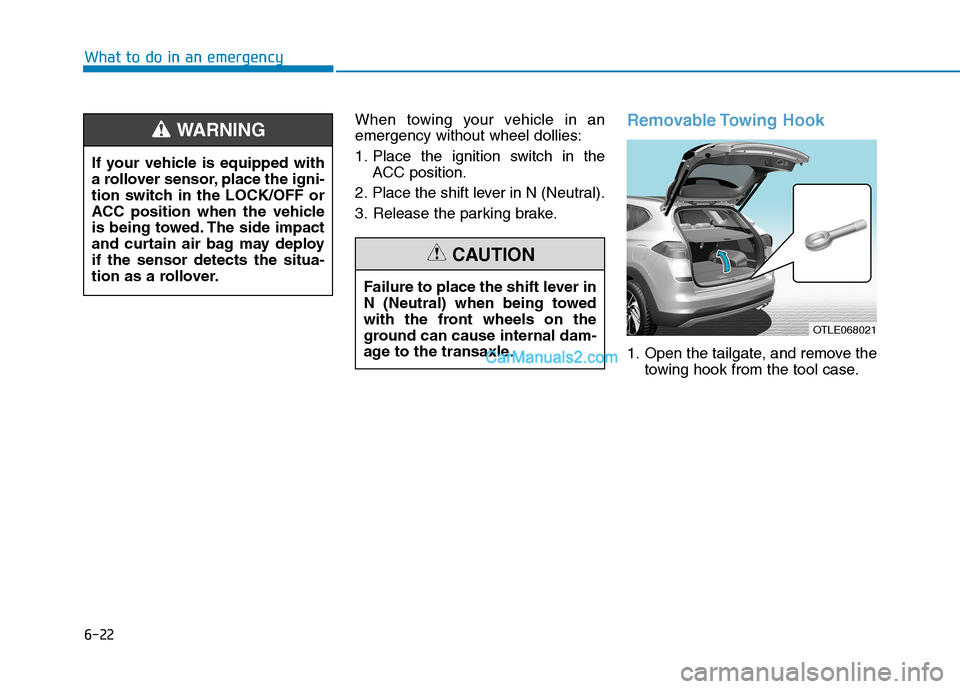
Removable Towing Hook
1. Open the tailgate, and remove the
towing hook from the tool case. If your vehicle is equipped with
a rollover sensor, place the igni-
tion switch in the LOCK/OFF or
ACC position when the vehicle
is being towed. The side impact
and curtain air bag may deploy
if the sensor detects the situa-
tion as a rollover.
WARNING
Failure to place the shift lever in
N (Neutral) when being towed
with the front wheels on the
ground can cause internal dam-
age to the transaxle.
CAUTION
OTLE068021