2019 Hyundai Tucson Epb
[x] Cancel search: EpbPage 295 of 546
5-29
Driving your vehicle
5
Parking brake warning light
Check the Parking
Brake Warning Light
by placing the ignition
switch to the ON posi-
tion (do not start the
engine).
This light will be illuminated when the
parking brake is applied with the igni-
tion switch in the START or ON posi-
tion.
Before driving, be sure the parking
brake is released and the Brake
Warning Light is OFF.
If the Parking Brake Warning Light
remains on after the parking brake is
released while engine is running,
there may be a malfunction in the
brake system. Immediate attention is
necessary.
If at all possible, cease driving the
vehicle immediately. If that is not pos-
sible, use extreme caution while
operating the vehicle and only con-
tinue to drive the vehicle until you
can reach a safe location.
Emergency braking
If there is a problem with the brake
pedal while driving, emergency brak-
ing is possible by pulling up and
holding the EPB switch. Braking is
possible only while you are holding
the EPB switch. However, braking
distance will be longer than normal.
Information
During emergency braking, the park-
ing brake warning light will illumi-
nate to indicate that the system is
operating.If you continuously notice a noise
or burning smell when the EPB is
used for emergency braking, have
system checked by an authorized
HYUNDAI dealer.
When the EPB (Electronic Parking
Brake) does not release
If the EPB does not release normal-
ly, we recommend that you contact
an authorized HYUNDAI dealer by
loading the vehicle on a flatbed tow
truck and have the system checked.
NOTICE
i
Do not operate the parking
brake while the vehicle is mov-
ing except in an emergency sit-
uation. It could damage the
brake system and lead to a
severe accident.
WARNING
Page 296 of 546
5-30
Driving your vehicle
Auto Hold (if equipped)
The Auto Hold maintains the vehicle
in a standstill even though the brake
pedal is not depressed after the driv-
er brings the vehicle to a complete
stop by depressing the brake pedal.
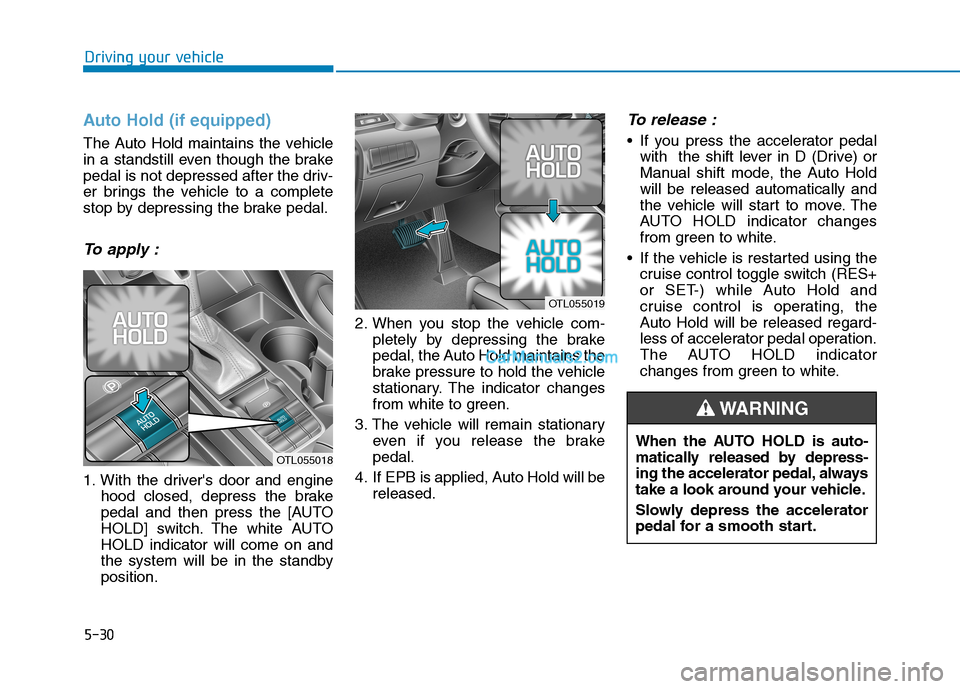
To apply :
1. With the driver's door and engine
hood closed, depress the brake
pedal and then press the [AUTO
HOLD] switch. The white AUTO
HOLD indicator will come on and
the system will be in the standby
position.2. When you stop the vehicle com-
pletely by depressing the brake
pedal, the Auto Hold maintains the
brake pressure to hold the vehicle
stationary. The indicator changes
from white to green.
3. The vehicle will remain stationary
even if you release the brake
pedal.
4. If EPB is applied, Auto Hold will be
released.
To release :
If you press the accelerator pedal
with the shift lever in D (Drive) or
Manual shift mode, the Auto Hold
will be released automatically and
the vehicle will start to move. The
AUTO HOLD indicator changes
from green to white.
If the vehicle is restarted using the
cruise control toggle switch (RES+
or SET-) while Auto Hold and
cruise control is operating, the
Auto Hold will be released regard-
less of accelerator pedal operation.
The AUTO HOLD indicator
changes from green to white.
OTL055018
OTL055019
When the AUTO HOLD is auto-
matically released by depress-
ing the accelerator pedal, always
take a look around your vehicle.
Slowly depress the accelerator
pedal for a smooth start.
WARNING
Page 297 of 546
![Hyundai Tucson 2019 Owners Manual 5-31
Driving your vehicle
5
To cancel :
1. Depress the brake pedal.
2. Press the [AUTO HOLD] switch.
The AUTO HOLD indicator will turn
off.
Information
• The Auto Hold does not operate
when:
- The](/manual-img/35/19694/w960_19694-296.png "Hyundai Tucson 2019 Owners Manual 5-31
Driving your vehicle
5
To cancel :
1. Depress the brake pedal.
2. Press the [AUTO HOLD] switch.
The AUTO HOLD indicator will turn
off.
Information
• The Auto Hold does not operate
when:
- The")
5-31
Driving your vehicle
5
To cancel :
1. Depress the brake pedal.
2. Press the [AUTO HOLD] switch.
The AUTO HOLD indicator will turn
off.
Information
• The Auto Hold does not operate
when:
- The driver's door is opened
- The engine hood is opened
- The shift lever is in P (Park) or R
(Reverse)
- The EPB is applied
• For your safety, the Auto Hold auto-
matically switches to EPB when:
- The driver's door is opened with
the shift lever in D (Drive) or N
(Neutral)
- The engine hood is opened with the
shift lever in D (Drive) or N
(Neutral)
- The vehicle stops for more than 10
minutes
- The vehicle stands on a steep slope
- The vehicle moves several timesIn these cases, the parking brake
warning light comes on, the AUTO
HOLD indicator changes from
green to white, and a warning sound
and a message will appear to inform
you that EPB has been automatical-
ly engaged. Before driving off again,
press foot brake pedal, check the
surrounding area near your vehicle
and release parking brake manually
with the EPB switch.
• While operating Auto Hold, you
may hear mechanical noise.
However, it is normal operating
noise.
If the AUTO HOLD indicator
changes to yellow, the Auto Hold
is not working properly. Contact
an authorized HYUNDAI dealer.
NOTICE
i
OTL055020
To prevent, unexpected and
sudden vehicle movement,
ALWAYS press your foot on the
brake pedal to cancel the Auto
Hold before you:
- Drive downhill.
- Drive the vehicle in R (Reverse).
- Park the vehicle.
WARNING
Page 298 of 546
5-32
Driving your vehicle
If there is a malfunction with the
driver's door or engine hood open
detection system, the Auto Hold
may not work properly.
Contact an authorized HYUNDAI
dealer.
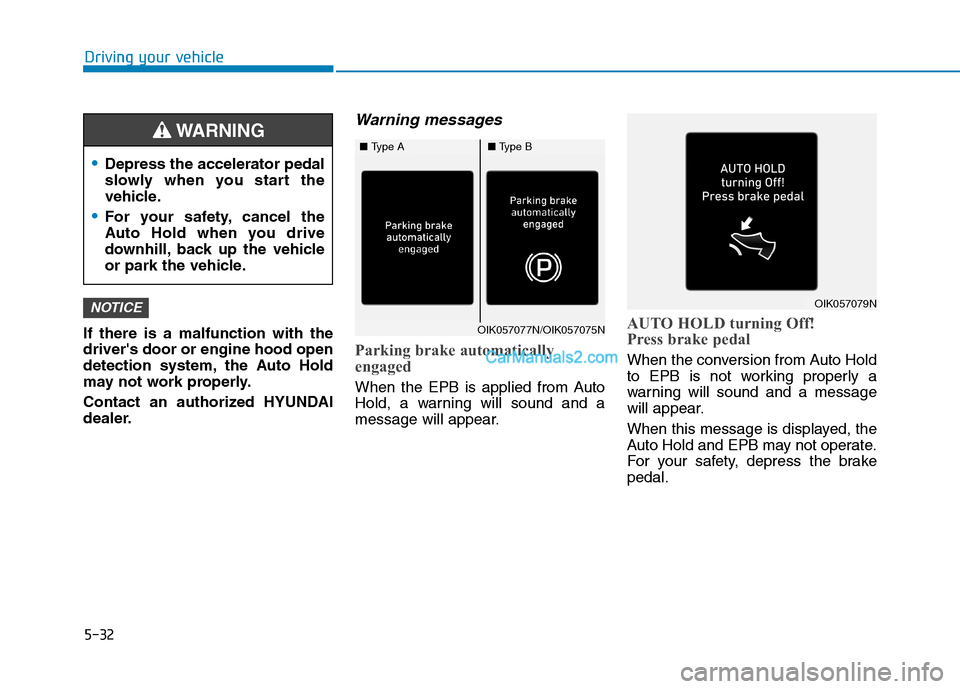
Warning messages
Parking brake automatically
engaged
When the EPB is applied from Auto
Hold, a warning will sound and a
message will appear.
AUTO HOLD turning Off!
Press brake pedal
When the conversion from Auto Hold
to EPB is not working properly a
warning will sound and a message
will appear.
When this message is displayed, the
Auto Hold and EPB may not operate.
For your safety, depress the brake
pedal.
NOTICE
Depress the accelerator pedal
slowly when you start the
vehicle.
For your safety, cancel the
Auto Hold when you drive
downhill, back up the vehicle
or park the vehicle.
WARNING
OIK057077N/OIK057075N
OIK057079N
■Type A■Type B
Page 374 of 546

5-108
Driving your vehicle
To temporarily accelerate with
the Smart Cruise Control on
If you want to speed up temporarily
when the Smart Cruise Control is on,
depress the accelerator pedal.
Increased speed will not interfere
with Smart Cruise Control operation
or change the set speed.
To return to the set speed, take your
foot off the accelerator pedal.
If you push the toggle switch down
(SET-) at increased speed, the cruis-
ing speed will be set again pedal.
Smart Cruise Control set speed
will be temporarily canceled
when:
Canceled manually
Depressing the brake pedal.
Pushing the CANCEL button locat-
ed on the steering wheel.
The Smart Cruise Control turns off
temporarily when the Set Speed and
Vehicle-to-Vehicle Distance indicator
on the LCD display turns off.
The cruise indicator is illuminated
continuously.
Canceled automatically
The driver's door is opened.
The vehicle is shifted to N
(Neutral), R (Reverse) or P (Park).
The EPB (Electronic Parking
Brake) is applied.
The vehicle speed is over 120 mph
(190 km/h).
The vehicle stops on a steep incline.
The ESC (Electronic Stability
Control), TCS (Traction Control
System) or ABS is operating.
The ESC is turned off.
The sensor or the cover is dirty or
blocked with foreign matter.
The vehicle is stopped for a certain
period of time.
The vehicle stops and goes repeat-
edly for a long period of time.
The accelerator pedal is continu-
ously depressed for a long period
of time.
The engine performance is abnor-
mal.
Engine rpm is in the red zone. Be careful when accelerating
temporarily, because the speed
is not controlled automatically
at this time even if there is a
vehicle in front of you.
CAUTIONOTL055103
Page 538 of 546
I-3
Brake Fluid .....................................................................7-23
Checking the Brake Fluid Level ................................7-23
Braking System ...............................................................5-21
Anti-lock Brake System (ABS)..................................5-33
Auto Hold ...................................................................5-30
Disc Brakes Wear Indicator........................................5-22
Downhill Brake Control (DBC) .................................5-40
Electronic Parking Brake (EPB) ................................5-24
Electronic Stability Control (ESC).............................5-35
Good Braking Practices..............................................5-42
Hill-Start Assist Control (HAC) .................................5-40
Parking Brake .............................................................5-22
Power Brakes..............................................................5-21
Vehicle Stability Management (VSM) .......................5-39
Bulb Wattage .....................................................................8-4
California Perchlorate Notice .........................................7-87
Cargo Net Holder ..........................................................3-167
Cargo Security Screen ..................................................3-167
Center Console Storage ................................................3-157
Child Restraint System (CRS) ........................................2-38
Children Always in the Rear ......................................2-38
Installing a Child Restraint System (CRS) ................2-41
Selecting a Child Restraint System (CRS).................2-39Climate Control Additional Features ............................3-156
Automatic Ventilation...............................................3-156
Cluster ionizer ..........................................................3-156
Sunroof Inside Air Recirculation .............................3-156
Climate Control Air Filter...............................................7-27
Filter Inspection..........................................................7-27
Clock .............................................................................3-165
Clothes Hanger .............................................................3-165
Consumer Information ....................................................8-13
Cruise Control ...............................................................5-100
Cruise Control operation ..........................................5-100
Cup Holder....................................................................3-159
Curtain air bags ...............................................................2-53
Dimensions .......................................................................8-2
Disc Brakes Wear Indicator ............................................5-22
Door Locks .....................................................................3-15
Automatic Door Lock and Unlock Features ..............3-18
Child-Protector Rear Door locks................................3-19
Operating Door Locks from Inside the Vehicle .........3-16
Operating Door Locks from Outside the Vehicle ......3-15
Downhill Brake Control (DBC) .....................................5-40
Drive Mode Integrated Control System .........................5-51
Driver Assist System.....................................................3-124
Rear View Monitor ...................................................3-124
Surround View Monitor ...........................................3-125
I
Index
C
D
Page 539 of 546

I-4
Driver Attention Warning (DAW) System......................5-96
Resetting the System ..................................................5-97
System Malfunction ...................................................5-98
System Setting and Activation ...................................5-96
System Standby ..........................................................5-98
Driver's front air bag .......................................................2-50
Electric Power Steering (EPS) ........................................3-21
Electronic Parking Brake (EPB) .....................................5-24
Electronic Stability Control (ESC) .................................5-35
Emission Control System ...............................................7-83
Crankcase Emission Control System .........................7-83
Evaporative Emission Control System Including
Onboard Refueling Vapor Recovery (ORVR) ........7-83
Exhaust Emission Control System .............................7-84
Engine ...............................................................................8-2
Engine compartment..................................................1-6, 7-3
Engine Coolant ...............................................................7-19
Changing Engine Coolant ..........................................7-22
Checking the Engine Coolant Level ..........................7-19
Engine Number ...............................................................8-12
Engine Oil .......................................................................7-17
Checking the Engine Oil and Filter ...........................7-18
Checking the Engine Oil Level ..................................7-17
Explanation Of Scheduled Maintenance Items ..............7-14Exterior Features .................................................3-47, 3-171
Fuel Filler Door ..........................................................3-48
Hood ...........................................................................3-47
Roof Rack.................................................................3-171
Exterior Lights ..............................................................3-107
AUTO headlamp position ........................................3-108
Battery saver function ..............................................3-114
Daytime running light (DRL) ..................................3-107
Front fog lamp ..........................................................3-114
Headlamp delay function..........................................3-115
Headlamp position....................................................3-109
High Beam Assist (HBA) .........................................3-110
High beam operation ................................................3-109
Lane change signals..................................................3-113
Parking lamp position ..............................................3-108
Turn signals ..............................................................3-113
Exterior overview .............................................................1-2
Floor Mat Anchor(s) .....................................................3-166
Forward Collision-Avoidance Assist (FCA) System
- Camera Type .............................................................5-60
FCA Sensor ................................................................5-65
FCA Warning Message and System Control..............5-63
Limitations of the System ..........................................5-68
System Not Operating ................................................5-67
System Setting and Activation ...................................5-60
Index
E
F