Page 352 of 546

5-86
Driving your vehicle
The adverse road conditions cause
excessive vehicle vibrations while
driving
The sensor recognition changes
suddenly when passing over a
speed bump
You are on a roundabout
Information
In some instances, the FCA system
may be cancelled when subjected to
electromagnetic interference.
Information
This device complies with Part 15 of
the FCC rules.
Operation is subject to the following
two conditions:
1. This device may not cause harmful
interference, and
2. This device must accept any inter-
ference received, including interfer-
ence that may cause undesired
operation.
i
i
Do not use the Forward
Collision-Avoidance Assist
(FCA) system when towing a
vehicle. Application of the
FCA system while towing may
adversely affect the safety of
your vehicle or the towing
vehicle.
Use extreme caution when the
vehicle in front of you has
cargo that extends rearward
from the cab, or when the
vehicle in front of you has
higher ground clearance.
The FCA system is designed
to help detect and monitor the
vehicle ahead or help detect a
pedestrian in the roadway
through radar signals and
camera recognition. It is not
designed to detect bicycles,
motorcycles, or smaller
wheeled objects such as lug-
gage bags, shopping carts, or
strollers.
Never try to test the operation
of the FCA system. Doing so
may cause severe injury or
death.
If the front bumper, front
glass, radar or camera have
been replaced or repaired,
have your vehicle inspected
by an authorized HYUNDAI
dealer.
WARNING
Page 380 of 546
5-114
Driving your vehicle
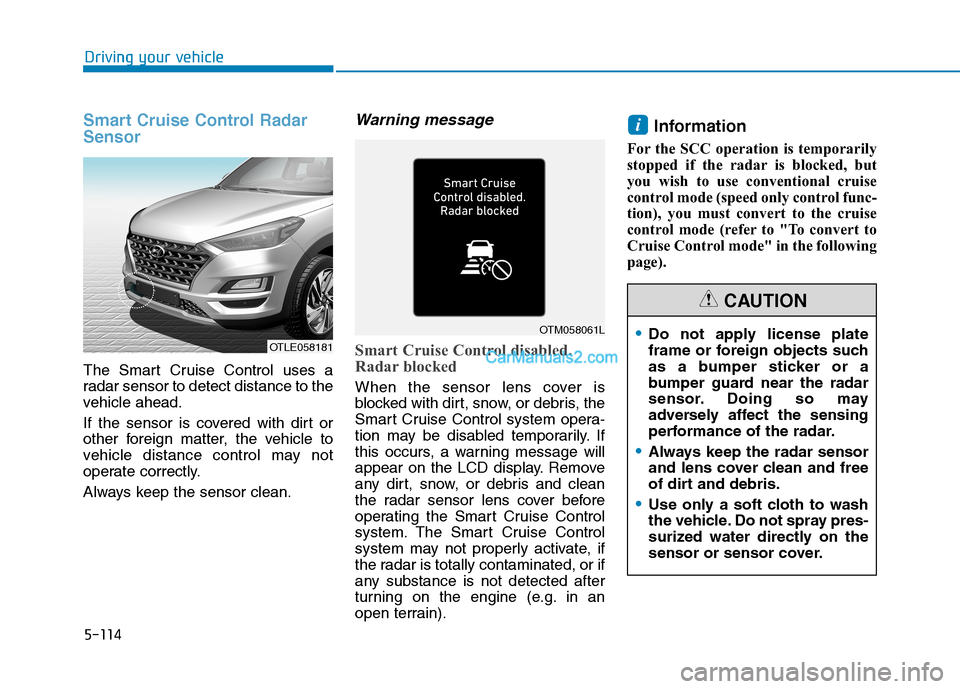
Smart Cruise Control Radar
Sensor
The Smart Cruise Control uses a
radar sensor to detect distance to the
vehicle ahead.
If the sensor is covered with dirt or
other foreign matter, the vehicle to
vehicle distance control may not
operate correctly.
Always keep the sensor clean.
Warning message
Smart Cruise Control disabled.
Radar blocked
When the sensor lens cover is
blocked with dirt, snow, or debris, the
Smart Cruise Control system opera-
tion may be disabled temporarily. If
this occurs, a warning message will
appear on the LCD display. Remove
any dirt, snow, or debris and clean
the radar sensor lens cover before
operating the Smart Cruise Control
system. The Smart Cruise Control
system may not properly activate, if
the radar is totally contaminated, or if
any substance is not detected after
turning on the engine (e.g. in an
open terrain).
Information
For the SCC operation is temporarily
stopped if the radar is blocked, but
you wish to use conventional cruise
control mode (speed only control func-
tion), you must convert to the cruise
control mode (refer to "To convert to
Cruise Control mode" in the following
page).
i
OTLE058181
OTM058061LDo not apply license plate
frame or foreign objects such
as a bumper sticker or a
bumper guard near the radar
sensor. Doing so may
adversely affect the sensing
performance of the radar.
Always keep the radar sensor
and lens cover clean and free
of dirt and debris.
Use only a soft cloth to wash
the vehicle. Do not spray pres-
surized water directly on the
sensor or sensor cover.
CAUTION
Page 381 of 546

5-115
Driving your vehicle
5
Check Smart Cruise Control System
The message will appear when the
vehicle to vehicle distance control
system is not functioning normally.
Take your vehicle to an authorized
HYUNDAI dealer and have the sys-
tem checked.
To Adjust the Sensitivity of
Smart Cruise Control
The sensitivity of vehicle speed
when following the front vehicle to
maintain the set distance can be
adjusted. Go to the 'User Settings →
Driver Assistance →SCC Reaction
→Fast/Normal/Slow' on the LCD
display. You may select one of the
three stages you prefer.
Fast:
Vehicle speed following the front
vehicle to maintain the set distance
is faster than normal speed.
OIK057097N
■Type A■Type B
OIK057109L/OIK057110L
Be careful not to apply unnec-
essary force on the radar sen-
sor or sensor cover. If the sen-
sor is forcibly moved out of
proper alignment, the Smart
Cruise Control system may
not operate correctly. In this
case, a warning message may
not be displayed. Have the
vehicle inspected by an
authorized HYUNDAI dealer.
If the front bumper becomes
damaged in the area around
the radar sensor, the Smart
Cruise Control System may
not operate properly. Have the
vehicle inspected by an
authorized HYUNDAI dealer.
Use only genuine HYUNDAI
parts to repair or replace a
damaged sensor or sensor
cover. Do not apply paint to
the sensor cover.
Page 398 of 546
5-132
Driving your vehicle
Trailer towing equipment
Hitches
It's important to have the correct
hitch equipment. Crosswinds, large
trucks going by, and rough roads are
a few reasons why you’ll need the
right hitch. Here are some rules to
follow:
Do you have to make any holes in
the body of your vehicle when you
install a trailer hitch? If you do, then
be sure to seal the holes later
when you remove the hitch. If you
don’t seal them, carbon monoxide
(CO) from your exhaust can get
into your vehicle, as well as dirt
and water.
The bumpers on your vehicle are
not intended for hitches. Do not
attach rental hitches or other
bumper-type hitches to them. Use
only a frame-mounted hitch that
does not attach to the bumper.
A HYUNDAI trailer hitch accessory
is available at an authorized
HYUNDAI dealer.
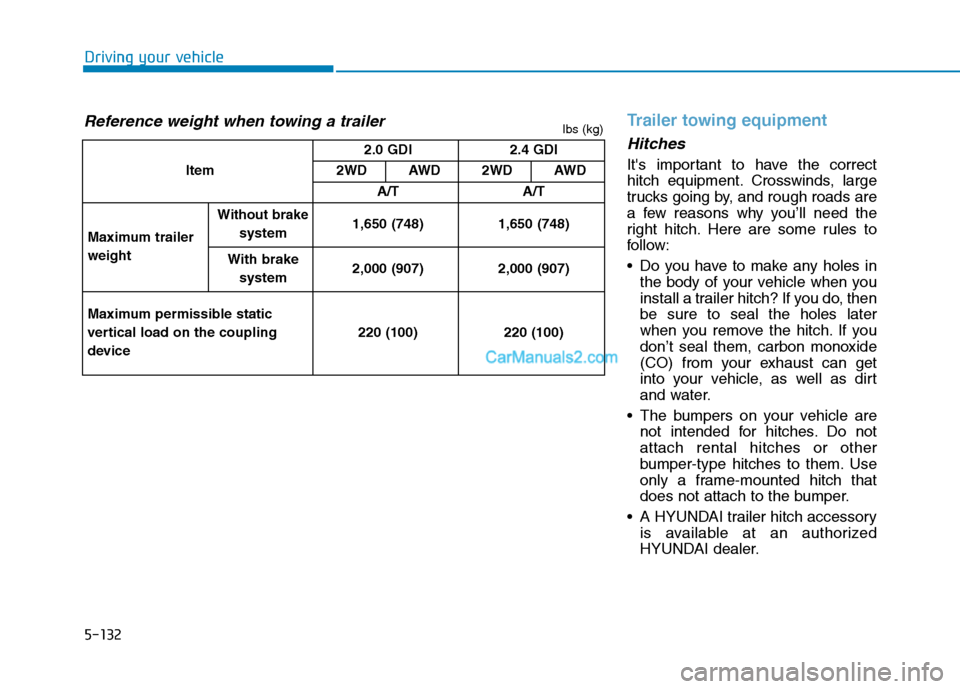
Reference weight when towing a trailer
Item2.0 GDI 2.4 GDI
2WD AWD 2WD AWD
A/T A/T
Maximum trailer
weight
Without brake
system1,650 (748) 1,650 (748)
With brake
system2,000 (907) 2,000 (907)
Maximum permissible static
vertical load on the coupling
device220 (100) 220 (100)
lbs (kg)
Page 424 of 546
6-15
What to do in an emergency
6
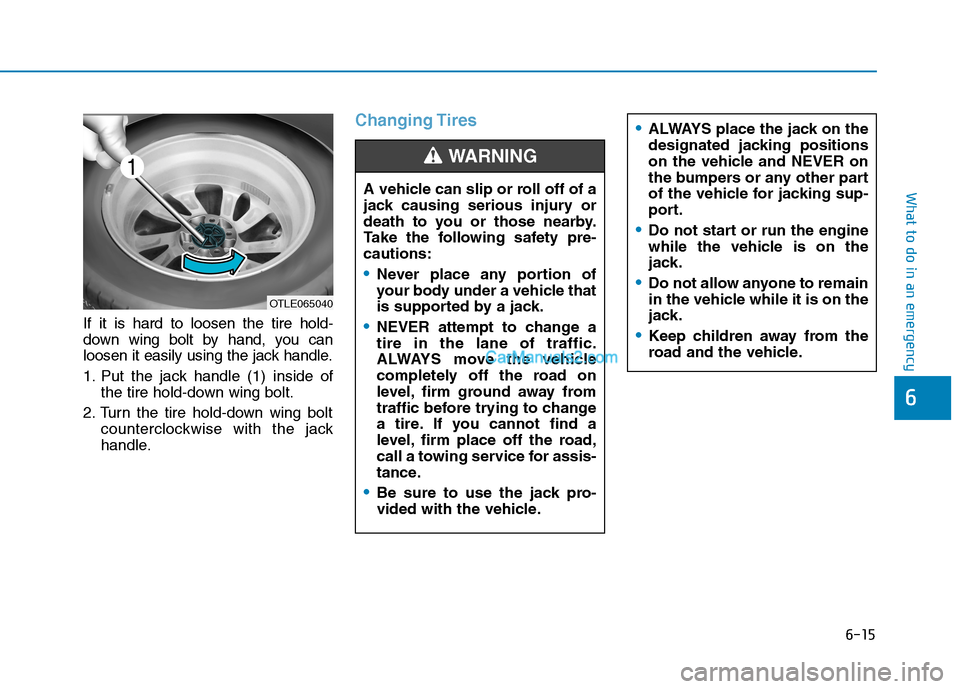
If it is hard to loosen the tire hold-
down wing bolt by hand, you can
loosen it easily using the jack handle.
1. Put the jack handle (1) inside of
the tire hold-down wing bolt.
2. Turn the tire hold-down wing bolt
counterclockwise with the jack
handle.
Changing Tires
A vehicle can slip or roll off of a
jack causing serious injury or
death to you or those nearby.
Take the following safety pre-
cautions:
Never place any portion of
your body under a vehicle that
is supported by a jack.
NEVER attempt to change a
tire in the lane of traffic.
ALWAYS move the vehicle
completely off the road on
level, firm ground away from
traffic before trying to change
a tire. If you cannot find a
level, firm place off the road,
call a towing service for assis-
tance.
Be sure to use the jack pro-
vided with the vehicle.
ALWAYS place the jack on the
designated jacking positions
on the vehicle and NEVER on
the bumpers or any other part
of the vehicle for jacking sup-
port.
Do not start or run the engine
while the vehicle is on the
jack.
Do not allow anyone to remain
in the vehicle while it is on the
jack.
Keep children away from the
road and the vehicle.
WARNING
OTLE065040
Page 432 of 546
6-23
What to do in an emergency
6
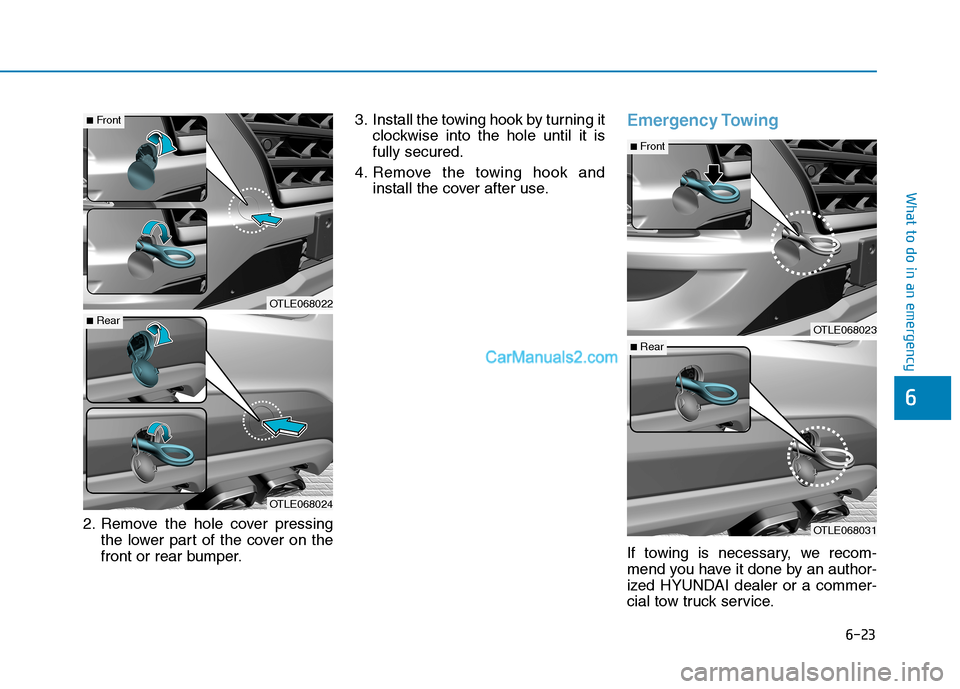
2. Remove the hole cover pressing
the lower part of the cover on the
front or rear bumper.3. Install the towing hook by turning it
clockwise into the hole until it is
fully secured.
4. Remove the towing hook and
install the cover after use.
Emergency Towing
If towing is necessary, we recom-
mend you have it done by an author-
ized HYUNDAI dealer or a commer-
cial tow truck service.
OTLE068022
OTLE068024
■Front
■RearOTLE068023
OTLE068031
■Front
■Rear
Page 434 of 546
6-25
What to do in an emergency
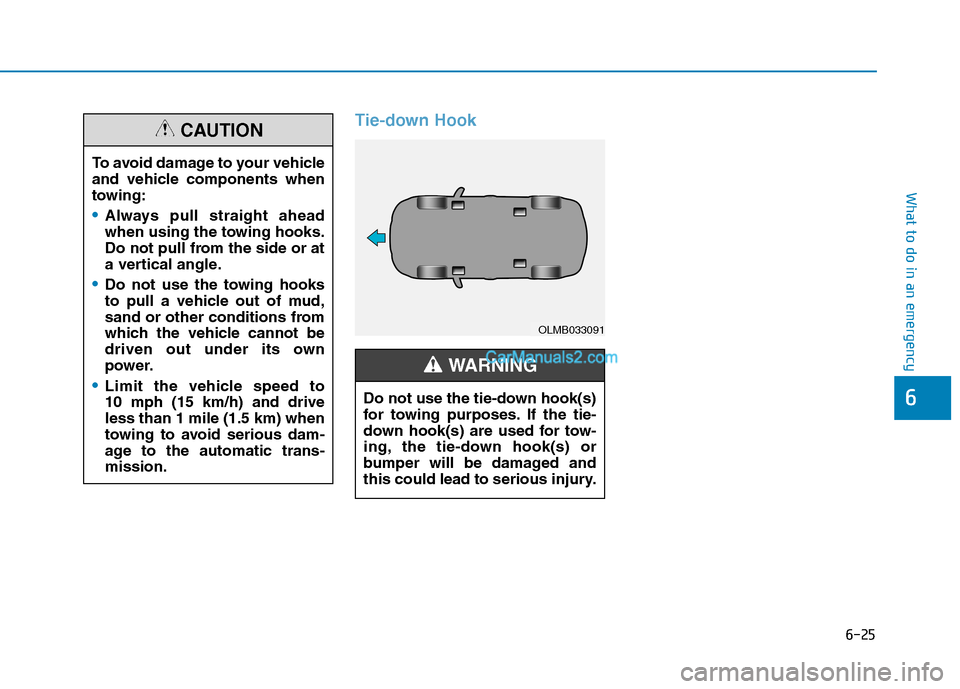
Tie-down Hook
6
To avoid damage to your vehicle
and vehicle components when
towing:
Always pull straight ahead
when using the towing hooks.
Do not pull from the side or at
a vertical angle.
Do not use the towing hooks
to pull a vehicle out of mud,
sand or other conditions from
which the vehicle cannot be
driven out under its own
power.
Limit the vehicle speed to
10 mph (15 km/h) and drive
less than 1 mile (1.5 km) when
towing to avoid serious dam-
age to the automatic trans-
mission.
CAUTION
OLMB033091
Do not use the tie-down hook(s)
for towing purposes. If the tie-
down hook(s) are used for tow-
ing, the tie-down hook(s) or
bumper will be damaged and
this could lead to serious injury.
WARNING