2019 Hyundai Tucson key
[x] Cancel search: keyPage 172 of 685
3-80
Convenient features of your vehicle
Key not in vehicle(for smart key system)
This warning message illuminates if
the smart key is not in the vehicle
when you press the Engine Start/Stop
button.
It means that you always have the
smart key with you.
Key not detected (for smart key system)
This warning message illuminates if
the smart key is not detected when you
press the Engine Start/Stop button.
Press start button again (for smart key system)
This warning message illuminates if
you can not operate the Engine
Start/Stop button when there is a
problem with the Engine Start/Stop
button system.
You could start the engine by press-
ing the Engine Start/Stop button
once more.
If the warning illuminates each time
you press the Engine Start/Stop but-
ton, we recommend that you have the
vehicle inspected by a HYUNDAI
authorised repairer.
Press “START” button with key(for smart key system)
This warning message illuminates if
you press the Engine Start/Stop but-
ton whilst the warning message “Key
not detected” is displayed.
At this time, the immobiliser indicator
light blinks.
Check "BRAKE SWITCH" fuse(for smart key system and auto-matic transaxle/dual clutch trans-mission)
This warning message illuminates if
the brake switch fuse is disconnected.
You need to replace the fuse with a
new one. If that is not possible, you
can start the engine by pressing the
Engine Start/Stop button for 10 sec-
onds in the ACC position.
Shift to "P" or "N" to start engine(for smart key system and auto-matic transaxle/dual clutch trans-mission)
This warning message illuminates if
you try to start the engine with the
shift lever not in the P (Park) or N
(Neutral) position.
Information
You can start the engine with the shift
lever in the N (Neutral) position. But,
for your safety, we recommend that
you start the engine with the shift
lever in the P (Park) position.
i
TLe UK 3a(~109).qxp 6/12/2018 2:27 PM Page 80
Page 181 of 685
3-89
Convenient features of your vehicle
The accumulated driving information
will continue to be counted whilst the
engine is still running (for example,
when the vehicle is in traffic or
stopped at a stop light).
Information
The vehicle must be driven for a min-
imum of 300 meters (0.19 miles) since
the last ignition key cycle before the
average fuel economy will be recalcu-
lated.
Drive Info display
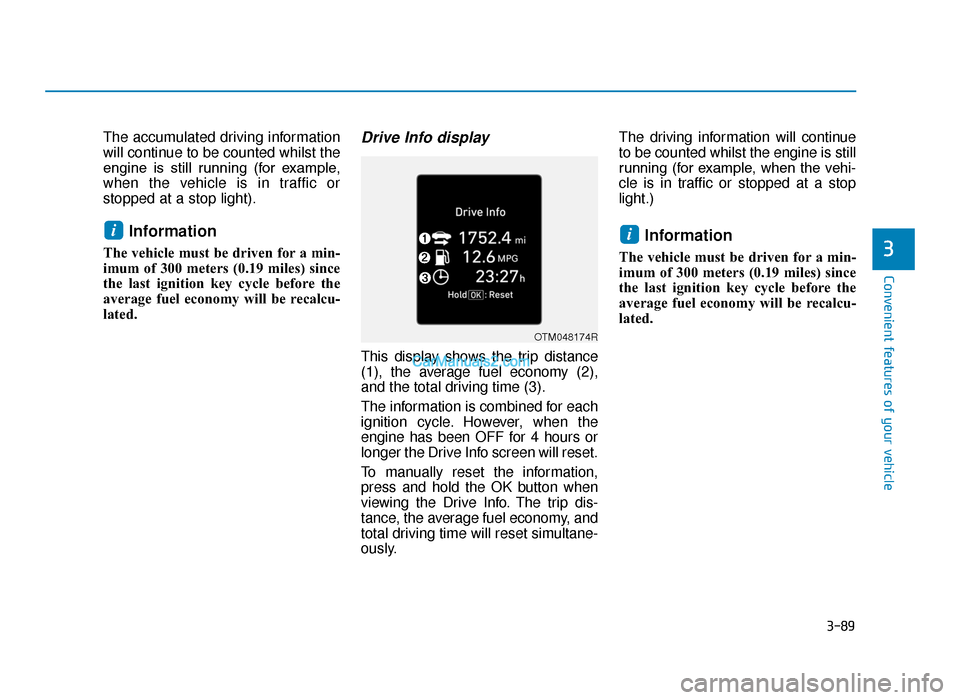
This display shows the trip distance
(1), the average fuel economy (2),
and the total driving time (3).
The information is combined for each
ignition cycle. However, when the
engine has been OFF for 4 hours or
longer the Drive Info screen will reset.
To manually reset the information,
press and hold the OK button when
viewing the Drive Info. The trip dis-
tance, the average fuel economy, and
total driving time will reset simultane-
ously.The driving information will continue
to be counted whilst the engine is still
running (for example, when the vehi-
cle is in traffic or stopped at a stop
light.)
Information
The vehicle must be driven for a min-
imum of 300 meters (0.19 miles) since
the last ignition key cycle before the
average fuel economy will be recalcu-
lated.
ii
3
OTM048174R
TLe UK 3a(~109).qxp 6/12/2018 2:28 PM Page 89
Page 189 of 685
3-97
Convenient features of your vehicle
3
Electric PowerSteering (EPS)Warning Light
This warning light illuminates:
• Once you set the ignition switch or
the Engine Start/Stop button to the
ON position.
- This indicator light comes on afterthe ignition key is turned to the
ON position and then goes out
after approximately 3 seconds.
• When there is a malfunction with the EPS.
In this case, we recommend that
you have the vehicle inspected by
a HYUNDAI authorised repairer.
Malfunction IndicatorLamp (MIL)
This warning light illuminates:
• Once you set the ignition switch or
the Engine Start/Stop button to the
ON position.
- It remains on until the engine isstarted.
• When there is a malfunction with the emission control system.
In this case, we recommend that
you have the vehicle inspected by
a HYUNDAI authorised repairer.
Driving with the Malfunction Indicator
Lamp (MIL) on may cause damage to
the emission control systems which
could affect drivability and/or fuel
economy.
- Petrol Engine
If the Malfunction Indicator Lamp
(MIL) illuminates, potential catalyt-
ic converter damage is possible
which could result in loss of
engine power.
In this case, we recommend that
you have the vehicle inspected by
a HYUNDAI authorised repairer as
soon as possible.
- Diesel Engine
If the Malfunction Indicator Lamp
(MIL) blinks, some error related to
the injection quantity adjustment
occurs which could result in loss
of engine power, combustion
noise and poor emission.
In this case, we recommend that
you have the engine control sys-
tem inspected by a HYUNDAI
authorised repairer.
NOTICE
NOTICE
NOTICE
TLe UK 3a(~109).qxp 6/12/2018 2:28 PM Page 97
Page 197 of 685
3-105
Convenient features of your vehicle
3
Immobiliser IndicatorLight (without smart key)(if equipped)
This indicator light illuminates:
• When the vehicle detects the
immobiliser in your key properly
whilst the ignition switch is ON.
- At this time, you can start theengine.
- The indicator light goes off after starting the engine.
This indicator light blinks:
• When there is a malfunction with the immobiliser system.
In this case, we recommend that
you have the vehicle inspected by
a HYUNDAI authorised repairer.
Immobiliser IndicatorLight (With Smart Key) (if equipped)
This indicator light illuminates for
up to 30 seconds:
• When the vehicle detects the
smart key in the vehicle properly
whilst the Engine Start/Stop button
is ACC or ON.
- At this time, you can start theengine.
- The indicator light goes off after starting the engine.
This indicator light blinks for a few
seconds:
• When the smart key is not in the vehicle.
- At this time, you cannot start theengine.
This indicator light illuminates for
2 seconds and goes off:
• When the vehicle cannot detect the smart key which is in the vehicle
whilst the Engine Start/Stop button
is ON.
In this case, we recommend that
you have the vehicle inspected by
a HYUNDAI authorised repairer.
This indicator light blinks:
• When the battery of the smart keyis weak.
- At this time, you can not start theengine. However, you can start
the engine if you press the
Engine Start/Stop button with the
smart key. (For more details,
refer to “Starting the Engine” in
chapter 5).
• When there is a malfunction with the immobiliser system.
In this case, we recommend that
you have the vehicle inspected by
a HYUNDAI authorised repairer.
TLe UK 3a(~109).qxp 6/12/2018 2:29 PM Page 105
Page 209 of 685
3-117
Convenient features of your vehicle
3
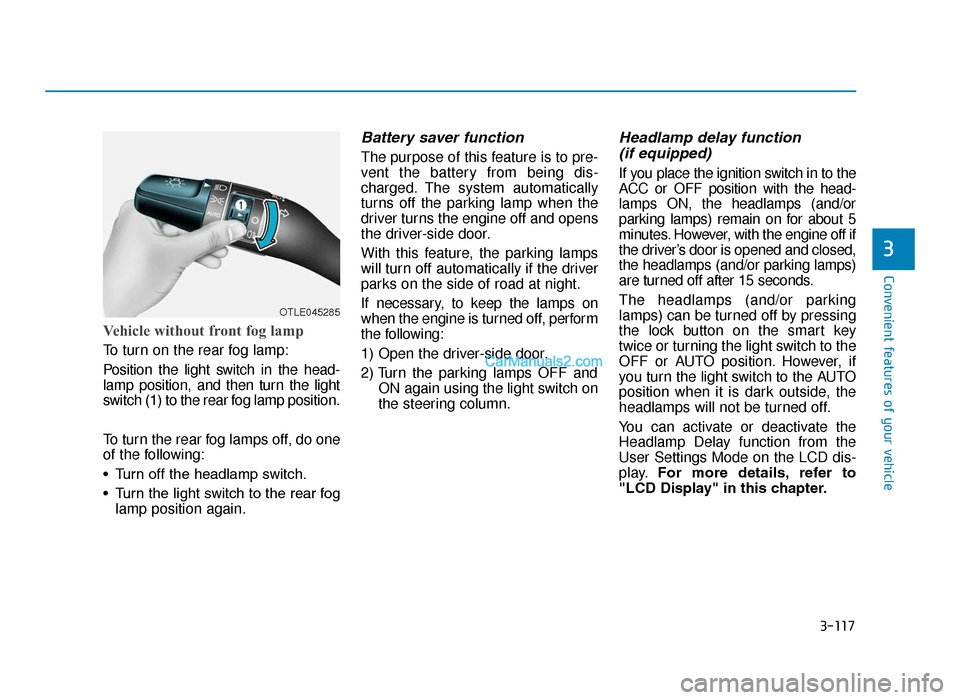
Vehicle without front fog lamp
To turn on the rear fog lamp:
Position the light switch in the head-
lamp position, and then turn the light
switch (1) to the rear fog lamp position.
To turn the rear fog lamps off, do one
of the following:
• Turn off the headlamp switch.
• Turn the light switch to the rear foglamp position again.
Battery saver function
The purpose of this feature is to pre-
vent the battery from being dis-
charged. The system automatically
turns off the parking lamp when the
driver turns the engine off and opens
the driver-side door.
With this feature, the parking lamps
will turn off automatically if the driver
parks on the side of road at night.
If necessary, to keep the lamps on
when the engine is turned off, perform
the following:
1) Open the driver-side door.
2) Turn the parking lamps OFF and ON again using the light switch on
the steering column.
Headlamp delay function (if equipped)
If you place the ignition switch in to the
ACC or OFF position with the head-
lamps ON, the headlamps (and/or
parking lamps) remain on for about 5
minutes. However, with the engine off if
the driver’s door is opened and closed,
the headlamps (and/or parking lamps)
are turned off after 15 seconds.
The headlamps (and/or parking
lamps) can be turned off by pressing
the lock button on the smart key
twice or turning the light switch to the
OFF or AUTO position. However, if
you turn the light switch to the AUTO
position when it is dark outside, the
headlamps will not be turned off.
You can activate or deactivate the
Headlamp Delay function from the
User Settings Mode on the LCD dis-
play. For more details, refer to
"LCD Display" in this chapter.
OTLE045285
TLe UK 3b(110~).qxp 6/12/2018 2:35 PM Page 117
Page 212 of 685
3-120
Convenient features of your vehicle
Low Beam Assist-Static light
(if equipped)
Whilst driving a corner, for greater
visibility and safety, either the left or
right side Low Beam Assist-Static
light will turn on automatically. The
Low Beam Assist-Static light will turn
on when one of the following condi-
tions occur.
• Vehicle speed is less than 6 mph(10 km/h) and steering wheel angle
is turned approximately 80 degrees
with the low beam on.
• Vehicle speed is between 6 mph (10 km/h) to 56 mph (90 km/h) and
steering wheel angle is turned
approximately 35 degrees with the
low beam on.
• When the vehicle is in reverse with one of the conditions above satis-
fied, the light opposite to the direc-
tion the steering wheel is turned
will turn on.
Welcome system (if equipped)
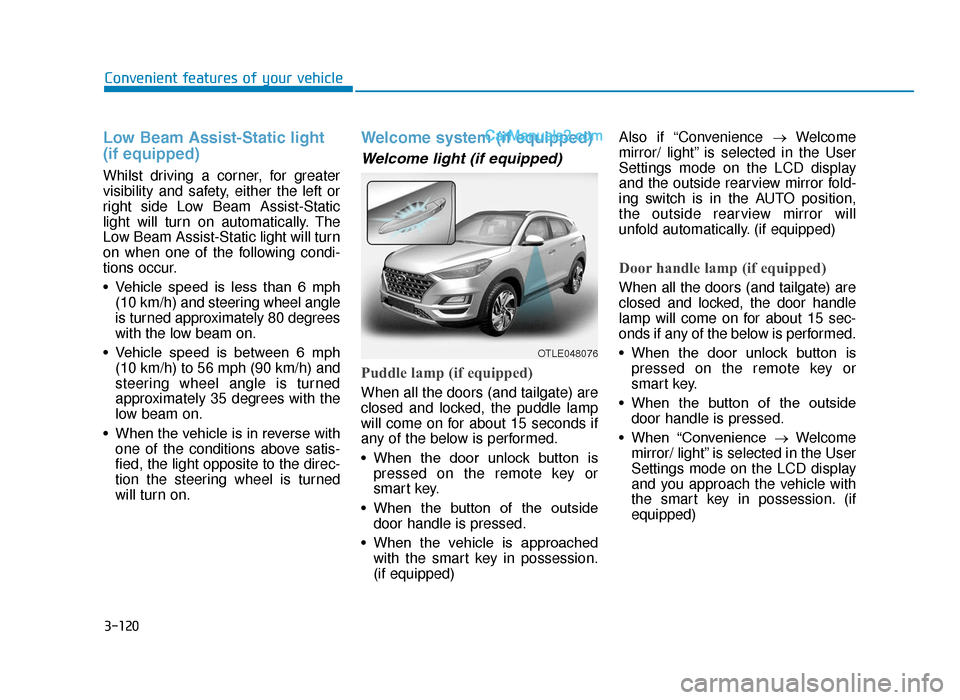
Welcome light (if equipped)
Puddle lamp (if equipped)
When all the doors (and tailgate) are
closed and locked, the puddle lamp
will come on for about 15 seconds if
any of the below is performed.
• When the door unlock button ispressed on the remote key or
smart key.
• When the button of the outside door handle is pressed.
• When the vehicle is approached with the smart key in possession.
(if equipped) Also if “Convenience
→Welcome
mirror/ light” is selected in the User
Settings mode on the LCD display
and the outside rearview mirror fold-
ing switch is in the AUTO position,
the outside rearview mirror will
unfold automatically. (if equipped)
Door handle lamp (if equipped)
When all the doors (and tailgate) are
closed and locked, the door handle
lamp will come on for about 15 sec-
onds if any of the below is performed.
• When the door unlock button is pressed on the remote key or
smart key.
• When the button of the outside door handle is pressed.
• When “Convenience →Welcome
mirror/ light” is selected in the User
Settings mode on the LCD display
and you approach the vehicle with
the smart key in possession. (if
equipped)
OTLE048076
TLe UK 3b(110~).qxp 6/12/2018 2:35 PM Page 120
Page 213 of 685
3-121
Convenient features of your vehicle
3
Headlamp and Parking lamp
When the headlamp (lamp switch in
the headlamp or AUTO position) is on
and all doors (and tailgate) are locked
and closed, the parking lamp and
headlamp will come on for 15 seconds
if/or any of the below is performed.
• When the door unlock button ispressed on the remote key or
smart key.
At this time, if you press the door lock
or unlock button, the parking lamp and
headlamp will turn off immediately.
You can activate or deactivate the
Welcome Light from the User
Settings Mode on the LCD display.
For more details, refer to "LCD
Display" in this chapter.
Interior lamp
When the interior lamp switch is in
the DOOR position and all doors (and
tailgate) are closed and locked, the
room lamp will come on for 30 sec-
onds if any of the below is performed.
• When the door unlock button is pressed on the remote key or
smart key.
• When the button of the outside door handle is pressed.
At this time, if you press the door lock
or unlock button, the room lamp will
turn off immediately.
Interior lights
Do not use the interior lights for
extended periods when the engine
is turned off or the battery will dis-
charge.
Interior lamp AUTO cut
The interior lamps will automatically
go off approximately 20 minutes after
the engine is turned off and the
doors closed. If a door is opened, the
lamp will go off 40 minutes after the
engine is turned off. If the doors are
locked and the vehicle enters the
armed stage of the theft alarm sys-
tem, the lamps will go off five sec-
onds later.
NOTICE
Do not use the interior lights
when driving in the dark. The inte-
rior lights may obscure your view
and cause an accident.
WARNING
TLe UK 3b(110~).qxp 6/12/2018 2:35 PM Page 121
Page 214 of 685
3-122
Convenient features of your vehicle
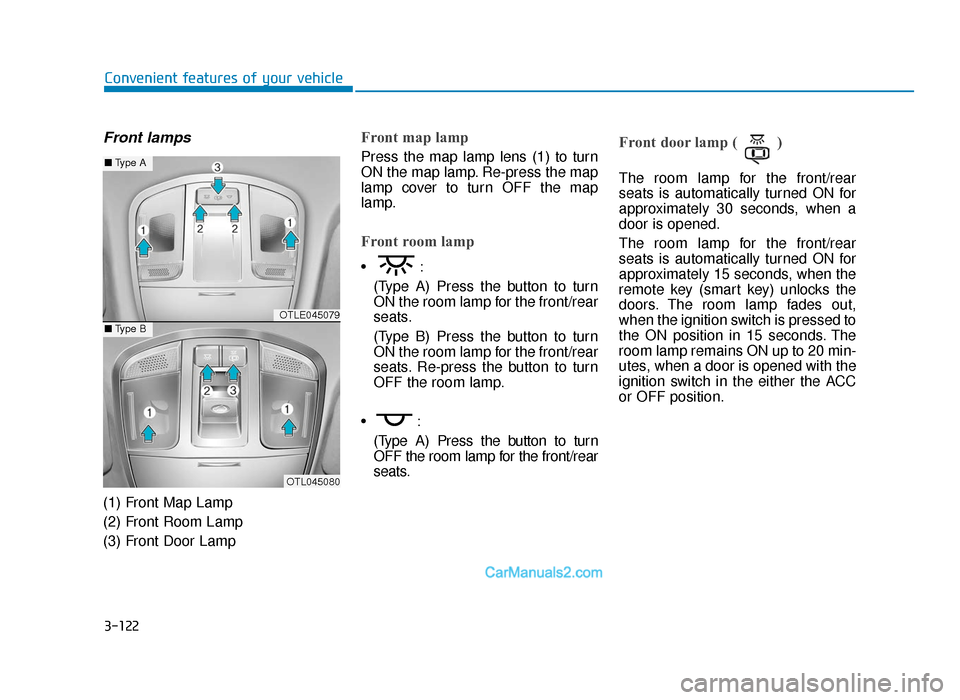
Front lamps
(1) Front Map Lamp
(2) Front Room Lamp
(3) Front Door Lamp
Front map lamp
Press the map lamp lens (1) to turn
ON the map lamp. Re-press the map
lamp cover to turn OFF the map
lamp.
Front room lamp
•:(Type A) Press the button to turn
ON the room lamp for the front/rear
seats.
(Type B) Press the button to turn
ON the room lamp for the front/rear
seats. Re-press the button to turn
OFF the room lamp.
•: (Type A) Press the button to turn
OFF the room lamp for the front/rear
seats.
Front door lamp ( )
The room lamp for the front/rear
seats is automatically turned ON for
approximately 30 seconds, when a
door is opened.
The room lamp for the front/rear
seats is automatically turned ON for
approximately 15 seconds, when the
remote key (smart key) unlocks the
doors. The room lamp fades out,
when the ignition switch is pressed to
the ON position in 15 seconds. The
room lamp remains ON up to 20 min-
utes, when a door is opened with the
ignition switch in the either the ACC
or OFF position.
OTLE045079
OTL045080
■ Type A
■Type B
TLe UK 3b(110~).qxp 6/12/2018 2:36 PM Page 122