Page 221 of 546

3-85
Convenient features of your vehicle
LCD display control
The LCD display modes can be
changed by pressing the control
switches on the steering wheel. (1) :Changing LCD modes or
returning to previous posi-tion
(2) , : Changing items
(3) OK : Selecting or resetting
LCD modes
LL CC DD DD IISS PP LLAA YY
3
OLF047201
Modes SymbolDescription
Trip Computer
This mode displays information related to driving such
as tripmeter, fuel economy, etc.
For more information, refer to "Trip Computer" in
this chapter.
Turn By Turn (TBT)
(if equipped)This mode displays the state of the navigation.
Assist
(If equipped)
This mode displays the state of the Smart Cruise Control (SCC) and Lane Keeping Assist System (LKAS).
For more information, refer to "Smart Cruise Control
(SCC)" and Lane Keeping Assist System (LKAS) in
chapter 5.
This mode displays information related to Driver Attention Alert and Tire Pressure Monitoring System (TPMS).
For more information, refer to "Driver Attention Alert
(DAA)" in chapter 5 and "Tire Pressure Monitoring
System (TPMS)" in chapter 6.
User SettingsOn this mode, you can change settings of the doors,
lamps, etc.
Warning
This mode displays information such as tire pressure,service intervals, warning messages related to the
Smart Cruise Control, etc.
Page 223 of 546
3-87
Convenient features of your vehicle
3
Turn By Turn (TBT) mode (if equipped)
This mode displays the state of the
navigation.
Assist mode
SCC/LKAS/DAA
This mode displays the state of the
Smart Cruise Control (SCC), Lane
Keeping Assist System (LKAS) and
Driver Attention Alert (DAA).
For more information, refer to
each system information in chap-ter 5.
Tire Pressure
This mode displays information relat-
ed to Tire Pressure.
For more information, refer to "Tire Pressure Monitoring System
(TPMS)" in chapter 6.
■ Type A■ Type B
OLF047172L/OLF047173L
OLF047604
OLF067028N
Page 280 of 546
3-144
Convenient features of your vehicle
Clock
With AVN system (if equipped)
You can set the clock by using the
Navigation system.
GPS Time check
The clock is automatically updated
through the navigation system.
GPS Time non-check
The clock can be manually adjusted.
1. Select the "System Settings" onthe "INFO/Setup" screen.
2. Select the "Date/Time".
3. Select the "Set time" by rotating the controller on the center con- sole panel.
4. Select the "Time Format" to the 12 hour or 24 hour format.
For more information, please refer to
the manual that was separately sup-
plied with your vehicle.
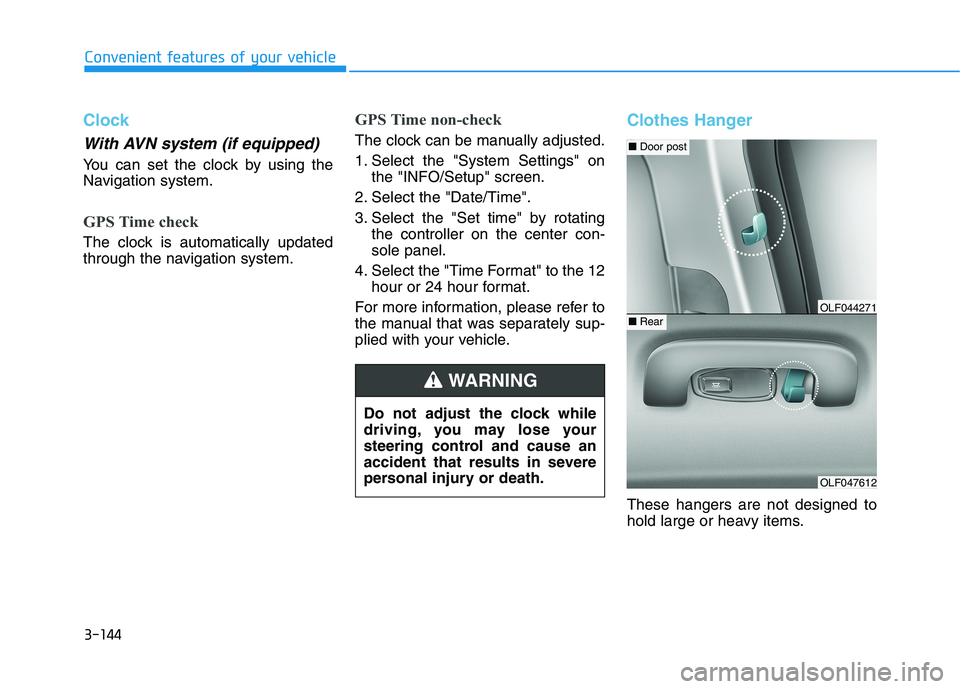
Clothes Hanger
These hangers are not designed to
hold large or heavy items.
Do not adjust the clock while
driving, you may lose your
steering control and cause an
accident that results in severe
personal injury or death.
WARNING
OLF047612
■
Door post
■RearOLF044271
Page 284 of 546
Multimedia System
Multimedia system .................................................4-2AUX, USB and iPod ®
Port ...............................................4-2
Antenna ...............................................................................4-2
Steering Wheel Audio Control........................................4-3
Audio / Video / Navigation System (AVN) ..................4-4
Bluetooth® Wireless Technology Hands-Free ...........4-4
How vehicle audio works ................................................4-5
Features of your vehicle .................................................4-7
4
Page 287 of 546
4-4
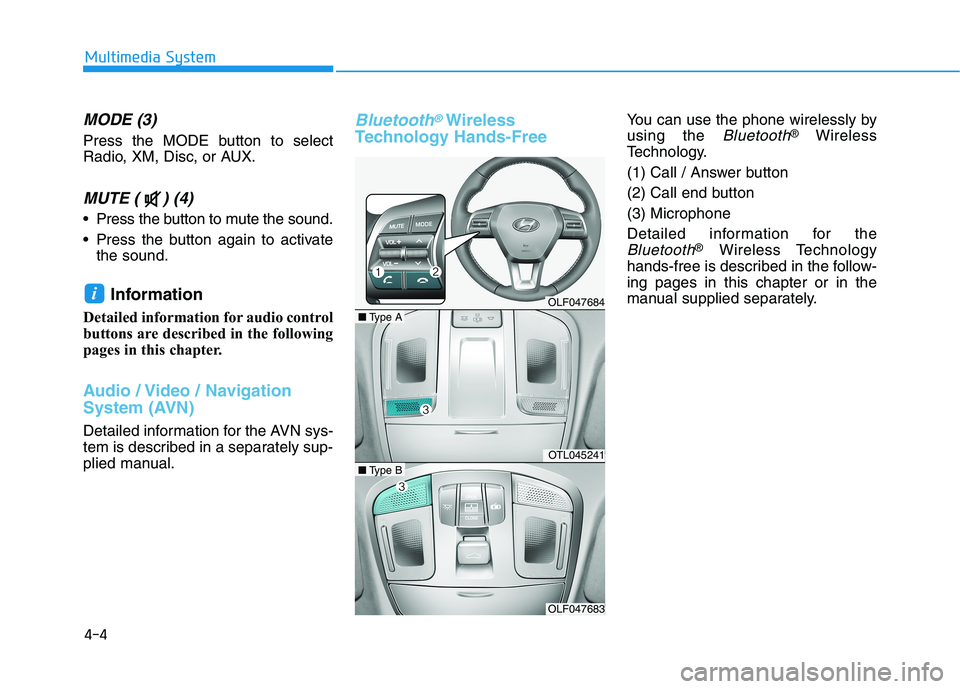
MODE (3)
Press the MODE button to select
Radio, XM, Disc, or AUX.
MUTE ( ) (4)
Press the button to mute the sound.
Press the button again to activatethe sound.
Information
Detailed information for audio control
buttons are described in the following
pages in this chapter.
Audio / Video / Navigation
System (AVN)
Detailed information for the AVN sys-
tem is described in a separately sup-
plied manual.
Bluetooth®Wireless
Technology Hands-FreeYou can use the phone wirelessly by using the
Bluetooth® Wireless
Technology.
(1) Call / Answer button
(2) Call end button(3) Microphone
Detailed information for the
Bluetooth® Wireless Technology
hands-free is described in the follow- ing pages in this chapter or in the
manual supplied separately.
i
Multimedia System
OLF047684
OTL045241
OLF047683
■ Type A
■Type B
Page 543 of 546
I-6
Lane Keeping Assist System (LKAS) ............................5-53
Limitations of the System ..........................................5-61
LKAS function change ...............................................5-60
LKAS malfunction .....................................................5-58
LKAS operation .........................................................5-54
LCD display ....................................................................3-85
LCD display control ...................................................3-85
Light ................................................................................3-98
Exterior Lights............................................................3-98
Interior Lights...........................................................3-107
Smart High Beam .....................................................3-100
Welcome System ......................................................3-106
Light bulbs ......................................................................7-69 Headlamp, parking lamp, turn signal lamp and side marker light bulb replacement.........................7-70
High mounted stop lamp ............................................7-76
Interior light bulb replacement ...................................7-76
License plate light bulb replacement .........................7-76
Rear combination light bulb replacement ..................7-74
Side repeater lamp replacement .................................7-73 Maintenance services ........................................................7-4
Owner maintenance precautions ..................................7-4
Owner's responsibility ..................................................7-4
Mirrors ............................................................................3-19 Inside Rearview Mirror ..............................................3-19
Reverse Parking Aid Function ...................................3-30
Side View Mirrors ......................................................3-27
Multimedia system............................................................4-2 Antenna ........................................................................4-2
Audio / Video / Navigation System (AVN) .................4-4
AUX, USB and iPod ®
Port ..........................................4-2
Bluetooth ®
Wireless Technology Hands-Free ..............4-4
Features of your vehicle ...............................................4-7
How vehicle audio works .............................................4-5
Steering Wheel Audio Control .....................................4-3
Owner maintenance ..........................................................7-5 Owner maintenance schedule .......................................7-6
Index
M
O
L