Page 392 of 682
5-63
Driving your vehicle
5
The ISG system is to reduce the fuel
consumption by automatically shut-
ting down the engine, when the vehi-
cle is at a standstill (i.e. red stop light,
stop sign, and traffic jam).
The engine is automatically started
upon satisfying the starting condi-
tions.
The ISG system is always active,
when the engine is running.
Information
When the engine is automatically
started by the ISG system, some warn-
ing lights (i.e. ABS, ESC, ESC OFF,
EPS, and parking brake warning
light) may illuminate for a few sec-
onds due to the low battery voltage.
However, it does not indicate a mal-
function with the ISG system.
To activate the ISG system
Prerequisite for activation
The ISG system operates in the fol-
lowing situations.
- The driver's seatbelt is fastened.
- The driver's door and the bonnet
are closed.
- The brake vacuum pressure is
adequate.
- The battery is sufficiently charged.
- The outside temperature is between
-10 °C and 35 °C (14 °F and 95 °F).
- The engine coolant temperature is
not too low.
- The system is not in the diagnostic
mode.
- The steering wheel is not steered
excessively. (for automatic trans-
mission vehicle)
- The vehicle is driven on a steep
incline. (for automatic transmission
vehicle)
Information
• The ISG system is not activated,
when the prerequisites to activate
the ISG system are unsatisfied. In
this case, the ISG OFF button indi-
cator illuminates, and the auto stop
indicator ( ) illuminates in yellow
on the instrument cluster.
• When the above indicator remains
illuminated on the instrument clus-
ter, we recommend that you have
the ISG system checked by a
HYUNDAI authorised repairer.
i
i
IDLE STOP AND GO (ISG) SYSTEM (IF EQUIPPED)
WTF-444
Page 400 of 682
5-71
Driving your vehicle
5
DRIVE MODE INTEGRATED CONTROL SYSTEM (IF EQUIPPED)
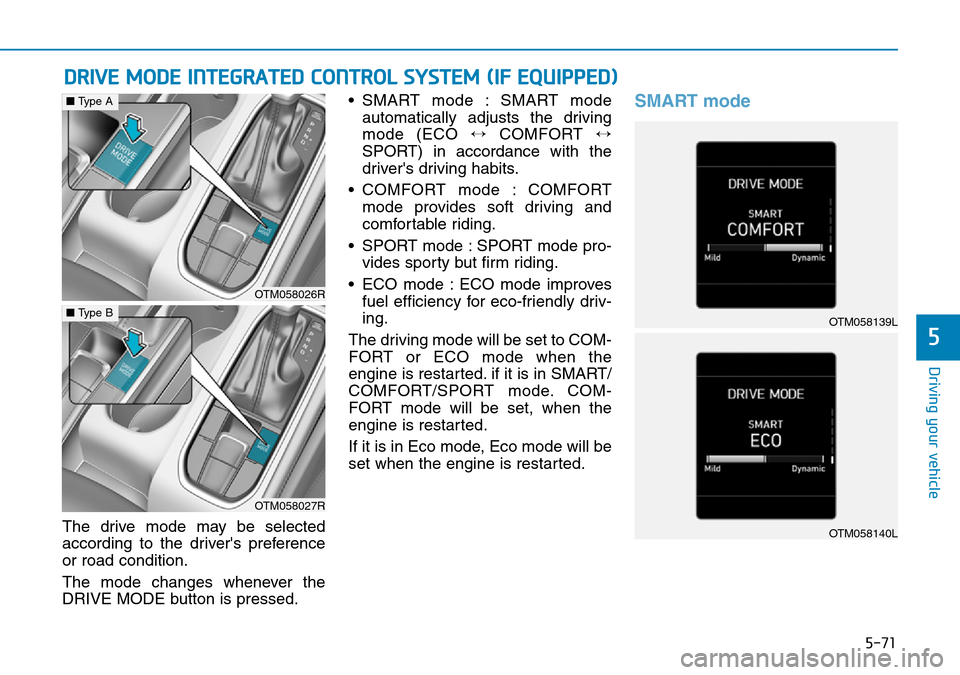
The drive mode may be selected
according to the driver's preference
or road condition.
The mode changes whenever the
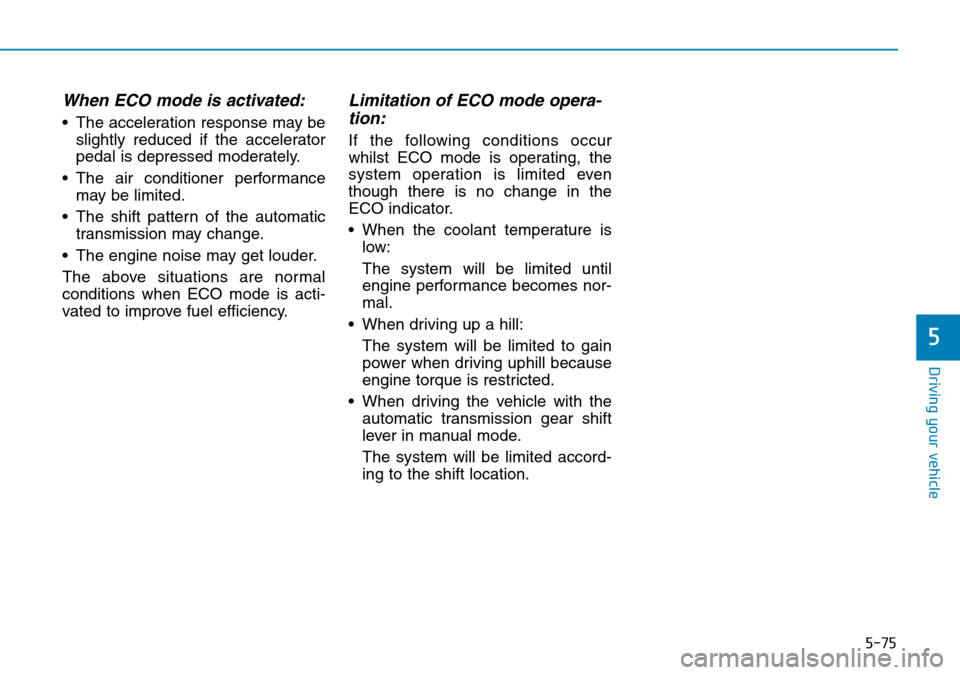
DRIVE MODE button is pressed.• SMART mode : SMART mode
automatically adjusts the driving
mode (ECO ↔ COMFORT ↔
SPORT) in accordance with the
driver's driving habits.
• COMFORT mode : COMFORT
mode provides soft driving and
comfortable riding.
• SPORT mode : SPORT mode pro-
vides sporty but firm riding.
• ECO mode : ECO mode improves
fuel efficiency for eco-friendly driv-
ing.
The driving mode will be set to COM-
FORT or ECO mode when the
engine is restarted. if it is in SMART/
COMFORT/SPORT mode. COM-
FORT mode will be set, when the
engine is restarted.
If it is in Eco mode, Eco mode will be
set when the engine is restarted.
SMART mode
OTM058026R
■Type A
OTM058027R
■Type BOTM058139L
OTM058140L
Page 401 of 682

5-72
Driving your vehicle
SMART mode selects the
proper driving mode
among ECO, COMFORT
and SPORT by judging
the driver's driving habits (i.e. mild or
dynamic) from the brake pedal
depression or the steering wheel
operation.• Press the DRIVE MODE button to
activate SMART mode. When
SMART mode is activated, the
indicator illuminates on the instru-
ment cluster.
• The vehicle starts in SMART
mode, when the engine was turned
OFF in SMART mode.
• SMART mode automatically con-
trols the vehicle driving, such as
gear shifting patterns, engine
torque, riding quality (if equipped
with the electronic suspension sys-
tem), and power distribution (if
equipped with the Four-Wheel
Drive (4WD) system), in accor-
dance with the driver's driving
habits.
Information
• When you mildly drive the vehicle
in SMART mode, the driving mode
changes to ECO mode to improve
fuel efficiency. However, the actual
fuel efficiency may differ in accor-
dance with your driving situations
(i.e. upward/downward slope, vehi-
cle deceleration/acceleration).
• When you dynamically drive the
vehicle in SMART mode by abrupt-
ly decelerating or sharply curving,
the driving mode changes to
SPORT mode. However, it may
adversely affect fuel economy.
i
OTM058141L
SMART
Page 403 of 682
5-74
Driving your vehicle
SPORT mode
SPORT mode manages
the driving dynamics by
automatically adjusting
the steering effort, and
the engine and transmission control
logic for enhanced driver perform-
ance.
• When SPORT mode is selected by
pressing the DRIVE MODE button,
the SPORT indicator (orange
colour) will illuminate.
• Whenever the engine is restarted,
the Drive Mode will revert back to
COMFORT mode. If SPORT mode
is desired, re-select SPORT mode
from the DRIVE MODE button.• When SPORT mode is activated:
- The engine rpm will tend to
remain raised over a certain
length of time even after releas-
ing the accelerator
- Upshifts are delayed when accel-
erating
Information
In SPORT mode, the fuel efficiency
may decrease.
ECO mode
When the Drive Mode is
set to ECO mode, the
engine and transmission
control logic are changed
to maximise fuel efficiency.
• When ECO mode is selected by
pressing the DRIVE MODE button,
the ECO indicator (green colour)
will illuminate.
• If the vehicle is set to ECO mode,
when the engine is turned OFF
and restarted the Drive Mode set-
ting will remain in ECO mode.
Information
Fuel efficiency depends on the driver's
driving habit and road condition.
i
i
SPORTECO
Page 404 of 682
5-75
Driving your vehicle
5
When ECO mode is activated:
• The acceleration response may be
slightly reduced if the accelerator
pedal is depressed moderately.
• The air conditioner performance
may be limited.
• The shift pattern of the automatic
transmission may change.
• The engine noise may get louder.
The above situations are normal
conditions when ECO mode is acti-
vated to improve fuel efficiency.
Limitation of ECO mode opera-
tion:
If the following conditions occur
whilst ECO mode is operating, the
system operation is limited even
though there is no change in the
ECO indicator.
• When the coolant temperature is
low:
The system will be limited until
engine performance becomes nor-
mal.
• When driving up a hill:
The system will be limited to gain
power when driving uphill because
engine torque is restricted.
• When driving the vehicle with the
automatic transmission gear shift
lever in manual mode.
The system will be limited accord-
ing to the shift location.
Page 523 of 682
5-194
Driving your vehicle
• If you believe your brakes may be
wet, apply them lightly whilst driv-
ing until normal braking operation
returns.
Hydroplaning
If the road is wet enough and you are
going fast enough, your vehicle may
have little or no contact with the road
surface and actually ride on the
water. The best advice is SLOW
DOWN when the road is wet.
The risk of hydroplaning increas-
es as the depth of tyre tread
decreases, refer to "Tyre replace-
ment" in chapter 7.
Driving in flooded areas
Avoid driving through flooded areas
unless you are sure the water is no
higher than the bottom of the wheel
hub. Drive through any water slowly.
Allow adequate stopping distance
because brake performance may be
reduced.
After driving through water, dry the
brakes by gently applying them sev-
eral times whilst the vehicle is mov-
ing slowly.
Highway driving
Tyres
Adjust the tyre inflation, as specified.
Under-inflation may overheat or
damage the tyres.
Do not install worn-out or damaged
tyres, which may reduce traction or
fail the braking operation.
Information
Never over-inflate your tyres above
the maximum inflation pressure, as
specified on your tyres.
Fuel, engine coolant and engine
oil
Driving at higher speeds on the high-
way consumes more fuel and is less
efficient than driving at a slower,
more moderate speed. Maintain a
moderate speed in order to conserve
fuel when driving on the highway.
Be sure to check both the engine
coolant level and the engine oil
before driving.
Drive belt
A loose or damaged drive belt may
overheat the engine.
i
Page 529 of 682
5-200
Driving your vehicle
If you are considering to tow with
your vehicle, you should first your
country's legal requirements. As laws
vary the requirements for towing trail-
ers, cars, or other types of vehicles
or apparatus may differ. Ask a
HYUNDAI authorised repairer for fur-
ther details before towing.
Remember that trailering is different
than just driving your vehicle by itself.
Trailering means changes in han-
dling, durability, and fuel economy.
Successful, safe trailering requires
correct equipment, and it has to be
used properly. Damage to your vehi-
cle caused by improper trailer towing
is not covered by your vehicle manu-
facturer’s warranty.This section contains many time-
tested, important trailering tips and
safety rules. Many of these are
important for your safety and that of
your passengers. Please read this
section carefully before you pull a
trailer.
TRAILER TOWING
Take the following precautions:
•If you don't use the correct
equipment and/or drive improp-
erly, you can lose control of the
vehicle when you are pulling a
trailer. For example, if the trailer
is too heavy, the braking per-
formance may be reduced. You
and your passengers could be
seriously or fatally injured. Pull
a trailer only if you have fol-
lowed all the steps in this sec-
tion.
•Before towing, make sure the
total trailer weight, GCW
(Gross Combination Weight),
GVW (Gross Vehicle Weight),
GAW (Gross Axle Weight) and
trailer tongue load are all with-
in the limits.
•When you tow a trailer, make
sure to turn off the ISG sys-
tem.
WARNING
Page 538 of 682
5-209
Driving your vehicle
5
Two labels on your driver's door sill
show how much weight your vehicle
was designed to carry: the Tyre and
Loading Information Label and the
Certification Label.
Before loading your vehicle, familiar-
ize yourself with the following terms
for determining your vehicle's weight
ratings, from the vehicle's specifica-
tions and the Certification Label:
Base Kerb Weight
This is the weight of the vehicle includ-
ing a full tank of fuel and all standard
equipment. It does not include pas-
sengers, cargo, or optional equipment.
Vehicle Kerb Weight
This is the weight of your new vehicle
when you picked it up from your deal-
er plus any aftermarket equipment.
Cargo Weight
This figure includes all weight added
to the Base Kerb Weight, including
cargo and optional equipment.GAW (Gross Axle Weight)
This is the total weight placed on
each axle (front and rear) - including
vehicle kerb weight and all payload.
GAWR (Gross Axle Weight Rating)
This is the maximum allowable
weight that can be carried by a single
axle (front or rear). These numbers
are shown on the Certification Label.
The total load on each axle must
never exceed its GAWR.
GVW (Gross Vehicle Weight)
This is the Base Kerb Weight plus
actual Cargo Weight plus passen-
gers.
GVWR (Gross Vehicle Weight
Rating)
This is the maximum allowable
weight of the fully loaded vehicle
(including all options, equipment,
passengers and cargo). The GVWR
is shown on the Certification Label
located on the driver's door sill.Overloading
VEHICLE WEIGHT
The Gross Axle Weight Rating
(GAWR) and the Gross Vehicle
Weight Rating (GVWR) for your
vehicle are on the Certification
Label attached to the driver's
(or front passenger's) door.
Exceeding these ratings can
cause an accident or vehicle
damage. You can calculate the
weight of your load by weighing
the items (and people) before
putting them in the vehicle. Be
careful not to overload your
vehicle.
WARNING