Page 188 of 540

3-104
Convenient features of your vehicle
Smart Cornering Lamp
(if equipped)
As an optional safety feature, your
vehicle may be equipped with a
smart cornering lamp. The cornering
lamp turns ON automatically while
driving when the vehicle enters into a
cornering maneuver.
The system will operate under the
following conditions:
When the headlamps are turnedON
When the steering angle is above 25 to 35 degrees (depending on
vehicle speed)
When the vehicle speed is under 25 mph (40 km/h)
Welcome System
Headlamp and parking lamp
When the headlamp (lamp switch in
the headlamp or AUTO position) is
on and all doors (and liftgate) are
locked and closed, the parking lamp
and headlamp will come on for 15
seconds when the door unlock but-
ton is pressed on the smart key.
At this time, if you press the door lock
or unlock button, the parking lamp
and headlamp will turn off immedi-
ately.
You can activate or deactivate the
Welcome Light from the User
Settings mode on the LCD display.
For more details, refer to "LCD
Display" in this chapter.
Interior lamp
When the interior lamp switch is in
the DOOR position and all doors (and
liftgate) are closed and locked, the
room lamp will come on for 30 sec-
onds if any of the below is performed.
When the door unlock button ispressed on the smart key.
When the button of the outside door handle is pressed.
At this time, if you press the door lock
or unlock button, the room lamp will
turn off immediately.
Page 190 of 540
3-106
Convenient features of your vehicle
Front Room Lamp
(3):
Press the button to turn ON the
room lamp for the front/rear seats.
(4):
Press the button to turn OFF the
room lamp for the front/rear seats
regardless of front or rear door open
position.
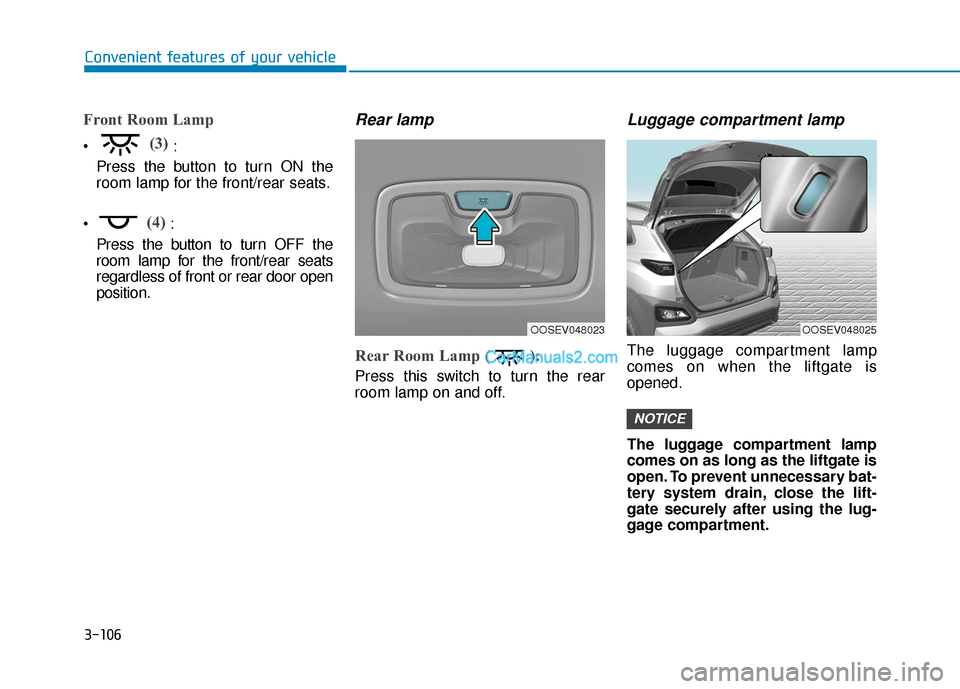
Rear lamp
Rear Room Lamp ( ):
Press this switch to turn the rear
room lamp on and off.
Luggage compartment lamp
The luggage compartment lamp
comes on when the liftgate is
opened.
The luggage compartment lamp
comes on as long as the liftgate is
open. To prevent unnecessary bat-
tery system drain, close the lift-
gate securely after using the lug-
gage compartment.
NOTICE
OOSEV048023OOSEV048025
Page 229 of 540
3-145
Convenient features of your vehicle
3
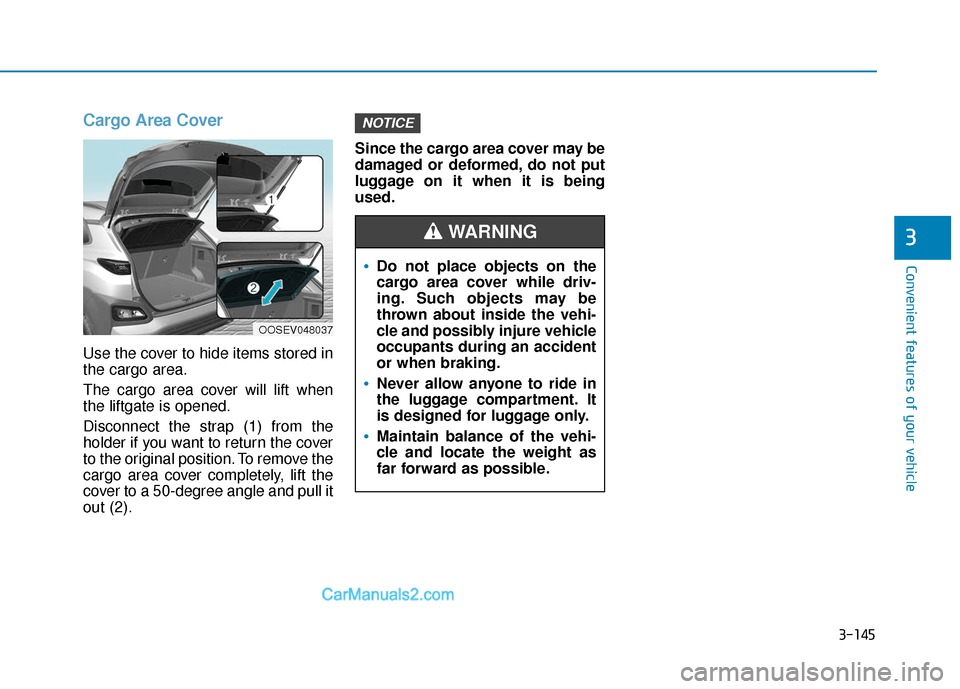
Cargo Area Cover
Use the cover to hide items stored in
the cargo area.
The cargo area cover will lift when
the liftgate is opened.
Disconnect the strap (1) from the
holder if you want to return the cover
to the original position. To remove the
cargo area cover completely, lift the
cover to a 50-degree angle and pull it
out (2).Since the cargo area cover may be
damaged or deformed, do not put
luggage on it when it is being
used.
NOTICE
OOSEV048037
Do not place objects on the
cargo area cover while driv-
ing. Such objects may be
thrown about inside the vehi-
cle and possibly injure vehicle
occupants during an accident
or when braking.
Never allow anyone to ride in
the luggage compartment. It
is designed for luggage only.
Maintain balance of the vehi-
cle and locate the weight as
far forward as possible.
WARNING
Page 237 of 540

5-4
Driving your vehicle
Before Entering the Vehicle
• Be sure all windows, outside mir-ror(s), and outside lights are clean
and unobstructed.
Remove any frost, snow, or ice that has accumulated on your vehicle.
Visually check the tires for uneven wear and damage.
Check under the vehicle for any sign of leaks.
Be sure there are no obstacles behind you if you intend to back up.
Before Starting
Make sure the hood, the liftgate,and the doors are securely closed
and locked.
Adjust the position of the seat and steering wheel.
Adjust the inside and outer side view mirrors.
Verify all the lights work.
Fasten your seat belts. Check that all passengers have fastened their
seat belts.
Check the gauges and indicators in the instrument panel and the mes-
sages on the instrument display
when the POWER button is in the
ON position.
Check that any items you are car- rying are stored properly or fas-
tened down securely.
CALIFORNIA PROPOSITION 65
WARNING
Engine exhaust and a wide vari-
ety of automobile components
including components found in
the interior furnishings in a
vehicle, contain or emit harmful
chemicals known to the State of
California to cause cancer and
birth defects and reproductive
harm. In addition, certain fluids
contained in vehicles and cer-
tain products of components
contain or emit chemicals
known to the State of California
to cause cancer and birth
defects or other reproductive
harm.WARNING
B B
E
EF
FO
O R
RE
E
D
D R
RI
IV
V I
IN
N G
G
Page 264 of 540

5-31
Driving your vehicle
5
However, if Auto Hold is OFF when
the the vehicle is turned off, the EPB
will not be applied.Releasing the parking brake
To release the EPB (Electronic
Parking Brake), press the EPB
switch in the following condition:
Have the POWER button in the ONposition.
Depress the brake pedal.
Make sure the Parking Brake
Warning Light goes off.
To release EPB (Electronic Parking
Brake) automatically:
Gear in P (Park) With the vehicle in the ready ( )
mode depress the brake pedal and
shift out of P (Park) to either D
(Drive) or R (Reverse).
Gear in N (Neutral) With the vehicle in the ready ( )
mode depress the brake pedal and
shift out of N (Neutral) to R
(Reverse) or D (Drive).
Under the following conditions 1. Start the vehicle.
2. Fasten the driver's seat belt.
3. Close the driver's door, hood and liftgate.
4. Depress the accelerator pedal while the gear is in D (Drive) or
R (Reverse).
The Parking Brake Warning Light
should be turned off when the EPB is
released.
To reduce the risk of SERIOUS
INJURY or DEATH, do not oper-
ate the parking brake while the
vehicle is moving except in an
emergency situation. It could
damage the brake system and
lead to an accident.
WARNING
OOSEV058016K
Page 265 of 540

5-32
Driving your vehicle
Information
• For your safety, you can engage theEPB even though the POWER but-
ton is in the OFF position, but you
cannot release it.
• For your safety, depress the brake pedal and release the parking brake
manually with the EPB switch when
you drive downhill or when backing
up the vehicle.
If the parking brake warning light is still on even though the EPB
has been released, have the sys-
tem checked an authorized
HYUNDAI dealer.
Do not drive your vehicle with the EPB applied. It may cause
excessive brake pad and brake
rotor wear.
EPB (Electronic Parking Brake)
may be automatically applied
when:
Requested by other systems
The vehicle is turned off with theAuto Hold operating
Warning messages
To release EPB, fasten seatbelt,
close door, hood and liftgate
A warning will sound and a message
will appear in the following condi-
tions.
If you try to drive with the EPBapplied.
If the driver's seat is not fastened, and you try to release EPB.
If the driver's door is opened, and you try to release EPB.
If the hood is opened with the gear in D (Drive) and you try to release
EPB.
NOTICE
i
OTMA058132
Page 266 of 540

5-33
Driving your vehicle
5
If the liftgate is opened with thegear in R (Reverse) and you try to
release EPB.
If there is a problem with the vehi- cle.
If the situation occurs, depress the
brake pedal and release EPB by
pressing the EPB switch. Do not apply the accelerator
pedal while the parking brake is
engaged. If you depress the
accelerator pedal with the EPB
engaged, a warning will sound
and a message will appear.
Damage to the parking brake
may occur.
Driving with the parking brake on can overheat the braking sys-
tem and cause premature wear
or damage to brake parts. Make
sure the EPB is released and the
Parking Brake Warning Light is
off before driving.
Information
• A clicking sound may be heardwhile operating or releasing the
EPB. These conditions are normal
and indicate that the EPB is func-
tioning properly.
• When leaving your keys with a parking attendant or assistant,
make sure to inform him/her how to
operate the EPB.
i
NOTICE
Whenever leaving the vehicle
or parking, always come to a
complete stop and continue
to depress the brake pedal.
Shift into the P (Park) posi-
tion, press the EPB switch,
and press the POWER button
to the OFF position. Take the
Smart Key with you when exit-
ing the vehicle.
Vehicles not fully engaged in
P (Park) with the parking
brake set are at risk for mov-
ing inadvertently and causing
injury to yourself or others.
NEVER allow anyone who is
unfamiliar with the vehicle to
touch the EPB switch. If the
EPB is released unintentional-
ly, serious injury may occur.
Only release the EPB when
you are seated inside the
vehicle with your foot firmly
on the brake pedal.
WARNING
Page 269 of 540
5-36
Driving your vehicle
If you continuously notice a noise
or burning smell when the EPB is
used for emergency braking, have
the system checked by an author-
ized HYUNDAI dealer.
When the EPB (Electronic Parking
Brake) does not release
If the EPB does not release normal-
ly, contact an authorized HYUNDAI
dealer by loading the vehicle on a
flatbed tow truck and have the sys-
tem checked.
Auto Hold
The Auto Hold feature keeps the
vehicle stationary once the vehicle
reaches a complete stop.
To apply:
1. With the driver's door, hood and liftgate closed, depress the brake
pedal and then press the [AUTO
HOLD] switch. The white AUTO
HOLD indicator will come on and
the system will be in the standby
position.
NOTICE
OOSEV058018
W
W
W
W
h
h
h
h
i
i
i
i
t
t
t
t
e
e
e
e