Page 26 of 599
H26
Charger (ICCB: In-Cable ControlBox)
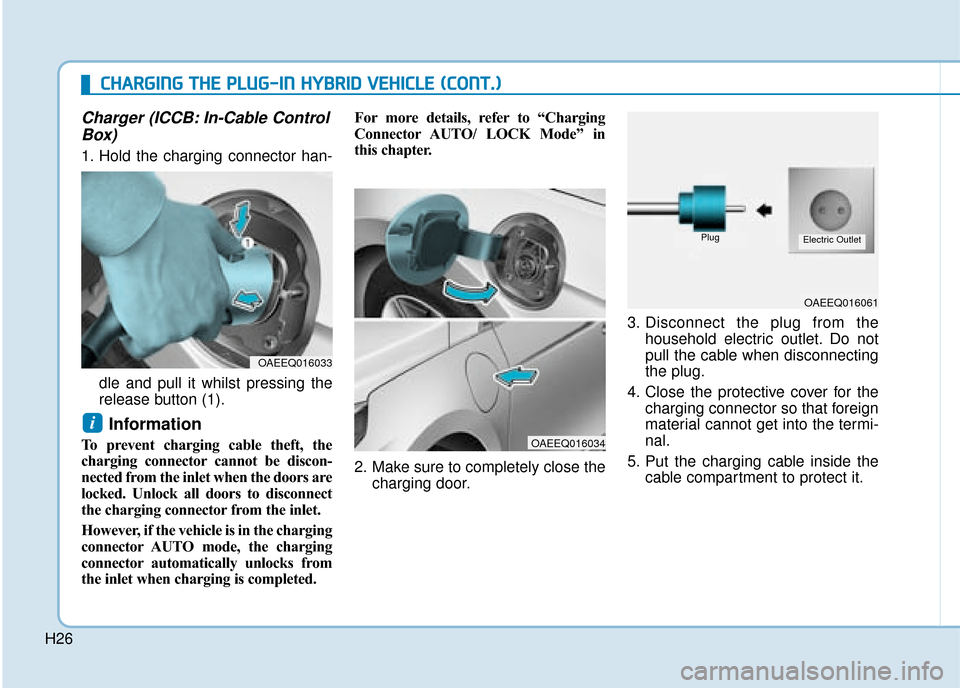
1. Hold the charging connector han-
dle and pull it whilst pressing the
release button (1).
Information
To prevent charging cable theft, the
charging connector cannot be discon-
nected from the inlet when the doors are
locked. Unlock all doors to disconnect
the charging connector from the inlet.
However, if the vehicle is in the charging
connector AUTO mode, the charging
connector automatically unlocks from
the inlet when charging is completed. For more details, refer to “Charging
Connector AUTO/ LOCK Mode” in
this chapter.
2. Make sure to completely close the
charging door. 3. Disconnect the plug from the
household electric outlet. Do not
pull the cable when disconnecting
the plug.
4. Close the protective cover for the charging connector so that foreign
material cannot get into the termi-
nal.
5. Put the charging cable inside the cable compartment to protect it.
i
OAEEQ016033
OAEEQ016034
OAEEQ016061
PlugElectric Outlet
C
CH
H A
AR
RG
G I
IN
N G
G
T
T H
H E
E
P
P L
LU
U G
G-
-I
IN
N
H
H Y
Y B
BR
RI
ID
D
V
V E
EH
H I
IC
C L
LE
E
(
( C
C O
O N
NT
T.
.)
)
Page 27 of 599
H27
Unlock Charging Connector inEmergency
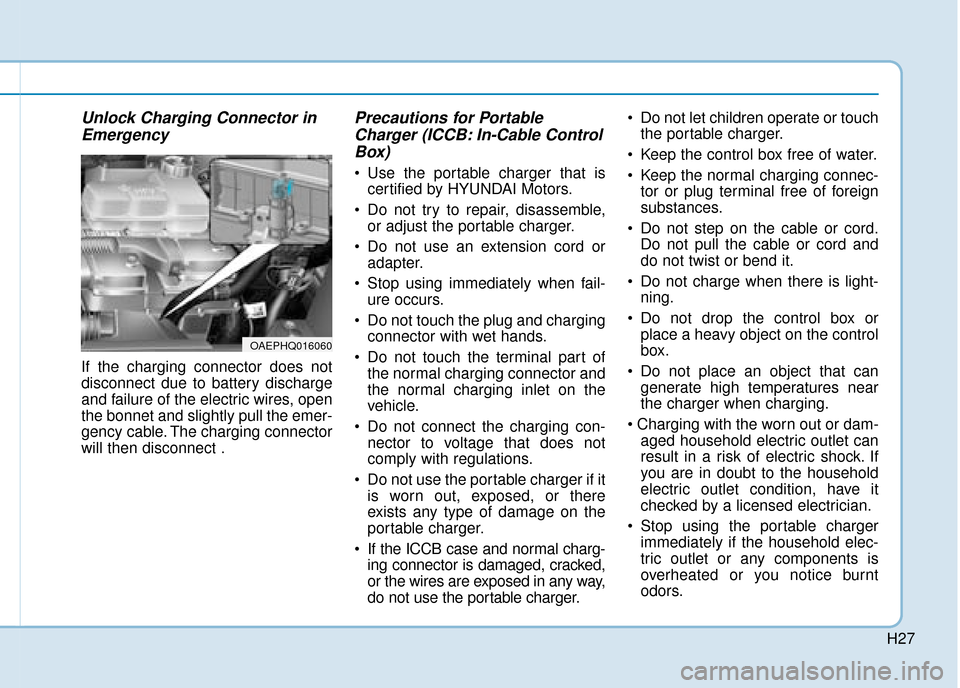
If the charging connector does not
disconnect due to battery discharge
and failure of the electric wires, open
the bonnet and slightly pull the emer-
gency cable. The charging connector
will then disconnect .
Precautions for PortableCharger (ICCB: In-Cable ControlBox)
Use the portable charger that is
certified by HYUNDAI Motors.
Do not try to repair, disassemble, or adjust the portable charger.
Do not use an extension cord or adapter.
Stop using immediately when fail- ure occurs.
Do not touch the plug and charging connector with wet hands.
Do not touch the terminal part of the normal charging connector and
the normal charging inlet on the
vehicle.
Do not connect the charging con- nector to voltage that does not
comply with regulations.
Do not use the portable charger if it is worn out, exposed, or there
exists any type of damage on the
portable charger.
If the ICCB case and normal charg- ing connector is damaged, cracked,
or the wires are exposed in any way,
do not use the portable charger. Do not let children operate or touch
the portable charger.
Keep the control box free of water.
Keep the normal charging connec- tor or plug terminal free of foreign
substances.
Do not step on the cable or cord. Do not pull the cable or cord and
do not twist or bend it.
Do not charge when there is light- ning.
Do not drop the control box or place a heavy object on the control
box.
Do not place an object that can generate high temperatures near
the charger when charging.
aged household electric outlet can
result in a risk of electric shock. If
you are in doubt to the household
electric outlet condition, have it
checked by a licensed electrician.
Stop using the portable charger immediately if the household elec-
tric outlet or any components is
overheated or you notice burnt
odors.
OAEPHQ016060
Page 32 of 599

H32However, if the Service Indicator
( ) and Malfunction Indicator
Lamp (MIL) ( ) turn on when the
SOC gauge is near the "0" level, we
recommend the vehicle be checked
by a HYUNDAI authorised repairer.
Plug-in Hybrid Mode
(Plug-in hybrid vehicle)
EV/HEV Button
Pressing the [EV/HEV] button
changes the plug-in hybrid system
modes, between Electric (CD) mode
and Hybrid (CS) mode.
Each time the mode is changed a
corresponding indicator is displayed
on the instrument cluster as follows.
Plug-in hybrid mode indicator
CD (Charge Depleting, Electric)
mode : The high-voltage (hybrid)
battery is used to drive the vehicle.
CS (Charge Sustaining, Hybrid) mode : The high-voltage (hybrid)
battery and petrol engine is used to
drive the vehicle.
Information
Even when the battery charging rate
is high and driving in electric mode is
possible, engine may turn on in some
areas to protect the system.
i
D
DR
RI
IV
V I
IN
N G
G
T
T H
H E
E
H
H Y
Y B
BR
RI
ID
D /
/P
P L
LU
U G
G-
-I
IN
N
H
H Y
Y B
BR
RI
ID
D
V
V E
EH
H I
IC
C L
LE
E
(
( C
C O
O N
NT
T.
.)
)
OAEPH047518R
OAEPH047519N
■ CD (Charge Depleting, Electric)
OAEPH047520N
■CS (Charge Sustaining, Hybrid)
Page 33 of 599
![Hyundai Ioniq Plug-in Hybrid 2019 Owners Manual - RHD (UK, Australia) H33
AVN Screen (Plug-in hybrid vehicle) (if equipped)
Press [PHEV] on the [Home] screen
or the [All menus] screen and the
menus related to plug-in hybrid
([ECO driving], [Energy information],
[EV rang](/manual-img/35/16215/w960_16215-32.png "Hyundai Ioniq Plug-in Hybrid 2019 Owners Manual - RHD (UK, Australia) H33
AVN Screen (Plug-in hybrid vehicle) (if equipped)
Press [PHEV] on the [Home] screen
or the [All menus] screen and the
menus related to plug-in hybrid
([ECO driving], [Energy information],
[EV rang")
H33
AVN Screen (Plug-in hybrid vehicle) (if equipped)
Press [PHEV] on the [Home] screen
or the [All menus] screen and the
menus related to plug-in hybrid
([ECO driving], [Energy information],
[EV range], [Set charging times],
[Charging stations], [Petrol stations])
are displayed.
For more information, please refer
to the Multimedia System Manual
that was separately supplied with
your vehicle.
Aux. Battery Saver+
(Plug-in hybrid vehicle)
The Aux. Battery Saver+ is a function
that monitors the charging status of
the 12 V auxiliary battery. If the aux-
iliary battery level is low, the main
high voltage battery charges the aux-
iliary battery.
Information
The Aux. Battery Saver+ function will
be ON when the vehicle is delivered. If
the function is not needed, you may
turn it off in the Users Settings mode
on the cluster. For more information,
refer to the following page.
Mode
Cycle Mode :
When the vehicle is OFF with all
doors, bonnet and tailgate closed,
the Aux. Battery Saver+ periodically
activates according to the auxiliary
battery status.
Automatic Mode :
When the ignition switch is in the ON
position with the charging connector
plugged in, the function activates
according to the auxiliary battery sta-
tus to prevent overdischarge of the
auxiliary battery.
i
OAEPHQ017003L
Page 35 of 599

H35
Warning and Indicator Lights
Ready Indicator
This indicator illuminates :
When the vehicle is ready to be driven.
- ON : Normal driving is possible.
- OFF : Normal driving is not possible,
or a problem has occurred.
- Blinking : Emergency driving.
When the ready indicator goes OFF
or blinks, there is a problem with the
system. In this case, we recommend
that you have your vehicle inspected
by a HYUNDAI authorised repairer.
Service Warning Light
This warning light illuminates :
When the ignition switch or the Engine Start/Stop button is in the
ON position.
- It illuminates for approximately 3seconds and then goes off.
When there is a problem with the hybrid vehicle control system or
hardware.
When the warning light illuminates
whilst driving, or does not go OFF
after starting the vehicle, we recom-
mend that you have your vehicle
inspected by a HYUNDAI authorised
repairer.
When the function is activating,
the third Charging Indicator
Lamp will blink and high voltage
electricity will be flowing in the
vehicle. Do not touch the high
voltage electric wire (orange),
connector, and all electric com-
ponents and devices. This may
cause electric shock and lead to
injuries. Also, do not modify
your vehicle in any way. This
may affect your vehicle per-
formance and lead to an acci-
dent.
WARNING
OAEEQ016025
Page 36 of 599

H36
EV Mode Indicator
This indicator illuminates when the
vehicle is driven by the electric motor.
Charging CableConnection Indicator (Plug-in hybrid vehicle)
This indicator illuminates in red when
the charging cable is connected.
Regenerative BrakeWarning Light
This warning light illuminates :
When the regenerative brake is not
operating. This causes the Brake
Warning light (red) and Regenerative
Brake Warning Light (yellow) to illu-
minate simultaneously as soon as
possible.
In this case, drive safely and have
your vehicle inspected by a
HYUNDAI authorised repairer.
The service brake still function, how-
ever, the operation of the brake pedal
may be more difficult than normal
and the braking distance can
increase.
LCD Display Messages
Check Hybrid system
This message is displayed when
there is a problem with the hybrid
control system.
Refrain from driving when the warn-
ing message is displayed.
In this case, we recommend that you
have your vehicle inspected by a
HYUNDAI authorised repairer.
EV
OLFH044248L
D
D R
RI
IV
V I
IN
N G
G
T
T H
H E
E
H
H Y
Y B
BR
RI
ID
D /
/P
P L
LU
U G
G-
-I
IN
N
H
H Y
Y B
BR
RI
ID
D
V
V E
EH
H I
IC
C L
LE
E
(
( C
C O
O N
NT
T.
.)
)
Page 38 of 599
H38
Stop vehicle to charge battery
This message is displayed when the
hybrid battery power (SOC) level is
low.
In this case, park the vehicle in a
safe location and wait until the hybrid
battery is charged.
You can increase the hybrid battery
charging rate by holding the acceler-
ator pedal to the floor with transmis-
sion in P. The engine will rev high but
it will be limited for charging purpose
when you hold the pedal to the floor.
Refuel to prevent Hybrid batterydamage
This message is displayed when the
fuel tank is nearly empty.
You should refill the fuel tank to pre-
vent hybrid battery damage.
Refill inverter coolant
This message is displayed when the
inverter coolant is nearly empty.
You should refill the inverter coolant.
OLFH044232L
OLFH044242L
OLFH044244L
D
D R
RI
IV
V I
IN
N G
G
T
T H
H E
E
H
H Y
Y B
BR
RI
ID
D /
/P
P L
LU
U G
G-
-I
IN
N
H
H Y
Y B
BR
RI
ID
D
V
V E
EH
H I
IC
C L
LE
E
(
( C
C O
O N
NT
T.
.)
)
Page 40 of 599
H40
Unplug vehicle to start (Plug-in hybrid vehicle)
This message is displayed when you
start the engine without unplugging
the charging cable. Unplug the
charging cable, and then start the
vehicle.
Remaining charge time (Plug-in hybrid vehicle)
This message is displayed to notify
the remaining time to fully charge the
battery.
Wait until fuel door opens(Plug-in hybrid vehicle)
This message is displayed when you
attempt to open the fuel filler door
with the fuel tank pressurised. Wait
until the fuel tank is depressurised.
Information
It may take up to 20 seconds to open
fuel filler door.
i
OLFP045258NOAEPH047193LOAEPH047201L
D
D R
RI
IV
V I
IN
N G
G
T
T H
H E
E
H
H Y
Y B
BR
RI
ID
D /
/P
P L
LU
U G
G-
-I
IN
N
H
H Y
Y B
BR
RI
ID
D
V
V E
EH
H I
IC
C L
LE
E
(
( C
C O
O N
NT
T.
.)
)

