Page 15 of 603

1-4
Your vehicle at a glance
I
IN
N T
TE
ER
R I
IO
O R
R
O
O V
VE
ER
R V
V I
IE
E W
W
-
-
H
H Y
Y B
BR
RI
ID
D
V
V E
EH
H I
IC
C L
LE
E
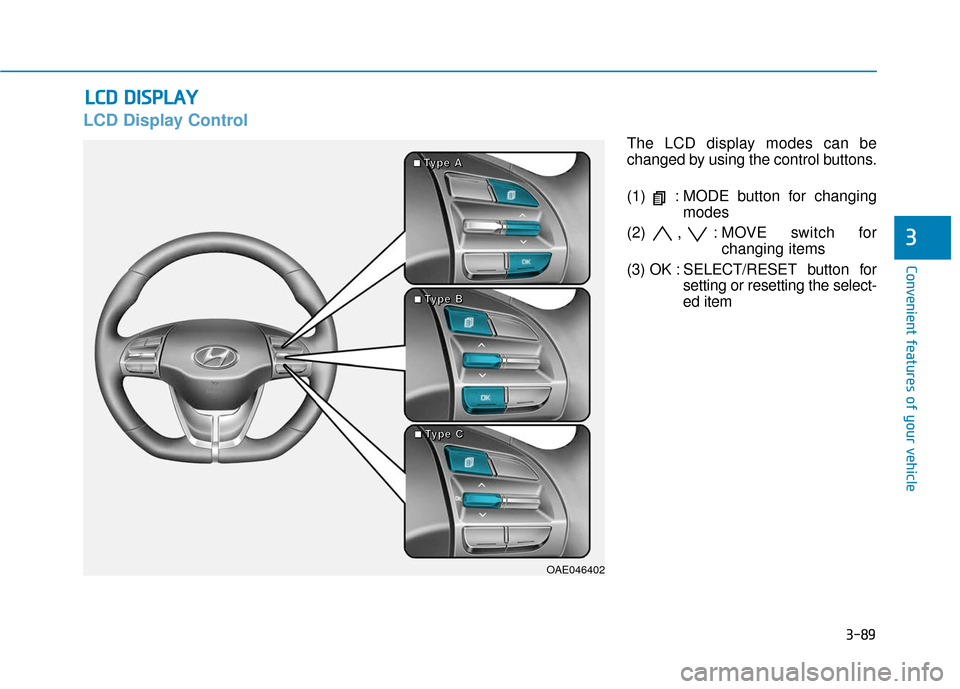
1. Door lock/unlock button ........................3-10
2. Driver position memory system ............3-14
3. Side view mirror control switch ..............3-35
4. Central door lock switch ........................3-11
5. Power window switches ........................3-37
6. Power window lock switch......................3-40
7. Instrument panel illumination control
switch ....................................................3-56
8. Blind-spot Collision Warning (BCW) System ..................................................5-34
9. Lane Keeping Assist (LKA) System ......5-56
10. ESC (Electronic Stability Control) OFF button ..........................................5-28
11. Fuel filler door open switch ..................3-48
12. 12V battery reset switch ........................6-5
13. Fuse panel ..........................................7-50
14. Steering wheel ....................................3-16
15. Steering wheel tilt/telescope lever ......3-16
16. Seat........................................................2-4
17. Hood release lever ..............................3-45
OAE017003N
The actual shape may differ from the illustration.
Page 131 of 603
3-39
Convenient features of your vehicle
3
Auto up/down window (if equipped)
Pressing or pulling up the power win-
dow switch momentarily to the sec-
ond detent position (6) completely
lowers or lifts the window even when
the switch is released. To stop the
window at the desired position while
the window is in operation, pull up or
press down and release the switch.
To reset the power windows
If the power windows do not operate
normally, the automatic power win-
dow system must be reset as follows:
1. Place the Engine Start/Stop button
to the ON position.
2. Close the window and continue pulling up on the power window
switch for at least one second.
If the power windows do not operate
properly after resetting, have the
system checked by an authorized
HYUNDAI dealer.
Automatic reverse (if equipped)
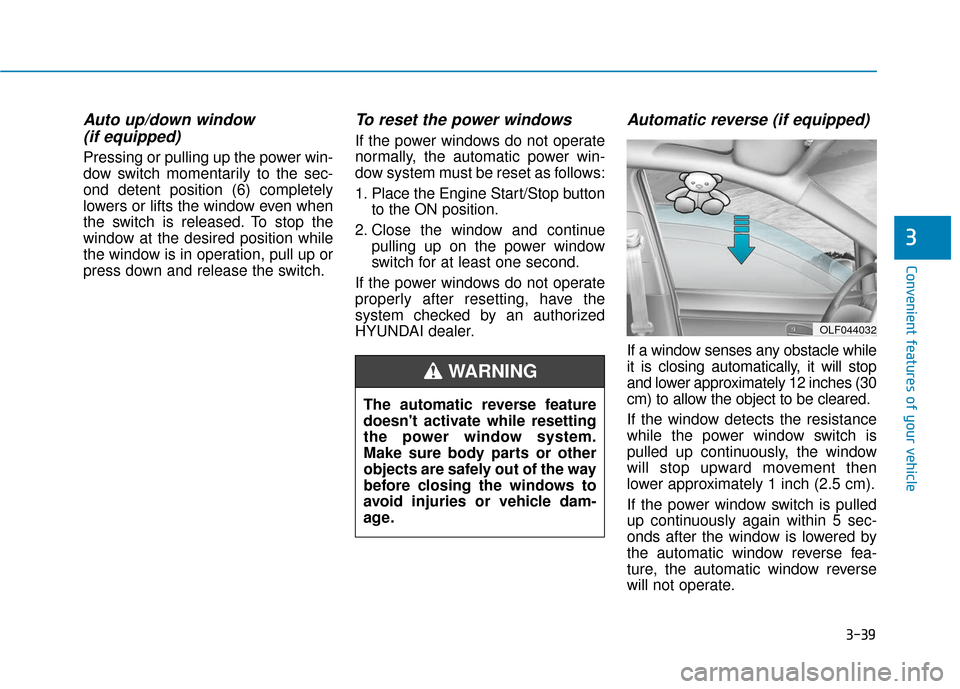
If a window senses any obstacle while
it is closing automatically, it will stop
and lower approximately 12 inches (30
cm) to allow the object to be cleared.
If the window detects the resistance
while the power window switch is
pulled up continuously, the window
will stop upward movement then
lower approximately 1 inch (2.5 cm).
If the power window switch is pulled
up continuously again within 5 sec-
onds after the window is lowered by
the automatic window reverse fea-
ture, the automatic window reverse
will not operate.
OLF044032
The automatic reverse feature
doesn't activate while resetting
the power window system.
Make sure body parts or other
objects are safely out of the way
before closing the windows to
avoid injuries or vehicle dam-
age.
WARNING
Page 181 of 603
3-89
Convenient features of your vehicle
3
L
LC
C D
D
D
D I
IS
S P
P L
LA
A Y
Y
LCD Display Control
The LCD display modes can be
changed by using the control buttons.
(1) : MODE button for changing
modes
(2) , : MOVE switch for changing items
(3) OK : SELECT/ RESET button for
setting or resetting the select-
ed item
OAE046402
■
■
■
■T
T
T
T
y
y
y
y
p
p
p
p
e
e
e
e
A
A
A
A
■
■
■
■T
T
T
T
y
y
y
y
p
p
p
p
e
e
e
e
B
B
B
B
■
■
■
■T
T
T
T
y
y
y
y
p
p
p
p
e
e
e
e
C
C
C
C
Page 185 of 603
3-93
Convenient features of your vehicle
3
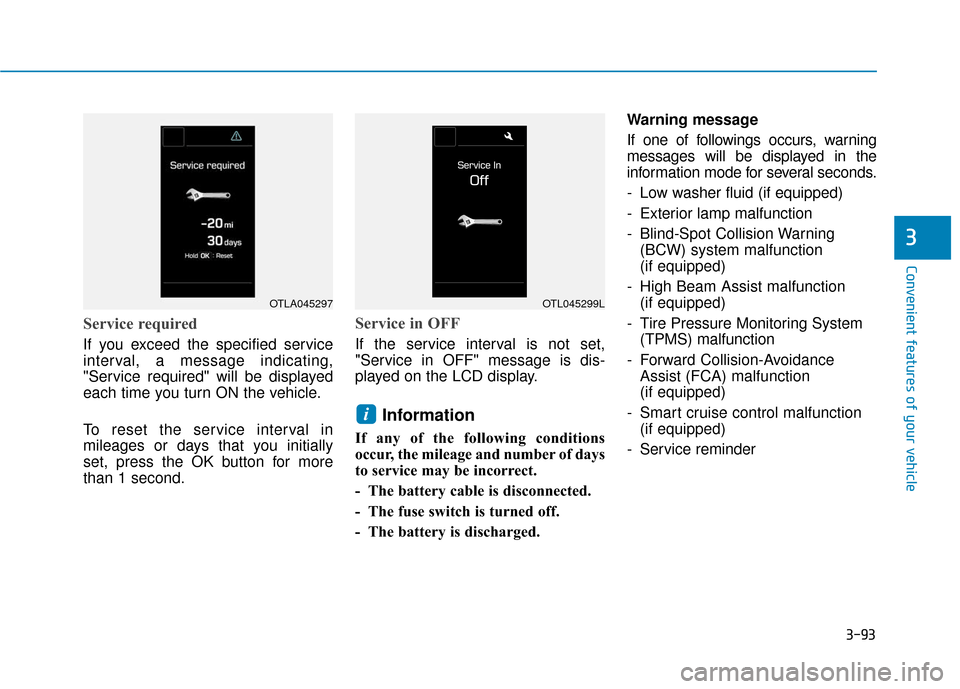
Service required
If you exceed the specified service
interval, a message indicating,
"Service required" will be displayed
each time you turn ON the vehicle.
To reset the service interval in
mileages or days that you initially
set, press the OK button for more
than 1 second.
Service in OFF
If the service interval is not set,
"Service in OFF" message is dis-
played on the LCD display.
Information
If any of the following conditions
occur, the mileage and number of days
to service may be incorrect.
- The battery cable is disconnected.
- The fuse switch is turned off.
- The battery is discharged.Warning message
If one of followings occurs, warning
messages will be displayed in the
information mode for several seconds.
- Low washer fluid (if equipped)
- Exterior lamp malfunction
- Blind-Spot Collision Warning
(BCW) system malfunction
(if equipped)
- High Beam Assist malfunction (if equipped)
- Tire Pressure Monitoring System (TPMS) malfunction
- Forward Collision-Avoidance Assist (FCA) malfunction
(if equipped)
- Smart cruise control malfunction (if equipped)
- Service reminder
i
OTLA045297OTL045299L
Page 189 of 603

3-97
Convenient features of your vehicle
3
If the service interval is activated and
the time and distance is adjusted,
messages are displayed in the fol-
lowing situations each time the vehi-
cle is turned on.
- Service in: Displayed to inform the driver theremaining mileage and days to
service.
- Service required : Displayed when the mileage anddays to service has been reached
or passed.
Information
If any of the following conditions
occur, the mileage and number of days
to service may be incorrect.
- The battery cable is disconnected.
- The fuse switch is turned off.
- The battery is discharged. 6. Other (Features)
Battery Saver+
To activate or deactivate the Aux.
Battery Saver+ function.
When activated, the high voltage bat-
tery is used to keep the 12V battery
charged.
For more information, refer to
"Hybrid System Overview" provid-
ed in the front of the owner’s man-
ual.
- Off: The average fuel economy will
not reset automatically whenever
refueling.
- After Ignition: When the vehicle has been OFF for 4 hours or longer the
average fuel economy will reset
automatically.
- After Refueling: The average fuel economy will reset automatically
after adding 1.6 gallons (6 liters) of
fuel or more and after driving speed
exceeds 1 mph (1 km/h).
For more information, refer to
"Trip Computer" in this chapter.
To select the fuel economy unit.
(US gallon, UK gallon)
To select the temperature unit.
(°C,°F)
To select the tire pressure unit.
(psi, kPa, bar)
To select language.
7. Reset
You can reset the menus in the User
Settings Mode. All menus in the User
Settings Mode are reset to factory
settings, except language and serv-
ice interval.
i
Page 196 of 603

3-104
Convenient features of your vehicle
If the service interval is activated and
the time and distance is adjusted,
messages are displayed in the fol-
lowing situations each time the vehi-
cle is turned on.
- Service in : Displayed to inform the driver theremaining mileage and days to
service.
- Service required : Displayed when the mileage anddays to service has been reached
or passed.
Information
If any of the following conditions
occur, the mileage and number of days
to service may be incorrect.
- The battery cable is disconnected.
- The fuse switch is turned off.
- The battery is discharged. 6. Other (Features)
Battery Saver+
To activate or deactivate the Aux.
Battery Saver+ function.
When activated, the high voltage bat-
tery is used to keep the 12V battery
charged.
For more information, refer to
"Hybrid System Overview" provid-
ed in the front of the owner's man-
ual.
- Off: The average fuel economy will
not reset automatically whenever
refueling.
- After Ignition: When the engine has been OFF for 4 hours or longer the
average fuel economy will reset
automatically.
- After Refueling: The average fuel economy will reset automatically
after adding 1.6 gallons (6 liters) of
fuel or more and after driving speed
exceeds 1 mph (1 km/h).
For more information, refer to
"Trip Computer" in this chapter.
To select the fuel economy unit.
(US gallon, UK gallon)
To select the temperature unit.
(°C,°F)
To select the tire pressure unit.
(psi, kPa, bar)
To select language.
7. Reset
You can reset the menus in the User
Settings Mode. All menus in the User
Settings Mode are reset to factory
settings, except language and serv-
ice interval.
i
Page 197 of 603
3-105
Convenient features of your vehicle
3
The trip computer is a microcomput-
er-controlled driver information sys-
tem that displays information related
to driving.
Information
Some driving information stored in the
trip computer (for example Average
Vehicle Speed) resets if the battery is
disconnected.
Trip modes
To change the trip mode, toggle the
" , " switch on the steering wheel.
i
T
TR
R I
IP
P
C
C O
O M
M P
PU
U T
TE
ER
R
(
( H
H Y
Y B
BR
RI
ID
D
V
V E
EH
H I
IC
C L
LE
E )
)
(Only for cluster type A)
Digital Speedometer
Driving Style
Energy Flow
Engine Coolant Temperature (Only for cluster type B)
OAE046402
■
■
■
■
T
T
T
T
y
y
y
y
p
p
p
p
e
e
e
e
A
A
A
A
■
■
■
■
T
T
T
T
y
y
y
y
p
p
p
p
e
e
e
e
B
B
B
B
■
■
■
■
T
T
T
T
y
y
y
y
p
p
p
p
e
e
e
e
C
C
C
C
Page 256 of 603
4-4
Multimedia System
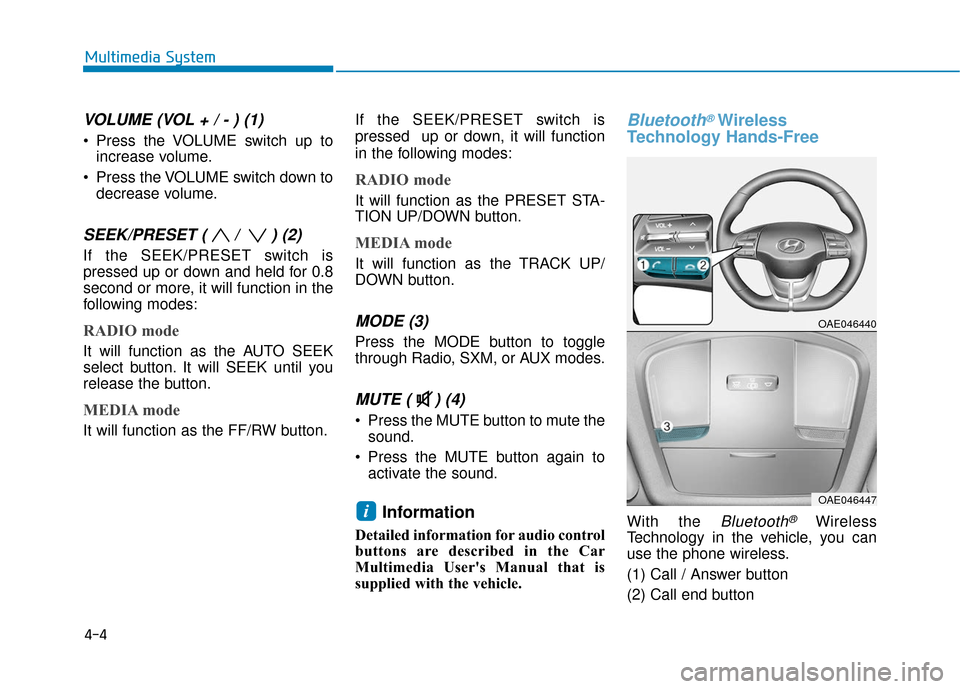
VOLUME (VOL + / - ) (1)
Press the VOLUME switch up toincrease volume.
Press the VOLUME switch down to decrease volume.
SEEK/PRESET ( / ) (2)
If the SEEK/PRESET switch is
pressed up or down and held for 0.8
second or more, it will function in the
following modes:
RADIO mode
It will function as the AUTO SEEK
select button. It will SEEK until you
release the button.
MEDIA mode
It will function as the FF/RW button. If the SEEK/PRESET switch is
pressed up or down, it will function
in the following modes:
RADIO mode
It will function as the PRESET STA-
TION UP/DOWN button.
MEDIA mode
It will function as the TRACK UP/
DOWN button.
MODE (3)
Press the MODE button to toggle
through Radio, SXM, or AUX modes.
MUTE ( ) (4)
Press the MUTE button to mute the
sound.
Press the MUTE button again to activate the sound.
Information
Detailed information for audio control
buttons are described in the Car
Multimedia User's Manual that is
supplied with the vehicle.
Bluetooth®Wireless
Technology Hands-Free
With the Bluetooth®Wireless
Technology in the vehicle, you can
use the phone wireless.
(1) Call / Answer button
(2) Call end buttoni
OAE046440
OAE046447