Page 420 of 659

5-116
Driving your vehicle
Warning light and message
Check LDWS
If there is a problem with the system
a message will appear for a few sec-
onds.
If the problem continues the LDWS
failure indicator will illuminate.
LDWS failure indicator
The LDWS failure indica-
tor (yellow) will illuminate
if the LDWS is not work-
ing properly. We recom-
mend you to have your vehicle
checked by an authorized HYUNDAI
dealer.
When there is a problem with the
system, do one of the following:
Turn the system on after turning the vehicle off and on again.
Check if the ignition switch is in the ON position.
Check if the system is affected by the weather. (e.g. fog, heavy rain, etc.)
Check if there is foreign matter on the camera lens.
If the problem is not solved, we rec-
ommend you have the system
checked by an authorized HYUNDAI
dealer.
Limitations of the system
The LDWS may operate prematurely
even if the vehicle does not depart
from the intended lane, OR, the
LDWS may not warn you if the vehi-
cle leaves the intended lane under
the following circumstances:
The lanes ahead are not visible due to rain, snow, water on the
road, damaged or stained road
surface, or other factors.
The brightness outside changes suddenly such as when entering or
exiting a tunnel.
The brightness outside is too low such as when the headlamps are
not on at night or the vehicle is
going through a tunnel.
The surrounding of the inside rear view mirror temperature is high
due to direct sunlight.
It is difficult to distinguish the lane marking from the road surface or
the lane marking is faded or not
clearly marked.
Driving on a steep grade, over a hill, or when driving on a curved
road.
OAE056164L
Page 422 of 659
5-118
Driving your vehicle
The Driver Attention Alert (DAA),
system is to warn the driver with any
hazardous driving situations upon
detecting the driver's fatigue level or
inattentive driving practices.
System setting and activation
System setting
The Driver Attention Alert system is set to be in the OFF position,
when your vehicle is first delivered
to you from the factory.
To turn ON the Driver Attention Alert system, turn on the engine,
and then select 'User Settings →
Driving Assist →Driver Attention
Alert →Normal/Early' on the LCD
display. The driver can select the Driver
Attention Alert system mode.
- Off : The Driver Attention Alertsystem is deactivated.
- Normal : The Driver Attention Alert system alerts the driver of
his/her fatigue level or inattentive
driving practices.
- Early : The Driver Attention Alert system alerts the driver of his/her
fatigue level or inattentive driving
practices faster than Normal
mode.
The set-up of the Driver Attention Alert system will be maintained, as
selected, when the engine is re-
started.
Prerequisite for activation
The Driver Attention Alert system is
operable, when driving speed is
between 60 km/h (40 mph) and 200
km/h (125 mph).
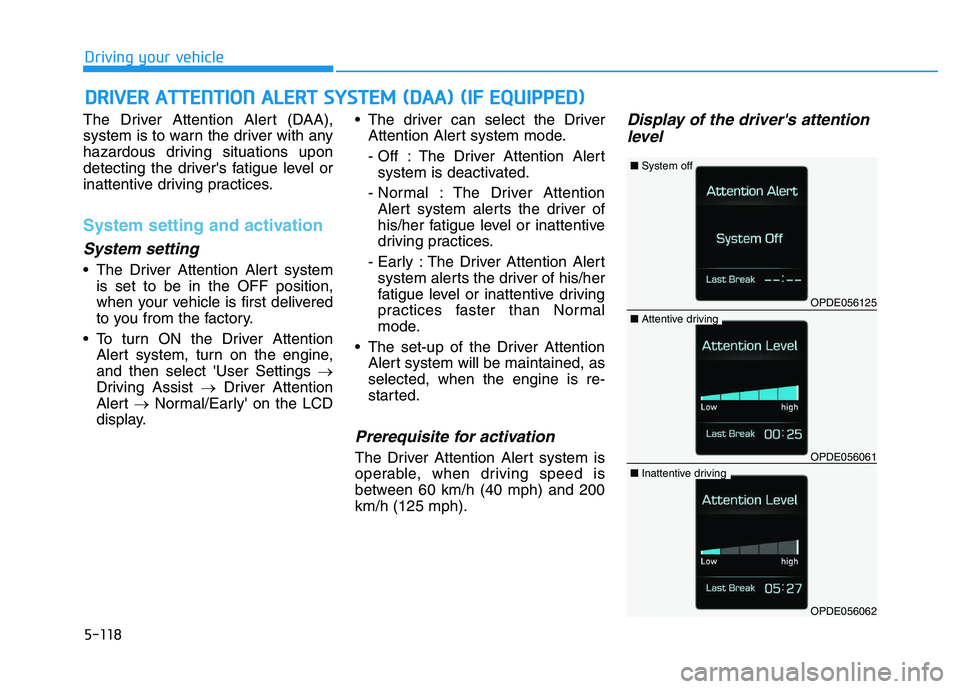
Display of the driver's attentionlevel
D
D R
R I
I V
V E
E R
R
A
A T
T T
T E
E N
N T
T I
I O
O N
N
A
A L
L E
E R
R T
T
S
S Y
Y S
S T
T E
E M
M
(
( D
D A
A A
A )
)
(
( I
I F
F
E
E Q
Q U
U I
I P
P P
P E
E D
D )
)
OPDE056125
■ System off
OPDE056061
■Attentive driving
OPDE056062
■Inattentive driving
Page 423 of 659
5-119
Driving your vehicle
5
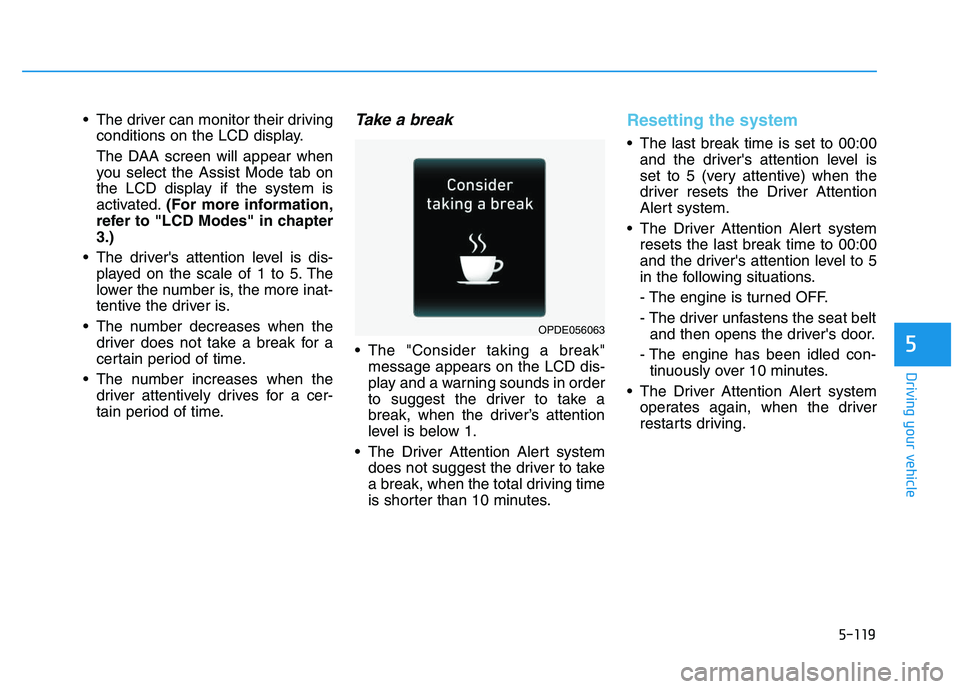
The driver can monitor their drivingconditions on the LCD display.
The DAA screen will appear when
you select the Assist Mode tab on
the LCD display if the system is
activated. (For more information,
refer to "LCD Modes" in chapter
3.)
The driver's attention level is dis- played on the scale of 1 to 5. The
lower the number is, the more inat-
tentive the driver is.
The number decreases when the driver does not take a break for a
certain period of time.
The number increases when the driver attentively drives for a cer-
tain period of time.Take a break
The "Consider taking a break"message appears on the LCD dis-
play and a warning sounds in order
to suggest the driver to take a
break, when the driver’s attention
level is below 1.
The Driver Attention Alert system does not suggest the driver to take
a break, when the total driving time
is shorter than 10 minutes.
Resetting the system
The last break time is set to 00:00and the driver's attention level is
set to 5 (very attentive) when the
driver resets the Driver Attention
Alert system.
The Driver Attention Alert system resets the last break time to 00:00
and the driver's attention level to 5
in the following situations.
- The engine is turned OFF.
- The driver unfastens the seat beltand then opens the driver's door.
- The engine has been idled con- tinuously over 10 minutes.
The Driver Attention Alert system operates again, when the driver
restarts driving.
OPDE056063
Page 425 of 659

5-121
Driving your vehicle
5
The Driver Attention Alert system
utilizes the camera sensor on the
front windshield for its operation.
To keep the camera sensor in the
best condition, you should
observe the followings:
NEVER install any accessoriesor stickers on the front wind-
shield, nor tint the front wind-
shield.
NEVER locate any reflective objects (i.e. white paper, mirror)
over the dashboard. Any light
reflection may cause a malfunc-
tion of the Driver Attention Alert
(DAA) system.
Pay extreme caution to keep the camera sensor out of water.
NEVER arbitrarily disassemble the camera assembly, nor apply
any impact on the camera
assembly.
Playing the vehicle audio sys- tem at high volume may offset
the Driver Attention Alert sys-
tem warning sounds.
NOTICE
The Driver Attention Alert sys-
tem may not properly operate
with limited alerting in the fol-
lowing situations:
The lane detection perform-
ance is limited. (For more
information, refer to "Lane
Keeping Assist System
(LKAS)" in this chapter.)
The vehicle is violently driven
or is abruptly turned for
obstacle avoidance (e.g. con-
struction area, other vehicles,
fallen objects, bumpy road).
Forward drivability of the
vehicle is severely under-
mined (possibly due to wide
variation in tire pressures,
uneven tire wear-out, toe-
in/toe-out alignment).
The vehicle drives on a curvy
road.
The vehicle drives on a
bumpy road.
(Continued)
CAUTION(Continued)
The vehicle drives through a
windy area.
The vehicle is controlled by
the following driving assist
systems:
- Lane Keeping Assist System
(LKAS)
- Autonomous Emergency Braking (AEB) System
Page 426 of 659
5-122
Driving your vehicle
Speed Limit Control operation
You can set the speed limit when you
do not want to drive over a specific
speed.
If you drive over the preset speed
limit, the warning system operates
(set speed limit will blink and chime
will sound) until the vehicle speed
returns within the speed limit.
Information
While speed limit control is in opera-
tion, the cruise control system cannot
be activated.
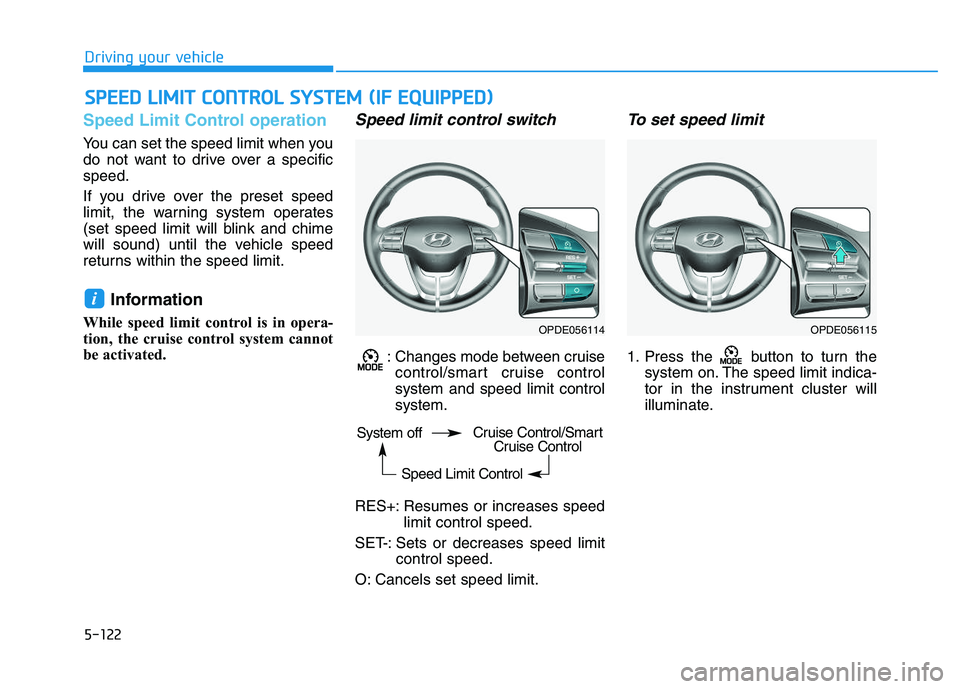
Speed limit control switch
: Changes mode between cruisecontrol/smart cruise control
system and speed limit control
system.
RES+: Resumes or increases speed limit control speed.
SET-: Sets or decreases speed limit control speed.
O: Cancels set speed limit.
To set speed limit
1. Press the button to turn the system on. The speed limit indica-
tor in the instrument cluster will
illuminate.
i
S
S P
P E
E E
E D
D
L
L I
I M
M I
I T
T
C
C O
O N
N T
T R
R O
O L
L
S
S Y
Y S
S T
T E
E M
M
(
( I
I F
F
E
E Q
Q U
U I
I P
P P
P E
E D
D )
)
OPDE056114OPDE056115
System off
Speed Limit ControlCruise Control/SmartCruise Control
Page 427 of 659
5-123
Driving your vehicle
5
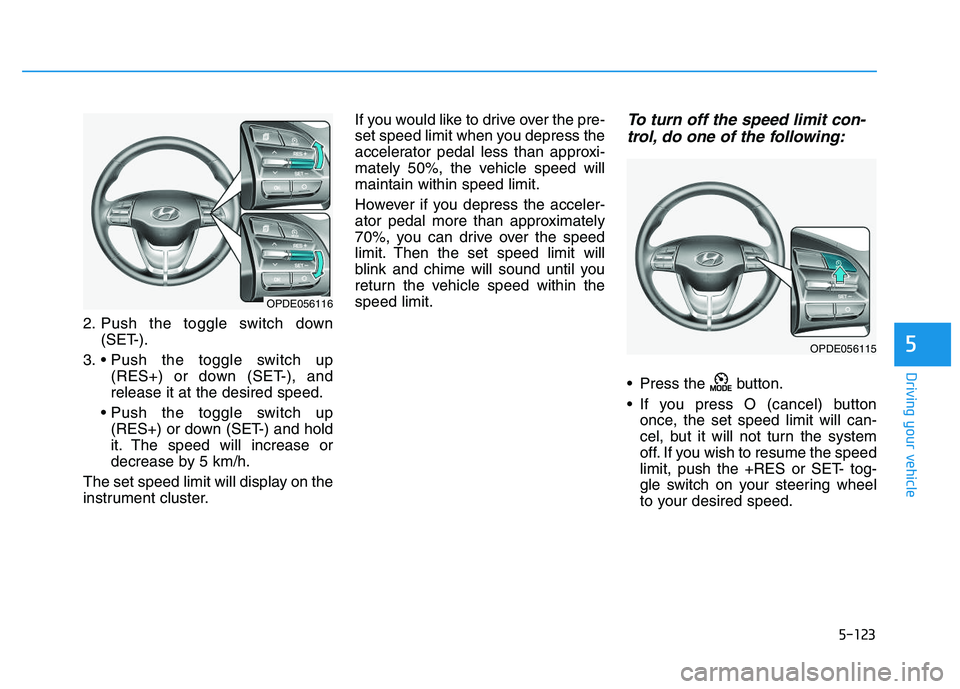
2. Push the toggle switch down(SET-).
3. (RES+) or down (SET-), and
release it at the desired speed.
(RES+) or down (SET-) and hold
it. The speed will increase or
decrease by 5 km/h.
The set speed limit will display on the
instrument cluster. If you would like to drive over the pre-
set speed limit when you depress the
accelerator pedal less than approxi-
mately 50%, the vehicle speed will
maintain within speed limit.
However if you depress the acceler-
ator pedal more than approximately
70%, you can drive over the speed
limit. Then the set speed limit will
blink and chime will sound until you
return the vehicle speed within the
speed limit.
To turn off the speed limit con-
trol, do one of the following:
Press the button.
If you press O (cancel) button
once, the set speed limit will can-
cel, but it will not turn the system
off. If you wish to resume the speed
limit, push the +RES or SET- tog-
gle switch on your steering wheel
to your desired speed.
OPDE056116
OPDE056115
Page 429 of 659
5-125
Driving your vehicle
5
Information
• During normal cruise control opera-tion, when the SET switch is activat-
ed or reactivated after applying the
brakes, the cruise control will ener-
gize after approximately 3 seconds.
This delay is normal.
• Before activating the cruise control function, the system will check to
verify that the brake switch is oper-
ating normally. Depress the brake
pedal at least once after turning ON
the ignition or starting the vehicle.
Cruise control switch
O : Cancels cruise control operation.
: Turns cruise control system onor off.
RES+: Resumes or increases cruise control speed.
SET-: Sets or decreases cruise con- trol speed.
Information
First, switch the mode to Cruise
Control by pressing the button if
equipped with the Speed Limit
Control System.
The mode changes, as below, whenev-
er the button is pressed.
ii
OPDE056115
System off Cruise Control
Speed Limit Control
OPDE056117
Page 430 of 659
5-126
Driving your vehicle
To set Cruise Control speed
1. Press the button on the steer-ing wheel to turn the system on.
The indicator will illuminate.
2. Accelerate to the desired speed, which must be more than 30 km/h
(20 mph).
Information - Manual trans-mission
For manual transmission vehicles, you
should depress the brake pedal at
least once to set the cruise control
after starting the engine. 3. Push the toggle switch down
(SET-), and release it. The SET
indicator light will illuminate.
4. Release the accelerator pedal.
Information
On a steep slope, the vehicle may
slightly slow down or speed up, while
driving uphill or downhill.
To increase Cruise Control speed
Push the toggle switch up (RES+)
and hold it, while monitoring the
SET speed on the instrument clus-
ter.
Release the toggle switch when the
desired speed is shown and the
vehicle will accelerate to that speed.
i
i
OPDE056118
OPDE056119
OPDE056120