2019 HYUNDAI I30 Change
[x] Cancel search: ChangePage 90 of 659

3-88
Convenient features of your vehicle
Turn signals and lane changesignals
To signal a turn, push down on the
lever for a left turn or up for a right
turn in position (A). To signal a lane
change, move the turn signal lever
slightly and hold it in position (B).The
lever will return to the OFF position
when released or when the turn is
completed.
If an indicator stays on and does not
flash or if it flashes abnormally, one of
the turn signal bulbs may be burned
out and will require replacement.
One-touch turn signal function
To activate an one-touch turn signal
function, move the turn signal lever
slightly and then release it. The lane
change signals will blink 3, 5 or 7
times.
You can activate/deactivate the One
Touch Turn Signal function or choose
the number of blinking (3, 5, or 7)
from the User Settings mode on the
LCD display. For more details, refer
to "LCD Display" in this chapter.
Front fog lamp (if equipped)
Fog lamps are used to provide
improved visibility when visibility is
poor due to fog, rain or snow, etc. Use
the switch next to the headlamp switch
to turn the fog lamps ON and OFF.
1. Turn on the position lamp.
2. Turn the light switch (1) to the front fog lamp position.
OPDE046066
OTLE045284
Page 116 of 659
3-114
Convenient features of your vehicle
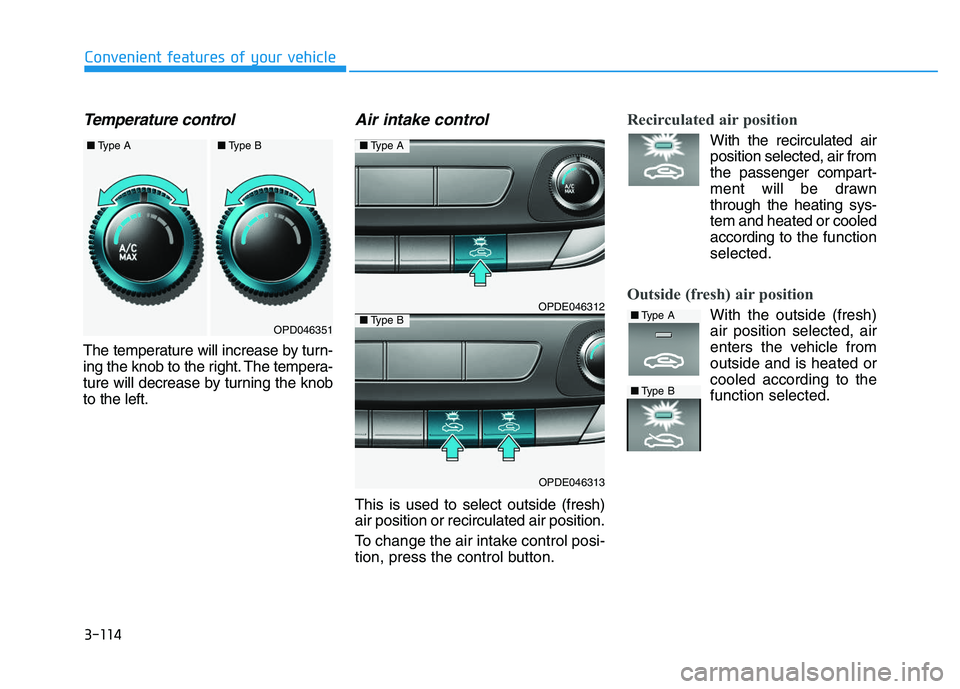
Temperature control
The temperature will increase by turn-
ing the knob to the right. The tempera-
ture will decrease by turning the knob
to the left.
Air intake control
This is used to select outside (fresh)
air position or recirculated air position.
To change the air intake control posi-
tion, press the control button.
Recirculated air position
With the recirculated air
position selected, air from
the passenger compart-
ment will be drawn
through the heating sys-
tem and heated or cooled
according to the function
selected.
Outside (fresh) air position
With the outside (fresh) air position selected, air
enters the vehicle from
outside and is heated or
cooled according to the
function selected.OPD046351
OPDE046312
OPDE046313
■ Type A
■Type B■Type A
■Type B
■Type A■Type B
Page 120 of 659

3-118
Convenient features of your vehicle
Air conditioning system operation
tips
If the vehicle has been parked indirect sunlight during hot weather,
open the windows for a short time
to let the hot air inside the vehicle
escape.
achieved, switch back from the
recirculated air to the fresh outside
air position.
To help reduce moisture inside of the windows on rainy or humid
days, decrease the humidity inside
the vehicle by operating the air
conditioning system with the win-
dows and sunroof closed.
Use the air conditioning system every month for a few minutes to
ensure maximum system perform-
ance.
excessively, the difference between
the temperature of the outside air
and that of the windshield could
cause the outer surface of the
windshield to fog up, causing loss
of visibility. In this case, set the
mode selection button to the
position and set the fan speed con-
trol knob to the lowest speed set-
ting.
System maintenance
Climate control air filter
This filter is installed behind the
glove box. It filters the dust or other
pollutants that enter the vehicle
through the heating and air condi-
tioning system.
We recommend that the climate con-
trol air filter replaced by an author-
ized HYUNDAI dealer according to
the maintenance schedule. If the car
is being driven in severe conditions
such as dusty or rough roads, more
frequent climate control filter inspec-
tions and changes are required.
1LDA5047
Outside air
Recirculatedair
Climate control air filter Blower
Evaporatorcore Heater core
Page 128 of 659

3-126
Convenient features of your vehicle
Adjusting the driver and passenger
side temperature equally
Press the “SYNC” button to adjustthe driver and passenger side tem-
perature equally.
The passenger side temperature
will be set to the same temperature
as the driver side temperature.
Turn the driver side temperature control knob. The driver and pas-
senger side temperature will be
adjusted equally.
Adjusting the driver and passenger
side temperature individually
Press the “SYNC” button again to
adjust the driver and passenger side
temperature individually. The button
indicator will turn off.
Temperature conversion
If the battery has been discharged or
disconnected, the temperature mode
display will reset to Centigrade.
To change the temperature unit from
°C to °F or °F to °C :
- Automatic climate control system
Press the AUTO button for 3 sec-
onds while pressing the OFF button.
- Instrument cluster Go to User Settings Mode →Other
Features →Temperature Unit.
Air intake control
This is used to select the outside
(fresh) air position or recirculated air
position.
To change the air intake control posi-
tion, push the control button.
OPDE046320
OPDE046321
Page 133 of 659

3-131
Convenient features of your vehicle
3
System maintenance
Climate control air filter
This filter is installed behind the
glove box. It filters the dust or other
pollutants that enter the vehicle
through the heating and air condi-
tioning system.
We recommend that the climate con-
trol air filter replaced by an author-
ized HYUNDAI dealer according to
the maintenance schedule. If the car
is being driven in severe conditions
such as dusty or rough roads, more
frequent climate control filter inspec-
tions and changes are required.
If the air flow rate suddenly decreas-
es, we recommend the system be
checked at an authorized HYUNDAI
dealer.
Checking the amount of air con-ditioner refrigerant and com-pressor lubricant
When the amount of refrigerant is
low, the performance of the air con-
ditioning is reduced. Overfilling also
has a bad influence on the air condi-
tioning system.
Therefore, if abnormal operation is
found, we recommend that the sys-
tem be inspected by an authorized
HYUNDAI dealer.
We recommend the air conditioning
system be serviced by an authorized
HYUNDAI dealer.
1LDA5047
Outside airRecirculatedair
Climate controlair filter Blower
Evaporatorcore Heater core
Vehicles equipped with R-134a
Because the refriger-
ant is at very high
pressure, the air con-
ditioning system
should only be serviced by
trained and certified technicians.
It is important that the correct
type and amount of oil and
refrigerant is used. Otherwise, it
may cause damage to the vehi-
cle and personal injury.
WARNING
Vehicles equipped with R-1234yf
Because the refriger-
ant is mildly inflamma-
ble at very high pres-
sure, the air condition-
ing system should
only be serviced by
trained and certified
technicians. It is
important that the cor-
rect type and amount of oil and
refrigerant is used. Otherwise, it
may cause damage to the vehi-
cle and personal injury.
WARNING
Page 139 of 659

3-137
Convenient features of your vehicle
C
C L
L I
I M
M A
A T
T E
E
C
C O
O N
N T
T R
R O
O L
L
A
A D
D D
D I
I T
T I
I O
O N
N A
A L
L
F
F E
E A
A T
T U
U R
R E
E S
S
3
Cluster ionizer (if equipped)
When the ignition switch is in the ON
position, the clean air function turns
on automatically.
Also, the clean air function turns off
automatically, when the ignition
switch is in the OFF position.
Automatic ventilation
(if equipped)
When the ignition switch is in the ON
position or when the engine is run-
ning and the outside temperature is
low, the automatic ventilation feature
will activate if the recirculated air
intake position is selected for more
than 30 minutes while A/C is on. In
this condition, the air intake position
will automatically switch to the out-
side (fresh) air position.
To cancel or set the Automatic
Ventilation
When the air conditioning system is
on, select Face Level mode and
press the recirculated air position
button for three seconds.
When the automatic ventilation is set,
the air intake control button (recircu-
lated air position) indicator will blink 6
times. When canceled, the air intake
control button (recirculated air posi-
tion) indicator will blink 3 times.
Sunroof inside air recirculation
(if equipped)
When the heater or air conditioning
system is on with the sunroof opened,
the outside (fresh) air position will be
automatically selected. At this time, if
you press the recirculated air position
button, the recirculated air position
will be selected but will change back
to the outside (fresh) air position after
3 minutes.
When the sunroof is closed, the air
intake position will return to the orig-
inal position that was selected.
Page 147 of 659

3-145
Convenient features of your vehicle
To charge a cellular phone
The wireless cellular phone charging
system charges only the Qi-enabled
cellular phones ( ). Read the label
on the cellular phone accessory
cover or visit your cellular phone
manufacturer’s website to check
whether your cellular phone supports
the Qi technology.
The wireless charging process starts
when you put a Qi-enabled cellular
phone on the wireless charging unit.
1. Remove other items, including thesmart key, from the wireless charg-
ing unit. If not, the wireless charg-
ing process may be interrupted.
2. The indicator illuminates in orange during the charging process. The
indicator color changes to green,
when the charging process is
completed.
3. You can turn ON or OFF the wire- less charging function in the User
Settings mode on the instrument
cluster. (For further information,
refer to the “LCD Modes” in this
chapter.) Slightly change the cellular phone
position, when the cellular phone is
not being charged. Make sure that
the indicator illuminates in orange.
The indicator color may not change
to green in accordance with the cel-
lular phone type, even though the
charging process is completed. The
indicator blinks in orange for 10 sec-
onds when there is a malfunction
with the wireless charging system.
In this case, temporarily stop the
charging process, and re-attempt to
wirelessly charge your cellular phone
again.
The system warns you with a mes-
sage on the LCD display when you do
not take out the cellular phone from
the wireless charging unit with the
front door open and the Engine
Start/Stop button in the OFF position.
The wireless cellular phone
charging system may not sup-
port certain cellular phones,
which are not verified for the Qi
specification ( ).
(Continued)(Continued)
Locate your cell phone well in the
middle of the wireless cellular
phone charging system. Even
when your cell phone locates
slightly to one side, the charging
speed may decrease.
The wireless charging process may temporarily stop, when a
smart key function operates (i.e.
starting the engine, opening the
doors, closing the doors).
For certain cell phones, the indi- cator color may not change to
green, even when the wireless
charging process is properly
completed.
The wireless charging process may temporarily stop, when tempera-
ture abnormally increases inside
the wireless cellular phone charg-
ing system. The wireless charging
process restarts, when tempera-
ture falls to a proper level.
The wireless charging process may temporarily stop when there
is any metallic item, such as a
coin, between the wireless cellu-
lar phone charging system and a
cellular phone.
NOTICE
3
Page 155 of 659

3-5
Convenient features of your vehicle
3
Remote key precautions
The remote key will not work if any of
the following occur:
The key is in the ignition switch.
You exceed the operating distance limit (about 30 m [90 feet]).
The remote key battery is weak.
Other vehicles or objects may be blocking the signal.
The weather is extremely cold.
The remote key is close to a radio transmitter such as a radio station
or an airport which can interfere
with normal operation of the remote
key.
When the remote key does not work
correctly, open and close the door
with the mechanical key. If you have a
problem with the remote key, it is rec-
ommended that you contact an
authorized HYUNDAI dealer.
If the remote key is in close proximity
to your mobile phone, the signal could
be blocked by your mobile phones
normal operational signals. This is especially important when the
phone is active such as making and
receiving calls, text messaging,
and/or sending/receiving emails.
Avoid placing the remote key and your
mobile phone in the same pants or
jacket pocket and always try to main-
tain an adequate distance between
the two devices.
Information
Changes or modifications not express-
ly approved by the party responsible
for compliance could void the user’s
authority to operate the equipment. If
the keyless entry system is inoperative
due to changes or modifications not
expressly approved by the party
responsible for compliance, it will not
be covered by your manufacturer’s
vehicle warranty.
Keep the remote key away from
electromagnetic materials that
blocks electromagnetic waves to
the key surface.
Battery replacement
If the remote key is not working prop-
erly, try replacing the battery with a
new one.
Battery Type: CR2032
To replace the battery:
1. Insert a slim tool into the slot and
gently pry open the cover.
2. Using a screw driver, remove the battery cover.
3. Remove the old battery and insert a new battery. Make sure the bat-
tery position is correct.
4. Reinstall the battery cover and key cover in the reverse order of
removal.
NOTICE
i
OPD046002