2019 HYUNDAI ELANTRA SPORT battery
[x] Cancel search: batteryPage 96 of 534
3-11
Convenient features of your vehicle
3
If you suspect your smart key might
have sustained some damage, or
you feel your smart key is not work-
ing correctly, contact an authorized
HYUNDAI dealer.InformationAn inappropriately disposedbattery can be harmful to the
environment and human
health. Dispose of the battery
according to your local law(s)
or regulations.Immobilizer System
The immobilizer system protects
your vehicle from theft. If an improp-
erly coded key (or other device) is
used, the engine’s fuel system is dis-
abled.
When the ignition switch is placed in
the ON position, the immobilizer sys-
tem indicator should come on briefly,
then go off. If the indicator starts to
blink, the system does not recognize
the coding of the key.
Place the ignition switch to the LOCK/OFF position, then place the
ignition switch to the ON positionagain.
The system may not recognize your
key’s coding if another immobilizer
key or other metal object (i.e., key
chain) is near the key. The engine
may not start because the metal may
interrupt the transponder signal from
transmitting normally. If the system repeatedly does not
recognize the coding of the key, it is
recommended that you contact your
HYUNDAI dealer. Do not attempt to alter this system or
add other devices to it. Electrical
problems could result that may make
your vehicle inoperable.
The transponder in your key is an
important part of the immobilizer
system. It is designed to give
years of trouble-free service, how-
ever you should avoid exposure to
moisture, static electricity and
rough handling. Immobilizer sys-
tem malfunction could occur.
NOTICE
i
In order to prevent theft of your
vehicle, do not leave spare keys
anywhere in your vehicle. Your
immobilizer password is a cus-
tomer unique password andshould be kept confidential.
WARNING
This device complies with
Industry Canada licence-
exempt RSS standard(s).
Operation is subject to the fol-
lowing two conditions: (1) this
device may not cause interfer-
ence, and (2) this device must
accept any interference, includ-
ing interference that may causeundesired operation of the
device.
IC WARNING
Page 105 of 534
3-20
Convenient features of your vehicle
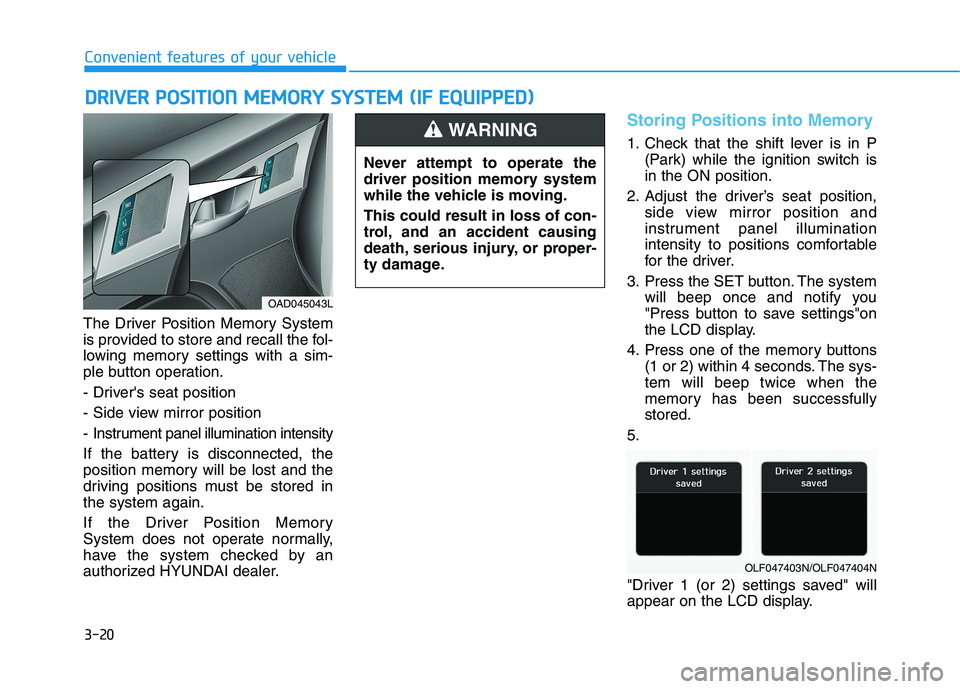
The Driver Position Memory System
is provided to store and recall the fol-
lowing memory settings with a sim-
ple button operation.
- Driver's seat position
- Side view mirror position
- Instrument panel illumination intensity
If the battery is disconnected, the
position memory will be lost and the
driving positions must be stored inthe system again.
If the Driver Position Memory
System does not operate normally,
have the system checked by an
authorized HYUNDAI dealer.
Storing Positions into Memory
1. Check that the shift lever is in P(Park) while the ignition switch is in the ON position.
2. Adjust the driver’s seat position, side view mirror position and
instrument panel illumination
intensity to positions comfortable
for the driver.
3. Press the SET button. The system will beep once and notify you
"Press button to save settings"on
the LCD display.
4. Press one of the memory buttons (1 or 2) within 4 seconds. The sys-tem will beep twice when the
memory has been successfullystored.
5.
"Driver 1 (or 2) settings saved" will
appear on the LCD display.
DD RRIIVV EERR PP OO SSIITT IIOO NN MM EEMM OORRYY SS YY SSTT EEMM (( IIFF EE QQ UUIIPP PPEEDD ))
OAD045043L Never attempt to operate the
driver position memory system
while the vehicle is moving. This could result in loss of con-
trol, and an accident causing
death, serious injury, or proper-
ty damage.
WARNING
OLF047403N/OLF047404N
Page 128 of 534
3-43
Convenient features of your vehicle
3
Periodically remove any dirt thatmay accumulate on the sunroof guide rail or between the sun-
roof and roof panel which can
make a noise.
Do not try to open the sunroof when the temperature is below
freezing or when the sunroof is
covered with snow or ice, other-wise the motor could be dam-
aged. In cold and wet climates,
the sunroof may not work prop-
erly.
Sunshade
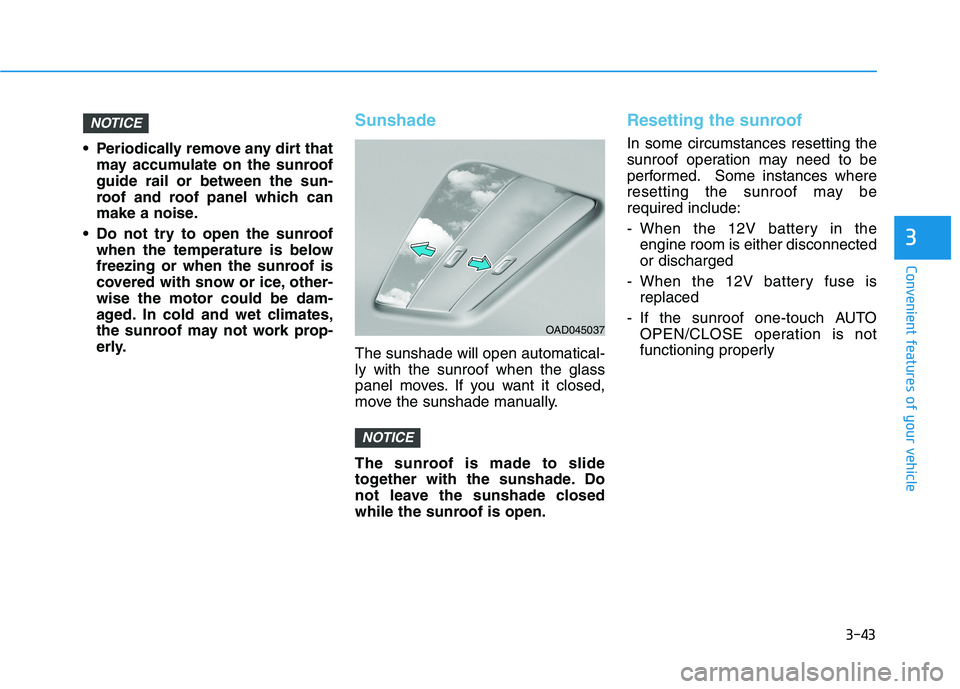
The sunshade will open automatical- ly with the sunroof when the glass
panel moves. If you want it closed,
move the sunshade manually.
The sunroof is made to slide
together with the sunshade. Do
not leave the sunshade closed
while the sunroof is open.
Resetting the sunroof
In some circumstances resetting the
sunroof operation may need to be
performed. Some instances where
resetting the sunroof may berequired include:
- When the 12V battery in theengine room is either disconnected or discharged
- When the 12V battery fuse is replaced
- If the sunroof one-touch AUTO OPEN/CLOSE operation is not
functioning properly
NOTICE
NOTICE
OAD045037
Page 129 of 534
3-44
Convenient features of your vehicle
Sunroof resetting procedure:
1. Place the ignition switch to the ONposition or start the engine. It is recommended to reset the sun-
roof while the engine is running.
2. Push the control lever forward. The sunroof will close completelyor tilt depending on the condition
of the sunroof.
3. Release the control lever when the sunroof stops moving.
4. Push the control lever forward about 10 seconds.
- When the sunroof is in the closed position :
The glass will tilt and slightly move up and down.
- When the sunroof is in the tilt position:
The glass will slightly move up and down.
Do not release the lever until the
operation is completed.
If you release the lever during opera-
tion, start the procedure again fromstep 2. 5. Within 3 seconds, push and hold
the control lever forward until the
sunroof operates as follows:
Tilt down Slide Open Slide
Close.
Do not release the lever until the
operation is completed.
If you release the lever during opera-
tion, start the procedure again fromstep 2.
6. Release the sunroof control lever after all steps have completed. (The sunroof system has beenreset.)
Information
If the sunroof is not reset when the vehicle battery is disconnected or
discharged, or the sunroof fuse is
blown, the sunroof may not operate
normally.
For more detailed information, we recommend that you contact an
authorized HYUNDAI dealer.Sunroof Open Warning (if equipped)
If the driver turns off the enginewhen the sunroof is not fully
closed, the warning chime will
sound for approximately 3 seconds
and the sunroof open warning will
appear on the LCD display.
If the driver turns off the engine and opens the door when the sun-roof is not fully closed, the open
sunroof warning will appear on the
LCD display until the door is closedor the sunroof is fully closed.
Close the sunroof securely when
leaving your vehicle.
i
Page 146 of 534
3-61
Convenient features of your vehicle
3
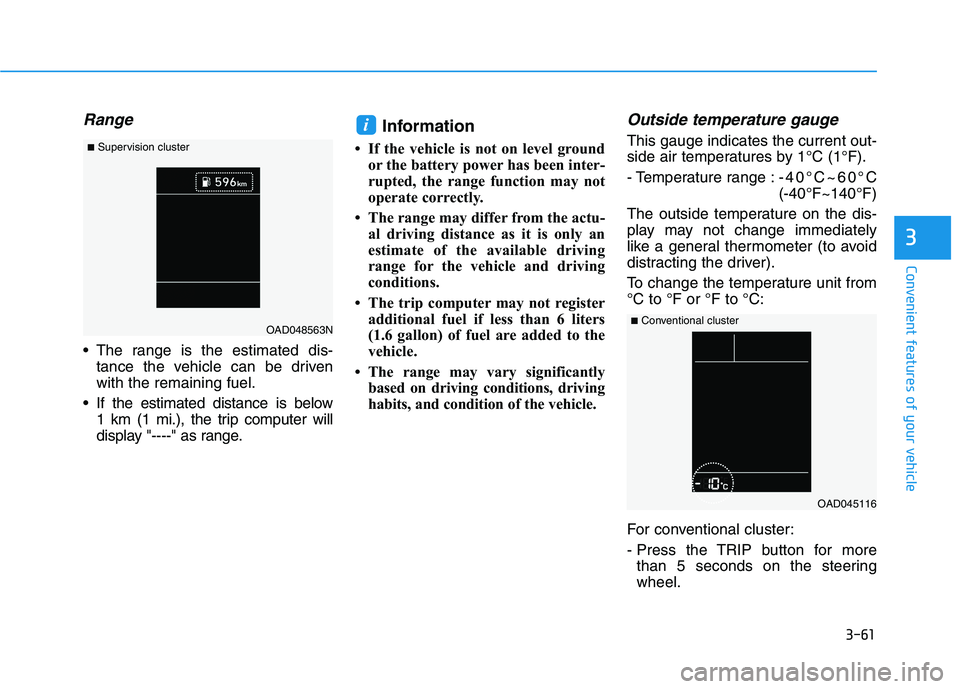
Range
The range is the estimated dis-tance the vehicle can be driven with the remaining fuel.
If the estimated distance is below 1 km (1 mi.), the trip computer will
display "----" as range. Information
If the vehicle is not on level ground or the battery power has been inter-
rupted, the range function may not
operate correctly.
The range may differ from the actu- al driving distance as it is only an
estimate of the available driving
range for the vehicle and driving
conditions.
The trip computer may not register additional fuel if less than 6 liters
(1.6 gallon) of fuel are added to the
vehicle.
The range may vary significantly based on driving conditions, driving
habits, and condition of the vehicle.
Outside temperature gauge
This gauge indicates the current out-
side air temperatures by 1°C (1°F).
- Temperature range : -40°C~60°C (-40°F~140°F)
The outside temperature on the dis-
play may not change immediately
like a general thermometer (to avoid
distracting the driver).
To change the temperature unit from °C to °F or °F to °C:
For conventional cluster:
- Press the TRIP button for more than 5 seconds on the steering wheel.i
OAD045116
■
Conventional cluster
OAD048563N
■
Supervision cluster
Page 160 of 534
3-75
Convenient features of your vehicle
3
LCD Display Messages (if equipped)
Shift to P or N to start engine(for smart key system and auto-
matic transmission/dual clutch transmission)
This warning message is displayed if
you try to start the engine with the
shift lever not in the P (Park) or N
(Neutral) position.
Information
You can start the engine with the shift
lever in the N (Neutral) position. But,
for your safety, we recommend that
you start the engine with the shift
lever in the P (Park) position.
Shift to P (for smart key system)
This message is displayed if you try
to turn off the engine without the shift
lever in P (Park) position.
At this time, the Engine Start/Stop
button turns to the ACC position (If
you press the Engine Start/Stop but-
ton once more, it will turn to the ONposition).
Press START button again (for smart key system)
This message is displayed if you
were unable to start the vehicle when
the Start/Stop button was pressed.
If this occurs, attempt to start the
engine by pressing the Start/Stop
button again.
If the warning message appears
each time you press the Start/Stop
button, have your vehicle inspected
by an authorized Hyundai dealer.
Press brake pedal to start engine
(for smart key systemand auto-matic transmission/dual clutch
transmission)
This warning message is displayed if
the Engine Start/Stop button
changes to the ACC position twice
by pressing the button repeatedly
without depressing the brake pedal.
In order to start the vehicle, press the
brake pedal to start the engine.
Press clutch pedal to startengine (for smart key system
and manual transmission)
This warning message is displayed if
the Engine Start/Stop button is in the
ACC position twice by pressing the
button repeatedly without depressingthe clutch pedal.
Depress the clutch pedal to start the
engine.
Press START button with key(for smart key system)
This warning message is displayed if
you press the Engine Start/Stop but-
ton while the warning message "Key
not detected" is shown.
At this time, the immobilizer indicator
light blinks.
Low Key Battery
(for smart key system)
This warning message is displayed if
the battery of the smart key is dis-
charged when the Engine Start/Stop
button changes to the OFF position.
i
Page 176 of 534
3-91
Convenient features of your vehicle
3
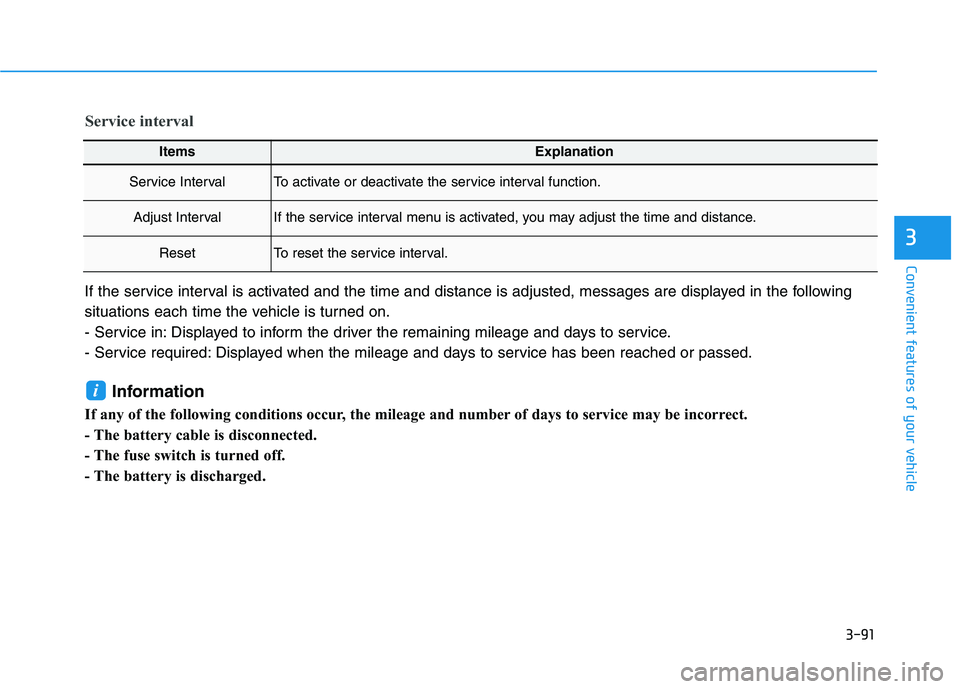
ItemsExplanation
Service IntervalTo activate or deactivate the service interval function.
Adjust IntervalIf the service interval menu is activated, you may adjust the time and distance.
ResetTo reset the service interval.
Service interval
If the service interval is activated and the time and distance is adjusted, messages are displayed in the following
situations each time the vehicle is turned on.
- Service in: Displayed to inform the driver the remaining mileage and days to service.
- Service required: Displayed when the mileage and days to service has been reached or passed.Information
If any of the following conditions occur, the mileage and number of days to service may be incorrect.
- The battery cable is disconnected.
- The fuse switch is turned off.
- The battery is discharged.
i
Page 178 of 534
3-93
Convenient features of your vehicle
3
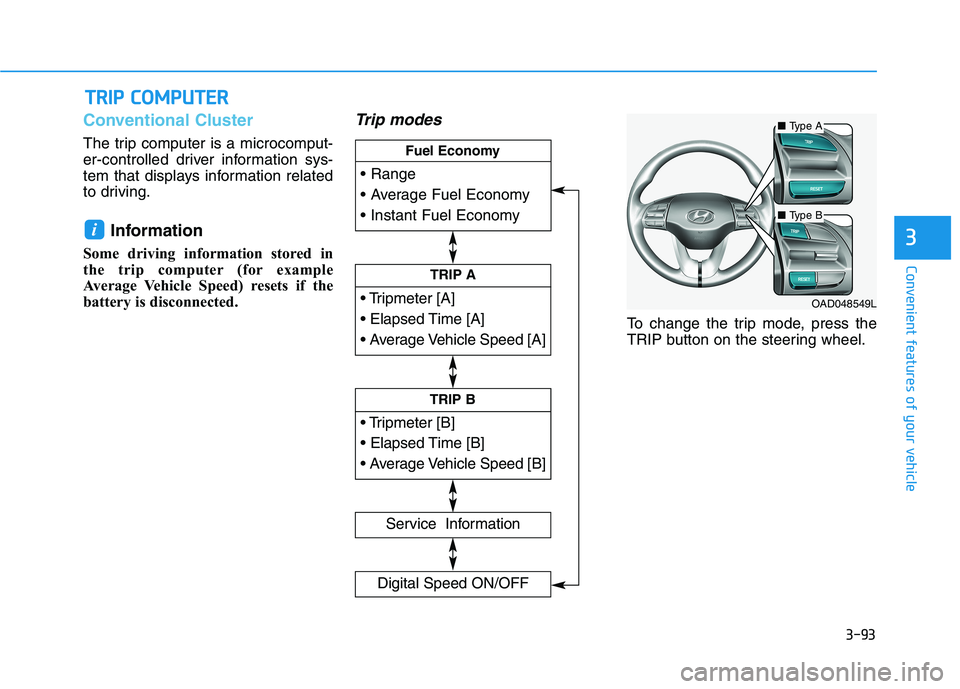
Conventional Cluster
The trip computer is a microcomput-
er-controlled driver information sys-
tem that displays information related
to driving.Information
Some driving information stored in
the trip computer (for example
Average Vehicle Speed) resets if the
battery is disconnected.
Trip modes
To change the trip mode, press the
TRIP button on the steering wheel.
i
TT RR IIPP CC OO MM PPUU TTEERR
TRIP A
Service Information
Digital Speed ON/OFF
TRIP B
Fuel Economy
■
Type A
■Type B
OAD048549L