Page 15 of 472

1-4
Your vehicle at a glance
I IN
NT
TE
ER
RI
IO
OR
R
O
OV
VE
ER
RV
VI
IE
EW
W
(
(I
I)
)
1. Door lock/unlock button ....................3-15
2. Outside rearview mirror folding
switch* ..............................................3-42
3. Outside rearview mirror control
switch* ..............................................3-41
4. Power window switches* ..................3-19
5. Power window lock switch* ................3-22
6. Central door lock switch ....................3-15
7. Headlight leveling device* ................3-85
8. Instrument panel illumination
control switch* ..................................3-44
9. ESC OFF switch * ............................5-36
10. Fuel filler door opener ....................3-30
11. Fuse box ..........................................7-64
12. Steering wheel ................................3-36
13. Seat ..................................................2-2
14. Clutch pedal* ..................................5-20
15. Brake pedal ....................................5-30
16. Accelerator pedal
17. Hood release lever ..........................3-28
* : if equipped
OGS015002The actual shape may differ from the illustration.
■Right Hand Drive
Page 16 of 472

1-5
Your vehicle at a glance
I IN
NT
TE
ER
RI
IO
OR
R
O
OV
VE
ER
RV
VI
IE
EW
W
(
(I
II
I)
)
1
1. Door lock/unlock button ....................3-15
2. Outside rearview mirror folding
switch* ..............................................3-42
3. Outside rearview mirror control
switch* ..............................................3-41
4. Power window switches* ..................3-19
5. Power window lock switch* ................3-22
6. Central door lock switch ....................3-15
7. Headlight leveling device* ................3-85
8. Instrument panel illumination
control switch* ..................................3-44
9. ESC OFF switch * ............................5-36
10. Fuel filler door opener ....................3-30
11. Fuse box ..........................................7-64
12. Steering wheel ................................3-36
13. Seat ..................................................2-2
14. Brake pedal ....................................5-30
15. Accelerator pedal
16. Hood release lever ..........................3-28
* : if equipped
OGS015002LThe actual shape may differ from the illustration.
■Left Hand Drive
Page 88 of 472

3-3
Convenient features of your vehicle
3
Remote key (if equipped)
Your HYUNDAI uses a remote key,
which you can use to lock or unlock
a door (and tailgate) and even start
the engine.
1. Door Lock
2. Door Unlock
3. Tailgate Unlock
Locking
To lock:
1. Close all doors, engine hood and
tailgate.
2. Press the Door Lock button (1) on
the remote key.
3. The doors will lock. The hazard
warning lights will blink.
4. Make sure the doors are locked by
checking the position of the door
lock button inside the vehicle.
Unlocking
To unlock:
1. Press the Door Unlock button (2)
on the remote key.
2. The doors will unlock. The hazard
warning lights will blink two times.
Information
After unlocking the doors, the doors
will lock automatically after 30 sec-
onds unless a door is opened.
i
A AC
CC
CE
ES
SS
SI
IN
NG
G
Y
YO
OU
UR
R
V
VE
EH
HI
IC
CL
LE
E
Do not leave the keys in your
vehicle with unsupervised chil-
dren. Unattended children could
place the key in the ignition
switch and may operate power
windows or other controls, or
even make the vehicle move,
which could result in serious
injury or death.
WARNING OIB034040
Page 93 of 472

3-8
Convenient features of your vehicle
Even though you press the outside
door handle button, the doors will not
lock and the chime will sound for
three seconds if any of the following
occur:
The Smart Key is in the vehicle.
The Engine Start/Stop button is in
ACC or ON position.
Any door except the tailgate is
open.
Unlocking
To unlock:
1. Carry the Smart Key.
2. Either press the door handle but-
ton or press the Door Unlock but-
ton (2) on the smart key.
3. The doors will unlock. The hazard
warning lights will blink two times.
Information
• The door handle button will only
operate when the smart key is with-
in 0.7~1 m (28~40 in.) from the out-
side door handle. Other people can
also open the doors without the
smart key in possession.
• After unlocking the doors, the doors
will lock automatically after 30 sec-
onds unless a door is opened.
i
Do not leave the Smart Key in
your vehicle with unsupervised
children. Unattended children
could press the Engine Start/
Stop button and may operate
power windows or other con-
trols, or even make the vehicle
move, which could result in
serious injury or death.
WARNING OGS045001L
Page 100 of 472
3-15
Convenient features of your vehicle
3
Operating door locks from
inside the vehicle
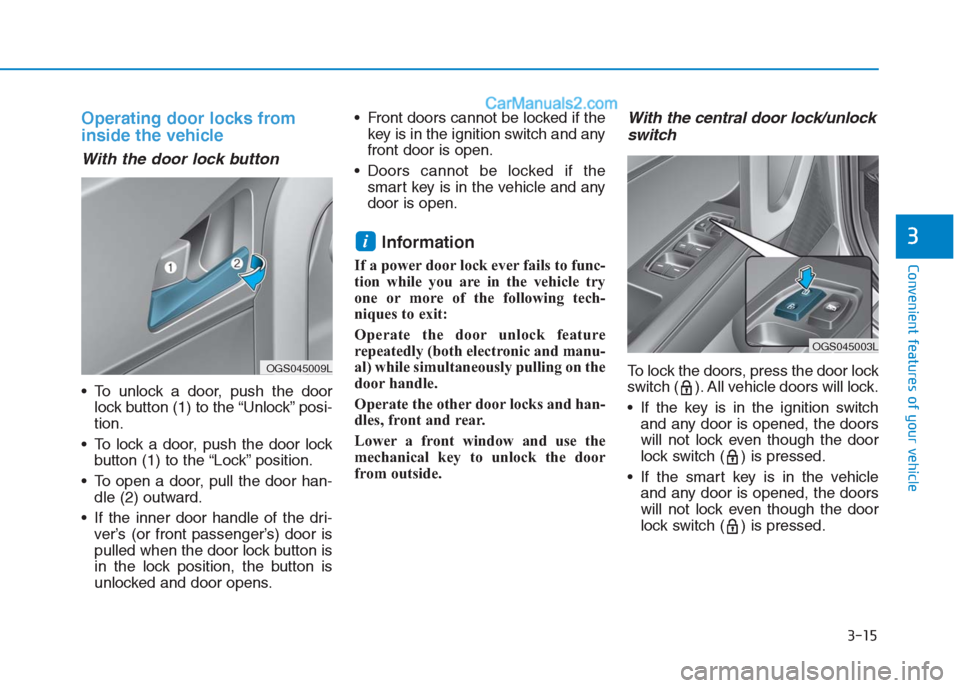
With the door lock button
To unlock a door, push the door
lock button (1) to the “Unlock” posi-
tion.
To lock a door, push the door lock
button (1) to the “Lock” position.
To open a door, pull the door han-
dle (2) outward.
If the inner door handle of the dri-
ver’s (or front passenger’s) door is
pulled when the door lock button is
in the lock position, the button is
unlocked and door opens. Front doors cannot be locked if the
key is in the ignition switch and any
front door is open.
Doors cannot be locked if the
smart key is in the vehicle and any
door is open.
Information
If a power door lock ever fails to func-
tion while you are in the vehicle try
one or more of the following tech-
niques to exit:
Operate the door unlock feature
repeatedly (both electronic and manu-
al) while simultaneously pulling on the
door handle.
Operate the other door locks and han-
dles, front and rear.
Lower a front window and use the
mechanical key to unlock the door
from outside.
With the central door lock/unlock
switch
To lock the doors, press the door lock
switch ( ). All vehicle doors will lock.
If the key is in the ignition switch
and any door is opened, the doors
will not lock even though the door
lock switch ( ) is pressed.
If the smart key is in the vehicle
and any door is opened, the doors
will not lock even though the door
lock switch ( ) is pressed.
i
OGS045009L
OGS045003L
Page 180 of 472
3-95
Convenient features of your vehicle
3
Defroster
To prevent damage to the conduc-
tors bonded to the inside surface
of the rear window, never use
sharp instruments or window
cleaners containing abrasives to
clean the window.
If you want to defrost and defog
the front windshield, refer to
“Windshield defrosting and defog-
ging” in this section.
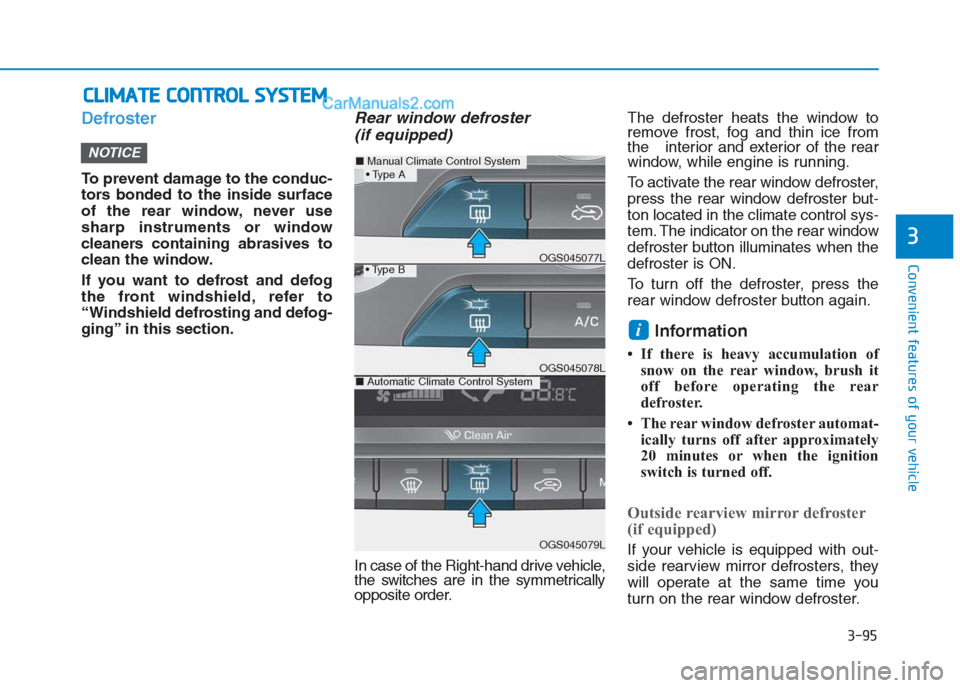
Rear window defroster
(if equipped)
In case of the Right-hand drive vehicle,
the switches are in the symmetrically
opposite order.The defroster heats the window to
remove frost, fog and thin ice from
the interior and exterior of the rear
window, while engine is running.
To activate the rear window defroster,
press the rear window defroster but-
ton located in the climate control sys-
tem. The indicator on the rear window
defroster button illuminates when the
defroster is ON.
To turn off the defroster, press the
rear window defroster button again.
Information
• If there is heavy accumulation of
snow on the rear window, brush it
off before operating the rear
defroster.
• The rear window defroster automat-
ically turns off after approximately
20 minutes or when the ignition
switch is turned off.
Outside rearview mirror defroster
(if equipped)
If your vehicle is equipped with out-
side rearview mirror defrosters, they
will operate at the same time you
turn on the rear window defroster.
i
NOTICE
C CL
LI
IM
MA
AT
TE
E
C
CO
ON
NT
TR
RO
OL
L
S
SY
YS
ST
TE
EM
M
■Manual Climate Control System
OGS045079L
■Automatic Climate Control SystemOGS045078L
OGS045077L
Page 181 of 472
3-96
Convenient features of your vehicle
1. Temperature control knob
2. Fan speed control knob
3. Mode selection knob
4. Rear window defroster button
5. Air intake control button
6. A/C (Air conditioning) button
(if equipped)
OGS045080L/OGS045081L
Manual climate control system (if equipped)
In case of the Right-hand drive
vehicle, the switches are in the
symmetrically opposite order.
■ ■
Type A
■ ■
Type B
Page 188 of 472
3-103
Convenient features of your vehicle
3
Air conditioning system operation
tips
If the vehicle has been parked in
direct sunlight during hot weather,
open the windows for a short time
to let the hot air inside the vehicle
escape.
After sufficient cooling has been
achieved, switch back from the
recirculated air to the fresh outside
air position.
To help reduce moisture inside of
the windows on rainy or humid
days, decrease the humidity inside
the vehicle by operating the air
conditioning system with the win-
dows closed.
Use the air conditioning system
every month only for a few minutes
to ensure maximum system per-
formance. If you operate air conditioner
excessively, the difference between
the temperature of the outside air
and that of the windshield could
cause the outer surface of the
windshield to fog up, causing loss
of visibility. In this case, set the
mode selection knob or button to
the position and fan speed
control to the lower speed.
System maintenance
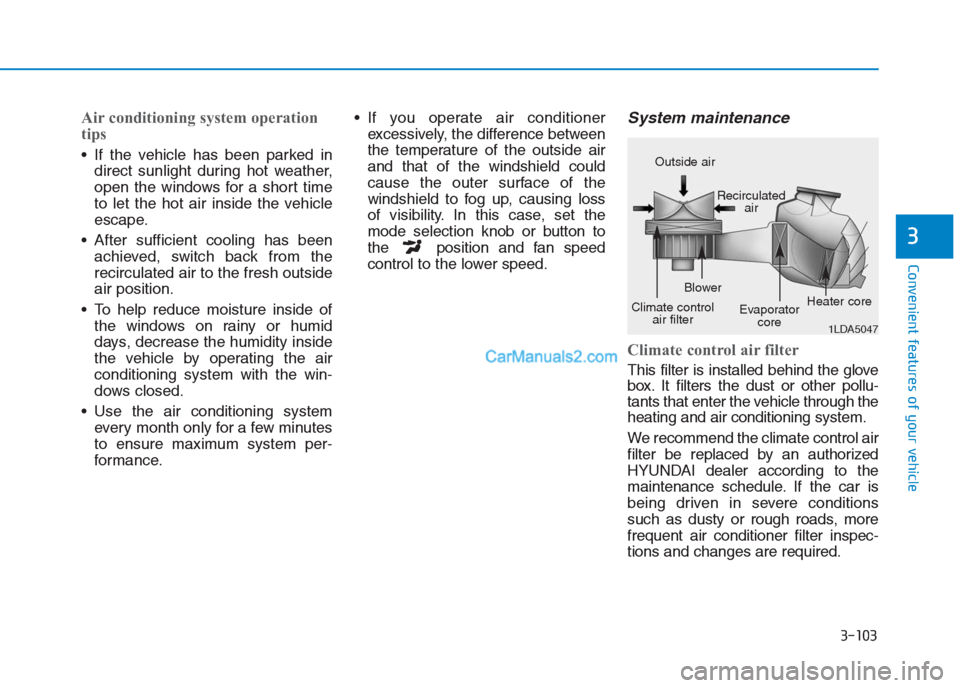
Climate control air filter
This filter is installed behind the glove
box. It filters the dust or other pollu-
tants that enter the vehicle through the
heating and air conditioning system.
We recommend the climate control air
filter be replaced by an authorized
HYUNDAI dealer according to the
maintenance schedule. If the car is
being driven in severe conditions
such as dusty or rough roads, more
frequent air conditioner filter inspec-
tions and changes are required.
1LDA5047
Outside air
Recirculated
air
Climate control
air filterBlower
Evaporator
coreHeater core
