Page 163 of 472
3-78
Convenient features of your vehicle
L LI
IG
GH
HT
T
Exterior lights
Lighting control
To operate the lights, turn the knob at
the end of the control lever to one of
the following positions:(1) OFF position
(2) AUTO light position (if equipped)
(3) Parking light position
(4) Headlight position
Headlight position ( )
When the light switch is in the head
light position, the headlights, license
plate light and instrument panel lights
are turned ON.
OLF044084R
OLF044084L
■Right Hand Drive
■Left Hand Drive
OLF044087R
OLF044087L
■Right Hand Drive
■Left Hand Drive
Page 164 of 472
3-79
Convenient features of your vehicle
3
Information
The ignition switch must be in the ON
position to turn on the headlights.
Parking light position ( )
When the light switch is in the park-
ing light position, the parking (posi-
tion) light, license plate light and
instrument panel lights are turned
ON.
AUTO light position (if equipped)
When the light switch is in the AUTO
position, the parking (position) light
and headlights will be turned ON or
OFF automatically depending on the
amount of light outside the vehicle.
i
OLF044086R
OLF044086L
■Right Hand Drive
■Left Hand DriveOLF044085R
OLF044085L
■Right Hand Drive
■Left Hand Drive
Page 165 of 472

3-80
Convenient features of your vehicle
Even with the AUTO light feature in
operation, it is recommended to
manually turn ON the lights when
driving at night or in a fog, or when
you enter dark areas, such as tun-
nels and parking facilities.
• Do not cover or spill anything on
the sensor (1) located on the
instrument panel.
Do not clean the sensor using a
window cleaner, the cleanser may
leave a light film which could
interfere with sensor operation.
If your vehicle has window tint
or other types of metallic coat-
ing on the front windshield, the
AUTO light system may not work
properly.
High beam operation
To turn on the high beam headlamp,
push the lever away from you. The
lever will return to its original position.The high beam indicator will light
when the headlamp high beams are
switched on.
To turn off the high beam headlamp,
pull the lever towards you. The low
beams will turn on.
NOTICE
Do not use high beam when there
are other vehicles approaching
you. Using high beam could
obstruct the other driver's vision.
WARNING
OLF044192R
OLF044192L
■Right Hand Drive
■Left Hand Drive
Page 184 of 472
3-99
Convenient features of your vehicle
3
Instrument panel vents
The outlet vents located in the rear
can be opened or closed separately
using the thumbwheel.
Also, you can adjust the direction of
air delivered from these vents using
the vent control lever as shown.
Temperature control
The temperature will increase by
turning the knob to the right.
The temperature will decrease by
turning the knob to the left.
Air intake control
This button is used to select the out-
side (fresh) air position or recirculat-
ed air position.
OGC044118
OGS045039L
OGS045040
■Front
■RearOGS045083L
OGS045084L
■Type B
■Type A
Page 195 of 472
3-110
Convenient features of your vehicle
Instrument panel vents
The outlet vents located in the rear
can be opened or closed separately
using the thumbwheel.
Also, you can adjust the direction of
air delivered from these vents using
the vent control lever as shown.
Temperature control
The temperature will increase to the
maximum (HI) by turning the knob to
the right.
The temperature will decrease to the
minimum (LO) by turning the knob to
the left.
The temperature will increase or
decrease by 0.5°C/1°F each time you
turn the knob. When set to the lowest
temperature setting, the air condition-
ing will operate continuously.
Air intake control
This button is used to select the out-
side (fresh) air position or recirculat-
ed air position.
OGS045089LOGS045130
OGS045039L
OGS04504
■Rear
■Front
Page 213 of 472
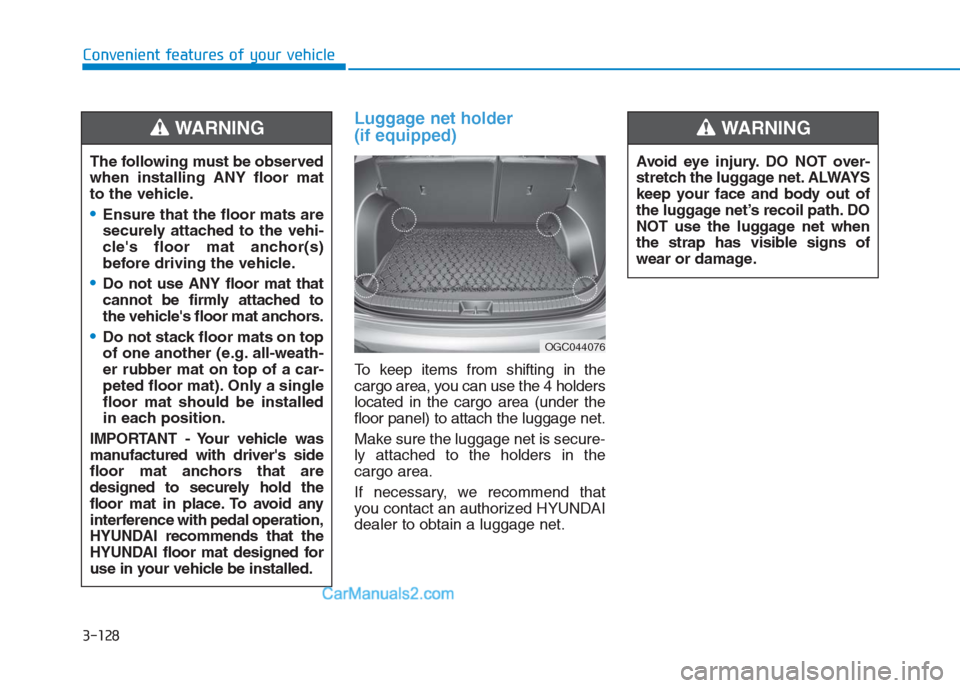
Luggage net holder
(if equipped)
To keep items from shifting in the
cargo area, you can use the 4 holders
located in the cargo area (under the
floor panel) to attach the luggage net.
Make sure the luggage net is secure-
ly attached to the holders in the
cargo area.
If necessary, we recommend that
you contact an authorized HYUNDAI
dealer to obtain a luggage net. The following must be observed
when installing ANY floor mat
to the vehicle.
Ensure that the floor mats are
securely attached to the vehi-
cle's floor mat anchor(s)
before driving the vehicle.
Do not use ANY floor mat that
cannot be firmly attached to
the vehicle's floor mat anchors.
Do not stack floor mats on top
of one another (e.g. all-weath-
er rubber mat on top of a car-
peted floor mat). Only a single
floor mat should be installed
in each position.
IMPORTANT - Your vehicle was
manufactured with driver's side
floor mat anchors that are
designed to securely hold the
floor mat in place. To avoid any
interference with pedal operation,
HYUNDAI recommends that the
HYUNDAI floor mat designed for
use in your vehicle be installed.
WARNING
OGC044076
Avoid eye injury. DO NOT over-
stretch the luggage net. ALWAYS
keep your face and body out of
the luggage net’s recoil path. DO
NOT use the luggage net when
the strap has visible signs of
wear or damage.
WARNING
Convenient features of your vehicle
3-128
Page 227 of 472
4-13
Multimedia System
4
Operating the device while driv-
ing could lead to accidents due
to a lack of attention to external
surroundings. First park the
vehicle before operating the
device.
Adjust the volume to levels that
allow the driver to hear sounds
from outside of the vehicle.
Driving in a state where external
sounds cannot be heard may
lead to accidents.
Pay attention to the volume set-
ting when turning the device on.
A sudden output of extreme vol-
ume upon turning the device on
could lead to hearing impair-
ment. (Adjust the volume to a
suitable level before turning off
the device.)
Turn on the car engine before
using this device. Do not oper-
ate the audio system for long
periods of time only with the
ignition turned on as such oper-
ations may lead to battery dis-
charge.
(Continued)(Continued)
Do not subject the device to
severe shock or impact. Direct
pressure onto the front side of
the monitor may cause damage
to the LCD.
When cleaning the device, make
sure to turn off the device and
use a dry and smooth cloth.
Never use tough materials,
chemical cloths, or solvents
(alcohol, benzene, thinners, etc.).
As such materials may damage
the device panel or cause
color/quality deterioration.
Do not place beverages close to
the audio system. Spilling bever-
ages may lead to system mal-
function.
In this case of product malfunc-
tion, please contact your place of
purchase or After Service center.
Placing the audio system within
an electromagnetic environment
may result in noise interference.
Prevent caustic solutions such
as perfume and cosmetic oil
from contacting the dashboard
because they may cause dam-
age or discoloration.
NOTICE
Driving while distracted can
result in a loss of vehicle con-
trol that may lead to an acci-
dent, severe personal injury,
and death. The driver’s primary
responsibility is in the safe and
legal operation of a vehicle, and
use of any handheld devices,
other equipment, or vehicle sys-
tems which take the driver’s
eyes, attention and focus away
from the safe operation of a
vehicle or which are not permis-
sible by law should never be
used during operation of the
vehicle.
WARNING
Page 251 of 472
4-37
Multimedia System
4
Operating the device while driv-
ing could lead to accidents due
to a lack of attention to external
surroundings. First park the
vehicle before operating the
device.
Adjust the volume to levels that
allow the driver to hear sounds
from outside of the vehicle.
Driving in a state where external
sounds cannot be heard may
lead to accidents.
Pay attention to the volume set-
ting when turning the device on.
A sudden output of extreme vol-
ume upon turning the device on
could lead to hearing impair-
ment. (Adjust the volume to a
suitable level before turning off
the device.)
Turn on the car engine before
using this device. Do not oper-
ate the audio system for long
periods of time only with the
ignition turned on as such oper-
ations may lead to battery dis-
charge.
(Continued)(Continued)
Do not subject the device to
severe shock or impact. Direct
pressure onto the front side of
the monitor may cause damage
to the LCD.
When cleaning the device, make
sure to turn off the device and
use a dry and smooth cloth.
Never use tough materials,
chemical cloths, or solvents
(alcohol, benzene, thinners,
etc.). As such materials may
damage the device panel or
cause color/quality deterioration
Do not place beverages close to
the audio system. Spilling bever-
ages may lead to system mal-
function.
In this case of product malfunc-
tion, please contact your place of
purchase or After Service center.
Placing the audio system within
an electromagnetic environment
may result in noise interference.
Prevent caustic solutions such
as perfume and cosmetic oil
from contacting the dashboard
because they may cause dam-
age or discoloration.
NOTICE
Driving while distracted can
result in a loss of vehicle con-
trol that may lead to an acci-
dent, severe personal injury,
and death. The driver’s primary
responsibility is in the safe and
legal operation of a vehicle, and
use of any handheld devices,
other equipment, or vehicle sys-
tems which take the driver’s
eyes, attention and focus away
from the safe operation of a
vehicle or which are not permis-
sible by law should never be
used during operation of the
vehicle.
WARNING


