Page 271 of 472
![Hyundai Creta 2019 Owners Manual 4-57
Multimedia System
4
Setup
Setup is the screen to control Audio
system settings.
Press the [SETUP]button on the
audio system.
Display
Press the [SETUP]button on the
audio system ➟Select [Displa](/manual-img/35/14529/w960_14529-270.png "Hyundai Creta 2019 Owners Manual 4-57
Multimedia System
4
Setup
Setup is the screen to control Audio
system settings.
Press the [SETUP]button on the
audio system.
Display
Press the [SETUP]button on the
audio system ➟Select [Displa")
4-57
Multimedia System
4
Setup
Setup is the screen to control Audio
system settings.
Press the [SETUP]button on the
audio system.
Display
Press the [SETUP]button on the
audio system ➟Select [Display].
Mode: Set the screen brightness to
be adjusted automatically accord-
ing to ambient lighting conditions
or set the screen to stay bright or
dark continuously.
Illumination: The brightness of the
audio screen can be changed.
Text Scroll: If text is too long to be
displayed on the screen, enable
the text scroll function.
Sound
Press the [SETUP]button on the
audio system ➟Select [Sound].
Position: Sound balance and fader
can be adjusted.
Tone: Sound tone color can be
adjusted.
Back-up Warning Priority:
- Automatically lower audio vol-
ume while reversing.
- Control the audio volume level
automatically in R-Position.
If volume level over “5 level” then
down to “5 level”.If volume level under “5 level”
then maintain the volume level.
Return the volume level when R-
Position was cancelled.
In R-Positon, if driver change the
volume level then volume
changed.
Apply the volume control option
“On/Off ” in “Setup”: Default is
“On”.
Speed Dependent Volume:
Automatically adjust volume based
on vehicle speed.
Beep: Select whether to play a
beep sound when the screen is
touched.
Page 299 of 472
5-24
Driving your vehicle
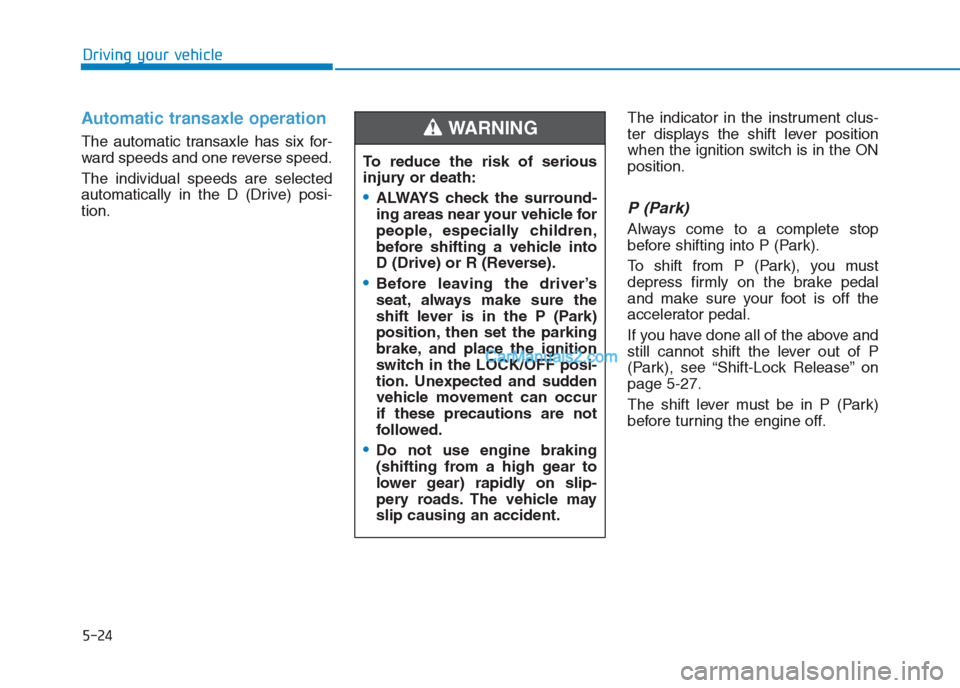
Automatic transaxle operation
The automatic transaxle has six for-
ward speeds and one reverse speed.
The individual speeds are selected
automatically in the D (Drive) posi-
tion.The indicator in the instrument clus-
ter displays the shift lever position
when the ignition switch is in the ON
position.
P (Park)
Always come to a complete stop
before shifting into P (Park).
To shift from P (Park), you must
depress firmly on the brake pedal
and make sure your foot is off the
accelerator pedal.
If you have done all of the above and
still cannot shift the lever out of P
(Park), see “Shift-Lock Release” on
page 5-27.
The shift lever must be in P (Park)
before turning the engine off. To reduce the risk of serious
injury or death:
ALWAYS check the surround-
ing areas near your vehicle for
people, especially children,
before shifting a vehicle into
D (Drive) or R (Reverse).
Before leaving the driver’s
seat, always make sure the
shift lever is in the P (Park)
position, then set the parking
brake, and place the ignition
switch in the LOCK/OFF posi-
tion. Unexpected and sudden
vehicle movement can occur
if these precautions are not
followed.
Do not use engine braking
(shifting from a high gear to
lower gear) rapidly on slip-
pery roads. The vehicle may
slip causing an accident.
WARNING
Page 314 of 472

The ESC OFF indicator light comes
on when the ESC is turned off with
the button.
Driving with wheels and tires with
different sizes may cause the ESC
system to malfunction. Before
replacing tires, make sure all four
tires and wheels are the same
size. Never drive the vehicle with
different sized tires and wheels
installed.ESC OFF usage
When Driving
The ESC OFF mode should only be
used briefly to help free the vehicle if
stuck in snow or mud by temporarily
stopping operation of the ESC to
maintain wheel torque.
To turn ESC off while driving, press
the ESC OFF button while driving on
a flat road surface.To prevent damage to the
transaxle:
Do not allow wheel(s) of one
axle to spin excessively while
the ESC, ABS, and parking brake
warning lights are displayed.
The repairs would not be cov-
ered by the vehicle warranty.
Reduce engine power and do
not spin the wheel(s) excessive-
ly while these lights are dis-
played.
When operating the vehicle on a
dynamometer, make sure the
ESC is turned off (ESC OFF light
illuminated).
Information
Turning the ESC off does not affect
ABS or standard brake system opera-
tion.
i
NOTICE
NOTICE
5-39
Driving your vehicle
5
When the ESC is blinking, this
indicates the ESC is active:
Drive slowly and NEVER
attempt to accelerate. NEVER
turn the ESC off while the ESC
indicator light is blinking or you
may lose control of the vehicle
resulting in an accident.
WARNING
Page 469 of 472

I-5
If the engine overheats ...................................................6-8
If the engine will not start ..............................................6-4
If the engine doesn't turn over or turns over ..............6-4
If the engine turns over normally but doesn't start ......6-4
If you have a flat tire ....................................................6-16
Changing tires ...........................................................6-17
Jack and tools ...........................................................6-16
Jack label ...................................................................6-21
Removing and storing the spare tire ..........................6-16
Ignition switch ................................................................5-5
Engine Start/Stop button ..............................................5-9
Key ignition switch......................................................5-5
In case of an emergency while driving ..........................6-3
If the engine stalls at a crossroad or crossing..............6-3
If the engine stalls while driving .................................6-3
If you have a flat tire while driving.............................6-3
Instrument cluster .........................................................3-43
Gauges .......................................................................3-45
Instrument Cluster Control ........................................3-44
LCD display ...............................................................3-67
Transaxle shift indicator ............................................3-48
Trip computer ............................................................3-74
Warning and indicator lights......................................3-50
Warning Messages (for Type B) ................................3-61Instrument panel overview (I) ........................................1-6
Instrument panel overview (II) .......................................1-7
Interior features...........................................................3-122
Ashtray .....................................................................3-123
Cargo area cover ......................................................3-129
Cigarette lighter .......................................................3-122
Clothes hanger .........................................................3-127
Cup holder ...............................................................3-124
Digital clock.............................................................3-122
Floor mat anchor(s) .................................................3-127
Luggage net holder ..................................................3-128
Power outlet/USB charger .......................................3-125
Sunvisor ...................................................................3-125
Interior overview (I) .......................................................1-4
Interior overview (II) ......................................................1-5
Jump starting...................................................................6-5
I
Index
I
J
Page:
< prev 1-8 9-16 17-24