2019 Hyundai Accent Settings
[x] Cancel search: SettingsPage 82 of 442

3-4
Unlocking
To unlock:
1. Press the Door Unlock button (2)on the remote key.
2. The driver's door will unlock. The hazard warning lights will blink two
times.
Two press unlock setting: If you press the Door Unlock but-
ton on the remote key again with-
in four seconds, then all the doors
will unlock.
Two press unlock setting can be changed according to owner's pref-
erence in the cluster User Settings
mode or with the remote key.
• User settings mode method:
Select or deselect the 'Two Press
Unlock' feature in the User
Settings mode on the cluster LCD
display (User Settings ➞ Door ➞
Two Press Unlock).
Press and hold both Door Lock (1)
and Door Unlock (2) buttons at the
same time until the hazard warn-
ing lights blink. Now all doors will unlock when the
Door Unlock button is pressed one
time. To change the setting back,
repeat this procedure.
Information
After unlocking the doors, the doors
will lock automatically after 30 sec-
onds unless a door is opened.
Trunk unlocking
To unlock:
1. Press and hold the Trunk Unlock
button (3) on the remote key for
more than one second.
2. The hazard warning lights will blink two times and the trunk will
be unlocked.
Once the trunk is opened and then
closed, the trunk will lock automati-
cally.
Information
The word "HOLD" is written on the
button to inform you that you must
press and hold the button for more
than one second.
Panic button (if equipped)
Press and hold the Panic button (4)
for more than one second. The horn
sounds and hazard warning lights
flash for about 30 seconds.
To cancel the panic mode, press any
button on the remote key.
Start-up
For information, refer to the "Key
Ignition Switch" section in chapter 5.
To prevent damaging the remote
key:
• Keep the remote key away from water or any liquid and fire.
Internal circuits may malfunc-
tion if the inside of the remote
key gets damp (from liquids or
moisture) or if it is heated. This
can exclude the remote key from
warranty coverage.
Avoid dropping or throwing the remote key.
Protect the remote key from extreme temperatures.
NOTICE
i
i
Convenient features of your vehicle
Page 86 of 442

3-8
Convenient features of your vehicle
3. The driver's door will unlock. The hazard warning lights will blink two
times.
Two press unlock setting: If you press the driver's outside
door handle button or Door Unlock
button on the smart key again
within four seconds, then all the
doors will unlock.
Two press unlock setting can be changed according to owner's
preference in the cluster User
Settings mode or with the smart
key.
Select or deselect the 'Two Press
Unlock' feature in the User
Settings mode on the cluster LCD
display (User Settings ➞ Door ➞
Two Press Unlock).
Press and hold both Door Lock (1)
and Door Unlock (2) buttons at the
same time until the hazard warn-
ing lights blink. Now all doors will
unlock when the Door Unlock but-
ton is pressed one time.
To change the setting back, repeat this procedure.
Information
• The door handle button will only
operate when the smart key is with-
in 28~40 inches (0.7~1 m) from the
outside door handle and other peo-
ple can also open the doors.
• If you press the front passenger's outside door handle, while carrying
the Smart Key, all doors will unlock.
• After unlocking the doors, the doors will lock automatically after 30 sec-
onds unless a door is opened.
• Either the driver or front passenger door can be opened with the door
handle button when the smart key is
within this range.
Trunk opening
To open:
1. Carry the smart key.
2. Either press the trunk handle but- ton or press and hold the Trunk
Unlock button (3) on the smart key
for more than one second.
3. The hazard warning lights will blink two times.
Once the trunk is opened and then
closed, the trunk will lock automati-
cally.
Information
The trunk handle button will only oper-
ate when the smart key is within 28
inches (0.7 m) from the trunk handle.
Panic button
Press and hold the Panic button (4)
for more than one second. The horn
sounds and hazard warning lights
blink for about 30 seconds. To cancel
the panic mode, press any button on
the Smart Key.
i
i
Page 91 of 442

3-13
Convenient features of your vehicle
3
Once the doors are unlocked, they
may be opened by pulling the door
handle.
When closing the door, push the
door by hand. Make sure that doors
are closed securely.
Information
• In cold and wet climates, door lockand door mechanisms may not work
properly due to freezing conditions.
• If the door is locked/unlocked multi- ple times in rapid succession with
either the vehicle key or door lock
switch, the system may stop operat-
ing temporarily in order to protect
the circuit and prevent damage to
system components.
• Two press unlock setting can be changed in the User Settings mode
on the cluster.
Information
If the electrical power to door lock
switch is not operating (ex. dead car
battery) and the trunk is closed you
will not be able to open the trunk until
power is restored.
Operating door locks from
inside the vehicle
With the door handle
To unlock a door, push the doorlock button (1) to the "Unlock" posi-
tion. The red mark (2) on the door
lock button will be visible.
To lock a door, push the door lock button (1) to the "Lock" position. If
the door is locked properly, the red
mark (2) on the door lock button
will not be visible.
To open a door, pull the door han- dle (3) outward.
i
i
OHCR046003
Page 94 of 442

3-16
Convenient features of your vehicle
Auto Door Lock/Unlock Features
Impact sensing door unlock(if equipped)
All doors will be automatically
unlocked when an impact causes the
air bags to deploy.
Speed sensing door lock(if equipped)
All doors will be automatically locked
(when set on cluster) when vehicle
speed exceeds 9 mph (15 km/h).
All of the doors will be automatically
unlocked after the vehicle is turned off.
You can activate or deactivate the
Auto Door Lock/Unlock features from
the User Settings mode on the LCD
display.
For more information, refer to the
"LCD Display" section in this
chapter.
Child-Protector Rear Door Locks
The child safety lock is provided to
help prevent children seated in the
rear from accidentally opening the
rear doors. The rear door safety locks
should be used whenever children
are in the vehicle.
The child safety lock is located on
the edge of each rear door. When the
child safety lock is in the lock posi-
tion, the rear door will not open if the
inner door handle is pulled.
To lock the child safety lock, insert a
key (or screw driver) (1) into the hole
and turn it to the lock position. To allow a rear door to be opened
from inside the vehicle, unlock the
child safety lock.
OHCR046005
If children accidently open the
rear doors while the vehicle is
in motion, they could fall out of
the vehicle. The rear door safety
locks should always be used
whenever children are in the
vehicle.
WARNING
Page 123 of 442

3-45
Convenient features of your vehicle
3
How to use the Smart Trunk
The trunk can be opened with no-
touch activation satisfying all the
conditions below.
After 15 seconds when all doorsare closed and locked
Positioned in the detecting area for more than 3 seconds.
Information
• The Smart Trunk does not operatewhen:
- The smart key is detected within15 seconds after the doors are
closed and locked, and is continu-
ously detected.
- The smart key is detected within 15 seconds after the doors are closed
and locked, and within 60 inches
(1.5 m) from the front door handles.
(for vehicles equipped with Welcome
Light)
- A door is not locked or closed.
- The smart key is in the vehicle. 1. Setting
To activate the Smart Trunk, go to
User Settings Mode and select
Smart Trunk on the LCD display.
For more information, refer to the
"LCD Display" section in this
chapter.
2. Detect and Alert
If you are positioned in the detecting
area (20 ~ 40 inches (50 ~ 100 cm)
behind the vehicle) carrying a smart
key, the hazard warning lights will
blink and chime will sound to alert
you the smart key has been detected
and the trunk will open.
Information
Do not approach the detecting area if
you do not want the trunk to open. If
you have unintentionally entered the
detecting area and the hazard warn-
ing lights and chime starts to operate,
leave the detecting area with the
smart key. The trunk will stay closed.
i
i
OHCR046021OHCA047720/OHCA047721
Page 133 of 442

3-55
Convenient features of your vehicle
3
Outside temperature gauge
This gauge indicates the current out-
side air temperatures by 1°F (1°C).
- Temperature range :-40°F ~ 140°F
(-40°C ~ 60°C)
The outside temperature on the dis-
play may not change immediately
like a general thermometer (to avoid
distracting the driver). You can change the temperature unit
from °F to °C or °C to °F in the User
Settings mode in the cluster:
- Go to User Settings Mode
➝Other
➝ Temperature Unit.
- Press TRIP button on the steering wheel for 5 seconds.
For vehicles equipped with Automatic
Climate Control, you can also:
- Press and hold the AUTO and OFF buttons on the climate control unit
for 3 seconds
Both the temperature unit on the
cluster LCD display and climate con-
trol screen will change.
Odometer
The odometer indicates the total dis-
tance that the vehicle has been driv-
en and should be used to determine
when periodic maintenance should
be performed.
■Type A■Type B
OAD045116N/OTLA045130
■Type A■Type B
OAD045119N/OTLE045140
Page 150 of 442
3-72
Convenient features of your vehicle
L
LC
C D
D
D
D I
IS
S P
P L
LA
A Y
Y
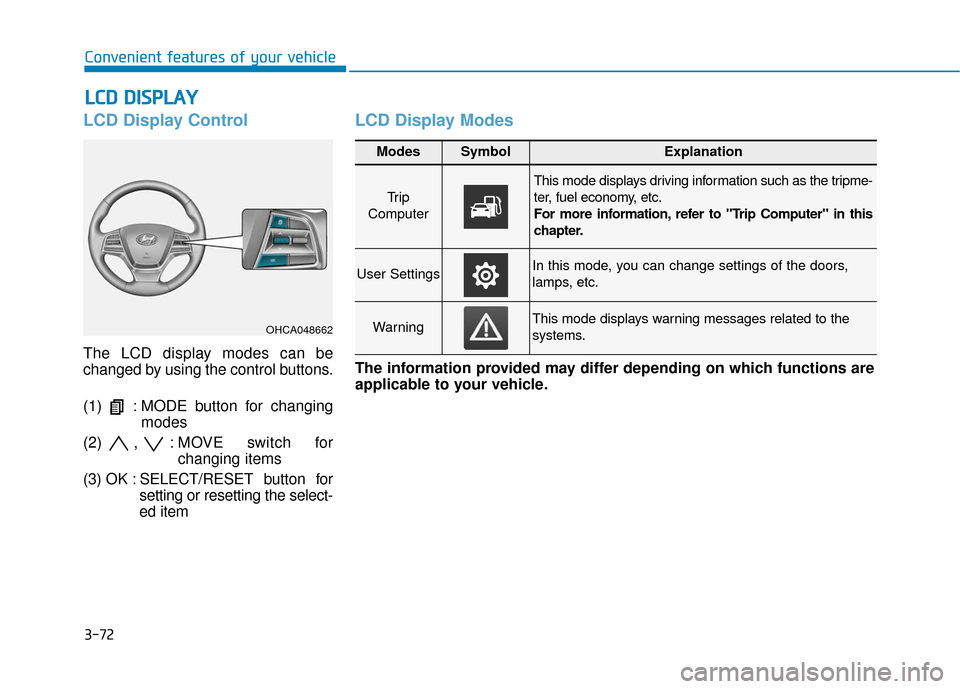
LCD Display Control
The LCD display modes can be
changed by using the control buttons.
(1) : MODE button for changing
modes
(2) , : MOVE s witch for
changing items
(3) OK : SELECT/ RESET button for
setting or resetting the select-
ed item
LCD Display Modes
OHCA048662
Modes SymbolExplanation
Tr i p
Computer
This mode displays driving information such as the tripme-
ter, fuel economy, etc.
For more information, refer to "Trip Computer" in this
chapter.
User SettingsIn this mode, you can change settings of the doors,
lamps, etc.
WarningThis mode displays warning messages related to the
systems.
The information provided may differ depending on which functions are
applicable to your vehicle.
Page 151 of 442

3-73
Convenient features of your vehicle
3
Engage parking brake to editsettings/Shift to P to edit set-tings
This warning message appears if
you try to adjust the User Settings
while driving.
- Manual transmission
For your safety, change the User
Settings after parking the vehicle,
applying the parking brake and
moving the shift lever to neutral.
- Automatic transmission For your safety, change the User
Settings after parking the vehicle,
applying the parking brake and
moving the shift lever to P (Park).
Quick guide help
This mode provides quick guides for
the systems in the User Settings
mode.
Select an item, press and hold the
OK button.
For more information about each
system, refer to this Owner's
Manual.
Trip computer mode
The trip computer mode displays
information related to vehicle driving
parameters including fuel economy,
tripmeter information and vehicle
speed.
For more information, refer to
"Trip Computer" in this chapter.
■ Type A ■Type B
OAD045152N/OHCA047716