2019 HONDA RIDGELINE transmission
[x] Cancel search: transmissionPage 22 of 624
20
Quick Reference Guide
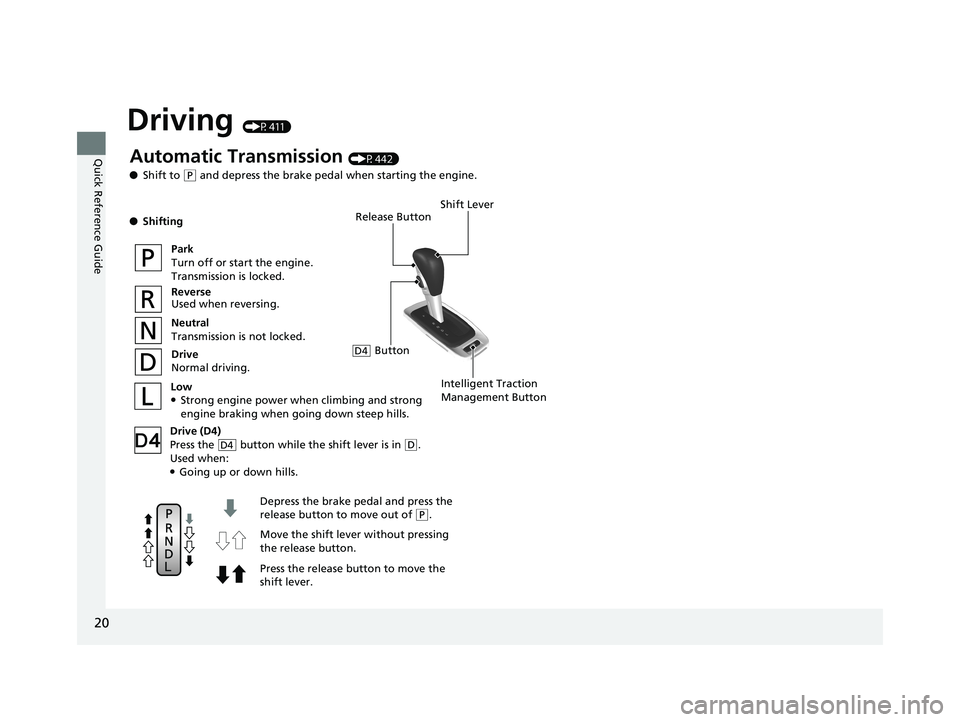
Driving (P411)
Release Button
Depress the brake pedal and press the
release button to move out of
( P.
Move the shift leve r without pressing
the release button.
Press the release button to move the
shift lever.
Automatic Transmission (P442)
● Shift to
(P and depress the brake pedal when starting the engine.
● Shifting
Park
Turn off or start the engine.
Transmission is locked.
Reverse
Used when reversing.
Neutral
Transmission is not locked.
Drive
Normal driving.
Shift Lever
Intelligent Traction
Management ButtonLow●Strong engine power when climbing and strong engine braking when going down steep hills.
Drive (D4)
Press the button while the shift lever is in
( D.
Used when:
●Going up or down hills.
D4
ButtonD4
Page 78 of 624

76
uuIndicators u
Instrument Panel
IndicatorNameOn/BlinkingExplanationMessage
Shift Lever
Position Indicator●Indicates the current shift lever
position.2Shifting P. 442—
Transmission
Indicator
●Blinks if the transmission system
has a problem.●Blinks while driving - Avoid sudden starts
and acceleration and have the vehicle
checked by a dealer immediately.
Seat Belt
Reminder
Indicator
●Comes on and the beeper sounds
if you are not wearing a seat belt
when you set the power mode to
ON.
●If the front passenger is not
wearing a seat belt, the indicator
comes on about a few seconds
later.
●Blinks while driving if either you
or the front passenger has not
fastened a seat belt. The beeper
sounds and the indicator blinks at
regular intervals.
●The beeper stops and the indicator goes off
when you and the front passenger fasten
their seat belts.
●Stays on after you or the front
passenger has fastened the seat belt -
A detection error may have occurred in the
sensor. Have your vehicle checked by a
dealer.
2 Seat Belt Reminder P. 36
Page 97 of 624

95
uuIndicators uMulti-Information Display Warning and Information Messages
Continued
Instrument Panel
MessageConditionExplanation
●Appears if there is a problem with the cooling system.●Drive slowly to prevent overheating and have your
vehicle checked by a dealer as soon as possible.
●Appears when the transmission system temperature is
too high.●Stop in a safe place and move the shift lever to (P.●Let the engine idle until the message disappears.
●Appears if the shift lever is in a position other than (P
and you press the ENGINE START/STOP button to turn
the engine off. ●Move the shift lever to (P and then press the ENGINE
START/STOP button twice.
●Appears when you set the power mode to ACCESSORY
or ON.
2Starting the Engine P. 434
Page 160 of 624
158
uuOperating the Switches Around the Steering Wheel uDriving Position Memory System*
Controls
Driving Position Memory System*
You can store two driver’s seat (except for power lumbar) and door mirror positions
with the driving position memory system.
When you unlock and open the driver’s do or with a remote transmitter or smart
entry system, the seat and door mirrors adju st automatically to one of the two preset
positions.
When you enter the vehicle, the multi-in formation display briefly shows you which
remote transmitter you used to unlock the vehicle.
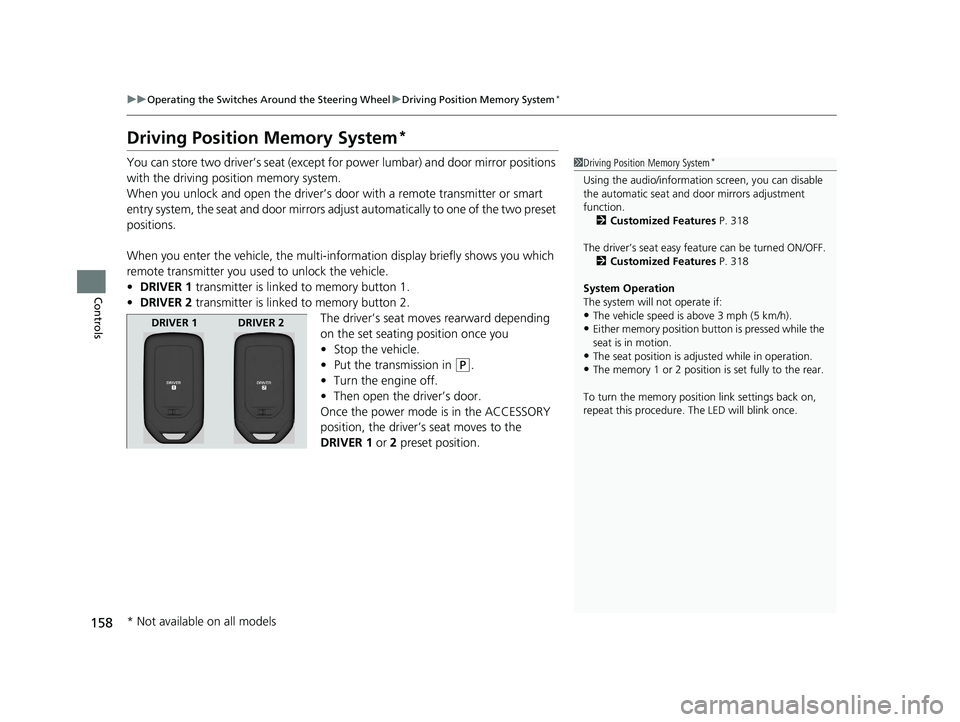
• DRIVER 1 transmitter is linked to memory button 1.
• DRIVER 2 transmitter is linked to memory button 2.
The driver’s seat moves rearward depending
on the set seating position once you
•Stop the vehicle.
• Put the transmission in
(P.
• Turn the engine off.
• Then open the driver’s door.
Once the power mode is in the ACCESSORY
position, the driver’s seat moves to the
DRIVER 1 or 2 preset position.
1Driving Position Memory System*
Using the audio/informati on screen, you can disable
the automatic seat and d oor mirrors adjustment
function. 2 Customized Features P. 318
The driver’s seat easy feature can be turned ON/OFF. 2 Customized Features P. 318
System Operation
The system will not operate if:
•The vehicle speed is above 3 mph (5 km/h).
•Either memory position button is pressed while the
seat is in motion.
•The seat position is adju sted while in operation.
•The memory 1 or 2 position is set fully to the rear.
To turn the memory positi on link settings back on,
repeat this procedure. The LED will blink once.
DRIVER 1 DRIVER 2
* Not available on all models
Page 286 of 624

284
uuAudio System Basic Operation uWi-Fi Connection
Features
Wi-Fi Connection
You can connect the Display Audio to the Internet using Wi-Fi and browse websites
or use online services on the audio/information screen. If your phone has cell
hotspot capabilities, the system can be te thered to the phone. Use the following
steps to setup.
1.Select .
2. Select Settings .
3. Select Bluetooth/Wi-Fi .
4. Select the Wi-Fi tab.
5. Select Wi-Fi On/Off Status , then On.
6. Select Wi-Fi Network List .
u Make sure your phone’s Wi-Fi setting is
in access point (tethering) mode.
u Select the phone you want to connect to
the system.
u If you do not find the phone you want to
connect in the list, select Scan.
7. Select Connect .
u Enter a password for your phone, and
select OK.
u When the connection is successful, the
icon is displayed on the list.
8. Select to go back to the home screen.
■Wi-Fi mode (setting for the first time)1Wi-Fi mode (setting for the first time)
You cannot go through the setting procedure while a
vehicle is moving. Park in a safe place to setup the
Wi-Fi connection.
Some cell phone carriers charge for tethering and
smartphone data use. Check your phone’s data
subscription package.
Check your phone manual to find out if the phone
has Wi-Fi connectivity.
You can confirm whether Wi -Fi connection is on or
off with the icon on Wi-Fi Network List.
Transmission speed and others will not be displayed
on this screen.
Page 290 of 624

uuAudio System Basic Operation uApple CarPlayTM
288
Features
■Maps
Display Apple CarPlay map and use the navigation function just as you would on
your iPhone.
Only one navigation system (pre-installed navigation or Apple CarPlay) can give
directions at a time. When you are using one system, directions to any prior
destination set on the other system wi ll be canceled, and the system you are
currently using will direct you to your destination.
After you have connected your iPhone to the system via USB, use the following
procedure to set up Apple CarPlay. Us e of Apple CarPlay will result in the
transmission of certain user and vehicle information (such as vehicle location, speed,
and status) to your iPhone to enhance th e Apple CarPlay experience. You will need
to consent to the sharing of this information on the Display Audio Screen.
■Enabling Apple CarPlay
Cancel: Does not allow this consent.
Enable Once : Allows only once. (Prompt
shows again next time.)
Always Enable : Allows anytime. (Prompt
does not show again.)
You may change the consent settings under
the Smartphone settings menu.
■Setting Up Apple CarPlay
1Apple CarPlayTM
Apple CarPlay Operating Requirements &
Limitations
Apple CarPlay requi res a compatible iPhone with an
active cellular connecti on and data plan. Your
carrier’s rate plans will apply.
Changes in operating system s, hardware, software,
and other technology integral to providing Apple
CarPlay functionality, as well as new or revised
governmental regulations, may result in a decrease or
cessation of Apple CarPlay functionality and services.
Honda cannot and does not pr ovide any warranty or
guarantee of future Appl e CarPlay performance or
functionality.
It is possible to use 3r d party apps if they are
compatible with Apple CarPlay. Refer to the Apple
homepage for information on compatible apps.
Models with navigation system
1 Setting Up Apple CarPlay
You can also use the method below to set up Apple
CarPlay:
Select HOME Settings Smartphone Apple
CarPlay
Use of user and vehicle information
The use and handling of user and vehicle information
transmitted to/from your iP hone by Apple CarPlay is
governed by the Apple iOS terms and conditions and
Apple’s Privacy Policy.
Page 311 of 624

309
uuGeneral Information on the Audio System uHonda App License Agreement
Continued
Features
E. Information Collection and Storage
1. Information Collection, Us e, Transmission and Storage of Data. Consent to Use of Data: You agree that HONDA and PROVIDERS may
collect and use your information gathered in any manner as part of product support services related to the SOFTWARE or related services.
HONDA may share such information with third parties, including, without limitation, PR OVIDERS, third party software and services
suppliers, their affiliates and/or their designated agents, solely to improve their products or to provide services or technolo gies to you.
HONDA, third party software and syst ems suppliers, their affiliates and/or their de signated agent may disclose this information to others,
but not in a form that pe rsonally identifies you.
2. Information Storage. Depending on the type of multimedia system you have in your VEHICLE, certain information may be stored fo r ease
of use of the SOFTWARE including, without limitation, search hi story, location history in certain applications, previous and saved
destinations, map locations within certain applicat ions, and device numbers and contact information.
(a) Vehicle Health Information. Your VEHICL E may remotely transmit information regardi ng the status and health of your VEHICLE
(“VEHICLE INFORMATION”) to HONDA without notification to you. VEHICLE INFORMATION may contain VEHICLE maintenance and
malfunction status that is derived from VEHICLE diagnostic data and includes, but is not limited to, status of powered doors and windows,
battery life data, battery charging data, VE HICLE speed, coolant temperature, air comp ressor revolution, output power, warning codes,
diagnostic trouble codes, fuel injection volume, and engine rota tions per minute. VEHICLE HEALTH INFORMATION may be used by HON DA
for research and development, to deliver HONDA SERVICES and informat ion to you, and to contact you, and is retained only for a period
of time necessary to fulfill these goals.
(b) VEHICLE Geolocation Data (non-navigation/map based). If you opt-in to geolocation-based SERVICES, your vehicle’s geolocatio n data
(latitude and longitude) will be automatically sent from your VEHICLE to HONDA and PROVIDERS.
(c) You understand that the inputting or uploading of information to your VEHICLE’s multimedia system or the SOFTWARE or SERVIC ES is
at your own risk and that HONDA is not responsible for unauthori zed access to or use of any personal or other information. All information
uploaded to the SOFTWARE and SERVICES may be stored on your VEHICLES’s multimedia system and you understand that the security and
safety of your VEHICLE’s multimedia system is your sole responsibility.
Page 314 of 624
312
uuGeneral Information on the Audio System uHonda App License Agreement
Features
I. Availability/Interruption. The SOFTWARE and certain SERVICES are made availa ble through your VEHICLE’s compatible multimedia
system when the VEHICLE is turned on. Certai n SERVICES may be available only through your compatible mobile device when it is w ithin
the operating range of the VEHICLE and a wireless carrier. The availability of the SOFTWARE and SERVICES may be subject to tran smission
limitation or interruption, including but not limited to technica l obsolesce or sunsetting of the hardware, software or firmware, inside of
or external to the Vehicle, required for data transmission or receipt. HONDA does not guarantee that the SOFTWARE, SERVICES, or any
portion thereof will be av ailable at all times or in all areas. You acknowle dge and agree that HONDA is not responsible for per formance
degradation, interruption or delays. You acknowledge that HONDA shall not be liable to you if the SOFTWARE or SERVICES in a given
location are not available. If the SOFTWARE or SERVICES are not available within your intended location, you agree that your sole remedy
shall be to cease using the SOFTWARE and SERVICES.
J. PRODUCT SUPPORT: Product support for the SOFTWARE is provided by HONDA. For product support, please refer to HONDA
instructions provided in the DOCUMENTATION. Should you have any que stions concerning this AGREEMENT, or if you desire to contact
HONDA for any other reason, please refer to the HONDA contact information provided in the DOCUMENTATION.
K. Termination and Transfer.
1. Termination. This AGREEMENT is effective until terminated by you or US. WE may term inate this AGREEMENT for any or no reason,
and with or without notice to you. Your rights under this AGRE EMENT will terminate automatically without notice from US if you fail to
comply with any term of this AGREEMENT. Upon termination of this AGREEMENT, you sh all cease all use of the SOFTWARE and SERVICE S.
2. Transfer: You may permanently transfer your rights under this AGREEMENT only as part of a sale or transfer of the VEHICLE, provided
you retain no copies, you transfer all of the SOFTWARE and HO NDA SERVICES (including all component parts, the media and printed
materials, and any upgrades), and the recipi ent agrees to the terms of this AGREEMENT. You agree to notify HONDA upon the sale or
transfer of the VEHICLE. To contact HONDA, please refer to the HONDA contact information provided in the DOCUMENTATION.