Page 2 of 624

Event Data Recorders
This vehicle is equipped with an event data recorder (EDR).
The main purpose of an EDR is to record, in certain crash or near
crash-like situations, such as an air bag deployment or hitting a
road obstacle, data that will assist in understanding how a vehicle’s
systems performed. The EDR is designed to record data related
to vehicle dynamics and safety systems for a short period of
time, typically 30 seconds or le ss. The EDR in this vehicle is
designed to record such data as:
• How various systems in your vehicle were operating;
• Whether or not the driver and passenger safety belts were
buckled/fastened;
3WARNING
California Proposition 65 Warning
Operating, servicing and maintaining a
passenger vehicle or off-highway motor
vehicle can expose you to chemicals including
engine exhaust, carbon monoxide,
phthalates, and lead, which are known to the
State of California to cause cancer and birth
defects or other reproductive harm. To
minimize exposure, avoid breathing exhaust,
do not idle the engine except as necessary,
service your vehicle in a well-ventilated area
and wear gloves or wash your hands
frequently when servicing your vehicle. For
more information go to
www.P65Warnings.ca.gov/passenger-vehicle.
• How far (if at all) the driver was depressing the accelerator
and/or brake pedal; and,
• How fast the vehicle was traveling.
These data can help provide a better understanding of the
circumstances in which crashes and injuries occur. NOTE: EDR data
are recorded by your vehicle only if a non-trivial crash situation
occurs; no data are recorded by the EDR under normal driving
conditions and no personal data (e.g., name, gender, age, and
crash location) are recorded.
However, other parties, such as law enforcement, could combine
the EDR data with the type of pers onally identifying data routinely
acquired during a crash investigation.
To read data recorded by an ED R, special equipment is required,
and access to the vehicle or the EDR is needed. In addition to the
vehicle manufacturer, other parties, such as law enforcement, that
have the special equipment, can re ad the information if they have
access to the vehicle or the EDR.
The data belongs to the vehicle ow ner and may not be accessed by
anyone else except as legally requir ed or with the permission of the
vehicle owner.
Service Diagnostic Recorders
This vehicle is equipped with se rvice-related devices that record
information about powertrain perfo rmance. The data can be used
to verify emissions law requirem ents and/or help technicians
diagnose and solve service problems. It may also be combined with
data from other sources for res earch purposes, but it remains
confidential. Some diagnostic and maintenance information is
uploaded to Honda upon vehicle start up.
Page 5 of 624

Contents
Child Safety P. 55Exhaust Gas Hazard P. 70Safety Labels P. 71
Opening and Closing the Tailgate P. 128 Opening and Closing the Trunk P. 130
Opening and Closing the Moonroof* P. 140 Operating the Switches Around the Steering Wheel P. 142
Interior Lights/Convenience It ems P. 171Climate Control System* P. 188
Audio System Basic Operation P. 207, 225 Audio Error Messages P. 295
Customized Features P. 318
Off-Highway Driving Guidelines P. 432 When Driving P. 434 Braking P. 490
Refueling P. 514 Fuel Economy and CO
2 Emissions P. 517
Maintenance Under the Hood P. 527 Replacing Light Bulbs P. 539
Checking and Maintaining Tires P. 547 Battery P. 556 Remote Transmitter Care P. 557
Cleaning P. 559 Accessories and Modifications P. 565
Engine Does Not Start P. 578Jump Starting P. 581 Shift Lever Does Not Move P. 584
Fuses P. 591 Emergency Towing P. 596
Refueling P. 598
Devices that Emit Radio Waves P. 605 Reporting Safety Defects P. 606
Authorized Manuals P. 611 Customer Service Information P. 612
Quick Reference GuideP. 4
Safe DrivingP. 29
Instrument PanelP. 73
ControlsP. 109
FeaturesP. 199
DrivingP. 411
MaintenanceP. 519
Handling the UnexpectedP. 567
InformationP. 601
IndexP. 613
Page 6 of 624
4
Quick Reference Guide
Quick Reference Guide
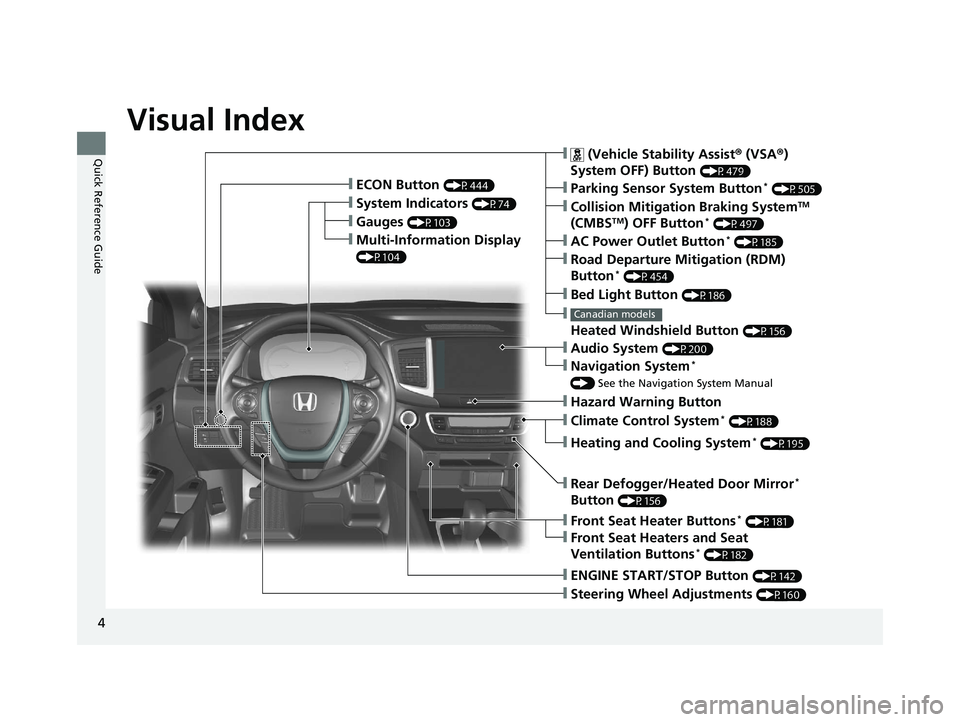
Visual Index
❙Gauges (P103)
❙Multi-Information Display
(P104)
❙System Indicators (P74)
❙ECON Button (P444)
❙Collision Mitigation Braking SystemTM
(CMBSTM) OFF Button* (P497)
❙
Heated Windshield Button (P156)
Canadian models
❙Parking Sensor System Button* (P505)
❙Steering Wheel Adjustments (P160)
❙ENGINE START/STOP Button (P142)
❙AC Power Outlet Button* (P185)
❙Road Departure Mitigation (RDM)
Button* (P454)
❙ (Vehicle Stability Assist ® (VSA ®)
System OFF) Button
(P479)
❙Bed Light Button (P186)
❙Audio System (P200)
❙Navigation System*
() See the Navigation System Manual
❙Front Seat Heater Buttons* (P181)
❙Front Seat Heaters and Seat
Ventilation Buttons* (P182)
❙Rear Defogger/Heated Door Mirror*
Button
(P156)
❙Heating and Cooling System* (P195)
❙Climate Control System* (P188)
❙Hazard Warning Button
Page 12 of 624
10
Quick Reference Guide
Safe Driving (P29)
Airbags (P42)
● Your vehicle is fitted with airbags to help protect you and
your passengers during a moderate-to-severe collision.
Child Safety (P55)
● All children 12 and younger should be seated in the rear seat.
● Smaller children should be properly restra ined in a forward-facing child seat.
● Infants must be properly restraine d in a rear-facing child seat.
Exhaust Gas Hazard (P70)
● Your vehicle emits dangerous exhaust gases that contain carbon
monoxide. Do not run the engine in confined spaces where carbon
monoxide gas can accumulate.
Before Driving Checklist (P34)
● Before driving, check that the front seats, head restraints,
steering wheel, and mirrors have been properly adjusted.
Seat Belts (P35)
● Fasten your seat belt and sit upright well
back in the seat.
● Check that your passengers are wearing
their seat belts correctly.
Fasten your lap belt as
low as possible.
Page 14 of 624
12
Quick Reference Guide
Controls (P109)
Clock (P110)
aPress and hold the MENU/CLOCK
button for two seconds.
bSelect Adjust Clock, then press .
cRotate to adjust the hours.
dPress to switch to minute
adjustment.
eRotate to adjust the minutes.
fPress to switch to Set .
gPress to complete clock adjustment.
Models with color audio system
aSelect , then select Settings.
bSelect Clock/Info , then Clock
Adjustment .
cAdjust the dates, hours and minutes by
selecting / .
dSelect OK to set the time.
Models with Display Audio
34
ENGINE START/STOP
Button
(P142)
Press the button to change the vehicle’s
power mode.
Page 22 of 624
20
Quick Reference Guide
Driving (P411)
Release Button
Depress the brake pedal and press the
release button to move out of
( P.
Move the shift leve r without pressing
the release button.
Press the release button to move the
shift lever.
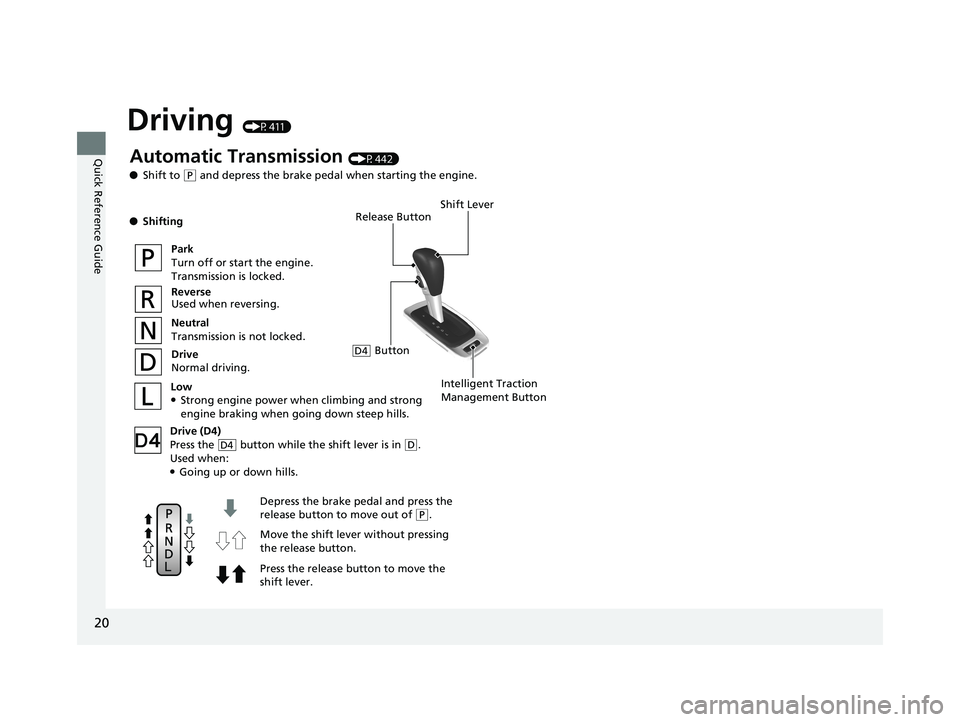
Automatic Transmission (P442)
● Shift to
(P and depress the brake pedal when starting the engine.
● Shifting
Park
Turn off or start the engine.
Transmission is locked.
Reverse
Used when reversing.
Neutral
Transmission is not locked.
Drive
Normal driving.
Shift Lever
Intelligent Traction
Management ButtonLow●Strong engine power when climbing and strong engine braking when going down steep hills.
Drive (D4)
Press the button while the shift lever is in
( D.
Used when:
●Going up or down hills.
D4
ButtonD4
Page 23 of 624

21
Quick Reference Guide
VSA® On and Off (P479)
● The Vehicle Stability Assist ® (VSA® ) system
helps stabilize the vehicle during
cornering, and helps maintain traction
while accelerating on loose or slippery
road surfaces.
● VSA ® comes on automatically every time
you start the engine.
● To partially disable or fully restore VSA ®
function, press and ho ld the button until
you hear a beep.
Cruise Control* (P447)
● Cruise control allows you to maintain a
set speed without keeping your foot on
the accelerator pedal.
● To use cruise control, press the CRUISE
button, then press the – /SET button once
you have achieved the desired speed
(above 25 mph or 40 km/h).
CMBSTM On and Off
(P497)
● When a possible collision is likely
unavoidable, the CMBS
TM can help you to
reduce the vehicle speed and the severity
of the collision.
● To turn the CMBS
TM on or off, press and
hold the button until you hear a beep.
Tire Pressure Monitoring System (TPMS) (P482, 590)
● TPMS monitors tire pressure.
● TPMS is turned on automatically every time you start the engine.
● TPMS fill assist provides audible and visual guidance during tire pressure adjustment.
Refueling (P514)
aPress the fuel fill
door release button.
bAfter refueling,
wait for about five
seconds before
removing the filler
nozzle.
Fuel recommendation: Unleaded gasoline, pump octane number 87 or
higher
Fuel tank capacity: 19.5 US gal (73.8 L)
* Not available on all models
Page 25 of 624
23
Quick Reference Guide
Maintenance (P519)
Under the Hood (P527)
● Check engine oil, engine coolant, and windshield washer
fluid. Add when necessary.
● Check brake fluid.
● Check the battery condition monthly.
aPull the hood release handle under the corner of the
dashboard.
bLocate the hood latch lever, pull the lever up, and lift up
the hood.
cWhen finished, close the hood and make sure it is firmly
locked in place.
Lights (P539)
● Inspect all lights regularly.
Wiper Blades (P545)
● Replace blades if they leave streaks
across the windshield.
Tires (P547)
● Inspect tires and wheels regularly.
● Check tire pressures regularly.
● Install snow tires for winter
driving.
* Not available on all models