Page 205 of 667
Continued203
uuInterior Lights/Interior Convenience Items uInterior Convenience Items
Controls
■Front seat beverage holders
Are located in the console between the front
seats.
■Door side beverage holders
Are located on the both of front and rear door
side pockets.
■Beverage Holders1 Beverage Holders
NOTICE
Spilled liquids damage the upholstery, carpeting, and
electrical components in the interior.
Be careful when you are us ing the beverage holders.
Hot liquid can scald you.
Front
Rear
19 PASSPORT-31TGS6020.book 203 ページ 2020年2月20日 木曜日 午後3時29分
Page 206 of 667
204
uuInterior Lights/Interior Convenience Items uInterior Convenience Items
Controls
■Rear seat beverage holders
Fold the armrest down to use the rear seat
beverage holders.
19 PASSPORT-31TGS6020.book 204 ページ 2020年2月20日 木曜日 午後3時29分
Page 207 of 667
Continued205
uuInterior Lights/Interior Convenience Items uInterior Convenience Items
Controls
The accessory power sockets can be used when the power mode is in ACCESSORY
or ON.
■Console panel
Open the lid and the cover to use it.
■Console compartment
Pull the handle and open the cover to use it.
■Accessory Power Sockets1 Accessory Power Sockets
Do not insert an automotive type cigarette lighter
element.
This can overheat the power socket.
The accessory power socket is designed to supply
power for 12-volt DC accessories that are rated 180
watts (15 amps) or less.
To prevent battery drain, only use the power socket
with the engine running.
19 PASSPORT-31TGS6020.book 205 ページ 2020年2月20日 木曜日 午後3時29分
Page 208 of 667

uuInterior Lights/Interior Convenience Items uInterior Convenience Items
206
Controls
■Cargo area*
Open the cover to use it.
The AC power outlet can be used when the engine is running. Open the cover to use it. Plug in the appliance
slightly, turn it 90° clockwise, then push it all
the way.
■AC Power Outlet*1AC Power Outlet*
NOTICE
Do not use the AC power outlet for electric
appliances that require high initial peak wattage,
such as cathode-ray tube type televisions,
refrigerators, electric pumps, etc. It is not suitable for
devices that process precis e data, such as medical
equipment, and that require an extremely stable
power supply, such as microcomputer-controlled
electric blankets, touc h sensor lamps, etc.
The AC power outlet is desi gned to supply power for
up to 115 volt appliances that are rated 150 watts or
less.
Continued use of any elec tric appliance/device
exceeding these ratings may result in damage to the
appliance/device.
* Not available on all models
19 PASSPORT-31TGS6020.book 206 ページ 2020年2月20日 木曜日 午後3時29分
Page 209 of 667

Continued207
uuInterior Lights/Interior Convenience Items uInterior Convenience Items
Controls
To use the wireless charger, the power mode must be in ACCESSORY or ON.
Charge a compatible device on the ar ea indicated by the mark as follows:
1. Place the device you want to charge on the
charging area.
u The system will au tomatically start
charging the device, and the green
indicator light will come on.
u Make sure that the device is compatible
with the system and placed with the
chargeable side in the center of the
charging area.
2. When charging is completed, the green
indicator light will go off.
u If the device is not located on the charge
area correctly, the green indicator light
will blink.
■Wireless Charger*1Wireless Charger*
In order to use safely:•Remove any metal objects from the charge pad
before charging a device.
•Do not open the charger case.•Do not use the charger if it malfunctions. Contact
your dealer.
3CAUTION
Metal objects between the charge pad
and the device to be charged will get
hot and can burn you.
• Always remove foreign objects from
the charge pad before charging the
device.
• Be sure the surface is clear of dust and
other debris before charging.
• Do not spill liquids (i. e. water, drinks,
etc.) on the charger and the device.
• Do not use oil, grease, alcohol,
benzine or thinner for cleaning the
charge pad.
• Do not cover the system with towels,
clothing, or other objects while
charging etc.
• Avoid spraying aerosols which may
come in contact with the charge pad
surface.
Green
Indicator
Charging Area
* Not available on all models
19 PASSPORT-31TGS6020.book 207 ページ 2020年2月20日 木曜日 午後3時29分
Page 210 of 667

uuInterior Lights/Interior Convenience Items uInterior Convenience Items
208
Controls
■When charging does not start
Perform one of the solution s in the following table.
IndicatorCauseSolution
Slow Blink
There is an obstacle(s) between
the charging area and the
device.Remove the
obstacle(s).
The device is not within the
charging area. Move the device to the
center of the charging
area where is
located.
Fast BlinkThe wireless charger is faulty.
Turn the vehicle off
and back on. If the
indicator still blinks,
contact a dealer.
1
Wireless Charger*
Using the audio/informati on screen, you can disable
the wireless ch arger function.
2 Customized Features P. 359
This system consumes a lot of power. Do not use the
system for a long time when the engine is not
running. This may weaken the battery, making it
difficult to start the engine.
When using the wireless charger, check the user’s
manual that came with th e compatible device you
want to charge.
NOTICE
Do not place any magneti c recording media or
precision machines within the charging area while
charging.
The data on your cards such as credit cards can be
lost because of the magneti c effect. Also precision
machines such as watches can go wrong.
Page 211 of 667
Continued209
uuInterior Lights/Interior Convenience Items uInterior Convenience Items
Controls
There is a coat hook on the rear grab handle
of both sides. Pull it down to use it.
1Wireless Charger*
A device may not charge if the size or shape of its
chargeable side is not a ppropriate for use with the
charging area.
Not all devices are compatible with the system.
During the charging phase, it is normal for the
charging area and de vice to heat up.
Charging may be briefl y interrupted when:
•All the doors and the tailgate are closed
- to avoid interference with the proper functioning
of the smart entry system.
•The position of the device is altered.
Do not charge more than one device at a time on a
charging area.
■Coat Hooks1 Coat Hooks
The coat hooks are not desi gned for large or heavy
items.
* Not available on all models
19 PASSPORT-31TGS6020.book 209 ページ 2020年2月20日 木曜日 午後3時29分
Page 212 of 667
uuInterior Lights/Interior Convenience Items uInterior Convenience Items
210
Controls
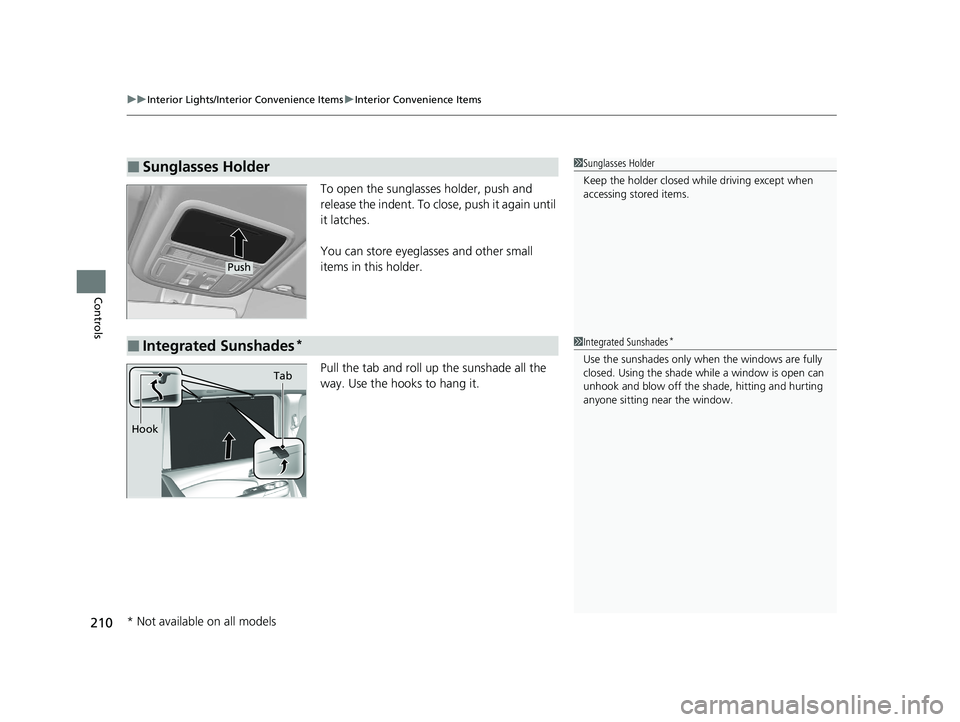
To open the sunglasses holder, push and
release the indent. To close, push it again until
it latches.
You can store eyeglasses and other small
items in this holder.
Pull the tab and roll up the sunshade all the
way. Use the hooks to hang it.
■Sunglasses Holder1Sunglasses Holder
Keep the holder closed wh ile driving except when
accessing stored items.
Push
■Integrated Sunshades*1 Integrated Sunshades*
Use the sunshades only when the windows are fully
closed. Using the shade while a window is open can
unhook and blow off the sh ade, hitting and hurting
anyone sitting near the window.
Tab
Hook
* Not available on all models
19 PASSPORT-31TGS6020.book 210 ページ 2020年2月20日 木曜日 午後3時29分