2019 HONDA PASSPORT change wheel
[x] Cancel search: change wheelPage 290 of 667

uuAudio System Basic Operation uPlaying SiriusXM ® Radio*
288
Features
1. Select Settings .
2. Select Tune Mode .
3. Select All Channels or Within Category .
■To Change the Tune Mode1Playing SiriusXM ® Radio*
In the channel mode, all available channels are
selectable. In the categor y mode, you can select a
channel within a ca tegory (Jazz, Rock, Classical, etc.).
There may be instances when SiriusXM ® Radio does
not broadcast all the data fi elds (artist name, title).
This does not indicate a problem with your audio
system.
SiriusXM ® Radio stations load in ascending order,
which can take about a minute. Once they have
loaded you will be able to scroll up or down to make
your selections.
Switching the Audio Mode
Press the or button on the steering wheel or
select the audio source icon on the screen.
2 Audio Remote Controls P. 230
Tune Start:
When you change to a preset channel, a song being
played on that channel restarts from the beginning
with this function. This can be turned on or off by the
following procedure.
1. Select Settings .
2. Select Tune Start .
3. Select ON or OFF .
To change a category, select Category icons, or
select More and then select Category List.
34
* Not available on all models
19 PASSPORT-31TGS6020.book 288 ページ 2020年2月20日 木曜日 午後3時29分
Page 321 of 667

319
uuAudio System Basic Operation uSiri Eyes Free
Features
Siri Eyes Free
You can talk to Siri using the (Talk) button on the steering wheel when your
iPhone is paired to the Bluetooth® HandsFreeLink ® (HFL) system.
2Phone Setup P. 411
■Using Siri Eyes Free
1Siri Eyes Free
Siri is a trademark of Apple Inc.
Check Apple Inc. website for features available for
Siri.
While driving we recomme nd only using Siri through
the button on the steering wheel (Siri Eyes Free).
1Using Siri Eyes Free
Some commands work only on specific phone
features or apps.
(Talk) Button
Press and hold until the display
changes as shown.
(Back) Button
Press to deactivate Siri.
While in Siri Eyes Free:
The display remains the same.
No feedback or commands
appears. Appears when Siri is
activated in Siri Eyes Free
19 PASSPORT-31TGS6020.book 319 ページ 2020年2月20日 木曜日 午後3時29分
Page 383 of 667
381Continued
Features
Bluetooth® HandsFreeLink ®
Bluetooth® HandsFreeLink ® (HFL) allows you to place and receive phone calls using
your vehicle’s audio system, without handling your cell phone.
Using HFL
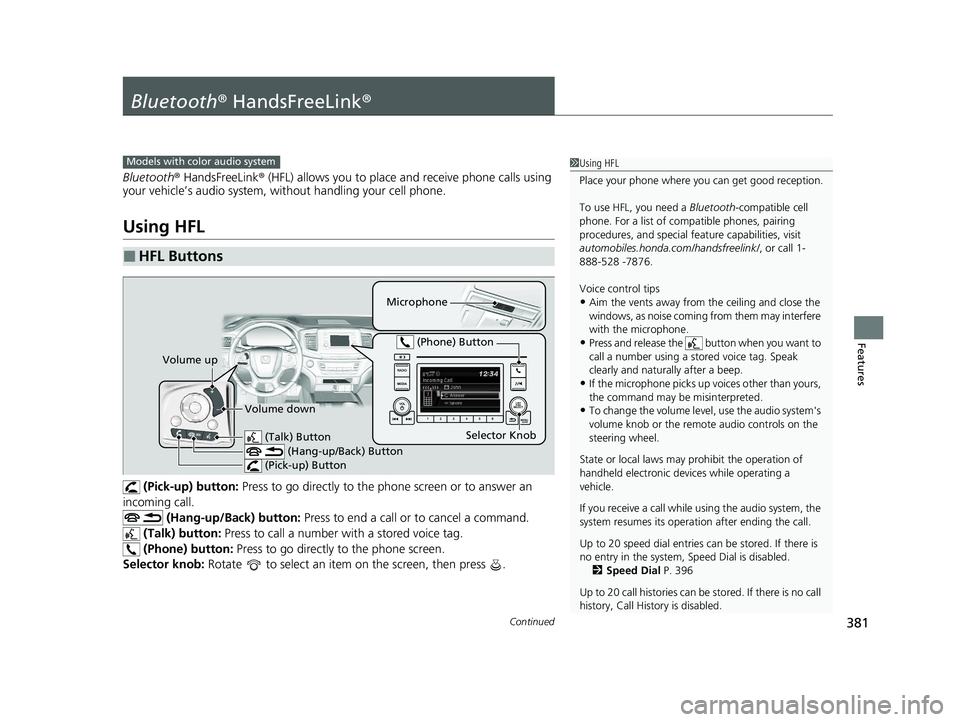
(Pick-up) button: Press to go directly to the p hone screen or to answer an
incoming call. (Hang-up/Back) button: Press to end a call or to cancel a command.
(Talk) button: Press to call a number with a stored voice tag.
(Phone) button: Press to go directly to the phone screen.
Selector knob: Rotate to select an item on the screen, then press .
■HFL Buttons
1Using HFL
Place your phone where y ou can get good reception.
To use HFL, you need a Bluetooth-compatible cell
phone. For a list of compatible phones, pairing
procedures, and special fe ature capabilities, visit
automobiles.honda.com /handsfreelink/, or call 1-
888-528 -7876.
Voice control tips
•Aim the vents away from the ceiling and close the
windows, as noise coming from them may interfere
with the microphone.
•Press and release the button when you want to
call a number using a st ored voice tag. Speak
clearly and naturally after a beep.
•If the microphone picks up vo ices other than yours,
the command may be misinterpreted.
•To change the volume level, use the audio system's
volume knob or the remote audio controls on the
steering wheel.
State or local laws may pr ohibit the operation of
handheld electronic devices while operating a
vehicle.
If you receive a call while using the audio system, the
system resumes its operati on after ending the call.
Up to 20 speed dial entries can be stored. If there is
no entry in the system, Speed Dial is disabled. 2 Speed Dial P. 396
Up to 20 call histories can be stored. If there is no call
history, Call History is disabled.
Models with color audio system
Microphone
(Talk) Button (Hang-up/Back) Button
(Pick-up) Button
Selector Knob
(Phone) Button
Volume up
Volume down
19 PASSPORT-31TGS6020.book 381 ページ 2020年2月20日 木曜日 午後3時29分
Page 408 of 667

406
Features
Bluetooth® HandsFreeLink ®
Bluetooth® HandsFreeLink ® (HFL) allows you to place and receive phone calls using
your vehicle’s audio system, without handling your cell phone.
Using HFL
■HFL Buttons
1 Bluetooth ® HandsFreeLink ®
Place your phone where y ou can get good reception.
To use HFL, you need a Bluetooth-compatible cell
phone. For a list of compatible phones, pairing
procedures, and special feature capabilities,
•U.S.: Visit automobiles.honda.com /handsfreelink/,
or call 1-888-528-7876.
•Canada: For more info rmation on smartphone
compatibility, call 1-855-490-7351.
To use the system, the Bluetooth setting must be
ON .
2 Phone Setup P. 411
Voice control tips
•Aim the vents away from the ceiling and close the
windows, as noise coming from them may interfere
with the microphones.
•Press the button when you want to call a
number using a phonebook name or a number.
Speak clearly and naturally after a beep.
•If the microphones pick up vo ices other than yours,
the command may be misinterpreted.
•To change the volume level, select the audio
system’s VOL (Volume) or use the remote audio
controls on the steering wheel.
If there is no speed dial entry in the system, the pop-
up notification appe ars on the screen.
2 Favorite Contacts P. 416
If there is no call history, the call history is disabled.
Models with Display Audio
(Talk) Button
Volume up Microphone
(Hang-up) Button
(Pick-up) Button
Volume down
ENTER
Button
(Ba
ck) Button
// / Buttons34
(Home) Button
19 PASSPORT-31TGS6020.book 406 ページ 2020年2月20日 木曜日 午後3時29分
Page 460 of 667

458
uuWhen Driving uPrecautions While Driving
Driving
Precautions While Driving
Utility vehicles have a significantly higher rollover rate than other types of vehicles.
To prevent rollovers or loss of control:
• Take corners at slower speeds than yo u would with a passenger vehicle.
• Avoid sharp turns and abrupt maneuvers whenever possible.
• Do not modify your vehicle in any way that you would raise the center of gravity.
• Do not carry heavy cargo on the roof.
Never carry more than 165 lbs (75 kg) of cargo on the roof rack (Honda accessory).
Avoid driving in deep water and on flooded roads. This can damage the engine,
driveline, or cause electrical component failure.
If there is a strong impact with something under the vehicle, stop in a safe location.
Check the underside of the vehicle for damage or any fluid leaks.
■Driving Guidelines for Your Utility Vehicle
■In Rain
■Other Precautions
1 Precautions While Driving
NOTICE
Do not change the gear position while pressing the
accelerator pedal. You could damage the
transmission.
NOTICE
If you repeatedly turn the steering wheel at an
extremely low speed, or hold the steering wheel in
the full left or right position for a while, the electric
power steering (EPS) system heats up. The system
goes into a protective mode, and limits its
performance. The steering wheel becomes harder
and harder to operate. Once the system cools down,
the EPS system is restor ed. Repeated operation under
these conditions can eventually damage the system.
If the power mode is set to ACCESSORY while
driving, the engine will shut down and all steering
and brake power assist functi ons will stop, making it
difficult to control the vehicle.
Do not change the gear position to
( N, as you will
lose engine braking (and acceleration) performance.
During the first 600 miles (1,000 km) of operation,
avoid sudden acceleration or full throttle operation so
as not to damage the engine or powertrain.
Avoid hard braking for the first 200 miles (300 km).
You should also follow this when the brake pads are
replaced.
19 PASSPORT-31TGS6020.book 458 ページ 2020年2月20日 木曜日 午後3時29分
Page 468 of 667

466
uuWhen Driving uShifting
Driving
Use the paddle shifters to change between 1st and 9th gears without removing your
hands from the steering wheel. The transmiss ion will switch to the sequential mode.
■When the transmission is in (D:
The vehicle will go into the sequential mode momentarily, and the sequential mode
gear selection indicator will come on.
Once you start traveling at a constant sp eed, the sequential mode will automatically
switch off, and the sequential mode gear selection indicator will go off.
Hold the
(+ paddle shifter for two seconds or push button to re turn to normal
drive.
■When the transmi ssion is in (S
The vehicle will go into the sequential mode, and the M (sequential mode) indicator
and sequential mode gear selection indicator will come on.
If the vehicle speed increases and the engi ne speed reaches near the tachometer’s
red zone, the transmission automatica lly shifts up to the next gear.
You can cancel this mode by holding the
(+ paddle shifter for two seconds or push
button. When the sequential mode is ca nceled, the sequential mode indicator
and sequential mode gear selection indicator go off.
■Sequential Mode
D/S
D/S
19 PASSPORT-31TGS6020.book 466 ページ 2020年2月20日 木曜日 午後3時29分
Page 474 of 667

uuWhen Driving uAuto Idle Stop
472
Driving
The brake pedal is released.
■The engine restarts even if the brake pedal is depressed when:
• The Auto Idle Stop OFF button is pressed.
• When a steering wheel is operated.
• The transmission is put into
(R or (S, or when it is set from (N to (D.
u If you put the transmission into
(P after the Auto Idle Stop activates, the Auto
Idle Stop continues to operate. In this case, the engine restarts when you
change the gear position other than
(P. When changing the gear position, the
brake pedal must be firmly depressed.
• The pressure on the brake pedal is redu ced and the vehicle starts moving while
stopped on an incline.
• The pressure on the brake pedal is repeated ly applied and released slightly during
a stop.
• The battery charge becomes low.
• The accelerator pedal is depressed.
• The driver’s seat belt is unlatched.
• is ON (indicator on).
• The climate control system is in us e, and the difference between the set
temperature and actual interior temperature becomes significant.
• The climate control system is bein g used to dehumidify the interior.
• The rear fan is set to maximum speed.
u Auto Idle Stop may not ac tivate under other conditions when the rear climate
control system is in use.
• When the Intelligent Traction Management is set to Snow, Mud
*, or Sand*.
■The Engine Automatically Restarts When1The Engine Automatically Restarts When
If you are using an electroni c device during Auto Idle
Stop, the device may tempor arily be turned off when
the engine restarts.
* Not available on all models
19 PASSPORT-31TGS6020.book 472 ページ 2020年2月20日 木曜日 午後3時29分
Page 480 of 667

uuWhen Driving uVehicle Stability Assist ® (VSA ®), aka Electronic Stability Control (ESC), System
478
Driving
This button is on the driver side control panel.
To partially disable VSA ® functionality/
features, press and hold it until you hear a
beep.
The traction control stops fully functioning,
allowing the wheels to sp in more freely at low
speed. The VSA ® OFF indicator will also come
on and a message on the driver information
interface informs you that the mode is
changed.
Traction control mode can not be changed
during Mud or Sand modes. If you are driving
on mud or sand, Mud or Sand Intelligent
Traction Management modes can also be
used to free a stuck vehicle. On other road
surfaces, change to Normal or Snow mode,
then press and hold the (VSA ® OFF) button.
To restore VSA ® functionality/features, press
the (VSA ® OFF) button until you hear a
beep.
VSA ® is turned on every time you start the
engine, even if you turned it off the last time
you drove the vehicle.
■VSA ® On and Off1 Vehicle Stability Assist ® (VSA ®), aka Electronic Stability Control
(ESC), System
With the button pressed, your vehicle will have
normal braking and corn ering ability, but VSA®
traction and stability enhancement becomes less
effective.
In certain unusual conditions when your vehicle gets
stuck in shallow mud or fr esh snow, it may be easier
to free it with the VSA ® temporarily switched off.
When the button is pressed, the traction control
function becomes less effective. This allows for the
wheels to spin more freely at low speed. You should
only attempt to free your vehicle with the VSA ® off if
you are not able to free it when the VSA ® is on.
Immediately after freeing your vehicle, be sure to
switch VSA ® on again. We do not recommend driving
your vehicle with the VSA ® system switched off.
You may hear a motor sound coming from the
engine compartment while system checks are being
performed immediately after starting the engine or
while driving. This is normal.
VSA ® OFF Indicator
AWD models
19 PASSPORT-31TGS6020.book 478 ページ 2020年2月20日 木曜日 午後3時29分