2019 HONDA ODYSSEY alerts
[x] Cancel search: alertsPage 3 of 767
California Perchlorate Contamination Prevention Act
The airbags, seat belt tensioners, and CR type batteries in this
vehicle may contain perchlorate materials - special handling may
apply. See www.dtsc.ca.gov/hazard ouswaste/perchlorate/
As you read this manual, you will find information that is preceded
by a symbol. This information is intended to help you avoid
damage to your vehicle, othe r property, or the environment.
Software End User License Agreement
Your vehicle comes equipped with software, which is governed by
the End User License Agreement in Owner’s Manual, and which
contains a binding arbitration clau se. Please refer to the End User
License Agreement for the terms and conditions governing your
use of the installed software, as we ll as the applications, services,
functions, and content provided through the software. Your use of
the installed software wi ll serve as your consent to the terms and
conditions of the End User License Agreement.
You may opt out within 30 days of your initial use of the Software
by sending a signed, written noti ce to HONDA at American Honda
Motor Co., Inc. Honda Automobile Customer Services Mail Stop
100-5E-8A, 1919 Torrance Blvd. Torrance, CA 90501-2746.
Privacy Notice
This vehicle may share location a nd usage information. To manage
this setting, visit www.hondalink.com/vehicle-data-choices .
A Few Words About Safety
Your safety, and the safety of others, is very important. And
operating this vehicle safely is an important responsibility.
NOTICE
To help you make informed de cisions about safety, we have
provided operating procedures and other information on labels and
in this manual. This information alerts you to potential hazards that
could hurt you or others.
Of course, it is not practical or possible to warn you about all the
hazards associated with operating or maintaining your vehicle. You
must use your own good judgment.
You will find this impo rtant safety information in a variety of forms,
including:
● Safety Labels - on the vehicle.
● Safety Messages - preceded by a safety alert symbol
3 and
one of three signal words: DANGER, WARNING , or CAUTION .
These signal words mean:
● Safety Headings - such as Important Safety Precautions.
● Safety Section - such as Safe Driving.
● Instructions - how to use this vehi cle correctly and safely.
This entire book is filled with important safety information - please
read it carefully.
3 DANGERYou WILL be KILLED or SERIOUSLY HURT if
you don’t follow instructions.
3 WARNINGYou CAN be KILLED or SERIOUSLY HURT if
you don’t follow instructions.
3CAUTIONYou CAN be HURT if you don’t follow
instructions.
19 ODYSSEY-31THR6120.book 1 ページ 2018年12月6日 木曜日 午後4時35分
Page 29 of 767

27
Quick Reference Guide
Honda Sensing®*
Honda Sensing® is a driver support system
which employs the use of two distinctly
different kinds of sensors, a radar sensor
located in the front grille and a front sensor
camera mounted to the interior side of the
windshield, behind the rear view mirror.
Front Sensor
Camera The camera is located
behind the rearview
mirror.
Radar Sensor
The radar sensor is
in the front grille.
Adaptive Cruise Control
(ACC)
(P566)
Helps maintain a constant vehicle speed and
a set following interval behind a vehicle
detected ahead of yours, without you
having to keep your foot on the brake or
the accelerator.
Road Departure
Mitigation (RDM) System
(P 578)
Alerts and helps to assist you when the
system detects a possibility of your vehicle
unintentionally crossing over detected lane
markings.
Lane Keeping Assist
System (LKAS)
(P 583)
Provides steering input to help keep the
vehicle in the middle of a detected lane and
provides tactile and visual alerts if the
vehicle is detected drifting out of its lane.
Collision Mitigation
Braking System
TM
(CMBS
TM) (P 610)
Can assist you when there is a possibility of
your vehicle colliding with a vehicle or a
pedestrian detected in front of yours. The
CMBS
TM is designed to alert you when a
potential collision is determined, as well as
to reduce your vehi cle speed to help
minimize collision severity when a collision is
deemed unavoidable.
* Not available on all models
19 ODYSSEY-31THR6120.book 27 ページ 2018年12月6日 木曜日 午後4時35分
Page 50 of 767

48
uuAirbags uAirbag System Components
Safe Driving
The front, driver’s and passenger’s knee,
front side, and side curtain airbags are
deployed according to the direction and
severity of impact. Both side curtain airbags
are deployed in a ro llover. The airbag
system includes:
aTwo SRS (Supplemental Restraint System)
front airbags. The driver’s airbag is stored
in the center of the steering wheel; the
front passenger’s airbag is stored in the
dashboard. Both are marked SRS
AIRBAG.
bTwo front knee airbags. The driver’s knee
airbag is stored under the steering
column. The front passenger’s knee
airbag is stored under the glove box.
Both are marked SRS AIRBAG.
cTwo side airbags, one for the driver and
one for a front passenger. The airbags are
stored in the outer edges of the seat-
backs. Both are marked SIDE AIRBAG .
dTwo side curtain airbags, one for each
side of the vehicle. The airbags are stored
in the ceiling, above the side windows. The front and rear pillars are marked
SIDE CURTAIN AIRBAG
.
eAn electronic control unit that, when the
vehicle is on, continually monitors
information about the various impact
sensors, seat and buckle sensors, rollover
sensor, airbag activators, seat belt
tensioners, and other vehicle
information. During a crash event the
unit can record such information.
fAutomatic front seat belt tensioners. In
addition, the driver’s and front
passenger’s seat belt buckles incorporate
sensors that detect whether or not they
are fastened.
gA driver’s seat position sensor. This
sensor determines the optimal force at
which the airbag will deploy in a crash.
hWeight sensors in the front passenger’s
seat. The front passenger’s airbag will be
turned off if the weight on the seat is
approximately 65 lbs (29 kg) or less (the
weight of an infant or small child).
iImpact sensors that can detect a
moderate-to-severe front or side impact.
jAn indicator on the dashboard that alerts
you that the front passenger’s front
airbag has been turned off.
kAn indicator on the instrument panel that
alerts you to a possible problem with your
airbag system or seat belt tensioners.
lSafing Sensor
mA rollover sensor that can detect if your
vehicle is about to roll over and signal the
control unit to deploy both side curtain
airbags.
19 ODYSSEY-31THR6120.book 48 ページ 2018年12月6日 木曜日 午後4時35分
Page 61 of 767
Continued59
uuAirbags uAirbag System Indicators
Safe Driving
■When side curtain airbags deploy in a frontal collision
One or both side curtain ai rbags may also inflate in a moderate-to-severe angled
frontal collision.
Airbag System Indicators
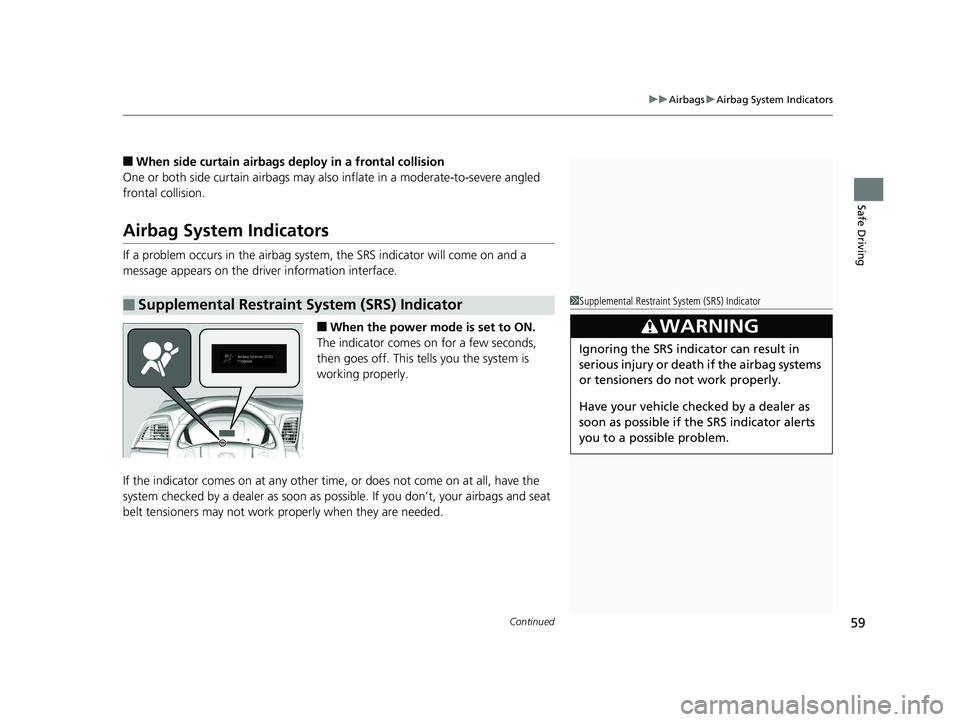
If a problem occurs in the airbag system , the SRS indicator will come on and a
message appears on the driver information interface.
■When the power mode is set to ON.
The indicator comes on for a few seconds,
then goes off. This te lls you the system is
working properly.
If the indicator comes on at any other time, or does not come on at all, have the
system checked by a dealer as soon as po ssible. If you don’t, your airbags and seat
belt tensioners may not work properly when they are needed.
■Supplemental Restraint System (SRS) Indicator1Supplemental Restraint Sy stem (SRS) Indicator
3WARNING
Ignoring the SRS indicator can result in
serious injury or death if the airbag systems
or tensioners do not work properly.
Have your vehicle checked by a dealer as
soon as possible if th e SRS indicator alerts
you to a possible problem.
19 ODYSSEY-31THR6120.book 59 ページ 2018年12月6日 木曜日 午後4時35分
Page 329 of 767
Continued327
uuAudio System Basic Operation uPlaying SiriusXM ® Radio*
Features
While listening to other channel, you can re ceive sports alerts such as scores from
your favorite teams.
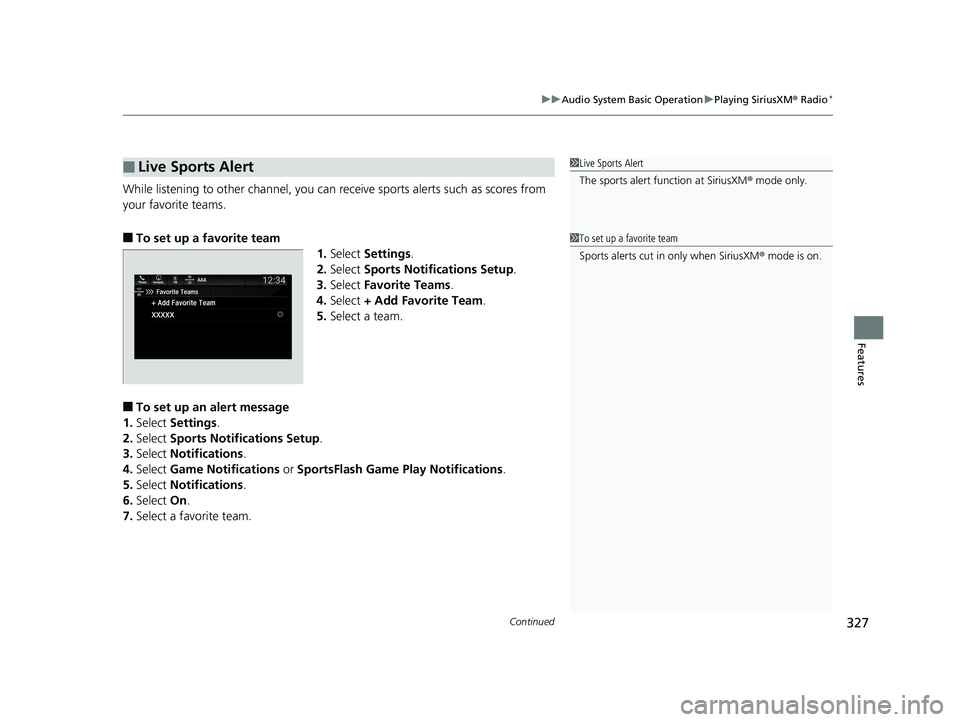
■To set up a favorite team 1.Select Settings .
2. Select Sports Notifications Setup .
3. Select Favorite Teams .
4. Select + Add Favorite Team .
5. Select a team.
■To set up an alert message
1. Select Settings .
2. Select Sports Notifications Setup .
3. Select Notifications .
4. Select Game Notifications or SportsFlash Game Pl ay Notifications.
5. Select Notifications .
6. Select On.
7. Select a favorite team.
■Live Sports Alert1Live Sports Alert
The sports alert function at SiriusXM ® mode only.
1 To set up a favorite team
Sports alerts cut in only when SiriusXM ® mode is on.
19 ODYSSEY-31THR6120.book 327 ページ 2018年12月6日 木曜日 午後4時35分
Page 332 of 767
330
uuAudio System Basic Operation uPlaying SiriusXM ® Radio*
Features
You can change settings for the alert function.
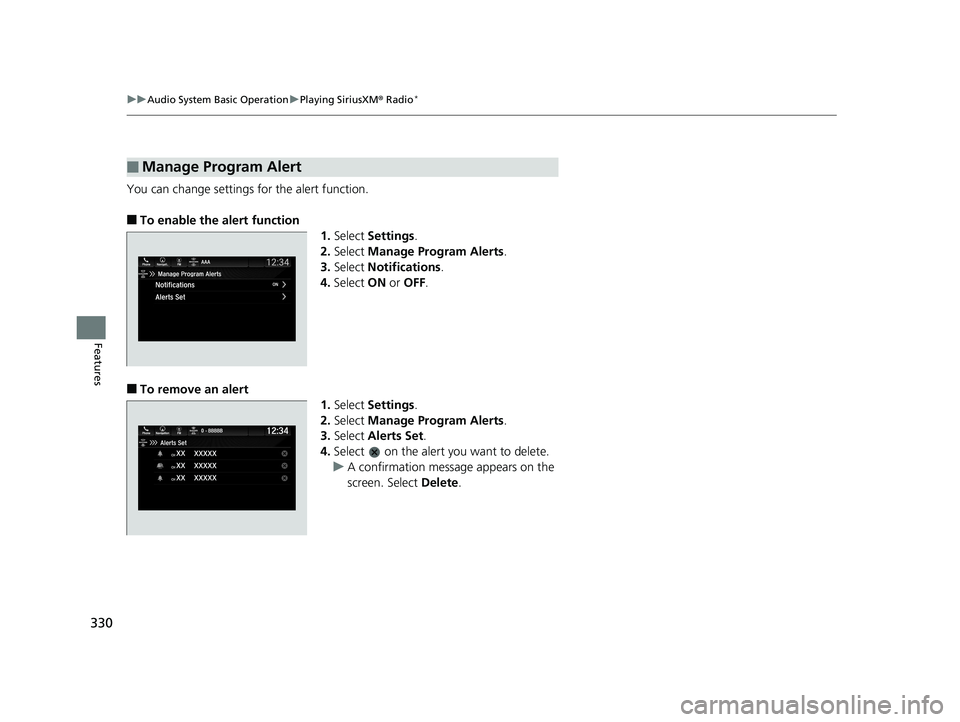
■To enable the alert function
1.Select Settings .
2. Select Manage Program Alerts .
3. Select Notifications .
4. Select ON or OFF .
■To remove an alert
1.Select Settings .
2. Select Manage Program Alerts .
3. Select Alerts Set .
4. Select on the alert you want to delete.
u A confirmation message appears on the
screen. Select Delete.
■Manage Program Alert
19 ODYSSEY-31THR6120.book 330 ページ 2018年12月6日 木曜日 午後4時35分
Page 466 of 767
464
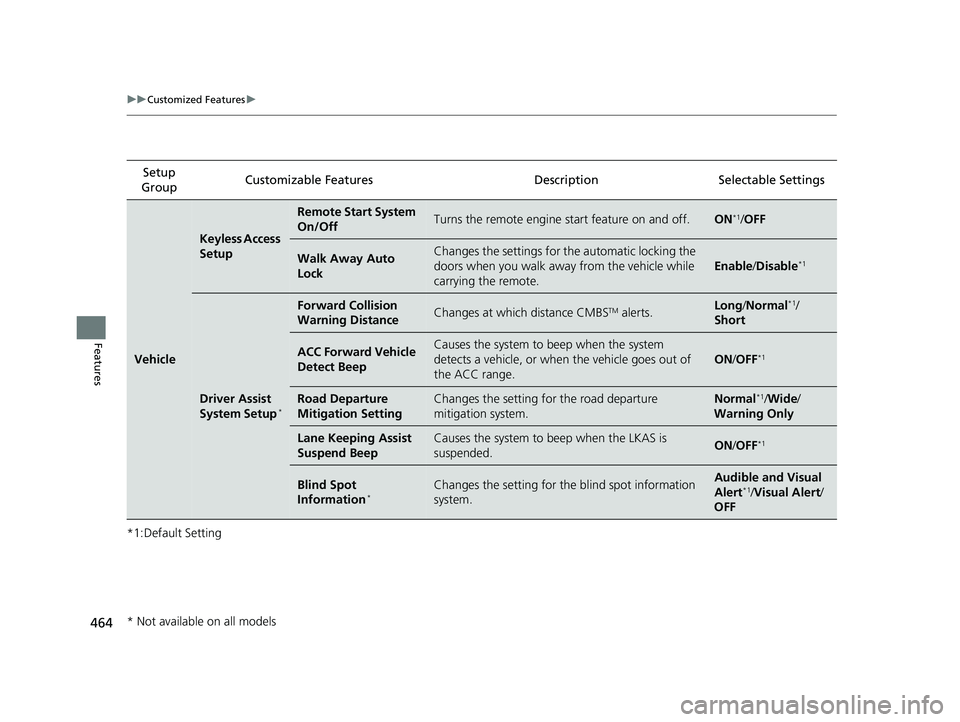
uuCustomized Features u
Features
*1:Default SettingSetup
Group Customizable Features Description Selectable Settings
Vehicle
Keyless Access
Setup
Remote Start System
On/OffTurns the remote engine start feature on and off.ON*1/
OFF
Walk Away Auto
LockChanges the settings for the automatic locking the
doors when you walk away from the vehicle while
carrying the remote.
Enable /Disable*1
Driver Assist
System Setup*
Forward Collision
Warning DistanceChanges at which distance CMBSTM alerts.Long /Normal*1/
Short
ACC Forward Vehicle
Detect BeepCauses the system to beep when the system
detects a vehicle, or when the vehicle goes out of
the ACC range.
ON /OFF*1
Road Departure
Mitigation SettingChanges the setting for the road departure
mitigation system.Normal*1/ Wide /
Warning Only
Lane Keeping Assist
Suspend BeepCauses the system to b eep when the LKAS is
suspended.ON /OFF*1
Blind Spot
Information*Changes the setting for the blind spot information
system.Audible and Visual
Alert*1/ Visual Alert /
OFF
* Not available on all models
19 ODYSSEY-31THR6120.book 464 ページ 2018年12月6日 木曜日 午後4時35分
Page 580 of 767

578
uuWhen Driving uRoad Departure Mitigation (RDM) System*
Driving
Road Departure Mitigation (RDM) System*
Alerts and helps to assist you when the system detects a possibility of your vehicle
unintentionally crossing over detected la ne markings and/or leaving the roadway
altogether.
The front camera behind the rearview mirror
monitors left and right lane markings (in white
or yellow). If your vehicle is getting too close
to detected lane markings without a turn
signal activated, the system, in addition to a
visual alert, applies steering torque and alerts
you with rapid vibrations on the steering
wheel, to help you remain within the detected
lane.
2 Customized Features P. 445
As a visual alert, the Lane Departure
message appears on the driver information
interface.
If the system determines that its steering input
is insufficient to keep your vehicle on the
roadway, it may apply braking. u Braking is applied only when the lane
markings are solid continuous lines.
The system cancels assisting operations when you turn th e steering wheel to avoid
crossing over detected lane markings.
If the system operates several times without detecting driver response, the system
beeps to alert you.
■How the System Works
1 Road Departure Mitigation (RDM) System*
Important Safety Reminder
Like all assistance systems, the RDM system has
limitations.
Over-reliance on the RDM system may result in a
collision. It is always your responsibility to keep the
vehicle within your driving lane.
The RDM system only alerts you when lane drift is
detected without a turn signal in use. The RDM
system may not detect all la ne markings or lane or
roadway departures; accu racy will vary based on
weather, speed and lane marker condition. It is
always your responsibilit y to safely operate the
vehicle and avoid collisions.
You can read about handling information for the
camera equipped with this system. 2 Front Sensor Camera
* P. 564
The RDM system may not wo rk properly or may work
improperly under the certain conditions:
2 RDM Conditions and Limitations P. 581
There are times when you may not notice RDM
functions due to your opera tion of the vehicle, or
road surface conditions.
* Not available on all models
19 ODYSSEY-31THR6120.book 578 ページ 2018年12月6日 木曜日 午後4時35分