Page 384 of 767
382
uuGeneral Information on the Audio System uHonda App License Agreement
Features
E. Information Collection and Storage
1. Information Collecti on, Use, Transmission and Storage of Data. Consent to Use of Data: You agree that HONDA and PROVIDERS may
collect and use your information gathered in any manner as part of product support services related to the SOFTWARE or related services.
HONDA may share such information with third parties, including, without limitation, PROV IDERS, third party software and service s
suppliers, their affiliates and/or their design ated agents, solely to improve their products or to provide services or technologies to you.
HONDA, third party software and systems supp liers, their affiliates and/or their designated agent may disclose this information to others,
but not in a form that pe rsonally identifies you.
2. Information Storage. Depending on the type of multimedia system you have in your VEHICLE, certain information may be stored fo r ease
of use of the SOFTWARE including, without limitation, search hi story, location history in certain applications, previous and saved
destinations, map locations within certain applications, and device numbers and contact information.
(a) Vehicle Health Information. Your VEHICL E may remotely transmit information regardin g the status and health of your VEHICLE
(“VEHICLE INFORMATION”) to HONDA without notification to you. VEHICLE INFORMATION may contain VEHICLE maintenance and
malfunction status that is derived from VEHICLE diagnostic data and includes, but is not limited to, status of powered doors and windows,
battery life data, battery charging data, VEHICLE speed, coolant temperat ure, air compressor revolution, output power, warning codes,
diagnostic trouble codes, fuel injection volume, and engine rotati ons per minute. VEHICLE HEALTH INFORMATION may be used by HONDA
for research and development, to deliver HO NDA SERVICES and information to you, and to contact you, and is retained only for a period
of time necessary to fulfill these goals.
(b) VEHICLE Geolocation Data (non-navigation/map based). If you opt-in to geolocation-based SERVICES, your vehicle’s geolocation data
(latitude and longitude) will be automatically sent from your VEHICLE to HONDA and PROVIDERS.
(c) You understand that the inputting or uploading of information to your VEHICLE’s multimedia system or the SOFTWARE or SERVICES is
at your own risk and that HONDA is not resp onsible for unauthorized access to or use of any personal or other information. All information
uploaded to the SOFTWARE and SERVICES may be stored on your VEHI CLES’s multimedia system and you understand that the security and
safety of your VEHICLE’s multimedia system is your sole responsibility.
19 ODYSSEY-31THR6120.book 382 ページ 2018年12月6日 木曜日 午後4時35分
Page 418 of 767
uuBlu-ray/DVD Rear Entertainment System*uPlaying Apps
416
Features
Displays the current location temperature, time remaining, distance traveled, and
distance remaining with an animation.
To play the app, press the (home) butt on on the remote, and then select the
How Much Farther? icon on the overhead screen.
You can select a background from five types using or on the remote, and bring
some items (at top of the screen) up and down using or .
Plays a stored video or audio file from a connected device via Wi-Fi.
Connect the device using Wi-Fi.
2 Wi-Fi Connection P. 354
Press the (home) button on the remote, and then select the Media Servers icon
on the overhead screen.
The operation are the same as the USB mode.
■How Much Farther?TM*
■Media Servers
1 How Much Farther?TM*
When there is no destinat ion set on the navigation
system, an animated demons tration will be displayed.
34
1Media Servers
NOTE: For this feature to work, an app that exposes
your device as a media se rver must be installed on
your device. Open this a pp on your device prior to
selecting the Media Servers icon. This feature is only
supported on Android phones.
* Not available on all models
19 ODYSSEY-31THR6120.book 416 ページ 2018年12月6日 木曜日 午後4時35分
Page 424 of 767
422
uuBlu-ray/DVD Rear Entertainment System*uPlayable Discs
Features
DES
DES
DesCipher - the DES encryption method
@@ The meat of this code is by Dave Zimmerman , and is:
Copyright (c) 1996 Widget Workshop, Inc. All Rights Reserved.
Permission to use, copy, modify, and distri bute this software and its documentation for NON-COMMERC IAL or COMMERCIAL purposes
and without fee is hereby granted, provided that this copyright notice is kept intact.
WIDGET WORKSHOP MAKES NO REPRESENTATIONS OR WARRANTIES AB OUT THE SUITABILITY OF THE SOFTWARE, EITHER EXPRESS OR
IMPLIED, INCLUDING BUT NOT LIMITED TO THE IMPLIED WARRANTIES OF MERCHANTABILITY, FITNESS FOR A PARTICULAR PURPOSE, OR
NON-INFRINGEMENT. WIDGET WORKSHOP SHALL NOT BE LIABLE FOR ANY DAMAGES SUFFERED BY LICENSEE AS A RESULT OF USING,
MODIFYING OR DISTRIBUTING THIS SOFTWARE OR ITS DERIVATIVES.
THIS SOFTWARE IS NOT DESIGNED OR INTENDED FOR USE OR RESALE AS ON-LINE CONTROL EQUIPMENT IN HAZARDOUS
ENVIRONMENTS REQUIRING FAIL-SAFE PERFORMANC E, SUCH AS IN THE OPERATION OF NUCLEAR FACILITIES, AIRCRAFT NAVIGATION OR
COMMUNICATION SYSTEMS, AIR TR AFFIC CONTROL, DIRECT LIFE SUPPORT MACHINES , OR WEAPONS SYSTEMS, IN WHICH THE FAILURE
OF THE SOFTWARE COULD LEAD DIRECTLY TO DEATH, PERSONAL INJURY, OR SEVERE PHYSICAL OR ENVIRONMENTAL DAMAGE ("HIGH
RISK ACTIVITIES"). WIDGET WORKSHOP SPECIF ICALLY DISCLAIMS ANY EXPRESS OR IMPLIED WARRANTY OF FITNESS FOR HIGH RISK
ACTIVITIES.
@@ The rest of the code is:
Copyright (C) 1996 by Jef Poskanzer . All rights reserved.
19 ODYSSEY-31THR6120.book 422 ページ 2018年12月6日 木曜日 午後4時35分
Page 454 of 767
452
uuCustomized Features u
Features
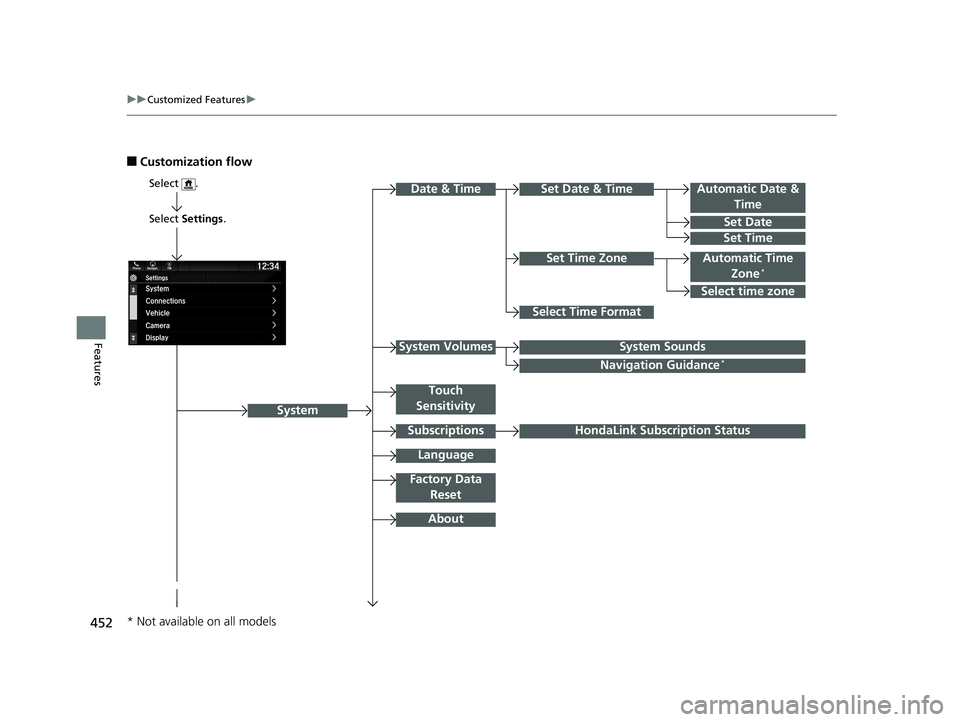
■Customization flow
Select Settings .
Automatic Date &
Time
Set Date
Set Time
System
Select .
Automatic Time Zone*
Select Time Format
HondaLink Subscription Status
Set Time Zone
Set Date & Time
Touch
Sensitivity
Subscriptions
Language
Factory Data Reset
About
Date & Time
Select time zone
System SoundsSystem Volumes
Navigation Guidance*
* Not available on all models
19 ODYSSEY-31THR6120.book 452 ページ 2018年12月6日 木曜日 午後4時35分
Page 460 of 767
458
uuCustomized Features u
Features
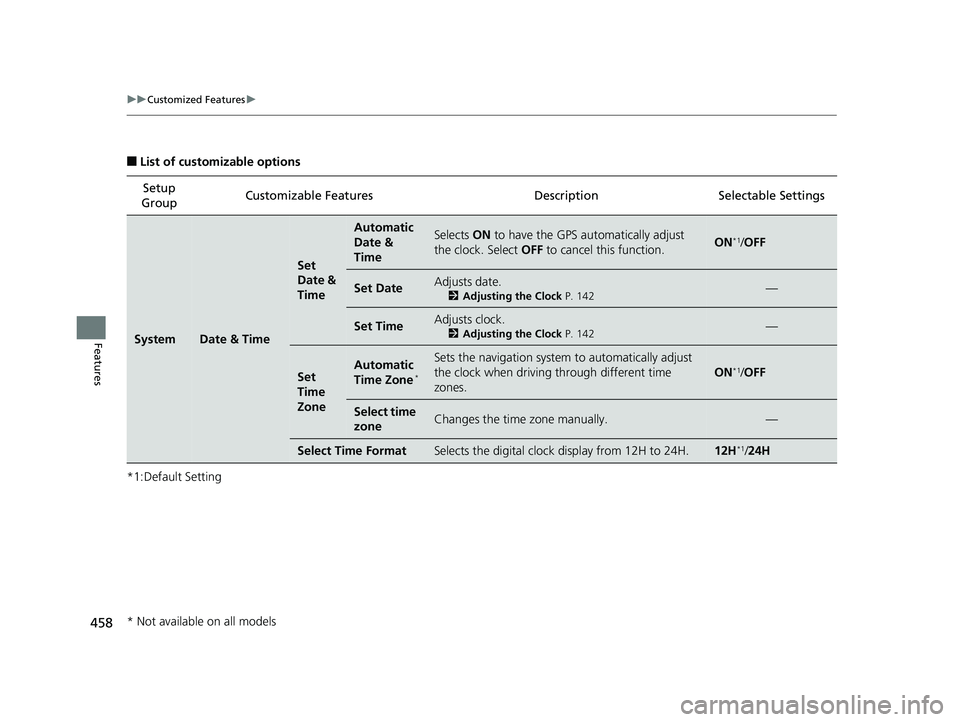
■List of customizable options
*1:Default Setting Setup
Group Customizable Features
DescriptionSelectable Settings
SystemDate & Time
Set
Date &
Time
Automatic
Date &
TimeSelects ON to have the GPS automatically adjust
the clock. Select OFF to cancel this function.ON*1/OFF
Set DateAdjusts date.
2 Adjusting the Clock P. 142—
Set TimeAdjusts clock.
2Adjusting the Clock P. 142—
Set
Time
ZoneAutomatic
Time Zone*
Sets the navigation system to automatically adjust
the clock when driving through different time
zones.
ON*1/ OFF
Select time
zoneChanges the time zone manually.—
Select Time FormatSelects the digital clock display from 12H to 24H.12H*1/24H
* Not available on all models
19 ODYSSEY-31THR6120.book 458 ページ 2018年12月6日 木曜日 午後4時35分
Page 461 of 767
459
uuCustomized Features u
Continued
Features
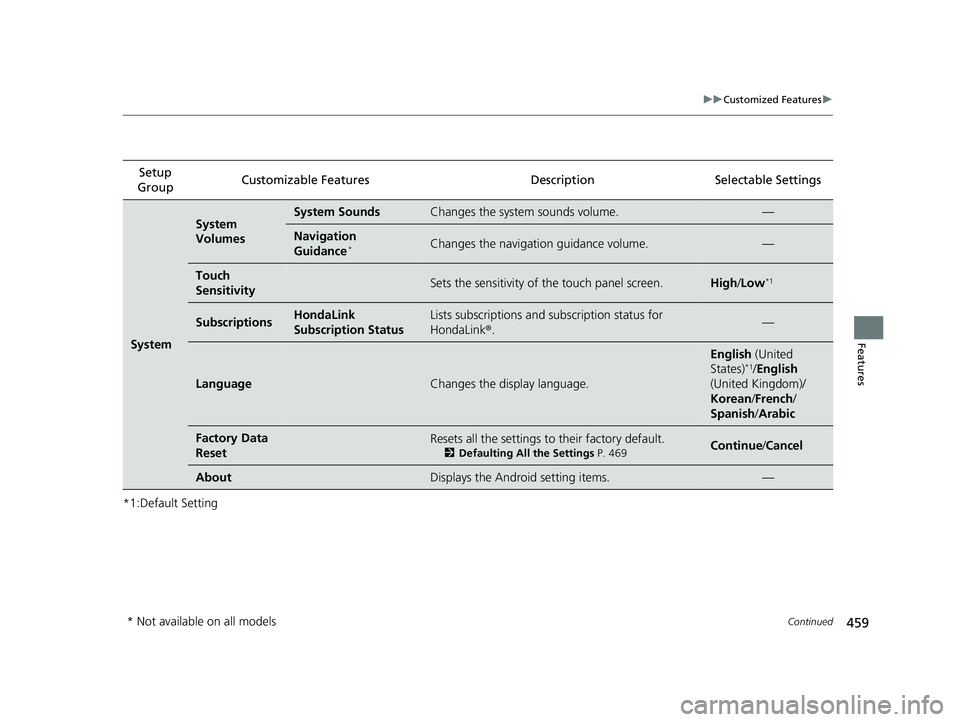
*1:Default SettingSetup
Group Customizable Features
Description Selectable Settings
System
System
VolumesSystem SoundsChanges the system sounds volume.—
Navigation
Guidance*Changes the navigation guidance volume.—
Touch
SensitivitySets the sensitivity of the touch panel screen.High/Low*1
SubscriptionsHondaLink
Subscription StatusLists subscriptions and subscription status for
HondaLink ®.—
LanguageChanges the display language.
English (United
States)*1/ English
(United Kingdom)/
Korean /French /
Spanish /Arabic
Factory Data
ResetResets all the settings to their factory default.
2 Defaulting All the Settings P. 469Continue/Cancel
AboutDisplays the Android setting items.—
* Not available on all models
19 ODYSSEY-31THR6120.book 459 ページ 2018年12月6日 木曜日 午後4時35分
Page 462 of 767
460
uuCustomized Features u
Features
*1:Default SettingSetup
Group Customizable Features Description Selectable Settings
SystemAdvanced
Options
App ManagerDisplays the Android sy
stem memory and apps
information.—
Recent Location
Request from AppsDisplays the recent loca tion requests from apps.—
Location SettingSelects OFF not to allow apps including the
navigation system* to access the vehicle’s location.ON*1/ OFF
Inter-
ruptions
Inter-
ruption
ModeSets the interruption mode for allowing to notify
when calls and notifications arrive.
Always interrupt*1/
Don’t interrupt /
Allow only priority
interruptions
Events and
remindersSets priority interruptions of events and reminders.ON*1/OFF
CallsSets priority interruptions of calls.ON /OFF*1
MessagesSets priority interruptions of messages.ON /OFF*1
Calls/
messages
from
Sets priority interruptions of from who.
Anyone*1/ Contacts
only /Starred
contacts only
* Not available on all models
19 ODYSSEY-31THR6120.book 460 ページ 2018年12月6日 木曜日 午後4時35分
Page 508 of 767
uuBluetooth ® HandsFreeLink ®u HFL Menus
506
Features
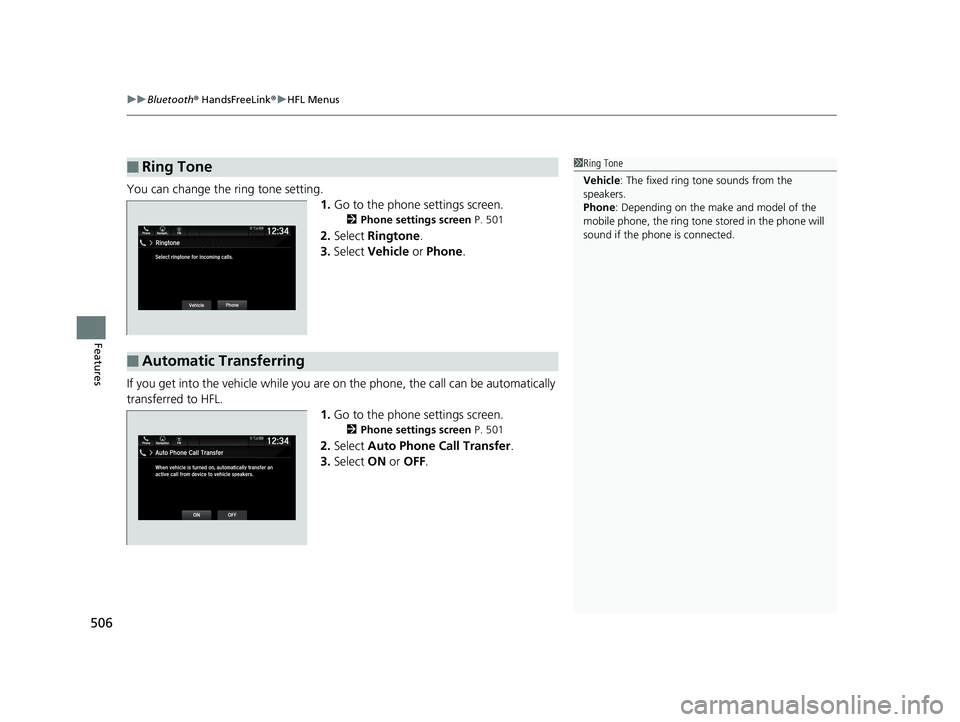
You can change the ring tone setting.
1.Go to the phone settings screen.
2 Phone settings screen P. 501
2.Select Ringtone .
3. Select Vehicle or Phone .
If you get into the vehicle while you are on the phone, the call can be automatically
transferred to HFL.
1.Go to the phone settings screen.
2 Phone settings screen P. 501
2.Select Auto Phone Call Transfer .
3. Select ON or OFF .
■Ring Tone1Ring Tone
Vehicle : The fixed ring tone sounds from the
speakers.
Phone : Depending on the make and model of the
mobile phone, the ring tone stored in the phone will
sound if the phone is connected.
■Automatic Transferring
Phone FMAuto Phone Call Transfer
ONOFF
12:34Navigation
When vehicle is turned on, automatically transfer an
active call from device to vehicle speakers.
19 ODYSSEY-31THR6120.book 506 ページ 2018年12月6日 木曜日 午後4時35分