Page 111 of 675
109
uuIndicators uDriver Information Interface Wa rning and Information Messages
Continued
Instrument Panel
MessageConditionExplanation
●Appears when the power mode is in ACCESSORY.
—
●Appears after the driver’s door is opened when the
power mode is in ACCESSORY.●Change the power mode to VEHICLE OFF.
2POWER Button P. 190
●Appears when you close th e door with the power
mode in ON without the remote inside the vehicle.●Disappears when you bring the remote back inside the
vehicle and close the door.
2 Remote Reminder P. 192
●Appears when the remote battery becomes weak.
2Replacing the Button Battery P. 593
19 INSIGHT HMIN-31TXM6000.book 109 ページ 2018年4月20日 金曜日 午後4時22分
Page 112 of 675
110
uuIndicators uDriver Information Interface Wa rning and Information Messages
Instrument Panel
MessageConditionExplanation
●Appears if the remote battery is too weak to turn on
the power system or the key is not within operating
range to turn on the power system.
A beeper sounds six times.●Bring the back of the remote into contact with the
POWER button.
2If the Remote Battery is Weak P. 626
●Appears as soon as a problem is detected in the
smart entry system* or push button starting system.
●Appears constantly - Have your vehicle checked by a
dealer.
●Appears after you set the power mode to
ACCESSORY or ON.
●Appears after you unlock and open the driver’s door.2 Turning on the Power P. 448
•Appears if you press the POWER button while the
vehicle is moving.• The message will disappear after six seconds or when
the power mode is set to VEHICLE OFF.
Canadian models
* Not available on all models
19 INSIGHT HMIN-31TXM6000.book 110 ページ 2018年4月20日 金曜日 午後4時22分
Page 169 of 675
167
uuLocking and Unlocking the Doors uKey Types and Functions
Controls
The built-in key can be us ed to lock/unlock the
doors when the remote battery becomes
weak and the power door lock/unlock
operation is disabled.
To remove the built-in key, slide the release
knob and then pull out the key. To reinstall
the built-in key, push the built-in key into the
remote until it clicks.
Contains a number that you will need if you
purchase a replacement key.
■Built-in Key
Built-in Key
Release Knob
■Key Number Tag1
Key Number Tag
Keep the key number tag separate from the key in a
safe place outside of your vehicle.
If you wish to purchase an additional key, contact a
dealer.
If you lose your key and you cannot activate the
power system, contact a dealer.
19 INSIGHT HMIN-31TXM6000.book 167 ページ 2018年4月20日 金曜日 午後4時22分
Page 192 of 675

190
Controls
Operating the Switches Around the Steering Wheel
POWER Button
■Changing the Power Mode1POWER Button
POWER Button Operating Range
You can start the power system when the remote is
inside the vehicle.
If the battery of the remote is getting low, the power
system may not start when you press the POWER
button. If the power system does not start, refer to
the following link. 2 If the Remote Battery is Weak P. 626
The power system may also start if the remote is close
to the door or window, even if it is outside the
vehicle.
ON mode:
The POWER button is on (in red), if the power system
is on.
Do not leave the power mode in ACCESSORY or ON
when you get out.
Operating Range
VEHICLE OFF (LOCK)
The button is off.
The power to all electrical components is turned off.
Press the button. Without pressing
the brake pedal ACCESSORY
The button blinks (in red).
Operate the audio system and other accessories in
this position.
ON
The button blinks (in red).
All electrical components can be used.
19 INSIGHT HMIN-31TXM6000.book 190 ページ 2018年4月20日 金曜日 午後4時22分
Page 204 of 675

202
uuOperating the Switches Around the Steering Wheel uRear Defogger/Heated Door Mirror Button
Controls
Rear Defogger/Heated Door Mirror Button
Press the rear defogger and heated door mirror button to defog the rear window
and mirrors when the power mode is in ON.
The rear defogger and heated door mirrors
automatically switch off after 10-30 minutes
depending on the outside temperature.
However, if the outside temperature is 32°F
(0°C) or below, it does not automatically
switch off.1Rear Defogger/Heated Door Mirror Button
This system consumes a lot of power, so turn it off
when the window has been defogged. Also, do not
use the system for a long time while the power
system is stopped. This may weaken the 12-volt
battery, making it difficult to turn the power system
on.
When the outside temperature is below 41°F (5°C),
the heated door mirror may activate automatically for
10 minutes when you set the power mode to ON.
Models without SYNC button
Models with SYNC button
19 INSIGHT HMIN-31TXM6000.book 202 ページ 2018年4月20日 金曜日 午後4時22分
Page 225 of 675
Continued223
uuInterior Lights/Interior Convenience Items uInterior Convenience Items
Controls
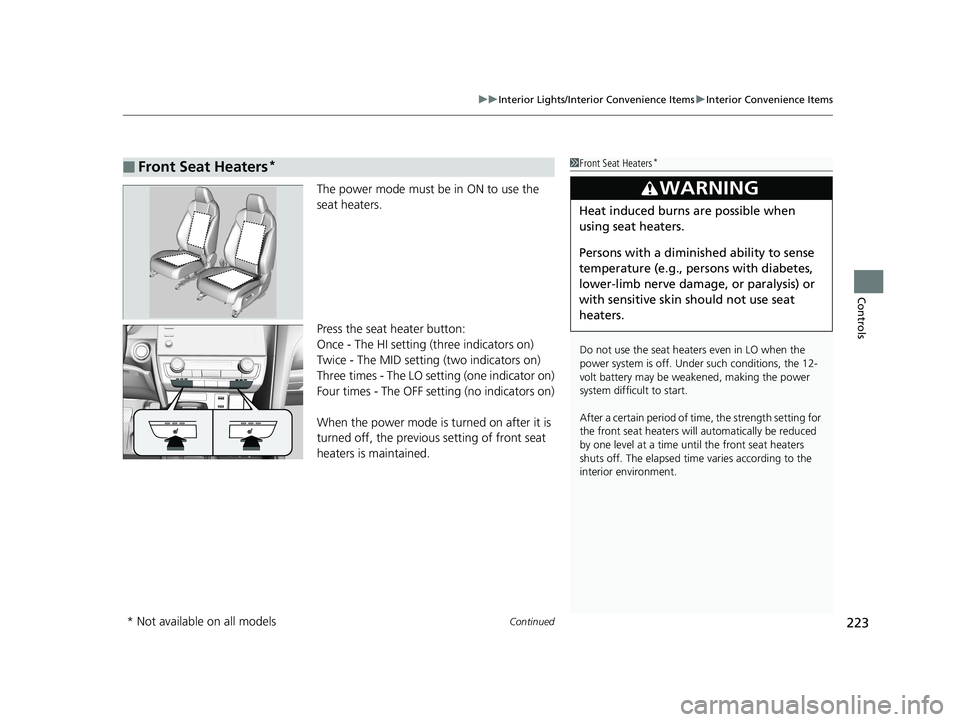
The power mode must be in ON to use the
seat heaters.
Press the seat heater button:
Once - The HI setting (three indicators on)
Twice - The MID setting (two indicators on)
Three times - The LO se tting (one indicator on)
Four times - The OFF setting (no indicators on)
When the power mode is turned on after it is
turned off, the previous setting of front seat
heaters is maintained.
■Front Seat Heaters*1 Front Seat Heaters*
Do not use the seat heaters even in LO when the
power system is off. U nder such conditions, the 12-
volt battery may be weakened, making the power
system difficult to start.
After a certain period of time, the strength setting for
the front seat heaters will automatically be reduced
by one level at a time unt il the front seat heaters
shuts off. The elapsed time varies according to the
interior environment.
3WARNING
Heat induced burns are possible when
using seat heaters.
Persons with a diminished ability to sense
temperature (e.g., persons with diabetes,
lower-limb nerve damage, or paralysis) or
with sensitive skin should not use seat
heaters.
* Not available on all models
19 INSIGHT HMIN-31TXM6000.book 223 ページ 2018年4月20日 金曜日 午後4時22分
Page 226 of 675

uuInterior Lights/Interior Convenience Items uInterior Convenience Items
224
Controls
The power mode must be in ON to use the
seat heaters.
There is no heater in the rear center seating
position.
While in HI, the heater cycles on and off.
u The appropriate indicator will be on
while the seat heater is on. Briefly press
the switch on the opposite side to turn
the heater off. The indicator will be off.
■Rear Seat Heaters*1Rear Seat Heaters*
Do not use the seat heaters even in LO when the
power system is off. U nder such conditions, the 12-
volt battery may be weakened, making the power
system difficult to start.
In the LO setting, the heater runs continuously and
does not automatically turn off.
3WARNING
Heat induced burns are possible when
using seat heaters.
Persons with a diminished ability to sense
temperature (e.g., persons with diabetes,
lower-limb nerve damage, or paralysis) or
with sensitive skin should not use seat
heaters.
* Not available on all models
19 INSIGHT HMIN-31TXM6000.book 224 ページ 2018年4月20日 金曜日 午後4時22分
Page 251 of 675

249
uuAudio System Basic Operation uPlaying AM/FM Radio
Features
Provides text data information related to your selected RDS capable FM station.
■To find an RDS station from Station List
1. Press while listening to an FM station.
2. Rotate to select the station, then press .
■Update List
Updates your available st ation list at any time.
1. Press while listening to an FM station.
2. Rotate to select Update List, then press .
■Radio text
Displays the radio text information of the selected RDS station.
1. Press the MENU/CLOCK button.
2. Rotate to select Settings, then press .
3. Rotate to select RDS Settings, then press .
4. Rotate to select Radio Text, then press .
■Scan
Samples each of the strongest stations on the selected band for 10 seconds.
1. Press the MENU/CLOCK button.
2. Rotate to select Scan, then press .
To turn off scan, press .
■Radio Data System (RDS)1 Playing AM/FM Radio
The ST indicator appears on the display indicating
stereo FM broadcasts.
Stereo reproduction in AM is not available.
You can store 6 AM stations and 12 FM stations into
the preset memory. FM1 and FM2 let you store 6
stations each.
Switching the Audio Mode
Press the SOURCE button on the steering wheel.
2 Audio Remote Controls P. 237
1Radio Data System (RDS)
When you select an RDS-capable FM station, the RDS
automatically turns on, and the frequency display
changes to the station name. However, when the
signals of that station become weak, the display
changes from the statio n name to the frequency.
19 INSIGHT HMIN-31TXM6000.book 249 ページ 2018年4月20日 金曜日 午後4時22分


