Page 8 of 591
6
Quick Reference Guide Quick Reference Guide
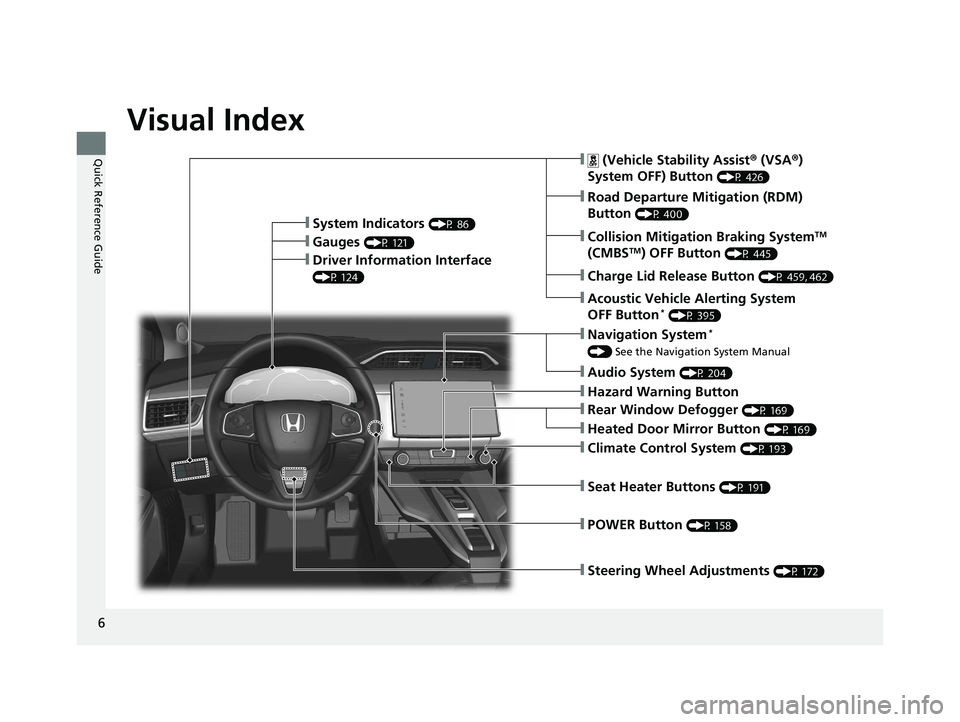
Visual Index
❙ Steering Wheel Adjustments (P 172)❙ (Vehicle Stability Assist ® (VSA ® )
System OFF) Button (P 426)
❙ Road Departure Mitigation (RDM)
Button (P 400)
❙ System Indicators (P 86)
❙ Gauges (P 121)
❙ Collision Mitigation Braking System TM
(CMBS TM
) OFF Button (P 445)
❙ Driver Information Interface (P 124)
❙ Navigation System *
() See the Navigation System Manual
❙ Audio System (P 204)
❙ Hazard Warning Button
❙ Climate Control System (P 193)
❙ Rear Window Defogger (P 169)
❙ POWER Button (P 158)
❙ Seat Heater Buttons (P 191)
❙ Heated Door Mirror Button (P 169)
❙ Acoustic Vehicle Alerting System
OFF Button *
(P 395)
❙ Charge Lid Release Button (P 459, 462)19 CLARITY PHEV-31TRW6100.book 6 ページ 2018年10月25日 木曜日 午後2時29分
Page 27 of 591
25
Quick Reference Guide
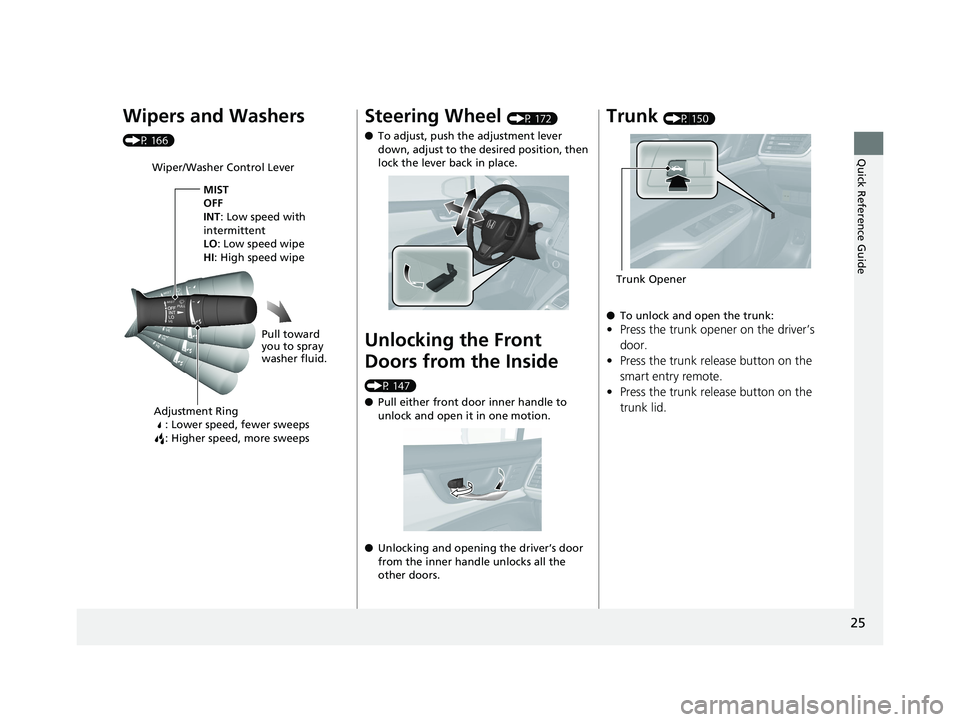
Wipers and Washers (P 166)
Wiper/Washer Control Lever
Adjustment Ring
: Lower speed, fewer sweeps
: Higher speed, more sweeps MIST
OFF
INT : Low speed with
intermittent
LO : Low speed wipe
HI : High speed wipe
Pull toward
you to spray
washer fluid.
Steering Wheel (P 172)
● To adjust, push the adjustment lever
down, adjust to the desired position, then
lock the lever back in place.
Unlocking the Front
Doors from the Inside (P 147)
● Pull either front door inner handle to
unlock and open it in one motion.
● Unlocking and opening the driver’s door
from the inner handle unlocks all the
other doors.Trunk (P 150)
● To unlock and open the trunk:
• Press the trunk opener on the driver’s
door.
• Press the trunk release button on the
smart entry remote.
• Press the trunk release button on the
trunk lid. Trunk Opener19 CLARITY PHEV-31TRW6100.book 25 ページ 2018年10月25日 木曜日 午後2時29分
Page 168 of 591
166 uu Operating the Switches Around the Steering Wheel u Wipers and Washers
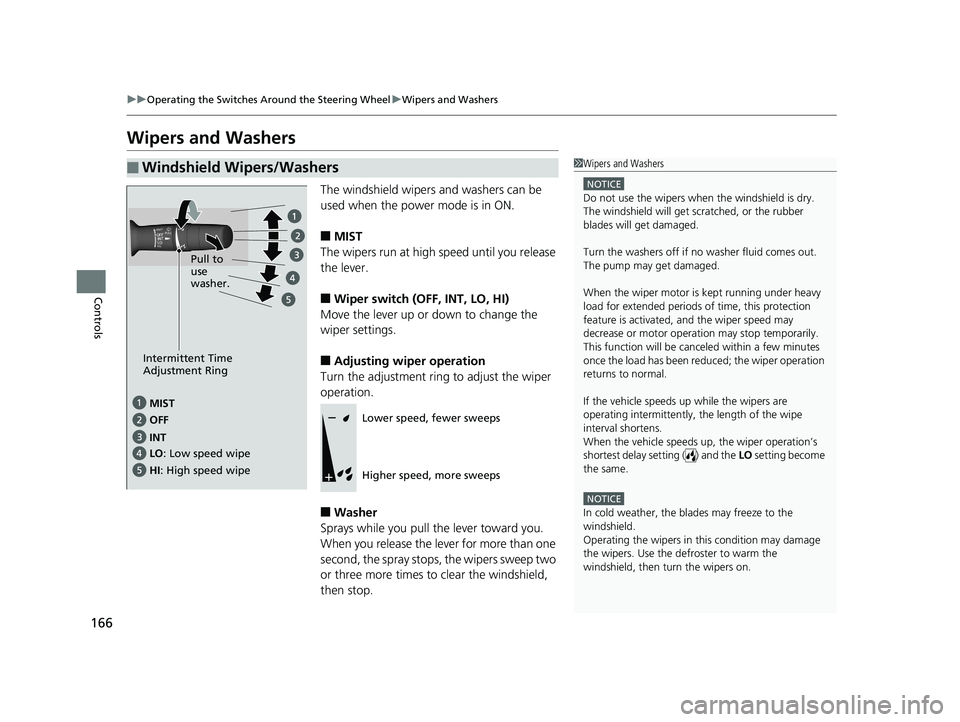
Controls Wipers and Washers The windshield wipers and washers can be
used when the power mode is in ON.
■ MIST
The wipers run at high speed until you release
the lever.
■ Wiper switch (OFF, INT, LO, HI)
Move the lever up or down to change the
wiper settings.
■ Adjusting wiper operation
Turn the adjustment ring to adjust the wiper
operation.
■ Washer
Sprays while you pull the lever toward you.
When you release the lever for more than one
second, the spray stops, the wipers sweep two
or three more times to clear the windshield,
then stop.■ Windshield Wipers/Washers 1 Wipers and Washers NOTICE
Do not use the wipers when the windshield is dry.
The windshield will get sc ratched, or the rubber
blades will get damaged.
Turn the washers off if no washer fluid comes out.
The pump may get damaged.
When the wiper motor is kept running under heavy
load for extended periods of time, this protection
feature is activated, and the wiper speed may
decrease or motor operat ion may stop temporarily.
This function will be canceled within a few minutes
once the load has been reduced; the wiper operation
returns to normal.
If the vehicle speeds up while the wipers are
operating intermittently, the length of the wipe
interval shortens.
When the vehicle speeds up, the wiper operation’s
shortest delay setting ( ) and the LO setting become
the same.
NOTICE
In cold weather, the blades may freeze to the
windshield.
Operating the wipers in th is condition may damage
the wipers. Use the defroster to warm the
windshield, then turn the wipers on.MIST
OFF
LO : Low speed wipe
HI : High speed wipe Pull to
use
washer.
INTIntermittent Time
Adjustment Ring
Lower speed, fewer sweeps
Higher speed, more sweeps19 CLARITY PHEV-31TRW6100.book 166 ページ 2018年10月25日 木曜日 午後2時29分
Page 172 of 591
170 uu Operating the Switches Around the Steering Wheel u Driving Position Memory System *
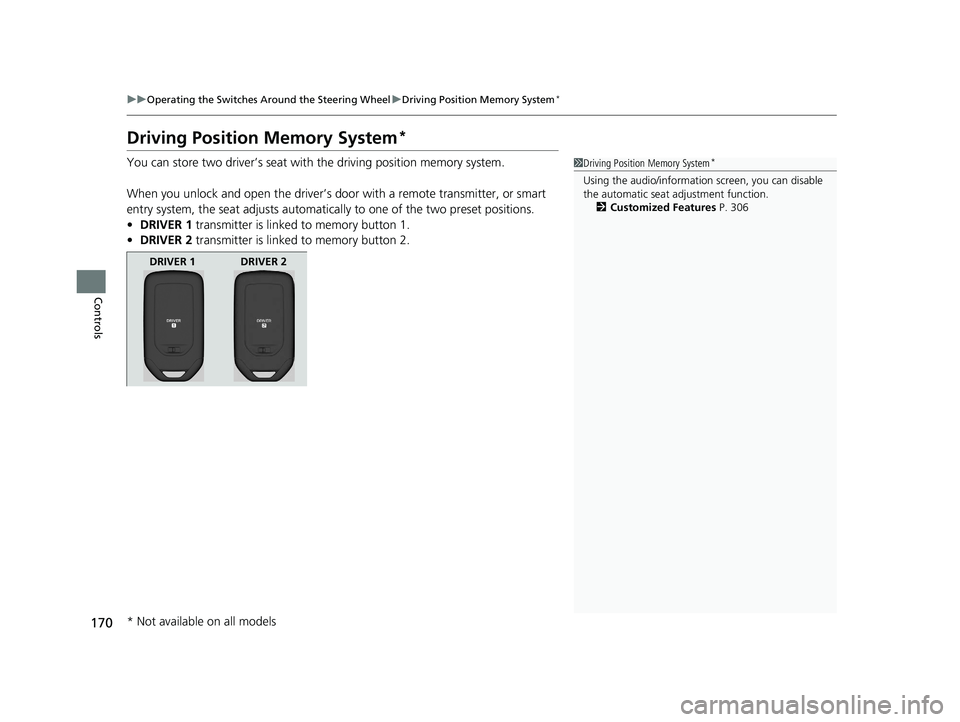
Controls Driving Position Memory System *You can store two driver’s seat with the driving position memory system.
When you unlock and open the driver’s do or with a remote transmitter, or smart
entry system, the seat adjusts automatica lly to one of the two preset positions.
• DRIVER 1 transmitter is linked to memory button 1.
• DRIVER 2 transmitter is linked to memory button 2. 1 Driving Position Memory System *
Using the audio/informati on screen, you can disable
the automatic seat adjustment function.
2 Customized Features P. 306
DRIVER 1 DRIVER 2
* Not available on all models 19 CLARITY PHEV-31TRW6100.book 170 ページ 2018年10月25日 木曜日 午後2時29分
Page 174 of 591
172 uu Operating the Switches Around the Steering Wheel u Adjusting the Steering Wheel
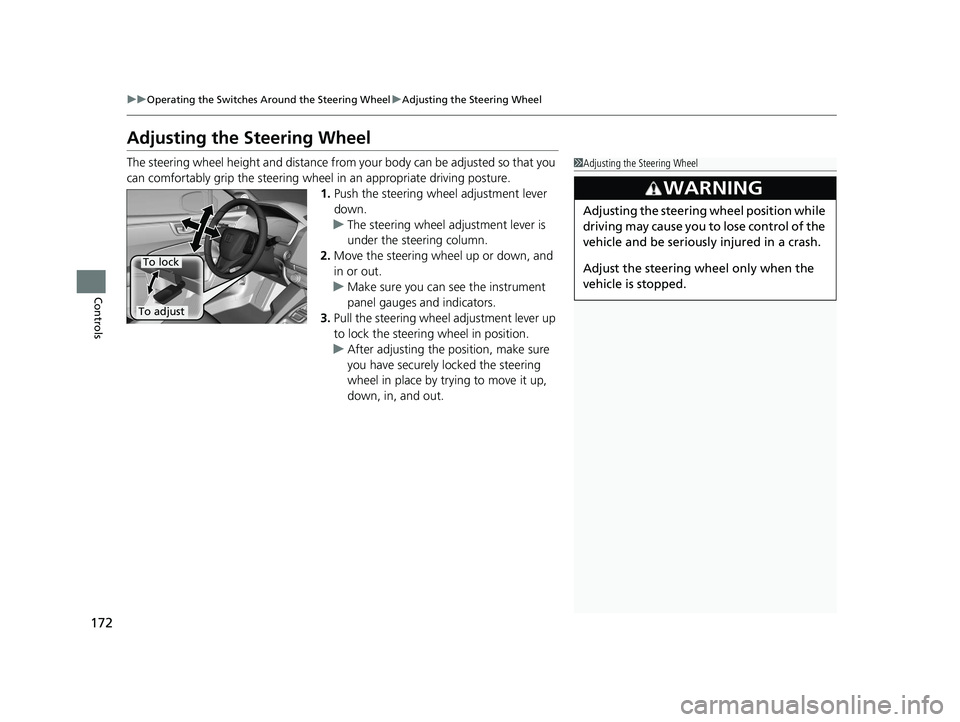
Controls Adjusting the Steering Wheel The steering wheel height and distance from your body can be adjusted so that you
can comfortably grip the steering wheel in an appropriate driving posture.
1. Push the steering wheel adjustment lever
down.
u The steering wheel adjustment lever is
under the steering column.
2. Move the steering wheel up or down, and
in or out.
u Make sure you can see the instrument
panel gauges and indicators.
3. Pull the steering wheel adjustment lever up
to lock the steering wheel in position.
u After adjusting the position, make sure
you have securely locked the steering
wheel in place by trying to move it up,
down, in, and out. 1 Adjusting the Steering Wheel
3
WARNING Adjusting the steering wheel position while
driving may cause you to lose control of the
vehicle and be seriously injured in a crash.
Adjust the steering wheel only when the
vehicle is stopped.To adjust To lock19 CLARITY PHEV-31TRW6100.book 172 ページ 2018年10月25日 木曜日 午後2時29分
Page 177 of 591
175Continued
Controls
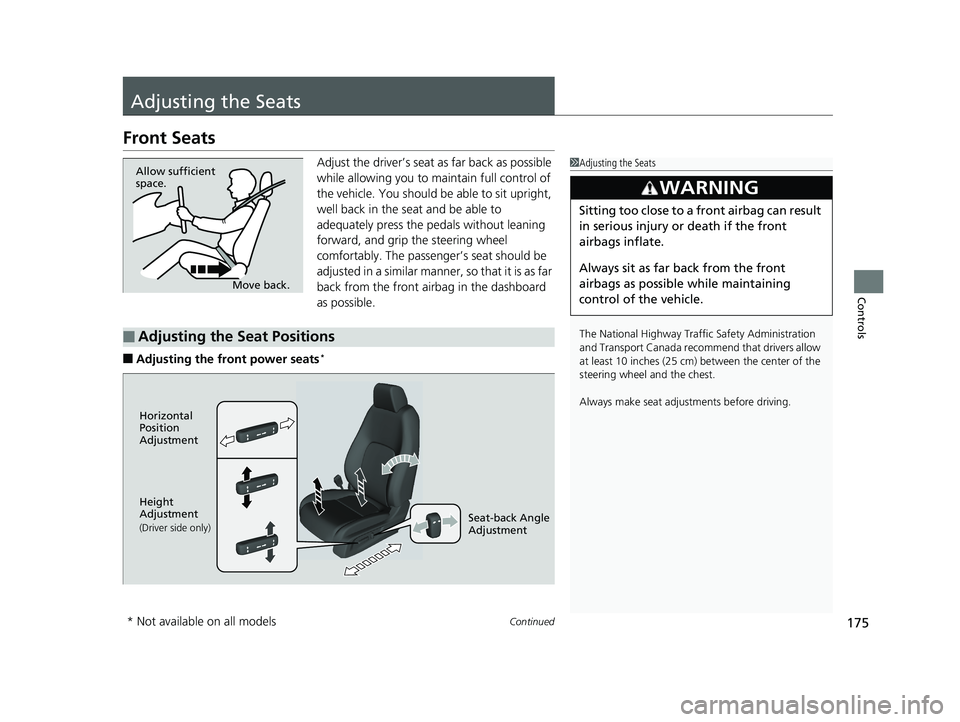
Adjusting the Seats Front Seats Adjust the driver’s seat as far back as possible
while allowing you to ma intain full control of
the vehicle. You should be able to sit upright,
well back in the seat and be able to
adequately press the pedals without leaning
forward, and grip the steering wheel
comfortably. The passenger’s seat should be
adjusted in a similar manner, so that it is as far
back from the front airbag in the dashboard
as possible.
■ Adjusting the fro nt power seats * 1 Adjusting the Seats
The National Highway Traffic Safety Administration
and Transport Cana da recommend that drivers allow
at least 10 inches (25 cm) between the center of the
steering wheel and the chest.
Always make seat adjustments before driving.3
WARNING Sitting too close to a front airbag can result
in serious injury or death if the front
airbags inflate.
Always sit as far back from the front
airbags as possible while maintaining
control of the vehicle.Move back.Allow sufficient
space.
■ Adjusting the Seat Positions Horizontal
Position
Adjustment
Height
Adjustment
(Driver side only)
Seat-back Angle
Adjustment
* Not available on all models 19 CLARITY PHEV-31TRW6100.book 175 ページ 2018年10月25日 木曜日 午後2時29分