Page 243 of 551
Continued241
uuAudio System Basic Operation uPlaying SiriusXM ® Radio
Features
1. Select .
2. Select Tune Mode .
3. Select Channel Mode or Category Mode .
■To Change the Tune Mode1Playing SiriusXM ® Radio
In the channel mode, all available channels are
selectable. In the categor y mode, you can select a
channel within a ca tegory (Jazz, Rock, Classical, etc.).
There may be instances when SiriusXM ® Radio does
not broadcast all the data fi elds (artist name, title).
This does not indicate a problem with your audio
system.
SiriusXM ® Radio stations load in ascending order,
which can take about a minute. Once they have
loaded you will be able to scroll up or down to make
your selections.
Switching the Audio Mode
Press the or button on the steering wheel or
select SOURCE on the screen.
2 Audio Remote Controls P. 201
Tune Start:
When you change to a preset channel, a song being
played on that channel restarts from the beginning
with this function. This can be turned on or off from
the Audio settings screen.
2 Customized Features P. 300
34
19 CLARITY FCV CSS-31TRT6200.book 241 ページ 2019年1月17日 木曜日 午前11 時54分
Page 244 of 551
uuAudio System Basic Operation uPlaying SiriusXM ® Radio
242
Features
To store a channel:
1. Tune to the selected channel.
2. Press and hold the preset number fo r the station you want to store.
u If Multiple Channel Mix Preset setting to On, then select Replace.
You can also store a channel by the following procedure.
1. Tune to the selected channel.
2. Select the open/close ic on to display a list.
3. Select the Preset tab.
4. Select and hold the preset number for the station you want to store.
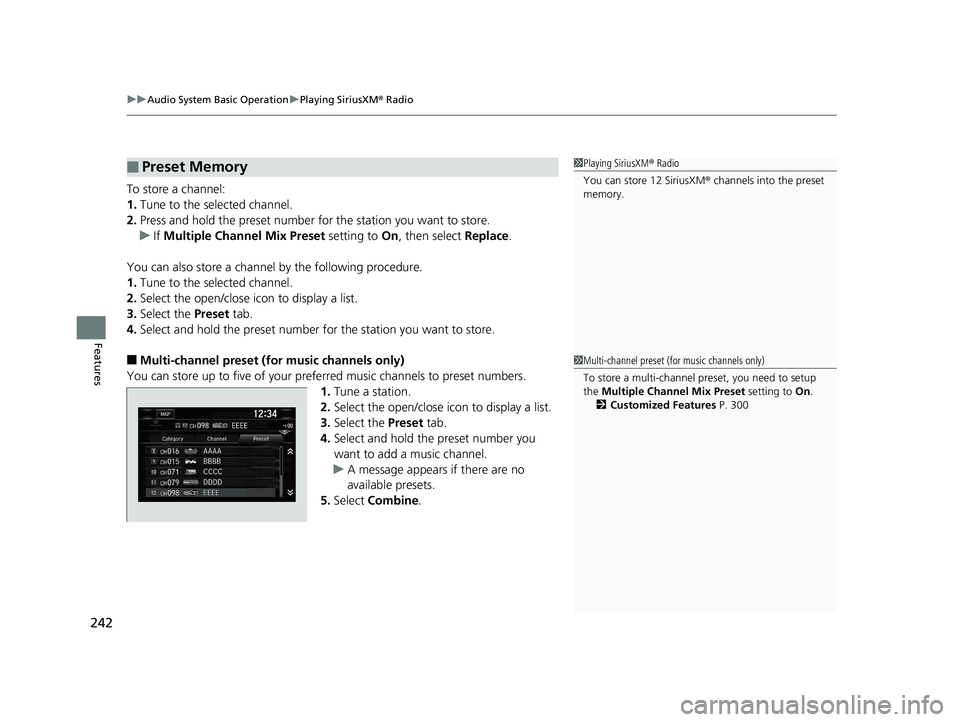
■Multi-channel preset (for music channels only)
You can store up to five of your preferred music channels to preset numbers. 1.Tune a station.
2. Select the open/close ic on to display a list.
3. Select the Preset tab.
4. Select and hold the preset number you
want to add a music channel.
u A message appears if there are no
available presets.
5. Select Combine .
■Preset Memory1Playing SiriusXM ® Radio
You can store 12 SiriusXM ® channels into the preset
memory.
1 Multi-channel preset (for music channels only)
To store a multi-channel preset, you need to setup
the Multiple Channel Mix Preset setting to On.
2 Customized Features P. 300
19 CLARITY FCV CSS-31TRT6200.book 242 ページ 2019年1月17日 木曜日 午前11 時54分
Page 246 of 551
uuAudio System Basic Operation uPlaying SiriusXM ® Radio
244
Features
The system can record up to the last 60 minutes of your currently tuned channel’s
broadcast, as well as the last 30 minutes of your preset channel’s broadcast, starting
from the moment you turn the vehicle on. If you tuned to a preset channel, the
system records up to 60 minutes of a broadcast instead of up to 30 minutes. You
can rewind and replay the last 30 or 60 minutes of a broadcast.
1. Select .
2. Select Playback .
3. Move the time marker to the position you want to replay.
The following items are available on the pop-up screen: (Skip Down): Skips to the previously stored channel. Select and hold to fast-
rewind the current selection. (Skip Up): Skips to the next channe l. Select and hold to fast-forward the
current selection.
(15sec Back): Select to skip back 15 se conds in the current selection. Select and
hold to fast-rewind the current selection. (15sec Skip): Select to skip forward 15 seconds in the current selection. Select
and hold to fast-forward the current selection. u Select OK to close the pop-up menu. Replay in playback mode continues.
To play or pause on playback mode:
1. Select .
2. Select Play/Pause .
■Replay Function1Replay Function
The system starts storing broadcast in memory when
the power mode is turned ON. You can go back to
the program from that point.
You can no longer repl ay any program once the
power mode is turned off as it erases memory.
You can check how long the program has been
stored in memory from th e audio/information screen.
After 30 or 60 minutes of recording the system will
automatically start deleting the oldest data.
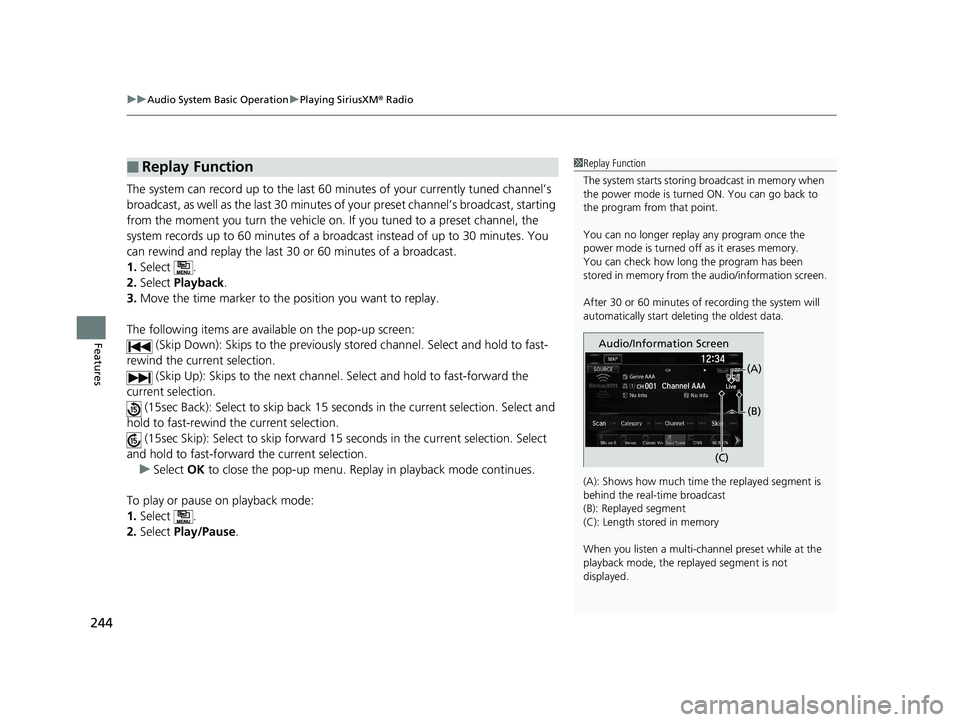
(A): Shows how much time the replayed segment is
behind the real-time broadcast
(B): Replayed segment
(C): Length stored in memory
When you listen a multi-channel preset while at the
playback mode, the repl ayed segment is not
displayed.
Audio/Information Screen
(C)(B)
(A)
19 CLARITY FCV CSS-31TRT6200.book 244 ページ 2019年1月17日 木曜日 午前11
時54分
Page 249 of 551
247
uuAudio System Basic Operation uPlaying SiriusXM ® Radio
Features
You can receive traffic and weather information.
■To set up a traffic & weather information
1. Select .
2. Select Settings .
3. Select Audio .
4. Select Traffic & Weather Setup .
5. Select the region.
u When you do not want to receive the information, select Unregistered.
■Listening a traffic and weather information
1. Select .
2. Select Traffic & Weather .
u Play mode can also use the any items same as playback mode.
2 Replay Function P. 244
To go back to the previous screen, select OK.
Sample each channel on the selected mode for 10 seconds.
1. Select Scan.
2. Select Scan Channels.
u You can select the desired channel by songs using Scan Song in Preset.
To turn off scan, select Cancel.
■Traffic and Weather Information
■Scan
1Traffic and Weather Information
The traffic and weather information function at
SiriusXM ® mode only.
You can also set up th e traffic and weather
information by the following procedure.
1. Select Audio .
2. Select .
3. Select Setting .
4. Select Traffic & Weather Setup .
Traffic & Weather Now are registered trademarks of
SiriusXM ® Radio, Inc.
1 Scan
The “Scan Songs in Preset” function is based on
TuneScan
TM technology of SiriusXM ®.
The “Featured Channels ” function is based on
Featured Favorites
TM technology of SiriusXM ®.
TuneScan
TM and Featured FavoritesTM are registered
trademarks of SiriusXM ® Radio, Inc.
19 CLARITY FCV CSS-31TRT6200.book 247 ページ 2019年1月17日 木曜日 午前11 時54分
Page 282 of 551
280
uuAudio Error Messages uAndroid/Apps
Features
Android/Apps
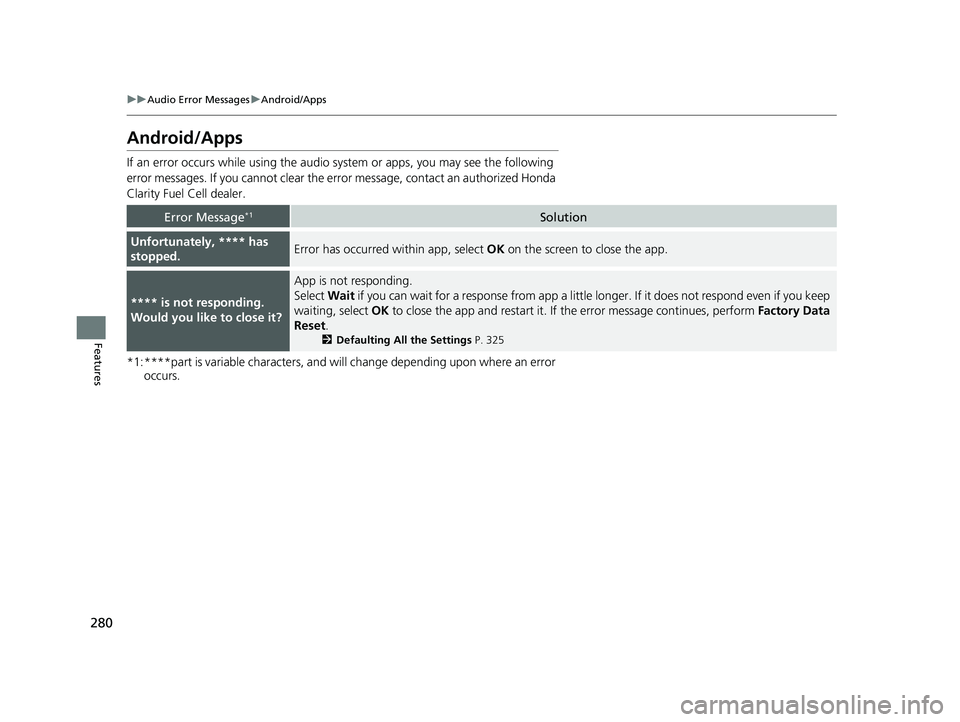
If an error occurs while us ing the audio system or apps , you may see the following
error messages. If you cannot clear the erro r message, contact an authorized Honda
Clarity Fuel Cell dealer.
*1:****part is variable characters, and will change depending upon where an error occurs.
Error Message*1Solution
Unfortunately, **** has
stopped.Error has occurred within app, select OK on the screen to close the app.
**** is not responding.
Would you like to close it?
App is not responding.
Select Wait if you can wait for a response from app a littl e longer. If it does not respond even if you keep
waiting, select OK to close the app and restart it. If the error message continues, perform Factory Data
Reset .
2Defaulting All the Settings P. 325
19 CLARITY FCV CSS-31TRT6200.book 280 ページ 2019年1月17日 木曜日 午前11 時54分
Page 303 of 551
301
uuCustomized Features u
Continued
Features
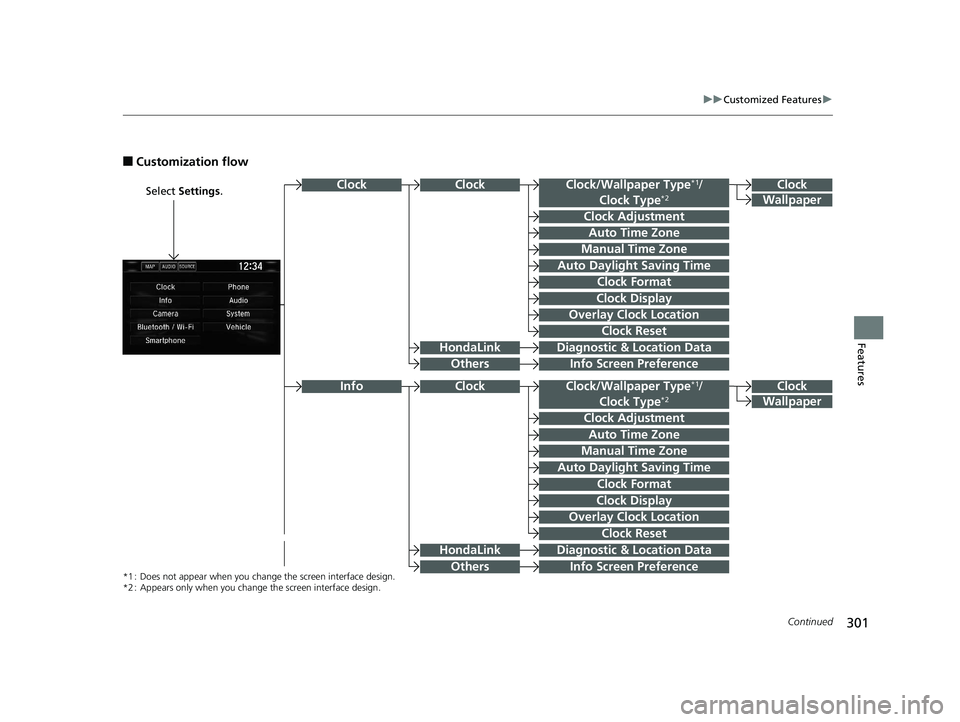
■Customization flow
Select Settings .Clock
Wallpaper
Clock/Wallpaper Type*1/
Clock Type*2
Clock Adjustment
Clock Format
ClockClock
Auto Time Zone
Manual Time Zone
Auto Daylight Saving Time
Clock Display
Overlay Clock Location
Info Screen Preference
Clock
Wallpaper
Clock/Wallpaper Type*1/
Clock Type*2
Clock Adjustment
Clock Format
Auto Time Zone
Manual Time Zone
Auto Daylight Saving Time
Clock Display
Overlay Clock Location
Clock Reset
Info Screen Preference
Info
*1 : Does not appear when you chan ge the screen interface design.
*2 : Appears only when you change the screen interface design.
Diagnostic & Location Data
Diagnostic & Location Data
HondaLink
Others
HondaLink
Others
Clock
Clock Reset
19 CLARITY FCV CSS-31TRT6200.book 301 ページ 2019年1月17日 木曜日 午前11 時54分
Page 305 of 551
303
uuCustomized Features u
Continued
Features
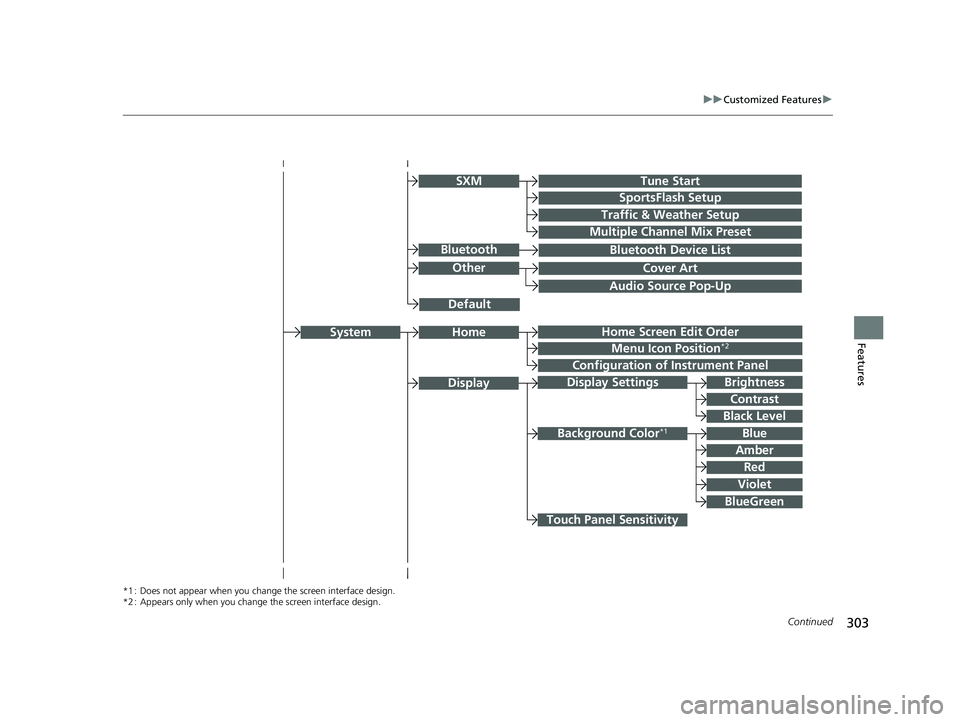
Audio Source Pop-Up
Cover Art
Tune Start
SportsFlash Setup
Traffic & Weather Setup
Other
SXM
Default
Bluetooth Device ListBluetooth
Multiple Channel Mix Preset
Home Screen Edit Order
Configuration of Instrument Panel
Display Settings
Background Color*1
Display
System
Touch Panel Sensitivity
Brightness
Contrast
Black Level
Blue
Amber
Red
Violet
BlueGreen
Home
Menu Icon Position*2
*1 : Does not appear when you chan ge the screen interface design.
*2 : Appears only when you change the screen interface design.
19 CLARITY FCV CSS-31TRT6200.book 303 ページ 2019年1月17日 木曜日 午前11 時54分
Page 307 of 551
305
uuCustomized Features u
Continued
Features
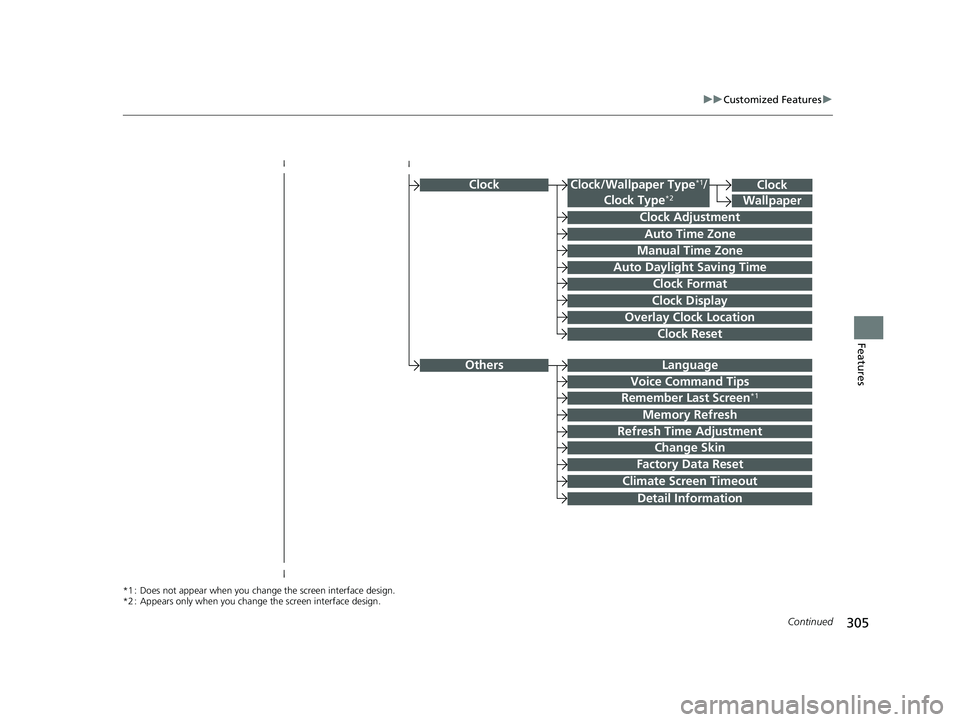
ClockClock/Wallpaper Type*1/
Clock Type*2
Clock Adjustment
Clock Format
Auto Time Zone
Manual Time Zone
Auto Daylight Saving Time
Clock Display
Overlay Clock Location
Clock Reset
Clock
Wallpaper
*1 : Does not appear when you chan ge the screen interface design.
*2 : Appears only when you change the screen interface design.
OthersLanguage
Voice Command Tips
Remember Last Screen*1
Memory Refresh
Refresh Time Adjustment
Change Skin
Detail Information
Factory Data Reset
Climate Screen Timeout
19 CLARITY FCV CSS-31TRT6200.book 305 ページ 2019年1月17日 木曜日 午前11 時54分