2019 HONDA CIVIC COUPE alarm
[x] Cancel search: alarmPage 13 of 675
11
Quick Reference Guide
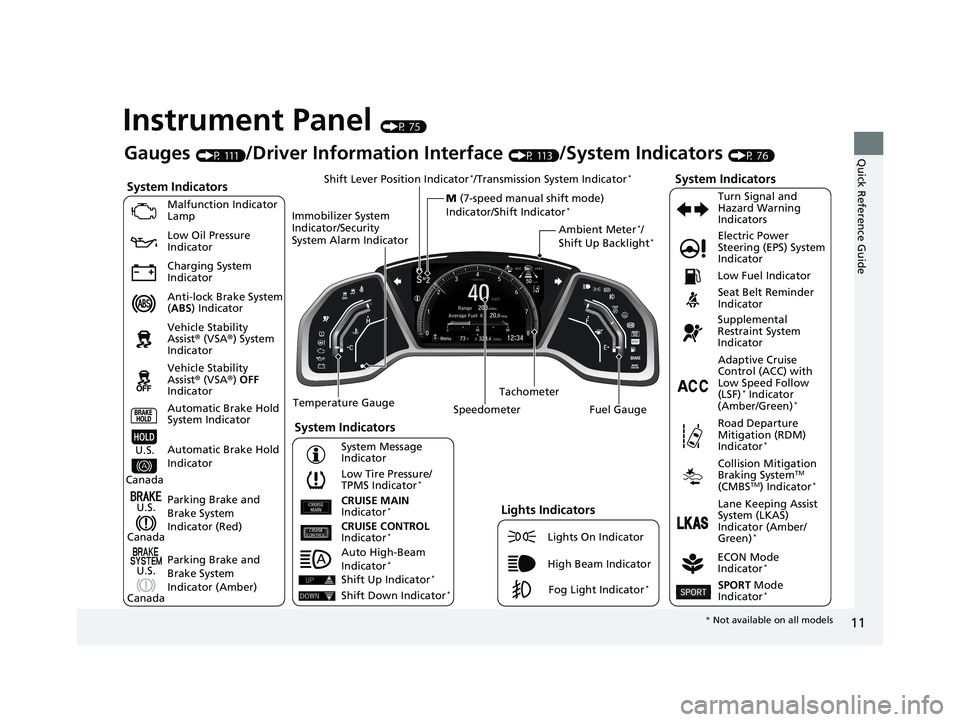
Instrument Panel (P 75)
System Indicators
Malfunction Indicator
Lamp
Low Oil Pressure
Indicator
Charging System
Indicator
Anti-lock Brake System
(ABS ) Indicator
Vehicle Stability
Assist® (VSA®) System
Indicator
Vehicle Stability
Assist® (VSA®) OFF
Indicator
Low Tire Pressure/
TPMS Indicator
*
Electric Power
Steering (EPS) System
Indicator
Seat Belt Reminder
Indicator
System Indicators
Parking Brake and
Brake System
Indicator (Red) Supplemental
Restraint System
Indicator
Tachometer
Speedometer Fuel Gauge Low Fuel Indicator
ECON Mode
Indicator
*
Turn Signal and
Hazard Warning
Indicators
Parking Brake and
Brake System
Indicator (Amber)
System Indicators
U.S.
Canada
U.S.
Canada Automatic Brake Hold
System Indicator
Automatic Brake Hold
IndicatorU.S.
Canada Temperature Gauge
Lights Indicators
Lights On Indicator
High Beam Indicator
Fog Light Indicator*
Adaptive Cruise
Control (ACC) with
Low Speed Follow
(LSF)
* Indicator
(Amber/Green)*
System Message
Indicator Collision Mitigation
Braking System
TM
(CMBSTM) Indicator*
Road Departure
Mitigation (RDM)
Indicator
*
Lane Keeping Assist
System (LKAS)
Indicator (Amber/
Green)
*CRUISE CONTROL
Indicator*
CRUISE MAIN
Indicator*
SPORT Mode
Indicator*
Ambient Meter*/
Shift Up Backlight*
Gauges (P 111)/Driver Information Interface (P 113)/System Indicators (P 76)
Shift Lever Position Indicator
*/Transmission System Indicator*
M (7-speed manual shift mode)
Indicator/Shift Indicator*
Auto High-Beam
Indicator*
Immobilizer System
Indicator/Security
System Alarm Indicator
Shift Up Indicator*
Shift Down Indicator*
* Not available on all models
19 CIVIC 2D HCM (KA KL KC)-31TBG6300.book 11 ページ 2018年9月4日 火曜 日 午後1時38分
Page 90 of 675

88
uuIndicators u
Instrument Panel
IndicatorNameOn/BlinkingExplanationMessage
Immobilizer
System Indicator
●Blinks if the immobilizer system
cannot recognize the key
information.●Repeatedly blinks - The system may be
malfunctioning. Have your vehicle
checked by a dealer.
●Do not attempt to alter this system or add
other devices to it. Electrical problems can
occur.—
Security System
Alarm Indicator
●Blinks when the security system
alarm has been set.
2 Security System Alarm P. 153—
ECON Mode
Indicator*
●Comes on when you press the
ECON button.
2ECON Mode* P. 452
CRUISE MAIN
Indicator*
●Comes on when you press the
CRUISE button.2Cruise Control * P. 454—
CRUISE
CONTROL
Indicator
*
●Comes on if you have set a speed
for cruise control.
2 Cruise Control * P. 454—
Indicator
Indicator
* Not available on all models
19 CIVIC 2D HCM (KA KL KC)-31TBG6300.book 88 ページ 2018年9月4日 火曜 日 午後1時38分
Page 127 of 675
125
uuGauges and Driver Information Interface uDriver Information Interface
Continued
Instrument Panel
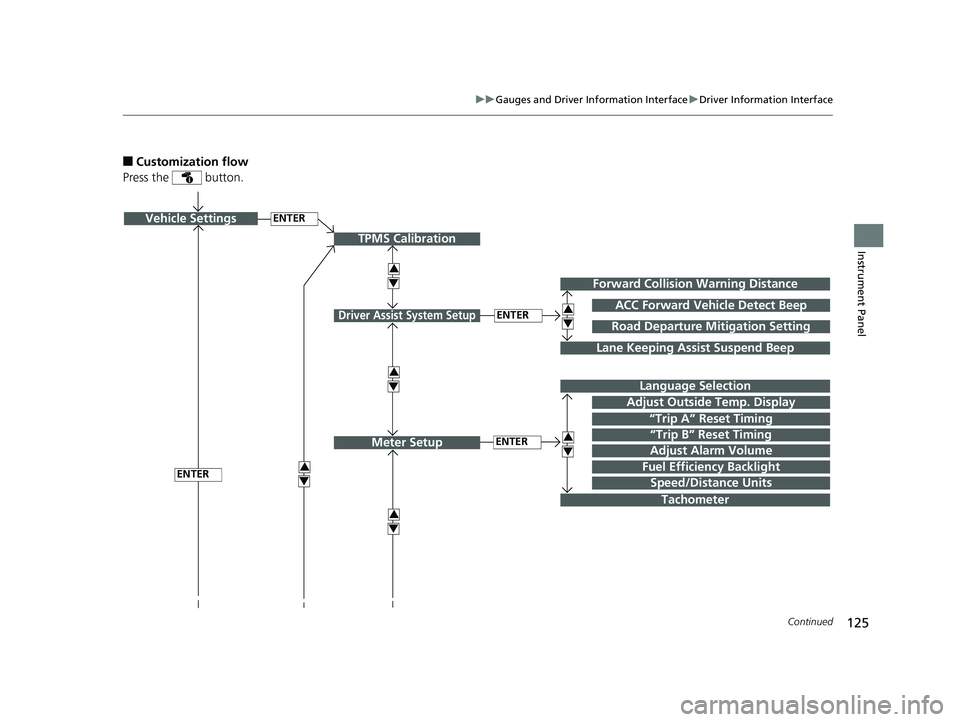
■Customization flow
Press the button.
ENTERVehicle Settings
“Trip A” Reset Timing
Language Selection
Adjust Outside Temp. Display
3
4
TPMS Calibration
ENTER
“Trip B” Reset Timing
Fuel Efficiency Backlight3
4
ACC Forward Vehicle Detect Beep
3
4
Tachometer
ENTER
Forward Collision Warning Distance
3
4
3
4
Lane Keeping Assist Suspend Beep
Road Departure Mi tigation Setting
Adjust Alarm Volume
Speed/Distance Units
3
4
ENTER
Driver Assist System Setup
Meter Setup
19 CIVIC 2D HCM (KA KL KC)-31TBG6300.book 125 ページ 2018年9月4日 火 曜日 午後1時38分
Page 130 of 675
128
uuGauges and Driver Information Interface uDriver Information Interface
Instrument Panel
*1:Default SettingSetup Group Customizable Features
Description Selectable Settings
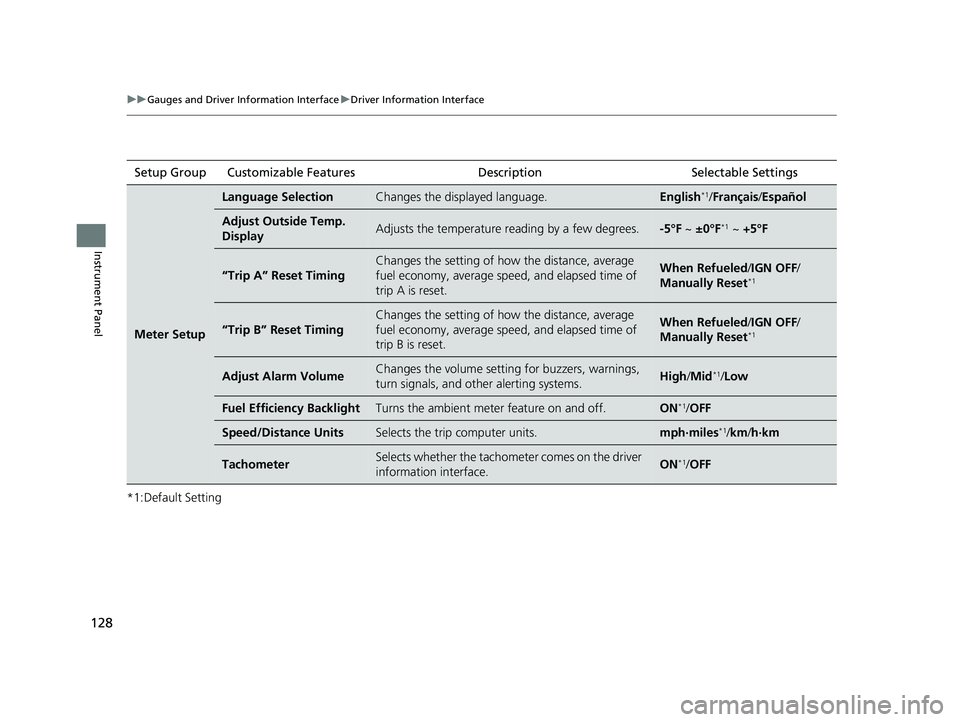
Meter Setup
Language SelectionChanges the displayed language.English*1/Français /Español
Adjust Outside Temp.
DisplayAdjusts the temperature reading by a few degrees.-5°F ~ ±0°F*1 ~ +5°F
“Trip A” Reset Timing
Changes the setting of how the distance, average
fuel economy, average sp eed, and elapsed time of
trip A is reset.When Refueled /IGN OFF /
Manually Reset*1
“Trip B” Reset Timing
Changes the setting of how the distance, average
fuel economy, average sp eed, and elapsed time of
trip B is reset.When Refueled /IGN OFF /
Manually Reset*1
Adjust Alarm VolumeChanges the volume setti ng for buzzers, warnings,
turn signals, and other alerting systems.High /Mid*1/Low
Fuel Efficiency BacklightTurns the ambient meter feature on and off.ON*1/ OFF
Speed/Distance UnitsSelects the trip computer units.mph∙miles*1/km /h∙km
TachometerSelects whether the tachometer comes on the driver
information interface.ON*1/ OFF
19 CIVIC 2D HCM (KA KL KC)-31TBG6300.book 128 ページ 2018年9月4日 火 曜日 午後1時38分
Page 135 of 675

133
Controls
This chapter explains how to operate the various controls necessary for driving.
Clock.................................................. 134
Locking and Unlocking the Doors Key Types and Functions .................. 136
Low Smart Entry Remote Signal Strength*... 138Locking/Unlocking the Doors from the Outside .......................................... 139
Locking/Unlocking the Doors from the Inside ............................................. 146
Auto Door Locking/Unlocking .......... 149
Opening and Closing the Trunk ....... 150
Security System Immobilizer System .......................... 153
Security System Alarm ...................... 153
Opening and Closing the Windows ..... 156Moonroof*................................................ 159
Operating the Switches Around the
Steering Wheel Ignition Switch ................................. 160
ENGINE START/STOP Button............. 161
Ignition Switch and Power Mode Comparison ................................... 164
Turn Signals ..................................... 165
Light Switches.................................. 166
Fog Lights
*...................................... 169
Daytime Running Lights ................... 169
Auto High-Beam
*............................ 170
Wipers and Washers ........................ 173
Brightness Control ........................... 175
Rear Defogger/Heat ed Door Mirror
*
Button ........................................... 176
Adjusting the Steering Wheel........... 177 Adjusting the Mirrors
Interior Rearview Mirror ................... 178
Power Door Mirrors ......................... 180
Adjusting the Seats .......................... 181
Interior Lights/Interior Convenience Items ................................................ 190
Climate Control System Using Automatic Climate Control .... 202
Automatic Climate Control Sensors......209
* Not available on all models
19 CIVIC 2D HCM (KA KL KC)-31TBG6300.book 133 ページ 2018年9月4日 火 曜日 午後1時38分
Page 155 of 675

153Continued
Controls
Security System
Immobilizer System
The immobilizer system prevents a key that has not been pre-registered from
starting the engine. Each key contains electronic transmitters that use electronic
signals to verify the key.
Pay attention to the following when insert ing the key into the ignition switch or
pressing the ENGINE START/STOP button:
• Do not allow objects that emit strong ra dio waves near the ignition switch or the
ENGINE START/STOP button.
• Make sure the key is not covered by or touching a metal object.
• Do not bring a key from another vehicle’s immobilizer system near the ignition
switch or the ENGINE START/STOP button.
• Do not put the key near magnetic items. Electronic devices, such as televisions
and audio systems emit strong magnetic fields. Note that even a key chain can
become magnetic.
Security System Alarm
The security system alarm activates when the trunk, hood or doors are forcibly
opened. The alarm does not activate if the trunk or doors are opened with the key,
remote transmitter or smart entry system
*.
However, the alarm activates if a door is opened with the key and then the
transmission is taken out of
(P (continuously variable transmission models) or the
hood is opened before the ignition switch is turned to ON
(w*1.
*1: Models with the smart entry system have an ENGINE START/STOP button instead of an
ignition switch.
1 Immobilizer System
NOTICE
Leaving the key in the vehicl e can result in theft or
accidental movement of the vehicle.
Always take the key with you whenever you leave the
vehicle unattended.
Do not alter the system or add other devices to it.
Doing so may damage the system and make your
vehicle inoperable.
Canadian models only: Apply and hold the brake
pedal before turning the vehicle on the first time after
the battery has been disconnected.
1 Security System Alarm
Do not alter the system or add other devices to it.
Doing so may damage the system and make your
vehicle inoperable.
The security alarm continues for a maximum of two
minutes until the security system alarm deactivates.
* Not available on all models
19 CIVIC 2D HCM (KA KL KC)-31TBG6300.book 153 ページ 2018年9月4日 火 曜日 午後1時38分
Page 156 of 675
uuSecurity System uSecurity System Alarm
154
Controls
■When the security sy stem alarm activates
The horn sounds intermittently, and some exterior lights flash.
■To deactivate the security system alarm
Unlock the vehicle using the remote transmitter or smart entry system*, or turn the
ignition switch to ON (w*1. The system, along with the horn and flashing lights, is
deactivated.
■Setting the security system alarm
The security system alarm automatically sets when the following conditions have
been met:
• The ignition switch is in LOCK
(0*1, and the key has been removed from the
ignition switch.
• The hood and trunk are closed.
• Both doors are locked with the key, th e remote transmitter, or smart entry
system
*.
■When the security system alarm sets
The security system alarm indicator in the instrument panel blinks and the blinking
interval changes after about 15 seconds.
■To cancel the security system alarm
The security system is canceled when th e vehicle is unlocked using the remote
transmitter or smart entry system
*, or when the ignition sw itch is turned to ON (w*1.
The security system indicator goes off at the same time.
*1: Models with the smart entry system have an ENGINE START/STOP button instead of an
ignition switch.
1 Security System Alarm
Do not set the security system alarm when someone
is in the vehicle or a window is open. The system can
accidentally activate when:
•Unlocking the door with the lock tab.•Opening the trunk with the trunk opener on the
driver’s door or the emergency trunk opener.
•Opening the hood with the hood release.
•Taking the transmission out of ( P.
If the battery goes dead after you have set the
security system alarm, the security alarm may activate
once the battery is re charged or replaced.
If this occurs, deactivate the security system alarm by
unlocking a door using the remote transmitter or
smart entry system
*.
Continuously variable transmission models
* Not available on all models
19 CIVIC 2D HCM (KA KL KC)-31TBG6300.book 154 ページ 2018年9月4日 火 曜日 午後1時38分
Page 157 of 675
155
uuSecurity System uSecurity System Alarm
Controls
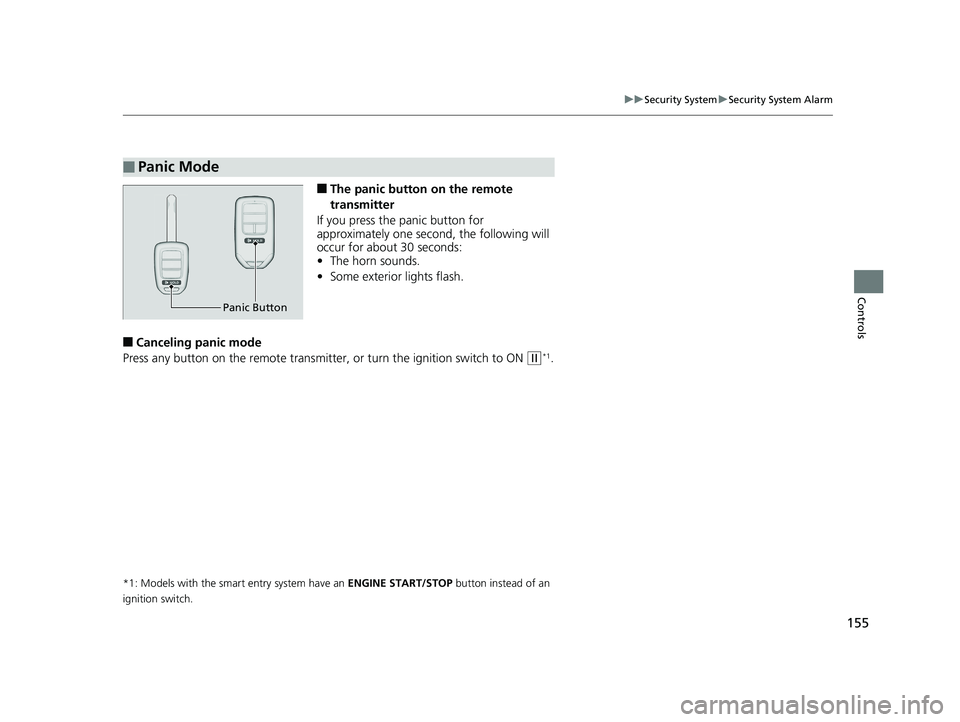
■The panic button on the remote
transmitter
If you press the panic button for
approximately one second, the following will
occur for about 30 seconds:
• The horn sounds.
• Some exterior lights flash.
■Canceling panic mode
Press any button on the remote transmitter, or turn the ignition switch to ON
(w*1.
*1: Models with the smart entry system have an ENGINE START/STOP button instead of an
ignition switch.
■Panic Mode
Panic Button
19 CIVIC 2D HCM (KA KL KC)-31TBG6300.book 155 ページ 2018年9月4日 火 曜日 午後1時38分