2019 GMC YUKON center console
[x] Cancel search: center consolePage 127 of 450

GMC Yukon/Yukon XL/Denali Owner Manual (GMNA-Localizing-U.S./
Canada/Mexico-12460267) - 2019 - crc - 9/11/18
126 Storage
Storage
Storage Compartments
Storage Compartments . . . . . . . 126
Instrument Panel Storage . . . . 126
Glove Box . . . . . . . . . . . . . . . . . . . . 126
Cupholders . . . . . . . . . . . . . . . . . . . 126
Sunglasses Storage . . . . . . . . . . 127
Armrest Storage . . . . . . . . . . . . . . 127
Rear Storage . . . . . . . . . . . . . . . . . 127
Center Console Storage . . . . . . 128
Floor Console Storage . . . . . . . . 129
Additional Storage Features
Cargo Tie-Downs . . . . . . . . . . . . . 129
Convenience Net . . . . . . . . . . . . . 129
Roof Rack System
Roof Rack System . . . . . . . . . . . 129
Storage
Compartments
{Warning
Do not store heavy or sharp
objects in storage compartments.
In a crash, these objects may
cause the cover to open and
could result in injury.
Instrument Panel Storage
If equipped with storage behind the
radio, press and hold
Pto open.
There is a USB port inside. See the
infotainment manual.
Press and hold
Pagain to close.
Keep the storage area closed when
not in use.
The storage area cannot be
operated with
Pwhen valet mode
is enabled. See Vehicle
Personalization 0169.
The storage area can be operated
manually.
Glove Box
Lift up the glove box handle to open
it. Use the key to lock and unlock
the glove box.
Cupholders
The cupholders are in front of the
center console storage area.
Page 129 of 450

GMC Yukon/Yukon XL/Denali Owner Manual (GMNA-Localizing-U.S./
Canada/Mexico-12460267) - 2019 - crc - 9/11/18
128 Storage
Center Console Storage
Bench Seat
If equipped, pull the front center
armrest down to access the
storage area.
Bench Seat
If equipped, pull the front center
seat armrest down to access the
storage area with cupholders.
Press the button and lift to open.
There is a removable divider.Bucket Seat
If equipped, press the latch and lift
to open. Depending on the options
there may be a tote compartment,
accessory power outlet, auxiliary
jack, and USB port(s) inside.
Page 130 of 450

GMC Yukon/Yukon XL/Denali Owner Manual (GMNA-Localizing-U.S./
Canada/Mexico-12460267) - 2019 - crc - 9/11/18
Storage 129
Floor Console Storage
If equipped with front center seat
storage, unlock with the ignition key,
press the latch, and lift to open.
Additional Storage
Features
Cargo Tie-Downs
There are four cargo tie-downs in
the rear cargo area. These can be
used to strap cargo down and keep
it from moving inside the vehicle.
Convenience Net
Use the convenience net, located in
the rear, to store small loads as far
forward as possible. The net should
not be used to store heavy loads.
Roof Rack System
{Warning
If something is carried on top of
the vehicle that is longer or wider
than the roof rack—like paneling,
plywood, or a mattress —the
wind can catch it while the vehicle
is being driven. The item being
carried could be violently torn off,
and this could cause a collision
and damage the vehicle. Never
carry something longer or wider
than the roof rack on top of the
vehicle unless using a GM
certified accessory carrier.
If equipped, the roof rack can be
used to load items. For roof racks
that do not have crossrails included,
GM Certified crossrails can be
purchased as an accessory. See
your dealer for additional
information.
Page 138 of 450

GMC Yukon/Yukon XL/Denali Owner Manual (GMNA-Localizing-U.S./
Canada/Mexico-12460267) - 2019 - crc - 9/11/18
Instruments and Controls 137
2. Touch Set Time, then touch«
orªto increase or decrease
hours, minutes, and AM or PM.
Touch 12–24 Hr for 12 or
24 hour clock.
3. Touch
Sto go back to the
previous menu.
Auto Set requires an active OnStar
or connected service plan.
If auto timing is set, the time
displayed on the clock may not
update immediately when driving
into a new time zone.
To set the date: 1. Touch SETTINGS on the Home Page, then touch Time
and Date.
2. Touch Set Date, then touch
«
orªto increase or decrease
month, day, or year.
3. Touch
Sto go back to the
previous menu. To set the clock display:
1. Touch SETTINGS on the Home Page, then touch Time
and Date.
2. Touch Clock Display, then touch Off or On to turn the
clock display off or on.
3. Touch
Sto go back to the
previous menu.
Power Outlets
Power Outlets 12-Volt Direct
Current
Accessory power outlets can be
used to plug in electrical equipment,
such as a cell phone, MP3
player, etc.
The vehicle may have up to five
accessory power outlets:
Vehicles with a Center Console
. One in front of the cupholders on
the center console
. One inside the center storage
console .
One on the rear of the center
storage console
. One in the third row seat on the
driver side
. One in the rear cargo area on
the passenger side
Vehicles with Bench Seats
. One on the center stack below
the climate control system
. One in the storage area on the
bench seat
. One on the rear of the center
armrest storage
. One in the third row seat area on
the driver side
. One in the rear cargo area on
the passenger side
Lift the cover to access and replace
when not in use.
The accessory power outlets are
powered as follows:
. The power outlet near the
cupholders for vehicles with a
center console or on the center
stack for vehicles with bench
Page 139 of 450
GMC Yukon/Yukon XL/Denali Owner Manual (GMNA-Localizing-U.S./
Canada/Mexico-12460267) - 2019 - crc - 9/11/18
138 Instruments and Controls
seats, can be configured to
operate using Retained
Accessory Power (RAP) or
battery power modes. If these
power outlets are used while in
the battery power mode, this
could cause interference
between the Remote Keyless
Entry (RKE) transmitter and the
vehicle, and the vehicle may not
start.
SeeIgnition Positions (Key
Access) 0217 orIgnition
Positions (Keyless Access)
0 219.
. The power outlets in the third
row seat area or in the rear
cargo area are powered at all
times. The power outlets inside
the storage area, on the rear of
the console, or on the bench
seat are only powered when the
ignition is on or in ACC/
ACCESSORY, or when RAP is
active.{Warning
Power is always supplied to the
outlet, if configured accordingly.
Do not leave electrical equipment
plugged in when the vehicle is not
in use because the vehicle could
catch fire and cause injury or
death.
Caution
Leaving electrical equipment
plugged in for an extended period
of time while the ignition is off will
drain the battery. Always unplug
electrical equipment when not in
use and do not plug in equipment
that exceeds the maximum
15 amp rating.
Certain power accessory plugs may
not be compatible with the
accessory power outlet and could
overload vehicle or adapter fuses.
If a problem is experienced, see
your dealer. When adding electrical equipment,
be sure to follow the proper
installation instructions included with
the equipment. See
Add-On
Electrical Equipment 0294.
Caution
Hanging heavy equipment from
the power outlet can cause
damage not covered by the
vehicle warranty. The power
outlets are designed for
accessory power plugs only, such
as cell phone charge cords.
Power Outlet 110/120-Volt
Alternating Current
If equipped with this power outlet, it
can be used to plug in electrical
equipment that uses a maximum
limit of 150 watts.
For vehicles with a center console,
the 110/120-volt power outlet is on
the rear of the center console.
Page 140 of 450

GMC Yukon/Yukon XL/Denali Owner Manual (GMNA-Localizing-U.S./
Canada/Mexico-12460267) - 2019 - crc - 9/11/18
Instruments and Controls 139
For vehicles with bench seats, the
110/120-volt power outlet is on the
center stack below the climate
controls.
An indicator light on the outlet turns
on to show it is in use. The light
comes on when the ignition is on,
equipment requiring less than 150
watts is plugged into the outlet, and
no system fault is detected.
The indicator light does not come on
when the ignition is off or if the
equipment is not fully seated into
the outlet.
If equipment is connected using
more than 150 watts or a system
fault is detected, a protection circuit
shuts off the power supply and the
indicator light turns off. To reset the
circuit, unplug the item and plug it
back in or turn the ignition off and
then back to on. The power restarts
when equipment using 150 watts or
less is plugged into the outlet and a
system fault is not detected.The power outlet is not designed for
the following, and may not work
properly if they are plugged in:
.
Equipment with high initial peak
wattage, such as
compressor-driven refrigerators
and electric power tools
. Other equipment requiring an
extremely stable power supply,
such as
microcomputer-controlled
electric blankets and touch
sensor lamps
. Medical equipment
Wireless Charging
The vehicle may have wireless
charging on top of the center
console. See Center Console
Storage 0128. The system
operates at 145 kHz and wirelessly
charges one Qi compatible
smartphone. The power output of
the system is capable of charging at
a rate up to 1 amp (5W), as
requested by the compatible
smartphone. See Radio Frequency
Statement 0421.
{Warning
Wireless charging can affect the
operation of an implanted
pacemaker or other medical
devices. If you have one, it is
recommended to consult with
your doctor before using the
wireless charging system.
The vehicle must be on, in ACC/
ACCESSORY, or Retained
Accessory Power (RAP) must be
active. The wireless charging
feature may not correctly indicate
charging when the vehicle is in RAP.
See Retained Accessory Power
(RAP) 0224.
The operating temperature is −20 °C
(−4 °F) to 60 °C (140 °F) for the
charging system and 0 °C (32 °F) to
35 °C (95 °F) for the smartphone.
Page 196 of 450
GMC Yukon/Yukon XL/Denali Owner Manual (GMNA-Localizing-U.S./
Canada/Mexico-12460267) - 2019 - crc - 9/11/18
Climate Controls 195
There is also an exterior
temperature sensor behind the front
grille. This sensor reads the outside
air temperature and helps maintain
the temperature inside the vehicle.
Any cover on the front of the
vehicle, including a snowplow, could
cause a false reading in the
displayed temperature.
The climate control system uses the
information from these sensors to
maintain comfort settings by
adjusting the outlet temperature, fan
speed, and air delivery mode. The
system may also supply cooler air to
the side of the vehicle facing the
sun. The recirculation mode will also
be used as needed to maintain cool
outlet temperatures.
Rear Climate Control
System
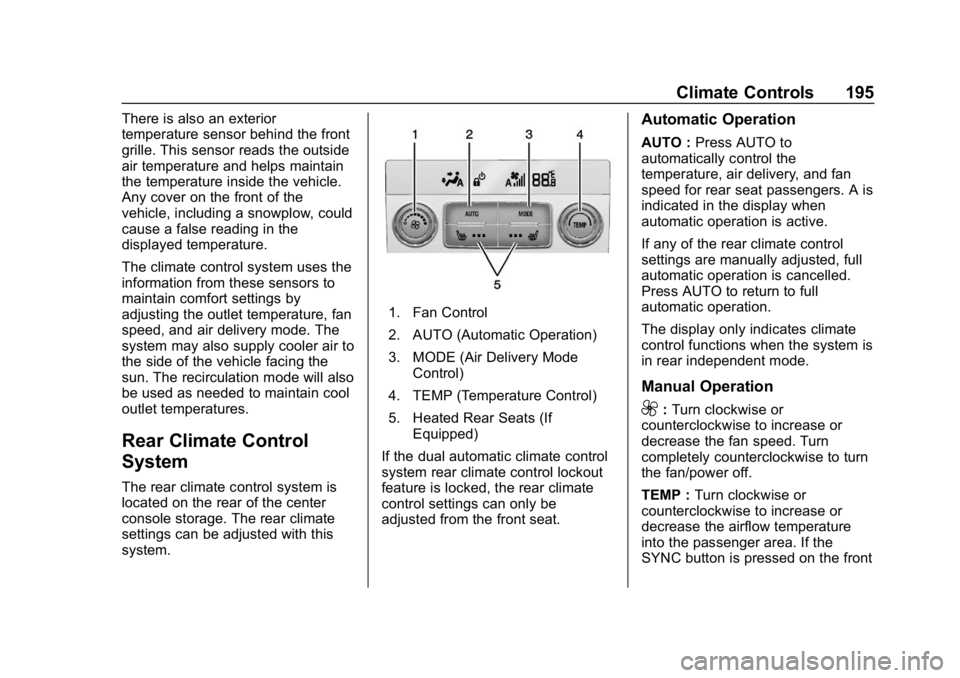
The rear climate control system is
located on the rear of the center
console storage. The rear climate
settings can be adjusted with this
system.
1. Fan Control
2. AUTO (Automatic Operation)
3. MODE (Air Delivery ModeControl)
4. TEMP (Temperature Control)
5. Heated Rear Seats (If Equipped)
If the dual automatic climate control
system rear climate control lockout
feature is locked, the rear climate
control settings can only be
adjusted from the front seat.
Automatic Operation
AUTO : Press AUTO to
automatically control the
temperature, air delivery, and fan
speed for rear seat passengers. A is
indicated in the display when
automatic operation is active.
If any of the rear climate control
settings are manually adjusted, full
automatic operation is cancelled.
Press AUTO to return to full
automatic operation.
The display only indicates climate
control functions when the system is
in rear independent mode.
Manual Operation
9: Turn clockwise or
counterclockwise to increase or
decrease the fan speed. Turn
completely counterclockwise to turn
the fan/power off.
TEMP : Turn clockwise or
counterclockwise to increase or
decrease the airflow temperature
into the passenger area. If the
SYNC button is pressed on the front
Page 439 of 450

GMC Yukon/Yukon XL/Denali Owner Manual (GMNA-Localizing-U.S./Cana-
da/Mexico-12460267) - 2019 - crc - 9/11/18
438 Index
Assistance Program,Roadside . . . . . . . . . . . . . . . . . . . . . . 415
Assistance Systems for Driving . . . . . . . . . . . . . . . . . . . . . . . . 260
Assistance Systems for Parking and Backing . . . . . . . . . . 256
Automatic
Dimming Mirrors . . . . . . . . . . . . . . . . 58
Door Locks . . . . . . . . . . . . . . . . . . . . . 45
Forward Braking . . . . . . . . . . . . . . 262
Headlamp System . . . . . . . . . . . . 184
Level Control . . . . . . . . . . . . . . . . . 245
Transmission . . . . . . . . . . . . . . . . . 228
Transmission Fluid . . . . . . 305, 308
Automatic Transmission Manual Mode . . . . . . . . . . . . . . . . . 231
Shift Lock Control Function
Check . . . . . . . . . . . . . . . . . . . . . . . 322
Axle, Front . . . . . . . . . . . . . . . . . . . . . . 319
Axle, Rear . . . . . . . . . . . . . . . . . . . . . . 320
B
Battery Exterior Lighting BatterySaver . . . . . . . . . . . . . . . . . . . . . . . 189
Load Management . . . . . . . . . . . . 188 Battery (cont'd)
Power Protection . . . . . . . . . . . . . 189
Battery - North America . . . . 318, 374
Blade Replacement, Wiper . . . . . 323
Blind Spot Mirrors . . . . . . . . . . . . . . . 58
Brake Pedal and AdjustableThrottle . . . . . . . . . . . . . . . . . . . . . . 216
System Warning Light . . . . . . . . 155
Brakes . . . . . . . . . . . . . . . . . . . . . . . . . . 316 Antilock . . . . . . . . . . . . . . . . . . . . . . . 239
Assist . . . . . . . . . . . . . . . . . . . . . . . . . 241
Fluid . . . . . . . . . . . . . . . . . . . . . . . . . . 317
Parking . . . . . . . . . . . . . . . . . . . . . . . 240
Braking . . . . . . . . . . . . . . . . . . . . . . . . . 201 Automatic Forward . . . . . . . . . . . 262
Break-In, New Vehicle . . . . . . . . . . 216
Bulb Replacement Back-up Lamps . . . . . . . . . . . . . . . 327
Fog Lamps . . . . . . . . . . . . . . . . . . . 326
Headlamp Aiming . . . . . . . . . . . . . 325
Headlamps . . . . . . . . . . . . . . . . . . . 326
High Intensity Discharge(HID) Lighting . . . . . . . . . . . . . . . 326
License Plate Lamps . . . . . . . . . 328
Buying New Tires . . . . . . . . . . . . . . . 357
C
Calibration . . . . . . . . . . . . . . . . . . . . . . 136
California Perchlorate MaterialsRequirements . . . . . . . . . . . . . . . 297
California Proposition
65 Warning . . . . . . . . . .296, 318, 374, Back Cover
Canadian Vehicle Owners . . . . . . . . 2
Capacities and
Specifications . . . . . . . . . . . . . . . . . 409
Carbon Monoxide Engine Exhaust . . . . . . . . . . . . . . . 227
Liftgate . . . . . . . . . . . . . . . . . . . . . . . . . 47
Winter Driving . . . . . . . . . . . . . . . . 209
Cargo Tie-Downs . . . . . . . . . . . . . . . . . . . . 129
Caution, Danger, and Warning . . . . 2
Center Console Storage . . . . . . . . 128
Center Seat . . . . . . . . . . . . . . . . . . . . . 67
Chains, Tire . . . . . . . . . . . . . . . . . . . . 361
Charging Wireless . . . . . . . . . . . . . . . . . . . . . . 139
Charging System Light . . . . . . . . . 152
Check Engine Light (MalfunctionIndicator) . . . . . . . . . . . . . . . . . . . . 153