2019 GMC SIERRA remote control
[x] Cancel search: remote controlPage 76 of 477

GMC Sierra/Sierra Denali Owner Manual (GMNA-Localizing-U.S./Canada/
Mexico-1500-11698638) - 2019 - CRC - 5/13/19
Seats and Restraints 75
Identifying Driver Number
To identify the driver number:1. Start the vehicle with a different key or RKE transmitter. The
DIC should display the driver
number; 1 or 2. Turn the
ignition off and remove the key
or RKE transmitter from the
vehicle.
2. Start the vehicle with the initial key or RKE transmitter. The
DIC should display the other
driver number not shown in
Step 1.
Saving Memory Positions
Read these instructions completely
before saving memory positions.
To save preferred driving positions
1 and 2: 1. Turn the ignition on or to ACC/ ACCESSORY.
A DIC welcome message may
indicate driver number 1 or 2.
2. Adjust all available memory features to the desired driving
position. 3. Press and release SET; a beep
will sound.
4. Immediately press and hold the 1 or 2 memory button matching
the above DIC welcome
message until two beeps
sound.
If too much time passes
between releasing SET and
pressing 1, the memory
position will not be saved and
two beeps will not sound.
Repeat Steps 3 and 4.
1 or 2 corresponds to the driver
number. See “Identifying Driver
Number” previously in this
section.
5. Repeat Steps 1–4 for a second driver using 1 or 2.
To save the position for
Band
Seat Exit Memory, repeat Steps 1–4
using
B. This saves the position
for getting out of the vehicle.
Save preferred memory feature
positions to both 1 and 2 if you are
the only driver. Manually Recalling Memory
Positions
Press and hold 1, 2, or
Bto recall
the previously saved memory
positions.
To stop Manual Memory Recall
movement, release 1, 2, or
Bor
press any of the following controls:
. Power seat
. Memory SET
. Power mirror, with the driver or
passenger outside mirror
selected
Seat Entry Memory
The vehicle identifies the number of
the current driver ’s RKE transmitter
(1–8). See Remote Keyless Entry
(RKE) System Operation (Keyless
Access) 034 or
Remote Keyless Entry (RKE)
System Operation (Key Access)
0 42. If the RKE transmitter is 1 or
2, and Seat Entry Memory is
programmed on in vehicle
personalization, the positions saved
to the same memory button number
Page 132 of 477

GMC Sierra/Sierra Denali Owner Manual (GMNA-Localizing-U.S./Canada/
Mexico-1500-11698638) - 2019 - CRC - 5/14/19
Instruments and Controls 131
Instruments and
Controls
Controls
Steering Wheel Adjustment . . . 132
Steering Wheel Controls . . . . . . 133
Heated Steering Wheel . . . . . . . 133
Horn . . . . . . . . . . . . . . . . . . . . . . . . . . 133
Windshield Wiper/Washer . . . . 133
Compass . . . . . . . . . . . . . . . . . . . . . 134
Clock . . . . . . . . . . . . . . . . . . . . . . . . . 134
Power Outlets . . . . . . . . . . . . . . . . 134
Wireless Charging . . . . . . . . . . . . 137
Warning Lights, Gauges, and
Indicators
Warning Lights, Gauges, andIndicators . . . . . . . . . . . . . . . . . . . 139
Instrument Cluster . . . . . . . . . . . . 140
Speedometer . . . . . . . . . . . . . . . . . 144
Odometer . . . . . . . . . . . . . . . . . . . . . 145
Trip Odometer . . . . . . . . . . . . . . . . 145
Tachometer . . . . . . . . . . . . . . . . . . . 145
Fuel Gauge . . . . . . . . . . . . . . . . . . . 145
Engine Oil Pressure Gauge . . . . . . . . . . . . . . . . . . . . . . 146
Engine Coolant Temperature Gauge . . . . . . . . . . . . . . . . . . . . . . 147 Voltmeter Gauge . . . . . . . . . . . . . 148
Seat Belt Reminders . . . . . . . . . 149
Airbag Readiness Light . . . . . . . 149
Passenger Airbag Status
Indicator . . . . . . . . . . . . . . . . . . . . 150
Charging System Light . . . . . . . 151
Malfunction Indicator Lamp (Check Engine Light) . . . . . . . . 151
Brake System Warning Light . . . . . . . . . . . . . . . . . . . . . . . . 153
Electric Parking Brake Light . . . . . . . . . . . . . . . . . . . . . . . . 154
Service Electric Parking Brake Light . . . . . . . . . . . . . . . . . . . . . . . . 154
Antilock Brake System (ABS) Warning Light . . . . . . . . . . . . . . . 155
Four-Wheel-Drive Light . . . . . . . 155
Tow/Haul Mode Light . . . . . . . . . 155
Hill Descent Control Light . . . . 156
Lane Keep Assist (LKA) Light . . . . . . . . . . . . . . . . . . . . . . . . 156
Vehicle Ahead Indicator . . . . . . 156
Pedestrian Ahead Indicator . . . 156
Traction Off Light . . . . . . . . . . . . . 157
Traction Control System (TCS)/ Electronic Stability Control
Light . . . . . . . . . . . . . . . . . . . . . . . . 157
Electronic Stability Control (ESC) Off Light . . . . . . . . . . . . . . 157 Engine Coolant Temperature
Warning Light . . . . . . . . . . . . . . . 158
Driver Mode Control Light . . . . 158
Tire Pressure Light . . . . . . . . . . . 159
Engine Oil Pressure Light (Uplevel Cluster) . . . . . . . . . . . . 159
Low Fuel Warning Light . . . . . . 160
Security Light . . . . . . . . . . . . . . . . . 160
High-Beam On Light . . . . . . . . . . 160
Front Fog Lamp Light . . . . . . . . . 160
Lamps On Reminder . . . . . . . . . 161
Cruise Control Light . . . . . . . . . . 161
Door Ajar Light . . . . . . . . . . . . . . . 161
Information Displays
Driver Information Center (DIC) (Base Level) . . . . . . . . . . . . . . . . 161
Driver Information Center (DIC) (Midlevel and Uplevel) . . . . . . 163
Head-Up Display (HUD) . . . . . . 166
Vehicle Messages
Vehicle Messages . . . . . . . . . . . . 169
Engine Power Messages . . . . . 169
Vehicle Speed Messages . . . . . 170
Vehicle Personalization
Vehicle Personalization . . . . . . . 170
Universal Remote System
Universal Remote System . . . . 175
Page 133 of 477
GMC Sierra/Sierra Denali Owner Manual (GMNA-Localizing-U.S./Canada/
Mexico-1500-11698638) - 2019 - CRC - 5/14/19
132 Instruments and Controls
Universal Remote SystemProgramming . . . . . . . . . . . . . . . 175
Universal Remote System Operation . . . . . . . . . . . . . . . . . . . 177Controls
Steering Wheel
Adjustment
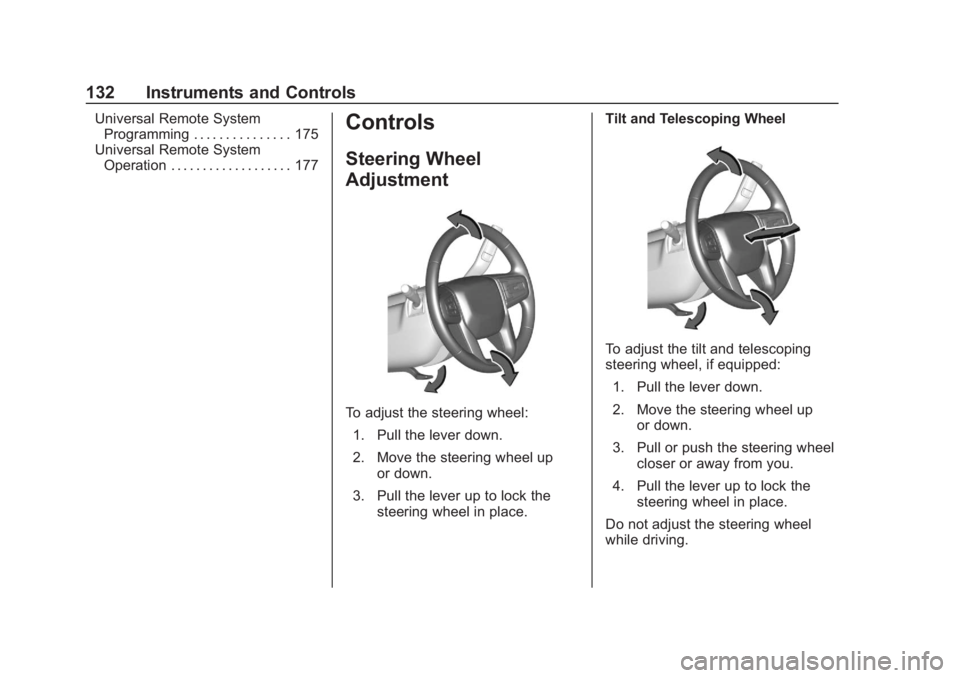
To adjust the steering wheel:
1. Pull the lever down.
2. Move the steering wheel up or down.
3. Pull the lever up to lock the steering wheel in place. Tilt and Telescoping Wheel
To adjust the tilt and telescoping
steering wheel, if equipped:
1. Pull the lever down.
2. Move the steering wheel up or down.
3. Pull or push the steering wheel closer or away from you.
4. Pull the lever up to lock the steering wheel in place.
Do not adjust the steering wheel
while driving.
Page 134 of 477

GMC Sierra/Sierra Denali Owner Manual (GMNA-Localizing-U.S./Canada/
Mexico-1500-11698638) - 2019 - CRC - 5/14/19
Instruments and Controls 133
Steering Wheel Controls
The infotainment system can be
operated by using the steering
wheel controls. See“Steering Wheel
Controls” in the infotainment
manual.
Heated Steering Wheel
(: Press to turn the heated
steering wheel on or off. A light next
to the button displays when the
feature is turned on.
The steering wheel takes about
three minutes to start heating. Automatic Heated Steering Wheel
If equipped with remote start, the
heated steering wheel will turn on
automatically during a remote start
along with the heated seats when it
is cold outside. The heated steering
wheel indicator light may not
come on.
See
Heated and Ventilated Front
Seats 076.
Horn
To sound the horn, pressaon the
steering wheel.
Windshield Wiper/Washer
The windshield wiper control is on
the turn signal lever. The windshield wipers are controlled
by turning the band with
Non it.
With the ignition on or in ACC/
ACCESSORY, turn the
Nband to
select the wiper speed.
HI : Use for fast wipes.
LO : Use for slow wipes.
3:Turn the band up for more
frequent intermittent wipes or down
for less frequent intermittent wipes.
OFF : Use to turn the wipers off.
1x : For a single wipe, briefly turn
the
Nband down. For several
wipes, hold the band down.
L: PressLon the windshield
wiper control to spray windshield
washer fluid and activate the wipers.
The wipers will continue until
Lis
released or the maximum wash time
is reached. When
Lis released,
additional wipes may occur
depending on how long the
windshield washer had been
Page 172 of 477

GMC Sierra/Sierra Denali Owner Manual (GMNA-Localizing-U.S./Canada/
Mexico-1500-11698638) - 2019 - CRC - 5/14/19
Instruments and Controls 171
Touch Off or On.
Auto Rear Defog
This setting automatically turns the
rear defogger on based on
temperature and humidity
conditions.
Touch Off or On.
Collision/Detection Systems
Touch and the following may
display:
.Alert Type
. Forward Collision System
. Front Pedestrian Detection
. Lane Change Alert
. Park Assist
. Rear Camera Park Assist
Symbols
. Rear Cross Traffic Alert
Alert Type
This feature sets the type of alert
from the driver assistance systems
to help avoid crashes.
Touch Beeps or Safety Alert Seat. Forward Collision System
This feature will turn on or off
Forward Collision Alert (FCA) and
Forward Automatic Braking (FAB).
The Off setting disables all FCA and
FAB functions. With the Alert and
Brake setting, both FCA and FAB
are available. The Alert setting
disables FAB. See
Forward
Automatic Braking (FAB) 0268.
Touch Off, Alert, or Alert and Brake.
Front Pedestrian Detection
This feature may help avoid or
reduce the harm caused by
front-end crashes with nearby
pedestrians. See Front Pedestrian
Braking (FPB) System 0269.
Touch Off, Alert, or Alert and Brake.
Lane Change Alert
This allows the feature to be turned
on or off. See Lane Change Alert
(LCA) 0272.
When Lane Change Alert is
disabled, Side Blind Zone Alert is
also disabled.
Touch Off or On. Park Assist
This allows the feature to be turned
on or off. See
Assistance Systems
for Parking or Backing 0259.
Select Off, On, or On with Towbar.
Rear Camera Park Assist Symbols
This setting enables the Rear
Camera Park Assist Symbols. See
Assistance Systems for Parking or
Backing 0259.
Touch Off or On.
Rear Cross Traffic Alert
This allows the Rear Cross Traffic
Alert feature to be turned on or off.
See Assistance Systems for Parking
or Backing 0259.
Touch Off or On.
Comfort and Convenience
Touch and the following may
display:
. Chime Volume
. Reverse Tilt Mirror
. Remote Mirror Folding
Page 173 of 477

GMC Sierra/Sierra Denali Owner Manual (GMNA-Localizing-U.S./Canada/
Mexico-1500-11698638) - 2019 - CRC - 5/14/19
172 Instruments and Controls
Chime Volume
This determines the chime volume
level.
Touch the controls on the
infotainment display to adjust the
volume.
Reverse Tilt Mirror
This allows the feature to be turned
on or off. SeeReverse Tilt Mirrors
0 60.
Touch Off, On - Driver and
Passenger, On - Driver, or On -
Passenger.
Remote Mirror Folding
When on, the outside mirrors will
remotely fold or unfold when the
Remote Keyless Entry (RKE)
transmitter
QorKbutton is
pressed and held. See Folding
Mirrors 058.
Touch Off or On.
Lighting
Touch and the following may
display:
. Vehicle Locator Lights
. Exit Lighting
Vehicle Locator Lights
This setting flashes the vehicle’ s
headlamps when
Kis pressed on
the Remote Keyless Entry (RKE)
transmitter.
Touch Off or On.
Exit Lighting
This setting specifies how long the
headlamps stay on after the vehicle
is turned off and exited.
Touch Off, 30 Seconds, 60 Seconds,
or 120 Seconds.
Power Door Locks
Touch and the following may
display:
. Open Door Anti Lock Out
. Auto Door Unlock
. Delayed Door Lock Open Door Anti Lock Out
This setting prevents the driver door
from locking when the door is open.
If this setting is on, the Delayed
Door Lock menu will not be
available. If this setting is turned off,
the Delayed Door Lock menu may
not be available until the next
ignition cycle.
Touch Off or On.
Auto Door Unlock
This setting allows selection of
which doors will automatically
unlock when the vehicle is shifted
into P (Park).
Touch Off, All Doors, or Driver Door.
Delayed Door Lock
When on, this feature will delay the
locking of the doors. To override the
delay, press the power door lock
switch on the door.
Touch Off or On.
Page 174 of 477
GMC Sierra/Sierra Denali Owner Manual (GMNA-Localizing-U.S./Canada/
Mexico-1500-11698638) - 2019 - CRC - 5/14/19
Instruments and Controls 173
Remote Lock, Unlock, Start
Touch and the following may
display:
.Remote Unlock Light Feedback
. Remote Lock Feedback
. Remote Door Unlock
. Remote Start Auto Cool Seats
. Remote Start Auto Heat Seats
. Remote Window Operation
. Passive Door Unlock
. Passive Door Lock
. Remote Left in Vehicle Alert
Remote Unlock Light Feedback
When on, the exterior lamps will
flash when unlocking the vehicle
with the RKE transmitter.
Touch Off or Flash Lights.
Remote Lock Feedback
This allows selection of what type of
feedback is given when locking the
vehicle with the RKE transmitter.
Touch Off, Lights and Horn, Lights
Only, or Horn Only. Remote Door Unlock
This allows selection of which doors
will unlock when pressing
Kon the
RKE transmitter.
Touch All Doors or Driver Door.
Remote Start Auto Cool Seats
If equipped and turned on, this
feature will turn on the ventilated
seats when using remote start on
warm days. See Heated and
Ventilated Front Seats 076 and
Remote Vehicle Start 044.
Touch Off or On.
Remote Start Auto Heat Seats
If equipped and turned on, this
feature will turn on the heated seats
when using remote start on
cold days. See Heated and
Ventilated Front Seats 076 and
Remote Vehicle Start 044.
Touch Off or On. Remote Window Operation
If equipped, this feature enables
remote operation of the windows
with the RKE transmitter. See
Remote Keyless Entry (RKE)
System Operation (Keyless Access)
0
34 or
Remote Keyless Entry (RKE)
System Operation (Key Access)
0 42.
Touch Off or On.
Passive Door Unlock
This allows the selection of what
doors will unlock when using the
button on the driver door to unlock
the vehicle.
Touch All Doors or Driver Door Only.
Passive Door Lock
This allows passive locking to be
turned on or off and selects
feedback. See Remote Keyless
Entry (RKE) System Operation
(Keyless Access) 034 or
Remote Keyless Entry (RKE)
System Operation (Key Access)
0 42.
Page 175 of 477

GMC Sierra/Sierra Denali Owner Manual (GMNA-Localizing-U.S./Canada/
Mexico-1500-11698638) - 2019 - CRC - 5/14/19
174 Instruments and Controls
Touch Off, On with Horn
Chirp, or On.
Remote Left in Vehicle Alert
This feature sounds an alert when
the RKE transmitter is left in the
vehicle. This menu also enables
Remote No Longer In Vehicle Alert.
Touch Off or On.
Seating Position
Touch and the following may
display:
.Seat Entry Memory
. Seat Exit Memory
Seat Entry Memory
This feature automatically recalls
the previously stored 1 or 2 button
positions when the ignition is
changed from off to on or ACC/
ACCESSORY. See Memory Seats
0 74.
Touch Off or On. Seat Exit Memory
This feature automatically recalls
the previously stored exit button
position when the ignition is
changed from on or ACC/
ACCESSORY to off and the driver
door is open. See
Memory Seats
0 74.
Touch Off or On.
Teen Driver
See “Teen Driver” under“Settings”
in the infotainment manual.
Valet Mode
This will lock the infotainment
system and steering wheel controls.
It may also limit access to vehicle
storage locations, if equipped.
To enable valet mode:
1. Enter a four-digit code on the keypad.
2. Select Enter to go to the confirmation screen.
3. Re-enter the four-digit code.
Touch Lock or Unlock to lock or
unlock the system. Touch Back to
go back to the previous menu.