2019 GMC SIERRA DENALI brake
[x] Cancel search: brakePage 4 of 472

GMC Sierra/Sierra Denali Owner Manual (GMNA-Localizing-U.S./Canada/
Mexico-1500-11698638) - 2019 - crc - 5/15/18
Introduction 3
{ DangerDanger indicates a hazard with a
high level of risk which will result
in serious injury or death.
{ WarningWarning indicates a hazard that
could result in injury or death.
CautionCaution indicates a hazard that
could result in property or vehicle
damage. A circle with a slash through it is a
safety symbol which means “ Do
Not, ” “ Do not do this, ” or “ Do not let
this happen. ”
Symbols The vehicle has components and
labels that use symbols instead of
text. Symbols are shown along with
the text describing the operation or
information relating to a specific
component, control, message,
gauge, or indicator.
M : Shown when the owner ’ s
manual has additional instructions
or information.
* : Shown when the service
manual has additional instructions
or information.
0 : Shown when there is more
information on another page —
“ see page. ” Vehicle Symbol Chart
Here are some additional symbols
that may be found on the vehicle
and what they mean. See the
features in this manual for
information.
u : Air Conditioning System
G : Air Conditioning Refrigerant Oil
9 : Airbag Readiness Light
! : Antilock Brake System (ABS)
$ : Brake System Warning Light
9 : Dispose of Used Components
Properly
P : Do Not Apply High Pressure
Water
B : Engine Coolant Temperature
_ : Flame/Fire Prohibited
H : Flammable
[ : Forward Collision Alert
R : Fuse Block Cover Lock
Location
+ : Fuses
j : ISOFIX/LATCH System Child
Restraints
Page 8 of 472

GMC Sierra/Sierra Denali Owner Manual (GMNA-Localizing-U.S./Canada/
Mexico-1500-11698638) - 2019 - crc - 5/15/18
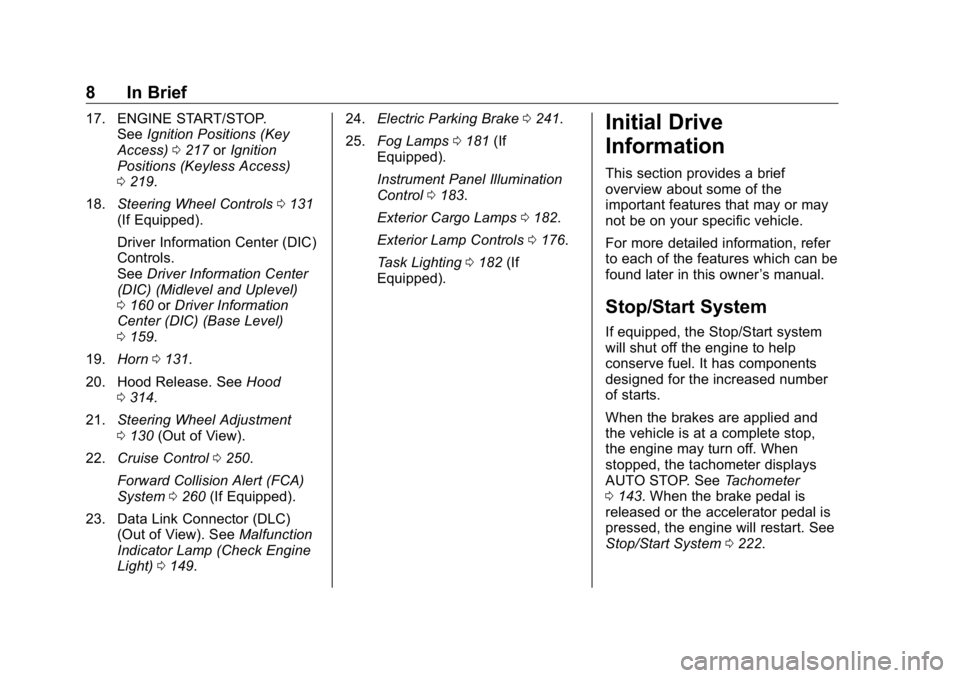
In Brief 71. Tow/Haul Mode (On Some
Models). See Driver Mode
Control 0 246 .
Automatic Transfer Case
Control (If Equipped). See
Four-Wheel Drive 0 235 .
Driver Mode Control 0 246 (If
Equipped).
2. Air Vents 0 194 .
3. Head-Up Display (HUD) 0 163
(If Equipped).
4. Turn Signal Lever. See Turn
and Lane-Change Signals
0 181 .
Windshield Wiper/Washer
0 131 .
5. Instrument Cluster 0 138 .
6. Shift Lever. See Automatic
Transmission 0 229 .
Range Selection Mode. See
Manual Mode 0 232 .
7. Light Sensor. See Automatic
Headlamp System 0 179 .
8. Infotainment 0 187 . 9. Climate Control Systems 0 188
(If Equipped).
Dual Automatic Climate Control
System 0 190 (If Equipped).
10. Heated and Ventilated Front
Seats 0 75 (If Equipped).
11.
X Park Assist Switch (If
Equipped). See Assistance
Systems for Parking or Backing
0 254 .
g Traction Control/Electronic
Stability Control 0 243 .
| Hazard Warning Flashers
0 180 .
A Lane Keep Assist (LKA)
0 269 (If Equipped).
5 Hill Descent Control Switch
(If Equipped). See Hill Descent
Control (HDC) 0 245 .
j Power Assist Steps 0 52 (If
Equipped).
5 Power Release Tailgate
(If Equipped). See Tailgate
0 47 . DC/AC Switch. See Power
Outlets 0 132 .
h Auto Stop Disable Switch
(If Equipped). See Stop/Start
System 0 222 .
L Express Window Down
Button (If Equipped). See
Power Windows 0 63 .
Tow/Haul Mode (On Some
Models). See Driver Mode
Control 0 246 .
12. Power Outlet (Alternating
Current) (If Equipped). See
Power Outlets 0 132 .
13. Power Outlets 0 132 .
14. USB Port. See the infotainment
manual.
15. Wireless Charging 0 135 (If
Equipped).
16. Trailer Brake Control Panel (If
Equipped). See “ Integrated
Trailer Brake Control System ”
under Towing Equipment
0 285 .
Page 9 of 472
GMC Sierra/Sierra Denali Owner Manual (GMNA-Localizing-U.S./Canada/
Mexico-1500-11698638) - 2019 - crc - 5/15/18
8 In Brief 17. ENGINE START/STOP.
See Ignition Positions (Key
Access) 0 217 or Ignition
Positions (Keyless Access)
0 219 .
18. Steering Wheel Controls 0 131
(If Equipped).
Driver Information Center (DIC)
Controls.
See Driver Information Center
(DIC) (Midlevel and Uplevel)
0 160 or Driver Information
Center (DIC) (Base Level)
0 159 .
19. Horn 0 131 .
20. Hood Release. See Hood
0 314 .
21. Steering Wheel Adjustment
0 130 (Out of View).
22. Cruise Control 0 250 .
Forward Collision Alert (FCA)
System 0 260 (If Equipped).
23. Data Link Connector (DLC)
(Out of View). See Malfunction
Indicator Lamp (Check Engine
Light) 0 149 . 24. Electric Parking Brake 0 241 .
25. Fog Lamps 0 181 (If
Equipped).
Instrument Panel Illumination
Control 0 183 .
Exterior Cargo Lamps 0 182 .
Exterior Lamp Controls 0 176 .
Task Lighting 0 182 (If
Equipped).
Initial Drive
Information This section provides a brief
overview about some of the
important features that may or may
not be on your specific vehicle.
For more detailed information, refer
to each of the features which can be
found later in this owner ’ s manual.
Stop/Start System If equipped, the Stop/Start system
will shut off the engine to help
conserve fuel. It has components
designed for the increased number
of starts.
When the brakes are applied and
the vehicle is at a complete stop,
the engine may turn off. When
stopped, the tachometer displays
AUTO STOP. See Tachometer
0 143 . When the brake pedal is
released or the accelerator pedal is
pressed, the engine will restart. See
Stop/Start System 0 222 .
Page 24 of 472
GMC Sierra/Sierra Denali Owner Manual (GMNA-Localizing-U.S./Canada/
Mexico-1500-11698638) - 2019 - crc - 5/15/18
In Brief 23
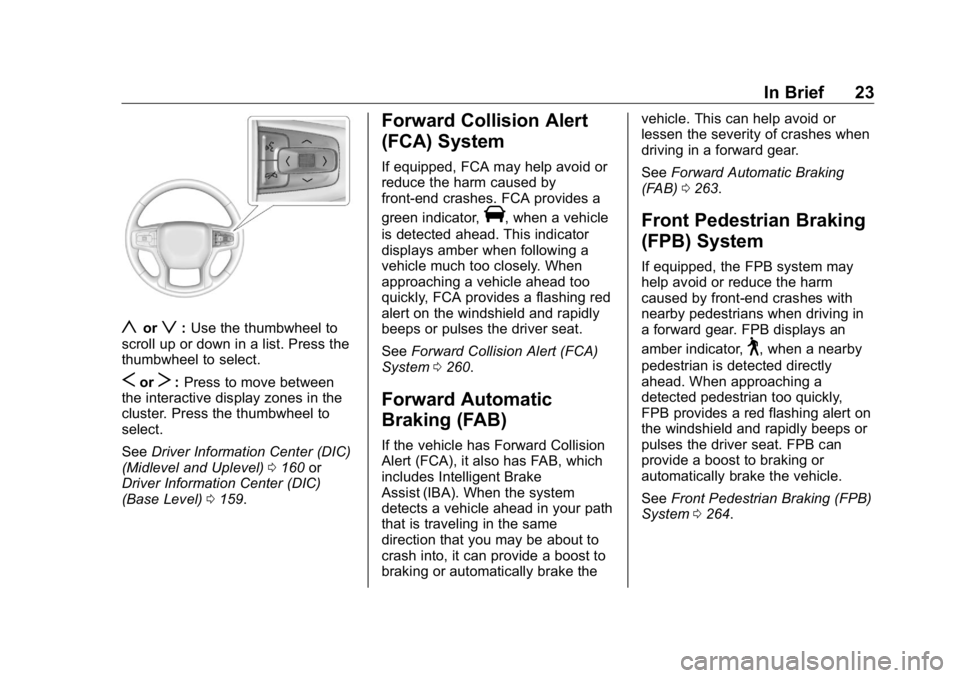
y or
z : Use the thumbwheel to
scroll up or down in a list. Press the
thumbwheel to select.
S or
T : Press to move between
the interactive display zones in the
cluster. Press the thumbwheel to
select.
See Driver Information Center (DIC)
(Midlevel and Uplevel) 0 160 or
Driver Information Center (DIC)
(Base Level) 0 159 . Forward Collision Alert
(FCA) System If equipped, FCA may help avoid or
reduce the harm caused by
front-end crashes. FCA provides a
green indicator,
V , when a vehicle
is detected ahead. This indicator
displays amber when following a
vehicle much too closely. When
approaching a vehicle ahead too
quickly, FCA provides a flashing red
alert on the windshield and rapidly
beeps or pulses the driver seat.
See Forward Collision Alert (FCA)
System 0 260 .
Forward Automatic
Braking (FAB) If the vehicle has Forward Collision
Alert (FCA), it also has FAB, which
includes Intelligent Brake
Assist (IBA). When the system
detects a vehicle ahead in your path
that is traveling in the same
direction that you may be about to
crash into, it can provide a boost to
braking or automatically brake the vehicle. This can help avoid or
lessen the severity of crashes when
driving in a forward gear.
See Forward Automatic Braking
(FAB) 0 263 .
Front Pedestrian Braking
(FPB) System If equipped, the FPB system may
help avoid or reduce the harm
caused by front-end crashes with
nearby pedestrians when driving in
a forward gear. FPB displays an
amber indicator,
~ , when a nearby
pedestrian is detected directly
ahead. When approaching a
detected pedestrian too quickly,
FPB provides a red flashing alert on
the windshield and rapidly beeps or
pulses the driver seat. FPB can
provide a boost to braking or
automatically brake the vehicle.
See Front Pedestrian Braking (FPB)
System 0 264 .
Page 30 of 472
GMC Sierra/Sierra Denali Owner Manual (GMNA-Localizing-U.S./Canada/
Mexico-1500-11698638) - 2019 - crc - 5/15/18
In Brief 29See Engine Oil Life System 0 323 .
Driving for Better Fuel
Economy Driving habits can affect fuel
mileage. Here are some driving tips
to get the best fuel economy
possible:
.
Set the climate controls to the
desired temperature after the
engine is started, or turn them
off when not required.
.
Avoid fast starts and accelerate
smoothly.
.
Brake gradually and avoid
abrupt stops.
.
Avoid idling the engine for long
periods of time.
.
When road and weather
conditions are appropriate, use
cruise control.
.
Always follow posted speed
limits or drive more slowly when
conditions require.
.
Keep vehicle tires properly
inflated. .
Combine several trips into a
single trip.
.
Replace the vehicle's tires with
the same TPC Spec number
molded into the tire's sidewall
near the size.
.
Follow recommended scheduled
maintenance.
Roadside Assistance
Program U.S.: 1-888-881-3302
TTY Users (U.S. Only):
1-888-889-2438
Canada: 1-800-268-6800
New GMC owners are automatically
enrolled in the Roadside Assistance
Program.
See Roadside Assistance Program
0 437 .
Page 41 of 472
GMC Sierra/Sierra Denali Owner Manual (GMNA-Localizing-U.S./Canada/
Mexico-1500-11698638) - 2019 - crc - 5/15/18
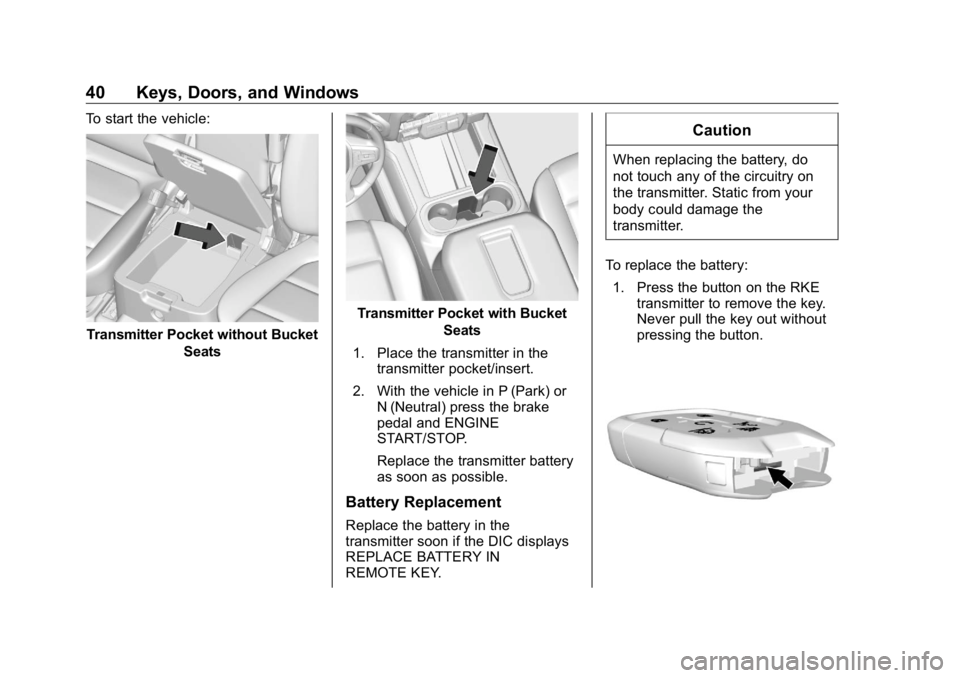
40 Keys, Doors, and Windows To start the vehicle:
Transmitter Pocket without Bucket
Seats Transmitter Pocket with Bucket
Seats
1. Place the transmitter in the
transmitter pocket/insert.
2. With the vehicle in P (Park) or
N (Neutral) press the brake
pedal and ENGINE
START/STOP.
Replace the transmitter battery
as soon as possible.
Battery Replacement
Replace the battery in the
transmitter soon if the DIC displays
REPLACE BATTERY IN
REMOTE KEY. CautionWhen replacing the battery, do
not touch any of the circuitry on
the transmitter. Static from your
body could damage the
transmitter.
To replace the battery:
1. Press the button on the RKE
transmitter to remove the key.
Never pull the key out without
pressing the button.
Page 47 of 472
GMC Sierra/Sierra Denali Owner Manual (GMNA-Localizing-U.S./Canada/
Mexico-1500-11698638) - 2019 - crc - 5/15/18
46 Keys, Doors, and Windows
Automatic Door Locks The doors will lock automatically
when all doors are closed, the
ignition is on, and the vehicle is
shifted out of P (Park).
If a vehicle door is unlocked, and
then opened and closed, the doors
will lock either when your foot is
removed from the brake or the
vehicle speed becomes faster than
13 km/h (8 mph).
To unlock the doors:
.
Press
K on the power door lock
switch.
.
Shift the transmission into
P (Park).
Automatic door locking cannot be
disabled. Automatic door unlocking
can be programmed. See Vehicle
Personalization 0 167 .
Lockout Protection If the ignition is on or in ACC/
ACCESSORY and the power door
lock switch is pressed with the driver door open, all the doors will
lock and only the driver door will
unlock.
If the vehicle is off and locking is
requested while a door is open,
when all doors are closed the
vehicle will check for RKE
transmitters inside. If an RKE
transmitter is detected and the
number of RKE transmitters inside
has not reduced, the driver door will
unlock and the horn will chirp three
times.
Lockout Protection can be manually
overridden with the driver door open
by pressing and holding
Q on the
power door lock switch.
Open Door Anti-Lockout
If Open Door Anti-Lockout is turned
on and the vehicle is off, the driver
door is open, and locking is
requested, all the doors will lock and
the driver door will remain open.
Press the button again to lock the
driver door. The Open Door
Anti-Lockout feature can be turned
on or off. See Vehicle
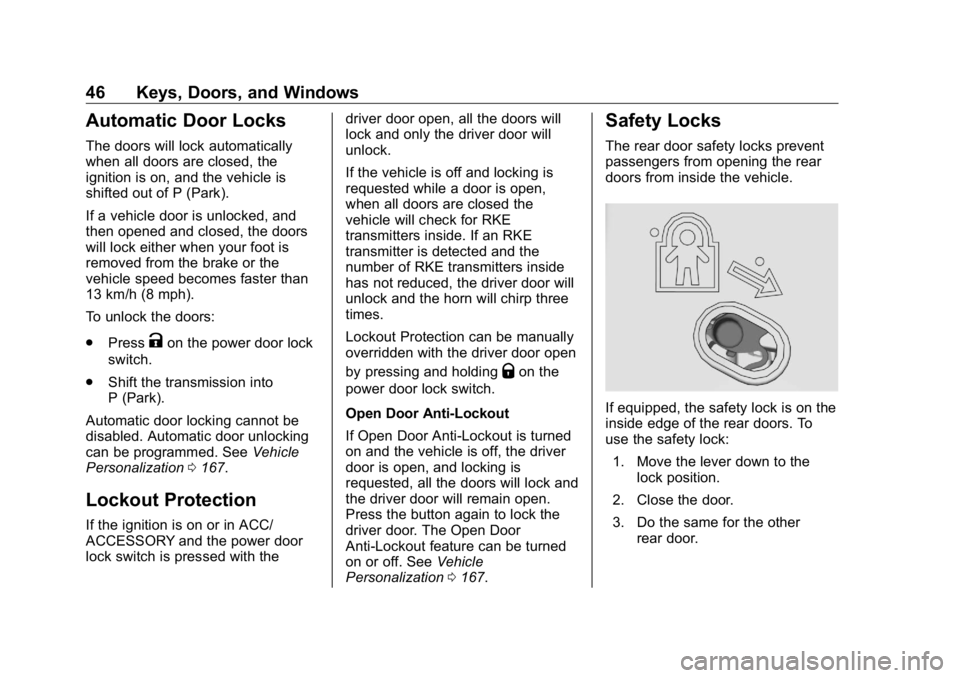
Personalization 0 167 .Safety Locks The rear door safety locks prevent
passengers from opening the rear
doors from inside the vehicle.
If equipped, the safety lock is on the
inside edge of the rear doors. To
use the safety lock:
1. Move the lever down to the
lock position.
2. Close the door.
3. Do the same for the other
rear door.
Page 92 of 472
GMC Sierra/Sierra Denali Owner Manual (GMNA-Localizing-U.S./Canada/
Mexico-1500-11698638) - 2019 - crc - 5/15/18
Seats and Restraints 91full or partial ejection in rollover
events, although no system can
prevent all such ejections.
But airbags would not help in many
types of collisions, primarily
because the occupant's motion is
not toward those airbags. See When
Should an Airbag Inflate? 0 89 .
Airbags should never be regarded
as anything more than a supplement
to seat belts.
What Will You See after
an Airbag Inflates? After frontal and seat-mounted side
impact airbags inflate, they quickly
deflate, so quickly that some people
may not even realize the airbags
inflated. Roof-rail airbags may still
be at least partially inflated for some
time after they inflate. Some
components of the airbag module
may be hot for several minutes. For
location of the airbags, see Where
Are the Airbags? 0 88 .
The parts of the airbag that come
into contact with you may be warm,
but not too hot to touch. There may be some smoke and dust coming
from the vents in the deflated
airbags. Airbag inflation does not
prevent the driver from seeing out of
the windshield or being able to steer
the vehicle, nor does it prevent
people from leaving the vehicle.
{ WarningWhen an airbag inflates, there
may be dust in the air. This dust
could cause breathing problems
for people with a history of
asthma or other breathing trouble.
To avoid this, everyone in the
vehicle should get out as soon as
it is safe to do so. If you have
breathing problems but cannot
get out of the vehicle after an
airbag inflates, then get fresh air
by opening a window or a door.
If you experience breathing
problems following an airbag
deployment, you should seek
medical attention. The vehicle has a feature that may
automatically unlock the doors, turn
on the interior lamps and hazard
warning flashers, and shut off the
fuel system after the airbags inflate.
The feature may also activate,
without airbag inflation, after an
event that exceeds a predetermined
threshold. After turning the ignition
off and then on again, the fuel
system will return to normal
operation; the doors can be locked,
the interior lamps can be turned off,
and the hazard warning flashers can
be turned off using the controls for
those features. If any of these
systems are damaged in the crash
they may not operate as normal.
{ Warning
A crash severe enough to inflate
the airbags may have also
damaged important functions in
the vehicle, such as the fuel
system, brake and steering
systems, etc. Even if the vehicle
appears to be drivable after a
(Continued)