2019 GMC SIERRA DENALI ignition
[x] Cancel search: ignitionPage 56 of 472
GMC Sierra/Sierra Denali Owner Manual (GMNA-Localizing-U.S./Canada/
Mexico-1500-11698638) - 2019 - crc - 5/15/18
Keys, Doors, and Windows 55.
Always unlock a door with the
RKE transmitter.
Unlocking the driver door with
the key will not disarm the
system or turn off the alarm.
How to Detect a Tamper
Condition If
K is pressed on the RKE
transmitter and the horn chirps three
times, an alarm occurred previously
while the alarm system was armed.
If the alarm has been activated, a
message will appear on the DIC.
Immobilizer See Radio Frequency Statement
0 443 .
Immobilizer Operation This vehicle has a passive
theft-deterrent system.
The system does not have to be
manually armed or disarmed.
The vehicle is automatically
immobilized when the vehicle is
turned off.
The system is automatically
disarmed when the ignition is turned
from off to on.
The security light, in the instrument
cluster, comes on if there is a
problem with arming or disarming
the theft-deterrent system.
When trying to start the vehicle, the
security light comes on briefly when
the ignition is turned on.
If the engine does not start and the
security light stays on, there is a
problem with the system. Turn the
ignition off and try again.
If the vehicle will not change ignition
modes (ACC/ACCESSORY, on, off),
and the RKE transmitter appears to
be undamaged, try another
transmitter. Or, you may try placing the transmitter in the transmitter
pocket in the center console. See
Keys 0 30 .
If the ignition modes will not change
with the other transmitter or in the
transmitter pocket, your vehicle
needs service. If the ignition does
change modes, the first transmitter
may be faulty. See your dealer who
can service the theft-deterrent
system and have a new RKE
transmitter programmed to the
vehicle.
It is possible for the immobilizer
system to learn a new or
replacement transmitter. Up to eight
transmitters can be programmed for
the vehicle.
Do not leave the transmitter or
device that disarms or deactivates
the vehicle theft system in the
vehicle.
When equipped with a key, if the
engine still does not start, and the
key appears to be undamaged, try
another ignition key. It may be
necessary to check the fuse. See
Fuses and Circuit Breakers 0 350 .
Page 57 of 472
GMC Sierra/Sierra Denali Owner Manual (GMNA-Localizing-U.S./Canada/
Mexico-1500-11698638) - 2019 - crc - 5/15/18
56 Keys, Doors, and Windows If the engine still does not start with
the other key, the vehicle needs
service. If the vehicle does start, the
first key may be faulty. See your
dealer. It is possible for the
immobilizer system to learn new or
replacement keys. Up to eight keys
can be programmed for the vehicle.
To program additional keys, see
Keys 0 30 . To program additional
transmitters, see your dealer. Do not
leave the key or device that disarms
or deactivates the vehicle theft
system in the vehicle.
See your dealer to get a new key
blank cut exactly as the ignition key
that operates the system. Exterior Mirrors Convex Mirrors
{ WarningA convex mirror can make things,
like other vehicles, look farther
away than they really are. If you
cut too sharply into the right lane,
you could hit a vehicle on the
right. Check the inside mirror or
glance over your shoulder before
changing lanes.
The passenger side mirror is convex
shaped. A convex mirror's surface is
curved so more can be seen from
the driver seat.
Manual Mirrors If equipped, adjust manual mirrors
by moving the mirror up and down
or left to right to see a little of the
side of the vehicle and to have a
clear view behind the vehicle. Using hood-mounted air deflectors
and add-on convex mirror
attachments could decrease mirror
performance.
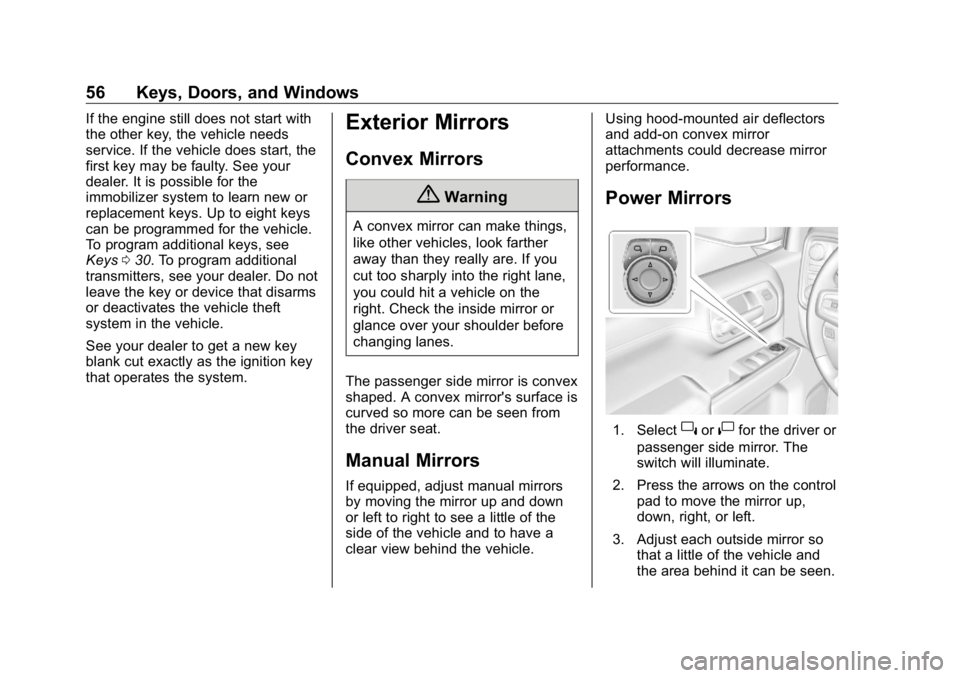
Power Mirrors
1. Select
} or
| for the driver or
passenger side mirror. The
switch will illuminate.
2. Press the arrows on the control
pad to move the mirror up,
down, right, or left.
3. Adjust each outside mirror so
that a little of the vehicle and
the area behind it can be seen.
Page 60 of 472
GMC Sierra/Sierra Denali Owner Manual (GMNA-Localizing-U.S./Canada/
Mexico-1500-11698638) - 2019 - crc - 5/15/18
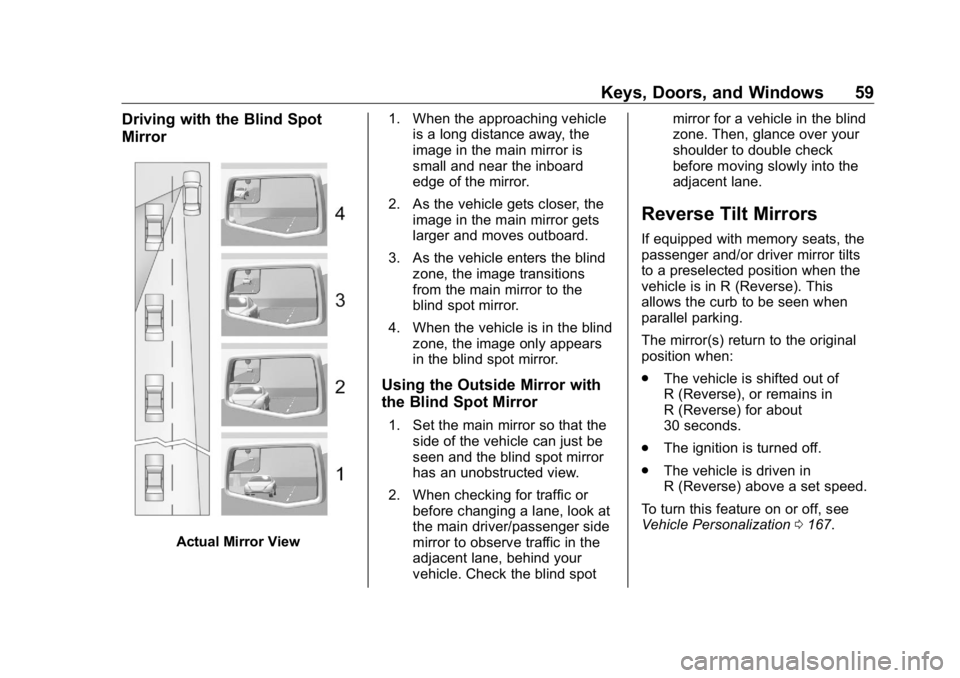
Keys, Doors, and Windows 59Driving with the Blind Spot
Mirror
Actual Mirror View 1. When the approaching vehicle
is a long distance away, the
image in the main mirror is
small and near the inboard
edge of the mirror.
2. As the vehicle gets closer, the
image in the main mirror gets
larger and moves outboard.
3. As the vehicle enters the blind
zone, the image transitions
from the main mirror to the
blind spot mirror.
4. When the vehicle is in the blind
zone, the image only appears
in the blind spot mirror.
Using the Outside Mirror with
the Blind Spot Mirror 1. Set the main mirror so that the
side of the vehicle can just be
seen and the blind spot mirror
has an unobstructed view.
2. When checking for traffic or
before changing a lane, look at
the main driver/passenger side
mirror to observe traffic in the
adjacent lane, behind your
vehicle. Check the blind spot mirror for a vehicle in the blind
zone. Then, glance over your
shoulder to double check
before moving slowly into the
adjacent lane.
Reverse Tilt Mirrors If equipped with memory seats, the
passenger and/or driver mirror tilts
to a preselected position when the
vehicle is in R (Reverse). This
allows the curb to be seen when
parallel parking.
The mirror(s) return to the original
position when:
.
The vehicle is shifted out of
R (Reverse), or remains in
R (Reverse) for about
30 seconds.
.
The ignition is turned off.
.
The vehicle is driven in
R (Reverse) above a set speed.
To turn this feature on or off, see
Vehicle Personalization 0 167 .
Page 64 of 472

GMC Sierra/Sierra Denali Owner Manual (GMNA-Localizing-U.S./Canada/
Mexico-1500-11698638) - 2019 - crc - 5/15/18
Keys, Doors, and Windows 63The vehicle aerodynamics are
designed to improve fuel economy
performance. This may result in a
pulsing sound when either rear
window is down and the front
windows are up. To reduce the
sound, open either a front window
or the sunroof, if equipped.
Manual Windows If equipped, turn the hand crank on
each door to manually raise or lower
the manual windows.
Power Windows
{ Warning
Children could be seriously
injured or killed if caught in the
path of a closing window. Never
leave the Remote Keyless Entry
(RKE) transmitter or keys in a
vehicle with children. When there
are children in the rear seat, use
the window lockout button to
prevent operation of the windows.
See Keys 0 30 . The power windows work when the
ignition is on, in ACC/ACCESSORY,
or when Retained Accessory Power
(RAP) is active. See Retained
Accessory Power (RAP) 0 225 .
Using the window switch, press to
open or pull to close the window.
The windows may be temporarily
disabled if they are used repeatedly
within a short time. Window Lockout
With Power Folding Mirrors,
Without Similar
This feature stops the rear door
passenger window switches from
working except from the driver
position.
Press
2 to engage the rear
window lockout feature. The
indicator light is on when engaged.
Press
2 again to disengage.
Page 65 of 472
GMC Sierra/Sierra Denali Owner Manual (GMNA-Localizing-U.S./Canada/
Mexico-1500-11698638) - 2019 - crc - 5/15/18
64 Keys, Doors, and Windows Windows Express Movement All windows can be opened without
holding the window switch. Press
the switch down fully and quickly
release to express open the
window.
If equipped, pull the window switch
up fully and quickly release to
express close the window.
Briefly press or pull the window
switch in the same direction to stop
that window ’ s express movement.
Express Window Down
L : If equipped, this button will be
on the center stack.
Press and hold
L to open all
windows. Release
L to stop all
movement.
Use the power window switches to
close each window.
Window Automatic Reversal
System
The express-close feature will
reverse window movement if it
comes in contact with an object. Extreme cold or ice could cause the
window to auto-reverse. The
window will operate normally after
the object or condition is removed.
Automatic Reversal System
Override
{ WarningIf automatic reversal system
override is active, the window will
not reverse automatically. You or
others could be injured and the
window could be damaged.
Before using automatic reversal
system override, make sure that
all people and obstructions are
clear of the window path.
When the engine is on, override the
automatic reversal system by pulling
and holding the window switch if
conditions prevent it from closing. Programming the Power
Windows Programming may be necessary if
the vehicle battery has been
disconnected or discharged. If the
window is unable to express-up,
program each express-close
window:
1. Close all doors.
2. Turn the ignition on or to ACC/
ACCESSORY.
3. Partially open the window to be
programmed. Then close it and
continue to pull the switch
briefly after the window has
fully closed.
4. Open the window and continue
to press the switch briefly after
the window has fully opened.
Remote Window Operation
If equipped, this feature allows the
windows to be opened remotely.
If enabled in vehicle personalization,
press and hold
K on the RKE
transmitter. See Vehicle
Personalization 0 167 .
Page 66 of 472
GMC Sierra/Sierra Denali Owner Manual (GMNA-Localizing-U.S./Canada/
Mexico-1500-11698638) - 2019 - crc - 5/15/18
Keys, Doors, and Windows 65
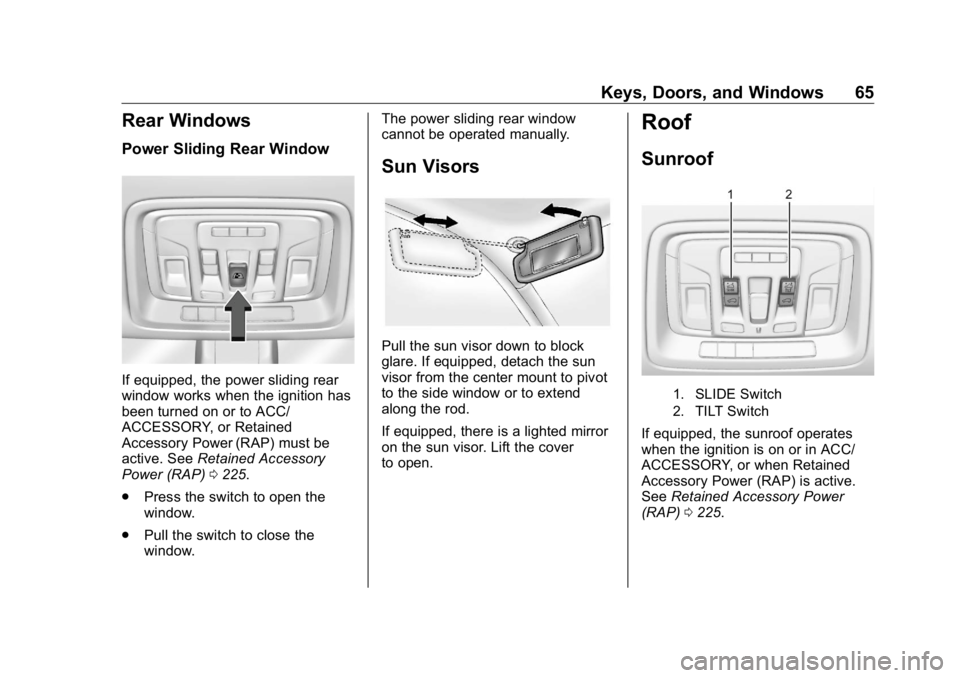
Rear Windows Power Sliding Rear Window
If equipped, the power sliding rear
window works when the ignition has
been turned on or to ACC/
ACCESSORY, or Retained
Accessory Power (RAP) must be
active. See Retained Accessory
Power (RAP) 0 225 .
.
Press the switch to open the
window.
.
Pull the switch to close the
window. The power sliding rear window
cannot be operated manually.
Sun Visors
Pull the sun visor down to block
glare. If equipped, detach the sun
visor from the center mount to pivot
to the side window or to extend
along the rod.
If equipped, there is a lighted mirror
on the sun visor. Lift the cover
to open. Roof Sunroof
1. SLIDE Switch
2. TILT Switch
If equipped, the sunroof operates
when the ignition is on or in ACC/
ACCESSORY, or when Retained
Accessory Power (RAP) is active.
See Retained Accessory Power
(RAP) 0 225 .
Page 74 of 472
GMC Sierra/Sierra Denali Owner Manual (GMNA-Localizing-U.S./Canada/
Mexico-1500-11698638) - 2019 - crc - 5/15/18
Seats and Restraints 73
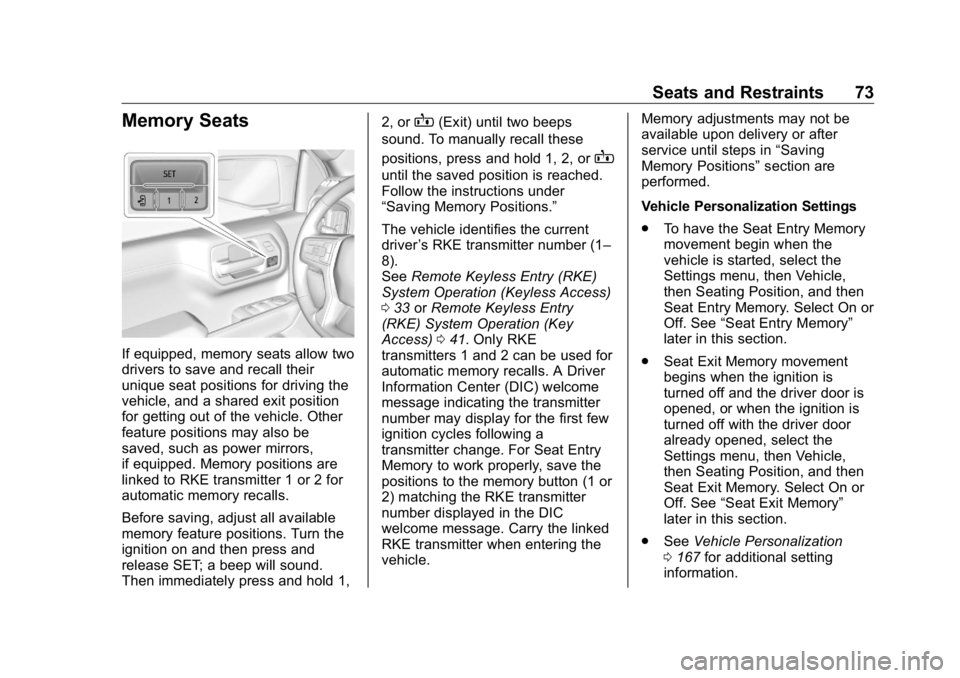
Memory Seats
If equipped, memory seats allow two
drivers to save and recall their
unique seat positions for driving the
vehicle, and a shared exit position
for getting out of the vehicle. Other
feature positions may also be
saved, such as power mirrors,
if equipped. Memory positions are
linked to RKE transmitter 1 or 2 for
automatic memory recalls.
Before saving, adjust all available
memory feature positions. Turn the
ignition on and then press and
release SET; a beep will sound.
Then immediately press and hold 1, 2, or
B (Exit) until two beeps
sound. To manually recall these
positions, press and hold 1, 2, or
Buntil the saved position is reached.
Follow the instructions under
“ Saving Memory Positions. ”
The vehicle identifies the current
driver ’ s RKE transmitter number (1 –
8).
See Remote Keyless Entry (RKE)
System Operation (Keyless Access)
0 33 or Remote Keyless Entry
(RKE) System Operation (Key
Access) 0 41 . Only RKE
transmitters 1 and 2 can be used for
automatic memory recalls. A Driver
Information Center (DIC) welcome
message indicating the transmitter
number may display for the first few
ignition cycles following a
transmitter change. For Seat Entry
Memory to work properly, save the
positions to the memory button (1 or
2) matching the RKE transmitter
number displayed in the DIC
welcome message. Carry the linked
RKE transmitter when entering the
vehicle. Memory adjustments may not be
available upon delivery or after
service until steps in “ Saving
Memory Positions ” section are
performed.
Vehicle Personalization Settings
.
To have the Seat Entry Memory
movement begin when the
vehicle is started, select the
Settings menu, then Vehicle,
then Seating Position, and then
Seat Entry Memory. Select On or
Off. See “ Seat Entry Memory ”
later in this section.
.
Seat Exit Memory movement
begins when the ignition is
turned off and the driver door is
opened, or when the ignition is
turned off with the driver door
already opened, select the
Settings menu, then Vehicle,
then Seating Position, and then
Seat Exit Memory. Select On or
Off. See “ Seat Exit Memory ”
later in this section.
.
See Vehicle Personalization
0 167 for additional setting
information.
Page 75 of 472
GMC Sierra/Sierra Denali Owner Manual (GMNA-Localizing-U.S./Canada/
Mexico-1500-11698638) - 2019 - crc - 5/15/18
74 Seats and Restraints Identifying Driver Number
To identify the driver number:
1. Start the vehicle with a different
key or RKE transmitter. The
DIC should display the driver
number; 1 or 2. Turn the
ignition off and remove the key
or RKE transmitter from the
vehicle.
2. Start the vehicle with the initial
key or RKE transmitter. The
DIC should display the other
driver number not shown in
Step 1.
Saving Memory Positions
Read these instructions completely
before saving memory positions.
To save preferred driving positions
1 and 2:
1. Turn the ignition on or to ACC/
ACCESSORY.
A DIC welcome message may
indicate driver number 1 or 2.
2. Adjust all available memory
features to the desired driving
position. 3. Press and release SET; a beep
will sound.
4. Immediately press and hold the
1 or 2 memory button matching
the above DIC welcome
message until two beeps
sound.
If too much time passes
between releasing SET and
pressing 1, the memory
position will not be saved and
two beeps will not sound.
Repeat Steps 3 and 4.
1 or 2 corresponds to the driver
number. See “ Identifying Driver
Number ” previously in this
section.
5. Repeat Steps 1 – 4 for a second
driver using 1 or 2.
To save the position for
B and
Seat Exit Memory, repeat Steps 1 – 4
using
B . This saves the position
for getting out of the vehicle.
Save preferred memory feature
positions to both 1 and 2 if you are
the only driver. Manually Recalling Memory
Positions
Press and hold 1, 2, or
B to recall
the previously saved memory
positions.
To stop Manual Memory Recall
movement, release 1, 2, or
B or
press any of the following controls:
.
Power seat
.
Memory SET
.
Power mirror, with the driver or
passenger outside mirror
selected
Seat Entry Memory
The vehicle identifies the number of
the current driver ’ s RKE transmitter
(1 – 8).
See Remote Keyless Entry (RKE)
System Operation (Keyless Access)
0 33 or Remote Keyless Entry
(RKE) System Operation (Key
Access) 0 41 . If the RKE transmitter
is 1 or 2, and Seat Entry Memory is
programmed on in vehicle
personalization, the positions saved
to the same memory button number