2019 GMC SIERRA DENALI odometer
[x] Cancel search: odometerPage 325 of 472
GMC Sierra/Sierra Denali Owner Manual (GMNA-Localizing-U.S./Canada/
Mexico-1500-11698638) - 2019 - crc - 5/15/18
324 Vehicle Care include engine revolutions, engine
temperature, and miles driven.
Based on driving conditions, the
mileage at which an oil change is
indicated can vary considerably. For
the oil life system to work properly,
the system must be reset every time
the oil is changed.
On some vehicles, when the system
has calculated that oil life has been
diminished, a CHANGE ENGINE
OIL SOON message comes on to
indicate that an oil change is
necessary. Change the oil as soon
as possible within the next 1 000 km
(600 mi). It is possible that, if driving
under the best conditions, the oil life
system might indicate that an oil
change is not necessary for up to a
year. The engine oil and filter must
be changed at least once a year
and, at this time, the system must
be reset. For vehicles without the
CHANGE ENGINE OIL SOON
message, an oil change is needed
when the REMAINING OIL LIFE
percentage is near 0%. Your dealer
has trained service people who will
perform this work and reset the
system. It is also important to check the oil regularly over the course of
an oil drain interval and keep it at
the proper level.
If the system is ever reset
accidentally, the oil must be
changed at 5 000 km (3,000 mi)
since the last oil change.
Remember to reset the oil life
system whenever the oil is changed.
How to Reset the Engine Oil
Life System Reset the system whenever the
engine oil is changed so that the
system can calculate the next
engine oil change. Always reset the
engine oil life to 100% after every oil
change. It will not reset itself. To
reset the engine oil life system:
1. Display the oil life percentage
on the DIC.
See Driver Information Center
(DIC) (Midlevel and Uplevel)
0 160 or Driver Information
Center (DIC) (Base Level)
0 159 .
2. Press the thumbwheel on the
steering wheel, or the trip
odometer reset stem if the vehicle does not have DIC
controls, for several seconds.
When the confirmation
message displays, select YES.
The oil life will change
to 100%.
The oil life system can also be reset
as follows:
1. Display the oil life percentage
on the DIC.
See Driver Information Center
(DIC) (Midlevel and Uplevel)
0 160 or Driver Information
Center (DIC) (Base Level)
0 159 .
2. Fully press the accelerator
pedal slowly three times within
five seconds.
3. If the display changes to 100%,
the system is reset.
If the vehicle has a CHANGE
ENGINE OIL SOON message and it
comes back on when the vehicle is
started and/or the oil life percentage
is near 0%, the engine oil life
system has not been reset. Repeat
the procedure.
Page 327 of 472
GMC Sierra/Sierra Denali Owner Manual (GMNA-Localizing-U.S./Canada/
Mexico-1500-11698638) - 2019 - crc - 5/15/18
326 Vehicle Care 4. Press to confirm to reset.
5. If the vehicle is not equipped
with DIC buttons, depress the
thumbwheel or trip odometer
reset stem for several seconds
to reset the air filter life system.
Engine Air Cleaner/Filter If the vehicle has a diesel engine,
see “ Engine Air Cleaner/Filter ” in
the Duramax diesel supplement for
the correct inspection and
replacement procedures.
The engine air cleaner/filter is on
the driver side of the engine
compartment. See Engine
Compartment Overview 0 316 .
When to Inspect the Engine Air
Cleaner/Filter For intervals on changing and
inspecting the engine air filter, see
Maintenance Schedule 0 415 .
If equipped with the engine air filter
life system, see Engine Air Filter
Life System 0 325 . If driving in very dusty areas, follow
the engine air filter inspecting and
changing intervals. See
Maintenance Schedule 0 415 .
How to Inspect the Engine Air
Cleaner/Filter Do not start the engine or have the
engine running with the engine air
cleaner/filter housing open. Before
removing the engine air cleaner/
filter, make sure that the engine air
cleaner/filter housing and nearby
components are free of dirt and
debris. Remove the engine air
cleaner/filter. Lightly tap and shake
the engine air cleaner/filter (away
from the vehicle), to release loose
dust and dirt. Inspect the engine air
cleaner/filter for damage, and
replace if damaged. Do not clean
the engine air cleaner/filter or
components with water or
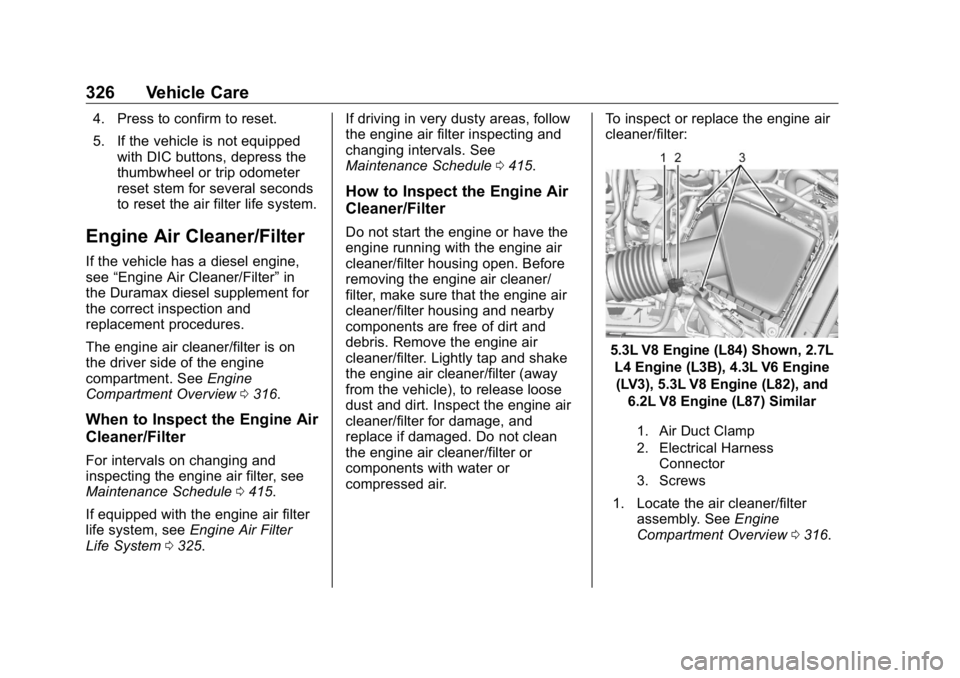
compressed air. To inspect or replace the engine air
cleaner/filter:
5.3L V8 Engine (L84) Shown, 2.7L
L4 Engine (L3B), 4.3L V6 Engine
(LV3), 5.3L V8 Engine (L82), and
6.2L V8 Engine (L87) Similar
1. Air Duct Clamp
2. Electrical Harness
Connector
3. Screws
1. Locate the air cleaner/filter
assembly. See Engine
Compartment Overview 0 316 .
Page 337 of 472
GMC Sierra/Sierra Denali Owner Manual (GMNA-Localizing-U.S./Canada/
Mexico-1500-11698638) - 2019 - crc - 5/15/18
336 Vehicle Care turned on after new pads and wear
sensors are installed, a message
will display. Follow the prompts to
reset the system.
The brake pad life system can also
be manually reset:
1. Display Brake Pad Life on the
DIC.
See Driver Information Center
(DIC) (Midlevel and Uplevel)
0 160 or Driver Information
Center (DIC) (Base Level)
0 159 .
2. Press the thumbwheel or the
trip odometer reset stem if the
vehicle does not have DIC
buttons. Select front or rear
pads as appropriate.
3. Select YES on the confirmation
message, or press the trip
odometer reset stem on a base
level DIC. Repeat for pads on
the other axle if they were also
replaced. How to Disable the Brake Pad
Life System The brake pad life system can be
turned off. This may be necessary if
aftermarket brake pads without wear
sensors are installed. When the
system is turned off, the front and
rear brake pad life percentages will
not display. However, the built-in
wear indicators that make a
high-pitched warning sound when
the brake pads are worn can still
determine when the pads should be
replaced. See Brakes 0 335 .
To turn off the brake pad life system:
1. Display Brake Pad Life on the
DIC.
See Driver Information Center
(DIC) (Midlevel and Uplevel)
0 160 or Driver Information
Center (DIC) (Base Level)
0 159 .
2. Select DISABLE.
To turn the brake pad life system
back on, follow the above steps but
select ENABLE in Step 2. Brake Fluid The brake master cylinder reservoir
is filled with GM approved DOT 4
brake fluid as indicated on the
reservoir cap. See Engine
Compartment Overview 0 316 for
the location of the reservoir.
Checking Brake Fluid
With the vehicle in P (Park) on a
level surface, the brake fluid level
should be between the minimum
and maximum marks on the brake
fluid reservoir.
There are only two reasons why the
brake fluid level in the reservoir may
go down:
.
Normal brake lining wear. When
new linings are installed, the
fluid level goes back up.
Page 374 of 472
GMC Sierra/Sierra Denali Owner Manual (GMNA-Localizing-U.S./Canada/
Mexico-1500-11698638) - 2019 - crc - 5/15/18
Vehicle Care 373See your dealer for service or to
purchase a relearn tool. A TPMS
relearn tool can also be purchased.
See Tire Pressure Monitor Sensor
Activation Tool at
www.gmtoolsandequipment.com or
call 1-800-GM TOOLS
(1-800-468-6657).
There are two minutes to match the
first tire/wheel position, and
five minutes overall to match all four
tire/wheel positions. If it takes
longer, the matching process stops
and must be restarted.
The TPMS sensor matching
process is:
1. Set the parking brake.
2. Turn the ignition on without
starting the vehicle.
3. Uplevel DIC Only: Make sure
the Tire Pressure info page
option is turned on. The info
pages on the DIC can be
turned on and off through the
Options menu. See Driver Information Center
(DIC) (Midlevel and Uplevel)
0 160 or Driver Information
Center (DIC) (Base Level)
0 159 .
4. If the vehicle has an uplevel
DIC, use the DIC controls on
the right side of the steering
wheel to scroll to the Tire
Pressure screen under the DIC
info page.
If the vehicle has a base level
DIC, use the trip odometer
reset stem to scroll to the Tire
Pressure screen.
5. If the vehicle has an uplevel
DIC, press and hold the
thumbwheel located in the
center of the DIC controls on
the right side of the steering
wheel.
If the vehicle has a base level
DIC, press and hold the trip
odometer reset stem for about
five seconds. A message
asking if the process should
begin should appear. Select yes and press the trip
odometer reset stem to confirm
the selection.
The horn sounds twice to
signal the receiver is in relearn
mode and the TIRE
LEARNING ACTIVE message
displays on the DIC screen.
6. Start with the driver side
front tire.
7. Place the relearn tool against
the tire sidewall, near the valve
stem. Then press the button to
activate the TPMS sensor.
A horn chirp confirms that the
sensor identification code has
been matched to this tire and
wheel position.
8. Proceed to the passenger side
front tire, and repeat the
procedure in Step 7.
9. Proceed to the passenger side
rear tire, and repeat the
procedure in Step 7.
10. Proceed to the driver side rear
tire, and repeat the procedure
in Step 7. The horn sounds two
Page 383 of 472
GMC Sierra/Sierra Denali Owner Manual (GMNA-Localizing-U.S./Canada/
Mexico-1500-11698638) - 2019 - crc - 5/15/18
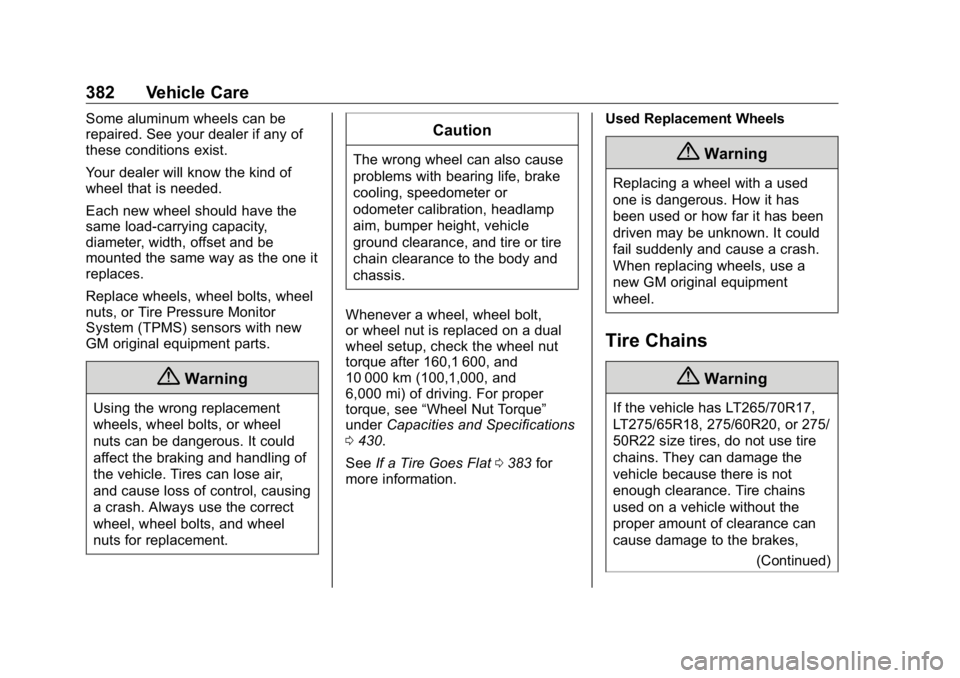
382 Vehicle Care Some aluminum wheels can be
repaired. See your dealer if any of
these conditions exist.
Your dealer will know the kind of
wheel that is needed.
Each new wheel should have the
same load-carrying capacity,
diameter, width, offset and be
mounted the same way as the one it
replaces.
Replace wheels, wheel bolts, wheel
nuts, or Tire Pressure Monitor
System (TPMS) sensors with new
GM original equipment parts.
{ WarningUsing the wrong replacement
wheels, wheel bolts, or wheel
nuts can be dangerous. It could
affect the braking and handling of
the vehicle. Tires can lose air,
and cause loss of control, causing
a crash. Always use the correct
wheel, wheel bolts, and wheel
nuts for replacement. CautionThe wrong wheel can also cause
problems with bearing life, brake
cooling, speedometer or
odometer calibration, headlamp
aim, bumper height, vehicle
ground clearance, and tire or tire
chain clearance to the body and
chassis.
Whenever a wheel, wheel bolt,
or wheel nut is replaced on a dual
wheel setup, check the wheel nut
torque after 160,1 600, and
10 000 km (100,1,000, and
6,000 mi) of driving. For proper
torque, see “ Wheel Nut Torque ”
under Capacities and Specifications
0 430 .
See If a Tire Goes Flat 0 383 for
more information. Used Replacement Wheels
{ WarningReplacing a wheel with a used
one is dangerous. How it has
been used or how far it has been
driven may be unknown. It could
fail suddenly and cause a crash.
When replacing wheels, use a
new GM original equipment
wheel.
Tire Chains
{ WarningIf the vehicle has LT265/70R17,
LT275/65R18, 275/60R20, or 275/
50R22 size tires, do not use tire
chains. They can damage the
vehicle because there is not
enough clearance. Tire chains
used on a vehicle without the
proper amount of clearance can
cause damage to the brakes,
(Continued)
Page 429 of 472
GMC Sierra/Sierra Denali Owner Manual (GMNA-Localizing-U.S./Canada/
Mexico-1500-11698638) - 2019 - crc - 5/15/18
428 Service and Maintenance
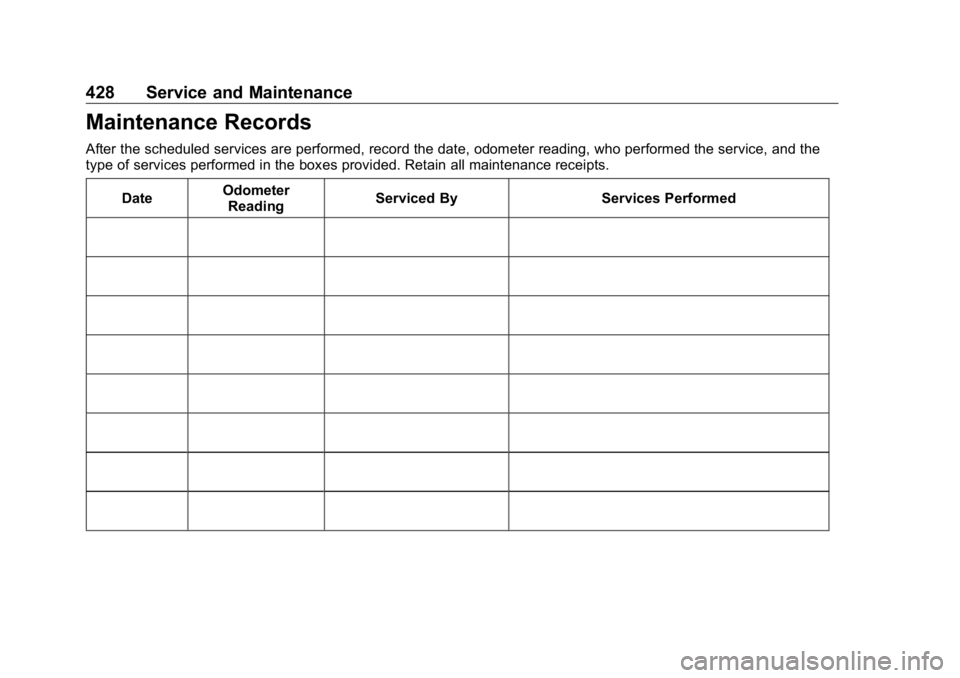
Maintenance Records After the scheduled services are performed, record the date, odometer reading, who performed the service, and the
type of services performed in the boxes provided. Retain all maintenance receipts.
Date Odometer
Reading Serviced By Services Performed
Page 438 of 472
GMC Sierra/Sierra Denali Owner Manual (GMNA-Localizing-U.S./Canada/
Mexico-1500-11698638) - 2019 - crc - 5/15/18
Customer Information 437
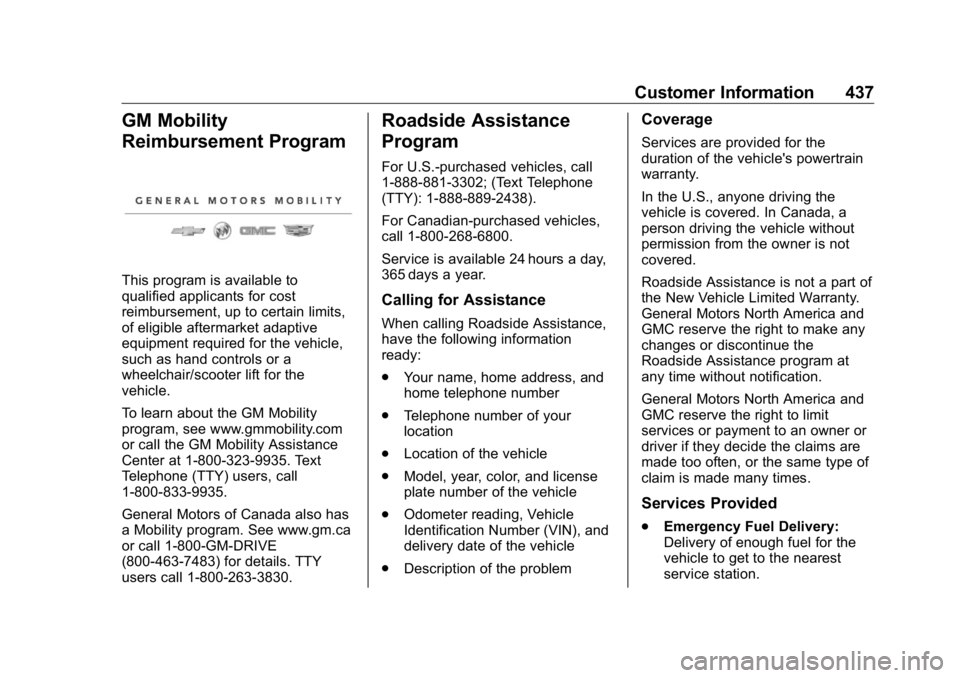
GM Mobility
Reimbursement Program
This program is available to
qualified applicants for cost
reimbursement, up to certain limits,
of eligible aftermarket adaptive
equipment required for the vehicle,
such as hand controls or a
wheelchair/scooter lift for the
vehicle.
To learn about the GM Mobility
program, see www.gmmobility.com
or call the GM Mobility Assistance
Center at 1-800-323-9935. Text
Telephone (TTY) users, call
1-800-833-9935.
General Motors of Canada also has
a Mobility program. See www.gm.ca
or call 1-800-GM-DRIVE
(800-463-7483) for details. TTY
users call 1-800-263-3830. Roadside Assistance
Program For U.S.-purchased vehicles, call
1-888-881-3302; (Text Telephone
(TTY): 1-888-889-2438).
For Canadian-purchased vehicles,
call 1-800-268-6800.
Service is available 24 hours a day,
365 days a year.
Calling for Assistance When calling Roadside Assistance,
have the following information
ready:
.
Your name, home address, and
home telephone number
.
Telephone number of your
location
.
Location of the vehicle
.
Model, year, color, and license
plate number of the vehicle
.
Odometer reading, Vehicle
Identification Number (VIN), and
delivery date of the vehicle
.
Description of the problem Coverage Services are provided for the
duration of the vehicle's powertrain
warranty.
In the U.S., anyone driving the
vehicle is covered. In Canada, a
person driving the vehicle without
permission from the owner is not
covered.
Roadside Assistance is not a part of
the New Vehicle Limited Warranty.
General Motors North America and
GMC reserve the right to make any
changes or discontinue the
Roadside Assistance program at
any time without notification.
General Motors North America and
GMC reserve the right to limit
services or payment to an owner or
driver if they decide the claims are
made too often, or the same type of
claim is made many times.
Services Provided
.
Emergency Fuel Delivery:
Delivery of enough fuel for the
vehicle to get to the nearest
service station.
Page 464 of 472

GMC Sierra/Sierra Denali Owner Manual (GMNA-Localizing-U.S./Canada/-
Mexico-1500-11698638) - 2019 - crc - 5/16/18
Index 463F Fan
Engine . . . . . . . . . . . . . . . . . . . . . . . . 333
Features
Memory . . . . . . . . . . . . . . . . . . . . . . . . . 12
Filter,
Engine Air Cleaner . . . . . . . . . . . 326
Flash-to-Pass . . . . . . . . . . . . . . . . . . . 179
Flashers, Hazard Warning . . . . . . 180
Flat Tire . . . . . . . . . . . . . . . . . . . . . . . . 383
Changing . . . . . . . . . . . . . . . . . . . . . 385
FlexFuel
E85 . . . . . . . . . . . . . . . . . . . . . . . . . . . 272
Floor Console Storage . . . . . . . . . . 127
Floor Mats . . . . . . . . . . . . . . . . . . . . . . 411
Fluid
Automatic Transmission . . . . . . 325
Brakes . . . . . . . . . . . . . . . . . . . . . . . . 336
Four-Wheel Drive
Transfer Case . . . . . . . . . . . . . . . 235
Washer . . . . . . . . . . . . . . . . . . . . . . . 334
Fog Lamps . . . . . . . . . . . . . . . . . . . . . 181
Folding Mirrors . . . . . . . . . . . . . . . . . . 57
Forward Automatic Braking . . . . . 263
Forward Collision Alert
(FCA) System . . . . . . . . . . . . . . . . . 260
Four-Wheel Drive . . . . . . . . . . 235, 340
Four-Wheel-Drive Light . . . . . . . . . 153 Frequency Statement
Radio . . . . . . . . . . . . . . . . . . . . . . . . . 443
Front Axle . . . . . . . . . . . . . . . . . . . . . . 340
Front Fog Lamp
Light . . . . . . . . . . . . . . . . . . . . . . . . . . 158
Front Pedestrian Braking
(FPB) System . . . . . . . . . . . . . . . . . 264
Front Seats
Adjustment . . . . . . . . . . . . . . . . . . . . . 69
Heated and Ventilated . . . . . . . . . . 75
Fuel
Additives . . . . . . . . . . . . . . . . . . . . . 272
Economy Driving . . . . . . . . . . . . . . . 29
Filling a Portable Fuel
Container . . . . . . . . . . . . . . . . . . . 275
Filling the Tank . . . . . . . . . . . . . . . 273
Foreign Countries . . . . . . . . . . . . 272
Gauge . . . . . . . . . . . . . . . . . . . . . . . . 143
Low Fuel Warning Light . . . . . . . 157
Management, Active . . . . . . . . . . 227
Prohibited Fuels . . . . . . . . . . . . . . 272
Recommended . . . . . . . . . . . . . . . 271
Top Tier . . . . . . . . . . . . . . . . . . . . . . 271
Full-Size Spare Tire . . . . . . . . . . . . 394
Fuses
Engine Compartment Fuse
Block . . . . . . . . . . . . . . . . . . . . . . . . 350
Fuses and Circuit Breakers . . . 350 Fuses (cont'd)
Instrument Panel Fuse
Block . . . . . . . . . . . . . . . . . . . 354, 356
G Garage Door Opener . . . . . . . . . . . 172
Programming . . . . . . . . . . . . . . . . . 172
Gas Strut(s) . . . . . . . . . . . . . . . . . . . . 345
Gauges
Engine Coolant
Temperature . . . . . . . . . . . . . . . . 145
Engine Oil Pressure . . . . . . . . . . 144
Fuel . . . . . . . . . . . . . . . . . . . . . . . . . . 143
Odometer . . . . . . . . . . . . . . . . . . . . . 142
Speedometer . . . . . . . . . . . . . . . . . 142
Tachometer . . . . . . . . . . . . . . . . . . . 143
Trip Odometer . . . . . . . . . . . . . . . . 142
Voltmeter . . . . . . . . . . . . . . . . . . . . . 146
Warning Lights and
Indicators . . . . . . . . . . . . . . . . . . . 137
General Information
Service and Maintenance . . . . . 413
Towing . . . . . . . . . . . . . . . . . . . . . . . . 276
Vehicle Care . . . . . . . . . . . . . . . . . . 312
Glove Box . . . . . . . . . . . . . . . . . . . . . . 125
GM Mobility Reimbursement
Program . . . . . . . . . . . . . . . . . . . . . . . 437