2019 FORD TRANSIT bluetooth
[x] Cancel search: bluetoothPage 452 of 529

Cell phone issues
Possible solution
Possible cause
Issue
Text messages from WhatsApp and Face-
book Messenger are not supported.
Your cell phone must support downloading
text messages through Bluetooth to receive
incoming text messages.
This is a cell phone-
dependent feature.
Audible text
messages do
not work on my
cell phone. Because each cell phone is different, refer
to your device's manual for the specific cell
phone you are pairing. In fact, there can be
differences between cell phones due to
brand, model, service provider and software
version.
This is a cell phone limita-
tion. USB and Bluetooth Stereo issues
Possible solution
Possible cause
Issue
Disconnect the device from SYNC 3. Try
switching your device off, resetting it or
removing the battery, then reconnect it to
SYNC 3.
Possible device malfunc-
tion.
I am having
trouble
connecting my
device. Make sure you are using the manufacturer's
cable.
Make sure to correctly insert the USB cable
into the device and your vehicle's USB port.
Make sure that the device does not have
an auto-install program or active security
settings.
Make sure your device is unlocked before
connecting it to SYNC 3.
The device has a lock
screen enabled.
Make sure you are not leaving the device in
your vehicle during very hot or cold
temperatures.
This is a device limitation.
SYNC 3 does
not recognize
my device when
I start my
vehicle.
Make sure you connect the device to SYNC
3 and that you have started the media
player on your device.
This is a device-
dependent feature.
Bluetooth audio
does not
stream.
449
2019 Transit (TTH) Canada/United States of America, Vehicles Built From: 02-01-2019, KK3J 19A321 AB enUSA, Edition date: 201812, First-Printing SYNC™ 3
Page 453 of 529
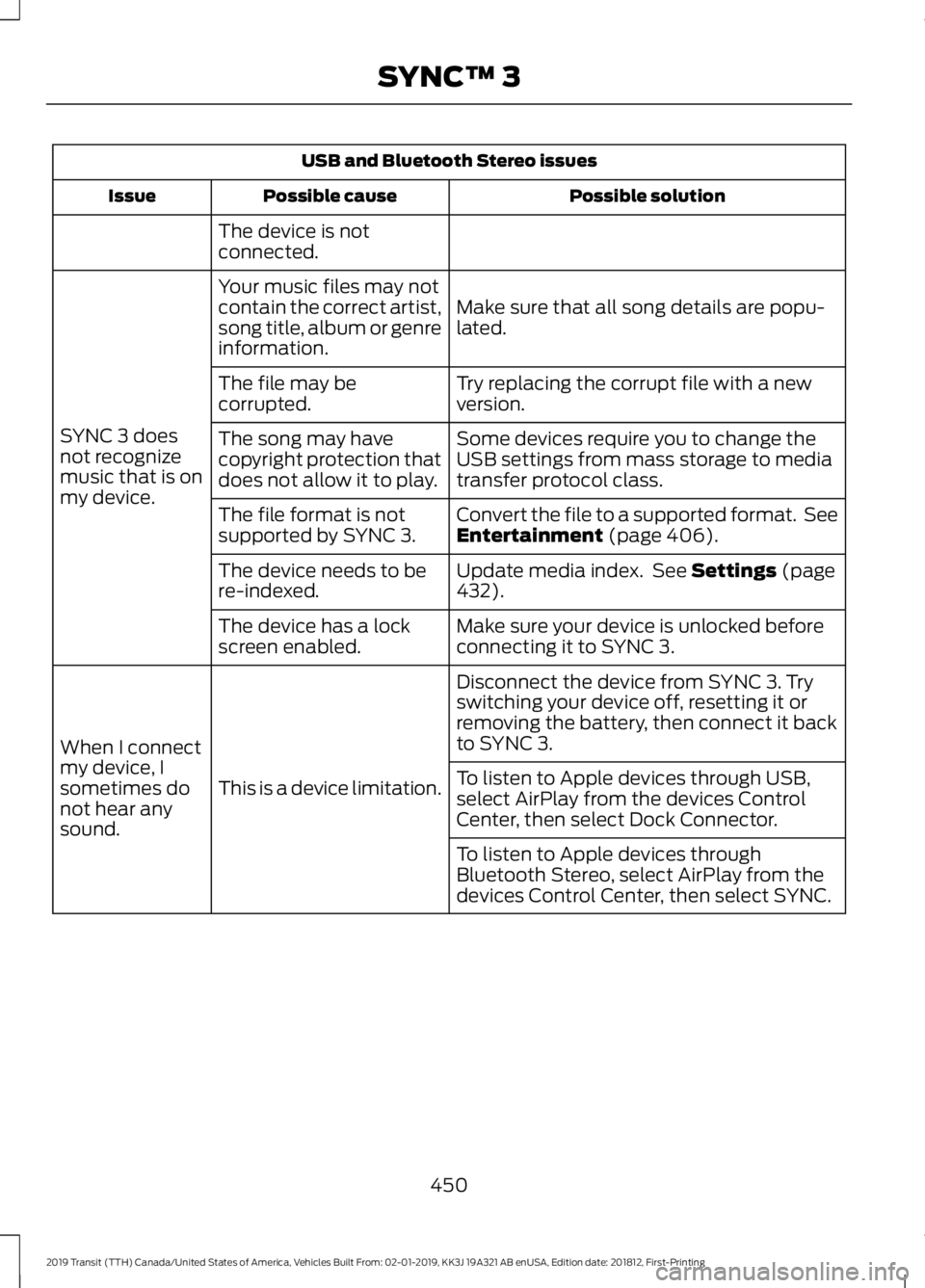
USB and Bluetooth Stereo issues
Possible solution
Possible cause
Issue
The device is not
connected.
Make sure that all song details are popu-
lated.
Your music files may not
contain the correct artist,
song title, album or genre
information.
SYNC 3 does
not recognize
music that is on
my device. Try replacing the corrupt file with a new
version.
The file may be
corrupted.
Some devices require you to change the
USB settings from mass storage to media
transfer protocol class.
The song may have
copyright protection that
does not allow it to play.
Convert the file to a supported format. See
Entertainment (page 406).
The file format is not
supported by SYNC 3.
Update media index. See
Settings (page
432).
The device needs to be
re-indexed.
Make sure your device is unlocked before
connecting it to SYNC 3.
The device has a lock
screen enabled.
Disconnect the device from SYNC 3. Try
switching your device off, resetting it or
removing the battery, then connect it back
to SYNC 3.
This is a device limitation.
When I connect
my device, I
sometimes do
not hear any
sound. To listen to Apple devices through USB,
select AirPlay from the devices Control
Center, then select Dock Connector.
To listen to Apple devices through
Bluetooth Stereo, select AirPlay from the
devices Control Center, then select SYNC.
450
2019 Transit (TTH) Canada/United States of America, Vehicles Built From: 02-01-2019, KK3J 19A321 AB enUSA, Edition date: 201812, First-Printing SYNC™ 3
Page 454 of 529

Wi-Fi Issues
Possible solution
Possible cause
Issue
Verify password.
Password error.
Failed connection.
Check for a poor Wi-Fi
signal.
Weak signal.
Use a unique name for your
SSID, don’t use the default
name unless it contains a
unique identifier, such as
part of the MAC address.
Multiple Access points
within range with the same
SSID.
Position the vehicle close to
the hotspot with the front of
the vehicle facing the
hotspot direction and
remove obstacles if
possible. Other Wi-Fi,
Bluetooth, microwave and
cordless phones may cause
interference.
Weak signal probably due
to distance from the
hotspot, obstruction or high
interference.
Disconnecting after
successful connection.
If the vehicle is equipped
with heated windshield, try
positioning the vehicle so
that the windshield is not
facing the hotspot. If you
have metallic window tinting
There may be an obstruction
between SYNC 3 and the
hotspot.
Poor signal seen by SYNC 3
despite being near a
hotspot.
but not on the windshield,
position the vehicle to face
the hotspot. If all windows
are tinted, you can open the
windows in the direction of
the hotspot if that is feas-
ible.
Try to remove other
obstructions that may
impact signal quality such
as opening the garage door.
Please set the network to
visible and try again.
The hotspot was defined as
a hidden network.
A hotspot is not listed in the
list of available networks.
451
2019 Transit (TTH) Canada/United States of America, Vehicles Built From: 02-01-2019, KK3J 19A321 AB enUSA, Edition date: 201812, First-Printing SYNC™ 3
Page 457 of 529
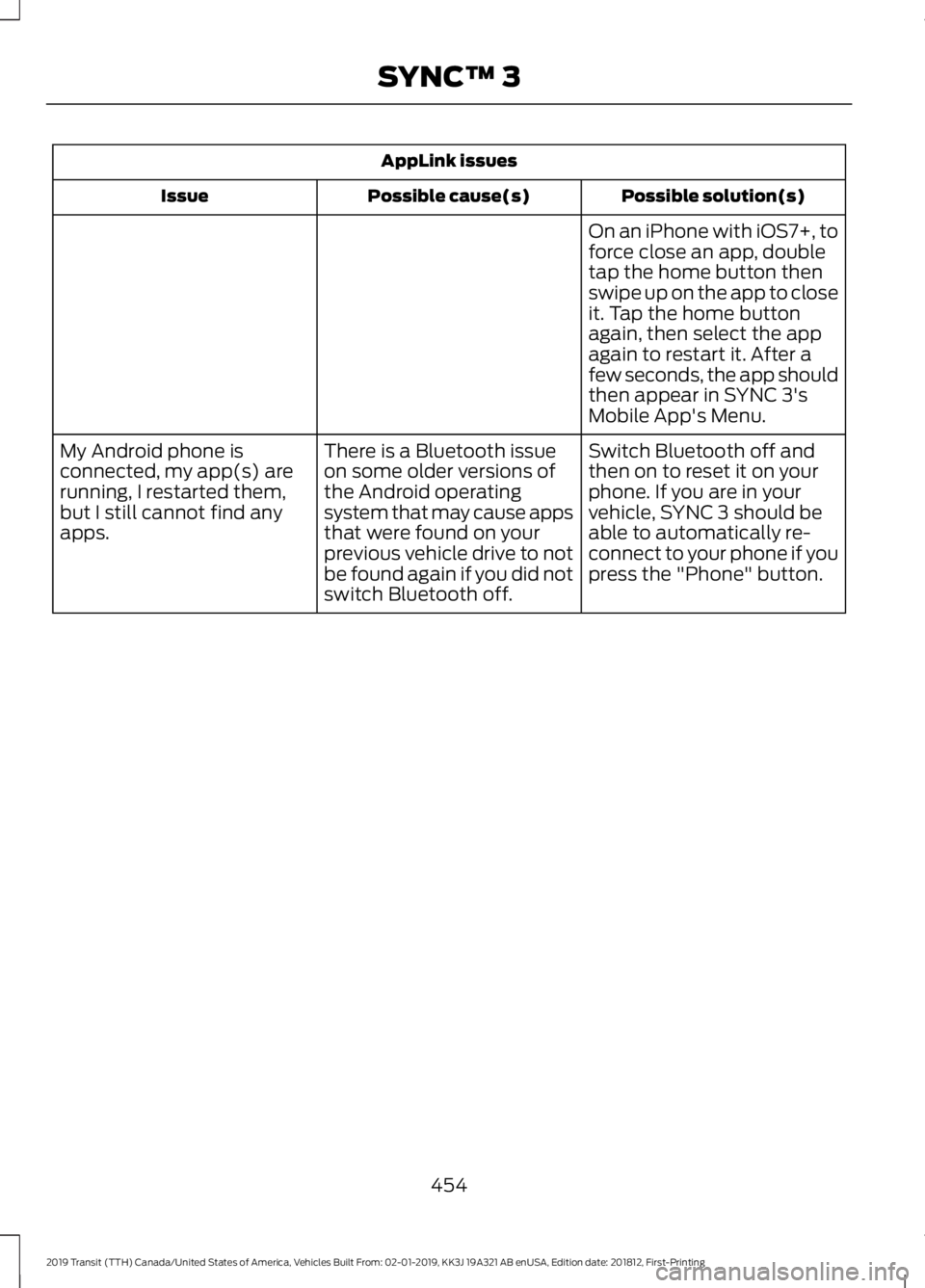
AppLink issues
Possible solution(s)
Possible cause(s)
Issue
On an iPhone with iOS7+, to
force close an app, double
tap the home button then
swipe up on the app to close
it. Tap the home button
again, then select the app
again to restart it. After a
few seconds, the app should
then appear in SYNC 3's
Mobile App's Menu.
Switch Bluetooth off and
then on to reset it on your
phone. If you are in your
vehicle, SYNC 3 should be
able to automatically re-
connect to your phone if you
press the "Phone" button.
There is a Bluetooth issue
on some older versions of
the Android operating
system that may cause apps
that were found on your
previous vehicle drive to not
be found again if you did not
switch Bluetooth off.
My Android phone is
connected, my app(s) are
running, I restarted them,
but I still cannot find any
apps.
454
2019 Transit (TTH) Canada/United States of America, Vehicles Built From: 02-01-2019, KK3J 19A321 AB enUSA, Edition date: 201812, First-Printing SYNC™ 3
Page 458 of 529

AppLink issues
Possible solution(s)
Possible cause(s)
Issue
Unplug the USB cable from
the phone, wait a moment,
and plug the USB cable
back in to the phone. After a
few seconds, the app should
appear in SYNC 3's Mobile
Apps Menu. If not, "Force
Close" the application and
restart it.
You may need to reset the
USB connection to SYNC 3.
My iPhone is connected, my
app is running, I restarted
the app but I still cannot find
it on SYNC 3.
Increase the Bluetooth
volume of the device by
using the device's volume
control buttons which are
most often found on the
side of the device.
The Bluetooth volume on
the phone may be low.
I have an Android phone. I
found and started my media
app on SYNC 3, but there is
no sound or the sound is
very low.
Force close or uninstall the
apps you do not want SYNC
3 to find. If the app has a
"Ford SYNC" setting, disable
that setting in the app's
settings menu on the phone.
Some Android devices have
a limited number of
Bluetooth ports that apps
can use to connect. If you
have more AppLink apps on
your phone than the number
of available Bluetooth ports,
you will not see all of your
apps listed in the SYNC 3
mobile apps menu.
I can only see some of the
AppLink apps running on my
phone listed in the SYNC 3
Mobile Apps Menu. Voice command issues
Possible solution
Possible cause
Issue
Review the cell phone voice commands
and the media voice commands at the
beginning of their respective sections.
You may be using the
wrong voice commands.
SYNC 3 does
not understand
what I am
saying. Refer to the audio display during an active
voice session to find a list of voice
commands there.
Wait for the system to prompt you before
you state your command.
You may be speaking too
soon or at the wrong
time.
455
2019 Transit (TTH) Canada/United States of America, Vehicles Built From: 02-01-2019, KK3J 19A321 AB enUSA, Edition date: 201812, First-Printing SYNC™ 3
Page 461 of 529

General
Possible solution
Possible cause
Issue
SYNC 3 supports multiple languages in a
single module for text display, voice control
and voice prompts. The country where you
bought your vehicle dictates the languages
based on the most popular languages
spoken. If the selected language is not
available, SYNC 3 remains in the current
active language.
SYNC 3 does not support
the currently selected
language for the instru-
ment cluster and inform-
ation and entertainment
display.
The language
selected for the
instrument
cluster and
information and
entertainment
display does not
match the
SYNC 3
SYNC 3 offers several new voice control
features for a wide range of languages.
Dialing a contact name directly from the
phonebook without pre-recording (for
example,
“call John Smith ”) or selecting a
track, artist, album, genre or playlist directly
from your media player (for example, "play
artist Madonna").
language
(phone, USB,
Bluetooth
audio, voice
control and
voice prompts). SYNC 3 System Reset
The system has a System Reset feature that can be performed if the function of a SYNC
3 feature is lost. This reset is intended to restore functionality and will not erase any
information previously stored in the system (such as paired devices, phonebook, call
history, text messages, or user settings). To perform a System Reset, press and hold
the Seek Up (>>|) button while pressing and holding the Radio Power button. After
approximately 5 seconds the screen will go black. Allow 1-2 minutes for the system
reset to complete. You may then resume using the SYNC 3 system.
For additional assistance with SYNC 3
troubleshooting please call or visit the Ford
Website. Ford Support
United States: 1-800-392-3673
Customer Relation-
ship Center
Canada: 1-800-565-3673
owner.ford.com
Website
www.syncmyride.ca
www.syncmaroute.ca
458
2019 Transit (TTH) Canada/United States of America, Vehicles Built From: 02-01-2019, KK3J 19A321 AB enUSA, Edition date: 201812, First-Printing SYNC™ 3
Page 518 of 529

9
911 Assist...........................................................59
A
A/C See: Climate Control......................................... 107
About 911 Assist..............................................59
About This Manual
...........................................7
ABS See: Brakes............................................................ 155
ABS driving hints See: Hints on Driving With Anti-Lock
Brakes................................................................. 155
Accessories....................................................459 Exterior Style....................................................... 459
Interior Style........................................................ 459
Lifestyle................................................................. 459
Peace of Mind..................................................... 459
Accessories See: Replacement Parts
Recommendation............................................ 13
Adjusting the Headlamps.........................247 Horizontal Aim Adjustment........................... 248
Vertical Aim Adjustment................................. 247
Adjusting the Steering Wheel
....................79
Airbag Disposal...............................................58
Air Conditioning See: Climate Control......................................... 107
Air Filter See: Changing the Engine Air Filter - 3.2L
Power Stroke Diesel..................................... 255
See: Changing the Engine Air Filter - 3.5L Ecoboost™..................................................... 256
See: Changing the Engine Air Filter - 3.7L...................................................................... 257
Alarm See: Anti-Theft Alarm........................................ 78
Anti-Theft Alarm............................................78 Alarm System........................................................ 78
Arming the Alarm................................................. 78
Disarming the Alarm........................................... 78
Triggering the Alarm............................................ 78
Appendices....................................................485
Apps.................................................................429 ........................................................................\
.......... 429
SiriusXM Traffic and Travel Link.................... 431Audible Warnings and Indicators.............96
Airbag Secondary Warning.............................. 96
Door Ajar................................................................. 96
Exterior Lamps On............................................... 96
Key in Ignition........................................................ 96
Parking Brake On................................................. 96
Seatbelt Reminder.............................................. 96
Transmission Selector Lever Not in park (P)........................................................................\
96
Audio Input Jack...........................................354
Audio System
................................................333
General Information......................................... 333
Audio Unit - Vehicles With: AM/FM/CD/ SYNC/Satellite Radio.............................334
Audio Unit - Vehicles With: AM/FM/CD/ SYNC.............................................................338
Audio Unit - Vehicles With: AM/FM/USB Port/Bluetooth..........................................340
Bluetooth Audio Streaming........................... 345
iPod........................................................................\
. 345
Making and Receiving Calls........................... 344
Phone and Voice Pass-Through.................. 342
Phone Menu Options....................................... 344
Sound Button....................................................... 341
Station Preset Buttons.................................... 342
Station Tuning Control..................................... 342
USB........................................................................\
. 345
Waveband Button.............................................. 341
Audio Unit - Vehicles With: AM/ FM
..................................................................346
AUX Button.......................................................... 348
Clock Button........................................................ 347
Menu Button....................................................... 348
Sound Button..................................................... 348
Station Preset Buttons.................................... 348
Station Tuning Buttons................................... 348
Audio Unit - Vehicles With: Premium AM/FM/CD..................................................336
Autolamps
........................................................83
Windshield Wiper Activated
Headlamps........................................................ 84
Automatic Transmission.............................151 Automatic Transmission Adaptive
Learning............................................................. 154
Brake-Shift Interlock......................................... 152
If Your Vehicle Gets Stuck in Mud or Snow.................................................................. 154
515
2019 Transit (TTH) Canada/United States of America, Vehicles Built From: 02-01-2019, KK3J 19A321 AB enUSA, Edition date: 201812, First-Printing Index
Page 521 of 529
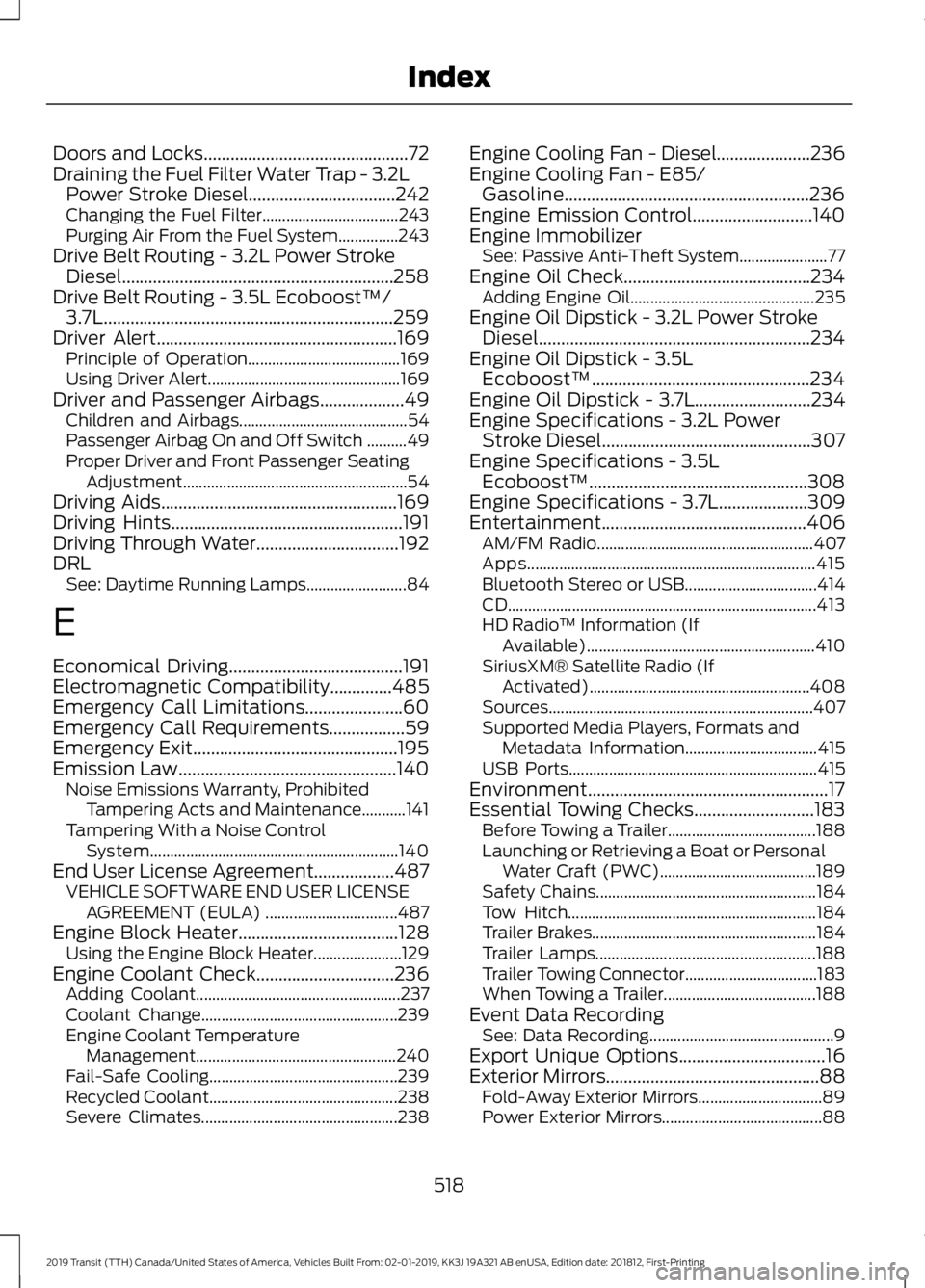
Doors and Locks..............................................72
Draining the Fuel Filter Water Trap - 3.2L
Power Stroke Diesel.................................242
Changing the Fuel Filter.................................. 243
Purging Air From the Fuel System...............243
Drive Belt Routing - 3.2L Power Stroke Diesel.............................................................258
Drive Belt Routing - 3.5L Ecoboost™/ 3.7L.................................................................259
Driver Alert......................................................169
Principle of Operation...................................... 169
Using Driver Alert................................................ 169
Driver and Passenger Airbags...................49 Children and Airbags.......................................... 54
Passenger Airbag On and Off Switch ..........49
Proper Driver and Front Passenger Seating Adjustment........................................................ 54
Driving Aids
.....................................................169
Driving Hints....................................................191
Driving Through Water................................192
DRL See: Daytime Running Lamps......................... 84
E
Economical Driving
.......................................191
Electromagnetic Compatibility..............485
Emergency Call Limitations......................60
Emergency Call Requirements.................59
Emergency Exit..............................................195
Emission Law
.................................................140
Noise Emissions Warranty, Prohibited
Tampering Acts and Maintenance...........141
Tampering With a Noise Control System.............................................................. 140
End User License Agreement
..................487
VEHICLE SOFTWARE END USER LICENSE
AGREEMENT (EULA) ................................. 487
Engine Block Heater
....................................128
Using the Engine Block Heater...................... 129
Engine Coolant Check
...............................236
Adding Coolant................................................... 237
Coolant Change................................................. 239
Engine Coolant Temperature Management.................................................. 240
Fail-Safe Cooling............................................... 239
Recycled Coolant............................................... 238
Severe Climates................................................. 238Engine Cooling Fan - Diesel.....................236
Engine Cooling Fan - E85/
Gasoline.......................................................236
Engine Emission Control...........................140
Engine Immobilizer See: Passive Anti-Theft System...................... 77
Engine Oil Check..........................................234 Adding Engine Oil.............................................. 235
Engine Oil Dipstick - 3.2L Power Stroke Diesel.............................................................234
Engine Oil Dipstick - 3.5L Ecoboost™.................................................234
Engine Oil Dipstick - 3.7L
..........................234
Engine Specifications - 3.2L Power Stroke Diesel
...............................................307
Engine Specifications - 3.5L Ecoboost™.................................................308
Engine Specifications - 3.7L....................309
Entertainment..............................................406 AM/FM Radio...................................................... 407
Apps........................................................................\
415
Bluetooth Stereo or USB................................. 414
CD........................................................................\
..... 413
HD Radio ™ Information (If
Available)......................................................... 410
SiriusXM® Satellite Radio (If Activated)....................................................... 408
Sources.................................................................. 407
Supported Media Players, Formats and Metadata Information................................. 415
USB Ports.............................................................. 415
Environment......................................................17
Essential Towing Checks
...........................183
Before Towing a Trailer..................................... 188
Launching or Retrieving a Boat or Personal Water Craft (PWC)....................................... 189
Safety Chains....................................................... 184
Tow Hitch.............................................................. 184
Trailer Brakes........................................................ 184
Trailer Lamps....................................................... 188
Trailer Towing Connector................................. 183
When Towing a Trailer...................................... 188
Event Data Recording See: Data Recording.............................................. 9
Export Unique Options
.................................16
Exterior Mirrors................................................88
Fold-Away Exterior Mirrors............................... 89
Power Exterior Mirrors........................................ 88
518
2019 Transit (TTH) Canada/United States of America, Vehicles Built From: 02-01-2019, KK3J 19A321 AB enUSA, Edition date: 201812, First-Printing Index