2019 FORD TRANSIT battery
[x] Cancel search: batteryPage 85 of 529
GENERAL INFORMATION
Condensation in the Exterior Front
Lamps and Rear Lamps
Exterior front lamps and rear lamps have
vents to accommodate normal changes
in air pressure.
Condensation can be a natural by-product
of this design. When moist air enters the
lamp assembly through the vents, there is
a possibility that condensation can occur
when the temperature is cold. When
normal condensation occurs, a fine mist
can form on the interior of the lens. The
fine mist eventually clears and exits
through the vents during normal operation.
Clearing time may take as long as 48 hours
under dry weather conditions.
Examples of acceptable condensation are:
•
The presence of a fine mist (no streaks,
drip marks or large droplets).
• A fine mist covers less than 50% of the
lens.
Examples of unacceptable condensation
are:
• A water puddle inside the lamp.
• Streaks, drip marks or large droplets
present on the interior of the lens.
If you see any unacceptable condensation,
have your vehicle checked by an authorized
dealer. LIGHTING CONTROL
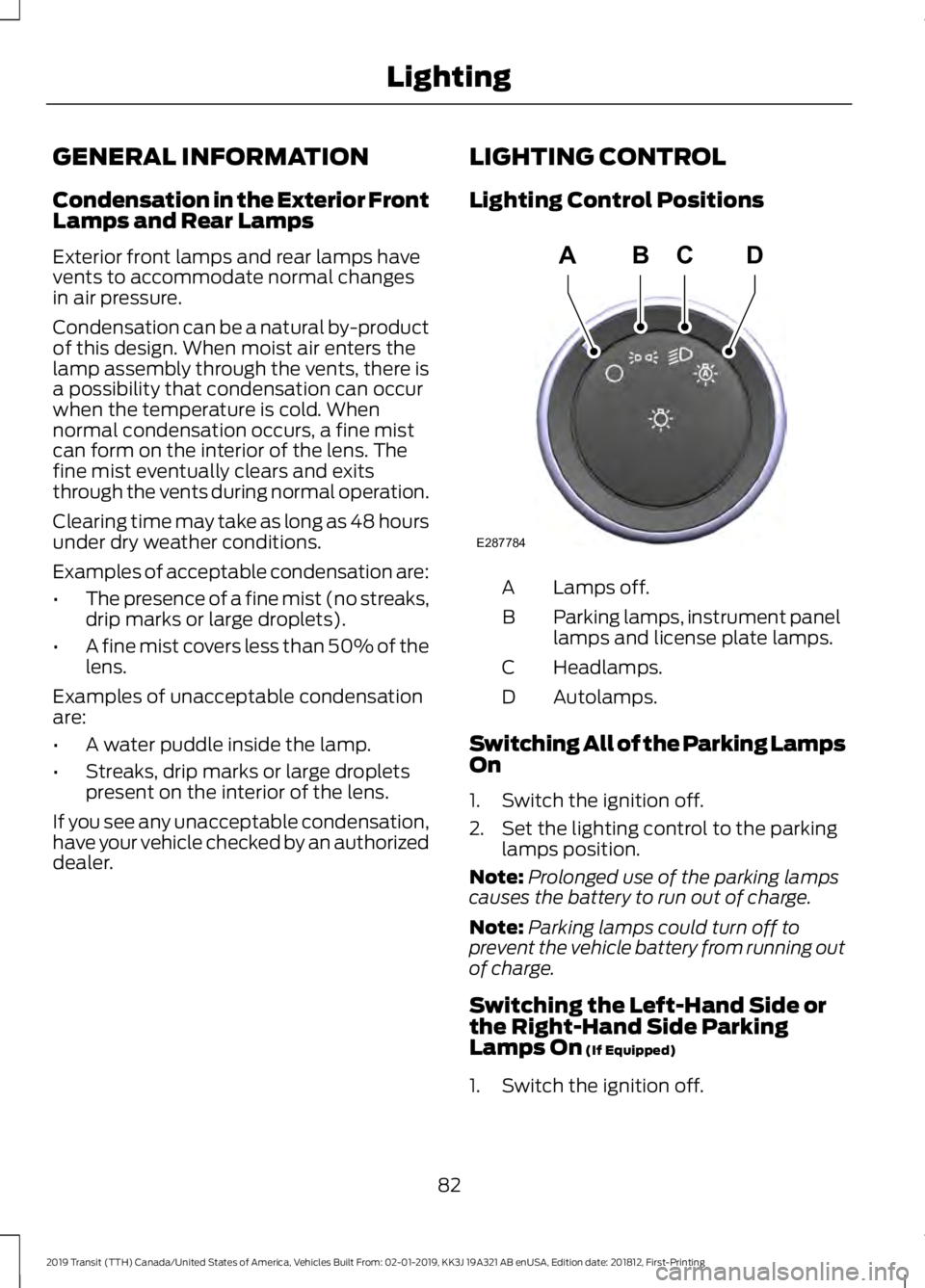
Lighting Control Positions
Lamps off.
A
Parking lamps, instrument panel
lamps and license plate lamps.
B
Headlamps.
C
Autolamps.
D
Switching All of the Parking Lamps
On
1. Switch the ignition off.
2. Set the lighting control to the parking lamps position.
Note: Prolonged use of the parking lamps
causes the battery to run out of charge.
Note: Parking lamps could turn off to
prevent the vehicle battery from running out
of charge.
Switching the Left-Hand Side or
the Right-Hand Side Parking
Lamps On (If Equipped)
1. Switch the ignition off.
82
2019 Transit (TTH) Canada/United States of America, Vehicles Built From: 02-01-2019, KK3J 19A321 AB enUSA, Edition date: 201812, First-Printing LightingE287784
ADBC
Page 86 of 529

2.
Push the lever up or down to switch the
parking lamps on.
Note: Prolonged use of the parking lamps
causes the battery to run out of charge.
Note: Parking lamps could turn off to
prevent the vehicle battery from running out
of charge.
Switching High Beam Headlamps
On and Off Push the lever away from you to switch
the high beam headlamps on.
Push the lever forward again or pull the
lever toward you to switch the high beam
headlamps off.
Note:
If you switch the autolamps on, you
cannot switch the high beam headlamps
on until the system turns the headlamps on. Flashing High Beam Headlamps
Pull the lever toward you and release it to
flash the high beam headlamps.
AUTOLAMPS
WARNING: The autolamps switch
position may not activate the headlamps
in all low visibility conditions, such as
daytime fog. Always ensure that your
headlamps are switched to auto or on,
as appropriate, during all low visibility
conditions. Failure to do so may result in
a crash. When the lighting control is in the
autolamps position, the headlamps
automatically turn on in low light situations
or when the wipers turn on.
83
2019 Transit (TTH) Canada/United States of America, Vehicles Built From: 02-01-2019, KK3J 19A321 AB enUSA, Edition date: 201812, First-Printing LightingE162681 E163718 E163719 E142451
Page 88 of 529

Note:
Tap the lever up or down to make the
direction indicators flash three times to
indicate a lane change.
INTERIOR LAMPS
Courtesy Lamp OffA
Door contact
B
OnC
If you set the switch to position B, the
courtesy lamp will switch on when you
unlock your vehicle or open a door. If you
leave a door open with the ignition
switched off, the courtesy lamp will switch
off automatically after a short period of
time to prevent your vehicle battery from
losing charge. To switch it back on, switch
the ignition on for a short period of time.
The courtesy lamp will also switch on
when you switch the ignition off. It will
switch off automatically after a short
period of time or when you start the engine.
If you set the switch to position C with the
ignition switched off, the courtesy lamp
will switch on. It will switch off
automatically after a short period of time
to prevent your vehicle battery from losing
charge. To switch it back on, switch the
ignition on for a short period of time. Reading Lamps
If you switch the ignition off, the reading
lamps will switch off automatically after
a short period of time to prevent your
vehicle battery from losing charge. To
switch them back on, switch the ignition
on for a short period of time.
Entrance Lamps
The lamps are located above the rear
doors and sliding door. They will switch on
and off automatically when you open and
close the doors. If you unlock the doors
with the remote control, they will switch
on. They will switch off automatically after
a short period of time.
85
2019 Transit (TTH) Canada/United States of America, Vehicles Built From: 02-01-2019, KK3J 19A321 AB enUSA, Edition date: 201812, First-Printing LightingE112207
BCA E112208 E162050
Page 89 of 529
CARGO LAMPS
Switching the Cargo Lamps Off
Press the button to switch the cargo lamps
off when a door is open.
Note:
The cargo lamps switch only
operates when the ignition is off.
The switch is inside the cargo area, behind
the left-hand rear door.
The cargo lamps turn off after a short
period of time to prevent the battery from
running out of charge.
Switching the Cargo Lamps On
Press the button to switch the cargo lamps
on.
If the cargo lamps turned off to prevent
the battery from running out of charge or
you switched them off by pressing the
button, reset the switch first.
Resetting the Switch
To reset the switch, do one of the
following:
• Lock or unlock a door.
• Open or close a front door.
• Switch the ignition on then off.
Press the button to switch the cargo lamps
on.
86
2019 Transit (TTH) Canada/United States of America, Vehicles Built From: 02-01-2019, KK3J 19A321 AB enUSA, Edition date: 201812, First-Printing Lighting
Page 91 of 529
1. Lift and hold the switch until the
window is fully closed.
2. Release the switch.
3. Lift the switch again for one second.
4. Release the switch.
5. Lift the switch again for one second.
6. Open the window and then try to close
using the one-touch feature.
7. Repeat the procedure if the window does not close using the one-touch
feature.
Note: If you disconnect the battery, you
must reset the bounce-back memory.
EXTERIOR MIRRORS
Power Exterior Mirrors WARNING: Do not adjust the
mirrors when your vehicle is moving. This
could result in the loss of control of your
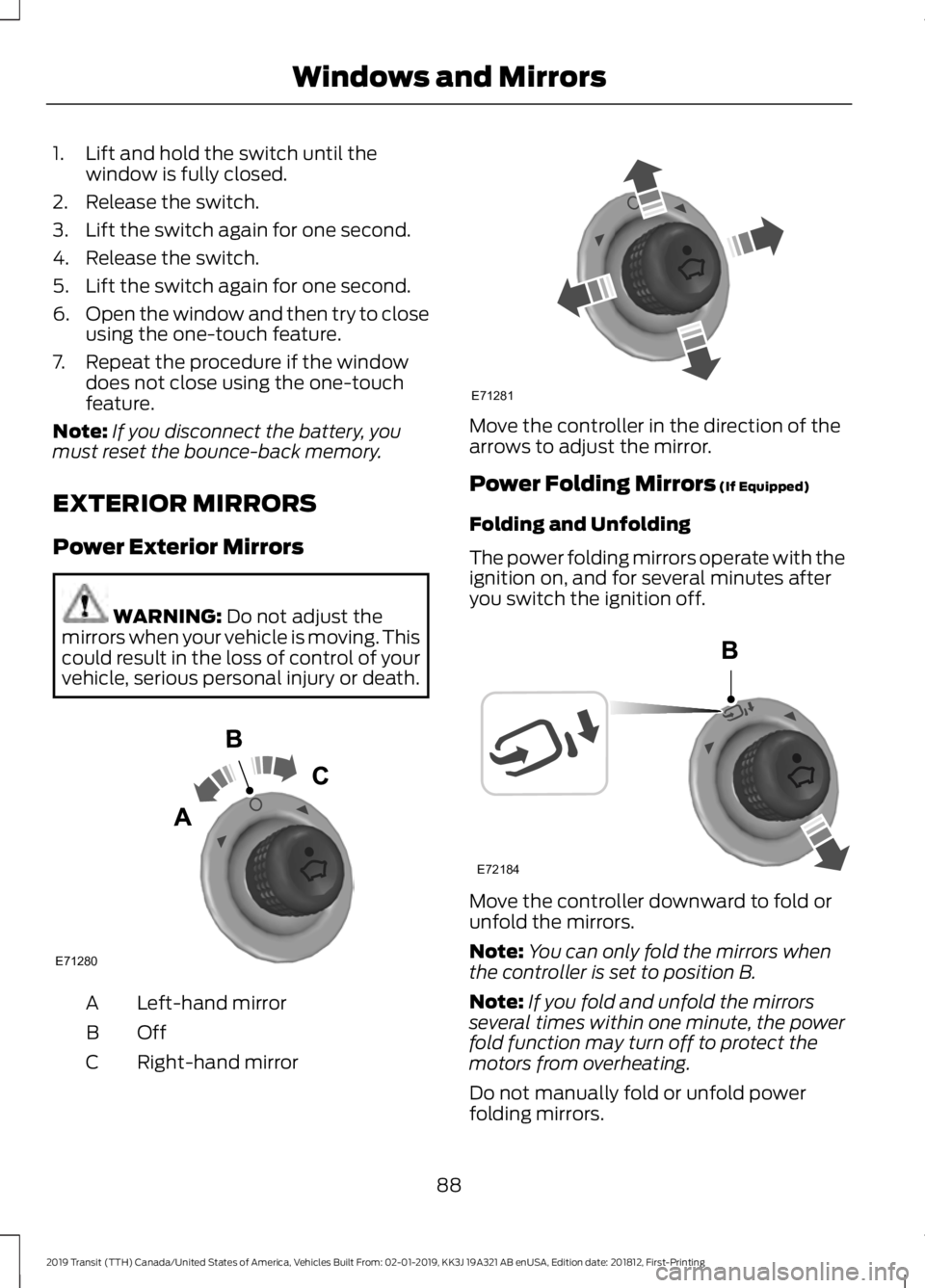
vehicle, serious personal injury or death. Left-hand mirror
A
OffB
Right-hand mirror
C Move the controller in the direction of the
arrows to adjust the mirror.
Power Folding Mirrors
(If Equipped)
Folding and Unfolding
The power folding mirrors operate with the
ignition on, and for several minutes after
you switch the ignition off. Move the controller downward to fold or
unfold the mirrors.
Note:
You can only fold the mirrors when
the controller is set to position B.
Note: If you fold and unfold the mirrors
several times within one minute, the power
fold function may turn off to protect the
motors from overheating.
Do not manually fold or unfold power
folding mirrors.
88
2019 Transit (TTH) Canada/United States of America, Vehicles Built From: 02-01-2019, KK3J 19A321 AB enUSA, Edition date: 201812, First-Printing Windows and MirrorsE71280 E71281 E72184
Page 96 of 529

WARNING LAMPS AND
INDICATORS
The following warning lamps and
indicators alert you to a vehicle condition
that may become serious. Some lamps
illuminate when you start your vehicle to
make sure they work. If any lamps remain
on after starting your vehicle, refer to the
respective system warning lamp for further
information.
Note:
Some warning indicators appear in
the information display and operate the
same as a warning lamp but do not
illuminate when you start your vehicle.
Airbag Warning Lamp If it does not illuminate when you
switch the ignition on, continues
to flash or remains on when the
engine is running, this indicates a
malfunction. Have your vehicle checked
as soon as possible.
Anti-Lock Brake System Warning
Lamp If it illuminates when you are
driving, this indicates a
malfunction. Your vehicle
continues to have normal braking without
the anti-lock brake system function. Have
your vehicle checked as soon as possible.
It momentarily illuminates when you
switch the ignition on to confirm the lamp
is functional. If it does not illuminate when
you switch the ignition on, or begins to
flash at any time, have your vehicle
checked as soon as possible.
Battery Charging Condition
Warning Lamp It illuminates when you switch
the ignition on. If it illuminates when the engine is running
this indicates a malfunction. Have your
vehicle checked as soon as possible.
Brake System Warning Lamp
WARNING: Driving extended
distances with the parking brake
engaged can cause brake failure and the
risk of personal injury. It illuminates when you engage
the parking brake and the
ignition is on.
If it illuminates when your vehicle is
moving, make sure the parking brake is
disengaged. If the parking brake is
disengaged, this indicates low brake fluid
level or a brake system fault. Have your
vehicle immediately checked.
It momentarily illuminates when you
switch the ignition on to confirm the lamp
is functional. If it does not illuminate when
you switch the ignition on, or begins to
flash at any time, have your vehicle
checked as soon as possible.
Diesel Warning Lamps
(If Equipped)
Diesel Exhaust Fluid Warning Lamp It illuminates when the diesel
exhaust fluid is low.
If it illuminates, the information display
message advises whether it is diesel
exhaust fluid level related or due to a
system malfunction. If the diesel exhaust
fluid level is sufficient, this indicates a
system malfunction. Have your vehicle
checked as soon as possible.
93
2019 Transit (TTH) Canada/United States of America, Vehicles Built From: 02-01-2019, KK3J 19A321 AB enUSA, Edition date: 201812, First-Printing Instrument ClusterE67017 E138644 E163176
Page 105 of 529

Battery and Charging System
Action
Message
Stop your vehicle as soon as it is safe to do so and switch the
engine off.
Electrical system over-
voltage Stop safely
Have your vehicle checked as soon as possible.
Displays if the battery is low or has no charge. Switch off all
unnecessary electrical equipment. Have your vehicle checked
as soon as possible.
Battery low See manual
Diesel Exhaust Fluid Level Action
Message
Indicates the approximate distance remaining before the
diesel exhaust fluid tank will be empty. Refill the diesel
exhaust fluid tank as soon as possible.
DEF level low Range XXX
mi Refill now
Indicates the approximate distance remaining before the
diesel exhaust fluid tank will be empty and when it will restrict
your vehicle speed. Refill the diesel exhaust fluid tank as soon
as possible.
DEF level empty YY MPH
max in XXX mi
Indicates that the diesel exhaust fluid tank is empty and that
your vehicle speed is being restricted. Refill the diesel exhaust
fluid tank as soon as possible.
DEF level empty Speed
limited to YY MPH
Indicates that the diesel exhaust fluid tank is empty and that
your vehicle speed will be restricted when you restart your
vehicle. Refill the diesel exhaust fluid tank as soon as possible.
DEF level empty YY MPH
max Upon restart
Indicates that the diesel exhaust fluid tank is empty and that
the engine will soon be restricted to idle operation.
DEF level empty Engine
idled soon
Indicates that the diesel exhaust fluid tank is empty and that
the engine is restricted to idle operation.
DEF level empty Engine
idled See manual
Note: When filling the diesel exhaust fluid tank from empty, there may be a short period
before the increased diesel exhaust fluid level is registered. The system must register the
increased diesel exhaust fluid level before your vehicle will return to full power.
Diesel Exhaust Fluid System Malfunction Action
Message
Indicates that your vehicle speed will soon be restricted.
DEF fault YY MPH max in
XXXX mi
102
2019 Transit (TTH) Canada/United States of America, Vehicles Built From: 02-01-2019, KK3J 19A321 AB enUSA, Edition date: 201812, First-Printing Information Displays
Page 116 of 529

WARNING: Make sure the driver
seat fully locks into place by rocking it
backward and forward. 1. Lift the handle.
2. Move the seat backward or forward to
attain the desired position.
3. Release the handle.
Note: The driver seat has removable stop
bolts on the track to enable access to the
vehicle battery. See
Changing the 12V
Battery (page 244). Adjusting the Lumbar Support
(If
Equipped) 1.
Rotate the handle clockwise or counter
clockwise to attain the desired lumbar
support.
Recline Adjustment WARNING:
Do not adjust the
driver seat backrest when your vehicle is
moving. This may result in sudden seat
movement, causing the loss of control
of your vehicle. WARNING:
Do not adjust the
recliner from inside your vehicle if the
seat is unoccupied. The seat back may
move suddenly and cause personal
injury.
113
2019 Transit (TTH) Canada/United States of America, Vehicles Built From: 02-01-2019, KK3J 19A321 AB enUSA, Edition date: 201812, First-Printing SeatsE177638 E146386